
🧑⚖️ MCP Judge
An interactive interface for testing your MCP tools. This application helps you connect to an MCP server, list available tools, inspect their schemas, and run them with custom inputs, all from a clean, web-based UI.
✨ Features
- Connect to any MCP Server: Easily connect to a new MCP server by simply entering its URL.
- Discover Tools: View a list of all available tools and their descriptions.
- Dynamic Input Forms: The app automatically generates input forms based on the tool's
inputSchema. - Live Tool Testing: Run any tool with your specified inputs and see the output in real-time.
🆕 New Feature
- Custom Headers Support: You can now add custom request headers (like API tokens, authorization keys, or metadata) when connecting to an MCP server. This makes it easy to test protected or authenticated MCP tools directly from the interface.
🚀 Installation
You can install mcp-judge directly from PyPI.
pip install mcp-judge
💻 How to Run
After installation, you can launch the application from your terminal with a single command:
mcp-judge
This will automatically start a local server and open the app in your default web browser.
🛠️ Usage
- Enter Server URL: On the left side of the screen, enter the URL of the MCP server you want to test and click "Connect".
- Optional Headers: Click on “⚙️ Advanced Options (Custom Headers)” below the URL input if your MCP tools requires custom headers and header-based access is already configured in your MCP server.
- Enter the header name (e.g., Authorization)
- Enter the header value (e.g., Bearer your_api_token)
- Select a Tool: Once connected, a list of available tools will appear below. Choose the tool you want to test from the dropdown menu.
- Provide Inputs: The right side of the screen will show a form based on the selected tool's required inputs. Fill in the necessary details.
- Run the Tool: Click the "Run Tool" button to execute the tool. The output will be displayed in the "Tool Result" section below.
📄 Requirements
- Python 3.11+
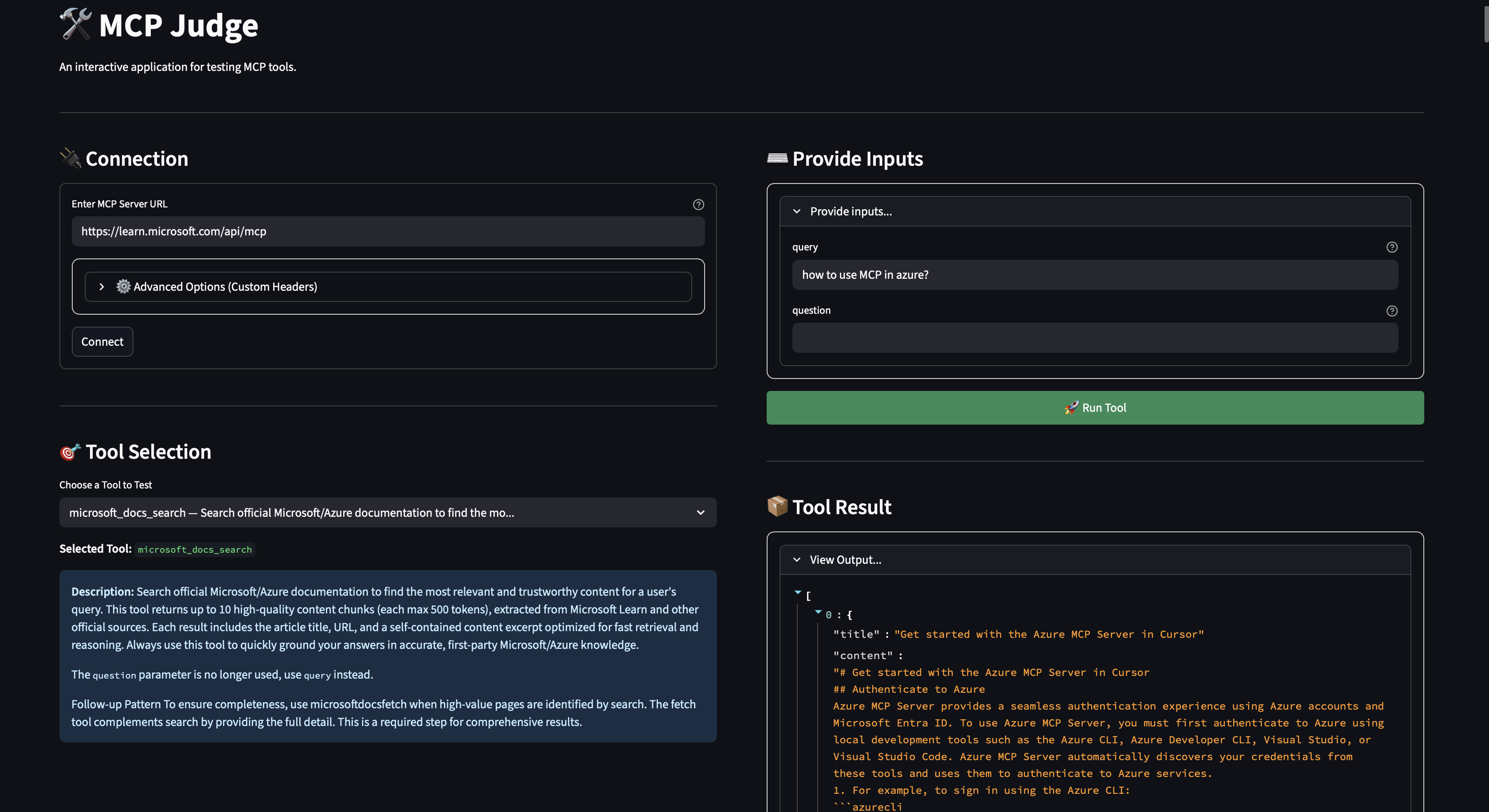
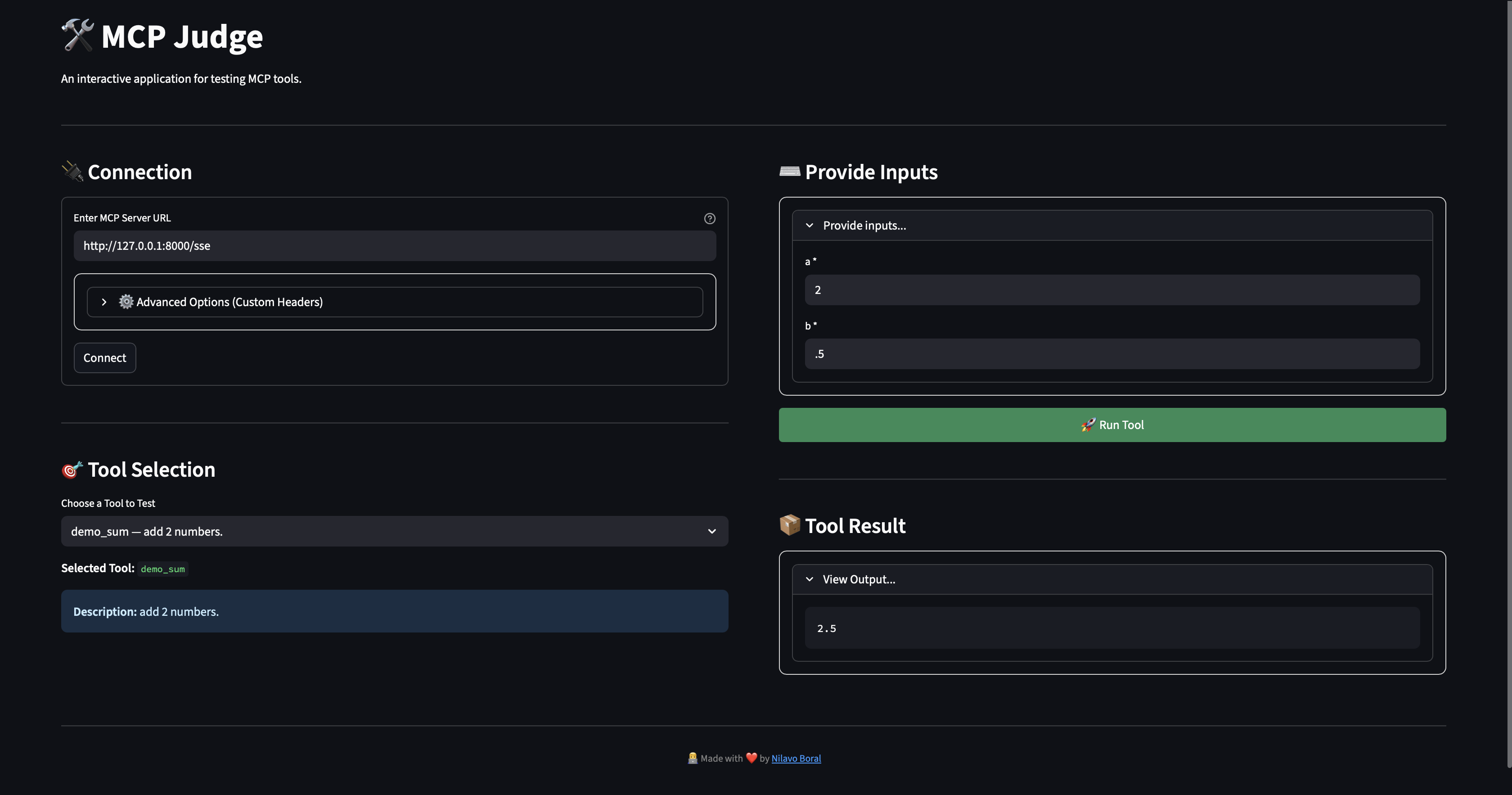
🔌 Sample MCP Connections
1. Connected to Microsoft's Sample MCP
2. Connected to Custom Test MCP
🔗 Project Links
1 maintainer

Metadata
1 maintainer
Release files for mcp-judge 0.1.4
For a detailed explanation of source distributions (sdists) and built distributions (wheels), please see the package formats documentation.
Source distribution (sdist)
| File | Size | Uploaded | Provenance | |
|---|---|---|---|---|
| mcp_judge-0.1.4.tar.gz | 6.1 kB | Without provenance | Details |
Built distribution (wheel)
| File | Interpreter | ABI | Platform | Reset |
|---|---|---|---|---|
| mcp_judge-0.1.4-py3-none-any.whl | Python 3 | none | any | Details |
Total release size: 12.8 kB
Release files / mcp_judge-0.1.4.tar.gz
| Download URL | mcp_judge-0.1.4.tar.gz |
|---|---|
| Size | 6.1 kB |
| Tags | Source |
|
SHA-256 checksum How to use checksums |
7e7eef379b8fb5467d690af21d2273161b68b100266c2f0afc8816347564f11e
|
|
BLAKE2b-256 checksum How to use checksums |
91c5d5432b84959a8437b5f2437d1a750203315da07927be15d43312cf0f5662
|
| Upload date | |
|
Uploaded using Trusted Publishing? What is trusted publishing? |
No |
| Uploaded via |
twine/6.2.0 CPython/3.9.7
|
Release files / mcp_judge-0.1.4-py3-none-any.whl
| Download URL | mcp_judge-0.1.4-py3-none-any.whl |
|---|---|
| Size | 6.7 kB |
| Tags | Python 3 |
|
SHA-256 checksum How to use checksums |
4c58740b6cd0022811943604b84c141375f269efc5359244952b4f4a176918b5
|
|
BLAKE2b-256 checksum How to use checksums |
a7170dc3693583995dcd21427e6d29d2fb430bac6b3ebe6cfdc1d8ffc1d99870
|
| Upload date | |
|
Uploaded using Trusted Publishing? What is trusted publishing? |
No |
| Uploaded via |
twine/6.2.0 CPython/3.9.7
|
Security for mcp-judge 0.1.4
Provenance
Provenance describes where a file came from. On PyPI, provenance is shared via attestations, which provide a verifiable record of the build or publishing details. View details, limitations and caveats.
No provenance found
None of the files in this release were uploaded with provenance metadata.
A note on package security
PyPI is a repository for distributing packages, not a service for auditing them. While third-party security researchers and our staff do their best to detect and remove malicious packages, PyPI cannot guarantee the quality, security or suitability of any given package.
To learn more about protecting yourself from malicious actors, visit our package security documentation.














