
mcp-gateway

Make MCP servers easier for every MCP client to use. mcp-gateway is a local MCP proxy that lets you improve a backend's tool names, descriptions, parameters, prompts, resources, and server instructions without forking that backend. Calls still reach the original backend; the gateway improves the surface your client receives.
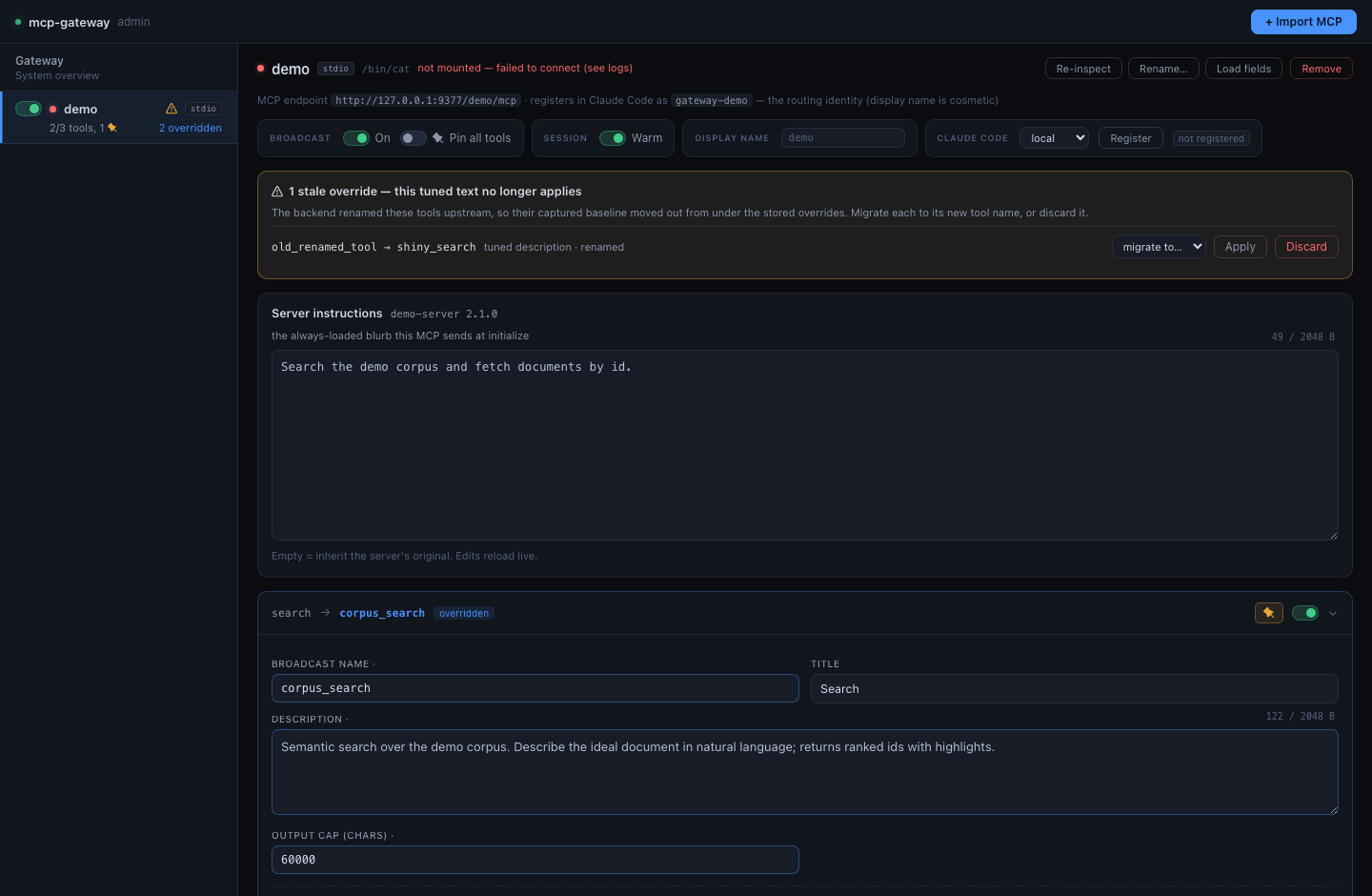
It runs one local HTTP service with an admin UI at
http://127.0.0.1:9100/admin. Claude Code and Codex are supported equally as
independent clients: each backend keeps its own /<backend>/mcp endpoint.
At a glance
MCP client (Claude Code, Codex, or another MCP client)
                        │
                        ▼
          mcp-gateway — localhost:9100/<backend>/mcp
                        │
                        ▼
              remote or local MCP backend
The gateway is deliberately a proxy and editor, not a replacement MCP client or an identity provider. It can rewrite what a backend advertises and optionally validate or post-process calls; it does not silently change a backend's core behavior.
Start here
Install the public PyPI distribution with uv:
uv tool install mcp-local-gateway
mcp-gateway
The distribution is named mcp-local-gateway because the unrelated
mcp-gateway name was already occupied on PyPI. The command and Python package
remain mcp-gateway and mcp_gateway.
Existing uv tool installs of v1.1.0 or earlier need the one-time
renamed-distribution migration.
On macOS, the first interactive run offers to install the resident LaunchAgent;
accepting is the entire service setup. On Linux and Windows, or with
mcp-gateway --foreground, it runs in the current terminal. The application
owns macOS service install, upgrade, status, and removal:
mcp-gateway --service-status
mcp-gateway --uninstall-service
Open http://127.0.0.1:9100/admin to import or edit backends. If the relevant
client CLI is installed, the Admin UI can register independent endpoints in
Claude Code and Codex; otherwise register /<backend>/mcp manually.
A fresh run normally creates ~/.config/mcp-gateway/config.toml. The bundled
DeepWiki and Context7 examples make outbound requests while capturing their
initial catalogs and when tools are called. The gateway also makes one
lightweight PyPI version request at startup and daily; it never auto-applies an
update, tolerates offline failure, and exposes an update_check toggle in
Gateway settings. Remove the sample backends and disable that toggle before
starting if the environment must be network-silent.
The installation guide covers the verified GitHub Release fallback, checkout development, configuration selection, and complete service lifecycle. See the Admin guide for client registration.
Running and updating
/health answers whether the gateway process is alive and identifies the code
path it is running. /ready answers whether the gateway and every enabled
backend are mounted; it returns 503 while any enabled backend is unavailable.
curl -s http://127.0.0.1:9100/health
curl -s http://127.0.0.1:9100/ready
For a normal installation, one command checks PyPI, installs the exact published
version, restarts the resident service when present, and requires /health plus
/ready before reporting success:
mcp-gateway update
Use the same path with an exact prior version for deterministic rollback:
mcp-gateway update --version X.Y.Z
An activation failure automatically attempts to reinstall and restart the old
version. Config, logs, backups, and captured state are never part of the package
swap. Contributors deploying a checkout can continue to use guarded
just update from a clean main branch.
What you can change
- Tool, parameter, resource, prompt, and server-instruction text.
- Visibility, injected defaults, output budgets, and per-tool behavior hooks.
- Backend configuration and independent client registrations.
- Gateway-owned Virtual Tools that compose or route backend tools at
/virtual/mcp.
The detailed configuration and security contracts live in the linked manuals; this README intentionally does not duplicate them.
Validation boundaries
just check is the repeatable local quality gate. CI runs that gate and a
hermetic MCP conformance job using disposable fixtures; it does not contact your
personal backends or exercise your installed daemon. Those stateful, local
integration checks remain your responsibility. just verify is opt-in: it may
call the public DeepWiki service, sends no bearer or OAuth credentials, and is
only suitable for an equivalent unprotected test instance.
Documentation
- Installation — foreground and macOS service paths, upgrades, moves, and uninstalling.
- Releases — versioning, PyPI publishing, and verified fallback artifacts.
- Admin guide — editing, registration, and Virtual Tools.
- Configuration reference —
config.toml, backends, secrets, and behavior hooks. - Operations — readiness, logs, recovery, and local verification boundaries.
- Security — network exposure, bearer tokens, OAuth, and local trust boundaries.
- Security policy — private vulnerability reporting and supported versions.
- Admin API — scripting interface and API contracts.
Contributing
Work through pull requests, with CI as the shared baseline. Start with CONTRIBUTING.md and the repository's agent instructions; they define the development workflow, validation expectations, and where to record deferred work.
License
MIT. See LICENSE.
1 maintainer

Download files
Download the file for your platform. If you're not sure which to choose, learn more about installing packages.
Source Distribution
Built Distribution
Filter files by name, interpreter, ABI, and platform.
If you're not sure about the file name format, learn more about wheel file names.
Copy a direct link to the current filters
File details
Details for the file mcp_local_gateway-1.3.2.tar.gz.
File metadata
- Download URL: mcp_local_gateway-1.3.2.tar.gz
- Upload date:
- Size: 151.3 kB
- Tags: Source
- Uploaded using Trusted Publishing? Yes
- Uploaded via: twine/7.0.0 CPython/3.13.14
File hashes
| Algorithm | Hash digest | |
|---|---|---|
| SHA256 |
3ee390d16d04104c22b3b0c5a5f09e488ade3090350e9de163921a8fe6c7169e
|
|
| MD5 |
641aef6e8dd2f0255d3569a6631a62f6
|
|
| BLAKE2b-256 |
b17384f5276cd474dd66347c4fbe91540fdfbed161f387e8b3a55f38ff23c5e0
|
Provenance
The following attestation bundles were made for mcp_local_gateway-1.3.2.tar.gz:
Publisher:
release-please.yml on voidfreud/mcp-gateway
-
Statement:
-
Statement type:
https://in-toto.io/Statement/v1 -
Predicate type:
https://docs.pypi.org/attestations/publish/v1 -
Subject name:
mcp_local_gateway-1.3.2.tar.gz -
Subject digest:
3ee390d16d04104c22b3b0c5a5f09e488ade3090350e9de163921a8fe6c7169e - Sigstore transparency entry: 2340002692
- Sigstore integration time:
-
Permalink:
voidfreud/mcp-gateway@5da310b705b5a0b671addd4326826c51f375676c -
Branch / Tag:
refs/heads/main - Owner: https://github.com/voidfreud
-
Access:
public
-
Token Issuer:
https://token.actions.githubusercontent.com -
Runner Environment:
github-hosted -
Publication workflow:
release-please.yml@5da310b705b5a0b671addd4326826c51f375676c -
Trigger Event:
push
-
Statement type:
File details
Details for the file mcp_local_gateway-1.3.2-py3-none-any.whl.
File metadata
- Download URL: mcp_local_gateway-1.3.2-py3-none-any.whl
- Upload date:
- Size: 167.4 kB
- Tags: Python 3
- Uploaded using Trusted Publishing? Yes
- Uploaded via: twine/7.0.0 CPython/3.13.14
File hashes
| Algorithm | Hash digest | |
|---|---|---|
| SHA256 |
4e3957ec101144f2df668f6bdcd8b95006effda1895de7638ad24bce829d430b
|
|
| MD5 |
84ec80d7078d90162503049a883ac869
|
|
| BLAKE2b-256 |
e178c3af371c150ef16c83842fdcbb87c2aa34a2b4d35f211200be066298b8e9
|
Provenance
The following attestation bundles were made for mcp_local_gateway-1.3.2-py3-none-any.whl:
Publisher:
release-please.yml on voidfreud/mcp-gateway
-
Statement:
-
Statement type:
https://in-toto.io/Statement/v1 -
Predicate type:
https://docs.pypi.org/attestations/publish/v1 -
Subject name:
mcp_local_gateway-1.3.2-py3-none-any.whl -
Subject digest:
4e3957ec101144f2df668f6bdcd8b95006effda1895de7638ad24bce829d430b - Sigstore transparency entry: 2340002701
- Sigstore integration time:
-
Permalink:
voidfreud/mcp-gateway@5da310b705b5a0b671addd4326826c51f375676c -
Branch / Tag:
refs/heads/main - Owner: https://github.com/voidfreud
-
Access:
public
-
Token Issuer:
https://token.actions.githubusercontent.com -
Runner Environment:
github-hosted -
Publication workflow:
release-please.yml@5da310b705b5a0b671addd4326826c51f375676c -
Trigger Event:
push
-
Statement type:







