
MCP Notmuch Sendmail
Status: Actively maintained and in daily use. Tested releases are published to PyPI with git tags, and issues and pull requests are triaged regularly.
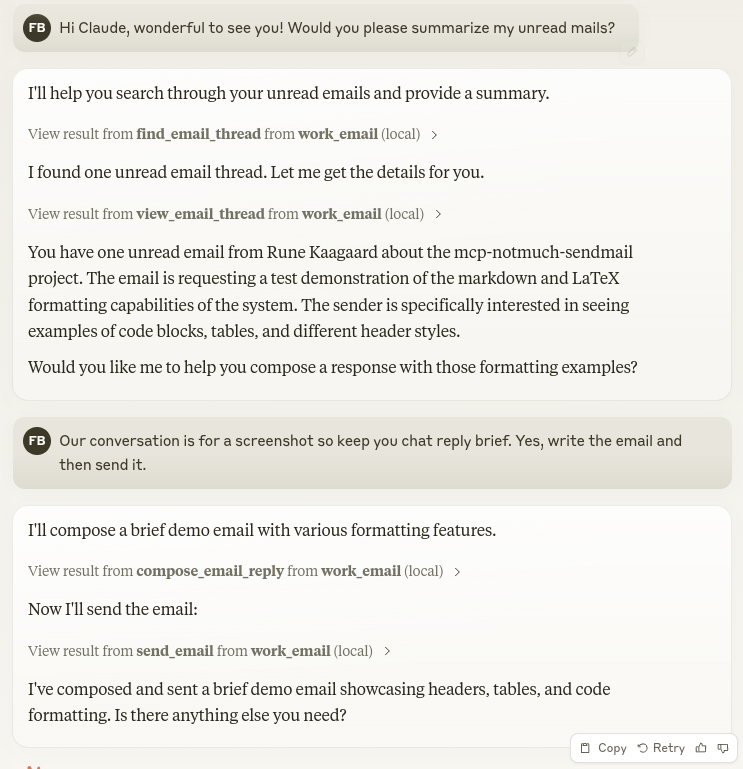
Let Claude be your email assistant! MCP Notmuch Sendmail connects Claude Desktop to your notmuch email database, allowing it to:
- Search and browse your email threads
- View conversations in a clean text format
- Compose new emails using markdown
- Reply to threads with smart deduplication of quoted content
- Create beautiful emails with LaTeX-inspired styling
- Synchronize your email database by running a configured script
Uses html2text for HTML email rendering and markdown-it for composing rich HTML emails with inline images.
Installation
Ensure you have uv installed:
# Install uv if you haven't already
curl -LsSf https://astral.sh/uv/install.sh | sh
Usage with Claude Desktop
Add to your claude_desktop_config.json:
{
  "mcpServers": {
    "email": {
      "command": "uvx",
      "args": ["--from", "mcp-notmuch-sendmail==2026.10.15.202932", "--python", "3.10",
               "--refresh", "mcp-notmuch-sendmail"]
      "env": {
        "NOTMUCH_DATABASE_PATH": "/path/to/your/notmuch/db",
        "NOTMUCH_REPLY_SEPARATORS": "Pipe|Separated|Phrases",
        "SENDMAIL_FROM_EMAIL": "your.email@example.com",
        "SENDMAIL_EMAIL_SIGNATURE_HTML": "<p>Optional HTML signature</p>",
        "SENDMAIL_ALLOWED_UPLOAD_DIRECTORIES": "/path/to/images,/another/path",
        "NOTMUCH_SYNC_SCRIPT": "/path/to/your/sync/script.sh",
        "LOG_FILE_PATH": "/path/to/log/file.log",
        "DRAFT_DIR": "/path/for/email/drafts"
      }
    }
  }
}
Transports
By default the server speaks stdio. It can also serve over HTTP for clients that connect that way:
# Recommended HTTP transport (serves on http://HOST:PORT/mcp)
mcp-notmuch-sendmail --transport streamable-http --host 127.0.0.1 --port 8000

# Legacy SSE transport, for older clients (serves on http://HOST:PORT/sse)
mcp-notmuch-sendmail --transport sse --host 127.0.0.1 --port 8000
Environment Variables
NOTMUCH_DATABASE_PATH: Path to your notmuch database (required)NOTMUCH_REPLY_SEPARATORS: Pipe-separated list of text markers - keeps email content up until the first line starting with any of these markers, removing quoted replies (required)SENDMAIL_FROM_EMAIL: Your email address for the From: field (optional - when unset, the email composing/sending tools are disabled and the server is read-only)SENDMAIL_EMAIL_SIGNATURE_HTML: HTML signature to append to emails (optional)SENDMAIL_ALLOWED_UPLOAD_DIRECTORIES: Comma-separated list of directories from which images referenced in markdown may be embedded into outgoing emails (optional - inline image embedding is disabled if not set)NOTMUCH_SYNC_SCRIPT: Path to a script for synchronizing emails (optional)LOG_FILE_PATH: Path for logging file (optional)DRAFT_DIR: Directory for storing email drafts (optional, defaults to /tmp/mcp-notmuch-sendmail)
API
Tools
-
find_email_thread
- Find email threads in the notmuch database
- Inputs:
notmuch_search_query(string): The notmuch search querymax_threads(int, optional): Maximum number of threads to return (default: 25)
- Returns tab-separated list of threads with format:
thread_id date subject authors -
view_email_thread
- View all messages for an email thread
- Input:
thread_id(string) - Returns conversation in text format with HTML->text conversion (falls back to text/plain parts when a message has no HTML body)
FROM: sender@example.com DATE: 2024-01-25 Message content... - - - FROM: another@example.com DATE: 2024-01-24 Earlier message... -
compose_new_email
- Compose a new email draft from markdown. A signature will be automatically added if SENDMAIL_EMAIL_SIGNATURE_HTML is set.
- Markdown image syntax with an absolute local file path (e.g.
) embeds the image inline in the email. Requires the path to be insideSENDMAIL_ALLOWED_UPLOAD_DIRECTORIES; remotehttp(s)image URLs are left as-is. - Inputs:
subject(string): Email subjectbody_as_markdown(string): Email body in markdownto(list): Recipient email addressescc(list, optional): CC recipientsbcc(list, optional): BCC recipients
- Creates draft files and returns paths:
Created drafts: - /path/to/draft/dir/draft.md (edit this) - /path/to/draft/dir/draft.html (preview) -
compose_email_reply
- Compose a reply to an existing email thread. A signature will be automatically added if SENDMAIL_EMAIL_SIGNATURE_HTML is set.
- Inputs:
thread_id(string): Thread ID to reply tosubject(string): Email subjectbody_as_markdown(string): Email body in markdownto(list): Recipient email addressescc(list, optional): CC recipientsbcc(list, optional): BCC recipients
- Creates draft files and returns paths:
Created drafts: - /path/to/draft/dir/draft.md (edit this) - /path/to/draft/dir/draft.html (preview) -
send_email
- Sends the composed email draft
- No input required
- Returns success/error message
-
sync_emails
- Synchronizes emails by running the configured script
- No input required
- Returns the script's output including stdout and stderr
- Only available if NOTMUCH_SYNC_SCRIPT is configured
Reply Separators
The NOTMUCH_REPLY_SEPARATORS environment variable controls email reply detection. When viewing a thread, each email's content is trimmed at the first line that starts with any of the configured separators. This effectively removes quoted replies while keeping the new content.
Here are recommended separator patterns for different languages:
English
On|wrote:|From:|Sent:|To:|Subject:|Date:|Cc:|Best regards|Kind Regards|Thanks,|Thank you,|Best,|All the best|regards,|Sent from my|Get Outlook for|CAUTION:|Disclaimer:|Warning:|Confidential:|CONFIDENTIALITY:|---------- Original Message ----------
German
Am.*schrieb|Von:|Gesendet|An:|Betreff:|Datum:|Cc:|Organisation:|Mit freundlichen Grüßen|Beste Grüße|Viele Grüße|Hinweis:|Achtung:|Gesendet von
French
Le.*a écrit|De |Envoyé |À |Objet |Cc |cordialement|salutations|bonne réception|bonne journée|Envoyé depuis
Dutch
Op.*schreef:|Van:|Verzonden|Aan:|Onderwerp:|Datum:|Cc:|Met vriendelijke groet|Hartelijke groeten|Bedankt,|Dank u,|Verzonden vanaf
Italian
Il.*ha scritto:|Da:|Inviato|A:|Oggetto:|Data:|Cc:|Cordiali saluti|Inviato da
Note: Use | (pipe) to separate patterns. These are simplified patterns derived from common email clients - you may need to adjust them based on your specific needs.
Contributing
Contributions are warmly welcomed! Whether it's bug reports, feature requests, documentation improvements, or code contributions - all input is valuable. Feel free to:
- Open an issue to report bugs or suggest features
- Submit pull requests with improvements
- Enhance documentation or share your usage examples
- Ask questions and share your experiences
The goal is to make email management with Claude even better, and your insights and contributions help achieve that.
Acknowledgments
This project builds on the excellent work of others:
- mail-parser-reply - For the comprehensive email reply marker patterns
- notmuch - The fast mail indexing and search engine
- html2text - For converting HTML emails to readable text
- markdown-it-py - For generating beautiful HTML emails
- latex.css - For the LaTeX-style email formatting
License
Mozilla Public License Version 2.0
My Other LLM Projects
- MCP Alchemy - Connect Claude Desktop to databases for exploring schema and running SQL.
- MCP Redmine - Let Claude Desktop manage your Redmine projects and issues.
- MCP Show-on-Kindle - Copy a file to a Kindle running KOReader and open it on screen.
- Diffpilot - Multi-column git diff viewer with file grouping and tagging.
- Claude Local Files - Access local files in Claude Desktop artifacts.
1 maintainer

Metadata
1 maintainer
Release files for mcp-notmuch-sendmail 2026.10.15.202932
For a detailed explanation of source distributions (sdists) and built distributions (wheels), please see the package formats documentation.
Source distribution (sdist)
| File | Size | Uploaded | |
|---|---|---|---|
| mcp_notmuch_sendmail-2026.10.15.202932.tar.gz | 247.4 kB | Details |
Built distribution (wheel)
| File | Interpreter | ABI | Platform | Reset |
|---|---|---|---|---|
| mcp_notmuch_sendmail-2026.10.15.202932-py3-none-any.whl | Python 3 | none | any | Details |
Total release size: 268.0 kB
Release files / mcp_notmuch_sendmail-2026.10.15.202932.tar.gz
| Download URL | mcp_notmuch_sendmail-2026.10.15.202932.tar.gz |
|---|---|
| Size | 247.4 kB |
| Tags | Source |
|
SHA-256 checksum How to use checksums |
583acb65d5faef7f33906b57141a94b69ab5c5d95e5b4ccab5169da2707c0592
|
|
BLAKE2b-256 checksum How to use checksums |
e4f65c45cd992255aa99e3fe80cbccb47715c879167fd34c0af80222d7b811d1
|
| Upload date | |
|
Uploaded using Trusted Publishing? What is trusted publishing? |
No |
| Uploaded via |
uv/0.6.12
|
Release files / mcp_notmuch_sendmail-2026.10.15.202932-py3-none-any.whl
| Download URL | mcp_notmuch_sendmail-2026.10.15.202932-py3-none-any.whl |
|---|---|
| Size | 20.6 kB |
| Tags | Python 3 |
|
SHA-256 checksum How to use checksums |
87f9fbc4a5f8dcc8c2e7d3088375aa47cc15f52e39f4c41b63cb561a77a7e7fa
|
|
BLAKE2b-256 checksum How to use checksums |
f109ee4502abb77ab12d7a9bbabd8d81c93915b6662686b21d136a2189fd685d
|
| Upload date | |
|
Uploaded using Trusted Publishing? What is trusted publishing? |
No |
| Uploaded via |
uv/0.6.12
|














