
MCP server exposing OpenAI gpt-image-2 image generation and editing as a single tool for Claude Code and other MCP clients.

Project description
mcp-openai-images-audio
MCP server that exposes OpenAI's gpt-image-2 and gpt-image-1.5 to Claude Code as a single tool. Generate, edit, or compose images straight from a chat. Files are written to disk; the model never returns base64 to your context.
This isn't a wrapper for everything OpenAI does. It's one tool: image. That's intentional.
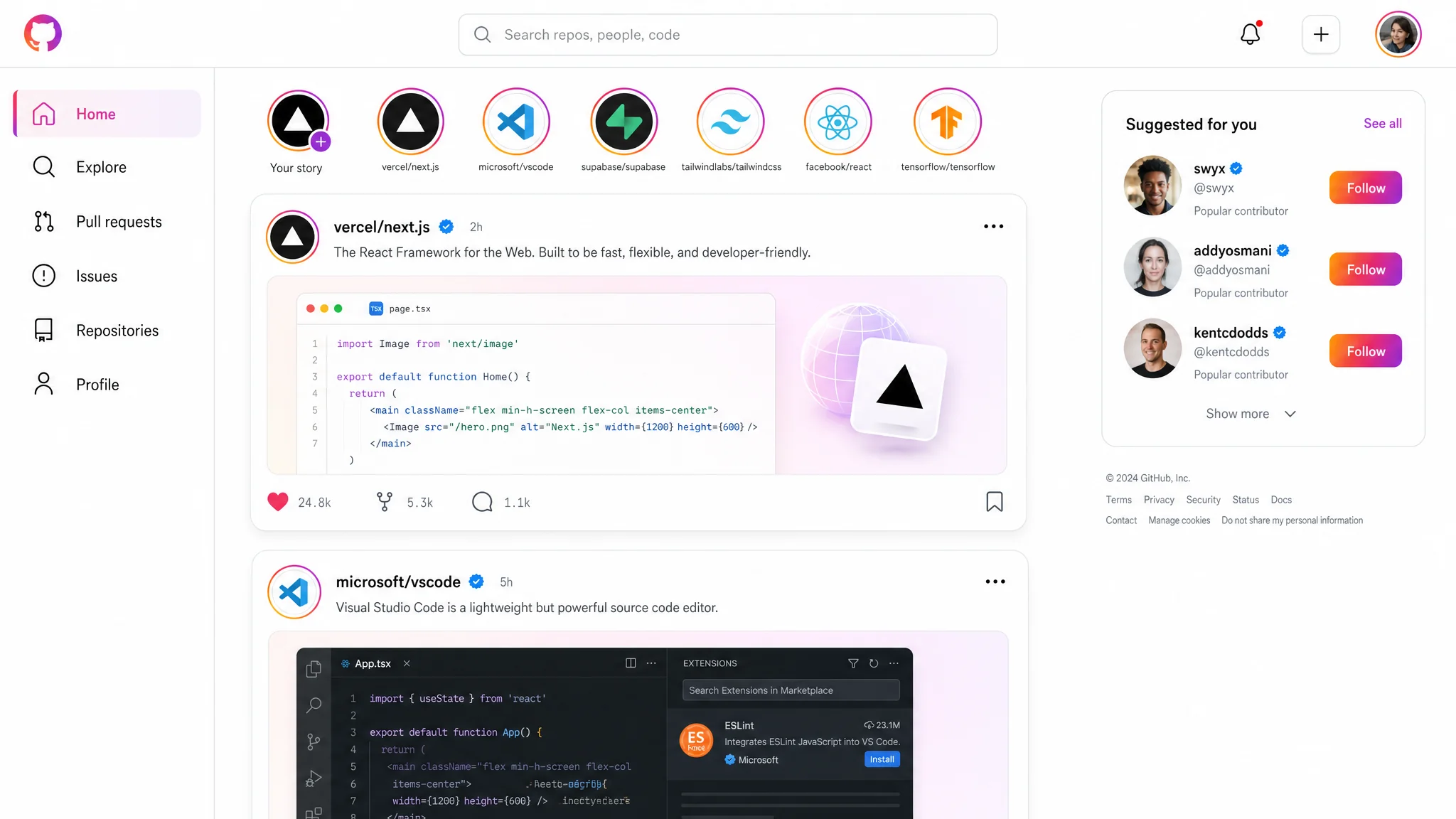
One call, size: 2048x1152, quality: high, no references — produced this UI mockup. Real readable typography, real-looking code preview, accurate Instagram visual language. That's the level you should expect.
Install
pip install mcp-openai-images-audio
Or run directly without installing:
uvx mcp-openai-images-audio
Connect to Claude Code
claude mcp add openai-images \
  --scope user \
  -e OPENAI_API_KEY=sk-... \
  -- uvx mcp-openai-images-audio
Important:
- Organization verification is mandatory for
gpt-image-2. Verify at https://platform.openai.com/settings/organization/general. Takes a few minutes, propagates within 15 minutes. - The API key needs billing credit. Without it you get a 400 with
billing_hard_limit_reached. - The server runs over stdio. No HTTP, no separate process to keep alive — Claude Code starts and stops it for you.
How the tool works
One tool, three modes selected by references_paths:
- empty / not passed →
/v1/images/generations(text → new image) - 1 path →
/v1/images/edits(modify that image) - 2..16 paths →
/v1/images/edits(compose with labeled references)
The server picks the model on its own:
background='transparent'→gpt-image-1.5(gpt-image-2 currently rejects alpha — confirmed regression in OpenAI's docs)- everything else →
gpt-image-2
The actual model used is reported in the response.
Parameters
| Param | Required | Notes |
|---|---|---|
prompt |
yes | English. Structure matters — see the prompting guide. |
output_path |
yes | Absolute path. Parent must exist. File must NOT exist. Extension picks format: .png / .jpg / .jpeg / .webp. |
size |
yes | One of: 1024x1024, 1536x1024, 1024x1536, 2048x2048, 2048x1152, 1152x2048, 3840x2160, 2160x3840. No default — pick deliberately. |
references_paths |
no | List of absolute paths, up to 16 files, each ≤50 MB. |
quality |
no | low / medium / high. Omit for default (auto). |
input_fidelity |
no | low / high. Pass high for face-preserving edits. |
background |
no | auto (default) / opaque / transparent. |
The server hard-codes moderation=low, n=1, output_compression=100. Not configurable.
Prompting guide
Before the first call, Claude reads the resource image-guide://full. It covers:
- prompt structure (medium → subject → scene → composition → lighting → texture → constraints)
- photorealism rules (camera language, anti-words like "8K", "masterpiece")
- text rendering inside images
- edit/compose modes with role labeling
sizeselection per use case- when to set
qualityandinput_fidelity - the transparent-background trap — if you write "transparent background" in the prompt instead of passing
background='transparent', the model paints the editor checkerboard pattern into RGB. The image looks transparent in a thumbnail but isn't.
The server detects the checkerboard trap after writing the file and returns alpha_appears_baked: true. Don't trust the visual preview without checking that flag.
Response
{
  "path": "/abs/path.png",
  "bytes": 1219063,
  "size": "1024x1024",
  "model": "gpt-image-2",
  "mode": "generate",
  "has_alpha": false,
  "alpha_used": null,
  "tokens_used": 289,
  "estimated_cost_usd": 0.0117
}
If transparency was requested, alpha_appears_baked is also included. If anything looks wrong, a warnings array is added with human-readable text.
Logs
Each call appends one JSON line to ~/.cache/mcp-openai-images-audio/log.jsonl. The log rotates at 10 MB; one previous file is kept as log.jsonl.1.
tail -f ~/.cache/mcp-openai-images-audio/log.jsonl
Recommendations
- For UI mockups with readable text, use
size: 3840x2160andquality: high. Smaller sizes blur small fonts. - For logos / icons that need transparency, set
background: 'transparent'— the server will route togpt-image-1.5automatically. Don't try to ask for transparency in the prompt. - For portrait edits, pass
input_fidelity: 'high'. Otherwise the face drifts across iterations. - For drafts, use
quality: 'low'(~$0.006/image). Promote tohighonly when the result has to be final. - Don't pass
qualityat all for most cases. The default is good enough. - The model gives most weight to the first ~50 words of the prompt. Put the medium and subject up front.
Pricing notes
Cost depends on size and quality. Typical 1024×1024 cases:
quality: low→ ~$0.006quality: medium→ ~$0.05quality: high→ ~$0.21
4K is roughly 4× the price of 2048×1152. The tool reports estimated_cost_usd per call; treat it as approximate — it tracks OpenAI's published per-token rates.
Build from source
git clone https://github.com/eduard256/mcp-openai-images-audio.git
cd mcp-openai-images-audio
uv sync
uv run mcp-openai-images-audio
Tests:
uv run --extra dev pytest
Known limitations
gpt-image-2does not supportbackground: transparent. The server falls back togpt-image-1.5automatically. Quality on transparent calls is thereforegpt-image-1.5quality, not the flagship.nis hard-coded to 1. To get multiple variants, call the tool multiple times in parallel.- No
tts/audiotool yet despite the package name. Coming in a later version. - No streaming partial images. The tool returns when the file is fully written.
License
MIT
Release history Release notifications | RSS feed


Download files
Download the file for your platform. If you're not sure which to choose, learn more about installing packages.
Source Distribution
Built Distribution
Filter files by name, interpreter, ABI, and platform.
If you're not sure about the file name format, learn more about wheel file names.
Copy a direct link to the current filters
File details
Details for the file mcp_openai_images_audio-0.1.1.tar.gz.
File metadata
- Download URL: mcp_openai_images_audio-0.1.1.tar.gz
- Upload date:
- Size: 139.4 kB
- Tags: Source
- Uploaded using Trusted Publishing? No
- Uploaded via: uv/0.11.8 {"installer":{"name":"uv","version":"0.11.8","subcommand":["publish"]},"python":null,"implementation":{"name":null,"version":null},"distro":{"name":"Ubuntu","version":"24.04","id":"noble","libc":null},"system":{"name":null,"release":null},"cpu":null,"openssl_version":null,"setuptools_version":null,"rustc_version":null,"ci":null}
File hashes
| Algorithm | Hash digest | |
|---|---|---|
| SHA256 |
c021d8bb8fd59aa33acfcf1338dd63dd0f26f564f5a7bf47cabaae0ee7cdfa65
|
|
| MD5 |
d8c91f03a14c46f487d2c16d6e30c4fe
|
|
| BLAKE2b-256 |
de714771d23afc36536f635d77d087f00717157f2786ee2db584310dcd1f79c8
|
File details
Details for the file mcp_openai_images_audio-0.1.1-py3-none-any.whl.
File metadata
- Download URL: mcp_openai_images_audio-0.1.1-py3-none-any.whl
- Upload date:
- Size: 33.5 kB
- Tags: Python 3
- Uploaded using Trusted Publishing? No
- Uploaded via: uv/0.11.8 {"installer":{"name":"uv","version":"0.11.8","subcommand":["publish"]},"python":null,"implementation":{"name":null,"version":null},"distro":{"name":"Ubuntu","version":"24.04","id":"noble","libc":null},"system":{"name":null,"release":null},"cpu":null,"openssl_version":null,"setuptools_version":null,"rustc_version":null,"ci":null}
File hashes
| Algorithm | Hash digest | |
|---|---|---|
| SHA256 |
b9c0a47e7b357fe46d07e83f6395ebfaa0d62dbb6deb142eaf724e10a0dbd078
|
|
| MD5 |
8ba7d67217d19a391b2a7c3f9f456408
|
|
| BLAKE2b-256 |
9561f1f94932c0ca85b44ad1f07b7df6ba3056ea384df3e78f94f800a8ee5ad2
|






