
MCP Server for the Perplexity API.
Verified details
These details have been verified by PyPIProject links
GitHub Statistics
Maintainers

Project description
Perplexity Chat MCP Server
The Perplexity MCP Server provides a Python-based interface to the Perplexity API, offering tools for querying responses, maintaining chat history, and managing conversations. It supports model configuration via environment variables and stores chat data locally. Built with Python and setuptools, it's designed for integration with development environments.
The MCP Server is desined to mimick how users interact with the Perplexity Chat on their browser by allowing your models to ask questions, continue conversations, and list all your chats.


Components
Tools
- ask_perplexity: Request expert programming assistance through Perplexity. Focuses on coding solutions, error debugging, and technical explanations. Returns responses with source citations and alternative suggestions.
- chat_perplexity: Maintains ongoing conversations with Perplexity AI. Creates new chats or continues existing ones with full history context. Returns chat ID for future continuation.
- list_chats_perplexity: Lists all available chat conversations with Perplexity AI. Returns chat IDs, titles, and creation dates (displayed in relative time format, e.g., "5 minutes ago", "2 days ago"). Results are paginated with 50 chats per page.
- read_chat_perplexity: Retrieves the complete conversation history for a specific chat. Returns the full chat history with all messages and their timestamps. No API calls are made to Perplexity - this only reads from local storage.
Key Features
-
Model Configuration via Environment Variable: Allows you to specify the Perplexity model using the
PERPLEXITY_MODELenvironment variable for flexible model selection.You can also specify
PERPLEXITY_MODEL_ASKandPERPLEXITY_MODEL_CHATto use different models for theask_perplexityandchat_perplexitytools, respectively.These will override
PERPLEXITY_MODEL. You can check which models are available on the Perplexity documentation. -
Persistent Chat History: The
chat_perplexitytool maintains ongoing conversations with Perplexity AI. Creates new chats or continues existing ones with full history context. Returns chat ID for future continuation. -
Streaming Responses with Progress Reporting: Uses progress reporting to prevent timeouts on slow responses.
Quickstart
Prerequisites
Before using this MCP server, ensure you have:
- Python 3.10 or higher
- uvx package manager installed
Note: Installation instructions for uvx are available here.
Configuration for All Clients
To use this MCP server, configure your client with these settings (configuration method varies by client):
"mcpServers": {
  "mcp-perplexity": {
    "command": "uvx",
    "args": ["mcp-perplexity"],
    "env": {
      "PERPLEXITY_API_KEY": "your-api-key",
      "PERPLEXITY_MODEL": "sonar-pro",
      "DB_PATH": "chats.db"
    }
  }
}
Environment Variables
Configure the MCP Perplexity server using the following environment variables:
| Variable | Description | Default Value | Required |
|---|---|---|---|
PERPLEXITY_API_KEY |
Your Perplexity API key | None | Yes |
PERPLEXITY_MODEL |
Default model for interactions | sonar-pro |
No |
PERPLEXITY_MODEL_ASK |
Specific model for ask_perplexity tool |
Uses PERPLEXITY_MODEL |
No |
PERPLEXITY_MODEL_CHAT |
Specific model for chat_perplexity tool |
Uses PERPLEXITY_MODEL |
No |
DB_PATH |
Path to store chat history database | chats.db |
No |
WEB_UI_ENABLED |
Enable or disable web UI | false |
No |
WEB_UI_PORT |
Port for web UI | 8050 |
No |
WEB_UI_HOST |
Host for web UI | 127.0.0.1 |
No |
DEBUG_LOGS |
Enable detailed logging | false |
No |
Using Smithery CLI
npx -y @smithery/cli@latest run @daniel-lxs/mcp-perplexity --config "{\"perplexityApiKey\":\"pplx-abc\",\"perplexityModel\":\"sonar-pro\"}"
Usage
ask_perplexity
The ask_perplexity tool is used for specific questions, this tool doesn't maintain a chat history, every request is a new chat.
The tool will return a response from Perplexity AI using the PERPLEXITY_MODEL_ASK model if specified, otherwise it will use the PERPLEXITY_MODEL model.
chat_perplexity
The chat_perplexity tool is used for ongoing conversations, this tool maintains a chat history.
A chat is identified by a chat ID, this ID is returned by the tool when a new chat is created. Chat IDs look like this: wild-horse-12.
This tool is useful for debugging, research, and any other task that requires a chat history.
The tool will return a response from Perplexity AI using the PERPLEXITY_MODEL_CHAT model if specified, otherwise it will use the PERPLEXITY_MODEL model.
list_chats_perplexity
Lists all available chat conversations. It returns a paginated list of chats, showing the chat ID, title, and creation time (in relative format). You can specify the page number using the page argument (defaults to 1, with 50 chats per page).
read_chat_perplexity
Retrieves the complete conversation history for a given chat_id. This tool returns all messages in the chat, including timestamps and roles (user or assistant). This tool does not make any API calls to Perplexity; it only reads from the local database.
Web UI
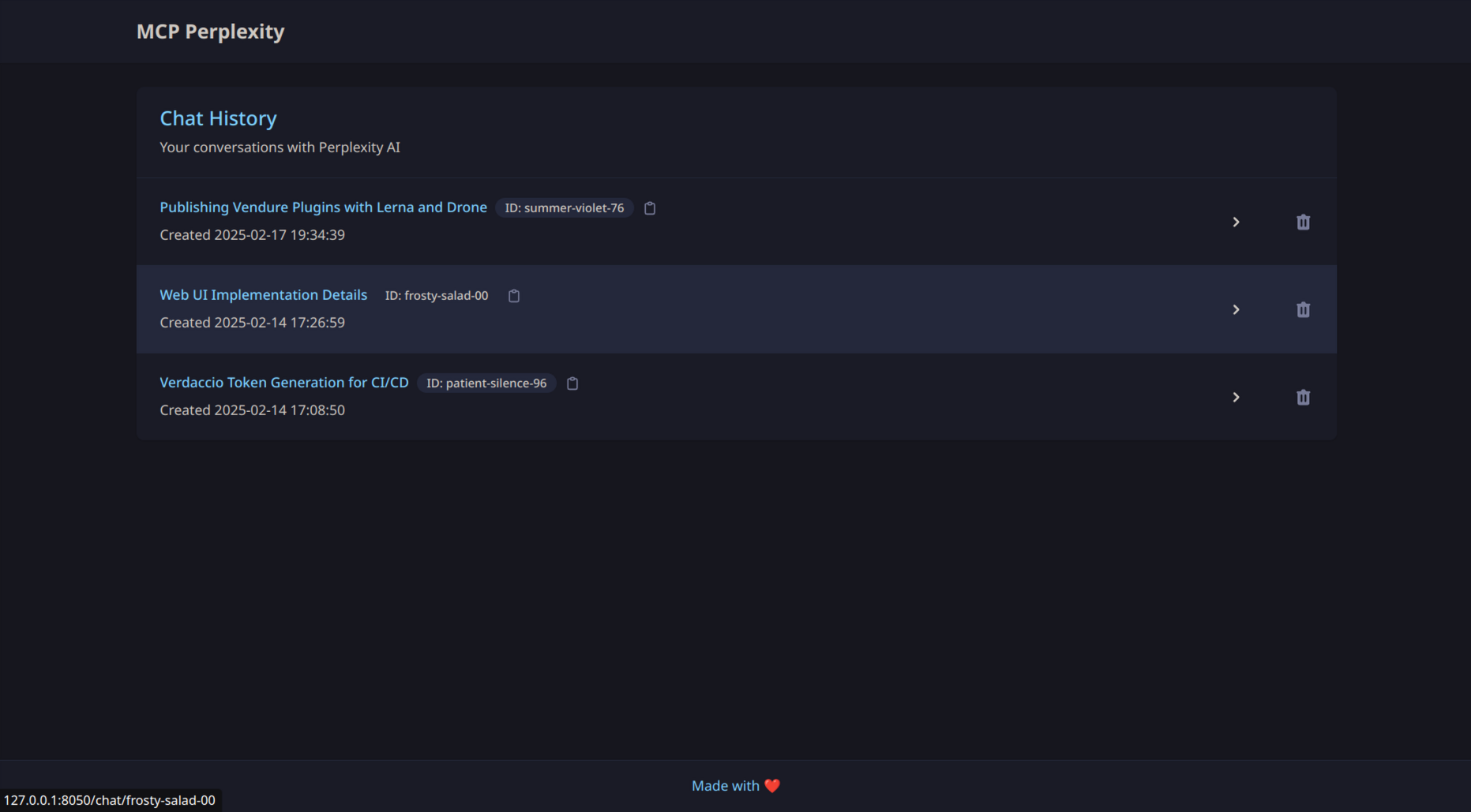
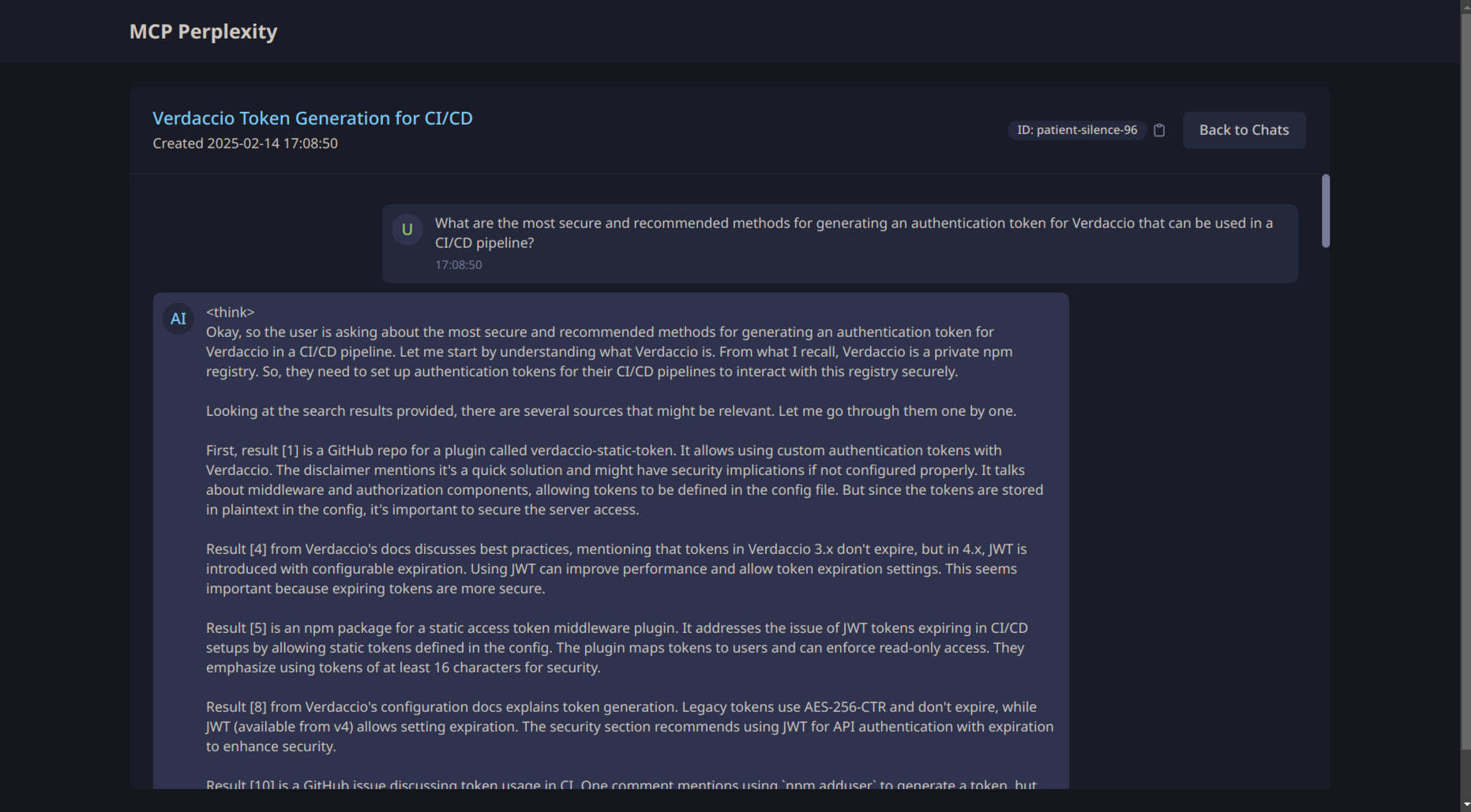
The MCP Perplexity server now includes a web interface for easier interaction and management of chats.
Features
- Interactive chat interface
- Chat history management
- Real-time message display
Screenshots
Chat List View
Chat Interface
Accessing the Web UI
When WEB_UI_ENABLED is set to true, the web UI will be available at http://WEB_UI_HOST:WEB_UI_PORT.
By default, this is http://127.0.0.1:8050.
Development
This project uses setuptools for development and builds. To get started:
-
Create a virtual environment:
python -m venv .venv
source .venv/bin/activate  # On Linux/macOS
# or
.venv\Scripts\activate  # On Windows
-
Install the project in editable mode with all dependencies:
pip install -e .
-
Build the project:
python -m build
The virtual environment will contain all required dependencies for development.
Contributing
This project is open to contributions. Please see the CONTRIBUTING.md file for more information.
License
This project is licensed under the MIT License. See the LICENSE file for details.
Project details
Verified details
These details have been verified by PyPIProject links
GitHub Statistics
Maintainers
Release history Release notifications | RSS feed


Download files
Download the file for your platform. If you're not sure which to choose, learn more about installing packages.
Source Distribution
Built Distribution
Filter files by name, interpreter, ABI, and platform.
If you're not sure about the file name format, learn more about wheel file names.
Copy a direct link to the current filters
File details
Details for the file mcp_perplexity-0.5.8.tar.gz.
File metadata
- Download URL: mcp_perplexity-0.5.8.tar.gz
- Upload date:
- Size: 37.0 kB
- Tags: Source
- Uploaded using Trusted Publishing? Yes
- Uploaded via: twine/6.1.0 CPython/3.12.9
File hashes
| Algorithm | Hash digest | |
|---|---|---|
| SHA256 |
1c9d72568c39da02e79a658fa48d1779c25b5ae579f9b0a4d2232a40df5d96ab
|
|
| MD5 |
9cb3d30b02bfa1d5036ed6f74d1da61d
|
|
| BLAKE2b-256 |
82e87276082ecedd1ca914d1d581ac3a3a69fef36c13837606b79dafed51b6d6
|
Provenance
The following attestation bundles were made for mcp_perplexity-0.5.8.tar.gz:
Publisher:
release.yml on daniel-lxs/mcp-perplexity
-
Statement:
-
Statement type:
https://in-toto.io/Statement/v1 -
Predicate type:
https://docs.pypi.org/attestations/publish/v1 -
Subject name:
mcp_perplexity-0.5.8.tar.gz -
Subject digest:
1c9d72568c39da02e79a658fa48d1779c25b5ae579f9b0a4d2232a40df5d96ab - Sigstore transparency entry: 174198501
- Sigstore integration time:
-
Permalink:
daniel-lxs/mcp-perplexity@ce6d7b0125eb12711f71b5457baa3aecac3d71f8 -
Branch / Tag:
refs/heads/main - Owner: https://github.com/daniel-lxs
-
Access:
public
-
Token Issuer:
https://token.actions.githubusercontent.com -
Runner Environment:
github-hosted -
Publication workflow:
release.yml@ce6d7b0125eb12711f71b5457baa3aecac3d71f8 -
Trigger Event:
push
-
Statement type:
File details
Details for the file mcp_perplexity-0.5.8-py3-none-any.whl.
File metadata
- Download URL: mcp_perplexity-0.5.8-py3-none-any.whl
- Upload date:
- Size: 31.8 kB
- Tags: Python 3
- Uploaded using Trusted Publishing? Yes
- Uploaded via: twine/6.1.0 CPython/3.12.9
File hashes
| Algorithm | Hash digest | |
|---|---|---|
| SHA256 |
5962ff1906ce5587a7e56db625434bb979ee82f69038fe0d7710bb6507752cc4
|
|
| MD5 |
b48d027a61c5bad359de0d5e8dec7282
|
|
| BLAKE2b-256 |
23fda768185ea6e67ba34b1ba94305b9d39d75008cc862dd66b19077fbee9fbb
|
Provenance
The following attestation bundles were made for mcp_perplexity-0.5.8-py3-none-any.whl:
Publisher:
release.yml on daniel-lxs/mcp-perplexity
-
Statement:
-
Statement type:
https://in-toto.io/Statement/v1 -
Predicate type:
https://docs.pypi.org/attestations/publish/v1 -
Subject name:
mcp_perplexity-0.5.8-py3-none-any.whl -
Subject digest:
5962ff1906ce5587a7e56db625434bb979ee82f69038fe0d7710bb6507752cc4 - Sigstore transparency entry: 174198502
- Sigstore integration time:
-
Permalink:
daniel-lxs/mcp-perplexity@ce6d7b0125eb12711f71b5457baa3aecac3d71f8 -
Branch / Tag:
refs/heads/main - Owner: https://github.com/daniel-lxs
-
Access:
public
-
Token Issuer:
https://token.actions.githubusercontent.com -
Runner Environment:
github-hosted -
Publication workflow:
release.yml@ce6d7b0125eb12711f71b5457baa3aecac3d71f8 -
Trigger Event:
push
-
Statement type:






