
MCP SAP GUI Server


An MCP server that lets AI assistants work in SAP GUI for Windows: ask in plain language, and the assistant reads screens and tables, fills in fields, runs transactions and handles popups, through SAP's own Scripting API. Saving always waits for your yes.
It works with any MCP client that can start a local server: Claude Code, GitHub Copilot, Codex, Google Antigravity and others.
What it does
- Looks things up: display transactions, fields, ALV grids, table controls, classic report lists and trees, read in full however long they are.
- Fills in and changes: fields, checkboxes, dropdowns, whole forms, table cells, F4 value help, table maintenance and IMG activities.
- Navigates: transactions, buttons, function keys, menus, tabs, SPRO and other trees.
- Handles popups, recognising questions, warnings, F4 lists and SAP messages in any logon language.
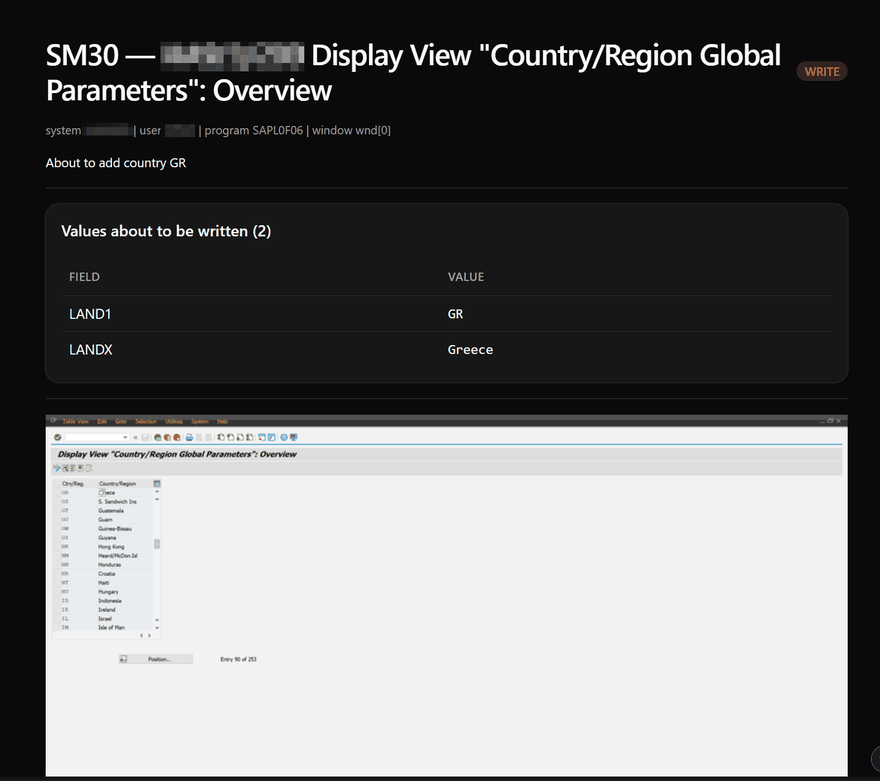
- Shows before it saves: a preview of the screen and the values about to be written, and screenshots on request.
More, with example prompts: What it can do.
Requirements
- Windows with SAP GUI for Windows (8.10 verified, 8.00 works; SAP GUI versions), and SAP Logon running.
- SAP GUI Scripting allowed in SAP GUI and on the SAP system: Preparing SAP.
- uv, which runs the server from PyPI.
- An MCP client. To approve saves, one that shows the server's confirmation questions (listed below).
Quick start
-
Install uv:
winget install --id=astral-sh.uv -e -
Add the server to your MCP client:
Command:   uvx
Arguments: mcp-sap-gui[screenshots]
Transport: stdio
In the Claude Code CLI, for example:
claude mcp add sap-gui --scope user -- uvx "mcp-sap-gui[screenshots]". Every client: Clients. -
Log on to SAP in SAP Logon, then ask: "Connect to my open SAP session and tell me what system I'm on."
Step by step, including updating to a new release: Getting started.
Safety
- Saves wait for your yes, and you can make other changes wait too, for example every field write: Confirmations.
- A transaction policy decides which transactions the assistant may start; read-only mode and profiles limit it further.
- An audit log records every call, question and answer.
- Everything runs as the logged-on SAP user, under that user's authorizations, which remain the real boundary.
Details for admins, Basis and security teams: Security guide.
Which clients show the confirmation questions
Tested on 2026-10-28: the Claude Code CLI, the GitHub Copilot CLI, VS Code with GitHub Copilot and the Codex CLI show them. The Claude desktop app does not (its Code tab declines without showing anything, its Chat and Cowork tabs do not support them), so a save is refused there: use it for reading. The full table: Clients.
Documentation
| Page | For |
|---|---|
| Getting started | Installing it and the first questions |
| What it can do | What to ask, and what is covered |
| Clients | Setup per MCP client, and which ones show the confirmation questions |
| Confirmations | What asks, and what each answer does |
| Troubleshooting | When something does not work |
| Preparing SAP | Enabling scripting, also for named users or read-only; SAP Business Client |
| Configuration | Every option and environment variable; profiles, HTTP, code mode |
| Security guide | Safeguards, the transaction policy, the audit log, a recommended setup |
| SAP GUI versions | Which SAP GUI releases work, and how |
| Tools | Every tool the assistant can call |
| CHANGELOG | What changed in each release |
What's new
0.6.0 supports MCP 2026-07-28, the newest protocol version, next to the earlier ones, and the confirmation questions work on both. It needs Python 3.11 or later, retires sap_set_policy_profile, names the MCP client in the audit log, and comes with reorganised documentation. Every change: CHANGELOG.
Contributing
Bug reports and pull requests are welcome: CONTRIBUTING. Security issues: SECURITY.
License
MIT. See LICENSE.
Disclaimer
This project is not affiliated with, endorsed by, or sponsored by SAP SE. SAP, SAP GUI, and other SAP products mentioned are trademarks of SAP SE.
Use of this software with SAP systems should comply with your SAP licensing agreement and your organization's security policies.
1 maintainer

Metadata
1 maintainer
Release files for mcp-sap-gui 0.6.0
For a detailed explanation of source distributions (sdists) and built distributions (wheels), please see the package formats documentation.
Source distribution (sdist)
| File | Size | Uploaded | Provenance | Actions |
|---|---|---|---|---|
| mcp_sap_gui-0.6.0.tar.gz | 476.7 kB | With provenance | Details for mcp_sap_gui-0.6.0.tar.gz |
Built distribution (wheel)
| File | Interpreter | ABI | Platform | Actions Reset |
|---|---|---|---|---|
| mcp_sap_gui-0.6.0-py3-none-any.whl | Python 3 | none | any | Details for mcp_sap_gui-0.6.0-py3-none-any.whl |
Total release size: 614.8 kB
Release files / mcp_sap_gui-0.6.0.tar.gz
| Download URL | mcp_sap_gui-0.6.0.tar.gz |
|---|---|
| Size | 476.7 kB |
| Tags | Source |
|
SHA-256 checksum How to use checksums |
b3f22d07242bfe06151694367413299470567af935b75417d0b783e3f369296c
|
|
BLAKE2b-256 checksum How to use checksums |
aa3912ee7750c3377367b5963759097b94d09f2b53c4ed00a2eb8e3d55bfaaec
|
| Upload date | |
|
Uploaded using Trusted Publishing? What is trusted publishing? |
Yes |
| Uploaded via |
twine/7.0.0 CPython/3.13.16
|
Provenance
Provenance describes where a file came from. On PyPI, provenance is shared via attestations, which provide a verifiable record of the build or publishing details. View details, limitations and caveats.


PyPI Publish Attestation
PyPI verified that this artifact, at this checksum, originated from the publisher listed below.
Signed by GitHub Actions, verified by PyPI on Oct 28, 2026.
Transparency logRelease files / mcp_sap_gui-0.6.0-py3-none-any.whl
| Download URL | mcp_sap_gui-0.6.0-py3-none-any.whl |
|---|---|
| Size | 138.1 kB |
| Tags | Python 3 |
|
SHA-256 checksum How to use checksums |
d1bd62809666fe05062b47969398b7c98515c180f8779b372080337e43b1d7d5
|
|
BLAKE2b-256 checksum How to use checksums |
ed1be12bc54c1cc34e8db621299b9f23b3d688fadfade9b049e6f3d8dd535969
|
| Upload date | |
|
Uploaded using Trusted Publishing? What is trusted publishing? |
Yes |
| Uploaded via |
twine/7.0.0 CPython/3.13.16
|
Provenance
Provenance describes where a file came from. On PyPI, provenance is shared via attestations, which provide a verifiable record of the build or publishing details. View details, limitations and caveats.
PyPI Publish Attestation
PyPI verified that this artifact, at this checksum, originated from the publisher listed below.
Signed by GitHub Actions, verified by PyPI on Oct 28, 2026.
Transparency logSecurity for mcp-sap-gui 0.6.0
Provenance
Provenance describes where a file came from. On PyPI, provenance is shared via attestations, which provide a verifiable record of the build or publishing details. View details, limitations and caveats.
Full provenance
Both files in this release have been uploaded with provenance metadata.
Attestation for mcp_sap_gui-0.6.0.tar.gz
PyPI Publish Attestation
PyPI verified that this artifact, at this checksum, originated from the publisher listed below.
Signed by GitHub Actions, verified by PyPI on Oct 28, 2026.
Transparency logA note on package security
PyPI is a repository for distributing packages, not a service for auditing them. While third-party security researchers and our staff do their best to detect and remove malicious packages, PyPI cannot guarantee the quality, security or suitability of any given package.
To learn more about protecting yourself from malicious actors, visit our package security documentation.














