
A Meta Model Context Protocol (MCP) server that seamlessly scales LLMs to 1000+ MCP servers through automatic routing.

Project description
MCP Server Copilot


A Meta Model Context Protocol (MCP) server that seamlessly scales LLMs to 1000+ MCP servers through automatic routing without expose all servers and tools to LLMs directly.
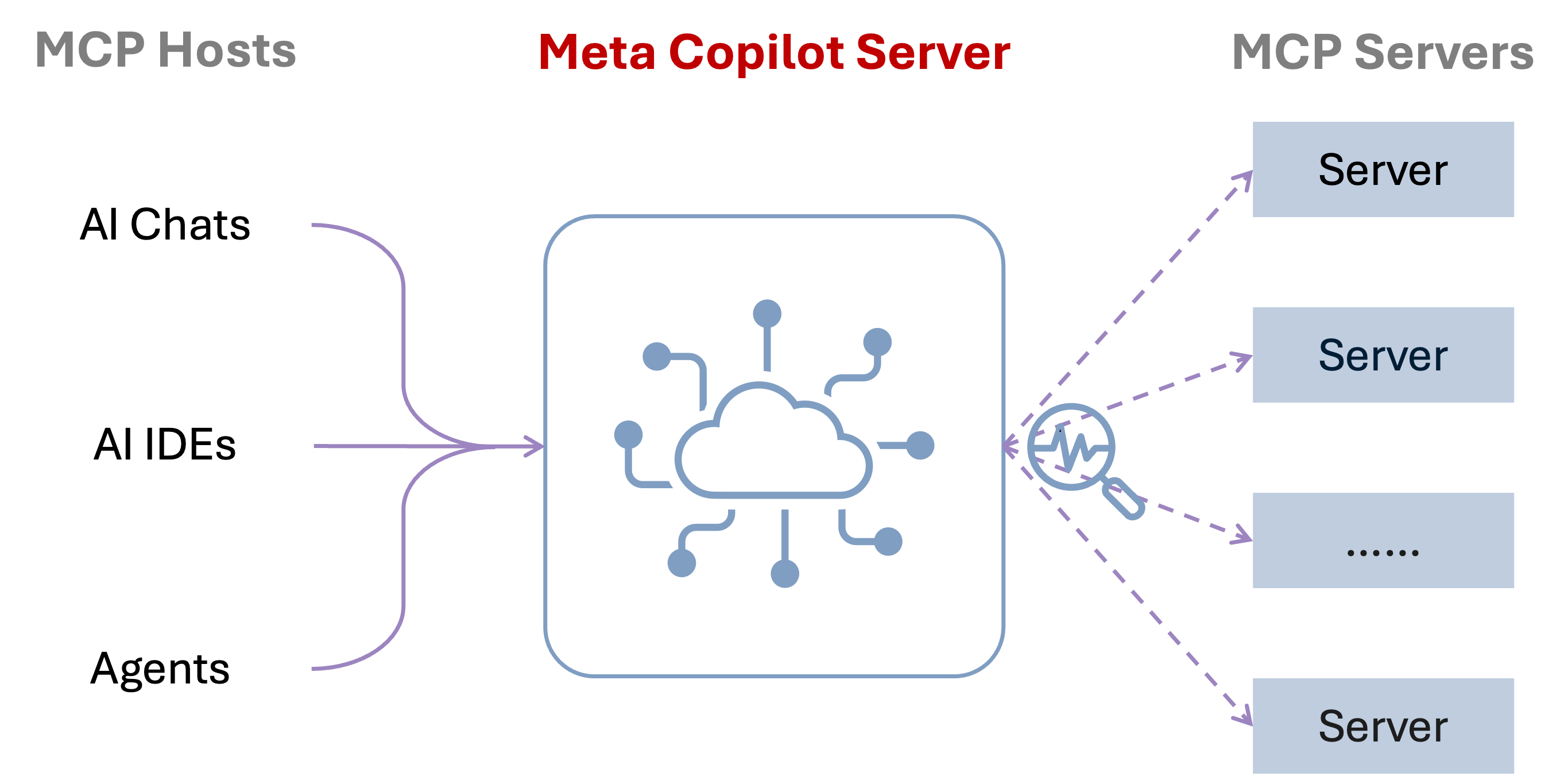
Components
Tools
-
router-servers: Route user query to appropriate servers. Use this when you need to find suitable servers that can handle the user's query. This should be your first step when processing a new query to determine which specialized servers are most relevant.query(string, required): User's query to find relevant servers.top_k(integer, optional): Maximum number of servers to return (default: 5).
-
route-tools: Route user query to appropriate tools across all servers. Use this when you need to find specific tools that can address the user's request, regardless of which server hosts them. This is helpful when you know the task type but not which server handles it.query(string, required): User's query to find relevant tools.top_k(integer, optional): Maximum number of tools to return (default: 5).
-
execute-tool: Execute a specific tool on a specific server based on previous routing results. Use this after you've identified the appropriate server and tool using the routing tools. This actually performs the requested operation.server_name(string, required): Name of the server hosting the tool.tool_name(string, required): Name of the tool to execute.params(object, optional): Parameters to pass to the tool, as a key-value dictionary (default: null or empty object).
Installation
Using uv (recommended)
When using uv no specific installation is needed. We will
use uvx to directly run mcp-server-copilot.
Using PIP
Alternatively you can install mcp-server-copilot via pip:
pip install mcp-server-copilot
After installation, you can run it as a script using:
python -m mcp_server_copilot
Configuration
Copy config/config.sample.json to ~/.config/mcp-server-copilot
Add to your MCP Client settings:
Using uvx
"mcpServers": {
  "copilot": {
    "command": "uvx",
    "args": ["mcp-server-copilot", "--config", "~/.config/mcp-server-copilot/config.json"]
  }
}
Using pip installation
"mcpServers": {
  "copilot": {
    "command": "python",
    "args": ["-m", "mcp_server_copilot", "--config", "~/.config/mcp-server-copilot/config.json"]
  }
}
TODOs
- Manage Servers more easily
- Add Semantic Routing
- Add Planning Capabilities
Release history Release notifications | RSS feed


Download files
Download the file for your platform. If you're not sure which to choose, learn more about installing packages.
Source Distribution
Built Distribution
Filter files by name, interpreter, ABI, and platform.
If you're not sure about the file name format, learn more about wheel file names.
Copy a direct link to the current filters
File details
Details for the file mcp_server_copilot-0.1.1.tar.gz.
File metadata
- Download URL: mcp_server_copilot-0.1.1.tar.gz
- Upload date:
- Size: 9.7 kB
- Tags: Source
- Uploaded using Trusted Publishing? No
- Uploaded via: uv/0.7.3
File hashes
| Algorithm | Hash digest | |
|---|---|---|
| SHA256 |
8a79fb78cd89cc194692bbe9f2dd8c0ad818520f13bfac9dff8405bb77f1cbde
|
|
| MD5 |
d5dcc83f6138f70a36b7ada907f052aa
|
|
| BLAKE2b-256 |
50dc464fcfba8927908f803d18718ee7ce93c14af779d40fa3fac1652dc56fc7
|
File details
Details for the file mcp_server_copilot-0.1.1-py3-none-any.whl.
File metadata
- Download URL: mcp_server_copilot-0.1.1-py3-none-any.whl
- Upload date:
- Size: 10.3 kB
- Tags: Python 3
- Uploaded using Trusted Publishing? No
- Uploaded via: uv/0.7.3
File hashes
| Algorithm | Hash digest | |
|---|---|---|
| SHA256 |
6e9b88fadb0590f3a1b7217844676bb37d3ddf2e26c0d1185fd8d680b8b7bf5d
|
|
| MD5 |
17780bea84f0d5419915cb33f97ea03e
|
|
| BLAKE2b-256 |
4cd8a1e541502878a4a1e1ad5ebd837174d494add942feb5e932a844510eb8e6
|






