
MCP server for Polarion ALM — read and write documents and work items
Verified details
These details have been verified by PyPIProject links
GitHub Statistics
Maintainers

Project description

mcp-server-polarion
Talk to your Polarion — AI reads, writes, and reorganizes documents, work items, test runs, and traceability links.
Features · Quickstart · Tools · Example Prompts · Setup




A Model Context Protocol (MCP) server for Polarion ALM, built for real-world instances: every write supports dry_run, guards validate fields and enum values before anything is committed, and requests are automatically paced to Polarion's rate limits — so an AI assistant can work on production data without surprises.
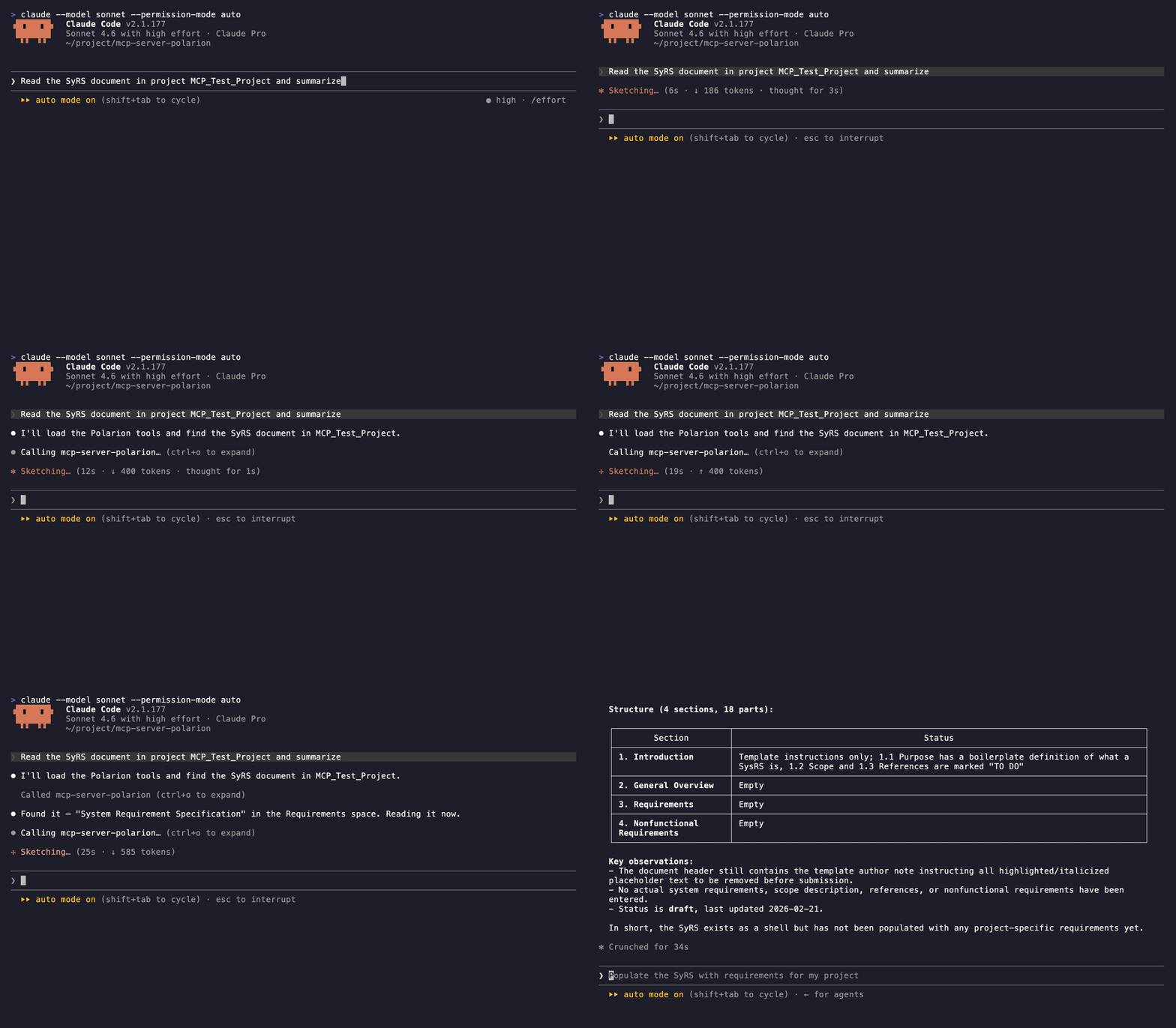
Features
- 30 tools covering read and write across documents, work items, test runs, traceability links, and comments.
- Read — render documents as Markdown, search with Lucene or SQL, walk incoming/outgoing links, resolve enum options.
- Write — create and update work items and documents, create test runs, manage links, reorganize document structure, post comments.
- Safe writes — every write tool supports
dry_run, and pre-write guards validate fields, enum values, and link targets before hitting Polarion. - Plays nice with your server — requests are paced to Polarion's rate limits, with automatic retries on 429/5xx responses.
- Built for LLMs — strict async, fully typed, pagination on every list tool, docstrings written as the assistant's manual.
Quickstart
Requires Polarion 2506+ and uv — see Prerequisites. Fastest path — Claude Code:
claude mcp add mcp-server-polarion \
  -e POLARION_URL=https://polarion.example.com \
  -e POLARION_TOKEN=your-personal-access-token \
  -- uvx mcp-server-polarion
Other clients (VS Code, Claude Desktop, Cursor) — see Client Configuration.
Tools
Read
| Tool | Description |
|---|---|
list_projects |
List accessible projects |
list_documents |
List documents in a project |
list_work_items |
List work items in a project (Lucene/SQL query) |
list_test_runs |
List test runs in a project (Lucene query, templates filter) |
get_sql_query_recipes |
Fetch copy-paste SQL recipes for advanced queries |
get_html_recipes |
Fetch copy-paste Polarion HTML templates for raw-HTML body edits |
get_document |
Get document metadata, optionally with the raw body HTML |
read_document |
Render a document end-to-end as Markdown |
read_document_parts |
List a document's structural parts with embedded work item metadata |
get_work_item |
Get work item details with the body as raw HTML |
read_work_item |
Get work item details with the body as Markdown |
list_work_item_links |
List a work item's outgoing or incoming links |
list_document_comments |
List a document's comments with thread relationships |
list_work_item_comments |
List a work item's comments with thread relationships |
list_document_enum_options |
Resolve valid enum ids for a document field |
list_work_item_enum_options |
Resolve valid enum ids for a work item field |
All list tools support pagination via page_size (1–100) and page_number parameters.
Write
| Tool | Description |
|---|---|
create_work_items |
Create one or more work items in a single request |
update_work_items |
Update fields, body, or workflow status on one or more work items |
create_document |
Create a new document |
update_document |
Update document metadata, body, or workflow status |
create_test_runs |
Create one or more test runs, optionally from a template |
create_work_item_links |
Create one or more outgoing links from a source work item |
update_work_item_link |
Update suspect / revision on one outgoing link |
delete_work_item_links |
Delete one or more outgoing links from a source work item |
move_work_item_to_document |
Attach a work item to a document at a chosen position |
move_work_item_from_document |
Detach a work item from its document |
create_document_comments |
Add one or more comments or replies to a document |
create_work_item_comments |
Add one or more comments or replies to a work item |
update_document_comment |
Resolve or re-open a document comment |
update_work_item_comment |
Resolve or re-open a work item comment |
Example Prompts
Discovery & search
"List the projects I can access, then show the documents in project MCPT with their types."
"List the documents in space 'Specifications' of project MCPT."
"Find every approved requirement in project MCPT whose title starts with 'Auth' and show me their owning document."
"Search project MCPT for work items where the custom field 'verification_method' is 'Test' — grab the SQL recipes first if you need a join."
"Find all work items in the SRS module of project MCPT that were changed in the last sprint."
Reading & summarizing
"Read the SRS document of project MCPT and summarize each open requirement."
"Show me the structural outline of the SRS document — headings and the work items under each."
"Read work item MCPT-042 as Markdown and explain what it asks for."
"Show the outgoing and incoming links for MCPT-042 and flag any child task that is still open."
"Which requirements in the SRS document have no 'verifies' back link from a test case?"
"List the open comment threads on the SRS document and who started each."
Creating & editing
"Create a task in project MCPT titled 'Refactor authentication module' and link it to MCPT-042 as 'relates_to'."
"Create three test-case work items in project MCPT from this checklist and link each one to MCPT-042 as 'verifies'."
"Add a new requirement under section 3.2 of the SRS document with the body I just drafted."
"Update the description of MCPT-042 with the revised text I'll paste, keeping the existing formatting."
"Add a comment on the SRS document asking the owner to clarify section 4, then reply to thread T-12 marking it resolved."
"Create a test run REG-SPRINT-7 in project MCPT from the 'Regression' template with status 'open'."
Workflow & reorganization
"List the valid status values for a defect in project MCPT, then move MCPT-077 to 'in_review'."
"Bump MCPT-042's priority to 90, set severity to 'major', and approve the workflow."
"Change MCPT-201 from a task to a requirement and re-apply its previous status."
"Move MCPT-201 into the SRS document right after MCPT-150."
"Detach MCPT-077 from its document so I can rework it as a standalone task."
"Mark the 'blocks' link from MCPT-042 to MCPT-099 as suspect, then delete the stale 'relates_to' link to MCPT-010."
Setup
Prerequisites
Polarion 2506 or higher is required. Earlier versions lack REST API endpoints this server depends on.
This server is distributed as a Python package and requires uv to run.
Install uv (if not already installed):
# macOS / Linux
curl -LsSf https://astral.sh/uv/install.sh | sh

# Windows
powershell -ExecutionPolicy ByPass -c "irm https://astral.sh/uv/install.ps1 | iex"
Or via pip:
pip install uv
No other installation is needed — uvx mcp-server-polarion downloads and runs the server automatically.
Environment Variables
| Variable | Description | Example |
|---|---|---|
POLARION_URL |
Base URL of your Polarion instance | https://polarion.example.com |
POLARION_TOKEN |
Personal Access Token for authentication | your-personal-access-token |
To generate a Personal Access Token, open Polarion, click your user name, and go to My Account → Personal Access Tokens.
Client Configuration
VS Code (GitHub Copilot)
Add to .vscode/mcp.json:
{
  "servers": {
    "mcp-server-polarion": {
      "type": "stdio",
      "command": "uvx",
      "args": ["mcp-server-polarion"],
      "env": {
        "POLARION_URL": "https://polarion.example.com",
        "POLARION_TOKEN": "your-personal-access-token"
      }
    }
  }
}
Claude Desktop
Add to claude_desktop_config.json:
{
  "mcpServers": {
    "mcp-server-polarion": {
      "command": "uvx",
      "args": ["mcp-server-polarion"],
      "env": {
        "POLARION_URL": "https://polarion.example.com",
        "POLARION_TOKEN": "your-personal-access-token"
      }
    }
  }
}
Cursor
Add to Cursor MCP settings:
{
  "mcpServers": {
    "mcp-server-polarion": {
      "command": "uvx",
      "args": ["mcp-server-polarion"],
      "env": {
        "POLARION_URL": "https://polarion.example.com",
        "POLARION_TOKEN": "your-personal-access-token"
      }
    }
  }
}
Claude Code
Register via the claude mcp add command:
claude mcp add mcp-server-polarion \
  -e POLARION_URL=https://polarion.example.com \
  -e POLARION_TOKEN=your-personal-access-token \
  -- uvx mcp-server-polarion
Contributing
Bug reports and pull requests are welcome — see CONTRIBUTING.md for branch, commit, and review conventions.
License
Project details
Verified details
These details have been verified by PyPIProject links
GitHub Statistics
Maintainers
Release history Release notifications | RSS feed


Download files
Download the file for your platform. If you're not sure which to choose, learn more about installing packages.
Source Distribution
Built Distribution
Filter files by name, interpreter, ABI, and platform.
If you're not sure about the file name format, learn more about wheel file names.
Copy a direct link to the current filters
File details
Details for the file mcp_server_polarion-1.6.0.tar.gz.
File metadata
- Download URL: mcp_server_polarion-1.6.0.tar.gz
- Upload date:
- Size: 162.6 kB
- Tags: Source
- Uploaded using Trusted Publishing? Yes
- Uploaded via: twine/6.1.0 CPython/3.13.12
File hashes
| Algorithm | Hash digest | |
|---|---|---|
| SHA256 |
677c38e7a8f3c666be8a7f3d8374fd694e08b967b5e9b38bb271a05c4fa12593
|
|
| MD5 |
246a061219e19206c80a35c4b9b40cdd
|
|
| BLAKE2b-256 |
118b14b528feee8c5f0cd30b3475df6a3045ff5f5480375b4dfedbff683b35ad
|
Provenance
The following attestation bundles were made for mcp_server_polarion-1.6.0.tar.gz:
Publisher:
publish.yml on devemberx/mcp-server-polarion
-
Statement:
-
Statement type:
https://in-toto.io/Statement/v1 -
Predicate type:
https://docs.pypi.org/attestations/publish/v1 -
Subject name:
mcp_server_polarion-1.6.0.tar.gz -
Subject digest:
677c38e7a8f3c666be8a7f3d8374fd694e08b967b5e9b38bb271a05c4fa12593 - Sigstore transparency entry: 2122571093
- Sigstore integration time:
-
Permalink:
devemberx/mcp-server-polarion@4a67c2cd9650ca3ae57149b31993d92a00928a23 -
Branch / Tag:
refs/tags/v1.6.0 - Owner: https://github.com/devemberx
-
Access:
public
-
Token Issuer:
https://token.actions.githubusercontent.com -
Runner Environment:
github-hosted -
Publication workflow:
publish.yml@4a67c2cd9650ca3ae57149b31993d92a00928a23 -
Trigger Event:
push
-
Statement type:
File details
Details for the file mcp_server_polarion-1.6.0-py3-none-any.whl.
File metadata
- Download URL: mcp_server_polarion-1.6.0-py3-none-any.whl
- Upload date:
- Size: 94.4 kB
- Tags: Python 3
- Uploaded using Trusted Publishing? Yes
- Uploaded via: twine/6.1.0 CPython/3.13.12
File hashes
| Algorithm | Hash digest | |
|---|---|---|
| SHA256 |
ae220bf57730888eeb60fcac9de9901ee8bab89f0751a1407edcf8b54983531e
|
|
| MD5 |
8a27fe0b582ef4c529217c411c89f06d
|
|
| BLAKE2b-256 |
cf7cdd5a37706526ad3bf9e159a1bfa68cd0c770dbcfb27e8ecd5b12235e7eee
|
Provenance
The following attestation bundles were made for mcp_server_polarion-1.6.0-py3-none-any.whl:
Publisher:
publish.yml on devemberx/mcp-server-polarion
-
Statement:
-
Statement type:
https://in-toto.io/Statement/v1 -
Predicate type:
https://docs.pypi.org/attestations/publish/v1 -
Subject name:
mcp_server_polarion-1.6.0-py3-none-any.whl -
Subject digest:
ae220bf57730888eeb60fcac9de9901ee8bab89f0751a1407edcf8b54983531e - Sigstore transparency entry: 2122571185
- Sigstore integration time:
-
Permalink:
devemberx/mcp-server-polarion@4a67c2cd9650ca3ae57149b31993d92a00928a23 -
Branch / Tag:
refs/tags/v1.6.0 - Owner: https://github.com/devemberx
-
Access:
public
-
Token Issuer:
https://token.actions.githubusercontent.com -
Runner Environment:
github-hosted -
Publication workflow:
publish.yml@4a67c2cd9650ca3ae57149b31993d92a00928a23 -
Trigger Event:
push
-
Statement type:






