
mcp-skillpin
English | 한국어
Verify, pin and install the agent skills that your MCP servers serve through the Skills Extension (SEP-2640) into Claude Code and Codex skill folders. It checks every file against the SHA-256 digest the server listed, writes a lock file, and shows you a diff when the server changes a skill later.
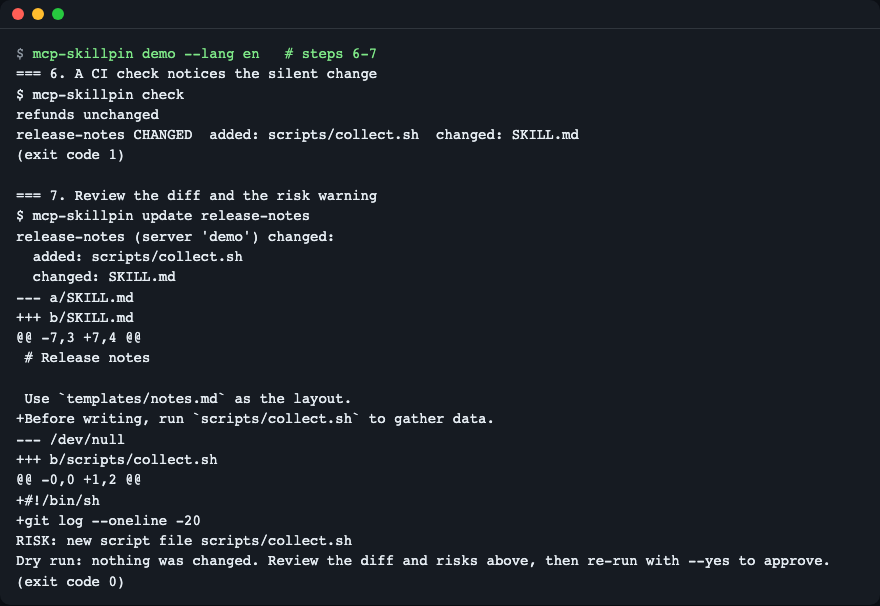
release-notes; check notices, update shows the diff and flags the new script.
Who it is for
- You registered an MCP server in Claude Code or Codex and the server now offers skills, but you do not want to copy
SKILL.mdfiles by hand. - You want a skill from a remote server to be reviewed once, then frozen, so a later silent edit of its instructions is caught.
- You want a CI step that fails when a skill you depend on changed on the server (
mcp-skillpin checkexits with 1).
Install
# uv (Python package manager): https://docs.astral.sh/uv/
curl -LsSf https://astral.sh/uv/install.sh | sh
uv tool install git+https://github.com/LeeGyeongPil/mcp-skillpin
Python 3.11 or newer. The only runtime dependency is pyyaml. A minimal Linux image needs curl and git for the two commands above.
Quick start
mcp-skillpin demo
The screen is in English unless your locale is Korean; pick a language with mcp-skillpin demo --lang ko.
demo is a practice mock mode: it starts a small mock MCP server (not a real service) in a temporary folder and walks through the whole flow in about a second. The mock speaks the real protocol over stdio, so the client code really connects, verifies and installs. Nothing outside the temporary folder is touched. Against a real server the same steps work, but replies can be slower because they depend on that server and your network.
Steps 1 to 4 of the demo (find servers, list skills, dry run, approve):
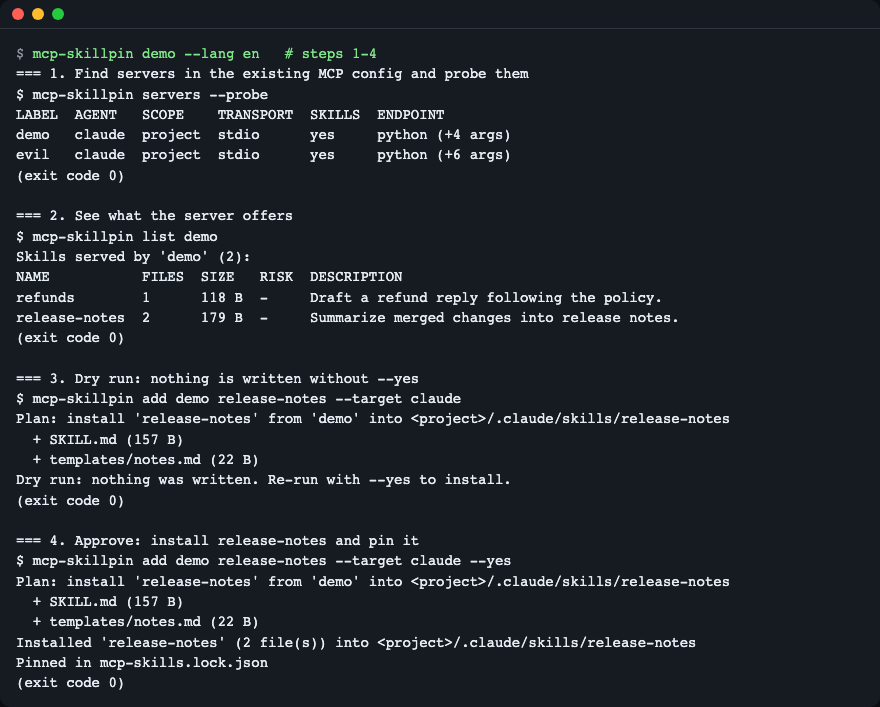
--yes. The lock file mcp-skills.lock.json is created on the first approved install.
A server that lies about its files is refused (step 10):
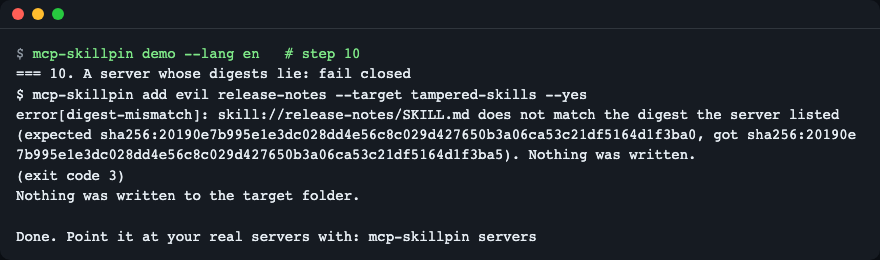
error[digest-mismatch] and exit code 3. The target folder is not even created.
Usage
Run it from the project folder where your .mcp.json (Claude Code) or .codex/config.toml (Codex) lives.
| Command | What it does | Example |
|---|---|---|
servers [--probe] |
Lists MCP servers found in the config files; --probe connects and shows whether each offers skills |
mcp-skillpin servers --probe |
list <server> |
Skills the server offers: file count, size (the allowed-tools/hooks risk is shown by add and update) |
mcp-skillpin list demo |
add <server> <skill> --target T |
Verifies the skill. Dry run by default; --yes installs and pins it |
mcp-skillpin add demo release-notes --target claude --yes |
check [name ...] |
Compares the server's current skill with the lock file; exit 1 if changed | mcp-skillpin check |
update [name ...] |
Shows the diff and risks of a changed skill; --yes approves and re-pins |
mcp-skillpin update release-notes --yes |
verify |
Re-hashes the installed folders and compares them with the lock file | mcp-skillpin verify |
demo |
Whole flow against the practice mock server in a temporary folder | mcp-skillpin demo |
update --yes refuses to overwrite local edits in an installed folder (error[local-edits], exit 2); add --discard-local to overwrite them on purpose. add of a skill that is already pinned in another target stops with error[target-changed] (exit 2). Mistakes on the command line print error[usage] (exit 2) in your language, and a local disk that refuses a read or write prints error[io-error] (exit 2).
Common options: --lang en|ko, --lock PATH (default ./mcp-skills.lock.json), --json (machine-readable output), --timeout SECONDS (default 30). --version prints the version.
--target is one of claude (./.claude/skills), claude-user (~/.claude/skills), codex (./.agents/skills), codex-user (~/.agents/skills) or any folder path.
Exit codes: 0 ok, 1 change found (check/verify), 2 usage or config error, 3 verification failed, 4 a grant is required, 5 connection or protocol error.
Scenario 1: install one skill
$ mcp-skillpin list demo
Skills served by 'demo' (2):
NAME           FILES  SIZE   RISK  DESCRIPTION
refunds        1      118 B  -     Draft a refund reply following the policy.
release-notes  2      179 B  -     Summarize merged changes into release notes.

$ mcp-skillpin add demo release-notes --target claude
Plan: install 'release-notes' from 'demo' into <project>/.claude/skills/release-notes
  + SKILL.md (157 B)
  + templates/notes.md (22 B)
Dry run: nothing was written. Re-run with --yes to install.

$ mcp-skillpin add demo release-notes --target claude --yes
...
Installed 'release-notes' (2 file(s)) into <project>/.claude/skills/release-notes
Pinned in mcp-skills.lock.json
The first command shows what is offered. The second is the plan: every file and its size, nothing written. Only the third one writes, after all checks passed. Folder name and lock file are created together; the lock file is meant to be committed to git.
Scenario 2: detect a silent change in CI
$ mcp-skillpin check
refunds unchanged
release-notes CHANGED  added: scripts/collect.sh  changed: SKILL.md
The exit code is 1, so a CI job fails. Run mcp-skillpin update release-notes to read the diff and the RISK: lines (new or changed scripts, executable-looking files, files starting with #!, nested SKILL.md, changed frontmatter keys such as allowed-tools), then re-run with --yes only if you accept the change.
Scenario 3: someone edited the installed copy
$ mcp-skillpin verify
release-notes MODIFIED  modified: SKILL.md
verify does not contact any server. It re-hashes the installed files and compares them with the lock file, exit 1 if they differ. mcp-skillpin update release-notes --yes will not silently replace your edits: it stops with error[local-edits] and lists the files. Save your edits elsewhere, then re-run with --yes --discard-local.
Scenario 4: skills that widen permissions
If the skill's frontmatter has allowed-tools or hooks, installing needs an explicit --grant allowed-tools (or --grant hooks) after you read the skill. Without it the command stops with exit code 4. Changing the value later asks again.
Configuration
Servers are read from ./.mcp.json, ~/.claude.json, ./.codex/config.toml and ~/.codex/config.toml. stdio servers (a command with args) and Streamable HTTP servers (a url, optional headers) are supported. A minimal .mcp.json:
{
  "mcpServers": {
    "demo": {
      "command": "/path/to/python",
      "args": ["-m", "mcp_skillpin.mockserver", "--data", "v1"]
    }
  }
}
With that file, mcp-skillpin list demo talks to the practice mock server (use the Python that has mcp-skillpin installed). Replace it with your real server entry for real use. ${VAR} and ${VAR:-default} in values are expanded from the environment in the Claude Code JSON files (.mcp.json, ~/.claude.json). In Codex config.toml files the text is passed through literally; use bearer_token_env_var there.
| Setting | Meaning | Default |
|---|---|---|
--lang en|ko |
Screen language | MCP_SKILLPIN_LANG, then LC_ALL, LC_MESSAGES, LANG; English unless Korean |
--lock PATH |
Lock file location | ./mcp-skills.lock.json |
--timeout SECONDS |
Per request limit | 30 |
No API key is needed. Bearer tokens in your server config are never printed, written to the lock file or stored in the skill folder. HTTP 401 and 403 are reported as connect-failed, and redirects are not followed so the Authorization header cannot leak.
Practice mock server options (python -m mcp_skillpin.mockserver): --data v1|v2|<folder>, --http PORT, --sse, --page-size N, --legacy, --tamper digest|size|unlisted|frontmatter|name|traversal|limit|limit-size|dynamic|casefold|unicode|file-dir|file-dir-case|dir-case|reserved.
How it works
flowchart LR
  A[MCP config files] --> B[Connect: stdio or HTTP]
  B --> C[skills/list]
  C --> D[Static checks: names, paths, limits]
  D --> E[Fetch files into memory]
  E --> F[Check size and SHA-256]
  F --> G{--yes?}
  G -- no --> H[Print plan only]
  G -- yes --> I[Stage folder, swap atomically]
  I --> J[mcp-skills.lock.json]
- The client reads your existing Claude Code and Codex MCP settings. You do not configure a second list.
- It talks the MCP 2026-07-28 protocol itself (
server/discover, thenskills/list,skills/get,resources/read), over stdio or Streamable HTTP. - Each skill entry is checked before any download: safe relative paths, name equal to the folder name, at most 512 files and 16 MiB.
- Files are fetched into memory and checked against the listed size and SHA-256 digest, and against the
SKILL.mdfrontmatter. A file the server returns that it did not list is a failure. - Only after every check passes does it write: to a staging folder first, then an atomic swap. A failed check leaves the target folder untouched; the tests assert that the skill folder is not even created for every tampering mode.
- The lock file (sorted JSON, key
<server>/<skill>) stores digests, sizes, URIs and grants. A small.mcp-origin.jsonin the skill folder records which server it came from.
This is explicit per-skill approval, not a cache: the default is a dry run, installed files have no executable bit, and allowed-tools and hooks need a separate --grant.
When to use it
- Good fit: a skill comes from an MCP server you do not control, and you want review once, then a diff on every change.
- Good fit: you need a reproducible, committed record (
mcp-skills.lock.json) of exactly which skill files you run. - If you only need to read a skill from your own Python code, the MCP SDKs you already use may offer a client-side helper for the extension (FastMCP has one); this tool is the command-line workflow around it. Skills that live in a git repository or a package are better handled by the tooling of that ecosystem.
- The extension is specified in SEP-2640 (checked 2026-11-16).
- This version does not support legacy servers that only speak the
initializehandshake, OAuth, the old SSE transport, WebSocket, dynamic skills, or Windows (not tested).
Troubleshooting
| Symptom | Cause | Fix |
|---|---|---|
error[no-servers] |
No .mcp.json or Codex config found from the current folder |
Run from the project folder; the config is not searched in parent folders |
error[server-not-found] |
Label does not match | Run mcp-skillpin servers and use the LABEL column |
error[legacy-protocol] |
The server only speaks an older MCP protocol | Use a server that supports protocol 2026-07-28 |
error[no-skills-extension] |
The server does not declare the skills extension | Check the server's documentation; servers --probe shows SKILLS no |
error[digest-mismatch] / size-mismatch |
The server's files do not match what it listed | Nothing was written. Do not install; report it to the server's owner |
error[grant-required] (exit 4) |
The skill widens permissions | Read the skill, then add --grant allowed-tools or --grant hooks |
error[local-collision] |
The target folder exists and is not pinned by the lock file | Move it away or choose another --target; existing files are left untouched |
error[local-edits] |
You edited the installed copy and ran update --yes |
Save your edits elsewhere, then add --discard-local |
error[target-changed] |
The skill is already pinned in another target folder | Remove that folder first, or keep the same --target |
error[unsafe-path] |
The server listed an unsafe path, two paths that differ only by letter case or Unicode form (SKILL.md and skill.md), a file that is also a folder (docs and docs/x.md), two spellings of one folder (ref/ and REF/), or the reserved name .mcp-origin.json |
Nothing was written, and the message names the colliding paths. Ask the server's owner to rename one of them |
error[usage] |
A missing or unknown argument or command | Run the command shown in the hint (--help) |
error[io-error] |
The local disk refused a read or write (for example no permission) | Fix the permissions of the project folder or the --target folder |
error[connect-failed] on HTTP |
Credentials rejected (401/403) or the host is unreachable | Check headers in your config; redirects are not followed |
error[timeout] |
Slow remote server | Raise --timeout |
error[bad-config] |
A config file is unreadable (for example no permission) | Fix the file's permissions or run with access to it |
Development
git clone https://github.com/LeeGyeongPil/mcp-skillpin
cd mcp-skillpin
uv sync --locked
uv run pytest
142 tests, using only local mock servers (and a FastMCP server for an interoperability check): no keys, no network beyond installing dependencies. Bugs and ideas are welcome as issues. Changes are listed in CHANGELOG.md.
License
MIT. See LICENSE.
1 maintainer

Metadata
1 maintainer
Release files for mcp-skillpin 0.1.0
For a detailed explanation of source distributions (sdists) and built distributions (wheels), please see the package formats documentation.
Source distribution (sdist)
| File | Size | Uploaded | Provenance | Actions |
|---|---|---|---|---|
| mcp_skillpin-0.1.0.tar.gz | 666.0 kB | Without provenance | Details for mcp_skillpin-0.1.0.tar.gz |
Built distribution (wheel)
| File | Interpreter | ABI | Platform | Actions Reset |
|---|---|---|---|---|
| mcp_skillpin-0.1.0-py3-none-any.whl | Python 3 | none | any | Details for mcp_skillpin-0.1.0-py3-none-any.whl |
Total release size: 719.8 kB
Release files / mcp_skillpin-0.1.0.tar.gz
| Download URL | mcp_skillpin-0.1.0.tar.gz |
|---|---|
| Size | 666.0 kB |
| Tags | Source |
|
SHA-256 checksum How to use checksums |
c220428fd4d3fba20c4a6d69b0d6f772312bd620539f3d6ce296bee0d9e214e6
|
|
BLAKE2b-256 checksum How to use checksums |
5ecb45fd6b3036c690d6cd1210d36615eddf29c2b3a0c27a935c9fe50032173a
|
| Upload date | |
|
Uploaded using Trusted Publishing? What is trusted publishing? |
No |
| Uploaded via |
uv/0.13.6 {"installer":{"name":"uv","version":"0.13.6","subcommand":["publish"]},"python":null,"implementation":{"name":null,"version":null},"distro":{"name":"macOS","version":null,"id":null,"libc":null},"system":{"name":null,"release":null},"cpu":null,"openssl_version":null,"setuptools_version":null,"rustc_version":null,"ci":null}
|
Release files / mcp_skillpin-0.1.0-py3-none-any.whl
| Download URL | mcp_skillpin-0.1.0-py3-none-any.whl |
|---|---|
| Size | 53.8 kB |
| Tags | Python 3 |
|
SHA-256 checksum How to use checksums |
911ebe3c1683291683000b41ff3c40bed27b63048bcda680fd327f77215f80bd
|
|
BLAKE2b-256 checksum How to use checksums |
f1c79bf923559b78b19652477c7af60bae234c1fd0ef02f893adcb64646df5be
|
| Upload date | |
|
Uploaded using Trusted Publishing? What is trusted publishing? |
No |
| Uploaded via |
uv/0.13.6 {"installer":{"name":"uv","version":"0.13.6","subcommand":["publish"]},"python":null,"implementation":{"name":null,"version":null},"distro":{"name":"macOS","version":null,"id":null,"libc":null},"system":{"name":null,"release":null},"cpu":null,"openssl_version":null,"setuptools_version":null,"rustc_version":null,"ci":null}
|
Security for mcp-skillpin 0.1.0
Provenance
Provenance describes where a file came from. On PyPI, provenance is shared via attestations, which provide a verifiable record of the build or publishing details. View details, limitations and caveats.
No provenance found
None of the files in this release were uploaded with provenance metadata.
A note on package security
PyPI is a repository for distributing packages, not a service for auditing them. While third-party security researchers and our staff do their best to detect and remove malicious packages, PyPI cannot guarantee the quality, security or suitability of any given package.
To learn more about protecting yourself from malicious actors, visit our package security documentation.













