

MCP-Slicer - 3D Slicer Model Context Protocol Integration



MCP-Slicer connects 3D Slicer with model clients like Claude Desktop or Cline through the Model Context Protocol (MCP), enabling direct interaction and control of 3D Slicer. This integration allows for medical image processing, scene creation, and manipulation using natural language.
Features
-
list_nodes: List and filter Slicer MRML nodes and view their properties
-
execute_python_code: Execute Python code in the Slicer environment
-
capture_screenshot: Capture real-time screenshots of Slicer views
- Full application window (including module panels)
- Individual slice views (Red/Yellow/Green)
- 3D rendering view
- Enables complete REACT loop with visual feedback
Installation
Prerequisites
- 3D Slicer 5.8 or newer
- Python 3.13 or newer
- uv package manager
If you're on Mac, please install uv as
brew install uv
On Windows
powershell -c "irm https://astral.sh/uv/install.ps1 | iex"
and then
set Path=C:\Users\nntra\.local\bin;%Path%
Otherwise installation instructions are on their website: Install uv
⚠️ Please install UV first
Claude for Desktop Integration
Go to Claude > Settings > Developer > Edit Config > claude_desktop_config.json to include the following:
{
  "mcpServers": {
    "slicer": {
      "command": "uvx",
      "args": ["mcp-slicer"]
    }
  }
}
Cline Intergration
{
  "mcpServers": {
    "slicer": {
      "command": "uvx",
      "args": ["mcp-slicer"]
    }
  }
}
Usage
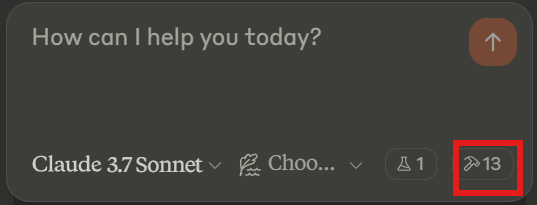
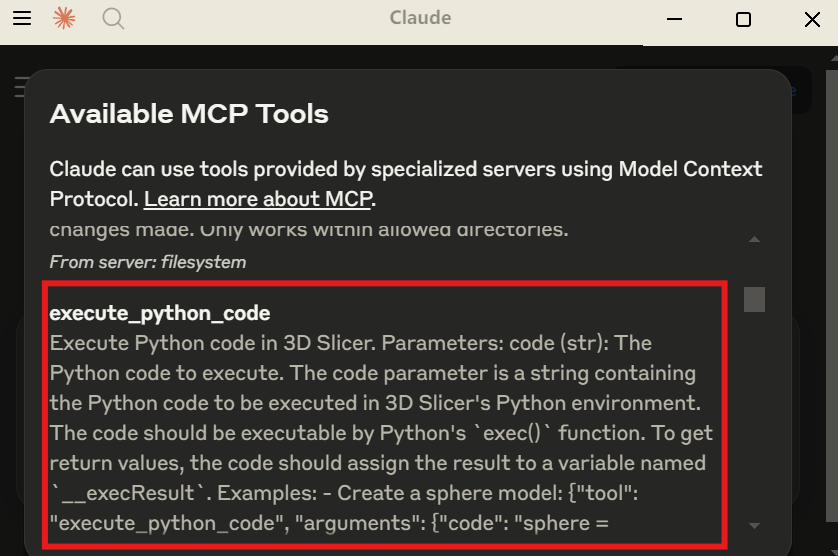
Check Claude Settings
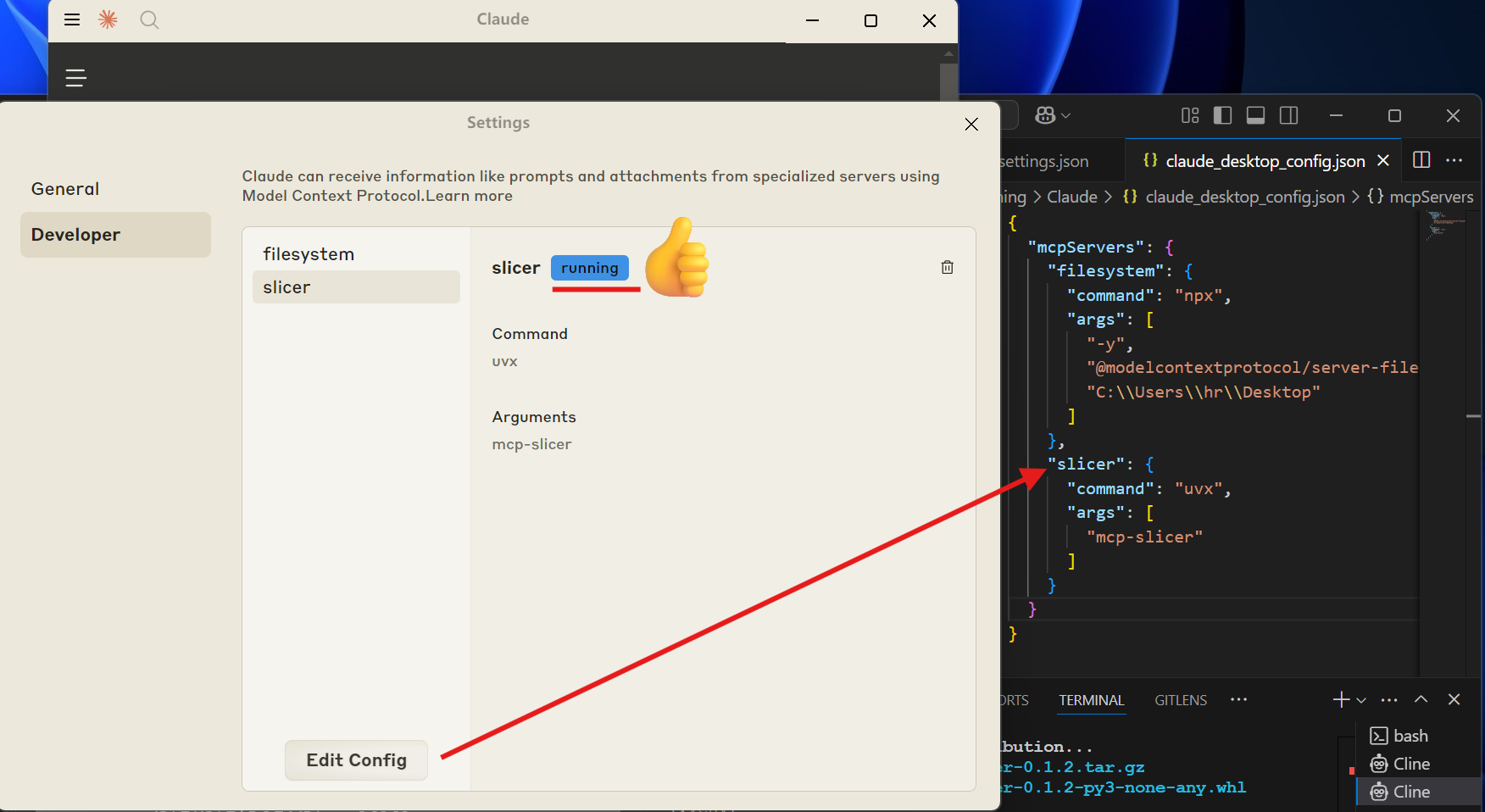 Make sure you see the corresponding slicer tools added to the Claude Desktop App
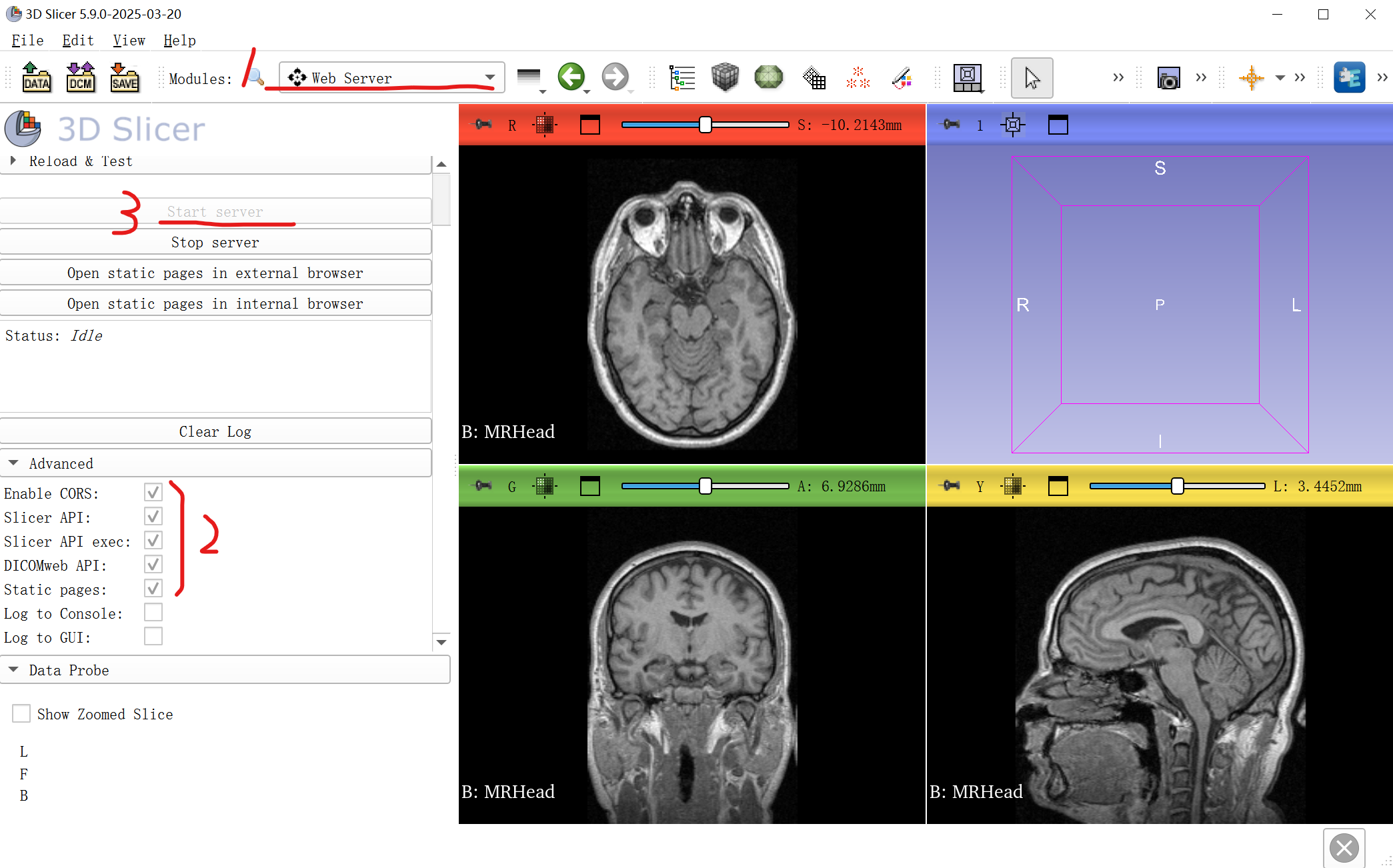
Open Slicer Web Server
- Open the Slicer Web Server module,
- ensure the required interfaces are checked,
- then start the server
Examples
- list_nodes
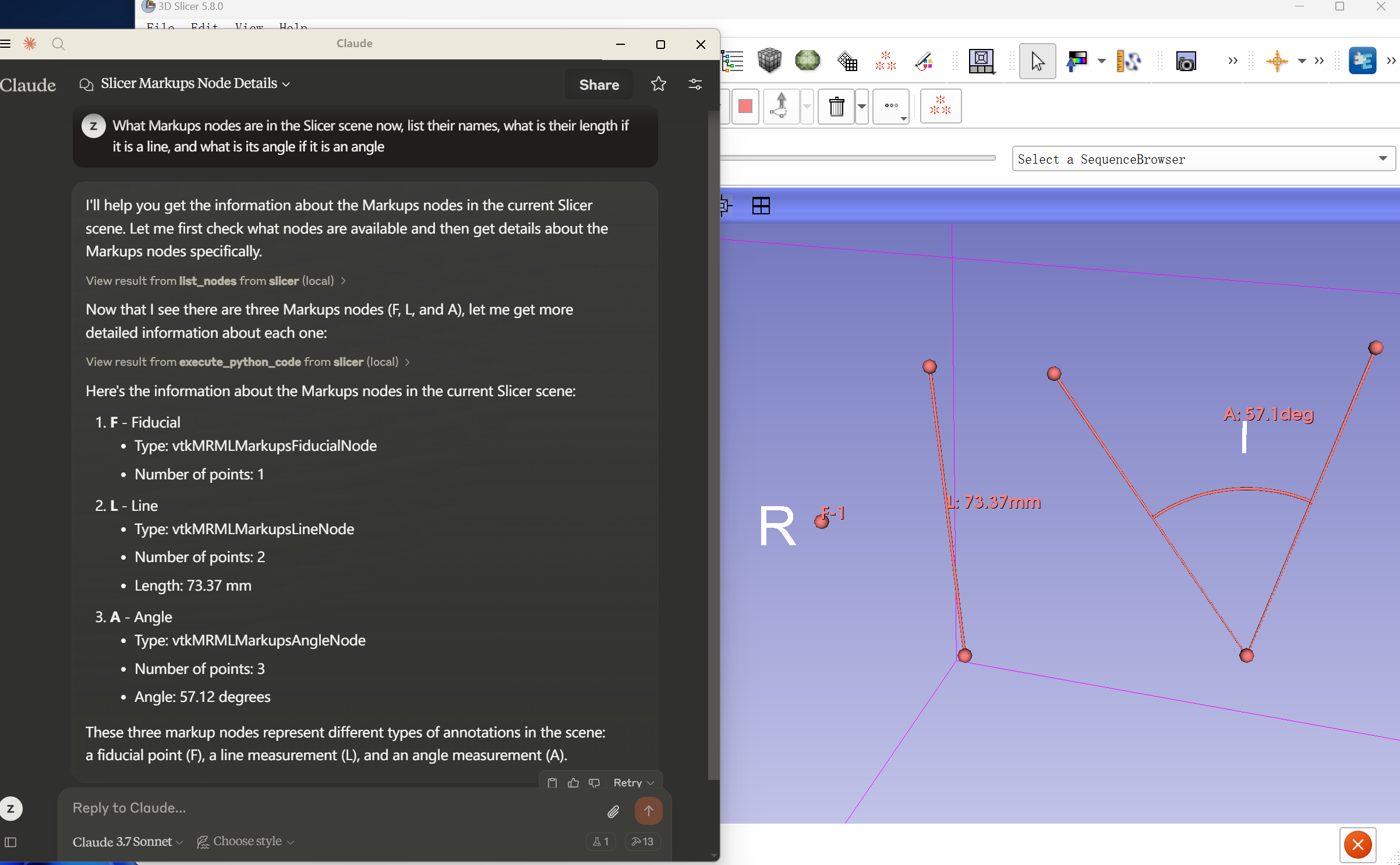
What Markups nodes are in the Slicer scene now, list their names, what is their length if it is a line, and what is its angle if it is an angle
- execute python code
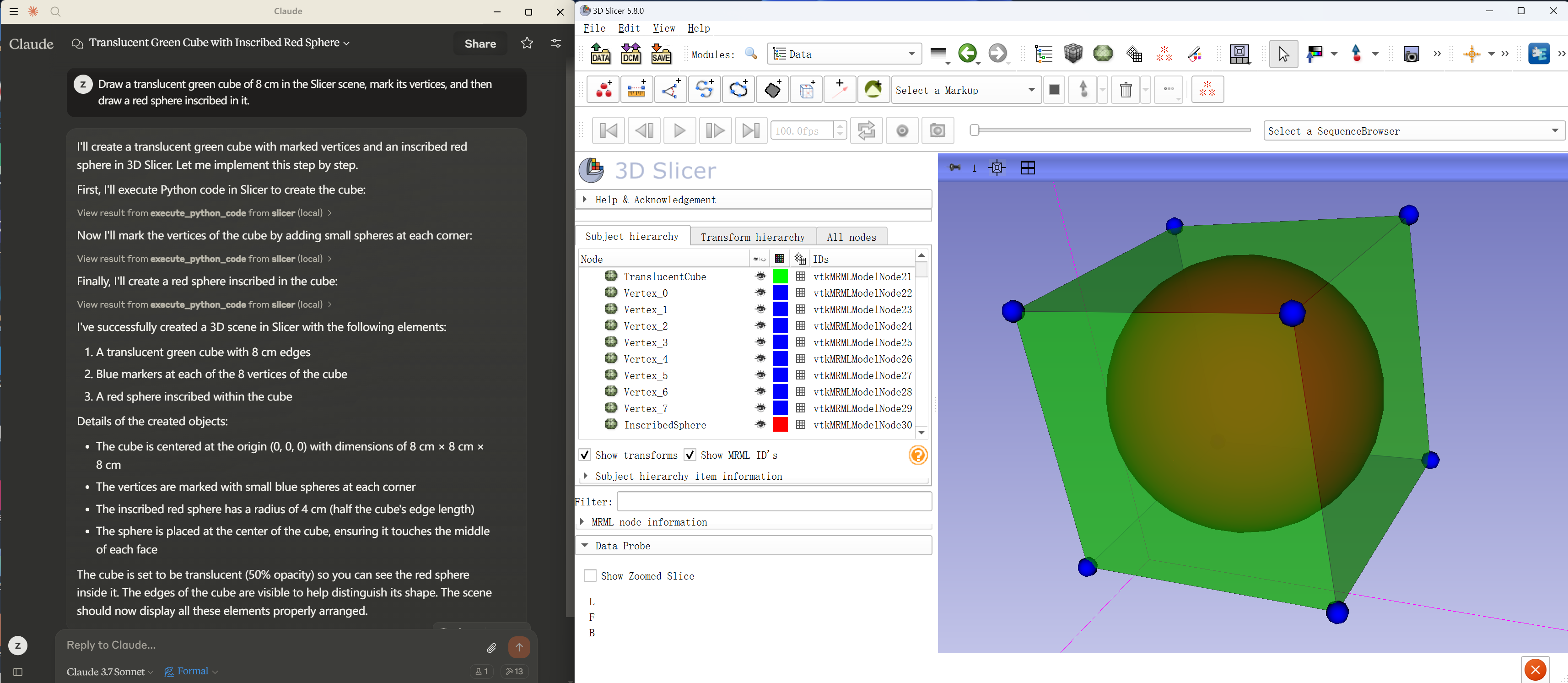
Draw a translucent green cube of 8 cm in the Slicer scene, mark its vertices, and then draw a red sphere inscribed in it.
- capture_screenshot
Capture the current state of Slicer to provide visual feedback to AI
Usage examples:
capture_screenshot()- Capture full application windowcapture_screenshot(view_type="slice", view_name="red")- Capture Red slice viewcapture_screenshot(view_type="3d", camera_axis="A")- Capture 3D view from anterior
This enables a complete REACT loop where AI can:
- Reason about what to do
- Act using
execute_python_code - Observe the result using
capture_screenshot
Technical Details
Utilizes existing Slicer Web Server interfaces. For technical details, please see Slicer web server user guide
Limitations & Security Considerations
-
The
execute_python_codetool allows running arbitrary Python code in 3D Slicer, which is powerful but potentially dangerous.⚠️ Not recommended for production use.
-
Complex operations may need to be broken down into smaller steps.
Contributing
Contributions are welcome! Feel free to submit Pull Requests.
Disclaimer
This is a third-party integration project, not developed by the 3D Slicer team.
1 maintainer

Metadata
1 maintainer
Release files for mcp-slicer 0.3.1
For a detailed explanation of source distributions (sdists) and built distributions (wheels), please see the package formats documentation.
Source distribution (sdist)
| File | Size | Uploaded | |
|---|---|---|---|
| mcp_slicer-0.3.1.tar.gz | 3.9 MB | Details |
Built distribution (wheel)
| File | Interpreter | ABI | Platform | Reset |
|---|---|---|---|---|
| mcp_slicer-0.3.1-py3-none-any.whl | Python 3 | none | any | Details |
Total release size: 3.9 MB
Release files / mcp_slicer-0.3.1.tar.gz
| Download URL | mcp_slicer-0.3.1.tar.gz |
|---|---|
| Size | 3.9 MB |
| Tags | Source |
|
SHA-256 checksum How to use checksums |
55f628201e15699b4eda409047b8d6d589166a73836a6f2399bf56931f8e8a5d
|
|
BLAKE2b-256 checksum How to use checksums |
8c475569666f7afebbb09342420590772696dbc0c4d0a0b9911db8bce154f553
|
| Upload date | |
|
Uploaded using Trusted Publishing? What is trusted publishing? |
No |
| Uploaded via |
uv/0.11.28 {"installer":{"name":"uv","version":"0.11.28","subcommand":["publish"]},"python":null,"implementation":{"name":null,"version":null},"distro":null,"system":{"name":null,"release":null},"cpu":null,"openssl_version":null,"setuptools_version":null,"rustc_version":null,"ci":null}
|
Release files / mcp_slicer-0.3.1-py3-none-any.whl
| Download URL | mcp_slicer-0.3.1-py3-none-any.whl |
|---|---|
| Size | 10.5 kB |
| Tags | Python 3 |
|
SHA-256 checksum How to use checksums |
e2d40029035f65a822aeb51546f231e31c0536e7e14a693b5f95bfcedd4b20dc
|
|
BLAKE2b-256 checksum How to use checksums |
b2316287583a4166d34e77596509df91e88151db1a43c9e8f3da26d9f564140c
|
| Upload date | |
|
Uploaded using Trusted Publishing? What is trusted publishing? |
No |
| Uploaded via |
uv/0.11.28 {"installer":{"name":"uv","version":"0.11.28","subcommand":["publish"]},"python":null,"implementation":{"name":null,"version":null},"distro":null,"system":{"name":null,"release":null},"cpu":null,"openssl_version":null,"setuptools_version":null,"rustc_version":null,"ci":null}
|














