
MCP Sniffer captures network traffic between MCP clients and servers and displays it in a web UI.
Verified details
These details have been verified by PyPIProject links
GitHub Statistics
Maintainers

Project description
MCP Sniffer
MCP Sniffer captures network traffic between MCP clients and servers.
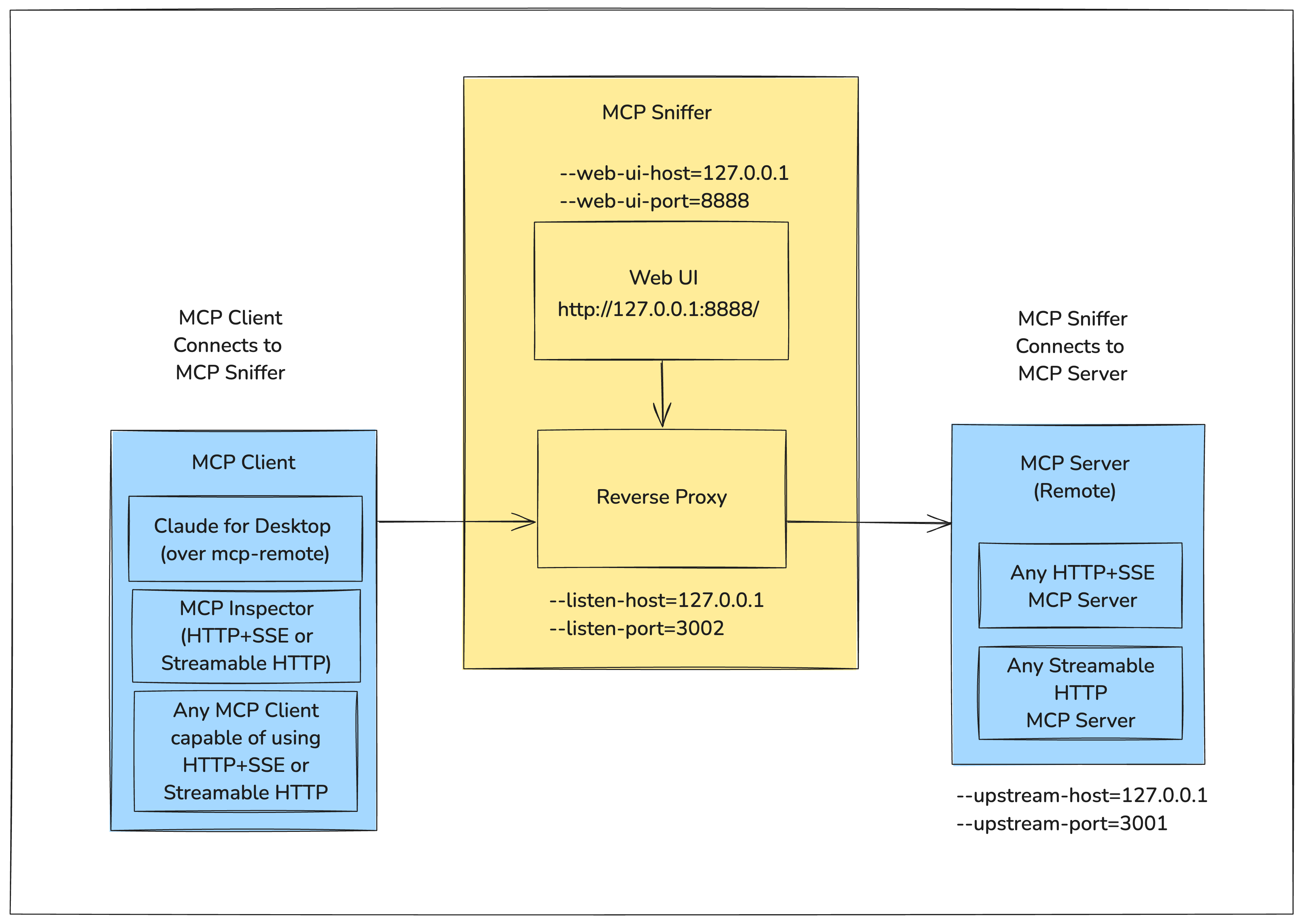
It runs as a reverse proxy between the client and server, capturing request and response payloads that can be visualized in a web UI.
The following diagram shows how MCP Sniffer fits into the MCP Client-Server Model.
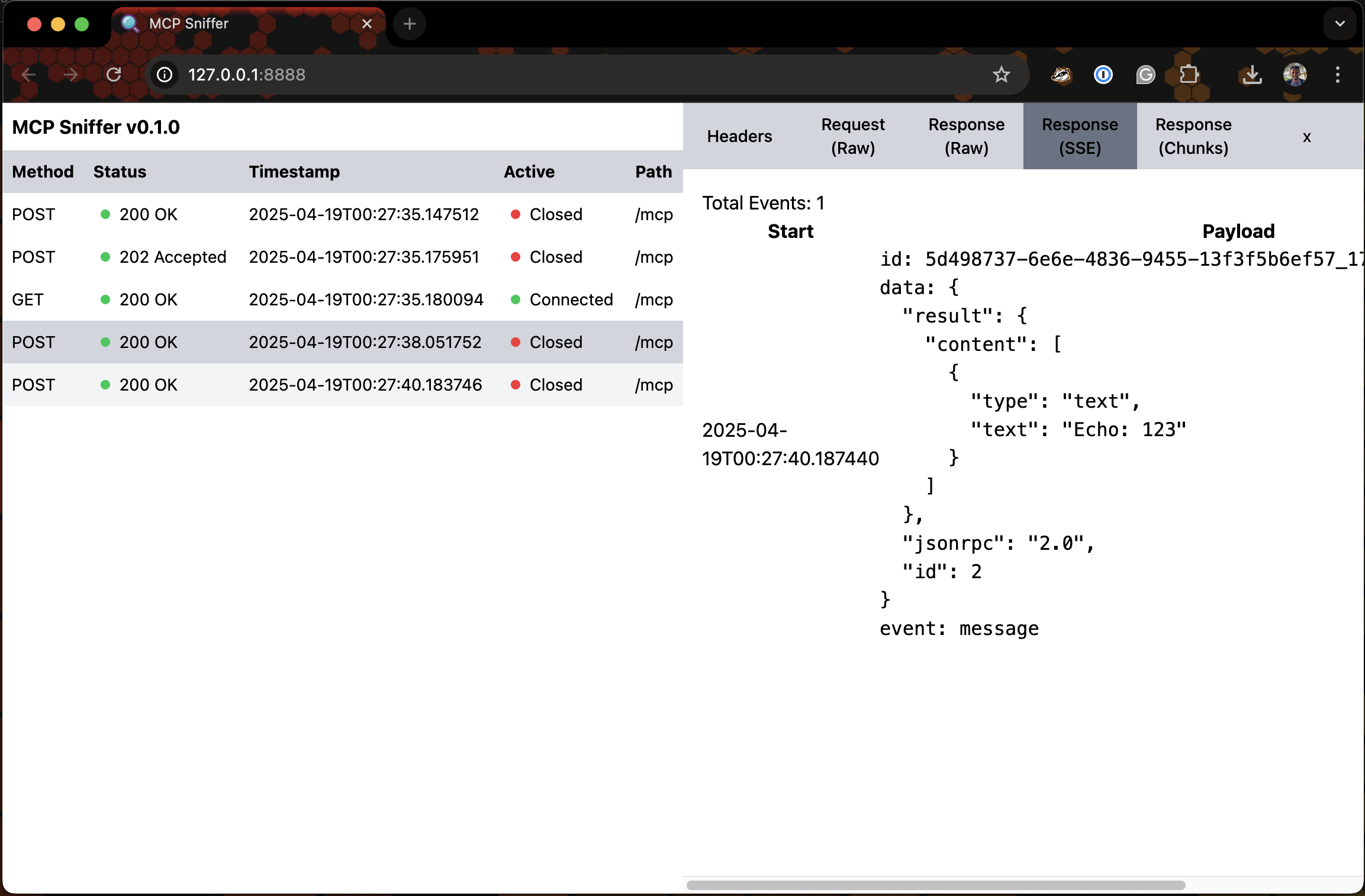
For the Web UI - Imagine Google Chrome DevTools' Network Tab for Model Context Protocol.
Following is a very early version of it.


Install
pipx install mcp-sniffer
Usage
$ mcp-sniffer --help
usage: mcp-sniffer [-h] [--listen-host LISTEN_HOST] [--listen-port LISTEN_PORT] [--upstream-host UPSTREAM_HOST]
                   [--upstream-port UPSTREAM_PORT] [--web-ui-host WEB_UI_HOST] [--web-ui-port WEB_UI_PORT]
                   [--log-level LOG_LEVEL]

MCP Sniffer

options:
  -h, --help            show this help message and exit
  --listen-host LISTEN_HOST
                        Host to listen on (default: env LISTEN_HOST or 127.0.0.1)
  --listen-port LISTEN_PORT
                        Port to listen on (default: env LISTEN_PORT or 3002)
  --upstream-host UPSTREAM_HOST
                        Upstream host (default: env UPSTREAM_HOST or 127.0.0.1)
  --upstream-port UPSTREAM_PORT
                        Upstream port (default: env UPSTREAM_PORT or 3001)
  --web-ui-host WEB_UI_HOST
                        Web UI host (default: env WEB_UI_HOST or 127.0.0.1)
  --web-ui-port WEB_UI_PORT
                        Web UI port (default: env WEB_UI_PORT or 8888)
  --log-level LOG_LEVEL
                        Log level (default: env LOG_LEVEL or INFO)
Run
mcp-sniffer --listen-port 3002 --upstream-port 3001
INFO:     Started server process [6174]
INFO:     Waiting for application startup.
INFO:     Application startup complete.
2025-04-27 19:52:53 devmachine.local mcp_sniffer.proxy[6174] INFO Listening on ('127.0.0.1', 3002)...
INFO:     Uvicorn running on http://127.0.0.1:8888 (Press CTRL+C to quit)
Web UI
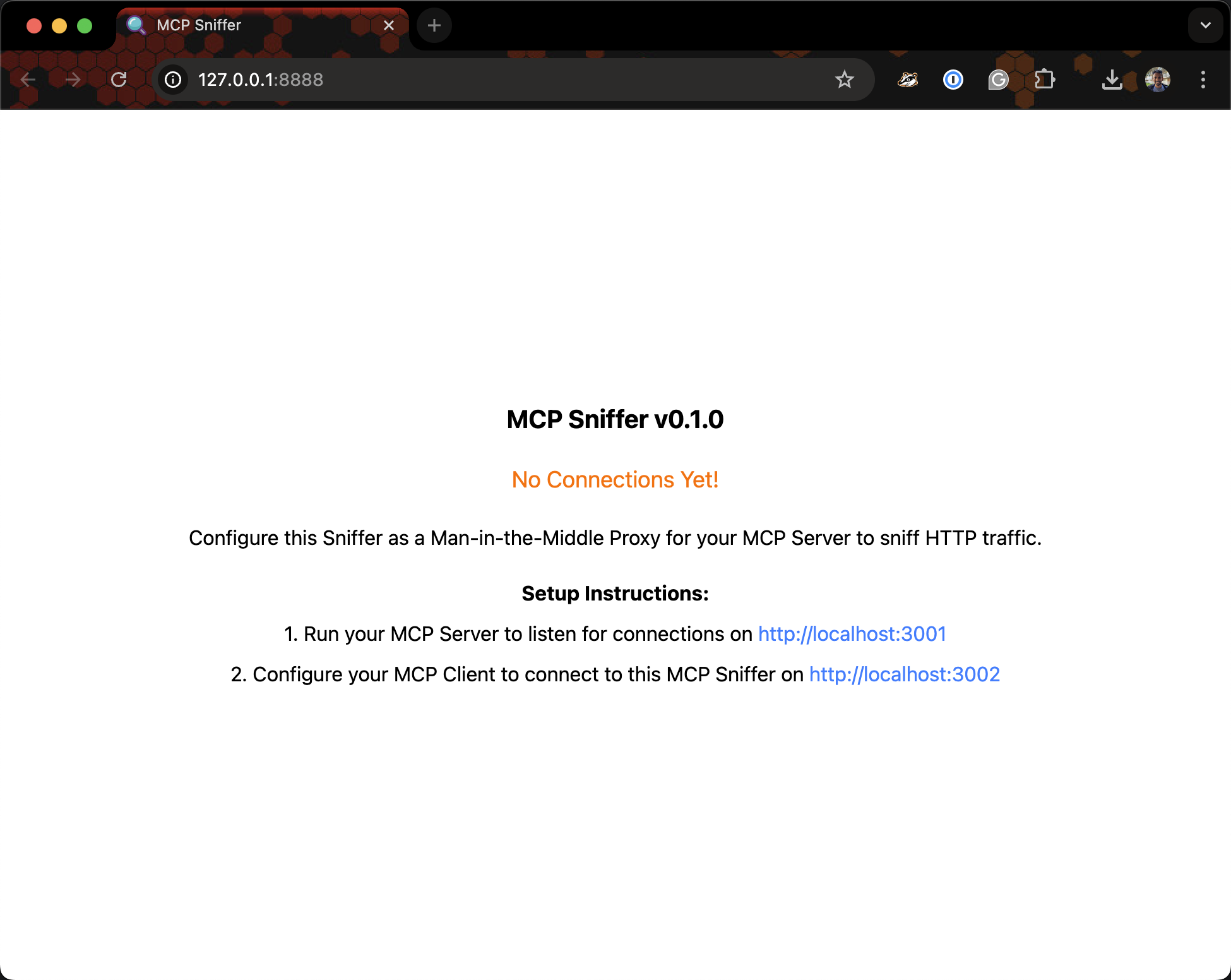
Visit http://127.0.0.1:8888.
Setup
Project details
Verified details
These details have been verified by PyPIProject links
GitHub Statistics
Maintainers
Release history Release notifications | RSS feed


Download files
Download the file for your platform. If you're not sure which to choose, learn more about installing packages.
Source Distribution
Built Distribution
Filter files by name, interpreter, ABI, and platform.
If you're not sure about the file name format, learn more about wheel file names.
Copy a direct link to the current filters
File details
Details for the file mcp_sniffer-0.1.5.tar.gz.
File metadata
- Download URL: mcp_sniffer-0.1.5.tar.gz
- Upload date:
- Size: 130.7 kB
- Tags: Source
- Uploaded using Trusted Publishing? Yes
- Uploaded via: twine/6.1.0 CPython/3.12.9
File hashes
| Algorithm | Hash digest | |
|---|---|---|
| SHA256 |
833ca34cf8618e27b14fa4a032a6ad38563c2afe8009c7a53cbde9966dd01679
|
|
| MD5 |
b5aa5774a315985d34188df1b39b3a33
|
|
| BLAKE2b-256 |
26583110e089dfbaf17ad9a54e1a4292b74eeb5020672b589b5be6c9d78be795
|
Provenance
The following attestation bundles were made for mcp_sniffer-0.1.5.tar.gz:
Publisher:
create-release.yaml on shivdeepak/mcp-sniffer
-
Statement:
-
Statement type:
https://in-toto.io/Statement/v1 -
Predicate type:
https://docs.pypi.org/attestations/publish/v1 -
Subject name:
mcp_sniffer-0.1.5.tar.gz -
Subject digest:
833ca34cf8618e27b14fa4a032a6ad38563c2afe8009c7a53cbde9966dd01679 - Sigstore transparency entry: 203515886
- Sigstore integration time:
-
Permalink:
shivdeepak/mcp-sniffer@f054e0feaed41cfa1538a576888f38d96208fc7c -
Branch / Tag:
refs/heads/main - Owner: https://github.com/shivdeepak
-
Access:
public
-
Token Issuer:
https://token.actions.githubusercontent.com -
Runner Environment:
github-hosted -
Publication workflow:
create-release.yaml@f054e0feaed41cfa1538a576888f38d96208fc7c -
Trigger Event:
workflow_run
-
Statement type:
File details
Details for the file mcp_sniffer-0.1.5-py3-none-any.whl.
File metadata
- Download URL: mcp_sniffer-0.1.5-py3-none-any.whl
- Upload date:
- Size: 134.0 kB
- Tags: Python 3
- Uploaded using Trusted Publishing? Yes
- Uploaded via: twine/6.1.0 CPython/3.12.9
File hashes
| Algorithm | Hash digest | |
|---|---|---|
| SHA256 |
abad55cd91de8984e6d8c63352fcbcc37e56c6552f71ed42620f8f6fa7356f98
|
|
| MD5 |
83694a074b0c8c0029c8488199a8cc79
|
|
| BLAKE2b-256 |
ea2c8179c98dc5697b5a53a87195e7d6ff659a41899342541e54301b5ee111f4
|
Provenance
The following attestation bundles were made for mcp_sniffer-0.1.5-py3-none-any.whl:
Publisher:
create-release.yaml on shivdeepak/mcp-sniffer
-
Statement:
-
Statement type:
https://in-toto.io/Statement/v1 -
Predicate type:
https://docs.pypi.org/attestations/publish/v1 -
Subject name:
mcp_sniffer-0.1.5-py3-none-any.whl -
Subject digest:
abad55cd91de8984e6d8c63352fcbcc37e56c6552f71ed42620f8f6fa7356f98 - Sigstore transparency entry: 203515894
- Sigstore integration time:
-
Permalink:
shivdeepak/mcp-sniffer@f054e0feaed41cfa1538a576888f38d96208fc7c -
Branch / Tag:
refs/heads/main - Owner: https://github.com/shivdeepak
-
Access:
public
-
Token Issuer:
https://token.actions.githubusercontent.com -
Runner Environment:
github-hosted -
Publication workflow:
create-release.yaml@f054e0feaed41cfa1538a576888f38d96208fc7c -
Trigger Event:
workflow_run
-
Statement type:






