

MCP Stealth Chrome
An MCP server with 173 tools that gives an AI agent a real Chrome browser and an HTTP client with Chrome's TLS fingerprint.


Install · Test results · Usage · Launch options · Tools · Limits · Configuration
It drives Chrome over CDP with nodriver, so there is no WebDriver and the identity stays that of your real browser and machine. Requests that need no browser go through curl_cffi, which is much lighter than rendering a page. Search and page reading work without an API key.
Use the browser when a page needs JavaScript, a login or a person looking at it. Use HTTP when you only need the data.
What it can do
| Feature | What you get | |
|---|---|---|
| ✅ | Real browser | Chrome or Brave over CDP with real mouse and key input. No WebDriver, and the identity is your real browser and machine |
| ✅ | Honest results | A click says whether the page changed and names what covers a blocked element. Nothing reports success on a guess |
| ✅ | Small page reads | browser_snapshot and describe_page return compact refs an agent can act on, reaching into iframes and open shadow roots |
| ✅ | HTTP without a browser | http_request, scrape_markdown and smart_fetch send the TLS fingerprint of Chrome, Firefox or Safari and can reuse the browser's cookies |
| ✅ | Search and research | web_search, deep_research, github_read and youtube_read, with no API key |
| ✅ | Logins that last | A kept profile, saved sessions, and cloning a profile from your own browser. Passwords and cookies are hidden from tool output by default |
| ✅ | Several browsers | Instances side by side, each with its own profile, tabs and logs |
| ✅ | Stays out of your way | A visible browser opens behind the app you are using and does not take the keyboard |
| ✅ | Anti-bot help | Detection of the protection in use, Turnstile and reCAPTCHA tools, and handing over to a person when needed |
| ✅ | Options per launch | Keep the browser open after the agent ends, reopen the last tabs, block ads, vertical tabs, a throwaway profile |
| ✅ | Debugging | Network capture, request interception, HAR and curl export, console, performance traces |
Works with Claude Code, Cursor, Codex, Gemini CLI, OpenCode, Droid and other MCP clients, on macOS, Linux and Windows.
Install
You need uv and Chrome or Chromium. uv takes care of Python 3.11+.
| OS | uv | Chrome |
|---|---|---|
| macOS | curl -LsSf https://astral.sh/uv/install.sh | sh |
brew install --cask google-chrome |
| Ubuntu or Debian | curl -LsSf https://astral.sh/uv/install.sh | sh |
sudo apt install -y google-chrome-stable |
| Windows | powershell -c "irm https://astral.sh/uv/install.ps1 | iex" |
winget install Google.Chrome |
Then add the server to your client. For Claude Code:
All projects:
claude mcp add stealth-chrome --scope user -- uvx mcp-stealth-chrome@latest
Current project only:
claude mcp add stealth-chrome -- uvx mcp-stealth-chrome@latest
Other clients:
Claude Desktop
Edit the config file, then restart the app:
- macOS:
~/Library/Application Support/Claude/claude_desktop_config.json - Windows:
%APPDATA%\Claude\claude_desktop_config.json - Linux:
~/.config/Claude/claude_desktop_config.json
{
  "mcpServers": {
    "stealth-chrome": {
      "command": "uvx",
      "args": ["mcp-stealth-chrome@latest"]
    }
  }
}
Cursor
Use ~/.cursor/mcp.json for all projects, or .cursor/mcp.json in one project:
{
  "mcpServers": {
    "stealth-chrome": {
      "command": "uvx",
      "args": ["mcp-stealth-chrome@latest"]
    }
  }
}
Windsurf
Use ~/.windsurf/mcp.json for all projects, or .windsurf/mcp.json in one project:
{
  "servers": {
    "stealth-chrome": {
      "command": "uvx",
      "args": ["mcp-stealth-chrome@latest"]
    }
  }
}
VS Code (Continue, Cline, Kilo Code)
Use your VS Code settings or ~/.continue/config.json for all projects, or .vscode/mcp.json in one project:
{
  "mcpServers": {
    "stealth-chrome": {
      "command": "uvx",
      "args": ["mcp-stealth-chrome@latest"]
    }
  }
}
Zed
Open Settings, then Extensions, then MCP Servers, or edit ~/.config/zed/settings.json:
{
  "context_servers": {
    "stealth-chrome": {
      "command": {
        "path": "uvx",
        "args": ["mcp-stealth-chrome@latest"]
      }
    }
  }
}
Codex CLI
Add to ~/.codex/config.toml:
[mcp_servers.stealth-chrome]
command = "uvx"
args = ["mcp-stealth-chrome@latest"]
Gemini CLI
Add to ~/.gemini/settings.json:
{
  "mcpServers": {
    "stealth-chrome": {
      "command": "uvx",
      "args": ["mcp-stealth-chrome@latest"]
    }
  }
}
OpenCode
Add to ~/.config/opencode/opencode.json:
{
  "mcp": {
    "stealth-chrome": {
      "type": "local",
      "command": ["uvx", "mcp-stealth-chrome@latest"],
      "enabled": true
    }
  }
}
Factory Droid
Add to ~/.factory/mcp.json:
{
  "mcpServers": {
    "stealth-chrome": {
      "type": "stdio",
      "command": "uvx",
      "args": ["mcp-stealth-chrome@latest"]
    }
  }
}
Oh My Pi (omp)
Add to ~/.omp/agent/mcp.json:
{
  "mcpServers": {
    "stealth-chrome": {
      "type": "stdio",
      "command": "uvx",
      "args": ["mcp-stealth-chrome@latest"]
    }
  }
}
See docs/INSTALL.md for verification and troubleshooting.
Optional extras
| Extra | Needed for | In your client config |
|---|---|---|
os-cursor |
solve_turnstile_oscursor |
"args": ["mcp-stealth-chrome[os-cursor]@latest"] |
adblock |
block_ads |
"args": ["mcp-stealth-chrome[adblock]@latest"] |
| both | "args": ["mcp-stealth-chrome[adblock,os-cursor]@latest"] |
Permissions, other ways to install, and why they are optional
solve_turnstile_oscursor needs the optional os-cursor extra. On macOS, use uvx 'mcp-stealth-chrome[os-cursor]' in your client config ("args": ["mcp-stealth-chrome[os-cursor]@latest"]), or install it with uv tool install 'mcp-stealth-chrome[os-cursor]'. Then give the app or terminal that runs your client Accessibility and Screen Recording permission in System Settings > Privacy & Security. server_status shows under os_cursor whether this is ready. Windows and Linux backends exist but have not been field-tested.
block_ads needs the optional adblock extra, which installs Brave's adblock-rust engine: uvx 'mcp-stealth-chrome[adblock]' in your client config ("args": ["mcp-stealth-chrome[adblock]@latest"]), uv tool install 'mcp-stealth-chrome[adblock]', or pip install 'mcp-stealth-chrome[adblock]'. It is not installed by default because the engine has no prebuilt package for Alpine and other musl Linux or for Windows on ARM, where installing it would need Rust. Without it, block_ads=True still launches, and the result and server_status say ad blocking is off and how to install the extra. Extras combine: mcp-stealth-chrome[adblock,os-cursor].
Test results
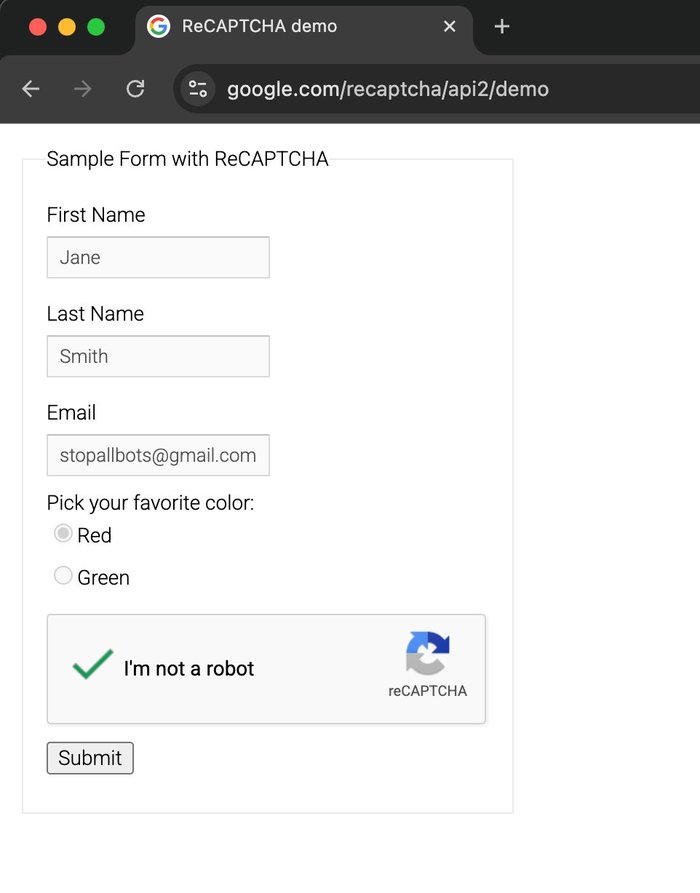
Sites change, so read these as results from the screenshots below and not as a guarantee.
| Site | What it checks | Result |
|---|---|---|
bot.sannysoft.com |
Fingerprint tests | ✅ All passed |
browserscan.net/bot-detection |
WebDriver, Selenium, CDP, headless | ✅ All "Normal" |
arh.antoinevastel.com areyouheadless |
Headless Chrome | ✅ "You are not Chrome headless" |
2captcha.com/demo/cloudflare-turnstile |
Turnstile widget, with Cloudflare's test key | ✅ Checkbox reaches "Success!" with click_turnstile |
nopecha.com/demo/cloudflare |
Full-page "Just a moment..." challenge | ❌ click_turnstile: 0 of 3✅ solve_turnstile_oscursor: 3 of 3 (one Mac, one IP) |
google.com/recaptcha/api2/demo |
reCAPTCHA v2 images | ✅ 5 of 5 runs with solve_recaptcha_ai |
tls.browserleaks.com |
JA3 and JA4 | ✅ Shows the JA3 of the browser it impersonates |
Screenshots
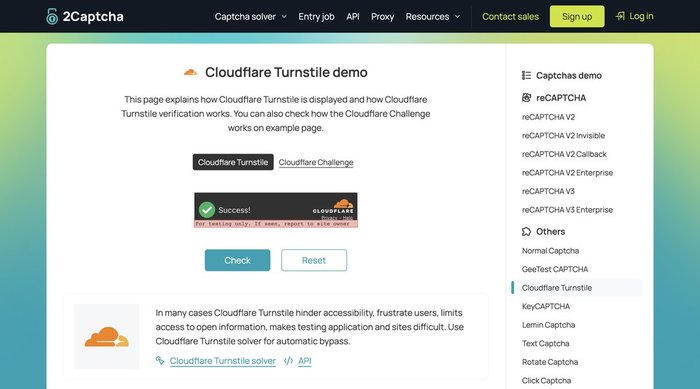 Cloudflare Turnstile |
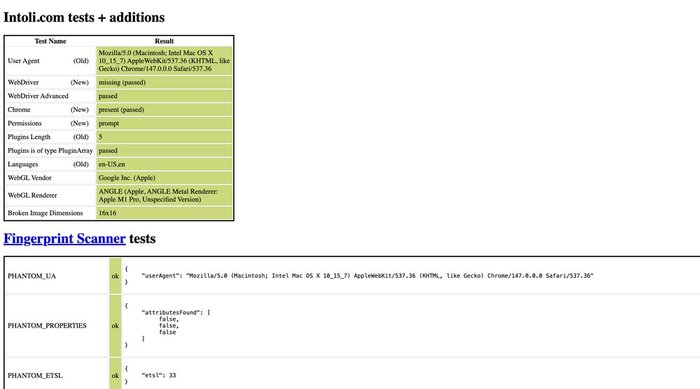 bot.sannysoft.com |
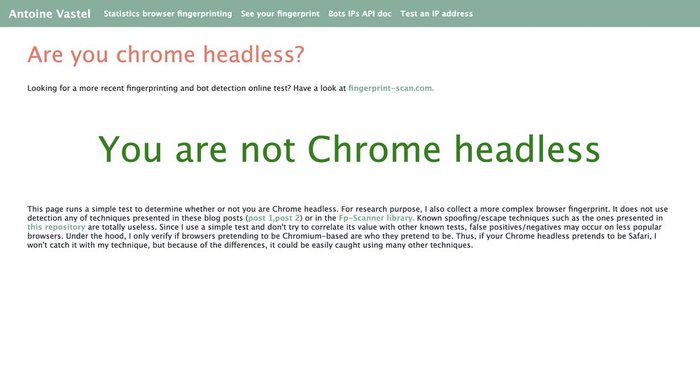 areyouheadless |
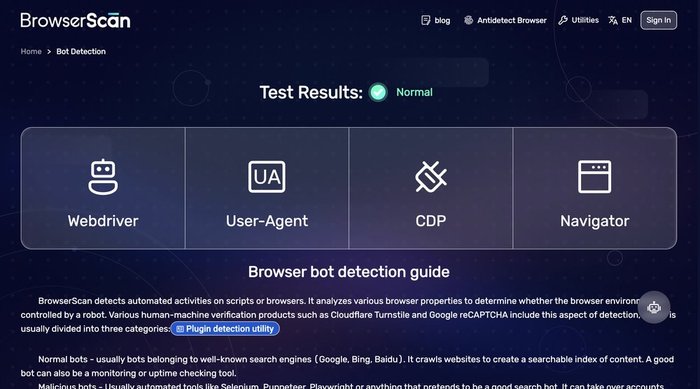 browserscan.net |
 reCAPTCHA v2 |
Speed and size, measured
Measured in November 2026 on one Mac (M4 Pro, Chrome 157, headless, a throwaway profile), with both servers driven over MCP by the same script. The other server is Google's chrome-devtools-mcp 1.12.0. Each number is the median of 5 runs, or of 9 clicks. One machine and one day, so read the ratios, not the digits.
| What | This server | chrome-devtools-mcp |
|---|---|---|
| Open a local page in a running browser | 63 ms | 131 ms |
Open en.wikipedia.org/wiki/Cat, cached |
276 ms | 370 ms |
| Click a button that changes the page | 160 ms | 253 ms |
| Click a button that does nothing | 577 ms, says NO page change detected |
262 ms, says it clicked |
| Click a button under an overlay | 88 ms, refuses and names the overlay | 252 ms, says it clicked; the overlay took the click |
| Click a disabled button | 89 ms, says it is disabled | 5.0 s, then a timeout |
| Fill a text field | 12 ms | 248 ms |
| Close the browser | 0.11 s | 0.11 s |
| Snapshot of a form with 158 elements | 2,181 tokens | 3,888 tokens |
| Snapshot of the Wikipedia page | 2,405 tokens for the first 100 elements, 100,127 for all | 225,658 tokens |
| Start the browser and load the first page | 1.07 s | 0.66 s |
| Memory with one page open | 941 MB in 10 processes | 585 MB in 6 processes |
| Tool definitions sent to the client | 39,877 tokens for 173 tools | 7,300 tokens for 32 tools |
- ✅ Faster at opening pages, clicking, filling and reading, and smaller snapshots. A snapshot here lists what can be acted on; the other server's lists the whole accessibility tree including text, so the two are not the same content.
- ❌ Slower to start, heavier in memory, and its tool list costs a client that loads every definition about five times as much.
profile_mode="light"brought one page to about 630 MB in 7 processes, at the cost described under Speed, memory and disk. - Tokens were counted with the
o200k_basetokenizer as an estimate.
Cloudflare Turnstile
| Situation | Tool |
|---|---|
| Checkbox embedded in a page, such as a login or signup form | click_turnstile |
| Full-page "Just a moment..." challenge, on macOS, with the desktop free for up to a minute | solve_turnstile_oscursor |
| Full-page challenge where the mouse cannot be taken over, or on Windows or Linux | A saved session with storage_state_load, or solve_captcha (paid) |
click_turnstile, verify_cf and auto_verify click through CDP. When a challenge is still there afterwards, their result says so and names solve_turnstile_oscursor.
One call moves the checkbox from "Verify you are human" to "Success!". This demo uses Cloudflare's test sitekey and returns a dummy token, so it shows that the click lands on the widget. It does not show that a protected site lets you through.
- ✅ Finds and clicks the embedded widget (
.cf-turnstile,[data-sitekey], or achallenges.cloudflare.comiframe). Earlier runs also passed thedash.cloudflare.comlogin andnopecha.com/captcha/turnstile, not retested since - ❌
click_turnstiledoes not get through Cloudflare's full-page "Just a moment..." challenge. Onnopecha.com/demo/cloudflare, the click earned acf_clearancecookie, but the page stayed at status 403, in 3 of 3 tries, one of them with the VPN off - ✅
solve_turnstile_oscursorgot the main browser through the same page in 3 of 3 tries: status 200, title "NopeCHA - CAPTCHA Demo", no challenge, checked from the main browser. Measured in November 2026 on one macOS machine with one home IP. It is not a claim about other sites, other IPs, or Windows and Linux
bot.sannysoft.com
navigator.webdriver is missing, WebDriver Advanced passes, Chrome and its plugins read as normal, and WebGL reports the real GPU.
areyouheadless
Antoine Vastel's public test reports "You are not Chrome headless" for a Chrome controlled by this server.
browserscan.net
Every signal it checks reads "Normal", including WebDriver, Selenium, CDP and headless Chrome.
TLS fingerprint
Measured at tls.browserleaks.com. Each impersonation shows the JA3 of the browser it names, and a plain Python client does not. Hashes change with browser versions.
httpx:                JA3 37f7d09ced1a845dc48872abc1a29d7b   python-httpx/0.28.1
impersonate=chrome:   JA3 f830262a93191fd695c65531282d5657   Chrome/146.0.0.0
impersonate=firefox:  JA3 6f7889b9fb1a62a9577e685c1fcfa919   Firefox/147.0
impersonate=safari:   JA3 ecdf4f49dd59effc439639da29186671   Safari/605.1.15
reCAPTCHA v2 images
Five runs in a row on Google's demo page, with a fresh profile and a vision model through an OpenAI-compatible API:
Run 1: passed, 2169-char token, tiles [3,4,7],        146 s
Run 2: passed, 2126-char token, tiles [0,2,4,7],       80 s
Run 3: passed, 2169-char token, tiles [1,2,4,8],      143 s
Run 4: passed, 2148-char token, tiles [1,4,5,6,8,9],  126 s
Run 5: passed, 2169-char token, tiles [0,3,4],         69 s
Average: 113 s
Usage examples
An agent usually reads the page, then acts on the refs it got back:
browser_launch(url="https://example.com")
browser_snapshot()
click(ref="e3")
fill(ref="e5", value="hello")
Log in once by hand, then reuse the session headless. This is the most reliable way past a login wall, because the site sees a session it already trusts:
browser_launch(url="https://target.com/login")
# log in by hand in the window
storage_state_save(filename="target.json")
browser_close()

browser_launch(url="https://target.com/dashboard", headless=true,
               storage_state_path="~/.mcp-stealth/storage-states/target.json")
Log in with the browser, then fetch data over HTTP with the same cookies:
http_request(url="https://target.com/v1/data", impersonate="chrome", use_browser_cookies=true)
Run several accounts side by side, each with its own profile:
spawn_browser("account_2", url="https://target.com", headless=true)
switch_instance("account_2")
click(ref="e7")
switch_instance("main")
Closing the instance you are on leaves its name current: after close_instance("account_2") the next browser_launch starts account_2 again on its own profile, and both results say so. Call switch_instance("main") first to go back to the main profile.
Find out what protects a page before choosing an approach:
browser_launch(url="https://unknown-site.com")
detect_anti_bot()
# {"detected": ["Cloudflare"], "recommended_tools": [...]}
See what a button would send on a real account, without sending it:
dry_run()
click(ref="e12")
intercept_log()
dry_run(enable=false)
Profiles and launch options
| You want to | Use | Profile | Kept after closing |
|---|---|---|---|
| Work with a logged-in account | browser_launch() |
~/.mcp-stealth/profile |
Logins, cookies, history, the list of open tabs |
| Try something without saving a login | browser_launch(persistent=False) |
Temporary | Nothing |
| Start with no trace of this browser's past use | browser_launch(privacy=True) |
Empty, under privacy-profiles/ |
Nothing, and the removal is checked |
| Use Brave instead of Chrome | browser_launch(browser="brave") |
~/.mcp-stealth/brave-profile |
As for Chrome, in a profile of Brave's own |
Privacy mode, identity overrides, cloning your own profile, the data folder
privacy=True starts from an empty profile, deletes it on close, and picks one proxy when you pass a pool (a|b). It does not change the identity. User agent, Chrome version, operating system, language and timezone stay those of the real browser and machine in every mode, since a made-up identity on a real engine contradicts itself. To use a logged-in account, leave privacy off.
You can override identity for one launch: fingerprint={"user_agent": ..., "accept_language": ..., "platform": ..., "timezone": ...}. Fields you leave out stay real. Client hints and a missing navigator.platform are derived from the user agent so they agree with it, and navigator.languages comes from accept_language without the ;q= weights.
To use logins from your own browser, list_chrome_profiles shows every Chromium-family browser on the machine and clone_chrome_profile copies one into an isolated profile. The source is only ever opened read-only. Caches are left out, and so are a profile's IndexedDB, Service Worker and File System folders, which some web apps use for their login (WhatsApp Web, Telegram Web): the result lists them under not_copied. For a profile you will use every day, pass keep_site_data=True to copy them too.
A browser started with browser_launch over stdio stays open until you close it, or until the server exits when its client goes away. keep_alive=True keeps it past that (see below). Instances from spawn_browser and browsers in HTTP mode close after BROWSER_IDLE_TIMEOUT.
Runtime data lives in ~/.mcp-stealth/: profile/, profiles/<id>/, brave-profile/, brave-profiles/<id>/, screenshots/, exports/, storage-states/, window-state/, keep-alive/, adblock/, brave-lean/. An app/ folder left by 0.13.0 is removed.
Options for one launch. Open one for the details:
| You want to | Pass |
|---|---|
| Keep the browser open after the agent ends | keep_alive=True |
| Reopen the tabs from last time | restore_tabs=True |
| Block ads and trackers in Chrome | block_ads=True |
| Tabs in a side bar | vertical_tabs="left", or "right" in Brave |
| Brave without Leo, VPN, P3A and the other extras (on by default for a profile the server made) | brave_lean=True, or False to keep Brave as it ships |
| Open the agent's browser from the Dock | mcp-stealth-chrome install-launcher |
Brave
browser_launch(browser="brave") and spawn_browser(..., browser="brave") run Brave instead of Chrome, from where Brave installs itself (/Applications/Brave Browser.app, /usr/bin/brave-browser, Program Files\BraveSoftware), or from MCP_STEALTH_BRAVE_PATH. Driven over CDP it stays Brave, measured on Brave 157.1.99.55:
- ✅ Shields blocks ads and trackers: a local page loading a script from an EasyList host had it blocked, where Chrome loaded it. A new profile fetches its filter lists first, about 11 to 12 seconds.
- ✅ Farbling: a canvas reads differently on each site and in each session, as in any Brave. Chrome reads the same everywhere.
fingerprint_auditcounts this as expected on Brave, not as a leak. - ✅ The page sees Brave:
navigator.brave.isBrave()is true anduserAgentDatalists Brave and Chromium with versions reduced to157.0.0.0, as Brave reports them. The identity override this server applies (headless,lang,fingerprint) keeps those, and never names Google Chrome there. - Brave's profiles are its own:
~/.mcp-stealth/brave-profilefor main,~/.mcp-stealth/brave-profiles/<id>for others. A profile belongs to the browser that made it: Brave and Chrome keep cookies and saved passwords under different keys, so opening a Chrome profile with Brave, or a Brave profile with Chrome, is refused and the result names why.clone_chrome_profile(browser="brave")copies intobrave-profiles/<id>, to launch withbrowser="brave". keep_alive=Trueworks for Brave as for Chrome. The nextbrowser="brave"launch reattaches to a kept Brave, and a Chrome launch is never handed one (nor the reverse); the result says why a kept browser was not reattached.- With
MCP_STEALTH_DOCK_ICON=1a visible Brave runs from Brave Beta (/Applications/Brave Browser Beta.app) with the project icon, on the same terms as Chrome Beta (see "Own Dock icon" below): only a profile Beta cannot damage, the icon outsideContents/, Beta missing means Brave with a note./Applications/Brave Browser.appis never changed. Quit,restore_tabs, cookies kept across a close, and visible windows that stay behind the app in use work as they do for Chrome. - Brave Beta is not on the access list of the "Brave Safe Storage" Keychain item that Brave created, so the first time Brave Beta needs it macOS asks you. Always Allow keeps its logins. Deny, or no answer, leaves it unable to read the profile's cookies, and it drops them (measured on a test profile: 3 cookies, then none). The launch result says this whenever Brave Beta runs.
server_statusreports underbravewhether Brave is installed, where, and its version, and underbrowserwhich one is running.- A profile whose maker cannot be told (it holds data, and its
Local StateandPreferencesare missing, any of them is unreadable, or they disagree) is refused to both browsers. A--user-data-dirinextra_argsis treated as the launch's profile folder and gets the same checks; naming two different folders is refused. attach_to_chrometells Brave from Chrome by the process on that port, ornavigator.brave, and says which. A browser it cannot tell (a wrapper, Edge, Vivaldi, or one on another machine withoutnavigator.brave) is reported as such, andfingerprint_rotateandemulate_devicethen leave the client hints alone rather than name the wrong browser.- Brave 158 handles cookies as Chrome 158 does: in a profile outside its own folder it cannot read the
v10cookies Brave 157 wrote, and deletes them. The cookie move under Chrome works for Brave too (measured on Brave Beta 158.1.101.48 with a test keychain: 3 cookies moved, read back, stored asv11). A Brave whose version cannot be read is refused a profile holdingv10cookies. profile_report,profile_cleanupand the start-up cleanup knowbrave-profile,brave-profiles/<id>andbrave-profile-pid<N>as they know Chrome's folders, with the same checks.
Measured through this server on one macOS machine in November 2026, Brave 157.1.99.55 against Google Chrome 157:
| Check | Brave | Chrome |
|---|---|---|
bot.sannysoft.com, headless and visible |
30 passed, 1 warning (TRANSPARENT_PIXEL, from farbling) in 3 of 4 runs |
31 passed |
browserscan.net/bot-detection |
18 of 18 "Normal" | 18 of 18 "Normal" |
2captcha.com/demo/cloudflare-turnstile with click_turnstile |
Token filled, 3 of 3 | Token filled |
detik.com front page |
135 requests, 16 iframes | 222 requests, 33 iframes |
cnnindonesia.com front page |
116 requests, 1 iframe | 231 requests, 16 iframes |
A Brave profile copied with clone_chrome_profile(browser="brave") |
1575 of its cookies read back, logins kept | Refused, since it would read none |
Opening the agent's browser from the Dock
mcp-stealth-chrome open --browser brave opens the agent's Brave without an agent. If it is already running on its profile it comes to the front (with --url, the page opens in a new tab). If not, it starts exactly as browser_launch(browser="brave", keep_alive=True) would, through that function: same flags, profile folder, debugging port, quit watcher and keep_alive record. It then stays open with no server running, and the next browser_launch(browser="brave") from any agent reattaches to it. --browser chrome does the same for Chrome.
mcp-stealth-chrome install-launcher builds ~/Applications/Stealth Brave.app (macOS), a small app with the project icon, signed on this Mac, that runs open. To use it:
- Pin it: drag it to the Dock. A click opens the agent's Brave or brings it forward. The app exits at once and has no Dock icon of its own, so while the browser runs the Dock shows the pinned launcher and Brave Beta with the project icon. Measured: cold click to a running browser in about 3 seconds, a click on a running one about 2 seconds.
- Pinning Brave Beta itself does not work as a launcher: a click on it when it is not running starts plain Brave Beta on its own default profile, with no debugging port and nothing an agent can reach. macOS has no way to send that click through the launcher without changing Beta's bundle, which this project does not do.
- Default browser: the app declares
httpandhttps, so it appears in System Settings > Desktop & Dock > Default web browser. Choose "Stealth Brave" there and links from other apps open in the agent's Brave, in a new tab when it runs and through a cold start when it does not. Onlyhttp://andhttps://links are passed on: any other scheme (file:,chrome:,brave:, a bare host name) is refused and nothing opens. The app does not open local files. Nothing changes the default for you; macOS asks you. Brave Beta should not be the default browser itself, for the reason above. - It never starts a second browser on a profile: a click reserves the profile the way
browser_launchandspawn_browserdo (one reservation per profile, shared by every process of this project), so a double click, or a click while an agent launches on that profile, waits and then finds that browser running. A profile held by any other browser is only ever brought forward, or refused with the reason. When the browser could not be brought to the front, or a window could not be opened, the click says so and fails rather than reporting success. A lock left by a browser that is gone (after a restart) is cleared when its PID now runs something else and no process uses the profile. - Safety: a click starts a browser with a DevTools port on 127.0.0.1 without any agent asking. Any program running as you on this Mac can drive that browser, read its pages and use its logins, as with any browser this server starts. It stays open when no agent runs, until you Quit it. The app says so and asks once before its first start. It never opens your own Brave or Chrome profile, and it sets nothing system-wide (no LaunchAgent, no managed preferences).
- An agent that reattaches to a browser you opened from the launcher acts only on the tabs it opens itself, or that an agent opened there before. Your own tabs are marked
[not opened by this server]intab_list, and the agent acts on one only aftertab_selectpicks it. The agent shares your cookie jar there (the result says so): it can read the logins of that profile. It never ends your browser for being idle and does not put ad blocking on it. - A browser opened from the launcher is yours: it is recorded as opened by the launcher and its time cap is a year instead of 24 hours, also after an agent reattached to it and left, unless you set
MCP_STEALTH_KEEP_ALIVE_MAX_HOURS. Quit ends it as usual, and so does closing its last window. - The app finds the command it recorded when it was built, then
~/.local/bin, Homebrew'sbinfolders and your shell's PATH, so a reinstall withuv tool install --forcekeeps it working. When the command cannot be found it says so in a dialog with the install command.install-launcher --removetakes it away again;--dirbuilds it elsewhere. - The launcher does not modify other apps: macOS blocks an app from writing into another app's bundle (App Management), so when an update of Brave Beta removed the project icon, the window shows Beta's own icon until the next launch from an agent or from
mcp-stealth-chrome openin a terminal puts it back. open --move-to-betamoves a profile Brave made to Brave Beta, once and one way: its cookies go through the cookie move, and Brave older than Beta is refused the profile afterwards. It is only applied when the profile is a folder of its own that Brave made, and both the version that last opened it and Brave Beta's are known; anything unknown is refused. If Brave Beta cannot read the cookies (macOS did not let it use "Brave Safe Storage": answer the Keychain dialog with Always Allow), the launch is refused and the profile is left as it was.--use-mock-keychaininextra_argsis for tests only and refused otherwise: cookies written with it can only be read with it again.- An agent that should launch the same Brave Beta when none runs needs
MCP_STEALTH_DOCK_ICON=1in its server's environment too. Without it, its Brave launch on a profile Brave Beta opened is refused, since Brave 157 is older than the Beta that last opened it. - On Linux
openworks without the app; on Windows it says why not (keep_alive needs the quit watcher, which does not run there).
Brave lean
With browser="brave" the server turns off the parts of Brave an agent has no use for. It is on by default for a profile the server makes in an empty folder (brave-profile, brave-profiles/<id>, persistent=False, privacy=True), which it records as its own in its data folder (~/.mcp-stealth/brave-lean), so a copy or a moved folder does not count. A profile you name with user_data_dir, a copy from clone_chrome_profile, or one made before this release keeps its settings unless you pass brave_lean=True; the launch result says which applies and why. brave_lean=False keeps Brave as it ships and puts back what an earlier lean launch changed, in every sub-profile it wrote. Reattaching to a kept Brave applies nothing and says so. Chrome has none of this, and says so when brave_lean is passed.
| Turned off | How |
|---|---|
| Leo AI chat, Brave VPN, Speedreader and its prompts, Playlist | --disable-features for this browser process only |
| P3A, the daily usage ping, Tor windows | the profile's Local State |
Toolbar and sidebar buttons, new tab widgets (stats, Rewards, News, VPN, Talk) and sponsored images, Brave News, the wallet's page provider (window.ethereum and the like), the Web Discovery, Wayback Machine and default-browser prompts |
the profile's Preferences, written before launch |
Kept: Shields, farbling, navigator.brave and the Brave brands, vertical tabs, Safe Browsing, and component updates, which bring Shields its filter lists.
- Brave's enterprise policies (
BraveRewardsDisabledand the rest) are not used: they apply to every Brave on the machine, including your own. So Rewards, Brave Ads and the wallet page stay as Brave ships them: Rewards and Ads are off until someone opts in, and lean only hides their button and cards. - Settings are written only into a profile no browser holds, never through a link (the profile folder included), and never into Brave's own folder (your Brave). A file that does not parse is left alone, and so is a setting whose parent holds something other than settings. Whatever could not be written is named in the launch result, and the launch goes on.
- The launch result lists what was turned off;
server_statusshows it underbrave.lean_running, and what lean does underbrave.lean.
Measured on Brave 157.1.99.55, macOS, November 2026:
| Check | Lean | Not lean |
|---|---|---|
| Brave servers a new profile left idle for 90 s contacted (net-log) | componentupdater, go-updater, redirector, brave-core-ext.s3 and variations, the same as without lean (safebrowsing in some runs) | the same, plus usage-ping, star-randsrv.bsg and collector.bsg (the usage ping and P3A) |
| Read from the running browser (brave://settings) | P3A, usage ping, Tor, Leo, VPN, Speedreader off | all on |
| Visible window | Toolbar: Shields and the menu; new tab page: background and search box | Toolbar adds Rewards, sidebar, wallet, Leo and VPN buttons; new tab page adds stats, News and VPN cards |
| Memory and processes on example.com, 3 runs each | headless 494 to 535 MB, 6 processes; visible 511 to 582 MB, 7 | headless 513 to 521 MB, 6; visible 517 to 540 MB, 7 (no difference beyond run-to-run spread) |
bot.sannysoft.com, headless and visible |
30 passed and TRANSPARENT_PIXEL warned (farbling), or 31 passed |
the same |
browserscan.net/bot-detection |
every check "Normal" | the same |
Vertical tabs
browser_launch(vertical_tabs="left"), "right" or "off" writes the tab-strip setting into the profile before the browser starts, and the profile keeps it. Leaving it out (None) keeps the profile's own setting. Brave has both sides. Google Chrome only has the left, so vertical_tabs="right" with Chrome is refused. Checked in visible windows on macOS by where the page starts: Brave's strip is 221 points wide on either side, Chrome's 240 on the left.
Reopening the last tabs
browser_launch(restore_tabs=True) reopens the tabs this instance had on this profile when the server last closed it: browser_close, close_instance, close_all_instances, the idle timeout, a Quit, or the server exiting because its client went away, which is what happens when an agent session is put to sleep. spawn_browser(restore_tabs=True) does the same for a named instance. Chrome's own session restore stays off, because restored window placement opened windows that could not be seen.
- ✅ Pages open behind the app you are using, the way
tab_newopens them, in the ordertab_listshowed, and the tab that was selected is selected again. Measured on macOS: 0 ms frontmost for the restored browser. - Without a
url, the first saved page loads in the first tab. With aurl, that page stays first and selected, the saved pages follow, and a saved page with exactly that URL is not opened twice. - ✅ The result lists each page as reopened (final URL, status) or failed (why), with secret URL parameters masked. It says plainly when there is no saved list, when the list cannot be read, and when it is older than 30 days (
MCP_STEALTH_RESTORE_TABS_MAX_DAYS), and it never fails the launch. - The list is saved when the server closes the browser, about 2 seconds after tool calls, and every 30 seconds while the browser runs, so a server that was killed still leaves the last list it saw. Saving takes about 1 ms. A Quit closes every window before anything can read them, so the list saved before the Quit stays: a browser with no pages never replaces a saved list. Only
http,httpsandfilepages are kept, up to 30. persistent=Falseandprivacy=Truekeep no tabs.- The list is in
~/.mcp-stealth/window-state/<instance>-tabs.json, one entry per profile, readable by you only. Page URLs can carry tokens.browser_close(forget_tabs=True)andclose_instance(instance_id, forget_tabs=True)close without saving and remove the list.profile_cleanup(action="remove_fallback", ...)removes the list of the profile it deletes. Deleting the file removes all of them.
Keeping a browser open when the agent goes away
When an agent session sleeps, reconnects (/mcp) or ends, its client closes the server's stdin and the server closes every browser it started. browser_launch(keep_alive=True) and spawn_browser(instance_id, keep_alive=True) leave that one browser running instead, with its tabs and page state, and the next launch on the same profile picks it up:
browser_launch(url="https://app.example.com", keep_alive=True)
# ... the agent sleeps; the browser stays open ...
browser_launch()   # a new agent, same profile
# Reattached to the running browser (pid 4242, 3 tab(s)). Selected tab shows: ...
- It is per launch, not a setting: other agents on the machine keep the default, which closes their browsers with their server.
- ✅ Reattaching opens no new Chrome. Tabs keep their order, the selected tab stays selected, and a half-filled form keeps what was typed, measured with a value typed before the server exited. With a
url, that page opens in a new tab so no kept page is navigated away from; a tab already showing exactly that URL is selected instead. The result lists the tabs, with secret URL parameters masked. - A launch on a profile held by a kept browser reattaches whatever
keep_alivesays. Left unset on a reattach,keep_alivestays as it was;keep_alive=Falsemeans it now closes with this server. Every result says which holds, a new browser included ("keep_alive=False: this browser closes when this server exits").browser_launch(keep_alive=...)on the browser already running applies the change. Launch options that only shape a new Chrome (headless, proxy, fingerprint, profile_mode, restore_tabs and so on) are named in the result as not applied. - ✅ It only takes a browser a previous server of this project started and no live server holds. Every one of these must hold, or the launch goes on as before (a
profile-pid<N>fallback, orprofile_conflictas you set it) and the result says why it did not reattach: the record's PID holds the profile lock, its command line names that--user-data-dir, the recorded DevTools port and flags only this server passes (exactly:/tmp/profilenever matches/tmp/profile-evil), the process started at the recorded time (so a PID handed to another program is told apart), DevTools answers there with the recorded Chrome version and names that same PID as its browser process, and the server that wrote the record has exited. Only one server reattaches at a time (a lock on the profile, released by the system if that server dies), and after connecting it asks the browser once more for its PID and version and checks the process again, dropping the connection if anything changed. Your own Chrome on that profile, or a browser another running server drives, is never attached. - Nothing starts on a reattach, so the profile version check, the Chrome Beta choice and the Chrome 158 cookie move do not run; the result says so, and says when a cookie move is still pending for the next real launch.
- How a kept browser ends: Quit (Cmd+Q, the Dock) still ends a visible one after its server has gone, through its watcher process.
browser_closeorclose_instancefrom an agent that reattached ends it. Once it has had no server forMCP_STEALTH_KEEP_ALIVE_MAX_HOURS(24 by default), its watcher ends it; the time counts from when the last server let go, not from the launch. - Headless works too, as an invisible Chrome that keeps holding memory until one of those ends it. The launch result says so.
persistent=Falseandprivacy=Trueignorekeep_aliveand say so: there is no profile for a later server to find. It is not available on Windows, or withMCP_STEALTH_QUIT_WATCHER=0, because nothing would end the browser on Quit or at the time cap there; the result says so and the browser closes with its server.- The record is one small file per profile in
~/.mcp-stealth/keep-alive/(PID and its start time, port, profile, instance, Chrome version), readable by you only, and removed when the browser ends. It never holds the proxy: a proxy URL can carry a password, so a reattach reads it from the running Chrome's own command line. The tab list forrestore_tabsis still saved when the server exits. The leftover-profile cleanup leaves the profile of a running kept browser alone; a record whose Chrome is gone, or whose PID now runs something else, is removed rather than trusted. - A signal from the watcher or the server only goes to a process proved to be the one meant, checked right before it: exact profile, and the start time recorded for it. A process whose command line or start time cannot be read is not signalled, and the close says it is not verified. On Linux the signal goes through a pidfd, so it cannot reach a process that took the PID after the check. On macOS the start time has one-second resolution and the check and the signal are separate calls, and Windows goes by the exact command line: small residual risks, not guarantees.
- If the watcher cannot identify the browser after its last window was closed, it stops after three tries and leaves the reason behind; the next tool call says the browser may still be running and was not ended.
MCP_STEALTH_KEEP_ALIVE_MAX_HOURSmust be a positive finite number.inf,nan, 0 or a negative value fall back to 24 and a value over a year is cut to a year; the launch result names either.
Blocking ads
browser_launch(block_ads=True) and spawn_browser(block_ads=True) block ad and tracker requests with EasyList and EasyPrivacy, using adblock-rust, the engine inside Brave. Off by default, and it needs the adblock extra (see Install).
- ✅ Every tab, popup, frame (including frames from other sites, which run as their own process) and worker of that browser is covered from its first request: a new one waits up to 2 seconds while blocking is set up for it. The page you navigate to is never blocked, even on an ad domain.
- ✅ Requests only. Nothing is hidden or written in the page, so a blocked ad can leave an empty box. Blocked requests fail with
net::ERR_BLOCKED_BY_CLIENT, as with any ad blocker, and a page can notice that. - The lists are downloaded the first time from easylist.to into
~/.mcp-stealth/adblock, readable by you only, checked again at most once a day in the background, and used offline from the last copy. They are not included in the package: they are published under GPLv3 and CC BY-SA. A download is limited to 16 MB and 20 seconds. Without a list the launch saysblock_ads: OFFand why, and runs without blocking. With one of the two lists missing it saysblock_ads: PARTIALand which one. - ✅ Blocking does not freeze the browser when it fails. If the part of the server that answers Chrome stops answering for 3 seconds, or its connection to Chrome ends while the browser is open, ad blocking turns itself off for that browser, the requests and new tabs it was holding go through, and the next tool result says so and why. Measured on real Chrome by stopping, hanging and disconnecting it in the middle of a page load, and by killing the whole server with SIGKILL: the page, a popup opened meanwhile and the page that opened it all finished loading.
- The launch result says whether it is on and how many rules it uses.
server_statusshows, per browser, the requests seen, blocked and allowed, by type and host, and the last blocked URLs with secret parameters masked. intercept_startworks alongside it on the same connection to Chrome, so each request gets one answer: an ad request is logged with the outcomeblocked by block_ads, andintercept_stopleaves ad blocking on.- Brave blocks ads itself with Shields, so
block_adsdoes nothing there and says so. - With
keep_alive=True, ad blocking ends when the server exits and the browser stays open: the browser goes on unblocked. A later launch that reattaches to it withblock_ads=Trueblocks again; one without it does not. A kept Brave is left to Shields on a reattach too. - Measured on three Indonesian news home pages, 5 runs each, headless, with and without
block_ads: frames went from 33 to 16 (detik.com), 30 to 5 (kompas.com) and 12 to 1 (cnnindonesia.com), and requests from 225 to 118, at least 250 to 145, and at least 250 to 118. The page's load event came within 60 s in 15 of 15 runs with blocking and 9 of 15 without, where ad auctions kept loading frames. The article text stayed the same apart from sponsored items. On a local page of 200 requests the load event took 178 ms instead of 138 ms (median of 24 loads), about 0.2 ms per request. A page can also wait longer for a widget it starts from a blocked tag manager: on cnnindonesia.com, its article recommendations started about 2 s later.
Chrome 158 and saved logins (macOS)
Chrome 158 on macOS stops reading the cookies an older Chrome wrote in a profile outside its default folder. Before such a launch the server backs the cookies up, moves them to the new format and checks every one came back. When it cannot be sure, it refuses the launch and says what to do. Steps, recovery and limits are in docs/CHROME-158.md.
Own Dock icon (macOS, opt-in)
With MCP_STEALTH_DOCK_ICON=1, a visible browser on a new profile runs from Google Chrome Beta (/Applications/Google Chrome Beta.app) with the project icon, so it is not mistaken for your own Chrome. It needs Chrome Beta installed. Measured on Chrome Beta 158:
- Only a profile nothing has written to goes to Beta:
persistent=False,privacy=True, or a profile folder that does not exist yet or is empty. A profile that already holds data stays on Google Chrome and the result says why. Chrome 158 does not read thev10cookies Chrome 157 stores in a profile outside its default folder, and deletes them: a copy of a profile with 1172 cookies had none left after Beta opened it. When in doubt, Google Chrome is used. - A profile Beta made stays on Beta, and the result says so. Google Chrome 157 is refused it, headless too, until Google Chrome reaches the version that last opened it.
- The icon is a custom Finder icon at the top of the Beta app (
Icon\rand a Finder flag). Nothing insideContents/changes, andcodesign --verify --deepstill passes. An update of Beta removes the icon. The next visible launch puts it back in the background, about 0.3 seconds, and does not wait for it./Applications/Google Chrome.appis never changed. - Beta registers with Google's updater under its own entry,
com.google.chrome.beta. Thecom.google.chromeentry is not changed. Headless browsers,attach_to_chromeand thesolve_turnstile_oscursorhelper keep Google Chrome. The helper stops at once when the main browser runs a different Chrome version, because a clearance bound to the user agent could not be moved over. server_statusreportsdock_icon:off,beta-ready,beta-missing,icon-missingorunavailable, with the reason, anddock_icon_bravethe same for Brave Beta.- The Chrome copy used by 0.13.0 is gone. A copy left in
~/.mcp-stealth/appis removed when a server starts and no browser runs from it.
What tool results tell you
Results describe what was observed. A tool that reports success when nothing happened would leave an agent building on a false result, so these rules hold across the server:
- ✅ A click says whether the page changed. One that changed nothing answers
clicked but NO page change detected - ✅ A click on a covered element is refused, and the result names what covers it
- ✅ An empty capture says whether anything was being captured
- ✅ A browser is reported closed only after its process was seen gone
- ✅ A visible browser stays behind the app you are using
Every rule, in full
- ✅ Clicks are real mouse input.
click,click_text,click_role,click_element_offset,click_at_cornerandhovertest the target first and refuse by name when something covers it. Clicks sayclicked but NO page change detectedwhen nothing happened,the outcome could NOT be verifiedwhen the page could not be read before or after, and name any new tab the click opened. A JS click only happens withjs_fallback=True, and the result says so. - ✅ A click is checked as soon as it lands and reported when the page changes, about 160 ms for a button that works. Only a click that changes nothing waits the full 450 ms before saying so, so a handler that reacts after 300 ms is not reported as dead.
- ✅ The hit test before a click and the before and after comparison run in an isolated world, like the snapshot. A page that replaces
getBoundingClientRect,elementFromPoint,getComputedStyleorquerySelectorto watch for automation sees none of them called by a click, a hover or a navigation: 0 calls, where one click used to make 37. - ✅ A native dialog cannot hang the server. A click, key or pointer move that opens one returns and names it, any other tool that needs the page says so instead of waiting, and
dialog_handleanswers the one already open. - ✅
select_optionsets the value from JS because a native dropdown cannot be driven with page input. The result statesisTrusted=false, and the value is read back. - ✅
browser_snapshotwrites nothing to the page. Refs live on the server and reach into iframes, cross-origin ones included, and open shadow roots. A field shows its label aslabel="...", taken from<label for>, a label around it oraria-labelledby, andname_containsfinds it by that. The label's own row is left out when its field is listed, and the count of those rows is reported. - ✅
navigatereports the final URL, redirects, status and ready state, and waits for the load event up to 15 seconds.expect_urlandexpect_statusturn a redirect into a failure. A page that did not load is an error, andbatch_actionsandworkflow_runcount it as failed. It no longer raises the window unless you passfocus=True. - ✅ A visible browser stays behind the app you are using.
browser_launch,spawn_browser,tab_new,tab_selectand page actions do not take the keyboard, measured withlsappinfoon macOS.tab_newopens its own background window, or withnew_window=Falsea tab behind the one its window shows, which pages still read as visible (Chrome picks the window and the result names it).tab_selectonly changes which tab tools act on unless you passfocus=True, and says when the page it selected reads as hidden. A click that callswindow.openstill brings Chrome forward for about 130 ms before focus returns, so keys typed in that moment reach Chrome.tab_focusraises the window on request. Quitting it with Cmd+Q or the Dock, or closing all its windows, ends it within about 3.5 seconds, also when the server that launched it has exited or was reinstalled meanwhile: each visible browser has a small watcher process of its own. The next tool call says it was closed, and nothing starts it again by itself. Closing the last tab withtab_closedoes not count as a Quit. - ✅ A profile last opened by a newer Chrome is never opened by an older one. The launch is refused with both versions named, nothing starts, and the profile is not changed. The version is read from
Last VersionandLocal Statein the profile. An older Chrome can damage a profile a newer one has upgraded.- It needs macOS with the copy on the same APFS volume as Chrome. If the copy cannot be made, launches use Chrome itself and the result says why. Headless launches and
attach_to_chromeare not affected.
- It needs macOS with the copy on the same APFS volume as Chrome. If the copy cannot be made, launches use Chrome itself and the result says why. Headless launches and
- ✅
evaluate,frame_evaluateandwait_for_functionreport a JavaScript exception as an error, and promises are awaited. Objects and arrays come back as JSON. - ✅
type_text,humanize_typeandfillsend a keydown and keyup per character.type_textrefuses when no field has focus, and refuses a newline in a single-line field. - ✅
upload_filerefuses a path that is not a file. It hands the file over by its path, so size does not matter (2.2 GB took 0.09 s and no memory), and an input inside a shadow root is reached by its snapshot ref.upload_file(..., drop=True)drops the file on a drop zone instead, as a drag from Finder does, after the same hit test as a click, and says when the page did not react.paste_textrefuses a field that cannot take text and reports what landed, contenteditable included. - ✅
click_turnstile,verify_cfandauto_verifyreport what the page shows after the click: whether the token filled, the title, and whether the challenge is still there. A click alone is not a pass, and no click happens when no checkbox matched. A challenge still present namessolve_turnstile_oscursoras the next step. - ✅
press_keyreports what the key did: navigation, page change, focus, or nothing. - ✅ A person can use the same visible browser. Tools act only on tabs the server opened or took over
(the launch,
tab_new, reopened tabs, a kept browser on reattach, every tab onattach_to_chrome, and any page one of those opened). A tab a person opens is marked[not opened by this server]intab_list, and tools act on it only aftertab_selectpicks it, whose result says so: atab=index andtab_close(index=)refuse it before that. When a person closes the tab tools were using, the next tool says so and no other tab is picked in its place.tab_listwaits at most 2 s per tab, so a dialog left open in some tab cannot hang it; the row names the reason. A browser whose tabs the server opened behaves as before. Measured hazards that remain: keys typed by a person and bytype_textin the same field interleave, and the server cannot answer a dialog in a tab no tool has used. - ✅
fill_formfails when a field fails and then does not submit.batch_actionscounts it as failed.batch_actionsrefuses input that is not a list of actions, or an empty list, and counts an item that is not an action object as failed. - ✅ Empty results say whether anything was measured.
console_get,intercept_logandstorage_snapshotreport that state, andnetwork_getis an error beforenetwork_start. - ✅
assert_clickabletells you what would block a click without clicking. - ✅ A lost browser connection names the condition and how to recover.
browser_recoverhandles a stuck browser and only touches this server's profiles.
✅ Credentials stay out of tool output, since output lands in the agent's transcript. cookie_list, network_get, intercept_log, wait_for_request, auth_capture, export_curl, http_request and http_request_with_session hide cookies, credential headers, JSON and form fields, and query parameters unless you pass reveal_values=True. A URL in their output, a Location, Content-Location or Referer header, and the URLs http_session_cookies and session_warmup print also hide a user:password@ part and secret pairs in the fragment, such as an OAuth #access_token=. Ordinary parameters stay as they are. Navigation tools (get_url, navigate, tab_list and the like) return the page's URL as it is, because agents use it to keep working. Bodies in other formats pass through unchanged. export_curl also returns an http_request call that replays the session with the browser's own cookies. Files holding credentials are written mode 600, and so are files taken from a page: screenshots, save_pdf, screenshot_element, inspect_image, traces and heap snapshots. They are written whole to a new private file that then replaces the old one, so nobody reads a half-written file and a symlink in the folder is replaced rather than followed.
Tools
Open a group to see its tools.
Browser and instances (14)
browser_launch, browser_close, browser_recover, spawn_browser, switch_instance, list_instances, instance_describe, instance_release, close_instance, close_all_instances, attach_to_chrome, detach, list_external_chrome, server_status
Profiles (4)
list_chrome_profiles, clone_chrome_profile, profile_report, profile_cleanup
Navigation and tabs (11)
navigate, navigate_and_snapshot, go_back, go_forward, reload, get_url, tab_list, tab_new, tab_select, tab_close, tab_focus
tab_new(new_window=...) picks where the tab opens. Left unset, a visible browser opens it in its own window behind the app you use, and headless opens a tab. True gives it its own window in both. False opens a tab in an existing window. In a visible browser that tab stays behind, so Chrome does not come to the front, and the page still reads as visible and focused. The result says which window it landed in and whether the page reads as visible.
Reading the page (17)
browser_snapshot, accessibility_snapshot, describe_page, form_introspect, get_text, get_html, get_attribute, get_links, inspect_element, query_selector_all, search_page, extract_table, extract_structured, detect_content_pattern, scrape_page, list_frames, frame_evaluate
Clicking and forms (23)
click, click_text, click_role, click_and_wait, click_element_offset, click_at_corner, click_at_image, hover, fill, fill_form, smart_fill, paste_text, type_text, press_key, select_option, check, uncheck, upload_file, drag_and_drop, dialog_handle, dialog_auto_handle, scroll, scroll_to
Several steps at once (2)
batch_actions, workflow_run
Mouse and behaviour (8)
mouse_click_xy, mouse_move, mouse_drift, mouse_record, mouse_replay, humanize_click, humanize_type, find_by_image
Waiting and checks (12)
wait_for, wait_for_change, wait_for_function, wait_for_navigation, wait_for_network_idle, wait_for_request, wait_for_response, wait_for_url, assert_clickable, assert_element_visible, assert_text_present, assert_url_matches
Handing over to a person (2)
request_human_help, wait_for_human
Images and files (6)
screenshot, screenshot_element, inspect_image, save_pdf, get_viewport_size, set_viewport_size
JavaScript (2)
evaluate, inject_init_script
Network capture (5)
network_start, network_get, auth_capture, export_curl, export_har
Request interception (4)
intercept_start, intercept_log, intercept_stop, dry_run
HTTP without a browser (7)
http_request, http_request_status, http_request_cancel, http_request_retry, http_request_with_session, http_session_cookies, session_warmup
Search and research (8)
web_search, scrape_markdown, smart_fetch, deep_research, social_research, social_digest, github_read, youtube_read
Cookies and storage (18)
cookie_list, cookie_set, cookie_delete, cookie_import, cookie_export, localstorage_get, localstorage_set, localstorage_clear, sessionstorage_get, sessionstorage_set, sessionstorage_clear, cache_clear, indexeddb_list, indexeddb_delete, storage_state_save, storage_state_load, storage_snapshot, storage_diff
Anti-bot and identity (11)
detect_anti_bot, detect_and_bypass, click_turnstile, verify_cf, solve_captcha, solve_recaptcha_ai, solve_turnstile_oscursor, fingerprint_audit, fingerprint_rotate, identity_pin, identity_show
Vision (4)
vision_locate, vision_describe, vision_ocr, vision_check
DevTools (15)
console_start, console_get, console_clear, get_page_errors, performance_trace_start, performance_trace_stop, performance_metrics, performance_timeline, web_vitals, coverage_start, coverage_stop, memory_heap_snapshot, emulate_network, emulate_cpu, emulate_device
What the main tools do
Tools for agents
These keep token use down and remove guesswork when an agent drives a page.
| Tool | What it does |
|---|---|
describe_page |
A short JSON summary of title, headings, fields, actions and errors, far smaller than accessibility_snapshot. wait_stable=True waits for a single-page app to settle |
smart_fill |
Fills a form by label text with fuzzy matching, and returns close candidates when a label is not found |
paste_text |
Sends the full paste event sequence, for frameworks that ignore a plain input event |
form_introspect |
Per-field detail: label, framework binding, validation state and constraints |
click_and_wait |
Clicks and waits for one outcome: navigation, URL, text, selector, request or network idle |
workflow_run |
Many steps in one call, with foreach, if, save_as and ${var}. No code runs on the server, and start_at="3.2.1" resumes from a nested step |
storage_snapshot, storage_diff |
Compare cookies, storage and URL before and after an action |
Search and research
These run without a browser and without a search API key, and use the stealth browser only when a page looks blocked or empty.
| Tool | What it does |
|---|---|
web_search |
Search results as title, URL and snippet. Bing by default, with Brave, DuckDuckGo and Exa as options |
scrape_markdown |
One URL as clean markdown, 70 to 98% smaller than the raw HTML |
smart_fetch |
Tries HTTP first and moves to the browser only when blocked |
deep_research |
Searches, fetches the top sources and returns markdown with citations |
social_research |
Who sells or makes something and how much attention it gets, across Reddit, Threads, Facebook and X. cookie_files re-imports your sessions on each call, which login-walled platforms need |
social_digest, github_read, youtube_read |
A Reddit community digest, GitHub repos and issues through the API, and YouTube metadata with transcripts |
HTTP with a browser fingerprint
http_request presents the TLS handshake of Chrome, Firefox or Safari. Slow calls return a request ID, which you follow with http_request_status or stop with http_request_cancel. http_request_retry replays a request only when you ask, and connection, read and unknown failures stay distinct. http_request_with_session reuses browser cookies and a bearer token seen earlier on the same origin. Both accept only http and https, send text arguments exactly as given, and take reveal_values=True to show credentials in the response. Redirects are followed up to 30 as before, with browser cookies scoped as before, but your own headers only go to the origin you asked for (scheme, host and port): headers_not_forwarded names any left behind, redirects lists each hop (also when a later hop fails), and a 303, or a 301 or 302 after a POST, continues as a GET without the body, as browsers do. session_warmup browses naturally before reaching a target.
Network capture and interception
network_start and network_get capture requests with headers and, on demand, response bodies. export_curl turns a captured request into a curl command and an http_request call. Prefer the second, because plain curl sends curl's own TLS fingerprint. export_har writes the capture to a HAR file.
intercept_start pauses matching requests at the CDP layer to observe, cancel or mock them, including XHR and anything a page captured before your script ran. It turns itself off after a deadline, so a forgotten intercept cannot hang the page. When Chrome refuses to turn it off, intercept_stop is an error and intercept_log still shows it active: the handler then lets every request through, and calling intercept_stop again, or the deadline, tries again. Starting one on another tab meanwhile is refused. dry_run is the preset for exploring a logged-in account: it blocks POST, PUT, PATCH and DELETE and records what each would have sent, while reads keep working.
Anti-bot
detect_anti_bot identifies Cloudflare, DataDome, PerimeterX, Akamai, Kasada and Imperva on the current page. detect_and_bypass also applies the best approach this server has. click_turnstile and verify_cf click a Turnstile checkbox, with template matching as a fallback. fingerprint_audit checks this browser's own fingerprint for inconsistencies, and states what it cannot see from inside a page, such as TLS or IP against timezone. identity_pin keeps a stable identity and proxy per instance. mouse_drift, mouse_record, mouse_replay, humanize_click and humanize_type add natural movement.
solve_turnstile_oscursor(url=None, timeout_s=50.0) tries a different path for an interactive full-page challenge. It opens a fresh headed Chrome without a CDP client, locates the checkbox in an OS screenshot, clicks with the real desktop cursor, then waits eight seconds before attaching CDP to read cookies. It transfers only site cookies through the storage-state loader and reports success only after the main browser returns HTTP 200 with no detected challenge. A click or a clearance cookie alone is not proof of access. An unsuccessful challenge is reported, not retried automatically.
- Launch the main browser first. Omit
urlto use its active tab. The main browser and sidecar need the same IP route and natural user agent; an explicit main-browser proxy or a user-agent mismatch is refused. - This tool intentionally takes focus and moves the shared OS cursor. Keep the desktop free during the call. A per-user OS lock prevents simultaneous solver calls across server processes, but cannot stop a person or another desktop program from moving the pointer.
- macOS: run it with
uvx 'mcp-stealth-chrome[os-cursor]'or install it withuv tool install 'mcp-stealth-chrome[os-cursor]'(uv sync --extra os-cursorfor development). Without the extra the tool stops before doing anything and says the module is missing. Grant the controlling app or terminal Accessibility and Screen Recording in System Settings.server_statusreportsos_cursor.availablewithout moving anything; right after a start it may saystill being measuredfor a moment. The Python helperos_input.is_available(prompt=True)can request the Accessibility prompt; the MCP tool never changes permissions by itself. - Windows and Linux: not field-tested. Windows uses native SendInput. Linux requires X11 and
xdotool, or theos-cursorextra's python-xlib/XTEST fallback. Native Wayland is refused. timeout_smust be at least 16 seconds and bounds the attempt, not process cleanup. A standalone run takes about 16 to 20 seconds, but inside the MCP server native input and screen capture run slower: 35 timed out during scoring and 50 passed, so 50 is the default. Only the tool's own temporary profile, screenshot and mode-600 cookie file are overwritten and deleted. Overwriting is best effort, not a secure-erasure guarantee on SSD or copy-on-write storage. Cookies already transferred to the main browser remain there until expiry or deletion.- Verification: a macOS local fixture passed native input, cookie handoff and main-browser HTTP 200 through a real MCP client. On
nopecha.com/demo/cloudflareit passed 3 of 3 withtimeout_s=40from one macOS machine and one IP, checked from the main browser (see Test results). This is not a claim of reliable Cloudflare access elsewhere.
DevTools
performance_timeline and web_vitals give load timing and Core Web Vitals without a trace. performance_trace_start saves a trace you can open in DevTools, and coverage_start shows unused JS and CSS. memory_heap_snapshot saves a V8 heap snapshot. emulate_network, emulate_cpu and emulate_device throttle and emulate, and wait_for_network_idle waits until no request is in flight.
Speed, memory and disk
| Option | Effect |
|---|---|
browser_snapshot(mode="fast") |
Skips computed styles, 2 to 3 times faster |
browser_snapshot(mode="viewport"), max_elements, container_selector |
Returns less on long pages |
browser_snapshot(diff_from_last=True), delta=True |
Near-instant on an unchanged page, or marks only what changed |
screenshot(format="jpeg"), region, region_selector |
Smaller files and faster crops. Base64 output stays opt-in |
browser_launch(profile_mode="light") |
No images, background Chrome services or Chrome's built-in component extensions, for ordinary pages. It also drops the "Google" speech voices, which pages can see. Keep the default on protected sites |
| Every launch | Chrome's default apps (Google Docs Offline, Web Store Payments) are not installed. On a fresh profile, one page took 10 processes and about 0.9 GB instead of 12 and 1.1 GB, measured on one machine. Pages cannot tell the difference: fingerprint_audit reads the same |
navigate |
Looks for a Cloudflare challenge once after load and waits only when something points at one. Opening a local page went from 669 ms to 63 ms |
browser_close |
Asks Chrome to quit over CDP and returns when its processes are seen gone, about 0.75 s. Chrome writes its cookies on the way out, so a login made just before the close is kept; ended with a signal, as before, it lost cookies set in the last 30 seconds. A Chrome that does not exit within 5 seconds is still ended with a signal. Programs Chrome starts that are not part of the browser, such as the system updater, are left alone |
| Headless | The reported screen is your display's size, or 1920x1080 when it cannot be read, so the window fits its screen. Headless Chrome otherwise reports 800x600 with a 1280x800 window. fingerprint_audit warns when a window is larger than its screen |
browser_launch(testing_mode=True) |
Faster regression runs, with less stealth |
profile_report, profile_cleanup |
Size and use of every profile, and cleanup of caches. Cleanup previews unless confirm=True, and refuses main and named profiles and anything in use |
Limits
- DataDome, Kasada, PerimeterX/HUMAN and ChatGPT's managed Turnstile are hard to pass with open source tools. A session saved after a manual login is the most reliable option, and commercial services may be needed in production.
- Datacenter IPs and fresh profiles get blocked more often. For search engines, a warm profile with
engine="brave"returns the most, and an empty result page usually comes from the environment. - Headless is easier to detect, so keep
headless=falseon difficult sites. - A Chrome profile can only be open once at a time. A second browser on the same profile moves to a separate one and says so.
- Closed shadow roots cannot be read.
- The browser is driven through a DevTools port on 127.0.0.1. Any program running on the same computer, under any account, can find that port (a scan of every local port took 8.3 s) and read the browser's cookies in plain text through it, without the Keychain prompt that guards the cookie file. Web pages cannot: Chrome refuses a page's connection to it (the server no longer passes nodriver's
--remote-allow-origins=*) and blocks public pages from local addresses. If you pass--remote-allow-originsinextra_argsit is kept, and the launch result andserver_status.remote_allow_originssay so. Do not keep accounts in a browser this server drives whose loss you could not undo, such as your main email, banking, crypto wallets or a password manager. - On Windows, tests saw Google Chrome read back none of a profile's cookies after a relaunch, so a login may not survive a restart there. Linux and macOS keep them. This is being looked into.
Configuration
API keys
✅ 167 of the 173 tools need no key. These six do:
| Tools | Key | Approximate cost |
|---|---|---|
solve_recaptcha_ai, vision_locate, vision_describe, vision_ocr, vision_check |
A vision model: OpenAI-compatible, Anthropic, or local Ollama | $0.001 to $0.03 per call |
solve_captcha (Turnstile, reCAPTCHA v2 and v3, hCaptcha) |
CapSolver | $0.80 to $1.00 per 1000 |
solve_recaptcha_ai suits low volume with your own key. solve_captcha suits production, since a dedicated service handles more challenge types.
Add the key to the env block of the server config. Use one of these:
"env": { "OPENAI_API_KEY": "sk-...", "OPENAI_MODEL": "your-vision-model" }
"env": { "ANTHROPIC_API_KEY": "sk-ant-...", "ANTHROPIC_MODEL": "your-vision-model" }
"env": { "OPENAI_BASE_URL": "https://api.groq.com/openai/v1", "OPENAI_API_KEY": "gsk_...", "OPENAI_MODEL": "your-vision-model" }
"env": { "OPENAI_BASE_URL": "http://localhost:11434/v1", "OPENAI_API_KEY": "ollama", "OPENAI_MODEL": "your-local-vision-model" }
"env": { "CAPSOLVER_KEY": "CAP-..." }
- ✅ Works: any current model that accepts images
- ❌ Fails: text-only models
Always set the model name. The built-in fallback may be out of date.
Any provider with /v1/chat/completions and image_url support works.
Order of use: arguments to the tool, then OPENAI_*, then AI_VISION_* (deprecated, it logs a warning), then ANTHROPIC_*.
One server for many clients
By default each client starts its own server over stdio. With --http, one server handles them all, and each connection (Mcp-Session-Id) gets its own instances, tabs and logs. Another session's instance is refused until that session calls instance_release.
mcp-stealth-chrome --http # http://127.0.0.1:8765/mcp
The server can act as whoever is logged in to its browsers, so access is restricted:
- ✅ A bearer token is always required, from
MCP_STEALTH_TOKENor~/.mcp-stealth/http-token(created mode 600 on first run, never printed). Send it asAuthorization: Bearer <token>. - ✅ Only loopback is allowed unless you pass
--allow-remote. The token then travels unencrypted without a TLS proxy. Behind a proxy or on a wildcard address, name what clients use with--allowed-host. - ✅ Host and Origin checks stay on, which blocks DNS rebinding from a web page.
Things to know
- A second session's default browser gets its own profile without the first session's logins. Use
instance_releaseorclone_chrome_profileto share. - Subagents on one connection count as one session and share state.
- Each session runs its own Chrome, so this saves server processes and not browser memory.
- When a client ends its session, its browsers wait to be claimed or closed by the idle timeout.
- Request interception and performance tracing work for one session at a time.
Environment variables
The ones most people set:
| Variable | Purpose |
|---|---|
BROWSER_IDLE_TIMEOUT |
Seconds before an idle spawn_browser instance or HTTP-mode browser closes. Default 600, 0 means never |
MCP_STEALTH_TOKEN |
Token for HTTP mode |
MCP_STEALTH_DOCK_ICON |
Set to 1 to run visible browsers on new profiles from Google Chrome Beta, or Brave Beta for browser="brave", with the project icon (macOS). See "Own Dock icon" under What tool results tell you |
MCP_STEALTH_DATA_DIR |
Folder used instead of ~/.mcp-stealth for profiles, screenshots, exports and the rest. Chrome keeps your real home folder. The HTTP token stays in ~/.mcp-stealth |
All other variables (30)
| Variable | Purpose |
|---|---|
BROWSER_IDLE_REAPER_INTERVAL |
How often idle browsers are checked. Default 60 |
BROWSER_LAUNCH_TIMEOUT, BROWSER_NAV_TIMEOUT, TOOL_ACTION_TIMEOUT |
Time limits for launching, navigating, and single actions |
CAPTURE_MAX_EVENTS, CAPTURE_MAX_INDEXED |
Size of the capture buffers |
MCP_STEALTH_APP_DIR |
Folder of the Chrome copy left by 0.13.0, which is removed. Default ~/.mcp-stealth/app |
MCP_WINDOWLESS_CLOSE_SECONDS |
Seconds a visible browser may have no window before it is ended as quit. Default 3 |
MCP_STEALTH_QUIT_WATCHER |
Set to 0 to leave quitting to the server alone, without the per-browser watcher process |
MCP_STEALTH_CLOSE_WAIT |
Seconds a browser asked to quit is given to write its state and exit before it is ended with a signal. Default 5 |
MCP_STEALTH_PROFILE_REMOVE_WAIT |
Seconds a privacy profile's removal keeps trying after its browser has gone, while Windows still holds its files open. Default 15 on Windows, 0 elsewhere (three quick tries) |
MCP_STEALTH_PROFILE_GC |
Set to 0 to turn off the cleanup of leftover profiles when the server starts |
MCP_STEALTH_TABS_DIR |
Folder for the saved tab lists of restore_tabs. Default ~/.mcp-stealth/window-state |
MCP_STEALTH_TAB_RECORD_DEBOUNCE |
Seconds after a tool call before the open tabs are saved. Default 2, 0 turns it off |
MCP_STEALTH_TAB_RECORD_PERIOD |
Seconds between saves of the open tabs while a browser runs. Default 30, 0 turns it off |
MCP_STEALTH_BRAVE_PATH |
Brave's executable, when it is not where Brave installs itself |
MCP_STEALTH_RESTORE_TABS_MAX_DAYS |
A saved tab list older than this is not reopened. Default 30, 0 means no limit |
MCP_STEALTH_RESTORE_TABS_MAX |
Tabs kept in a saved list. Default 30 |
MCP_STEALTH_KEEP_ALIVE_MAX_HOURS |
Hours a browser kept with keep_alive=True may run with no server before its watcher ends it. Default 24, at most a year; anything not a positive finite number means 24 |
MCP_STEALTH_KEEP_ALIVE_DIR |
Folder for the records of kept browsers. Default ~/.mcp-stealth/keep-alive |
MCP_STEALTH_LAUNCHER_DIR |
Where install-launcher builds the Dock launcher. Default ~/Applications |
MCP_STEALTH_LAUNCHER_ACTIVATE |
Set to 0 so open leaves the browser behind the app in use instead of bringing it forward (tests) |
MCP_STEALTH_LAUNCHER_EXTRA_ARGS |
A JSON list of extra browser flags for open, used by tests |
MCP_STEALTH_ADBLOCK_DIR |
Folder for the filter lists and engine of block_ads. Default ~/.mcp-stealth/adblock |
MCP_STEALTH_ADBLOCK_DOWNLOAD_TIMEOUT |
Seconds a list download may take in all. Default 20 |
MCP_STEALTH_ADBLOCK_MAX_BYTES |
Largest list accepted, in bytes. Default 16 MB |
MCP_STEALTH_ADBLOCK_STALL |
Seconds ad blocking may go unanswered before it turns itself off for that browser. Default 3 |
OPENAI_API_KEY, OPENAI_BASE_URL, OPENAI_MODEL |
Vision model through any OpenAI-compatible API |
ANTHROPIC_API_KEY, ANTHROPIC_MODEL |
Vision model through Anthropic |
CAPSOLVER_KEY |
Enables solve_captcha |
EXA_API_KEY |
Exa as a web_search engine |
GITHUB_TOKEN, GH_TOKEN |
Higher rate limit for github_read |
RESEARCH_PROXY |
Proxy for the research tools |
Development
git clone https://github.com/RobithYusuf/mcp-stealth-chrome
cd mcp-stealth-chrome
uv sync
uv run mcp-stealth-chrome                # stdio server
uv run pytest tests/ -q                  # fast tests
MCP_E2E=1 uv run pytest tests/ -q        # adds the real Chrome tests
CI runs on macOS, Ubuntu and Windows:
- the fast tests, with Python 3.11 and 3.13
- an install of the built wheel without
uv.lock, thenserver_statusthrough a real MCP client - the real Chrome tests, headless
Tests that need a visible window or Chrome Beta run only on a developer's Mac.
AGENTS.md records the rules and platform facts behind the code.
Related
mcp-camoufox offers the same tool names and snapshot format on Firefox, for sites where Chromium is harder to get through.
Built with nodriver, curl_cffi, FastMCP, OpenCV and adblock-rust (MPL-2.0, through the python-adblock bindings). The EasyList and EasyPrivacy lists are by the EasyList authors (https://easylist.to) and are downloaded at run time. stealth-browser-mcp covers UI cloning and network hooks.
License
MIT. See LICENSE.
1 maintainer

Metadata
1 maintainer
Release files for mcp-stealth-chrome 0.22.0
For a detailed explanation of source distributions (sdists) and built distributions (wheels), please see the package formats documentation.
Source distribution (sdist)
| File | Size | Uploaded | Provenance | Actions |
|---|---|---|---|---|
| mcp_stealth_chrome-0.22.0.tar.gz | 1.3 MB | Without provenance | Details for mcp_stealth_chrome-0.22.0.tar.gz |
Built distribution (wheel)
| File | Interpreter | ABI | Platform | Actions Reset |
|---|---|---|---|---|
| mcp_stealth_chrome-0.22.0-py3-none-any.whl | Python 3 | none | any | Details for mcp_stealth_chrome-0.22.0-py3-none-any.whl |
Total release size: 2.6 MB
Release files / mcp_stealth_chrome-0.22.0.tar.gz
| Download URL | mcp_stealth_chrome-0.22.0.tar.gz |
|---|---|
| Size | 1.3 MB |
| Tags | Source |
|
SHA-256 checksum How to use checksums |
aad64498b74218eb053687a66800174d09e0e43d0e980cb956da8c33ff31599a
|
|
BLAKE2b-256 checksum How to use checksums |
9088d526b4ac6bd5b0c349d5bcfb06301585d245fa37a10b9d0f73458a239af6
|
| Upload date | |
|
Uploaded using Trusted Publishing? What is trusted publishing? |
No |
| Uploaded via |
uv/0.11.30 {"installer":{"name":"uv","version":"0.11.30","subcommand":["publish"]},"python":null,"implementation":{"name":null,"version":null},"distro":{"name":"macOS","version":null,"id":null,"libc":null},"system":{"name":null,"release":null},"cpu":null,"openssl_version":null,"setuptools_version":null,"rustc_version":null,"ci":null}
|
Release files / mcp_stealth_chrome-0.22.0-py3-none-any.whl
| Download URL | mcp_stealth_chrome-0.22.0-py3-none-any.whl |
|---|---|
| Size | 1.3 MB |
| Tags | Python 3 |
|
SHA-256 checksum How to use checksums |
5db2b5dd5d62acc57f7a6133b60d74928e899f581abe3dbfbcd8f3e20da98272
|
|
BLAKE2b-256 checksum How to use checksums |
602857da599aa5c945d3a3968bb7c564ccefc4c0291ce1459dbb8f157a9ed0ec
|
| Upload date | |
|
Uploaded using Trusted Publishing? What is trusted publishing? |
No |
| Uploaded via |
uv/0.11.30 {"installer":{"name":"uv","version":"0.11.30","subcommand":["publish"]},"python":null,"implementation":{"name":null,"version":null},"distro":{"name":"macOS","version":null,"id":null,"libc":null},"system":{"name":null,"release":null},"cpu":null,"openssl_version":null,"setuptools_version":null,"rustc_version":null,"ci":null}
|
Security for mcp-stealth-chrome 0.22.0
Provenance
Provenance describes where a file came from. On PyPI, provenance is shared via attestations, which provide a verifiable record of the build or publishing details. View details, limitations and caveats.
No provenance found
None of the files in this release were uploaded with provenance metadata.
A note on package security
PyPI is a repository for distributing packages, not a service for auditing them. While third-party security researchers and our staff do their best to detect and remove malicious packages, PyPI cannot guarantee the quality, security or suitability of any given package.
To learn more about protecting yourself from malicious actors, visit our package security documentation.














