
mcp-upload
File uploads for MCP servers, using short-lived upload tickets.
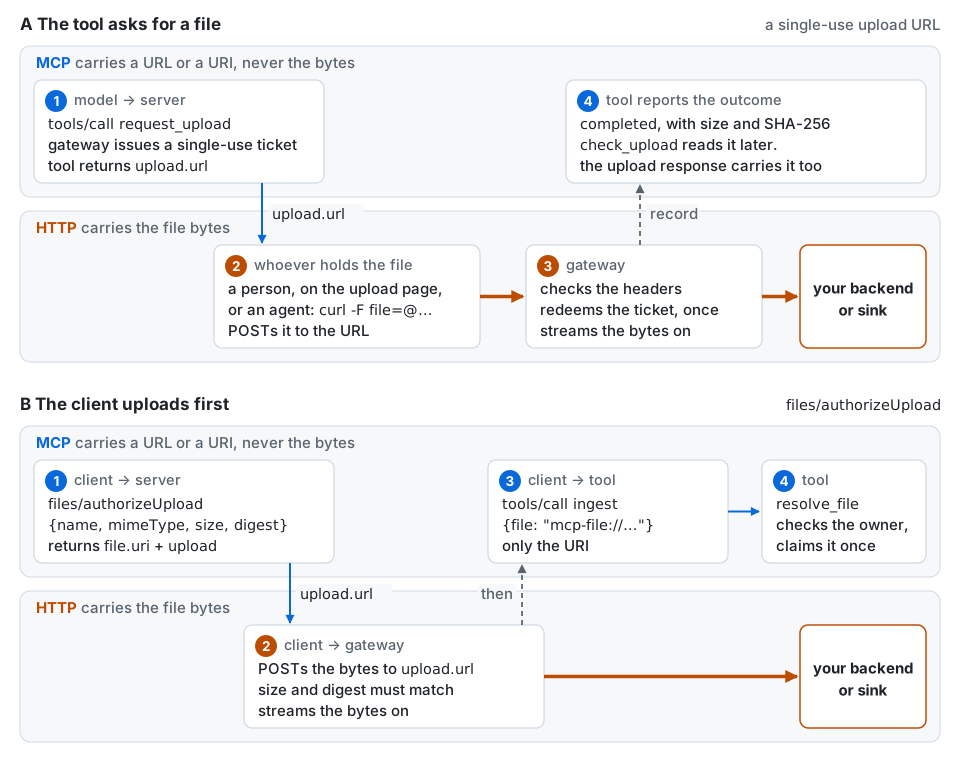
An MCP tool that needs a file hands back a single-use URL. Whoever holds the file posts it there over plain HTTPS. The server streams the bytes straight through to the backend you already have, and keeps a small record of what happened. Nothing about the file ever travels through MCP except a reference to it. No change to the protocol is needed, and no host has to know the library exists.
MCP has no file type for tool arguments. The usual workaround is to base64 the file into a string, and the real problem with that is who types the bytes. Tool arguments are model output, generated token by token, so the model has to produce the whole encoded file, perfectly. A 126 KB image costs about 120,000 output tokens. That is 94% of the 128,000-token per-response ceiling of the largest models available today. The official Python SDK's Streamable HTTP server also rejects any request body over 4 MiB before it parses the JSON. Claude.ai, Claude Desktop, Cursor and VS Code have no path for a user-attached file to reach an MCP tool, and ChatGPT's is proprietary.
The full argument, with the measurements, is at https://imaadkhan.me/writing/the-file-shaped-hole-in-mcp.html, and Why it exists has the short version and a comparison with the alternatives.
Targets protocol revision 2026-07-28. Works with the official Python SDK (mcp 2.x)
and with FastMCP (fastmcp 4.x). Python 3.11 or later. Apache 2.0.
Install
pip install "mcp-upload[mcp]"        # official SDK, mcp 2.x
pip install "mcp-upload[fastmcp]"    # FastMCP 4.x
Pick the one your server uses. FastMCP 4.x builds on the official SDK 2.x, so the two can also be installed together. The core has no dependency on either.
Quickstart
A tool that asks for a file
Declare where uploads may go, build a gateway, attach it to your server, and return what the gateway describes.
from mcp.server.mcpserver import MCPServer
from mcp_upload import Destination, MemoryStore, Registry, UploadGateway
from mcp_upload.adapters.mcp import attach
from mcp_upload.types import AwaitingUpload, UploadStatus

reports = Destination(
    name="reports",
    url="https://api.internal/reports/{filename}",
    max_size=50 * 1024 * 1024,
)
gateway = UploadGateway(
    base_url="https://mcp.example.com",  # where clients reach the upload endpoint
    registry=Registry(reports),
    store=MemoryStore(),
    server_name="example",
)
mcp = MCPServer("example")
attach(mcp, gateway)  # serves GET and POST /upload/{ticket}


@mcp.tool()
async def request_upload() -> AwaitingUpload:
    """Ask for a report. Returns a single-use upload URL valid for fifteen minutes."""
    issued = await gateway.issue("reports", owner=current_user())
    return gateway.describe(issued)


@mcp.tool()
async def check_upload(id: str) -> UploadStatus:
    return await gateway.status(id, owner=current_user())


app = mcp.streamable_http_app()
current_user() stands for however your server identifies the caller. With an
owner, another user who learns the record id sees it as unknown. request_upload
returns the upload URL in the shape of SEP-2631's transfer descriptor, and
check_upload reports the file's name, size and SHA-256 once it has arrived. With
FastMCP the only differences are from fastmcp import FastMCP,
from mcp_upload.adapters.fastmcp import attach, and app = mcp.http_app().
Upload first, then pass the file to a tool (SEP-2631)
The MCP file transfer proposal has the client authorize and upload the file before the tool call, then pass the file's URI as an ordinary string argument. With the gateway from above, the server side is an extension and a tool that resolves the URI:
from mcp.server.mcpserver.exceptions import ToolError
from mcp_upload.adapters.mcp_extension import UploadTicketExtension
from mcp_upload.resolve import FileReferenceError, resolve_file
from mcp_upload.types import FileValue

mcp = MCPServer(
    "files",
    extensions=[UploadTicketExtension(gateway, destination="reports", owner=user_of)],
)
attach(mcp, gateway)


@mcp.tool()
async def ingest(file: str) -> FileValue:
    try:
        return await resolve_file(gateway, file, owner=current_user())
    except FileReferenceError as exc:
        raise ToolError(str(exc)) from exc
On the client, upload_file does the whole flow and returns the URI:
from mcp.client import Client
from mcp_upload.client import upload_file

async with Client("https://files.example.com/mcp") as client:
    uri = await upload_file(client, "report.pdf")
    await client.call_tool("ingest", {"file": uri})
upload_file hashes the file, sends files/authorizeUpload with the size and
SHA-256, and streams the bytes from disk. resolve_file checks that the URI is one
this server issued, that the upload finished and that the caller owns it, then claims
it so a second call with the same URI is refused. user_of(ctx) maps the request to
a user, and the
usage guide
builds one on the SDK's access token. SEP-2631 is a proposal, and the method name and
shapes may change before it lands.
Who sends the bytes
The upload URL is the whole interface, so anything that can make an HTTP request with the bytes can finish the job.
- A person opens the URL in a browser and picks the file. This is the path in Claude.ai, Claude Desktop, ChatGPT, Cursor and VS Code.
- An agent with a shell, such as Claude Code, runs
curl -F file=@path <url>. - A client that supports URL-mode elicitation shows the link and asks the user for
consent, when the tool uses
ask_for_upload. - A harness with no person present reads the upload target that
ask_for_uploadputs in the tool'sinput_requiredresult, sends the bytes itself, and retries. The upload endpoint can require the same bearer token as the server's MCP requests. - Your own program posts the file and then asks the server what happened, or calls
upload_file.
No host today acts on an upload request by itself, and none renders a native file picker for MCP. The browser page exists so the pattern works everywhere anyway.
The upload page
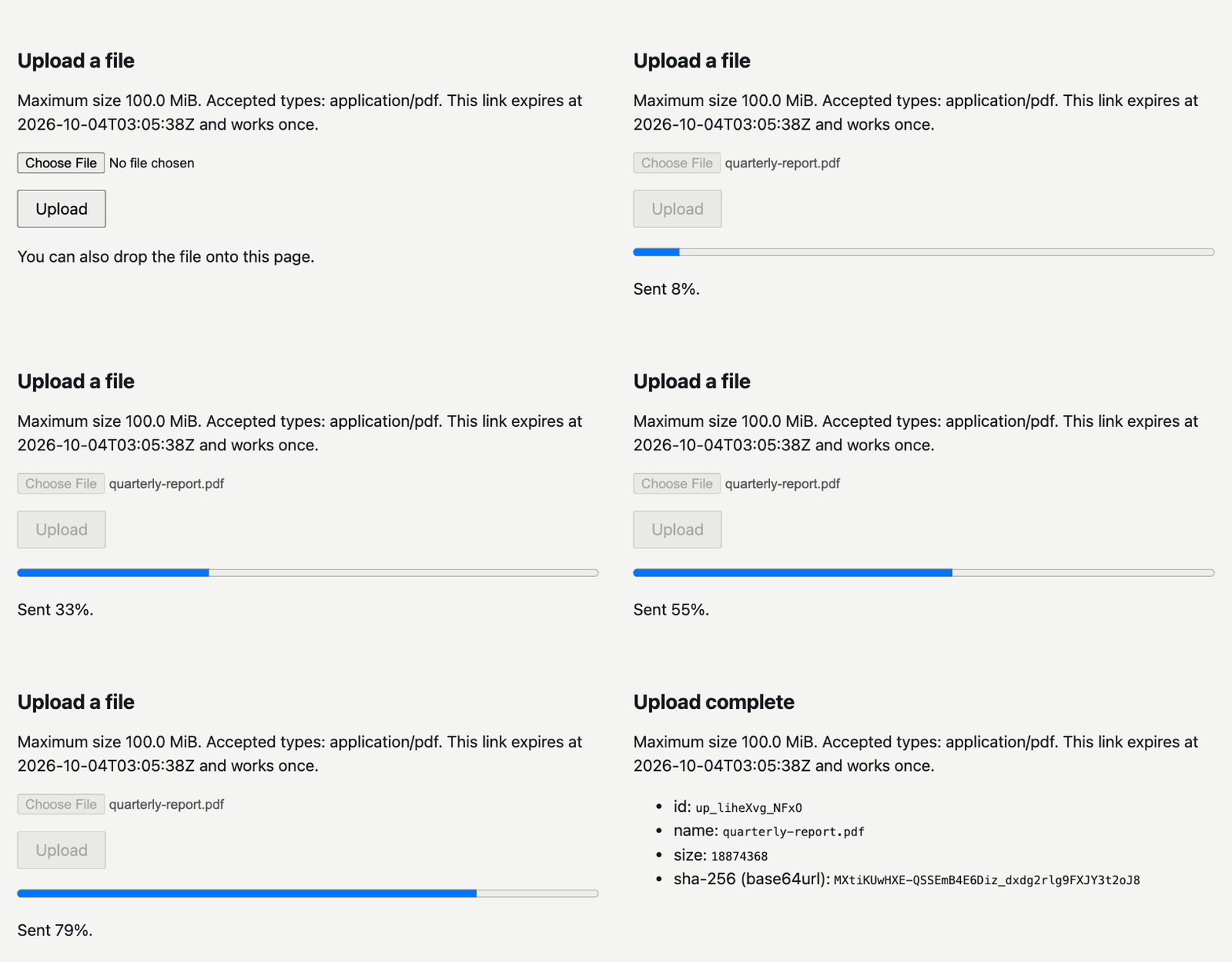
A GET on the upload URL renders this page: a plain form that works with scripts off
and adds drag and drop and a progress bar where scripts run.
What it guarantees, and how it was tested
Each guarantee below was attacked with the stress harness in stress/, mostly over
real sockets with the gateway, a backend and the load in separate processes. Measured
on one machine:
| Guarantee | Attack | Result |
|---|---|---|
| Part headers cannot exhaust memory | A 64 MiB part header, max_size 1 MiB |
Refused after 2 MiB, gateway at 56 MB |
| Slow clients cannot hold every slot | 32 slow clients against 40 honest uploads | 28 honest uploads completed, slow clients cut at 35 s |
| The concurrency cap holds | A burst against max_in_flight=8 |
8 at the backend at once |
| A completed upload has exactly the bytes sent | 3,000 randomized multipart bodies | 0 completed with wrong bytes |
| Bytes that differ from a declared size or digest are never committed | 100 wrong digests and 50 wrong sizes | All refused, none committed |
| Another user cannot see or claim your file | 50 lookups by another user, and their claims | 0 leaks, no claim won |
| A ticket is redeemed once and a file is claimed once | 100 simultaneous posts of one ticket to two gateway processes sharing one Redis, and concurrent claims | One winner each |
| A crashed upload still gets an answer | A gateway killed mid-upload | abandoned 33 s after restart |
| SEP-2631 works end to end | 50 concurrent good flows, plus mismatched, oversize, repeated and other-owner flows | 90 of 90 on each framework |
The protections cost some throughput: one 1 GiB upload streams at 878 MiB/s, against 999 MiB/s on 0.3.0, medians of three alternating runs. The changelog records the release each figure comes from, with the same runs against 0.3.0 for comparison.
A nightly CI job reruns most of these against real sockets and a real Redis, along with the multipart fuzz and the SEP-2631 flows, and fails on any broken invariant. The slow-client and crash runs are not in it. Testing it covers the harness and how to compare two versions with it.
Where the bytes go
A tool never names a URL, host or path. It names a destination the server author
registered at startup, and the gateway streams the bytes there. A destination is an
HTTP backend
that accepts a streamed body, an
async function
in your own process, or the ready-made
filesystem sink.
Tickets live in a store:
MemoryStore for one process and for tests, SqliteStore for one host with several
workers, and RedisStore for a server behind a load balancer.
Guide
- Why it exists: the problem in full, the alternatives compared, and the limits and non-goals.
- Using it: how an
upload flows, owners, declared digests and claiming, URL elicitation, headless
harnesses, bearer tokens on uploads,
on_completeand OpenTelemetry, the extension,files/authorizeUploadwith its errors and destination choice, and the example. - Where the bytes go: HTTP backends, function destinations, the filesystem sink, raw-body uploads and the upload page.
- The ticket and the endpoint: why the ticket is enough, the stores, every refusal and its error code, and streaming.
- Deploying it: TLS, limits, destinations, logs, bearer tokens and reporting a vulnerability.
- Testing it: the test suite, the stress harness, the fuzz, the SEP-2631 flows and the nightly job.
- Security: the threat model and how to report a vulnerability.
Stability
From 1.0 the library follows semantic versioning. The public API is every name in
mcp_upload.__all__, the adapters in mcp_upload.adapters, mcp_upload.sinks,
mcp_upload.client, mcp_upload.redis_store, the error codes in ERROR_STATUS and
the JSON shapes the endpoint returns. Anything starting with an underscore is not.
The files/authorizeUpload method and the FileValue and FileTransferDescriptor
shapes follow SEP-2631, which is a proposal. If it changes before it lands, the
library will follow it in a minor release and say so in the changelog. Everything else
changes only in a major release.
Limits
Upload only. Server-to-client delivery is already covered by MCP resources. One file per ticket, and no resumable or chunked uploads. The accept list is checked against the declared type, and the bytes are not sniffed. The library has no storage of its own: bytes go to your backend or your sink and nowhere else. The full list is in Limits and non-goals.
Provenance
The design comes from production systems I built and ran, in C# on ASP.NET Core, and rebuilt here in Python. The code, the tests, this README and the guide were written with AI assistance (Claude Code) under my direction and review.
The wire shapes follow the MCP file transfer proposal, SEP-2631, by Casey Chow (OpenAI). The pattern itself has been arrived at independently by several implementers, among them Notion's MCP server, FutureSearch and zenk-co/mcp-upload-kit. The earliest request for it in the MCP repository is discussion #1197, from December 2024.
License
Apache 2.0. See LICENSE.
1 maintainer

Metadata
1 maintainer
Release files for mcp-upload 1.1.2
For a detailed explanation of source distributions (sdists) and built distributions (wheels), please see the package formats documentation.
Source distribution (sdist)
| File | Size | Uploaded | Provenance | Actions |
|---|---|---|---|---|
| mcp_upload-1.1.2.tar.gz | 136.5 kB | With provenance | Details for mcp_upload-1.1.2.tar.gz |
Built distribution (wheel)
| File | Interpreter | ABI | Platform | Actions Reset |
|---|---|---|---|---|
| mcp_upload-1.1.2-py3-none-any.whl | Python 3 | none | any | Details for mcp_upload-1.1.2-py3-none-any.whl |
Total release size: 226.1 kB
Release files / mcp_upload-1.1.2.tar.gz
| Download URL | mcp_upload-1.1.2.tar.gz |
|---|---|
| Size | 136.5 kB |
| Tags | Source |
|
SHA-256 checksum How to use checksums |
e9f80edb81f947658e00310c6141f24754721ce4c39c9be8ac16935887ab62c4
|
|
BLAKE2b-256 checksum How to use checksums |
bdef890761d7627ef863affd9a37119a841c26afc114a5d3551f5f5bf96eecf0
|
| Upload date | |
|
Uploaded using Trusted Publishing? What is trusted publishing? |
Yes |
| Uploaded via |
twine/7.0.0 CPython/3.13.14
|
Provenance
Provenance describes where a file came from. On PyPI, provenance is shared via attestations, which provide a verifiable record of the build or publishing details. View details, limitations and caveats.


PyPI Publish Attestation
PyPI verified that this artifact, at this checksum, originated from the publisher listed below.
Signed by GitHub Actions, verified by PyPI on Oct 5, 2026.
Transparency logRelease files / mcp_upload-1.1.2-py3-none-any.whl
| Download URL | mcp_upload-1.1.2-py3-none-any.whl |
|---|---|
| Size | 89.6 kB |
| Tags | Python 3 |
|
SHA-256 checksum How to use checksums |
6df06d9e8a77510f076352c8262362da579050fb41885bb550d848d891cceb0b
|
|
BLAKE2b-256 checksum How to use checksums |
2c2d8a83eda3f832314dca377b3fed17b8b6e0a1e8c4c2b0d251f359d0bcf2fe
|
| Upload date | |
|
Uploaded using Trusted Publishing? What is trusted publishing? |
Yes |
| Uploaded via |
twine/7.0.0 CPython/3.13.14
|
Provenance
Provenance describes where a file came from. On PyPI, provenance is shared via attestations, which provide a verifiable record of the build or publishing details. View details, limitations and caveats.
PyPI Publish Attestation
PyPI verified that this artifact, at this checksum, originated from the publisher listed below.
Signed by GitHub Actions, verified by PyPI on Oct 5, 2026.
Transparency logSecurity for mcp-upload 1.1.2
Provenance
Provenance describes where a file came from. On PyPI, provenance is shared via attestations, which provide a verifiable record of the build or publishing details. View details, limitations and caveats.
Full provenance
All 2 files in this release have been uploaded with provenance metadata.
Attestation for mcp_upload-1.1.2.tar.gz
PyPI Publish Attestation
PyPI verified that this artifact, at this checksum, originated from the publisher listed below.
Signed by GitHub Actions, verified by PyPI on Oct 5, 2026.
Transparency logA note on package security
PyPI is a repository for distributing packages, not a service for auditing them. While third-party security researchers and our staff do their best to detect and remove malicious packages, PyPI cannot guarantee the quality, security or suitability of any given package.
To learn more about protecting yourself from malicious actors, visit our package security documentation.














