





Static security scanner for MCP (Model Context Protocol) servers written in Python, JavaScript and TypeScript. Point it at a server's source or config and it flags the problems that let an attacker hijack an AI agent: tool poisoning, command injection, path traversal, SSRF, SQL injection, unsafe deserialization, leaked secrets and unauthenticated transports.
Zero dependencies. One command. Works in CI.
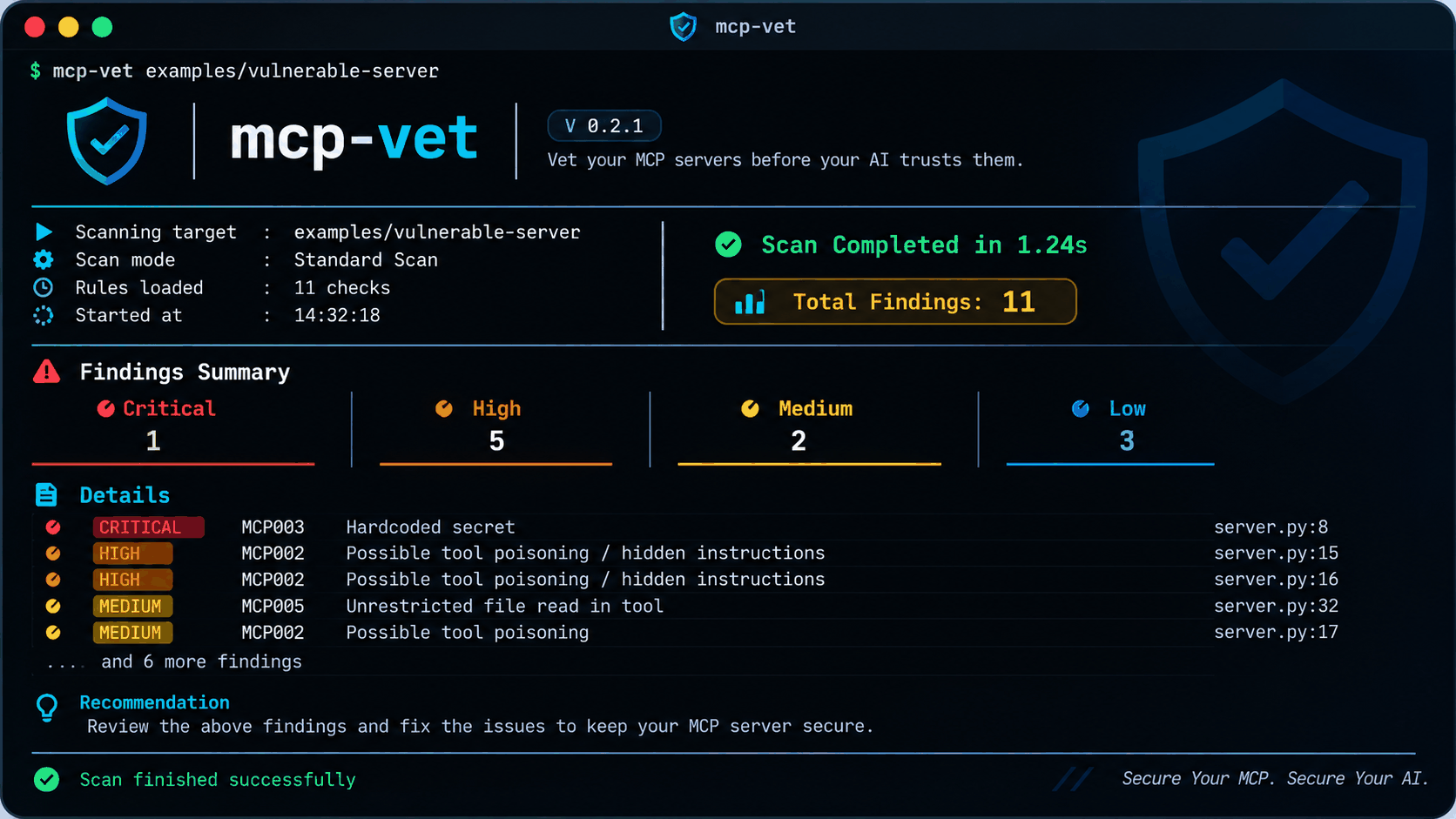
A stylised rendering of the report. The totals (11 findings: 1 critical, 5 high, 2 medium, 3 low) and the 11 rules come from a real run on examples/vulnerable-server; the version number, scan time and clock time are illustrative. A real run always lists every critical and high finding, so it shows more rows than this image; --limit 5 shortens the list for the weaker ones.
Why
An MCP server lets an AI take real actions: read files, run commands, call APIs. A weak server can leak data or run an attacker's instructions, and most people install them without reading the code. mcp-vet is a linter for that gap.
Install
pip install mcp-vet-scanner   # needs Python 3.9+, no other dependencies
mcp-vet --version             # the command is `mcp-vet`
The PyPI package is called mcp-vet-scanner because mcp-vet is too similar to an unrelated project already on PyPI. The command, the repository and the Python module are all mcp-vet.
From source:
git clone https://github.com/sonuoffsec/mcp-vet && cd mcp-vet
pip install -e .
Or run it without installing: PYTHONPATH=src python -m mcp_vet ./my-server.
Use
mcp-vet ./my-server                        # the report shown above
mcp-vet ./my-server -v                     # also show the offending code and how to fix each rule
mcp-vet ./my-server --all                  # list every finding (default: up to 10, never hiding critical or high)
mcp-vet ./my-server --limit 5              # shorter list of the weaker findings
mcp-vet ./my-server -f json -o out.json    # machine-readable
mcp-vet ./my-server -f sarif -o out.sarif  # GitHub code scanning
mcp-vet ./my-server --fail-on MEDIUM       # CI gate (default: HIGH)
mcp-vet --list-rules
The report is colourised on a terminal. Colour is off when the output is piped or written to a file, with --no-color, or when the NO_COLOR environment variable is set. JSON and SARIF output never change with these display options.
Exit code is 1 when a finding at or above --fail-on exists, 2 on usage errors, otherwise 0.
Rules
| ID | Severity | What it catches |
|---|---|---|
| MCP001 | HIGH / MEDIUM | Shell or dynamic code execution. Python: HIGH only when a tool argument reaches shell=True, os.system, eval or chooses the program; MEDIUM if the command is non-constant but not tool-controlled; constants are ignored. JS/TS: HIGH when a tool argument reaches exec, eval, new Function or a shell spawn; MEDIUM when a command is non-constant |
| MCP002 | HIGH | Tool poisoning: instructions aimed at the model hidden in descriptions or code |
| MCP003 | CRITICAL | Hardcoded secrets (AWS, GitHub, OpenAI/Anthropic-style keys, Slack, private keys). Output is redacted |
| MCP004 | HIGH | HTTP/SSE transport with no authentication anywhere in the project, especially when bound to 0.0.0.0 |
| MCP005 | MEDIUM | Tool argument controls a file path with no containment check (path traversal) |
| MCP006 | LOW | Unpinned dependencies (requirements.txt, package.json) |
| MCP007 | HIGH | MCP config granting access to /, ~ or a whole drive |
| MCP008 | HIGH | Hidden Unicode (zero-width, bidi, tag characters) that can conceal instructions. In .md/.txt only bidi overrides, tag characters and runs of 3+ zero-width characters count, so Persian, Thai and emoji text is not flagged |
| MCP009 | MEDIUM | Tool argument controls the URL of an outbound request (SSRF) |
| MCP010 | HIGH / MEDIUM | SQL built from tool input: HIGH when a query that looks like SQL is assembled with f-strings, +, % or .format; MEDIUM when the caller passes the whole query. ORM statements such as select(...).where(...) are not flagged |
| MCP011 | HIGH | Tool argument passed to an unsafe deserializer (pickle, marshal, dill, yaml.load without a safe loader) |
Suppress a finding
os.system(cmd) # mcp-vet: ignore MCP001
Omit the rule ID to suppress every rule on that line.
GitHub Action
- run: pip install mcp-vet-scanner
- run: mcp-vet . -f sarif -o mcp-vet.sarif --fail-on HIGH
- uses: github/codeql-action/upload-sarif@v3
  if: always()
  with: { sarif_file: mcp-vet.sarif }
How it works
- Python files are parsed into an AST and checked with simple taint tracking. Values that come from a tool's parameters are "tainted". Taint follows assignments, and calls to functions named like
validate,sanitize,safe,check,alloworquote(for exampleshlex.quote) clear it. A tool that runs a constant command is not flagged. - JavaScript and TypeScript get their own analyzer, with no dependencies. A tokenizer (strings, template literals, comments, regex literals) feeds a scope-aware pass that finds tool handlers (
server.tool,registerTool,setRequestHandler) and HTTP routes (Express, Fastify), follows tool arguments through assignments and destructuring, and understandsimport { a as b },require,promisify(exec),execa,shelljsand Zod schemas that constrain an input (z.enum,z.number,z.string().uuid()). It also knows that a ternary's value comes only from its branches, that an equality test yields a boolean, and thatORDERS[args.sort]returns a value the caller does not control. It is a purpose-built analyzer, not a full JavaScript parser: a file it cannot tokenize falls back to line patterns, reported at lower confidence. - Config and manifest files (
package.json,requirements.txt, MCP client config) are checked with direct rules. - HTTP route handlers count as entry points. Python functions decorated like
@app.post("/mcp/call")(FastAPI, Flask) are treated like tool handlers, so hand-rolled MCP-over-HTTP servers are analyzed too. - Authentication and path guards are looked for per app: in the same folder, or any parent folder, that has its own
requirements.txt,package.jsonorDockerfile. One app's auth does not hide another app's gap. - Allowlist checks count. A parameter tested with
if x not in ALLOWED: return/raise, or looked up withif registry.get(x) is None: raise, is treated as validated. A filesystem existence check (os.path.exists,isfile) is not. - One hop into helpers. If a tool passes a tool argument to a plain function defined in the same file, and that function runs a command, opens a path or makes a request, the tool's call is reported.
- Wide sink coverage. File operations include
open,Path(...).read_text/unlink/...,os.remove/listdir/rename,shutil.copy/rmtree/moveandsend_file. Command execution includesos.system,subprocesswithshell=True, a caller-chosen program (cmd.split(),shlex.split),os.exec*and__import__('os').system. - Test files and test directories are skipped by default (
--include-teststo scan them).
Tested on real servers
All runs were static: the code was cloned and read, never executed.
Precision on 67 small community MCP servers (about 29,500 files in Python, JavaScript and TypeScript):
- The first pass (v0.1) reported 715 HIGH or CRITICAL findings. Almost all were false positives: emoji and Persian/Sinhala text flagged as hidden Unicode, code that reads
.envflagged as tool poisoning, Playwright's$evalflagged aseval, security libraries that contain the very strings they block. Each cause was fixed and became a regression test. - Today there are 12 HIGH or CRITICAL findings in 6 repos. Eight of them I reviewed by hand and none is a vulnerability: blocklists and defensive examples in security libraries, attack payloads in test data, defensive prompt text, a test credential, and a zero-width character in a docstring. The other 4 are SQL findings (MCP010) in a single repo, a low-code platform that executes SQL stored in its application configuration by design. I traced six more findings in that repo to code that is escaped (
pg.escapeIdentifier) or parameterized and fixed the analyzer for those patterns. The remaining four run configured SQL, and the analyzer cannot tell configuration from request data once both pass through a context object, so I have not confirmed whether any of them is exploitable. - The file-path findings (MCP005, MEDIUM) are the most useful tier: 40 findings in 8 repos. I checked 24 of them (the flagged line and its enclosing function): 22 were a tool argument deciding where a file is read, written, copied, listed or deleted (
save_to,world_path,directory,filePath,session_id), and 2 were false positives (validated by a registry lookup; guarded by the caller), both fixed. I did not read all 40. Many of these servers are local developer tools where choosing a path is the point, so "real" means the rule's condition holds, not that the server is exploitable. - Two further JavaScript findings I read and confirmed: a tool that reads an arbitrary caller-supplied file path, and a tool that fetches a caller-supplied URL (
faucetUrl: z.string().url()checks the format only). - When the JS/TS analyzer was first enabled it reported 391 JS findings against 102 from the old patterns. Nearly all of the 337 new ones were false positives:
/regex/.exec()mistaken forchild_process.exec, SQL fragments built from a ternary of constants,ORDERS[args.sort]allowlist lookups, query-builder helpers that return?placeholders,items.map(() => '?'),pg.escapeIdentifierunder another name. Each was fixed and tested, and the JS/TS count is now 72. - The SQL rule first reported 23 findings on one Python repo, all false positives (SQLAlchemy ORM statements). It now only flags SQL built by string formatting, or a query passed in whole by the caller.
- The official
modelcontextprotocol/serversrepo (TypeScript) produces no findings other than four unpinned workspace dependencies, and the Python SDK produces two MEDIUMshell=Truecalls in its developer CLI.
Recall on a deliberately vulnerable server. DVAP's MCP lab contains an unauthenticated endpoint, an arbitrary file read and two SSRF calls. The first version of this scanner found none of them. It only understood the official SDK's decorators, and one app's auth elsewhere in the repo hid the missing auth. After adding route-handler support and per-app scoping, it finds all of them (plus a further SSRF in a second lab). That is one server, so treat it as a sanity check, not a measured recall rate.
Recall suite. tests/recall_cases.py and tests/recall_cases_js.py hold 118 vulnerable snippets (each must trigger its rule) and 82 safe twins (none may produce a MEDIUM or higher finding), 63 and 43 of them JavaScript or TypeScript. It runs with the tests, and python tests/test_recall.py prints a per-rule table. A lesson from building it: the first version scored 37 of 37, which proved little, because I wrote the cases knowing how the scanner works. A probe with 18 harder Python variants (os.remove, shutil.copy, subprocess.run(x.split()), pickle.loads, a tainted value passed through a helper, __import__('os').system...) found that 13 of 18 were missed, and a probe with 21 harder JS variants found 4 misses and 1 false positive. Those drove the file-operation, command-construction, helper-tracking, SQL, deserialization, alias-resolution and Zod work, and every variant is now a permanent test case. The suite measures known bug classes and regressions, not unknown ones.
What this does not show. The rules were tuned on this same sample, so the precision above is optimistic. None of the 67 servers was malicious, so I have not measured how well tool-poisoning detection (MCP002) works against real attacks beyond the patterns in the tests.
Limits (read this)
- Static analysis. It does not run your server, so runtime-only bugs are missed.
- Taint tracking is shallow. It follows assignments inside a function and one call into a helper defined in the same file. It does not follow data across files, through classes, or two helpers deep. Sanitizer detection is name-based (
validate,sanitize,safe,resolve_,quote...), so a function calledvalidate_paththat does not validate will be trusted. - Not covered: XSS, authorization logic, race conditions, prototype pollution, and logic flaws in how a tool uses the model's output. Unsafe deserialization in JS/TS is limited to
node-serialize. - The JS/TS analyzer is not a full parser. It will miss taint that flows through classes,
.mapcallbacks or dynamic property access, and it can be fooled by unusual code layout. Files over about 600 KB,.d.tsfiles and minified bundles are not analyzed. - MCP004 and MCP005 trust any auth or guard code in the same app. One unrelated
Authorizationheader in the app will silence MCP004, and an existence check such asos.path.isfileis correctly not treated as a guard, but a badly written custom one namedvalidate_pathwould be. - Recall is measured on one server (DVAP's MCP lab) and precision on 67 servers that were also used to tune the rules. Expect different results on code that looks unlike these.
- A clean report is not a security guarantee.
Develop
python -m unittest discover -s tests
python -m mcp_vet src    # the scanner scans itself
The examples/ folder holds a deliberately vulnerable server and a clean one. Never deploy the vulnerable one.
Roadmap
- Parse tool schemas and flag over-permissive inputs
- SSRF and unsafe-deserialization rules
- Dependency CVE lookup
- Dataset mode: batch-scan many public servers and emit aggregate statistics
- Prompt-injection guardrail benchmark (companion project)
Responsible use
- Use mcp-vet on code you own, or code you are authorized to review. It only reads files; it never connects to or executes a server.
- If you find a vulnerability in someone else's project, report it privately to the maintainers and allow a reasonable time (commonly 90 days) before publishing details.
- Findings are heuristic signals, not proof of a vulnerability. Verify each one before acting on it or reporting it.
- Example files in
examples/are intentionally insecure and use only documentation placeholder credentials. Never deploy them.
Disclaimer
This is an independent open-source project. It is not affiliated with, endorsed by, or sponsored by Anthropic or the Model Context Protocol project, and it is unrelated to the PyPI project mcpvet, which is a different tool. "MCP" and other names mentioned belong to their respective owners.
The software is provided "as is", without warranty of any kind (see LICENSE). A clean scan is not a guarantee that a server is secure.
Found a security problem in mcp-vet itself? See SECURITY.md.
License
MIT
1 maintainer

Metadata
1 maintainer
Release files for mcp-vet-scanner 0.2.2
For a detailed explanation of source distributions (sdists) and built distributions (wheels), please see the package formats documentation.
Source distribution (sdist)
| File | Size | Uploaded | Provenance | Actions |
|---|---|---|---|---|
| mcp_vet_scanner-0.2.2.tar.gz | 54.2 kB | With provenance | Details for mcp_vet_scanner-0.2.2.tar.gz |
Built distribution (wheel)
| File | Interpreter | ABI | Platform | Actions Reset |
|---|---|---|---|---|
| mcp_vet_scanner-0.2.2-py3-none-any.whl | Python 3 | none | any | Details for mcp_vet_scanner-0.2.2-py3-none-any.whl |
Total release size: 98.1 kB
Release files / mcp_vet_scanner-0.2.2.tar.gz
| Download URL | mcp_vet_scanner-0.2.2.tar.gz |
|---|---|
| Size | 54.2 kB |
| Tags | Source |
|
SHA-256 checksum How to use checksums |
8521872942d873d6403787d5893129d187d03b1a5728cc8b4e84188fa2a0220e
|
|
BLAKE2b-256 checksum How to use checksums |
830ad980ad44764b3d8595385d78471e50cd33611608c7e278ec39f98f781af4
|
| Upload date | |
|
Uploaded using Trusted Publishing? What is trusted publishing? |
Yes |
| Uploaded via |
twine/7.0.0 CPython/3.13.16
|
Provenance
Provenance describes where a file came from. On PyPI, provenance is shared via attestations, which provide a verifiable record of the build or publishing details. View details, limitations and caveats.


PyPI Publish Attestation
PyPI verified that this artifact, at this checksum, originated from the publisher listed below.
Signed by GitHub Actions, verified by PyPI on Nov 21, 2026.
Transparency logRelease files / mcp_vet_scanner-0.2.2-py3-none-any.whl
| Download URL | mcp_vet_scanner-0.2.2-py3-none-any.whl |
|---|---|
| Size | 43.9 kB |
| Tags | Python 3 |
|
SHA-256 checksum How to use checksums |
7b39e4350a980370aef99b9f481ecd5a96e635e40dd0eac778b5e9e5fe32e8d7
|
|
BLAKE2b-256 checksum How to use checksums |
4fa44802cb8e648aaeb1beac670b0d5a409992c3665cb4c0f473aa94ecb75ef0
|
| Upload date | |
|
Uploaded using Trusted Publishing? What is trusted publishing? |
Yes |
| Uploaded via |
twine/7.0.0 CPython/3.13.16
|
Provenance
Provenance describes where a file came from. On PyPI, provenance is shared via attestations, which provide a verifiable record of the build or publishing details. View details, limitations and caveats.
PyPI Publish Attestation
PyPI verified that this artifact, at this checksum, originated from the publisher listed below.
Signed by GitHub Actions, verified by PyPI on Nov 21, 2026.
Transparency logSecurity for mcp-vet-scanner 0.2.2
Provenance
Provenance describes where a file came from. On PyPI, provenance is shared via attestations, which provide a verifiable record of the build or publishing details. View details, limitations and caveats.
Full provenance
Both files in this release have been uploaded with provenance metadata.
Attestation for mcp_vet_scanner-0.2.2.tar.gz
PyPI Publish Attestation
PyPI verified that this artifact, at this checksum, originated from the publisher listed below.
Signed by GitHub Actions, verified by PyPI on Nov 21, 2026.
Transparency logA note on package security
PyPI is a repository for distributing packages, not a service for auditing them. While third-party security researchers and our staff do their best to detect and remove malicious packages, PyPI cannot guarantee the quality, security or suitability of any given package.
To learn more about protecting yourself from malicious actors, visit our package security documentation.














