
MCP Virtual Computer
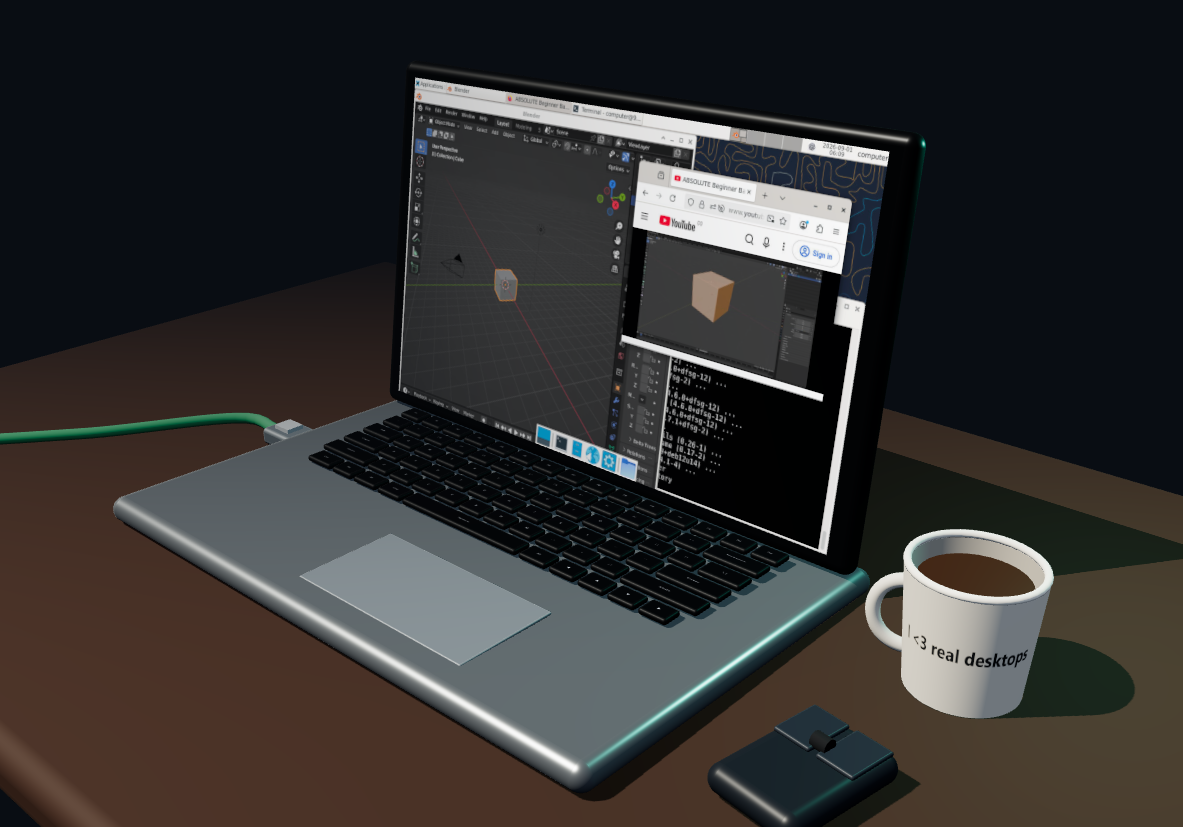
A VM for your agent. And for you.
- click the mug to switch between a virtual desktop or a real one
- unplug the network cable and cut network access
- use the computer screen like a normal screen
- model can use terminal, create/read/edit files, see the screen, click, type
- little fun thing: if either you or the llm types text, you see that on the keyboard; if one uses the cursor, you see the mouse move on the table.
- auto installs docker and all prerequresits (hopefully)
MCP client example
{
  "mcpServers": {
    "virtual-computer": {
      "command": "uvx",
      "args": ["mcp-virtual-computer"],
      "env": {
        "COMPUTER_ID": "agent-workstation",
        "DESKTOP_ENVIRONMENT": "false",
        "NETWORK_ACCESS": "true",
        "AUTO_INSTALL_DOCKER": "true",
        "EXPOSE_LIFECYCLE_TOOLS": "false"
      }
    }
  }
}
What it exposes
terminal_execute— run a command in the configured Docker computer.read_file— read a UTF-8 text file relative to/workspaceor by absolute path.write_file— atomically write a UTF-8 text file.edit_file— replace one exact text match, or all matches when requested.computer_ui— open or attach the Three.js computer view.
With DESKTOP_ENVIRONMENT=true, it additionally exposes:
look_at_screen— return the current PNG framebuffer, AT-SPI snapshot, or both.click,type, andscroll— interact by AT-SPI element reference or coordinates.list_windowsandswitch_window— enumerate and activate real Xfce windows.move_window,maximize_window,restore_window,minimize_window, andclose_window— control a selected window by ID, title, or class.computer://screen/current.png— current live framebuffer resource.computer://screen/accessibility.json— Playwright-like AT-SPI tree with element refs, roles, names, actions, focus state, and screen bounds.
Set EXPOSE_LIFECYCLE_TOOLS=true to additionally expose runtime_status, set_network_access, and set_desktop_environment; these lifecycle tools are absent by default.
License and origin
MIT licensed. This project is a Docker-only fork of Kilntainers.
1 maintainer

Download files
Download the file for your platform. If you're not sure which to choose, learn more about installing packages.
Source Distribution
Built Distribution
Filter files by name, interpreter, ABI, and platform.
If you're not sure about the file name format, learn more about wheel file names.
Copy a direct link to the current filters
File details
Details for the file mcp_virtual_computer-0.2.6.tar.gz.
File metadata
- Download URL: mcp_virtual_computer-0.2.6.tar.gz
- Upload date:
- Size: 475.3 kB
- Tags: Source
- Uploaded using Trusted Publishing? No
- Uploaded via:
twine/7.0.0 CPython/3.14.6
File hashes
| Algorithm | Hash digest | |
|---|---|---|
| SHA256 |
71dd40faae4073eaaae223c378ef80866fb2ab2bc611f28db72bb71aa29d8401
|
|
| MD5 |
5497066ade8cf6fcb7ea8e4dde44f856
|
|
| BLAKE2b-256 |
11a92253eb8a3a74104414f357cfd56142ad30f3e3d5c77f1b2f58e5ee5bba2d
|
File details
Details for the file mcp_virtual_computer-0.2.6-py3-none-any.whl.
File metadata
- Download URL: mcp_virtual_computer-0.2.6-py3-none-any.whl
- Upload date:
- Size: 492.5 kB
- Tags: Python 3
- Uploaded using Trusted Publishing? No
- Uploaded via:
twine/7.0.0 CPython/3.14.6
File hashes
| Algorithm | Hash digest | |
|---|---|---|
| SHA256 |
ecd75496ad90c1f7fc1efe4bb423ad5ccbb0a67bf49f7b39821a60e68c1065c4
|
|
| MD5 |
3a23ca0ba9f3171d50d9868654718adf
|
|
| BLAKE2b-256 |
109e79067e90ea26e9606a31955c9a1c0f7e909a5e64fb116e2855af6f40161a
|














