

mcp-zen-of-docs
📝 Write documentation the way the framework intended.








An MCP server for AI assistants that brings documentation quality tooling into your editor. Connect it to Claude Desktop, VS Code Copilot, or Cursor and your AI can detect your framework, scaffold pages in native syntax, validate structure, and generate visual assets — all inside the conversation.
- 4 primary framework profiles — Zensical, Docusaurus, VitePress, Starlight
- 3 supplemental detected contexts — MkDocs Material, Sphinx, and generic Markdown
- 22 canonical authoring primitives — frontmatter, tabs, diagrams, API endpoint blocks, badges, and more
- 10 composite MCP tools — detect, profile, scaffold, validate, generate, onboard, theme, copilot, docstring, story
- 530+ tests with pytest and Pydantic v2 type safety throughout
- CLI interface for local scripts, CI pipelines, and standalone runs
Why MCP
MCP turns documentation quality from a standalone report into an interactive authoring loop.
Instead of switching between tools, your editor calls mcp-zen-of-docs directly — your AI
detects the framework, scaffolds a page in its native syntax, validates it, and generates
assets all in the same conversation.
- Less context switching — scaffold, validate, and score without leaving your editor.
- Framework-native output — no generic Markdown; every snippet uses the right syntax.
- Consistent quality — the same ten Zen principles applied to every page, every time.
Zen Philosophy
Zen of Docs treats documentation quality as an engineering constraint, not a style preference. Every framework profile encodes the authoring primitives that make docs maintainable in that ecosystem, with a quality scorer that surfaces structural problems before they ship.
- Framework-native quality over generic Markdown linting.
- Primitive-first scaffolding beyond copy-pasting templates.
- Actionable scoring through the ten principles of The Zen of Documentation.
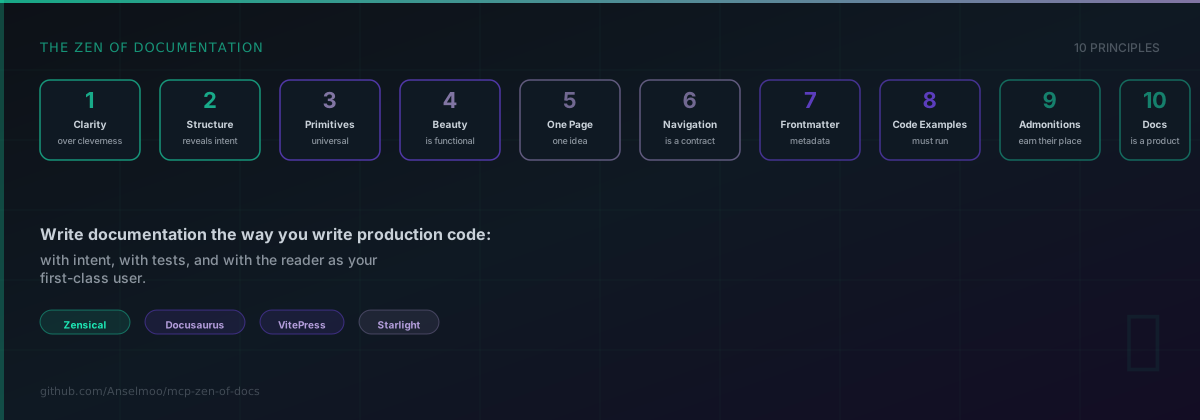
The project is guided by the Zen of Documentation — ten language-agnostic principles that drive every tool decision.
Quickstart
# MCP server (IDE and agent workflows)
uvx --from mcp-zen-of-docs mcp-zen-of-docs-server

# CLI without installing
uvx --from mcp-zen-of-docs mcp-zen-of-docs --help

# Or install globally
pip install mcp-zen-of-docs

# Scaffold a documentation page
mcp-zen-of-docs scaffold doc --doc-path docs/new-page.md --title "My Page"

# Validate your docs
mcp-zen-of-docs validate all --docs-root docs

# Score documentation quality
mcp-zen-of-docs validate score --docs-root docs
MCP Tools at a Glance
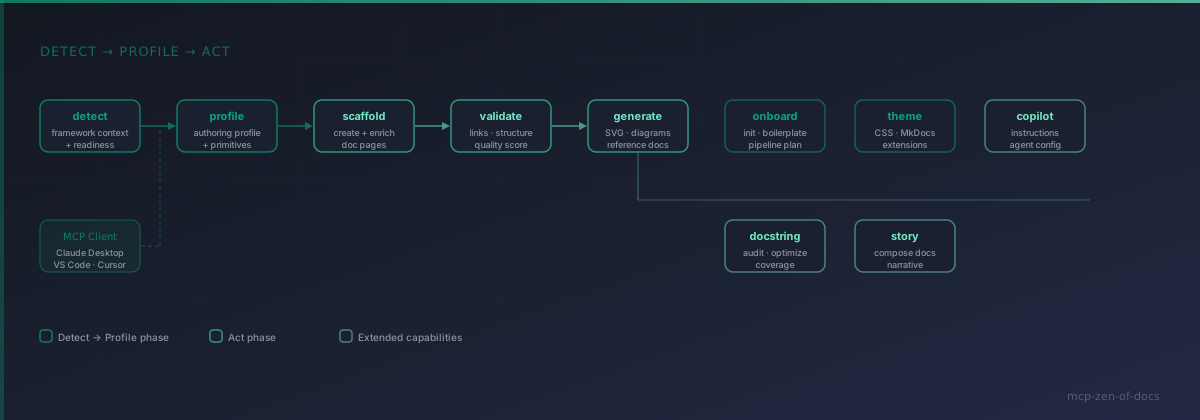
The MCP server exposes 10 composite tools across the full documentation lifecycle:
| Tool | Purpose |
|---|---|
detect |
Framework detection · project readiness checks |
profile |
Authoring profile lookup · primitive resolution · syntax translation |
scaffold |
Create and enrich documentation pages in native syntax |
validate |
Links · orphans · frontmatter · structure · quality scoring |
generate |
SVG visuals · Mermaid diagrams · reference docs |
onboard |
Project init · boilerplate scaffolding · pipeline planning |
theme |
Custom CSS, JS, and MkDocs extension generation |
copilot |
GitHub Copilot instruction files and agent configuration |
docstring |
Docstring audit and quality optimization |
story |
Multi-module documentation narrative composition |
See the full API Reference for parameters, modes, and examples.
Choose Your Path
- New user: Quickstart → Tools → Guides
- Author: Guides → Authoring Primitives → Frameworks
- Contributor: Contributing → Development → Adding a Framework
- AI-agent workflow: Quickstart → Tools → API Reference
Naming Guide
Keep these names distinct to avoid setup confusion:
- Package name:
mcp-zen-of-docs - CLI command:
mcp-zen-of-docs - MCP server command:
mcp-zen-of-docs-server - Compatibility CLI alias:
mcp-zen-of-docs-cli - MCP client server key:
zen-of-docs
Installation
MCP Integration
Add the server to your MCP client configuration.
Claude Desktop
Add to claude_desktop_config.json:
{
  "mcpServers": {
    "zen-of-docs": {
      "command": "uvx",
      "args": ["--from", "mcp-zen-of-docs", "mcp-zen-of-docs-server"]
    }
  }
}
VS Code
Add to .vscode/mcp.json:
{
  "servers": {
    "zen-of-docs": {
      "command": "uvx",
      "args": ["--from", "mcp-zen-of-docs", "mcp-zen-of-docs-server"]
    }
  }
}
Cursor
Add to .cursor/mcp.json:
{
  "mcpServers": {
    "zen-of-docs": {
      "command": "uvx",
      "args": ["--from", "mcp-zen-of-docs", "mcp-zen-of-docs-server"]
    }
  }
}
One-Click (VS Code)
| Method | VS Code | VS Code Insiders |
|---|---|---|
| UVX |  |
 |
| Docker |  |
 |
Docker
# MCP server via Docker
docker run --rm -i ghcr.io/anselmoo/mcp-zen-of-docs:latest

# CLI via Docker
docker run --rm ghcr.io/anselmoo/mcp-zen-of-docs:latest mcp-zen-of-docs --help
Documentation
Full documentation: anselmoo.github.io/mcp-zen-of-docs
Development
uv sync --group dev --group docs
uv run --group dev pytest
uv run --group dev ruff check .
uv run --group docs zensical serve
Contributing
See Adding a Framework and Development Guide to get started.
License
1 maintainer

Metadata
1 maintainer
Release files for mcp-zen-of-docs 0.1.0
For a detailed explanation of source distributions (sdists) and built distributions (wheels), please see the package formats documentation.
Source distribution (sdist)
| File | Size | Uploaded | |
|---|---|---|---|
| mcp_zen_of_docs-0.1.0.tar.gz | 189.7 kB | Details |
Built distribution (wheel)
| File | Interpreter | ABI | Platform | Reset |
|---|---|---|---|---|
| mcp_zen_of_docs-0.1.0-py3-none-any.whl | Python 3 | none | any | Details |
Total release size: 413.3 kB
Release files / mcp_zen_of_docs-0.1.0.tar.gz
| Download URL | mcp_zen_of_docs-0.1.0.tar.gz |
|---|---|
| Size | 189.7 kB |
| Tags | Source |
|
SHA-256 checksum How to use checksums |
7432ea3c777d5fd1eb24ed54dbd0fe5f4ff7d40acfc06fd91a1ce454ce6b2344
|
|
BLAKE2b-256 checksum How to use checksums |
3b143667012fc73e39dec84908f7edcf06b0a33541ba0ab1dde613deda54b6b0
|
| Upload date | |
|
Uploaded using Trusted Publishing? What is trusted publishing? |
Yes |
| Uploaded via |
twine/6.1.0 CPython/3.13.7
|
Provenance
Provenance describes where a file came from. On PyPI, provenance is shared via attestations, which provide a verifiable record of the build or publishing details. View details, limitations and caveats.


PyPI Publish Attestation
PyPI verified that this artifact, at this checksum, originated from the publisher listed below.
Signed by GitHub Actions, verified by PyPI on Mar 15, 2026.
Transparency logRelease files / mcp_zen_of_docs-0.1.0-py3-none-any.whl
| Download URL | mcp_zen_of_docs-0.1.0-py3-none-any.whl |
|---|---|
| Size | 223.6 kB |
| Tags | Python 3 |
|
SHA-256 checksum How to use checksums |
2c55e845a13c6b2492380fbd34246aa0c476155572079a36604e56e07750d2d7
|
|
BLAKE2b-256 checksum How to use checksums |
83d5d9d3ba49f01c1752a7bbb244a6296ce5e12e060829ff4a61b5813f800fb7
|
| Upload date | |
|
Uploaded using Trusted Publishing? What is trusted publishing? |
Yes |
| Uploaded via |
twine/6.1.0 CPython/3.13.7
|
Provenance
Provenance describes where a file came from. On PyPI, provenance is shared via attestations, which provide a verifiable record of the build or publishing details. View details, limitations and caveats.
PyPI Publish Attestation
PyPI verified that this artifact, at this checksum, originated from the publisher listed below.
Signed by GitHub Actions, verified by PyPI on Mar 15, 2026.
Transparency log












