
Multi-language architectural and idiomatic code analysis via CLI and MCP server.
Verified details
These details have been verified by PyPIProject links
GitHub Statistics
Maintainers

Project description

Zen of Languages
🖌️ Write code the way the language intended.








An MCP server for AI assistants that brings multi-language idiomatic code analysis into your editor. Zen of Languages codifies best practices ("zen principles") into machine-readable rules across programming languages, CI automation, and configuration formats — so AI agents and developers get actionable, language-aware feedback in every review. Connect it to Codex, Claude Desktop, VS Code, Cursor, or any MCP-compatible client and start analyzing code in seconds.
- 348 zen principles across programming, markup, workflow, and config domains
- 367 detector/check coverage points with severity scoring
- MCP server for IDE and agent workflows (13 tools, 3 resources, 1 prompt)
- CLI reports with remediation prompts and JSON / Markdown export
- Rule-driven pipelines configurable per language and project
Why MCP for Zen Analysis
MCP turns zen analysis from a standalone report into an interactive engineering loop. Instead of copying output between tools, your editor/agent can call zen tools directly, inspect violations in context, generate remediation prompts, and apply fixes in one flow.
- Less context switching: analyze, explain, and remediate without leaving your coding session.
- Higher-fidelity fixes: prompts are generated from structured violations, not ad-hoc lint text.
- Team consistency: MCP workflows make review behavior repeatable across IDEs and agents.
Zen Philosophy
Zen of Languages treats idioms as engineering constraints, not style preferences. Every language guide encodes the practices that make code maintainable in that ecosystem, then scores violations by risk so teams can fix what matters first.
- Language-native quality over one-size-fits-all linting.
- Architectural feedback beyond formatting checks.
- Actionable prioritization through severity-guided remediation.
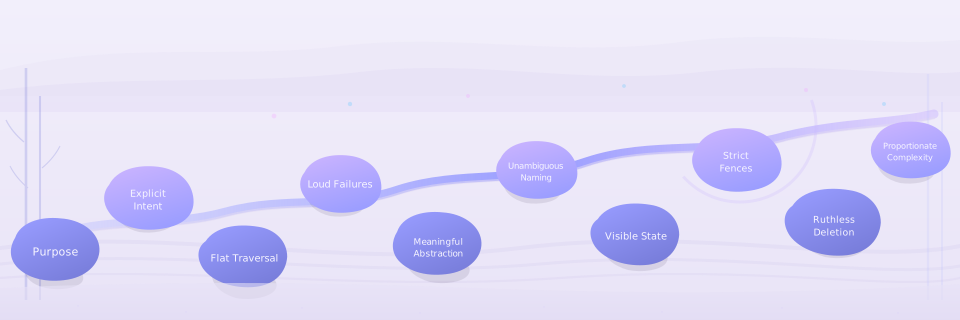
The project is guided by the 10 Dogmas of Zen — a set of language-agnostic principles that drive every detector and architectural decision. Read the full philosophy document for anti-patterns, rationale, and detector mappings.
Quickstart
# MCP server (IDE/agent workflows)
uvx --from mcp-zen-of-languages mcp-zen-of-languages-server

# CLI without installing (recommended)
uvx --from mcp-zen-of-languages mcp-zen-of-languages-cli --help

# Or install globally
pip install mcp-zen-of-languages

# Analyze a file (CLI)
mcp-zen-of-languages-cli report path/to/file.py

# Analyze a project with remediation prompts (CLI)
mcp-zen-of-languages-cli report path/to/project --include-prompts
Legacy aliases remain available after install: zen for the CLI and
zen-mcp-server for the MCP server.
Ignore files during analysis
Directory scans in both CLI and MCP repository analysis honor:
.gitignore.zen-of-languages.ignore
zen init now bootstraps a starter .zen-of-languages.ignore file when one is missing.
Naming Guide
Keep these names distinct to avoid setup confusion:
- Package name:
mcp-zen-of-languages(forpip installanduvx --from) - Preferred CLI command:
mcp-zen-of-languages-cli - Preferred server command:
mcp-zen-of-languages-server - Compatibility aliases:
mcp-zen-of-languages,zen, andzen-mcp-server - MCP client server key:
zen-of-languages(JSON config label in VS Code/Claude/Cursor; use the same label as a quoted TOML table name in Codex)
Installation
MCP Integration
Add the server to your MCP client configuration. For the full setup guide, see MCP Integration.
Claude Desktop — add to claude_desktop_config.json:
{
  "mcpServers": {
    "zen-of-languages": {
      "command": "uvx",
      "args": ["--from", "mcp-zen-of-languages", "mcp-zen-of-languages-server"]
    }
  }
}
VS Code — add to .vscode/mcp.json:
{
  "servers": {
    "zen-of-languages": {
      "command": "uvx",
      "args": ["--from", "mcp-zen-of-languages", "mcp-zen-of-languages-server"]
    }
  }
}
Cursor — add to .cursor/mcp.json:
{
  "mcpServers": {
    "zen-of-languages": {
      "command": "uvx",
      "args": ["--from", "mcp-zen-of-languages", "mcp-zen-of-languages-server"]
    }
  }
}
Codex — add to ~/.codex/config.toml:
[mcp_servers."zen-of-languages"]
command = "uvx"
args = ["--from", "mcp-zen-of-languages", "mcp-zen-of-languages-server"]
enabled = true
Codex loads MCP servers from the global ~/.codex/config.toml file rather than a repo-local workspace config.
One-Click (VS Code)
| Method | VS Code | VS Code Insiders |
|---|---|---|
| UVX (native) |  |
 |
| Docker (isolated) |  |
 |
Docker
# MCP server via Docker
docker run --rm -i ghcr.io/anselmoo/mcp-zen-of-languages:latest

# CLI via Docker
docker run --rm ghcr.io/anselmoo/mcp-zen-of-languages:latest mcp-zen-of-languages-cli --help
CLI — First Code Anamnesis
The CLI is a powerful tool for first code anamnesis — an initial diagnostic sweep of any codebase. Before wiring up MCP or choosing which files to focus on, run a single command to get a full-project health picture with severity-ranked violations, architectural smells, and remediation guidance.
# Install globally
pip install mcp-zen-of-languages

# Full-project diagnostic in one command
mcp-zen-of-languages-cli report path/to/project --include-prompts

# Export structured results for CI or dashboards
mcp-zen-of-languages-cli report path/to/project --export-json report.json --export-markdown report.md
From source:
git clone https://github.com/Anselmoo/mcp-zen-of-languages.git
cd mcp-zen-of-languages
uv sync --all-groups --all-extras

# Start the MCP server
mcp-zen-of-languages-server

# Run a CLI report
mcp-zen-of-languages-cli report path/to/file.py
MCP Tools
The server exposes 13 tools, 3 resources, and 1 prompt for AI-assisted code analysis.
| Family | Tools | Purpose |
|---|---|---|
| Analysis | analyze_zen_violations, analyze_repository, check_architectural_patterns |
Idiomatic and structural analysis |
| Reporting | generate_prompts, generate_agent_tasks, generate_report |
Remediation guidance, task lists, gap reports |
| Configuration | get_config, set_config_override, clear_config_overrides |
Read and tune thresholds at runtime |
| Metadata | detect_languages, get_supported_languages, export_rule_detector_mapping |
Discover languages, rules, detector coverage |
| Onboarding | onboard_project |
Initialize zen-config.yaml for a project |
See the full MCP Tools Reference for parameters, return types, and workflow diagrams.
Use Cases
- AI Code Review — Call
analyze_zen_violationson a file, thengenerate_promptsfor remediation instructions in a single editor round-trip. - Project-Wide Gap Analysis —
analyze_repositoryscans a codebase,generate_reportproduces a Markdown/JSON report, andgenerate_agent_taskscreates a prioritised fix list. - One-Click Onboarding —
onboard_projectdetects languages and writes a tunedzen-config.yaml, making analysis immediately project-aware.
Supported Languages
| Tier | Languages | Notes |
|---|---|---|
| Stable | Python | Full parser + richest detector coverage |
| Beta | Pydantic, FastAPI, Django, SQLAlchemy, TypeScript, React, Angular, Next.js, Go, Rust, JavaScript, Vue | Rule-driven pipelines and framework-aware heuristics |
| Experimental | Bash, PowerShell, Ruby, C++, C# | Heuristic detectors |
| Data/Config | YAML, TOML, JSON/JSON5, XML, GitHub Actions | Structure, schema, and workflow checks |
Configuration
Analysis pipelines are derived from language zen rules and merged with project overrides in zen-config.yaml. See the Configuration Guide for the full reference.
# Generate reports in multiple formats
zen report path/to/project --export-json report.json --export-markdown report.md
Documentation
Full documentation is available at anselmoo.github.io/mcp-zen-of-languages.
Contributing
See Adding a Language and Development Guide to get started.
License
Project details
Verified details
These details have been verified by PyPIProject links
GitHub Statistics
Maintainers
Release history Release notifications | RSS feed


Download files
Download the file for your platform. If you're not sure which to choose, learn more about installing packages.
Source Distribution
Built Distribution
Filter files by name, interpreter, ABI, and platform.
If you're not sure about the file name format, learn more about wheel file names.
Copy a direct link to the current filters
File details
Details for the file mcp_zen_of_languages-0.7.1.tar.gz.
File metadata
- Download URL: mcp_zen_of_languages-0.7.1.tar.gz
- Upload date:
- Size: 425.6 kB
- Tags: Source
- Uploaded using Trusted Publishing? Yes
- Uploaded via: twine/6.1.0 CPython/3.13.7
File hashes
| Algorithm | Hash digest | |
|---|---|---|
| SHA256 |
ab1fdc39e693a4557eb64cc7ff33bed4f0a0036692044ada59c6c0962e8570e8
|
|
| MD5 |
72c34fcf6122f5aeb31f4e2d25c38ff5
|
|
| BLAKE2b-256 |
59a8c83da8cfdfc9ed327299f9c02f10b831ab6f26780805d23ecfd8e4e8b0c9
|
Provenance
The following attestation bundles were made for mcp_zen_of_languages-0.7.1.tar.gz:
Publisher:
cicd.yml on Anselmoo/mcp-zen-of-languages
-
Statement:
-
Statement type:
https://in-toto.io/Statement/v1 -
Predicate type:
https://docs.pypi.org/attestations/publish/v1 -
Subject name:
mcp_zen_of_languages-0.7.1.tar.gz -
Subject digest:
ab1fdc39e693a4557eb64cc7ff33bed4f0a0036692044ada59c6c0962e8570e8 - Sigstore transparency entry: 1218258028
- Sigstore integration time:
-
Permalink:
Anselmoo/mcp-zen-of-languages@b8a4ae7a3a2aac2af92ee20bb147cfcf13fce64f -
Branch / Tag:
refs/tags/v0.7.1 - Owner: https://github.com/Anselmoo
-
Access:
public
-
Token Issuer:
https://token.actions.githubusercontent.com -
Runner Environment:
github-hosted -
Publication workflow:
cicd.yml@b8a4ae7a3a2aac2af92ee20bb147cfcf13fce64f -
Trigger Event:
push
-
Statement type:
File details
Details for the file mcp_zen_of_languages-0.7.1-py3-none-any.whl.
File metadata
- Download URL: mcp_zen_of_languages-0.7.1-py3-none-any.whl
- Upload date:
- Size: 556.6 kB
- Tags: Python 3
- Uploaded using Trusted Publishing? Yes
- Uploaded via: twine/6.1.0 CPython/3.13.7
File hashes
| Algorithm | Hash digest | |
|---|---|---|
| SHA256 |
5f3fe2a81938a72b776725ecab1fb2f70295d4554999f68a7ece1279ec76879a
|
|
| MD5 |
152571e2db4bf6452c39d1ed0be3b32f
|
|
| BLAKE2b-256 |
3dc3bce9591adaaf591a6cb61f599e9e329290f32ad323652b314677383ddb0d
|
Provenance
The following attestation bundles were made for mcp_zen_of_languages-0.7.1-py3-none-any.whl:
Publisher:
cicd.yml on Anselmoo/mcp-zen-of-languages
-
Statement:
-
Statement type:
https://in-toto.io/Statement/v1 -
Predicate type:
https://docs.pypi.org/attestations/publish/v1 -
Subject name:
mcp_zen_of_languages-0.7.1-py3-none-any.whl -
Subject digest:
5f3fe2a81938a72b776725ecab1fb2f70295d4554999f68a7ece1279ec76879a - Sigstore transparency entry: 1218258088
- Sigstore integration time:
-
Permalink:
Anselmoo/mcp-zen-of-languages@b8a4ae7a3a2aac2af92ee20bb147cfcf13fce64f -
Branch / Tag:
refs/tags/v0.7.1 - Owner: https://github.com/Anselmoo
-
Access:
public
-
Token Issuer:
https://token.actions.githubusercontent.com -
Runner Environment:
github-hosted -
Publication workflow:
cicd.yml@b8a4ae7a3a2aac2af92ee20bb147cfcf13fce64f -
Trigger Event:
push
-
Statement type:






