
mcp2mcpb
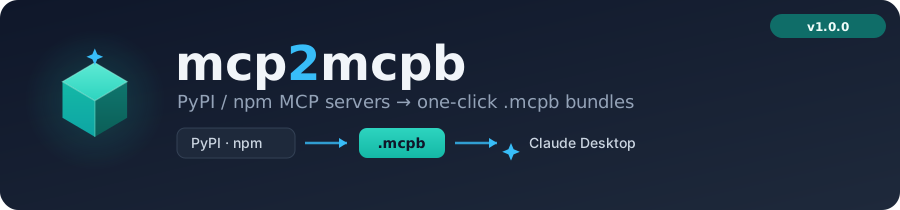
Convert PyPI / npm MCP servers into one-click
.mcpbbundles for Claude Desktop.



What is .mcpb?
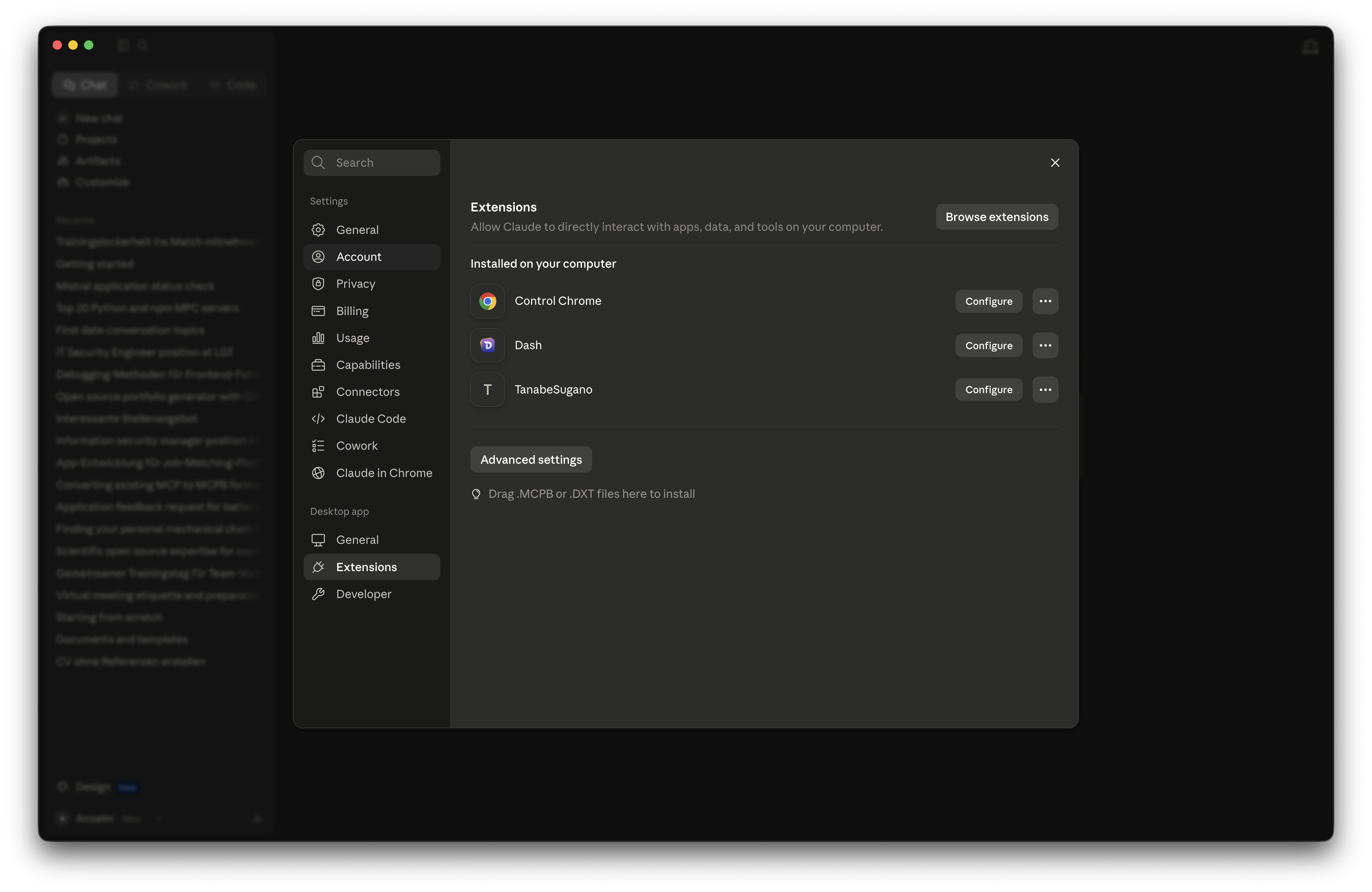
Claude Desktop has a built-in Extensions panel
that lets you install MCP servers with a single
drag-and-drop or button click — no manual claude_desktop_config.json editing
required. The file format powering that experience is .mcpb.
| Extensions panel | Install options |
|---|---|
 |
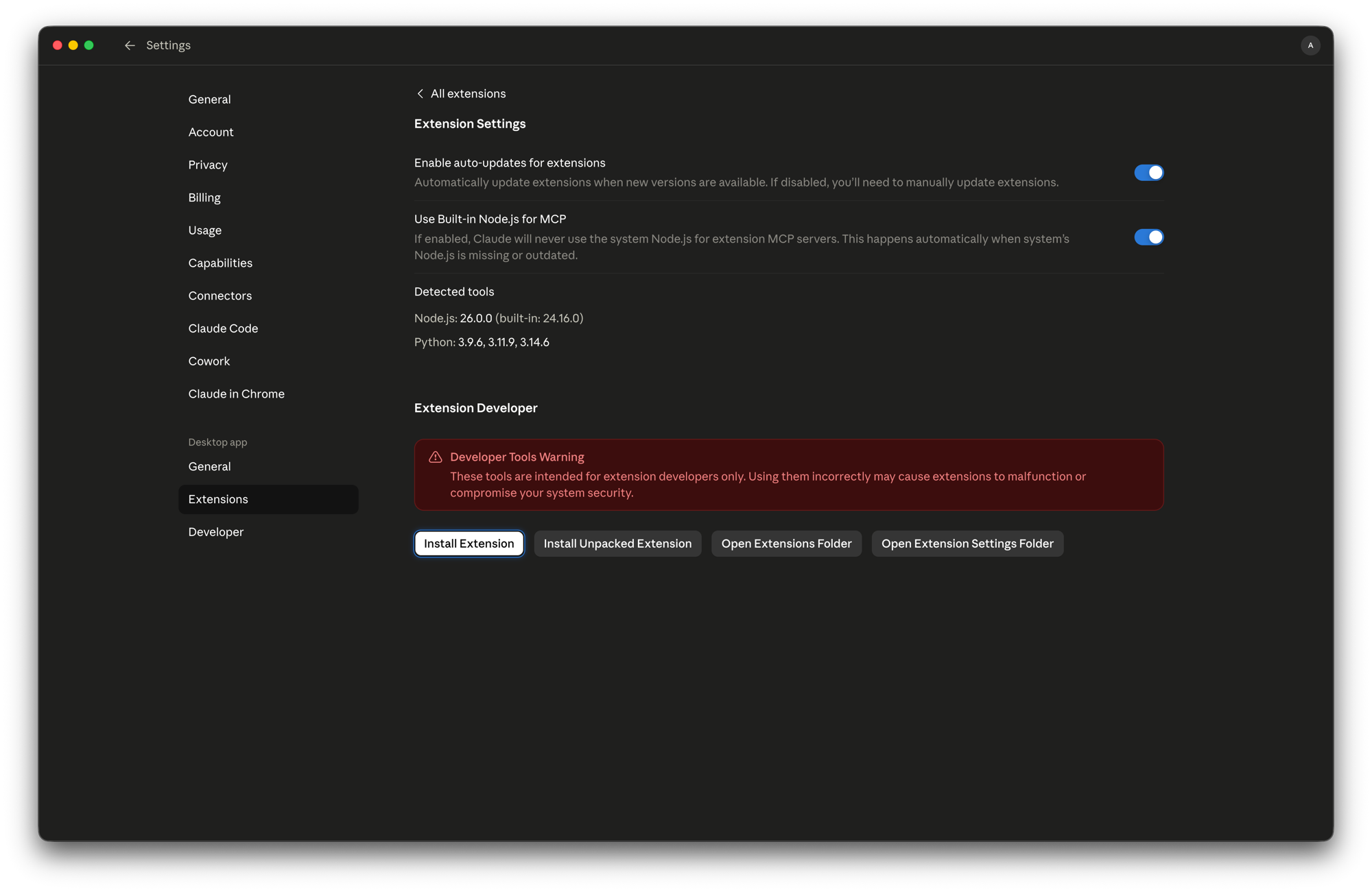 |
A .mcpb file is a ZIP archive containing the server's files together with a
manifest.json. Drop it onto the Extensions panel (or click Install Extension)
and Claude Desktop configures and launches the MCP server automatically.
The format is specified by the
Model Context Protocol bundle spec.
mcp2mcpb bridges the gap between the existing PyPI/npm ecosystem and the .mcpb
install experience. It works in two directions:
- On-demand conversion — give it any published package name and it emits a
ready-to-install
.mcpbbundle in seconds. - Continuous publishing — a reusable GitHub Action and upstream-polling workflows keep bundles in sync with new upstream releases.
Installation
# via uv (recommended)
uv pip install mcp2mcpb

# via pip
pip install mcp2mcpb
Requires Python 3.12+ and
uv (for uvx-based reference bundles and
dependency vendoring).
Usage
Three ways to drive mcp2mcpb: CLI flags, a config file, or the
GitHub Action.
Command line — with flags
# Convert a published MCP server into a .mcpb bundle
mcp2mcpb mcp-server-fetch \
    --registry pypi \      # -r : pypi | npm
    --pin 1.2.0 \          # -v : omit for the latest release
    --mode complete \      # -m : complete (vendor deps) | reference (uvx/npx)
    --output dist/         # -o : output directory

# Always pull the newest version at launch (reference mode)
mcp2mcpb mcp-server-fetch --mode reference --latest

# Print the version
mcp2mcpb --version
--latest makes the launch command re-resolve the newest published release on
every start: npm/uvx use pkg@latest, and uvx --from recipes use
--refresh-package. It conflicts with --pin, and trades startup speed for
freshness (the default cached resolution is faster). Plain --pin latest (or
omitting --pin) stays unpinned but lets uvx/npx reuse a cached version.
When auto-detection isn't enough, spell out the launch recipe explicitly and skip
the --help probe:
mcp2mcpb serena-agent \
    --entry-script serena --subcommand "start-mcp-server" \
    --mode reference --no-probe
Recipe flags — --runner, --entry-script, --extra (repeatable),
--subcommand, --transport, --no-probe — are documented under
Launch recipe. Add --verbose to see the resolved recipe and
which config file was read:
$ mcp2mcpb repo-release-tools --extra mcp --entry-script rrt-mcp \
      --transport stdio --mode reference --no-probe --verbose
→ Config file: none
→ Resolved launch recipe — runner=uvx, entry_script=rrt-mcp, extras=['mcp'], subcommand=[], transport=stdio
Building from a local artifact
For release pipelines that build and publish in one run, use --from-dist to bundle a
locally-built wheel or npm .tgz before uploading to the registry:
# In CI, after `uv build` produced dist/*.whl:
mcp2mcpb my-server --registry pypi --from-dist dist/ --mode reference
--from-dist PATH accepts a path to a .whl, .tgz, or a directory containing
exactly one such file. The bundle still references --registry (PyPI/npm) at
runtime, so Claude Desktop installs the published version once it lands. The
--help probe is skipped automatically.
Command line — with a config file
Put the recipe in a .mcpb.toml (read from the current working directory) or a
[tool.mcpb] table in pyproject.toml so you don't repeat flags on every run:
# .mcpb.toml
version      = "1.9.0"    # optional; omit or "latest" → latest (--pin wins)
runner       = "uvx"      # optional; inferred from registry+mode if omitted
entry-script = "rrt-mcp"
extras       = ["mcp"]
subcommand   = ["start-mcp-server"]
transport    = "stdio"
from         = true        # optional; force/suppress uvx --from
mcp2mcpb repo-release-tools --mode reference # name only — the rest comes from the file
A few things worth knowing:
runneris inferred fromregistry+modewhen omitted —(pypi, reference) → uvx,(npm, reference) → npx,(pypi, complete) → python,(npm, complete) → node(see Bundle modes). Setrunneronly to override.fromis auto-derived for uvx: used whenextrasare set orentry-scriptdiffers from the package name. Setfrom = true|falseonly for edge cases.versionis the one piece of package identity a config file can carry. Precedence:--pin(CLI) > configversion> latest. In-package config cannot set the version (the version is needed to fetch the package).
The recipe keys (runner, entry-script, extras, subcommand, transport,
from) can also ship inside the package itself (a bundled mcpb.toml, or a
"mcpb" key in package.json for npm) so that even third-party conversions
resolve the correct launch command. Full precedence chain:
Launch recipe. Pass --verbose to see the resolved recipe, the
effective version, and which config file was read.
GitHub Action
Add one step to your release workflow to get .mcpb bundles automatically:
jobs:
  bundle:
    runs-on: ubuntu-latest
    permissions:
      contents: write
    steps:
      - uses: Anselmoo/mcp2mcpb@v1
        with:
          package: mcp-server-fetch   # your published package
          registry: pypi              # pypi | npm
          mode: complete              # complete | reference
On a release event the action attaches the produced .mcpb files to the GitHub
release. For platform-specific Python bundles, run it in a matrix across
ubuntu-latest, macos-13, macos-latest, and windows-latest.
Pinning the action (security + pre-release testing)
@v1 is a floating major tag. For supply-chain safety, pin to a full commit SHA
(immutable; Dependabot
still bumps SHA pins):
- uses: Anselmoo/mcp2mcpb@<full-commit-sha> # immutable pin
To trial an unreleased build before it lands on PyPI — e.g.
to test a commit across your repos without going productive — pin the action to the
SHA and install the package straight from that commit via mcp2mcpb-src:
- uses: Anselmoo/mcp2mcpb@<full-commit-sha>
  with:
    package: mcp-server-fetch
    mode: reference
    mcp2mcpb-src: "git+https://github.com/Anselmoo/mcp2mcpb.git@<full-commit-sha>"
mcp2mcpb-src (default mcp2mcpb>=0.2) is what the action uv pip installs, so it —
not the action ref — controls which conversion logic runs.
Or adopt the reusable workflow at the job level:
jobs:
  bundle:
    uses: Anselmoo/mcp2mcpb/.github/workflows/build-mcpb.yml@v1
    permissions:
      contents: write
    with:
      package: mcp-server-fetch
      registry: pypi
      mode: complete
Both accept the optional launch-recipe inputs runner, entry-script, extras,
subcommand, transport, and no-probe
(see Launch recipe). Omit them and the converter auto-detects
from the package.
Inspect a bundle
mcp2mcpb unpack extracts a .mcpb to a sibling folder (or --output DIR) and
pretty-prints its manifest.json — handy for verifying the resolved launch command
and what a bundle ships:
mcp2mcpb unpack dist/repo-release-tools-1.9.0-universal.mcpb
# → Extracted to dist/repo-release-tools-1.9.0-universal/
# → prints manifest.json
Sandbox — simulate Claude Desktop
Before shipping a bundle, verify it actually starts and speaks MCP correctly:
mcp2mcpb sandbox dist/my-server-1.0.0-universal.mcpb
The sandbox:
- Extracts the bundle to a temporary directory.
- Resolves manifest placeholders (
${__dirname},${user_config.some_key}); prompts interactively for requireduser_configvalues when stdin is a TTY. - Launches the process and streams its stderr.
- Performs the MCP
initializehandshake. - Sends
notifications/initializedand queriestools/list. - Verifies clean EOF shutdown when stdin is closed.
Pass environment overrides directly:
mcp2mcpb sandbox dist/my-server-1.0.0-universal.mcpb --env API_KEY=secret_val
With no path argument, mcp2mcpb sandbox auto-detects: it looks for a single
.mcpb file in dist/, then falls back to a manifest.json in the current
directory.
Examples
serena — a PyPI server behind a subcommand (serena-agent)
Serena exposes its MCP server through the
serena start-mcp-server subcommand, so the recipe needs an explicit
--entry-script and --subcommand:
mcp2mcpb serena-agent \
    --registry pypi --mode reference \
    --entry-script serena --subcommand "start-mcp-server" --no-probe
- uses: Anselmoo/mcp2mcpb@v1
  with:
    package: serena-agent
    registry: pypi
    mode: reference
    entry-script: serena
    subcommand: start-mcp-server
Resolves to uv tool run --from serena-agent serena start-mcp-server.
sequential-thinking — a scoped npm server
(@modelcontextprotocol/server-sequential-thinking)
The sequential-thinking server is published to npm and needs no recipe overrides — auto-detection is sufficient:
mcp2mcpb @modelcontextprotocol/server-sequential-thinking \
    --registry npm --mode reference
- uses: Anselmoo/mcp2mcpb@v1
  with:
    package: "@modelcontextprotocol/server-sequential-thinking"
    registry: npm
    mode: reference
Resolves to npx -y @modelcontextprotocol/server-sequential-thinking.
fetch — an official PyPI server, no overrides (mcp-server-fetch)
The reference fetch server auto-detects cleanly — just name it:
mcp2mcpb mcp-server-fetch --registry pypi --mode reference
- uses: Anselmoo/mcp2mcpb@v1
  with:
    package: mcp-server-fetch
    registry: pypi
    mode: reference
Resolves to uv tool run mcp-server-fetch.
serena via .mcpb.toml — keep the recipe in a config file
Drop a .mcpb.toml in the directory you run the converter from; the recipe is
read automatically so the package name is the only argument you repeat:
# .mcpb.toml
entry-script = "serena"
subcommand   = ["start-mcp-server"]
mcp2mcpb serena-agent --mode reference --no-probe --verbose
# → Config file: .mcpb.toml
# → Version: latest
# → Resolved launch recipe — runner=uvx, entry_script=serena, extras=[], subcommand=['start-mcp-server'], transport=auto, from=None
runner=uvx is inferred (pypi + reference) — the file never states it — and
--from is added automatically because entry-script (serena) differs from the
package name (serena-agent). Same result as the flag-based example above.
Package authors can ship the same table inside the package (a bundled
mcpb.toml, or "mcpb" in package.json) so third-party conversions always
resolve the correct command.
Bundle modes
| Mode | Manifest command | Bundle contents | Use case |
|---|---|---|---|
reference |
uvx pkg / npx pkg |
Empty server/ |
Lightweight; requires uv / Node at runtime |
complete |
python server/… / node server/… |
All dependencies vendored | Zero runtime dependencies; CI default |
CI always builds complete. reference is for users who already have
uv or Node.js installed.
Launch recipe
How a server is launched is resolved into a single recipe —
runner, entry_script, extras, subcommand, transport — and rendered into
the manifest's mcp_config
(MCPB spec v0.4;
reference bundles use server.type: "uv"). Each field is taken from the first
source that sets it:
CLI / action inputs ▸ .mcpb.toml (cwd) ▸ in-package config ▸ --help probe ▸ default
Authors declare the recipe once in [tool.mcpb] (inside pyproject.toml or a
standalone .mcpb.toml) so it travels with the package:
[tool.mcpb]
runner       = "uvx"                          # uvx | npx | uv-run | python | node (omit → inferred)
entry-script = "mcp-zen-of-languages-server"  # console script / npm bin (omit → package name)
extras       = ["mcp"]                         # PyPI/uv only → uvx --from pkg[mcp]
subcommand   = ["start-mcp-server"]            # args appended after the script
transport    = "stdio"                         # stdio | none | auto (default: auto)
from         = true                            # force/suppress uvx --from (omit → auto-derive)
runner is inferred from registry + mode when omitted
(see Bundle modes); from is auto-derived for
uvx (used when extras are set or
entry-script ≠ package name). A version key is also read from the cwd
.mcpb.toml / pyproject.toml (not in-package) with precedence
--pin > config version > latest.
Shipping recipe keys inside the package means even third-party / upstream
conversions produce the correct command. When nothing is declared, the --help
probe inspects the package's CLI (skippable with --no-probe); failing that, a
conservative default is used.
If a package declares an extra literally named mcp (a common convention for
gating server-only dependencies, e.g. tanabesugano[mcp],
repo-release-tools[mcp]) and you don't specify extras yourself, mcp2mcpb
includes it automatically and prints a notice. Override with --extra or
[tool.mcpb].
Resolved commands for common patterns:
| Package | Resolved command |
|---|---|
mcp-server-analyzer |
uv tool run mcp-server-analyzer==<v> |
mcp-zen-of-languages |
uv tool run --from mcp-zen-of-languages==<v> mcp-zen-of-languages-server |
repo-release-tools (extra) |
uv tool run --from repo-release-tools[mcp]==<v> rrt-mcp |
serena-agent (subcommand) |
uv tool run --from serena-agent==<v> serena start-mcp-server |
| npm package | npx -y <pkg>@<v> |
Manifest env-var detection
mcp2mcpb scans the package README / description for likely environment variables
— uppercase identifiers of 4+ characters containing tokens such as API, KEY,
TOKEN, SECRET, PASS, AUTH, CRED, BEARER, or WEBHOOK. Each match
becomes:
- a
user_configfield shown at install time in Claude Desktop, and - an
enventry wired to${user_config.<name>}.
Variables that look like secrets (KEY, TOKEN, SECRET, …) are marked
sensitive: true so Claude Desktop masks them on input.
Licensing
A complete bundle redistributes the package and its dependencies, so the
upstream license must travel with it (the same reason
conda-forge records a license_file). mcp2mcpb
lifts the package's own LICENSE / NOTICE / COPYING into the bundle root;
each vendored dependency keeps its license inside server/**/*.dist-info/. If no
license file is found, a warning is emitted so you can verify the terms yourself.
The SPDX license id in the manifest is resolved
from PEP 639 license-expression, the
legacy license field, or trove classifiers, in that order.
A reference bundle redistributes no upstream code (it fetches from
PyPI / npm at runtime), so it carries
only the SPDX license field in the manifest.
Permissive licenses (MIT / BSD / Apache / ISC) are satisfied by shipping the license text. Apache
NOTICEaggregation across dependencies and copyleft (GPL) corresponding-source obligations are not handled automatically — review them yourself when bundling such packages incompletemode.
Inspect what a bundle actually ships with
mcp2mcpb unpack:
mcp2mcpb unpack dist/my-server-1.0.0-universal.mcpb # extract + print manifest
Platform matrix
Python servers vendor platform-specific wheels, so complete Python bundles
are built four times — linux-x86_64, macos-x86_64, macos-arm64, and
windows-x86_64 — and the filename carries the {os}-{arch} tag. Node servers
are platform-independent (Claude Desktop ships its
own Node.js runtime), so a single universal-tagged bundle covers every platform.
Troubleshooting
reference bundle fails to start on Apple Silicon (Intel uv shadowing)
Symptom — A reference-mode bundle shows “Unable to connect to extension
server” in Claude Desktop, and the extension log
shows uv … x86_64-apple-darwin trying to build a native dependency such as
cryptography / openssl-sys, with
$HOST = aarch64-apple-darwin and $TARGET = x86_64-apple-darwin.
Cause — You have two uv installs: an Intel
one at /usr/local/bin/uv (from Intel Homebrew) and the native
arm64 one at /opt/homebrew/bin/uv. Claude Desktop resolves /usr/local/bin
first, so it launches the x86_64 uv under Rosetta. When a dependency ships
arm64-only wheels (cryptography 49.x has no macOS x86_64 wheel), that uv
can’t find a matching wheel and falls back to a source build, which cross-compiles
and crashes in openssl-sys. reference bundles already pass --no-build, so you
get a clear “no compatible wheel” error rather than a long native-build traceback —
but the real fix is to use the native uv.
Fix — Make Claude resolve the arm64 uv, then fully restart it:
rm -f /usr/local/bin/uv /usr/local/bin/uvx   # or: arch -x86_64 /usr/local/bin/brew uninstall uv
which -a uv      # should now show only /opt/homebrew/bin/uv
uv --version     # expect: … aarch64-apple-darwin
Quit Claude Desktop completely (it caches PATH at launch), relaunch, then
re-enable / re-drag the extension. The arm64 uv pulls the prebuilt arm64 wheel —
no compile.
Releasing
The cicd.yml workflow runs lint + types
(ruff, ty),
the test matrix (Python 3.12–3.14), then on a v*.*.* tag: builds the package,
generates an SBOM, attests build provenance,
publishes to TestPyPI → PyPI via
trusted publishing, and creates a
GitHub release.
Version bumps, changelog promotion, and release policy are managed with
Anselmoo/repo-release-tools
([tool.rrt] in pyproject.toml). The two version sources — pyproject.toml
and src/mcp2mcpb/__init__.py — are kept in lock-step:
uv run rrt release check   # validate version targets + CHANGELOG
uv run rrt bump patch      # bump both targets, promote CHANGELOG, branch + commit
# open a PR; merging and pushing the v* tag triggers cicd.yml
CI also enforces release policy on PRs/tags (branch name, commit subject,
changelog, version-target health) via the repo-release-tools action in the lint
job. Changelog entries follow
Keep a Changelog in
CHANGELOG.md.
Local release
Build the same wheel + sdist that CI publishes, locally into dist/ (gitignored):
uv run poe build   # → dist/mcp2mcpb-<version>-py3-none-any.whl + .tar.gz
uv run poe dist    # full gate (lint, format, types, tests) then build
mcp2mcpbis a CLI tool, not itself an MCP server, so its release artifact is the PyPI package — not a.mcpbbundle. (Producing.mcpbbundles is what the tool does:mcp2mcpb <pkg> --output dist/.)
Contributing
uv sync --extra dev
uv run poe check      # lint + format-check + type-check + tests (full gate)
# or individually:
uv run poe lint
uv run poe type-check
uv run poe test
uv run poe test-cov   # with coverage report
Issues and pull requests are welcome at https://github.com/Anselmoo/mcp2mcpb/issues.
License
MIT — see LICENSE and the license field in
pyproject.toml.
1 maintainer

Metadata
1 maintainer
Release files for mcp2mcpb 1.0.0
For a detailed explanation of source distributions (sdists) and built distributions (wheels), please see the package formats documentation.
Source distribution (sdist)
| File | Size | Uploaded | |
|---|---|---|---|
| mcp2mcpb-1.0.0.tar.gz | 1.7 MB | Details |
Built distribution (wheel)
| File | Interpreter | ABI | Platform | Reset |
|---|---|---|---|---|
| mcp2mcpb-1.0.0-py3-none-any.whl | Python 3 | none | any | Details |
Total release size: 1.7 MB
Release files / mcp2mcpb-1.0.0.tar.gz
| Download URL | mcp2mcpb-1.0.0.tar.gz |
|---|---|
| Size | 1.7 MB |
| Tags | Source |
|
SHA-256 checksum How to use checksums |
bc3f1d186d074e5a78d13540cd33443f98d34b8869910b034b5fd296168e61ad
|
|
BLAKE2b-256 checksum How to use checksums |
0f684e0cf5ab013b767b11c7defaa1d64539630131397bbdcaa740d596974d42
|
| Upload date | |
|
Uploaded using Trusted Publishing? What is trusted publishing? |
Yes |
| Uploaded via |
twine/6.1.0 CPython/3.13.12
|
Provenance
Provenance describes where a file came from. On PyPI, provenance is shared via attestations, which provide a verifiable record of the build or publishing details. View details, limitations and caveats.


PyPI Publish Attestation
PyPI verified that this artifact, at this checksum, originated from the publisher listed below.
Signed by GitHub Actions, verified by PyPI on Jun 24, 2026.
Transparency logRelease files / mcp2mcpb-1.0.0-py3-none-any.whl
| Download URL | mcp2mcpb-1.0.0-py3-none-any.whl |
|---|---|
| Size | 46.6 kB |
| Tags | Python 3 |
|
SHA-256 checksum How to use checksums |
383b079117719eb999ec01c571eed1ddd9d91a67077569f0fa50c95ca55f7bc9
|
|
BLAKE2b-256 checksum How to use checksums |
d71a4ecd859606f75b2360232d9209b3c7d9118950cfd0edd5f33151b2974e95
|
| Upload date | |
|
Uploaded using Trusted Publishing? What is trusted publishing? |
Yes |
| Uploaded via |
twine/6.1.0 CPython/3.13.12
|
Provenance
Provenance describes where a file came from. On PyPI, provenance is shared via attestations, which provide a verifiable record of the build or publishing details. View details, limitations and caveats.
PyPI Publish Attestation
PyPI verified that this artifact, at this checksum, originated from the publisher listed below.
Signed by GitHub Actions, verified by PyPI on Jun 24, 2026.
Transparency log













