


mysql_mcp_server_AirNet
Introduction
mcp_mysql_server_pro is not just about MySQL CRUD operations, but also includes database anomaly analysis capabilities and makes it easy for developers to extend with custom tools.
- Supports both STDIO and SSE modes
- Supports multiple SQL execution, separated by ";"
- Supports querying database table names and fields based on table comments
- Supports SQL execution plan analysis
- Supports Chinese field to pinyin conversion
- Supports table lock analysis
- Supports database health status analysis
- Supports permission control with three roles: readonly, writer, and admin
"readonly": ["SELECT", "SHOW", "DESCRIBE", "EXPLAIN"], # Read-only permissions "writer": ["SELECT", "SHOW", "DESCRIBE", "EXPLAIN", "INSERT", "UPDATE", "DELETE"], # Read-write permissions "admin": ["SELECT", "SHOW", "DESCRIBE", "EXPLAIN", "INSERT", "UPDATE", "DELETE", "CREATE", "ALTER", "DROP", "TRUNCATE"] # Administrator permissions - Supports prompt template invocation
Tool List
| Tool Name | Description |
|---|---|
| execute_sql | SQL execution tool that can execute ["SELECT", "SHOW", "DESCRIBE", "EXPLAIN", "INSERT", "UPDATE", "DELETE", "CREATE", "ALTER", "DROP", "TRUNCATE"] commands based on permission configuration |
| get_chinese_initials | Convert Chinese field names to pinyin initials |
| get_db_health_running | Analyze MySQL health status (connection status, transaction status, running status, lock status detection) |
| get_table_desc | Search for table structures in the database based on table names, supporting multi-table queries |
| get_table_index | Search for table indexes in the database based on table names, supporting multi-table queries |
| get_table_lock | Check if there are row-level locks or table-level locks in the current MySQL server |
| get_table_name | Search for table names in the database based on table comments and descriptions |
| get_db_health_index_usage | Get the index usage of the currently connected mysql database, including redundant index situations, poorly performing index situations, and the top 5 unused index situations with query times greater than 30 seconds |
Prompt List
| Prompt Name | Description |
|---|---|
| analyzing-mysql-prompt | This is a prompt for analyzing MySQL-related issues |
| query-table-data-prompt | This is a prompt for querying table data using tools. If description is empty, it will be initialized as a MySQL database query assistant |
Usage Instructions
Installation and Configuration
- Install Package
pip install mysql_mcp_server_pro
- Configure Environment Variables
Create a
.envfile with the following content:
# MySQL Database Configuration
MYSQL_HOST=localhost
MYSQL_PORT=3306
MYSQL_USER=your_username
MYSQL_PASSWORD=your_password
MYSQL_DATABASE=your_database
# Optional, default is 'readonly'. Available values: readonly, writer, admin
MYSQL_ROLE=readonly
- Run Service
# SSE mode
mysql_mcp_server_sse
- mcp client
go to see see “Use uv to start the service” ^_^
Note:
- The
.envfile should be placed in the directory where you run the command - You can also set these variables directly in your environment
- Make sure the database configuration is correct and can connect
Run with uvx, Client Configuration
{
    "mcpServers": {
        "mysql": {
            "command": "uvx",
            "args": [
                "--from",
                "mcp_mysql_airnet",
                "mysql_mcp_server_AirNet"
            ],
            "env": {
                "MYSQL_HOST": "192.168.x.xxx",
                "MYSQL_PORT": "3306",
                "MYSQL_USER": "root",
                "MYSQL_PASSWORD": "root",
                "MYSQL_DATABASE": "a_llm",
                "MYSQL_ROLE": "admin"
            }
        }
    }
}
Local Development with SSE Mode
- Use uv to start the service
Add the following content to your mcp client tools, such as cursor, cline, etc.
mcp json as follows:
{
  "mcpServers": {
    "operateMysql": {
      "name": "operateMysql",
      "description": "",
      "isActive": true,
      "baseUrl": "http://localhost:9000/sse"
    }
  }
}
Modify the .env file content to update the database connection information with your database details:
# MySQL Database Configuration
MYSQL_HOST=192.168.xxx.xxx
MYSQL_PORT=3306
MYSQL_USER=root
MYSQL_PASSWORD=root
MYSQL_DATABASE=a_llm
MYSQL_ROLE=readonly  # Optional, default is 'readonly'. Available values: readonly, writer, admin
Start commands:
# Download dependencies
uv sync

# Start
uv run -m mysql_mcp_server_pro.server
Local Development with STDIO Mode
Add the following content to your mcp client tools, such as cursor, cline, etc.
mcp json as follows:
{
  "mcpServers": {
      "operateMysql": {
        "isActive": true,
        "name": "operateMysql",
        "command": "uvx",
        "args": [
          "--directory",
          "E:\\技术支持室\\Trae\\mcp_mysql_AirNet\\src\\",
	    	  "mysql_mcp_server_pro",
          "mysql_mcp_server_AirNet"
        ],
        "env": {
			"MYSQL_HOST": "192.168.31.158",
			"MYSQL_PORT": "3306",
			"MYSQL_USER": "root",
			"MYSQL_PASSWORD": "abc",
			"MYSQL_DATABASE": "atcdb",
			"MYSQL_ROLE": "admin"
       }
    }
  }
}
{
    "mcpServers": {
        "mysql": {
            "command": "uvx",
            "args": [
                "--from",
                "E:\\技术支持室\\Trae\\mcp_mysql_AirNet\\dist\\mcp_mysql_airnet-0.0.1-py3-none-any.whl",
                "mysql_mcp_server_AirNet"
            ],
            "env": {
                "MYSQL_HOST": "192.168.31.158",
                "MYSQL_PORT": "3306",
                "MYSQL_USER": "root",
                "MYSQL_PASSWORD": "abc",
                "MYSQL_DATABASE": "atcdb",
                "MYSQL_ROLE": "admin"
            }
        }
    }
}
Custom Tool Extensions
-
Add a new tool class in the handles package, inherit from BaseHandler, and implement get_tool_description and run_tool methods
-
Import the new tool in init.py to make it available in the server
Examples
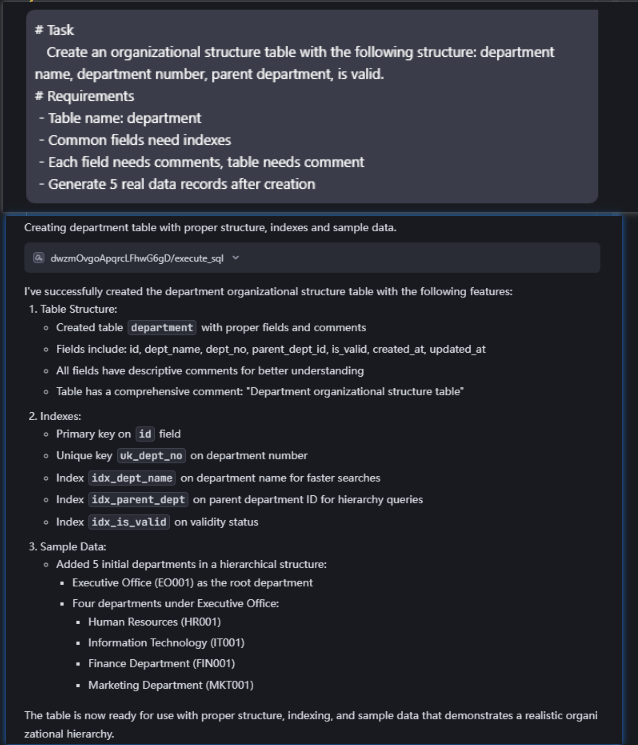
- Create a new table and insert data, prompt format as follows:
# Task
   Create an organizational structure table with the following structure: department name, department number, parent department, is valid.
# Requirements
 - Table name: department
 - Common fields need indexes
 - Each field needs comments, table needs comment
 - Generate 5 real data records after creation

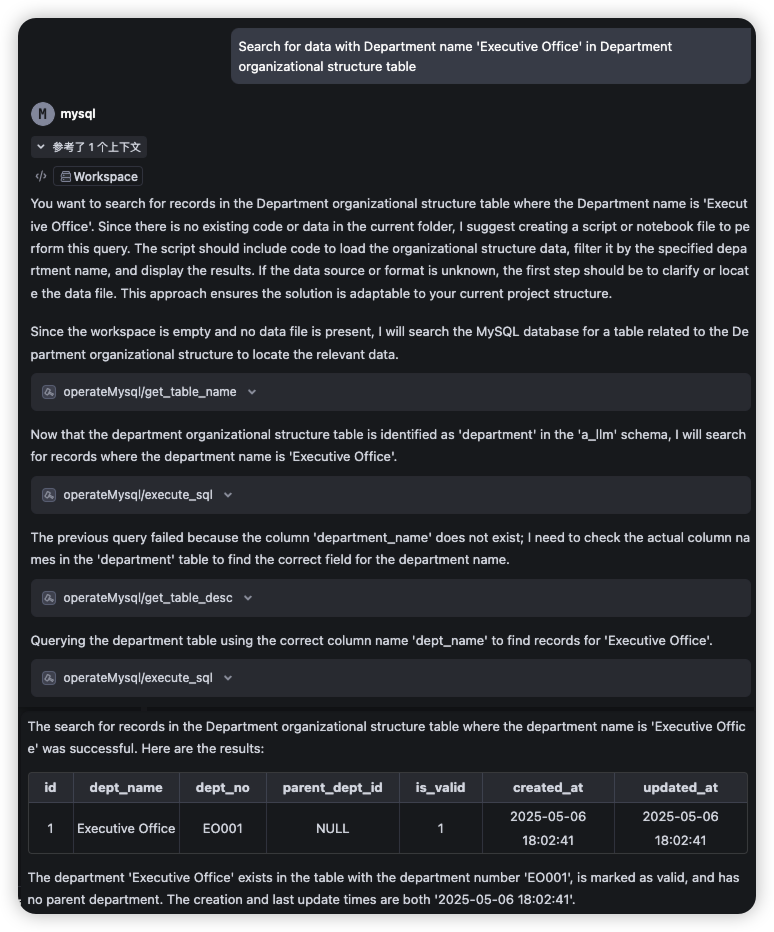
- Query data based on table comments, prompt as follows:
Search for data with Department name 'Executive Office' in Department organizational structure table
- Analyze slow SQL, prompt as follows:
select * from t_jcsjzx_hjkq_cd_xsz_sk xsz
left join t_jcsjzx_hjkq_jcd jcd on jcd.cddm = xsz.cddm
Based on current index situation, review execution plan and provide optimization suggestions in markdown format, including table index status, execution details, and optimization recommendations
- Analyze SQL deadlock issues, prompt as follows:
update t_admin_rms_zzjg set sfyx = '0' where xh = '1' is stuck, please analyze the cause
- Analyze the health status prompt as follows
Check the current health status of MySQL
1 maintainer

Metadata
1 maintainer
Release files for mcp_mysql_AirNet 0.0.1
For a detailed explanation of source distributions (sdists) and built distributions (wheels), please see the package formats documentation.
Source distribution (sdist)
| File | Size | Uploaded | Provenance | |
|---|---|---|---|---|
| mcp_mysql_airnet-0.0.1.tar.gz | 16.5 kB | Without provenance | Details |
Built distribution (wheel)
| File | Interpreter | ABI | Platform | Reset |
|---|---|---|---|---|
| mcp_mysql_airnet-0.0.1-py3-none-any.whl | Python 3 | none | any | Details |
Total release size: 43.8 kB
Release files / mcp_mysql_airnet-0.0.1.tar.gz
| Download URL | mcp_mysql_airnet-0.0.1.tar.gz |
|---|---|
| Size | 16.5 kB |
| Tags | Source |
|
SHA-256 checksum How to use checksums |
75ada6e63f3d19c5fed0aac2c92ef395145c052c7f5200cafd21db57847bcbac
|
|
BLAKE2b-256 checksum How to use checksums |
d80a87cc33a3b2c6c63cc55f13cb8221e1ddbe01b5d22517cdcbcc5b4f01865d
|
| Upload date | |
|
Uploaded using Trusted Publishing? What is trusted publishing? |
No |
| Uploaded via |
uv/0.6.17
|
Release files / mcp_mysql_airnet-0.0.1-py3-none-any.whl
| Download URL | mcp_mysql_airnet-0.0.1-py3-none-any.whl |
|---|---|
| Size | 27.3 kB |
| Tags | Python 3 |
|
SHA-256 checksum How to use checksums |
5551993fcec39046870fdafdd6568c70cff359cb93cb30c67387fd06ac5107b5
|
|
BLAKE2b-256 checksum How to use checksums |
0fdf0b041e2d3f2b38b1f8ca4d877171d87202d8d0dd6989bd3573ac71720e8f
|
| Upload date | |
|
Uploaded using Trusted Publishing? What is trusted publishing? |
No |
| Uploaded via |
uv/0.6.17
|
Security for mcp_mysql_AirNet 0.0.1
Provenance
Provenance describes where a file came from. On PyPI, provenance is shared via attestations, which provide a verifiable record of the build or publishing details. View details, limitations and caveats.
No provenance found
None of the files in this release were uploaded with provenance metadata.
A note on package security
PyPI is a repository for distributing packages, not a service for auditing them. While third-party security researchers and our staff do their best to detect and remove malicious packages, PyPI cannot guarantee the quality, security or suitability of any given package.
To learn more about protecting yourself from malicious actors, visit our package security documentation.













