
🧠 memorymcp — Persistent cognitive memory for AI agents




v1.0.2 — Persistent, intelligent memory for AI agents. Store facts, episodes, and context across sessions. Query by meaning. Expose as an MCP server. Now with pluggable persistent backends (Redis, SQLite, Neo4j, pgvector).
What is memorymcp?
memorymcp gives AI agents a structured, persistent memory system inspired by cognitive science:
- Facts are stored with importance scores, confidence levels, and temporal validity
- Consolidation resolves contradictions automatically — nothing is deleted, everything is archived
- Decay simulates forgetting: less-accessed facts fade over time, confirmed facts persist
- Semantic search (via ragmcp) retrieves the most relevant context for any query
- Persistent backends — Redis, SQLite, Neo4j, and pgvector for production-grade storage
- MCP server exposes 16 memory tools natively to Claude Desktop, Cursor, or any MCP client
Architecture
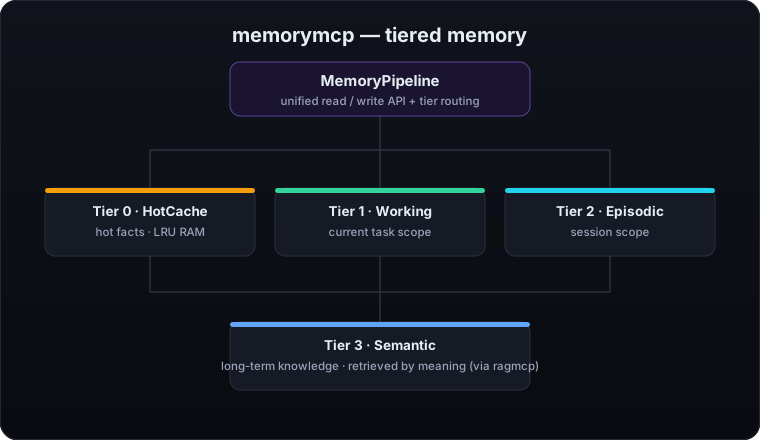
Each tier has a distinct role and TTL. Hot facts bubble up to Tier 0 on access. Long-term knowledge is indexed semantically in Tier 3 and retrieved by meaning, not by key.
Quick Start
3-line usage
from memorymcp import MemoryFactory

pipeline = MemoryFactory.default()
await pipeline.store_fact("User prefers Python over JavaScript", importance=0.9)
Agent usage
from memorymcp import MemoryFactory

pipeline = MemoryFactory.default()

# Store what your agent learns
await pipeline.store_fact(
    "User prefers Python over JavaScript",
    fact_type="preference",
    importance=0.9,
)

# Query relevant context by meaning
facts = await pipeline.query_memory("coding preferences", top_k=5)
for r in facts:
    print(f"[{r.final_score:.2f}] {r.fact.content}")

# Assemble a prompt-ready context block
ctx = await pipeline.assemble_context(
    query="what does the user prefer?",
    session_id="sess_1",
    max_tokens=2000,
)
print(ctx.render())
MCP server
from memorymcp import MemoryFactory
from memorymcp.mcp_server import MemoryMCPServer

pipeline = MemoryFactory.default()
MemoryMCPServer(pipeline).run()
Or from the command line:
memorymcp serve
Claude Desktop claude_desktop_config.json:
{
  "mcpServers": {
    "memorymcp": {
      "command": "memorymcp",
      "args": ["serve"]
    }
  }
}
Features
- 🧠 4-tier memory — HotCache / Working / Episodic / Semantic
- 🔍 Semantic search powered by ragmcp (Qdrant, ChromaDB, InMemory)
- 🎯 Cross-encoder reranker (optional) — re-scores retrieved facts for accuracy; measured recall@1 0.40 → 0.88.
enable_rerank=True(pip install "mcpaisuite-memorymcp[rerank]") - 🔎 Adaptive query expansion (optional) — when a search scores weakly, an LLM rewrites the query into synonymous phrasings and re-searches, recovering hard paraphrases the embedder misses; measured retrieval recall@5 0.42 → 0.92.
enable_query_expansion=True(adaptive — one extra LLM call only when the first pass is weak) - 🕒 Recency-aware injection — retrieved facts are stamped with their age (
recorded 10 minutes ago) so the agent picks the current value when two facts conflict on the same attribute - ⚡ Consolidation engine — ADD / UPDATE / OVERWRITE / SKIP, with full audit trail
- 📊 Tri-modal decay — linear / exponential / anchored + adaptive retrieval boost
- 🔗 Fact graph with typed relations (supports / contradicts / supersedes / derived_from)
- 💡 Confidence tracker — score incremented by confirmations, decays on contradiction
- 🔌 MCP server — 16 tools, stdio transport, compatible with any MCP client
- 💾 Persistent backends — Redis (episodic, working, hot cache), SQLite (episodic), Neo4j (fact graph), pgvector (semantic)
- 🤖 Dual extractors — Pattern (regex, zero-dep) + LLM-powered (any model via completion_fn)
- 🧩 Smart extraction — question/noise filtering, correction detection, per-fact decay mode assignment
- 🔐 Thread-safety — All in-memory stores use
threading.Lockfor cross-event-loop safety (compatible with asyncio and anyio/trio) - 🗄️ Chroma semantic store — ChromaDB support for persistent semantic fact storage with native dict variable handling
- 🧠 LLM fact extractor — Optional LLM-based fact extraction (automatically wired when a kernel LLM is available, replacing the pattern-based extractor)
- 🔒 PII filter — email / phone / credit card / SSN detection, GDPR Art.17
forget_user - 🏢 Multi-tenancy — namespace-based isolation, each tenant gets its own memory
- 📦 Memory quotas — per-namespace fact limits
- 🛡️ Audit logging — SQLite + JSONL, immutable conflict log per fact
- 📈 Observability — OpenTelemetry + Prometheus (optional)
- ⏱️ Temporal facts —
valid_from/valid_until, automatic expiry - 🏭 MemoryFactory —
default()/create()/from_env()/from_yaml()/from_ragmcp() - 📡 Event streaming — Event bus with 14 event types, subscribe/emit/async stream
- 🪝 Webhooks — HTTP POST notifications on memory events, register/unregister endpoints
- 🗓️ Consolidation scheduler — Cron-based scheduling for automatic consolidation cycles
- 📊 Memory analytics — Fact type distribution, decay analysis, confidence distribution, retrieval patterns
- 📥 Import/Export — Full memory roundtrip with merge/overwrite strategies
- 📋 CLI —
serve/query/store/stats/consolidate/forget-user
Installation
# Minimal — no external services
pip install mcpaisuite-memorymcp

# With semantic search (recommended)
pip install "mcpaisuite-memorymcp[semantic]"

# Full stack (MCP + semantic + observability)
pip install "mcpaisuite-memorymcp[all]"
Requirements: Python 3.11+
Persistent Backends
memorymcp ships pluggable persistent backends so memory survives restarts. Mix and match per tier.
SQLite — Episodic Store (zero dependencies)
pipeline = MemoryFactory.create(episodic_store="sqlite", sqlite_path="memory.db")
Redis — Episodic, Working, and Hot Cache
pip install "mcpaisuite-memorymcp[redis]"
pipeline = MemoryFactory.create(
    episodic_store="redis",
    working_store="redis",
    hot_cache="redis",
    redis_url="redis://localhost:6379/0",
)
Neo4j — Fact Graph
pip install "mcpaisuite-memorymcp[neo4j]"
pipeline = MemoryFactory.create(
    fact_graph="neo4j",
    neo4j_uri="bolt://localhost:7687",
    neo4j_user="neo4j",
    neo4j_password="password",
)
pgvector — Semantic Store
pip install "mcpaisuite-memorymcp[pgvector]"
pipeline = MemoryFactory.create(
    semantic_store="pgvector",
    db_url="postgresql://localhost:5432/memory",
)
Usage
MemoryFactory
from memorymcp import MemoryFactory

# Zero config — in-memory, no external services
pipeline = MemoryFactory.default()

# Read config from environment variables
pipeline = MemoryFactory.from_env()

# Read config from a YAML file
pipeline = MemoryFactory.from_yaml("memory_config.yaml")

# Attach to an existing ragmcp RAGPipeline
pipeline = MemoryFactory.from_ragmcp(rag_pipeline)

# Configurable — choose extractor, decay, consolidation thresholds
pipeline = MemoryFactory.create(
    extractor="llm",
    completion_fn=my_llm_fn,          # async (messages) -> str
    decay_mode="exponential",
    decay_half_life_days=14,
    similarity_threshold=0.85,
    contradiction_threshold=0.92,
)

# Full persistent backend configuration
pipeline = MemoryFactory.create(
    episodic_store="redis",           # "memory" | "redis" | "sqlite"
    working_store="redis",            # "memory" | "redis"
    hot_cache="redis",                # "memory" | "redis"
    fact_graph="neo4j",               # "memory" | "neo4j"
    semantic_store="pgvector",        # "memory" | "pgvector" | "chroma"
    redis_url="redis://localhost:6379/0",
    sqlite_path="memory.db",
    neo4j_uri="bolt://localhost:7687",
    neo4j_user="neo4j",
    neo4j_password="password",
    db_url="postgresql://localhost:5432/memory",
)
store_fact / query_memory
# Store a fact with optional metadata
fact = await pipeline.store_fact(
    "The capital of France is Paris",
    fact_type="knowledge",
    importance=0.8,
    tags=["geography", "europe"],
    namespace="my_agent",
)
print(fact.id, fact.importance, fact.confidence)

# Query by meaning
results = await pipeline.query_memory(
    "European capitals",
    namespace="my_agent",
    top_k=10,
    confidence_gte=0.5,
)
for r in results:
    print(f"score={r.final_score:.3f} | {r.fact.content}")
add_episode / get_session_context
# Add conversation turns to episodic memory
await pipeline.add_episode("user", "I love functional programming", session_id="sess_42")
await pipeline.add_episode("assistant", "Noted! I'll keep that in mind.", session_id="sess_42")

# Retrieve the session window
episodes = await pipeline.get_session_context("sess_42", last_n=20)
for ep in episodes:
    print(f"{ep.role}: {ep.content}")
assemble_context
ctx = await pipeline.assemble_context(
    query="user programming preferences",
    session_id="sess_42",
    namespace="default",
    max_tokens=2000,
    format="markdown",
)
print(ctx.render())
Working memory
# Set a key for the current task
await pipeline.working.set("current_task", "Refactor auth module", "sess_42")

# Retrieve snapshot
snapshot = await pipeline.working.snapshot("sess_42")
MCP server
from memorymcp.mcp_server import MemoryMCPServer, create_mcp_server

# High-level: run stdio server
MemoryMCPServer(pipeline).run()

# Low-level: get the MCP Server object for custom transports
server = create_mcp_server(pipeline, name="my-agent-memory")
CLI
# Start MCP server (stdio)
memorymcp serve

# Serve with persistent backends
memorymcp serve --episodic sqlite --redis-url redis://localhost:6379/0

# Query memory
memorymcp query "user preferences" --namespace my_agent --top-k 5

# Store a fact
memorymcp store "User prefers dark mode" --importance 0.7

# Show stats
memorymcp stats --namespace my_agent

# Run consolidation cycle
memorymcp consolidate --namespace my_agent

# GDPR — erase all data for a user namespace
memorymcp forget-user --namespace my_agent

# View / update runtime config
memorymcp config
memorymcp config --set decay_mode=adaptive --set episodic_store=redis
Configuration (YAML)
namespace: my_agent

semantic:
  backend: qdrant          # qdrant | chroma | inmemory
  url: http://localhost:6333

working:
  max_entries: 100
  ttl_seconds: 3600

episodic:
  max_window: 50

decay:
  mode: exponential        # linear | exponential | anchored | adaptive
  half_life_hours: 168     # 1 week default

quotas:
  max_facts: 10000

pii:
  action: redact           # redact | block
Load it with:
pipeline = MemoryFactory.from_yaml("memory_config.yaml")
Memory Tiers
| Tier | Name | Backend | Default TTL | Use case |
|---|---|---|---|---|
| 0 | HotCache | LRU RAM | 5 min | Hot facts, frequent access |
| 1 | Working | InMemory | 1 hour | Current task context |
| 2 | Episodic | InMemory | Session | Conversation history |
| 3 | Semantic | ragmcp | Permanent | Long-term knowledge base |
Facts are promoted to Tier 0 (HotCache) automatically on each retrieval, ensuring the most-accessed facts are served from RAM with zero latency.
Consolidation
When a new fact arrives, the ConsolidationEngine searches for semantically similar existing facts and determines the correct action:
| Action | Condition | Effect |
|---|---|---|
| SKIP | Exact duplicate detected | Fact is ignored; no write |
| UPDATE | Similarity ≥ 0.85 | Adds a supports relation; confirmation count incremented |
| OVERWRITE | Similarity ≥ 0.92 (contradiction) | Old fact archived with valid_until=now; supersedes relation created |
| ADD | New information | Stored directly with no merge |
Nothing is ever hard-deleted by consolidation — overwritten facts are archived with valid_until set and remain queryable with until= filters.
# Contradiction is handled automatically
await pipeline.store_fact("The meeting is on Monday")
await pipeline.store_fact("The meeting is on Tuesday")  # triggers OVERWRITE
Decay Engine
The DecayEngine computes a decay score [0.0, 1.0] for each fact based on time since last update and retrieval frequency. Three decay modes are available, plus an optional adaptive retrieval boost:
| Mode | Behavior | Best for |
|---|---|---|
linear |
Gradual, constant fade | Short-lived task facts |
exponential |
Fast initial decay, stable plateau | General knowledge (default) |
anchored |
No decay; score stays at 1.0 | Critical / pinned facts |
adaptive |
Decay slows with each retrieval | User preferences, confirmed facts |
Facts with importance >= 1.0 are permanently anchored and never decay.
The adaptive multiplier is: 1 / (1 + retrieval_count × 0.05) — a fact retrieved 20 times decays twice as slowly.
Fact Extraction
memorymcp ships two extractors that run automatically when episodes are added:
PatternFactExtractor (default, zero dependencies)
Regex-based extraction for common patterns in EN/FR:
"I prefer X"/"je préfère X"→ preference"I created X"/"I built X"→ simple"my name is X"→ simple"I work at X"→ simple"I always/never X"→ constraint"I believe/think X"→ belief
LLMFactExtractor (recommended for production)
Uses any LLM to extract structured facts with semantic understanding:
import litellm

async def completion_fn(messages):
    resp = await litellm.acompletion(messages=messages, model="gpt-4o-mini")
    return resp.choices[0].message.content

pipeline = MemoryFactory.create(extractor="llm", completion_fn=completion_fn)
The LLM extractor handles:
- Natural language:
"im alex, a dev who made ragmcp"→ 3 structured facts - Corrections:
"not memorymcp"(after context) →"User is not working on memorymcp" - Decay assignment: each fact gets
anchored(name, identity),exponential(preferences), orlinear(today's task) - Relation extraction: auto-detects links between facts (created_by, related_to, describes, etc.)
- Noise filtering: questions,
"ok","thanks","tell me everything"→ skipped, no LLM call
Automatic extraction
When you call pipeline.add_episode(), extraction runs automatically in the background. For synchronous extraction with results:
# Add episode without auto-extraction
await pipeline.add_episode("user", "I'm Kim, 28, from Seoul", session_id="s1", extract=False)

# Extract synchronously — returns the stored facts
facts = await pipeline.extract_facts(namespace="default", session_id="s1")
for f in facts:
    print(f"{f.content} [{f.fact_type}] decay={f.metadata.get('decay_mode', 'exponential')}")
MCP Tools
memorymcp exposes 16 tools via the MCP protocol (stdio transport):
| Tool | Description |
|---|---|
query_memory |
Semantic search across all tiers with decay scoring |
store_fact |
Explicitly store a high-value fact with consolidation |
get_session_context |
Get the episodic window for a session |
add_episode |
Add a conversation turn (user / assistant / system) |
assemble_context |
Assemble memory context ready for prompt injection |
set_working_memory |
Set a key in working memory for the current task |
get_working_memory |
Get current task working memory snapshot |
forget_fact |
Soft-delete a fact from long-term memory |
memory_stats |
Get memory health statistics for a namespace |
memory_config |
View or update runtime memory configuration |
traverse_graph |
Walk the fact graph from a starting fact by relation type |
find_contradictions |
Detect contradicting facts in a namespace |
extract_facts |
Trigger explicit fact extraction from recent episodes |
export_memory |
Export all facts as JSON for backup or migration |
import_memory |
Import facts from JSON with merge/overwrite strategies |
memory_analytics |
Get analytics: type distribution, decay analysis, confidence stats, retrieval patterns |
Event Streaming, Webhooks, Scheduler & Analytics
Event bus
from memorymcp.events import MemoryEventBus, MemoryEventType

bus = MemoryEventBus()

# Subscribe to a namespace — returns an asyncio.Queue
queue = bus.subscribe("my_agent")
event = await queue.get()
print(f"{event.type}: {event.message}")

# Or stream events asynchronously
async for event in bus.stream("my_agent"):
    if event.type == MemoryEventType.fact_stored:
        print(f"New fact: {event.message}")
Webhooks
from memorymcp.webhooks import MemoryWebhookManager

webhooks = MemoryWebhookManager()

# Register a webhook — receives HTTP POST on matching events
webhooks.register(
    url="https://example.com/hooks/memory",
    events=["fact.stored", "contradiction.detected"],
)
webhooks.start()

# Unregister
webhooks.unregister(url="https://example.com/hooks/memory")
Consolidation scheduler
from memorymcp.scheduler import MemoryScheduler

scheduler = MemoryScheduler(pipeline=pipeline)

# Run consolidation every hour
scheduler.add(task_type="consolidation", cron="0 * * * *", namespace="default")
scheduler.start()

# Stop when done
scheduler.stop()
Memory analytics
from memorymcp.analytics import MemoryAnalytics

analytics = MemoryAnalytics(pipeline)

report = await analytics.namespace_summary(namespace="default")
print(report["fact_types"])     # {"preference": 42, "identity": 15, ...}
print(report["decay"])          # {"total": 65, "avg_decay": 0.72, "at_risk": 8, ...}
print(report["confidence"])     # {"total": 65, "high": 30, "medium": 20, "low": 5}
print(report["top_retrieved"])  # [{"id": ..., "content": ..., "retrieval_count": 12}, ...]
Import/Export roundtrip
# Export all facts
data = await pipeline.export(namespace="default")

# Import into another pipeline (or restore from backup)
await pipeline.import_memory(data, strategy="merge")    # merge | overwrite
Integration with ragmcp
memorymcp uses ragmcp as its Tier 3 semantic backend. Any RAGPipeline from ragmcp can be injected directly:
from ragmcp.vectorstores import QdrantVectorStore
from ragmcp.embedders import FastEmbedEmbedder
from ragmcp.pipeline import RAGPipeline
from ragmcp.chunkers import RecursiveChunker
from memorymcp import MemoryFactory

rag = RAGPipeline(
    embedder=FastEmbedEmbedder(),
    vectorstore=QdrantVectorStore(url="http://localhost:6333"),
    chunker=RecursiveChunker(chunk_size=256, overlap=32),
)

pipeline = MemoryFactory.from_ragmcp(rag)
Without ragmcp installed, memorymcp falls back to FallbackSemanticStore — a keyword-based in-memory store that requires no external services.
Development / Contributing
git clone https://github.com/gashel01/memorymcp
cd memorymcp
pip install -e ".[dev]"

# Unit tests — no external services needed
pytest tests/unit/ -v

# Full test suite
pytest tests/ -v                               # 303 tests

# With coverage
pytest tests/unit/ --cov=memorymcp --cov-report=html
Project structure:
memorymcp/
  core/           — Base classes and Pydantic models
  working/        — Tier 1: Working memory store
    redis_store.py   — Redis working memory backend
  episodic/       — Tier 2: Episodic store
    sqlite_store.py  — SQLite episodic backend
    redis_store.py   — Redis episodic backend
  semantic/       — Tier 3: Semantic store (ragmcp wrapper)
    pgvector_store.py — pgvector semantic backend
  hot_cache/      — Tier 0: LRU RAM cache
    _redis.py        — Redis hot cache backend
  consolidation/  — Consolidation engine
  decay/          — Decay engine
  graph/          — Fact graph (typed relations)
    neo4j_graph.py   — Neo4j graph backend
  extraction/     — Pattern + LLM fact extractors
  importance/     — Heuristic importance scorer
  confidence/     — Confidence tracker
  context/        — Context assembler
  events.py       — Event bus (14 event types, subscribe/emit/stream)
  webhooks.py     — Webhook manager (HTTP POST on events)
  scheduler.py    — Consolidation scheduler (cron support)
  analytics.py    — Memory analytics (type distribution, decay, confidence, retrieval)
  mcp_server.py   — MCP server (16 tools)
  factory.py      — MemoryFactory
  pipeline.py     — MemoryPipeline (main entry point)
Contributions are welcome. Please open an issue before submitting a large PR.
License
Apache-2.0 — see LICENSE.
Open source for individuals and open-source projects. For commercial use in closed-source products, a commercial license is available — contact contact@mcpaisuite.com.
1 maintainer

Metadata
1 maintainer
Release files for mcpaisuite-memorymcp 1.1.0
For a detailed explanation of source distributions (sdists) and built distributions (wheels), please see the package formats documentation.
Source distribution (sdist)
| File | Size | Uploaded | Provenance | Actions |
|---|---|---|---|---|
| mcpaisuite_memorymcp-1.1.0.tar.gz | 118.0 kB | With provenance | Details for mcpaisuite_memorymcp-1.1.0.tar.gz |
Built distribution (wheel)
| File | Interpreter | ABI | Platform | Actions Reset |
|---|---|---|---|---|
| mcpaisuite_memorymcp-1.1.0-py3-none-any.whl | Python 3 | none | any | Details for mcpaisuite_memorymcp-1.1.0-py3-none-any.whl |
Total release size: 210.2 kB
Release files / mcpaisuite_memorymcp-1.1.0.tar.gz
| Download URL | mcpaisuite_memorymcp-1.1.0.tar.gz |
|---|---|
| Size | 118.0 kB |
| Tags | Source |
|
SHA-256 checksum How to use checksums |
0b9c73e2354cb76cfd56d1daba869485b90fe5fe5c4b685cdfa9aafa2d7c6444
|
|
BLAKE2b-256 checksum How to use checksums |
d3e8530ae3af1fbc36c9558ad3ef299afe87520a5745db743b668e8334960fbc
|
| Upload date | |
|
Uploaded using Trusted Publishing? What is trusted publishing? |
Yes |
| Uploaded via |
twine/6.1.0 CPython/3.13.12
|
Provenance
Provenance describes where a file came from. On PyPI, provenance is shared via attestations, which provide a verifiable record of the build or publishing details. View details, limitations and caveats.


PyPI Publish Attestation
PyPI verified that this artifact, at this checksum, originated from the publisher listed below.
Signed by GitHub Actions, verified by PyPI on Jun 22, 2026.
Transparency logRelease files / mcpaisuite_memorymcp-1.1.0-py3-none-any.whl
| Download URL | mcpaisuite_memorymcp-1.1.0-py3-none-any.whl |
|---|---|
| Size | 92.2 kB |
| Tags | Python 3 |
|
SHA-256 checksum How to use checksums |
1a4623296878d7282d04ea0581809a7a01e18229e2f4841ce19904479d30f9d2
|
|
BLAKE2b-256 checksum How to use checksums |
9a855232222de1a5da8aeb595b3883dcf524c93c17b5624479c0ddefb89215d1
|
| Upload date | |
|
Uploaded using Trusted Publishing? What is trusted publishing? |
Yes |
| Uploaded via |
twine/6.1.0 CPython/3.13.12
|
Provenance
Provenance describes where a file came from. On PyPI, provenance is shared via attestations, which provide a verifiable record of the build or publishing details. View details, limitations and caveats.
PyPI Publish Attestation
PyPI verified that this artifact, at this checksum, originated from the publisher listed below.
Signed by GitHub Actions, verified by PyPI on Jun 22, 2026.
Transparency logSecurity for mcpaisuite-memorymcp 1.1.0
Provenance
Provenance describes where a file came from. On PyPI, provenance is shared via attestations, which provide a verifiable record of the build or publishing details. View details, limitations and caveats.
Full provenance
All 2 files in this release have been uploaded with provenance metadata.
Attestation for mcpaisuite_memorymcp-1.1.0.tar.gz
PyPI Publish Attestation
PyPI verified that this artifact, at this checksum, originated from the publisher listed below.
Signed by GitHub Actions, verified by PyPI on Jun 22, 2026.
Transparency logA note on package security
PyPI is a repository for distributing packages, not a service for auditing them. While third-party security researchers and our staff do their best to detect and remove malicious packages, PyPI cannot guarantee the quality, security or suitability of any given package.
To learn more about protecting yourself from malicious actors, visit our package security documentation.














