
ragmcp
Plug-and-play RAG with native MCP support. LLM-agnostic, swappable at every level.



ragmcp is a modular Python RAG library that exposes your document pipeline as an MCP server — ready to be used with Claude Desktop, Cursor, or any MCP-compatible client.
- Zero lock-in — swap embedders, vector stores, rerankers, caches, and LLMs without rewriting your pipeline
- MCP-native — one line to turn your pipeline into a tool callable by Claude Desktop or Cursor
- Production-ready modules — Graph RAG, multimodal search (CLIP + ColPali), streaming ingestion, feedback loop, observability
- RAGFactory — start in minutes; scale by changing env vars
Table of Contents
- Architecture
- Installation
- Quickstart
- MCP Server
- Core Pipeline
- Loaders & Chunkers
- Embedders
- Vector Stores
- Retrievers
- Rerankers
- Context Compression
- Cache
- Graph RAG
- Multimodal Search
- Streaming Ingestion
- Source Connectors
- Multi-tenancy
- User Profiles & Personalization
- Evaluation
- Observability
- Audit Logging
- REST API
- CLI
- pydantic-ai Integration
- Langfuse Integration
- Semantic Router
- Self-RAG & ReAct
- Configuration
- Backends Reference
- Security
- Deployment
- Troubleshooting
- Contributing
Architecture
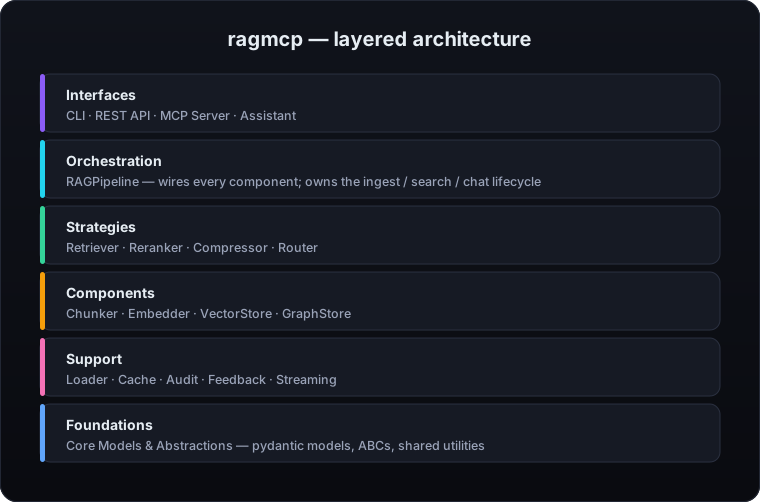
| Layer | Role |
|---|---|
| Interfaces | Entry points: CLI commands, REST API, MCP stdio/SSE transport, pydantic-ai/Langfuse agents |
| Orchestration | RAGPipeline wires every component together and owns the ingest/search/chat lifecycle |
| Strategies | Pluggable algorithms — swap Retriever, Reranker, Compressor, or Router independently |
| Components | Stateful building blocks: Chunker splits text, Embedder produces vectors, VectorStore/GraphStore persists them |
| Support | Cross-cutting concerns: Loader reads sources, Cache accelerates hot paths, Audit/Feedback record activity, Streaming handles live data |
| Foundations | Pydantic models, abstract base classes, and shared utilities that every layer depends on |
All components are injectable — swap any layer without modifying the others.
Installation
# Minimal (MCP server + in-memory store)
pip install mcpaisuite-ragmcp

# With local embedder + ChromaDB
pip install "mcpaisuite-ragmcp[local]"

# With PDF, DOCX, HTML loaders
pip install "mcpaisuite-ragmcp[pdf,docx,html]"

# Full stack (all backends)
pip install "mcpaisuite-ragmcp[all]"
Optional extras:
| Extra | What it enables |
|---|---|
fastembed |
FastEmbed local ONNX embedder (CPU, no API key, no PyTorch) |
litellm |
LiteLLM embedder (OpenAI, Cohere, Mistral, …) |
local |
sentence-transformers + ChromaDB + Ollama |
pdf |
PDF loader via pypdf |
docx |
Word document loader |
html |
HTML/web page loader |
ocr |
OCR for scanned PDFs and images (pytesseract) |
audio |
Whisper transcription for audio/video files |
qdrant |
Qdrant vector store |
milvus |
Milvus vector store |
pgvector |
PostgreSQL + pgvector (includes psycopg2-binary, pgvector, numpy) |
rerank |
CrossEncoderReranker (sentence-transformers) |
cohere |
CohereReranker |
cache |
Redis cache + memory LRU cache |
graph |
GraphRAG with NetworkX or Neo4j |
clip |
CLIP image search |
colpali |
ColPali MaxSim document image search |
sources |
SQL, REST API, GitHub, Notion, Confluence connectors |
email |
IMAP email source (stdlib only, no extra packages) |
slack |
Slack source (channels, threads) |
jira |
Jira source (Cloud + Server/DC, JQL) |
streaming |
Kafka streaming ingestion |
s3 |
S3 loader |
gcs |
Google Cloud Storage loader |
tiktoken |
Accurate token counting for OpenAI models (used by ContextAssembler) |
metrics |
Prometheus metrics |
tracing |
OpenTelemetry tracing |
eval |
Recall@k + RAGAS evaluation |
api |
FastAPI REST server |
langfuse |
Langfuse tracing integration |
pydantic-ai |
pydantic-ai agent bridge |
all |
Everything |
Quickstart
5-minute start
from ragmcp import RAGFactory

# Default pipeline (fastembed + persistent ChromaDB), no API key required
pipeline = RAGFactory.create_default()

await pipeline.ingest("docs/manual.pdf")
results = await pipeline.search("How do I reset my password?")

for chunk in results:
    print(chunk.content)
With OpenAI + ChromaDB
import os
from ragmcp import RAGFactory

# OpenAI embeddings + local ChromaDB
pipeline = RAGFactory.create_openai(api_key=os.environ["OPENAI_API_KEY"])

await pipeline.ingest_folder("./docs")
results = await pipeline.search("RAG architectures", top_k=5)
Production stack
import os
from ragmcp import RAGFactory

# pgvector + Cohere reranker
pipeline = RAGFactory.create_production(
    db_url="postgresql://user:pass@localhost/ragmcp",
    api_key=os.environ["OPENAI_API_KEY"],
)
From environment variables
export RAGMCP_EMBEDDER=litellm
export RAGMCP_EMBEDDER_MODEL=text-embedding-3-small
export RAGMCP_EMBEDDER_API_KEY=sk-...
export RAGMCP_VECTORSTORE=qdrant
export RAGMCP_VECTORSTORE_URL=http://localhost:6333
export RAGMCP_CACHE=redis
export RAGMCP_CACHE_URL=redis://localhost:6379
from ragmcp import RAGFactory

pipeline = RAGFactory.from_env()
MCP Server
ragmcp exposes your pipeline as an MCP server so Claude Desktop, Cursor, or any MCP-compatible LLM client can call search_documents as a native tool.
Two transports are supported:
| Transport | When to use |
|---|---|
stdio (default) |
Local use — Claude Desktop or Cursor launches ragmcp as a subprocess |
sse |
HTTP server — share a running server across clients, Docker, or remote deployments |
Python
from ragmcp import RAGFactory
from ragmcp.mcp_server import RAGMCPServer

pipeline = RAGFactory.from_env()
server = RAGMCPServer(pipeline=pipeline)

# stdio — Claude Desktop / Cursor subprocess (default)
server.run()

# SSE — HTTP server on port 8080
# server.run(transport="sse", port=8080)
Claude Desktop — stdio (claude_desktop_config.json)
ragmcp is launched as a subprocess; documents ingest through ingest_document or by running ragmcp ingest before starting.
{
  "mcpServers": {
    "ragmcp": {
      "command": "ragmcp",
      "args": ["serve"],
      "cwd": "/path/to/your/project"
    }
  }
}
To use a custom config file:
{
  "mcpServers": {
    "ragmcp": {
      "command": "ragmcp",
      "args": ["serve", "--config", "ragmcp.yaml"],
      "cwd": "/path/to/your/project"
    }
  }
}
Config file location:
- macOS:
~/Library/Application Support/Claude/claude_desktop_config.json - Windows:
%APPDATA%\Claude\claude_desktop_config.json
Claude Desktop — SSE
Start the server first, then point Claude Desktop at it. Useful when you want a persistent server with documents already indexed.
ragmcp serve --transport sse --port 8080
{
  "mcpServers": {
    "ragmcp": {
      "type": "sse",
      "url": "http://localhost:8080/sse"
    }
  }
}
Cursor
# Cursor settings → MCP Servers → Add:
ragmcp:
  command: ragmcp
  args: ["serve"]
  cwd: /path/to/your/project
CLI
# stdio (default)
ragmcp serve

# With config file
ragmcp serve --config ragmcp.yaml

# SSE transport
ragmcp serve --transport sse --port 8080
Core Pipeline
RAGPipeline is the central object. All high-level operations go through it.
from ragmcp.pipeline import RAGPipeline
from ragmcp.embedders import FastEmbedEmbedder
from ragmcp.vectorstores import ChromaStore
from ragmcp.retrievers import HybridRetriever
from ragmcp.rerankers import CrossEncoderReranker

pipeline = RAGPipeline(
    embedder=FastEmbedEmbedder(),
    vectorstore=ChromaStore(path=".chroma"),
    retriever=HybridRetriever(),
    reranker=CrossEncoderReranker(),
)

# Ingest a single file
await pipeline.ingest("report.pdf")

# Ingest a whole folder (recursive by default)
await pipeline.ingest_folder("./docs")

# Ingest from a streaming data source (S3, GitHub, SQL, …)
# await pipeline.ingest_source(my_source)

# Search
chunks = await pipeline.search("What is the refund policy?", top_k=10)

# Stream chunks one by one
async for chunk in pipeline.search_stream("Summarize the report"):
    print(chunk.content)
Loaders & Chunkers
Loaders
ragmcp auto-detects file type via AutoLoader.
| Loader | Extensions | Extra |
|---|---|---|
TextLoader |
.txt, .md |
— |
PDFLoader |
.pdf |
pdf |
PDFOCRLoader |
scanned .pdf |
ocr |
DocxLoader |
.docx |
docx |
HTMLLoader |
.html, URLs |
html |
CSVLoader |
.csv |
— (stdlib) |
JSONLoader |
.json, .jsonl |
— (stdlib) |
ImageLoader |
.png, .jpg, .webp |
ocr or litellm |
AudioLoader |
.mp3, .wav, .m4a |
audio |
VideoLoader |
.mp4, .webm, .mov, .mkv |
audio |
S3Loader |
s3:// |
s3 |
GCSLoader |
gs:// |
gcs |
Cloud Storage Loaders
from ragmcp.loaders.s3_loader import S3Loader
from ragmcp.loaders.gcs_loader import GCSLoader

# AWS S3 (production)
loader = S3Loader(bucket="my-bucket", prefix="docs/")

# AWS S3 with a local emulator (MinIO, LocalStack, …)
loader = S3Loader(
    bucket="ragmcp-test",
    endpoint_url="http://localhost:9100",   # or set AWS_ENDPOINT_URL env var
    aws_access_key_id="minioadmin",
    aws_secret_access_key="minioadmin",
)

# Google Cloud Storage (production)
loader = GCSLoader(bucket="my-bucket", prefix="docs/")

# GCS with a local emulator (fake-gcs-server)
# Set STORAGE_EMULATOR_HOST before instantiating — no credentials required
import os
os.environ["STORAGE_EMULATOR_HOST"] = "http://localhost:4443"
loader = GCSLoader(bucket="ragmcp-test")
Chunkers
from ragmcp.chunkers import RecursiveChunker, SentenceChunker, LateChunker, SemanticChunker

# Token-based recursive splitting (default)
chunker = RecursiveChunker(chunk_size=512, overlap=64)

# Sentence-aware splitting
chunker = SentenceChunker(max_sentences=5, overlap_sentences=1)

# Contextual: neighbor text is included in each chunk's embedding window
chunker = LateChunker(chunk_size=512, overlap=64, context_before=200, context_after=200)

# Semantic: cuts at topic transitions detected via cosine similarity
# Requires an embedder — use achunk() inside async code
chunker = SemanticChunker(
    embedder=embedder,
    breakpoint_threshold=0.5,  # lower = more chunks
    buffer_size=1,             # sentences of context for each embedding window
    min_chunk_size=100,        # merge chunks shorter than this
    max_chunk_size=2000,       # split chunks larger than this with RecursiveChunker
)

# Inside an async context:
chunks = await chunker.achunk(documents)

# Or synchronously (wraps asyncio.run — avoid inside existing event loop):
chunks = chunker.chunk(documents)
Embedders
| Class | Backend | Extra |
|---|---|---|
FastEmbedEmbedder |
fastembed (local, CPU) | fastembed |
LiteLLMEmbedder |
OpenAI, Cohere, Mistral, … | litellm |
OllamaEmbedder |
Ollama (local GPU) | local |
CachedEmbedder |
Wraps any embedder with cache | cache |
from ragmcp.embedders import LiteLLMEmbedder
from ragmcp.cache import CachedEmbedder, MemoryLRUCache

embedder = CachedEmbedder(
    embedder=LiteLLMEmbedder(model="text-embedding-3-small", api_key="sk-..."),
    cache=MemoryLRUCache(max_size=10_000),
)
Vector Stores
| Class | Backend | Extra |
|---|---|---|
InMemoryVectorStore |
NumPy (no deps) | — |
ChromaStore |
ChromaDB | local |
QdrantStore |
Qdrant | qdrant |
MilvusStore |
Milvus | milvus |
PgVectorStore |
PostgreSQL + pgvector | pgvector |
from ragmcp.vectorstores import QdrantStore

store = QdrantStore(url="http://localhost:6333", collection="my_docs")
Retrievers
| Class | Strategy |
|---|---|
DenseRetriever |
Pure vector similarity |
BM25SparseIndex |
Keyword-based BM25 |
HybridRetriever |
Dense + BM25 with RRF fusion |
CachedRetriever |
Wraps any retriever with query-level cache |
GraphRAGRetriever |
Graph traversal + augmented dense retrieval |
MultiQueryRetriever |
Generates N query variants via LLM + RRF fusion |
HyDERetriever |
Hypothetical Document Embeddings (Gao et al. 2022) |
Choosing the search strategy
The retrieval strategy is selected by the retriever you inject into the pipeline
(DenseRetriever, BM25SparseIndex, HybridRetriever, …). When no retriever is set,
the pipeline falls back to direct dense vector search via the vector store.
from ragmcp.retrievers import HybridRetriever

pipeline = RAGPipeline(..., retriever=HybridRetriever(embedder=embedder, vectorstore=store))
results = await pipeline.search(query, top_k=5)   # dense + BM25 with RRF fusion
pipeline.search() signature: search(query, top_k=None, filters=None, user_id=None, session_id=None).
Sparse Indexes
| Class | Backend | Notes |
|---|---|---|
BM25SparseIndex |
BM25 (keyword) | Default, no deps |
SPLADESparseIndex |
SPLADE (learned sparse) | pip install "mcpaisuite-ragmcp[splade]" |
from ragmcp.retrievers import SPLADESparseIndex, HybridRetriever

# Drop-in replacement for BM25SparseIndex
splade = SPLADESparseIndex(
    model_name="naver/splade-cocondenser-ensembledistil",
    device="cpu",   # or "cuda" / "mps"
)
retriever = HybridRetriever(embedder=embedder, vectorstore=store, sparse_index=splade)
SPLADE learns to expand queries with synonyms and related terms — better than BM25 on specialized vocabulary (medical, legal, technical). Model downloads on first use (~500MB).
from ragmcp.retrievers import HybridRetriever, CachedRetriever, MultiQueryRetriever, HyDERetriever
from ragmcp.cache import RedisCache

# Cache query results
retriever = CachedRetriever(
    retriever=HybridRetriever(alpha=0.7),
    cache=RedisCache(url="redis://localhost:6379"),
)

# Multi-query: generates 3 variants via LLM, fuses with RRF (+15-25% recall)
retriever = MultiQueryRetriever(
    retriever=HybridRetriever(...),
    llm_model="gpt-4o-mini",
    num_queries=3,
)

# HyDE: generates a hypothetical passage, embeds that instead of the raw query
retriever = HyDERetriever(
    embedder=embedder,
    vectorstore=vectorstore,
    llm_model="gpt-4o-mini",
)
Rerankers
| Class | Backend | Extra |
|---|---|---|
CrossEncoderReranker |
sentence-transformers (local) | rerank |
CohereReranker |
Cohere Rerank API | cohere |
FeedbackReranker |
User feedback signals (SQL store) | — |
from ragmcp.rerankers import CrossEncoderReranker, FeedbackReranker
from ragmcp.audit.sql_feedback_store import SQLFeedbackStore

# Local reranker
reranker = CrossEncoderReranker(model="cross-encoder/ms-marco-MiniLM-L-6-v2")

# Feedback-driven reranker — boosts chunks with positive votes
feedback_store = SQLFeedbackStore(db_path="feedback.db")
reranker = FeedbackReranker(store=feedback_store, feedback_weight=0.3)
Context Compression
Reduce tokens sent to the LLM by compressing retrieved chunks before generation.
from ragmcp.compression import ExtractiveSentenceCompressor, LLMContextCompressor

# Extractive: rank sentences by relevance, drop low-scoring ones (no LLM required)
compressor = ExtractiveSentenceCompressor(min_sentence_score=0.0)

# LLM-based: ask the LLM to extract relevant passages
compressor = LLMContextCompressor(model="gpt-4o-mini")

# Compress retrieved chunks down to a token budget before generation
chunks = await pipeline.search("refund policy", top_k=10)
compressed = await compressor.compress("refund policy", chunks, target_tokens=1500)
Cache
from ragmcp.cache import MemoryLRUCache, RedisCache

# In-process LRU cache
cache = MemoryLRUCache(max_size=5_000, default_ttl_s=3600)

# Redis cache (survives restarts, shared across workers)
cache = RedisCache(url="redis://localhost:6379", ttl=86400)
Both can be passed to CachedEmbedder (embedding-level) or CachedRetriever (query-level).
Graph RAG
Build a knowledge graph from your documents, then augment retrieval with entity-aware traversal.
from ragmcp.graph import GraphRAGRetriever, NetworkXGraphStore, LLMEntityExtractor
from ragmcp.embedders import FastEmbedEmbedder
from ragmcp.vectorstores import InMemoryVectorStore

graph_store = NetworkXGraphStore()   # or Neo4jGraphStore(uri=..., user=..., password=...)
extractor = LLMEntityExtractor(model="gpt-4o-mini")

retriever = GraphRAGRetriever(
    embedder=FastEmbedEmbedder(),
    vectorstore=InMemoryVectorStore(),
    graph_store=graph_store,
    entity_extractor=extractor,
    graph_depth=2,        # BFS traversal depth
    dense_weight=0.7,     # share of dense results in the final top_k
)

# Extracts entities → traverses graph → augments query → dense retrieval
results = await retriever.retrieve("What did Alice say about the merger?", top_k=5)
Neo4j is supported for production graph stores:
from ragmcp.graph import Neo4jGraphStore

graph_store = Neo4jGraphStore(uri="bolt://localhost:7687", user="neo4j", password="...")
Multimodal Search
CLIP Image Search
from ragmcp.multimodal import CLIPImageEmbedder
from ragmcp.vectorstores import InMemoryVectorStore

embedder = CLIPImageEmbedder()
store = InMemoryVectorStore()

# Embed and index an image
img_vec = await embedder.embed_image("product_photo.jpg")
await store.upsert([chunk], [img_vec])

# Cross-modal search: text query → similar images
text_vec = await embedder.embed(["red running shoes"])
results = await store.search(text_vec[0], top_k=5)
ColPali (Document Image Search)
from ragmcp.multimodal import ColPaliRetriever

retriever = ColPaliRetriever()
await retriever.index_image("invoice_page1.png")
results = await retriever.search("total amount due", top_k=3)
# Uses MaxSim scoring — works on dense document images without OCR
Vision LLM (Image Description)
from ragmcp.multimodal import LiteLLMVisionDescriber

describer = LiteLLMVisionDescriber(model="gpt-4o", api_key="sk-...")
description = await describer.describe("chart.png", prompt="What trend does this chart show?")
Audio & Video Transcription
from ragmcp.loaders.audio_loader import AudioLoader
from ragmcp.loaders.video_loader import VideoLoader
from ragmcp.multimodal import WhisperTranscriber

transcriber = WhisperTranscriber(mode="local", model="base")   # or mode="api"

loader = AudioLoader(transcriber=transcriber)
chunks = await loader.load("interview.mp3")

video_loader = VideoLoader(transcriber=transcriber)
chunks = await video_loader.load("meeting_recording.mp4")
Streaming Ingestion
Kafka — quickstart
from ragmcp.streaming import StreamingIngestionService
from ragmcp.streaming import KafkaStreamSource   # pip install mcpaisuite-ragmcp[streaming]

kafka = KafkaStreamSource(
    bootstrap_servers="localhost:9092",
    topic="documents",
    group_id="ragmcp-ingest",
)
service = StreamingIngestionService(pipeline=pipeline)
await service.run(kafka)  # infinite loop, Ctrl+C to stop
Kafka — multi-tenant
Each tenant gets its own Kafka consumer and dedicated topic. Topic naming convention:
ragmcp-docs→ default tenantragmcp-docs-legal→ tenantlegalragmcp-docs-support→ tenantsupport
from ragmcp.streaming import KafkaStreamSource, StreamingIngestionService

# One consumer per tenant — subscribe to the tenant-specific topic
source = KafkaStreamSource(
    bootstrap_servers=["localhost:9092"],
    topic="ragmcp-docs-legal",     # tenant-specific topic
    group_id="ragmcp-consumer-legal",
)

service = StreamingIngestionService(pipeline=pipeline, source=source)
await service.run()   # streams docs into the pipeline continuously
Publish a message (for testing):
# Start Kafka
docker compose --profile kafka up -d kafka

# Publish to the tenant topic
docker exec -it demo-kafka-1 kafka-console-producer \
    --bootstrap-server localhost:9092 \
    --topic ragmcp-docs-legal
Note: the
UNKNOWN_TOPIC_OR_PARTITIONwarning on first publish is expected — Kafka auto-creates the topic and retries. Start the consumer before publishing for real-time ingestion; messages are retained by Kafka if the consumer starts later.
Webhook (HMAC-secured)
from ragmcp.streaming import HMACWebhookHandler

handler = HMACWebhookHandler(secret="my-webhook-secret", pipeline=pipeline)
# Mount on your FastAPI app: app.include_router(handler.router)
Source Connectors
Pull documents from external systems on demand or on a schedule.
| Source | Class | Install | Notes |
|---|---|---|---|
| GitHub repo | GitHubSource |
ragmcp[sources] |
files, issues, wikis |
| SQL database | SQLDataSource |
ragmcp[sources] |
PostgreSQL, MySQL, SQLite |
| REST API | RESTAPISource |
ragmcp[sources] |
paginated, JSONPath |
| IMAP email | EmailSource |
stdlib only | Gmail, any IMAP server |
| Slack | SlackSource |
ragmcp[slack] |
channels, threads |
| Jira | JiraSource |
ragmcp[jira] |
Cloud + Server/DC, JQL, comments |
| Notion | NotionLoader |
ragmcp[notion] |
pages, databases |
| Confluence | ConfluenceLoader |
ragmcp[confluence] |
spaces, pages |
| Kafka | KafkaStreamSource |
ragmcp[streaming] |
real-time streaming ingestion |
| AWS S3 | S3Loader |
ragmcp[s3] |
any bucket, MinIO-compatible |
| Google Cloud Storage | GCSLoader |
ragmcp[gcs] |
any bucket, emulator-compatible |
from ragmcp.sources import GitHubSource, SQLDataSource, RESTAPISource
from ragmcp.sources import EmailSource, SlackSource, JiraSource

# GitHub repository
source = GitHubSource(repo="owner/repo", token="ghp_...", path_prefix="docs/")
await pipeline.ingest_source(source)

# SQL database
source = SQLDataSource(
    url="postgresql+asyncpg://user:pass@localhost/db",
    query="SELECT title, body FROM articles",
    content_column="body",
)
await pipeline.ingest_source(source)

# IMAP email — stdlib only, no extra deps
source = EmailSource(
    host="imap.gmail.com",
    username="me@example.com",
    password="app-password",
    mailbox="INBOX",
    since_days=30,
    max_emails=500,
)
await pipeline.ingest_source(source)

# Slack — pip install mcpaisuite-ragmcp[slack]
source = SlackSource(
    token="xoxb-...",
    channels=["general", "engineering"],
    since_days=30,
    window_size=10,       # messages grouped into windows of 10
    include_threads=True,
)
await pipeline.ingest_source(source)

# Jira — pip install mcpaisuite-ragmcp[jira]
source = JiraSource(
    base_url="https://myteam.atlassian.net",
    email="me@example.com",
    api_token="ATATT...",
    jql="project = ENG AND updated >= -30d ORDER BY updated DESC",
    max_issues=1000,
    include_comments=True,
)
await pipeline.ingest_source(source)

# Notion — pip install mcpaisuite-ragmcp[notion]
from ragmcp.loaders.notion_loader import NotionLoader
from ragmcp import RAGFactory

# Use NotionLoader as the pipeline's loader, then ingest by page/database ID
pipeline = RAGFactory.create_default(loader=NotionLoader(api_key="secret_...", max_pages=50))
await pipeline.ingest("notion://8fbf270c287742f6a0671b68a4f8541d")   # page or database UUID

# Kafka streaming — pip install mcpaisuite-ragmcp[streaming]
from ragmcp.streaming import KafkaStreamSource, StreamingIngestionService

source = KafkaStreamSource(
    bootstrap_servers="localhost:9092",
    topic="ragmcp-docs",
    group_id="ragmcp-ingest",
)
service = StreamingIngestionService(pipeline=pipeline)
await service.run(source)   # streams continuously until cancelled
All sources follow the BaseDataSource async streaming interface — no data is loaded into memory all at once.
Multi-tenancy
Each tenant gets an isolated vector store, BM25 index, and pipeline instance.
tenant_id is set when the pipeline is constructed — each tenant gets a dedicated
pipeline whose ingests and searches are isolated to its namespace.
from ragmcp.pipeline import RAGPipeline

acme = RAGPipeline(..., tenant_id="acme")
globex = RAGPipeline(..., tenant_id="globex")

await acme.ingest("acme_docs.pdf")
await globex.ingest("globex_docs.pdf")

results = await acme.search("refund policy")
# Only returns chunks from acme's documents
User Profiles & Personalization
Personalization works by persisting a user profile and passing user_id to search() —
the pipeline fetches the profile and reranks results accordingly.
Persistent profile store
from ragmcp.graph import SQLUserProfileStore, PersonalizationStrategy
from ragmcp.core import BaseUserProfile as UserProfile

profile_store = SQLUserProfileStore("profiles.db")
await profile_store.save(UserProfile(
    user_id="alice",
    preferences={"topics": ["machine learning", "NLP"]},
    search_history=[],
))

# Personalized search: chunks matching the profile are boosted
results = await pipeline.search(
    "What is RAG?",
    top_k=5,
    user_id="alice",   # pipeline fetches the profile and reranks accordingly
)
Evaluation
Recall@k
from ragmcp.eval import EvalSample, evaluate

samples = [
    EvalSample(question="What is the refund window?", expected_source="refunds.md"),
    EvalSample(question="How to cancel?",             expected_source="cancellation.pdf"),
]
result = await evaluate(pipeline, samples)   # matches expected_source against result metadata
print(f"Recall@k    : {result.recall_at_k:.2%}")
print(f"Mean latency: {result.mean_latency_ms:.0f}ms")
print(f"p95 latency : {result.p95_latency_ms:.0f}ms")
print(f"Failed      : {result.failed_samples}/{result.total_samples}")
EvalSample(question, expected_source) — evaluate checks whether expected_source
appears (substring match) in the metadata source of any returned chunk.
EvalResult fields: recall_at_k, mean_latency_ms, p50_latency_ms,
p95_latency_ms, total_samples, failed_samples.
RAGAS (5 metrics)
from ragmcp.eval.ragas_eval import RAGASEvaluator, RAGASSample

evaluator = RAGASEvaluator(embedder=pipeline.embedder)

samples = [
    RAGASSample(
        query="What is the refund window?",
        answer="Refunds are accepted within 30 days.",
        chunks=retrieved_chunks,
        ground_truth="30 days",   # optional — enables answer_correctness metric
    )
]
result = await evaluator.evaluate(samples)
print(f"Context Relevancy : {result.context_relevancy:.2f}")
print(f"Context Precision : {result.context_precision:.2f}")  # fraction of useful chunks
print(f"Answer Relevancy  : {result.answer_relevancy:.2f}")
print(f"Faithfulness      : {result.faithfulness:.2f}")
print(f"Answer Correctness: {result.answer_correctness:.2f}")  # vs ground truth
print(f"Overall (harmonic): {result.overall:.2f}")
Agentic RAG (ReAct)
For complex multi-step questions, the ReAct agent runs an iterative Thought/Action/Observation loop — the LLM decides how many searches to perform and when it has enough context.
from ragmcp.agent import ReActRAGAgent

agent = ReActRAGAgent(
    pipeline=pipeline,
    llm_fn=my_llm_function,   # async (messages: list[dict]) -> str
    top_k=5,
    max_steps=5,
)

result = await agent.run(
    "Compare the refund policy for enterprise vs standard plans, "
    "and list any exceptions that apply after 2023"
)

print(result.final_answer)
print(f"Iterations: {result.iteration_count}")
for step in result.steps:
    print(f"  → searched: {step.action_input}")
    print(f"    thought:  {step.thought}")
Both ReActRAGAgent and SelfRAGPipeline require an llm_fn — an async callable you
provide (ReActRAGAgent receives messages: list[dict], SelfRAGPipeline receives a
prompt: str). There is no built-in model shorthand; wire your own LLM client.
from ragmcp.agent import ReActRAGAgent

agent = ReActRAGAgent(pipeline=pipeline, llm_fn=my_llm_fn, max_steps=5)
result = await agent.run("Compare dense and hybrid retrieval")
# result.final_answer, result.steps (list of ReActStep: thought/action/action_input/observation)
Difference vs Self-RAG: Self-RAG does 1 retrieval + optional 1 re-retrieval with a fixed critique. ReAct has no fixed structure — the LLM drives all decisions through natural language reasoning.
Self-RAG
Generate an answer, critique it, and optionally re-retrieve if the answer is insufficiently supported or incomplete.
from ragmcp.agent import SelfRAGPipeline

self_rag = SelfRAGPipeline(
    pipeline=pipeline,
    llm_fn=my_llm_function,       # async (prompt: str) -> str
    support_threshold=6.0,        # re-retrieve if support score < 6/10
    completeness_threshold=6.0,   # re-retrieve if completeness score < 6/10
    max_iterations=2,
)

result = await self_rag.run("What are the refund conditions for enterprise plans?")

print(result.final_answer)
print(f"Support      : {result.support_score:.0%}")
print(f"Completeness : {result.completeness_score:.0%}")
print(f"Iterations   : {result.iteration_count}")   # 1 = no re-retrieval needed
if result.refined_query:
    print(f"Refined query: {result.refined_query}")
The LLM is used three times per iteration: generate answer, critique support + completeness, generate refined query. Falls back gracefully if any step fails.
Observability
Prometheus metrics
pip install "mcpaisuite-ragmcp[metrics]"
import prometheus_client
from ragmcp.observability import RAGMetrics

metrics = RAGMetrics()
pipeline = RAGPipeline(..., metrics=metrics)

# Start a dedicated HTTP server that exposes /metrics for Prometheus to scrape.
# Use a port that does not conflict with Prometheus UI (9090) or Milvus (9091).
prometheus_client.start_http_server(9095)
Metrics exposed:
| Metric | Type | Labels |
|---|---|---|
ragmcp_searches_total |
Counter | tenant_id |
ragmcp_search_duration_seconds |
Histogram | tenant_id |
ragmcp_ingestions_total |
Counter | tenant_id, status |
ragmcp_chunks_ingested_total |
Counter | tenant_id |
ragmcp_embed_duration_seconds |
Histogram | model |
Prometheus scrape_configs (use host.docker.internal if Prometheus runs in Docker):
scrape_configs:
  - job_name: "ragmcp"
    static_configs:
      - targets: ["host.docker.internal:9095"]   # or localhost:9095 if running natively
⚠️ Port conflicts to avoid:
9090= Prometheus UI,9091= Milvus metrics.
OpenTelemetry tracing
from ragmcp.observability import RAGTracer

tracer = RAGTracer(
    service_name="my-rag-service",
    otlp_endpoint="http://localhost:4317",
)
pipeline = RAGPipeline(..., tracer=tracer)
pip install "mcpaisuite-ragmcp[tracing]"
Audit Logging
Every search and ingest operation is logged with user, tenant, query, latency, and result IDs.
from ragmcp.audit import SQLAuditLogger, FileAuditLogger

# SQLite / PostgreSQL
audit = SQLAuditLogger(db_url="sqlite:///audit.db")

# Append-only JSONL file
audit = FileAuditLogger(path="audit.jsonl")

pipeline = RAGPipeline(..., audit_logger=audit)
REST API
ragmcp ships a production-ready FastAPI server wrapping any RAGPipeline.
pip install "mcpaisuite-ragmcp[api]"
Embedding the server
import uvicorn
from ragmcp import RAGFactory
from ragmcp.api import create_app
from ragmcp.audit.sql_feedback_store import SQLFeedbackStore

pipeline = RAGFactory.create_default()
app = create_app(
    pipeline,
    api_keys={"your-secret-key"},    # None = no auth (dev only)
    feedback_store=SQLFeedbackStore(db_path="feedback.db"),  # enables POST /feedback
    chat_fn=my_llm_fn,               # enables POST /chat
)
uvicorn.run(app, host="0.0.0.0", port=8000)
Endpoints
| Method | Path | Auth | Description |
|---|---|---|---|
GET |
/health |
— | Liveness probe, always public |
POST |
/search |
✓ | Semantic search, returns top-k chunks |
POST |
/stream |
✓ | Same as /search but streamed as NDJSON |
POST |
/chat |
✓ | Search + LLM answer (opt-in via chat_fn) |
POST |
/ingest |
✓ | Ingest a single file path |
POST |
/ingest/folder |
✓ | Ingest all files in a directory |
POST |
/ingest/upload |
✓ | Upload and ingest a file (multipart) |
GET |
/sources |
✓ | List all indexed source IDs |
DELETE |
/sources/{id} |
✓ | Remove a source from the index |
POST |
/feedback |
✓ | Submit relevance feedback (opt-in via feedback_store) |
GET |
/metrics |
— | Prometheus metrics (opt-in via metrics=) |
Auth is X-API-Key header. Pass api_keys=None to disable (development only).
Example requests
# Search
curl -X POST http://localhost:8000/search \
  -H "X-API-Key: your-secret-key" \
  -H "Content-Type: application/json" \
  -d '{"query": "refund policy", "top_k": 5}'

# Stream results as NDJSON
curl -X POST http://localhost:8000/stream \
  -H "X-API-Key: your-secret-key" \
  -H "Content-Type: application/json" \
  -d '{"query": "billing", "top_k": 3}'

# Upload and ingest a file
curl -X POST http://localhost:8000/ingest/upload \
  -H "X-API-Key: your-secret-key" \
  -F "file=@manual.pdf"

# Chat (requires chat_fn)
curl -X POST http://localhost:8000/chat \
  -H "X-API-Key: your-secret-key" \
  -H "Content-Type: application/json" \
  -d '{"query": "What is the return window?", "top_k": 5}'

# List indexed sources
curl http://localhost:8000/sources -H "X-API-Key: your-secret-key"

# Delete a source
curl -X DELETE http://localhost:8000/sources/doc-abc123 \
  -H "X-API-Key: your-secret-key"
CLI
# Start MCP server (stdio transport)
ragmcp serve

# Start REST API server
ragmcp api --host 0.0.0.0 --port 8000

# Ingest documents (embedder/vectorstore are configured in ragmcp.yaml)
ragmcp ingest ./docs

# Search
ragmcp search "What is the refund policy?" --top-k 5

# Evaluate (JSON file of questions + expected sources)
ragmcp eval --samples queries.json
pydantic-ai Integration
ragmcp ships a first-class bridge for pydantic-ai — giving any pydantic-ai Agent semantic search, source listing, and live ingestion with zero boilerplate.
Installation
pip install "mcpaisuite-ragmcp[pydantic-ai]"
Quickstart — create_rag_agent
from ragmcp import RAGFactory
from ragmcp.integrations.pydantic_ai import create_rag_agent

pipeline = RAGFactory.create_default()
await pipeline.ingest_folder("./docs")

agent = create_rag_agent(
    "openai:gpt-4o",
    pipeline,
    system_prompt="You are a support agent for Acme Corp.",
    top_k=8,
)

result = await agent.run("What are the refund conditions?")
print(result.data)
Three tools are registered automatically:
| Tool | Description |
|---|---|
search_knowledge_base(query) |
Semantic search — always called first |
list_indexed_sources() |
Lists available documents |
ingest_url(url) |
Live ingestion (opt-in via enable_ingest=True) |
Manual tool registration
from pydantic_ai import Agent
from ragmcp.integrations.pydantic_ai import ragmcp_tools

agent = Agent("anthropic:claude-opus-4-6", system_prompt="You are a helpful assistant.")
for tool in ragmcp_tools(pipeline, top_k=5, enable_ingest=True):
    agent.tool_plain(tool)

result = await agent.run("Summarise the onboarding section.")
RunContext / dependency injection
from pydantic_ai import Agent, RunContext
from ragmcp.integrations.pydantic_ai import RAGMCPDeps

agent = Agent("openai:gpt-4o", deps_type=RAGMCPDeps)

@agent.tool
async def search(ctx: RunContext[RAGMCPDeps], query: str) -> str:
    return await ctx.deps.search(query)

@agent.tool
async def ingest(ctx: RunContext[RAGMCPDeps], url: str) -> str:
    return await ctx.deps.ingest(url)

result = await agent.run(
    "What changed in v2?",
    deps=RAGMCPDeps(pipeline=pipeline, top_k=10, enable_ingest=True),
)
Recommended stack
ragmcp           → ingestion, retrieval, MCP
+ pydantic-ai    → tool calling, structured outputs, agent loop
+ langfuse       → tracing, evaluation, A/B testing in production
Langfuse Integration
ragmcp ships a transparent tracing wrapper that sends every search and ingest call to Langfuse — no code changes required on the pipeline side.
Installation
pip install "mcpaisuite-ragmcp[langfuse]"
Quickstart
import os
from ragmcp import RAGFactory
from ragmcp.integrations.langfuse import LangfuseRAGPipeline

os.environ["LANGFUSE_PUBLIC_KEY"] = "pk-lf-..."
os.environ["LANGFUSE_SECRET_KEY"] = "sk-lf-..."

pipeline = RAGFactory.create_default()
traced = LangfuseRAGPipeline(pipeline)  # wraps transparently

await traced.ingest("./docs/guide.pdf")
chunks = await traced.search("How does billing work?")
One-liner factory
from ragmcp.integrations.langfuse import trace_pipeline

traced = trace_pipeline(RAGFactory.create_default())
What gets traced
| Operation | Langfuse span | Output fields |
|---|---|---|
search(query) |
search |
result_count, sources |
ingest(source) |
ingest |
success, skipped, failed |
Errors are recorded with level="ERROR" and the exception message.
Graceful degradation
If langfuse is not installed or keys are missing, the wrapper silently falls back to the unwrapped pipeline with no exception raised. Use enabled=False to skip tracing entirely in tests.
wrapped = LangfuseRAGPipeline(pipeline, enabled=False)
Flush before exit
traced.flush() # sends any buffered events to Langfuse
Semantic Router
Route any query to the best-matching pipeline, agent, or handler based on semantic similarity — no regex, no keyword lists.
Quickstart
from ragmcp.routing import SemanticRouter, Route

router = SemanticRouter(embedder=embedder, routes=[
    Route(name="technical", examples=["how to install", "configuration", "API reference"]),
    Route(name="billing",   examples=["pricing", "invoice", "subscription"]),
])
route = await router.route("How do I configure the chunker?")
# → "technical"
Full example
from ragmcp.routing import Route, SemanticRouter
from ragmcp.embedders import FastEmbedEmbedder

router = SemanticRouter(
    embedder=FastEmbedEmbedder(),
    routes=[
        Route("billing",   ["How do I pay?", "Invoice not received", "refund"]),
        Route("technical", ["API returns 500", "SDK crash", "rate limit error"]),
        Route("general",   ["Hello", "What can you do?"]),
    ],
    threshold=0.45,   # minimum cosine similarity to declare a match
    default="general", # fallback when no route exceeds the threshold
)

await router.build()   # embed examples once (reuse across requests)

route, score = await router.route("My payment failed")
# → Route(name="billing"), 0.87
Handler dispatch
billing_pipeline = RAGFactory.create_default()
await billing_pipeline.ingest_folder("./docs/billing")
technical_pipeline = RAGFactory.create_default()
await technical_pipeline.ingest_folder("./docs/technical")

Route("billing", [...], handler=lambda q: billing_pipeline.search(q))
Route("technical", [...], handler=lambda q: technical_pipeline.search(q))

result = await router.route_and_handle("My invoice is missing")
# → calls billing handler automatically
REST API
The demo server exposes a POST /router/route endpoint:
curl -X POST http://localhost:8000/router/route \
  -H "Content-Type: application/json" \
  -d '{
    "query": "My payment failed",
    "routes": [
      {"name": "billing", "examples": ["How to pay", "refund"]},
      {"name": "technical", "examples": ["API error", "crash"]}
    ],
    "threshold": 0.45
  }'
The demo UI also includes a Router Playground page with live score visualization.
Configuration
YAML config
# ragmcp.yaml
embedder:
  type: litellm
  model: text-embedding-3-small
  api_key: "${OPENAI_API_KEY}"

vectorstore:
  type: qdrant
  url: http://localhost:6333
  collection: my_docs

retriever:
  type: hybrid
  alpha: 0.7

reranker:
  type: cross_encoder
  model: cross-encoder/ms-marco-MiniLM-L-6-v2

cache:
  type: redis
  url: redis://localhost:6379
  ttl: 86400

chunker:
  type: recursive       # recursive | sentence | late | semantic
  chunk_size: 512
  chunk_overlap: 64

# Semantic chunker — splits at topic boundaries (requires embedder)
# chunker:
#   type: semantic
#   breakpoint_threshold: 0.5   # lower = more splits
#   buffer_size: 1
#   min_chunk_size: 100

audit:
  type: sql
  db_url: sqlite:///audit.db

# Langfuse tracing (optional)
langfuse:
  enabled: true
  public_key: "${LANGFUSE_PUBLIC_KEY}"
  secret_key: "${LANGFUSE_SECRET_KEY}"
  host: "https://cloud.langfuse.com"   # or self-hosted URL
from ragmcp import RAGFactory

pipeline = RAGFactory.from_config("ragmcp.yaml")
Backends Reference
Loaders
| Format | Class | Notes |
|---|---|---|
| TXT / MD | TextLoader |
Always available |
PDFLoader |
pip install "mcpaisuite-ragmcp[pdf]" |
|
| PDF (scanned) | PDFOCRLoader |
pip install "mcpaisuite-ragmcp[ocr]" |
| DOCX | DocxLoader |
pip install "mcpaisuite-ragmcp[docx]" |
| HTML / URL | HTMLLoader |
pip install "mcpaisuite-ragmcp[html]" |
| CSV | CSVLoader |
Always available |
| JSON / JSONL | JSONLoader |
Always available |
| Image | ImageLoader |
OCR or vision LLM |
| Audio | AudioLoader |
Whisper |
| Video | VideoLoader |
Whisper (extracts audio) |
| S3 | S3Loader |
pip install "mcpaisuite-ragmcp[s3]" |
| GCS | GCSLoader |
pip install "mcpaisuite-ragmcp[gcs]" |
Vector Stores
Retrievers
| Strategy | Class | Notes |
|---|---|---|
| Dense | DenseRetriever |
Pure vector similarity |
| BM25 | BM25SparseIndex |
Keyword-based |
| Hybrid | HybridRetriever |
Dense + BM25 + RRF |
| Cached | CachedRetriever |
Query-level cache wrapper |
| Multi-Query | MultiQueryRetriever |
LLM query variants + RRF fusion |
| HyDE | HyDERetriever |
Hypothetical Document Embeddings |
| GraphRAG | GraphRAGRetriever |
Graph traversal + dense |
Vector Stores
| Store | Class | Notes |
|---|---|---|
| In-memory | InMemoryVectorStore |
Default, no persistence |
| ChromaDB | ChromaStore |
Local persistence |
| Qdrant | QdrantStore |
Local or cloud |
| Milvus | MilvusStore |
Self-hosted |
| PostgreSQL | PgVectorStore |
pgvector extension required |
Chunkers
| Strategy | Class | Notes |
|---|---|---|
| Recursive (token-based) | RecursiveChunker |
Default, no deps |
| Sentence-aware | SentenceChunker |
Splits at sentence boundaries |
| Contextual | LateChunker |
Enriches chunk embeddings with neighbor context |
| Semantic (topic-based) | SemanticChunker |
Cuts at topic transitions via cosine similarity |
Embedders
| Model | Class | Notes |
|---|---|---|
| fastembed | FastEmbedEmbedder |
Default, CPU, no API key |
| OpenAI / Cohere / Mistral | LiteLLMEmbedder |
Any LiteLLM-supported model |
| Ollama | OllamaEmbedder |
Local GPU |
Rerankers
| Model | Class | Notes |
|---|---|---|
| Cross-encoder (local) | CrossEncoderReranker |
No API key |
| Cohere Rerank | CohereReranker |
Cohere API key required |
| Feedback-driven | FeedbackReranker |
Uses thumbs up/down signals from users |
Security
Authentication
Protect the REST API with API keys:
app = create_app(pipeline, api_keys={"key-prod-xxx", "key-dev-yyy"})
All requests must include the X-API-Key header. Pass api_keys=None to disable authentication (development only).
Multi-tenancy isolation
Each tenant is isolated in its own vectorstore namespace. Data from one tenant is never accessible from another tenant — the tenant_id is enforced at every query and ingest call.
SQL Injection
PgVectorStore uses parameterized queries (%s placeholders) for all dynamic values. Filter keys are validated against a whitelist of scalar types.
Deployment
Docker
FROM python:3.11-slim
RUN pip install "mcpaisuite-ragmcp[litellm,pgvector,qdrant,api]"
COPY . /app
WORKDIR /app
CMD ["ragmcp", "api", "--host", "0.0.0.0", "--port", "8000"]
Docker Compose (ragmcp + PostgreSQL/pgvector)
# docker-compose.yml
services:
  ragmcp:
    build: .
    ports: ["8000:8000"]
    environment:
      RAGMCP_EMBEDDER: litellm
      RAGMCP_EMBEDDER_MODEL: text-embedding-3-small
      RAGMCP_EMBEDDER_API_KEY: ${OPENAI_API_KEY}
      RAGMCP_VECTORSTORE: pgvector
      RAGMCP_VECTORSTORE_URL: postgresql://user:pass@postgres/ragmcp
  postgres:
    image: pgvector/pgvector:pg16
    environment:
      POSTGRES_PASSWORD: pass
      POSTGRES_DB: ragmcp
Troubleshooting
SemanticChunker in an async context
# Incorrect — raises RuntimeError inside an existing event loop
chunks = chunker.chunk(docs)

# Correct
chunks = await chunker.achunk(docs)
Dimension mismatch (Milvus / Qdrant)
If you change the embedding model, the existing vectorstore has a different dimension. Solution:
await pipeline.reindex(folder, new_embedder=new_embedder)
No results returned
- Check that documents were ingested:
sources = await pipeline.vectorstore.list_sources() - The
tenant_idmust match between ingestion and search (set on the pipeline). - Try a
BM25SparseIndexto isolate embedding issues.
MCP Server — stdout corruption
The stdio transport uses stdout as the JSON-RPC channel. Never write to stdout in an MCP configuration. ragmcp automatically redirects logs to stderr in stdio mode.
Slow first call
The first embed() call downloads the ONNX model (~45–560 MB depending on the model). Subsequent calls use the local cache. Use RAGMCPServer with warmup=True to pre-load at startup:
server = RAGMCPServer(pipeline=pipeline, warmup=True)
server.run()
Contributing
git clone https://github.com/ragmcp/ragmcp
cd ragmcp
pip install -e ".[all]"
pip install pytest pytest-asyncio
pytest tests/
Integration tests
Integration tests live in tests/integration/ and require real or emulated backends.
-
Copy the credentials template and fill in values:
cp tests/integration/.env.example tests/integration/.env
# edit tests/integration/.env
-
Start the local emulators (Qdrant, ChromaDB, PostgreSQL/pgvector, Milvus, Redis, MinIO, fake-gcs, Neo4j):
docker compose -f docker-compose.test.yml up -d
-
Run the integration suite:
pytest tests/integration/ -v
Any credential left blank in
.envcauses that backend's tests to be skipped automatically — you don't need every service running.
PRs welcome. Please open an issue first for large changes.
License
Apache-2.0 — see LICENSE.
Open source for individuals and open-source projects. For commercial use in closed-source products, a commercial license is available — contact contact@mcpaisuite.com.
1 maintainer

Release files for mcpaisuite-ragmcp 1.1.0
For a detailed explanation of source distributions (sdists) and built distributions (wheels), please see the package formats documentation.
Source distribution (sdist)
| File | Size | Uploaded | |
|---|---|---|---|
| mcpaisuite_ragmcp-1.1.0.tar.gz | 333.9 kB | Details |
Built distribution (wheel)
| File | Interpreter | ABI | Platform | Reset |
|---|---|---|---|---|
| mcpaisuite_ragmcp-1.1.0-py3-none-any.whl | Python 3 | none | any | Details |
Total release size: 611.5 kB
Release files / mcpaisuite_ragmcp-1.1.0.tar.gz
| Download URL | mcpaisuite_ragmcp-1.1.0.tar.gz |
|---|---|
| Size | 333.9 kB |
| Tags | Source |
|
SHA-256 checksum How to use checksums |
ed003a47c58650ee3f6afd6af5dc2d46ee9e439c905d7ba36e0120d16ace85e9
|
|
BLAKE2b-256 checksum How to use checksums |
c7c838ebf2839b97b41ae18c4205173bbe98bc1b0003bddcdaf432c504c8f476
|
| Upload date | |
|
Uploaded using Trusted Publishing? What is trusted publishing? |
Yes |
| Uploaded via |
twine/6.1.0 CPython/3.13.12
|
Provenance
Provenance describes where a file came from. On PyPI, provenance is shared via attestations, which provide a verifiable record of the build or publishing details. View details, limitations and caveats.


PyPI Publish Attestation
PyPI verified that this artifact, at this checksum, originated from the publisher listed below.
Signed by GitHub Actions, verified by PyPI on Jun 22, 2026.
Transparency logRelease files / mcpaisuite_ragmcp-1.1.0-py3-none-any.whl
| Download URL | mcpaisuite_ragmcp-1.1.0-py3-none-any.whl |
|---|---|
| Size | 277.6 kB |
| Tags | Python 3 |
|
SHA-256 checksum How to use checksums |
3b24ca96660eecae8092815b5ae8333b4a4af25183ceb942924dcba333719b25
|
|
BLAKE2b-256 checksum How to use checksums |
1ebb232667c84b5a6a5e74051e13051e388194da0d1ac04ec46123129db1c34e
|
| Upload date | |
|
Uploaded using Trusted Publishing? What is trusted publishing? |
Yes |
| Uploaded via |
twine/6.1.0 CPython/3.13.12
|
Provenance
Provenance describes where a file came from. On PyPI, provenance is shared via attestations, which provide a verifiable record of the build or publishing details. View details, limitations and caveats.
PyPI Publish Attestation
PyPI verified that this artifact, at this checksum, originated from the publisher listed below.
Signed by GitHub Actions, verified by PyPI on Jun 22, 2026.
Transparency log













