
mcpbytes-image-to-3d
Turn one image of an object into a textured 3D model (GLB) on your own NVIDIA GPU, from the command line or from any
MCP client (Claude, Cursor, VS Code, …). It is a harness around Tencent's
Hunyuan3D 2.1, whose code it vendors. The harness cuts the object
out, has Hunyuan3D model its shape and paint PBR textures, and then finishes the model the way MCPBytes' hosted
create_3d_model_from_image tool does at economy quality: welded, cleaned of loose debris, standing on the ground at
unit size, with a compressed web copy and previews from six sides. It can also send jobs to the hosted tool when you
have no GPU.
Provided by MCPBytes.com. Tencent is not affiliated with, associated with, sponsoring or endorsing it. Hunyuan3D 2.1's licence does not apply in the European Union, the United Kingdom or South Korea: see Licence.
Example
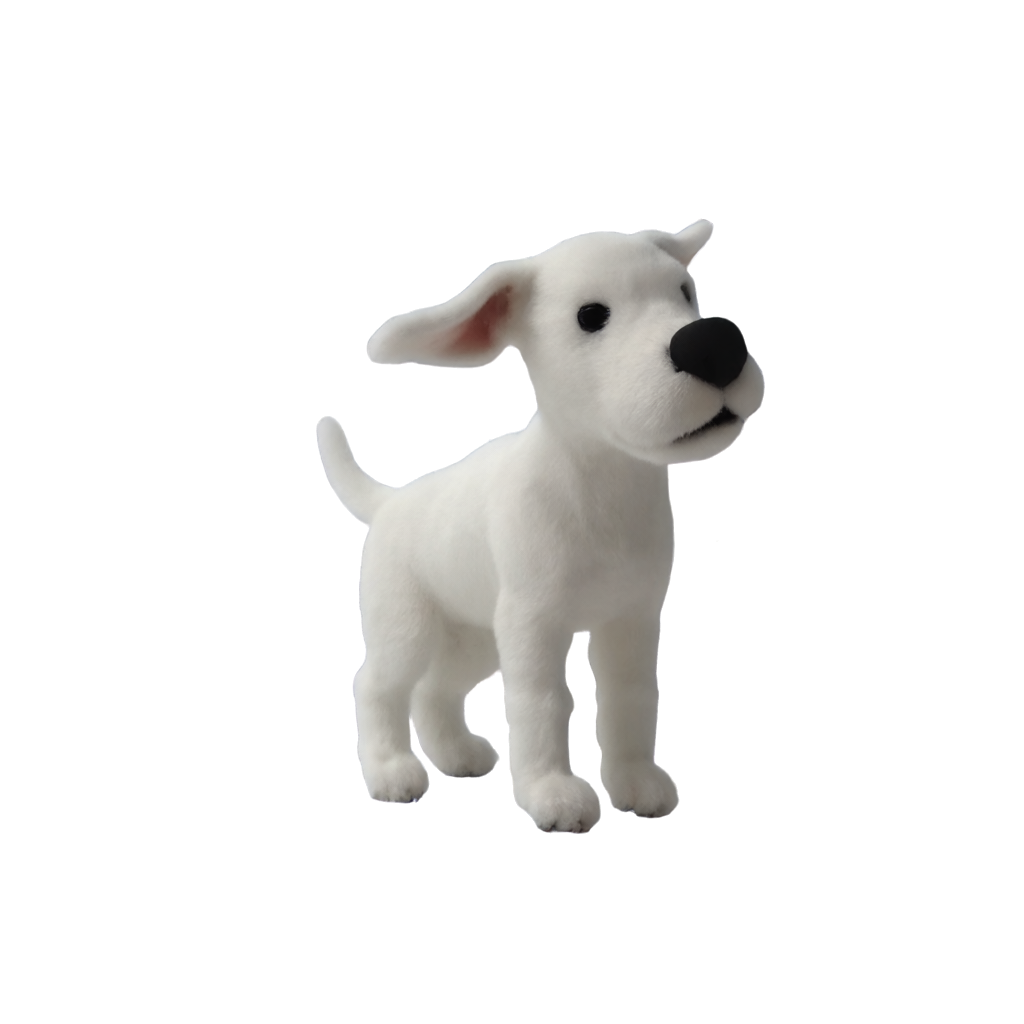
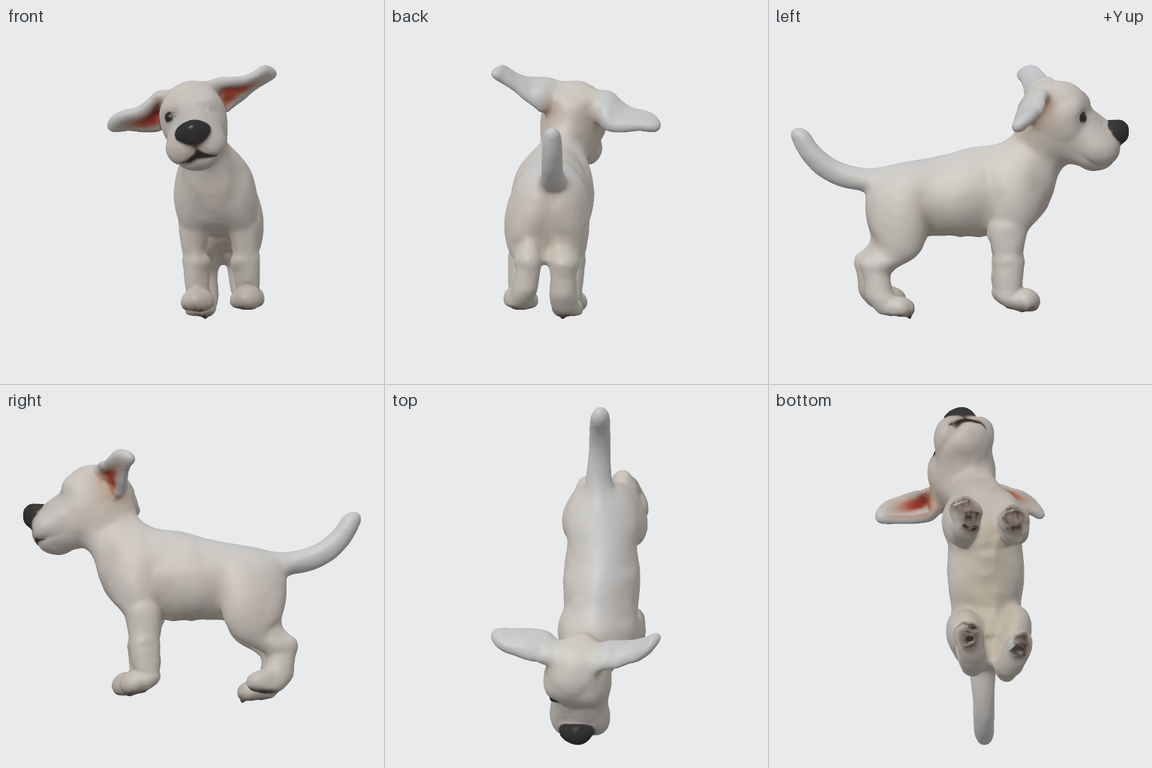
A real, unedited result of this package (--detail full, seed 42, on an NVIDIA A40): the input image and the
finished model from six sides, as written to model_preview.png.
| Input | Result |
|---|---|
 |
 |
Requirements
-
Linux or WSL2 with an NVIDIA GPU of 32 GB or more and a CUDA 12.8 driver (R570 or newer).
--detailpicks the settings from the GPU's memory; you can override it:--detailViews painted Faces Peak GPU memory* Time per model* full(picked for 48 GB cards and larger)8 at 768 px 120,000 41.2 GB 386 s reduced(picked for smaller ones)6 at 512 px 40,000 28.2 GB 203 s *Measured on an NVIDIA A40 (48 GB), including about two minutes of model loading. Your numbers will differ.
-
The CUDA 12 toolkit (
nvcc) and a C++ compiler (g++). Hunyuan3D has two native extensions, its texture rasterizer and its mesh inpainter; they are compiled for your GPU the first time and cached. -
About 19 GB of disk for the model files, downloaded once, and about 16 GB for the Python packages (PyTorch with CUDA).
-
uv (or Python 3.11–3.12 with pip).
-
No NVIDIA GPU (an Apple Silicon Mac, for example)? Use
--cloudwith an MCPBytes API key; see below.
Install and run
uvx --torch-backend=auto mcpbytes-image-to-3d chair.jpg
--torch-backend=auto installs the CUDA build of PyTorch that matches your driver. With pip:
pip install mcpbytes-image-to-3d --extra-index-url https://download.pytorch.org/whl/cu128.
The first run downloads the pinned files listed below (about 19 GB, resumable) and compiles the extensions (111 s in
all on a RunPod A40; your download speed decides). mcpbytes-image-to-3d --download does both without modelling
anything. Results go to chair-3d/ next to where you run it, or to a new or empty folder you name:
mcpbytes-image-to-3d chair.jpg models/chair. The command prints a JSON summary of the run on stdout.
| File | Contents |
|---|---|
model.glb |
glTF 2.0 binary: one mesh with base-colour and metallic-roughness textures (1024 px), +Y up, standing on y = 0, largest side 1 |
model.web.glb |
The same model with Draco geometry and WebP textures, for browsers and game engines |
model_preview.png |
The finished model from six sides on one labelled sheet |
model_front.png … model_bottom.png |
Each of the six views on its own |
model_views.json |
The camera of each view |
generation.json |
Seed, settings, file checks and timings |
provenance.json |
Package, model and library versions and the input image's SHA-256 |
Input: a PNG, JPEG or WebP of one object, whole and in focus. A transparent background is used as the cut-out;
any other background is removed first. The back and underside are invented, so look at model_preview.png before
you use a model.
Options: --seed 0-4294967295 and --detail auto|full|reduced. Seeds are derived the same way as in the hosted
tool. The same seed, image, settings and GPU repeated a model byte for byte in our tests.
MCP server
Add this to your MCP client's configuration (for example claude_desktop_config.json, .cursor/mcp.json):
{
  "mcpServers": {
    "image-to-3d": {
      "command": "uvx",
      "args": ["--torch-backend=auto", "mcpbytes-image-to-3d", "--mcp"]
    }
  }
}
Run uvx --torch-backend=auto mcpbytes-image-to-3d --download once first. A 19 GB download would outlast any
client's timeout, so the tool asks for it instead of starting it. The server provides one tool,
create_3d_model_from_image, which takes the absolute path of an image, an optional seed and an optional
output_dir. It writes the files, returns their summary and shows the six-view preview so the model can look at
it. Files go to ~/mcpbytes/image-to-3d/<timestamp>/ unless the call passes output_dir, or you set
MCPBYTES_OUTPUT_DIR. Hunyuan3D loads on the first call and stays in memory; --detail applies to the server too.
Cloud mode (optional)
--cloud sends the job to MCPBytes GPUs instead and charges prepaid credits (prices at
mcpbytes.com/pricing). Create a key at
console.mcpbytes.com/keys:
export MCPBYTES_API_KEY=...
uvx mcpbytes-image-to-3d chair.jpg --cloud
uvx mcpbytes-image-to-3d --mcp --cloud     # the MCP server, backed by the hosted tool
The model files are the same; generation.json is the hosted service's, and there is no provenance.json. The run
prints a request key: if it is interrupted, run it again with --idempotency-key <key> to resume the same job
without a second charge. Nothing is sent to MCPBytes unless you pass --cloud.
Models
Nothing is bundled. These files are downloaded at pinned commits or checksums and licensed to you by their publishers:
- tencent/Hunyuan3D-2.1: the shape and texture models (Tencent Hunyuan 3D 2.1 Community License Agreement)
- facebook/dinov2-giant: the image encoder of the texture model (Apache-2.0)
- Real-ESRGAN x4plus: upscales the painted views (BSD-3-Clause)
- U²-Net, as distributed by rembg: background removal (Apache-2.0)
Hugging Face files go into its cache, so HF_HOME, HF_ENDPOINT, HF_TOKEN and HF_HUB_OFFLINE work as usual.
The other two files and the compiled extensions go into ~/.cache/mcpbytes/image-to-3d/ (or $XDG_CACHE_HOME,
or MCPBYTES_CACHE_DIR). See NOTICE for
attributions.
Development
uv run --with pytest pytest
The tests need no GPU. The vendored code and what we changed in it are described in
src/mcpbytes_image_to_3d/vendor/hunyuan3d/README.md. This
repository is also the packages/image-to-3d submodule of MCPBytes/tools, the
workspace it shares with mcpbytes-core.
Licence
Our code is GNU AGPL v3.0 only, with an additional permission to combine it with Hunyuan3D 2.1. The vendored
Hunyuan3D code in src/mcpbytes_image_to_3d/vendor/hunyuan3d/ and the Hunyuan3D weights are Tencent's, under the
Tencent Hunyuan 3D 2.1 Community License Agreement, which
binds your use of them: it does not apply in the European Union, the United Kingdom or South Korea, it carries an
Acceptable Use Policy, and outputs must not be used to improve any other AI model. The models you generate are not
covered by the AGPL, and Tencent claims no rights in them. See
NOTICE.
1 maintainer

Metadata
1 maintainer
Release files for mcpbytes-image-to-3d 0.1.0
For a detailed explanation of source distributions (sdists) and built distributions (wheels), please see the package formats documentation.
Source distribution (sdist)
| File | Size | Uploaded | Provenance | |
|---|---|---|---|---|
| mcpbytes_image_to_3d-0.1.0.tar.gz | 224.6 kB | Without provenance | Details |
Built distribution (wheel)
| File | Interpreter | ABI | Platform | Reset |
|---|---|---|---|---|
| mcpbytes_image_to_3d-0.1.0-py3-none-any.whl | Python 3 | none | any | Details |
Total release size: 523.0 kB
Release files / mcpbytes_image_to_3d-0.1.0.tar.gz
| Download URL | mcpbytes_image_to_3d-0.1.0.tar.gz |
|---|---|
| Size | 224.6 kB |
| Tags | Source |
|
SHA-256 checksum How to use checksums |
82eb37011399f8031278caa578f8d28a8ea7d0f5c5517325e950bb976d3145a8
|
|
BLAKE2b-256 checksum How to use checksums |
41d04f9c699ff913418d19b0b56fa5aaf8154cab227cd85b759f312dd6064dbf
|
| Upload date | |
|
Uploaded using Trusted Publishing? What is trusted publishing? |
No |
| Uploaded via |
uv/0.12.24 {"installer":{"name":"uv","version":"0.12.24","subcommand":["publish"]},"python":null,"implementation":{"name":null,"version":null},"distro":{"name":"macOS","version":null,"id":null,"libc":null},"system":{"name":null,"release":null},"cpu":null,"openssl_version":null,"setuptools_version":null,"rustc_version":null,"ci":true}
|
Release files / mcpbytes_image_to_3d-0.1.0-py3-none-any.whl
| Download URL | mcpbytes_image_to_3d-0.1.0-py3-none-any.whl |
|---|---|
| Size | 298.4 kB |
| Tags | Python 3 |
|
SHA-256 checksum How to use checksums |
61a770efe4200076d3161282736a9f3c2ec3e3c2e0df77b2b903798eeea3a84b
|
|
BLAKE2b-256 checksum How to use checksums |
54438b1f1d30f263478c9573538145a29fbe6ac9975e094fae7448d7bef950b4
|
| Upload date | |
|
Uploaded using Trusted Publishing? What is trusted publishing? |
No |
| Uploaded via |
uv/0.12.24 {"installer":{"name":"uv","version":"0.12.24","subcommand":["publish"]},"python":null,"implementation":{"name":null,"version":null},"distro":{"name":"macOS","version":null,"id":null,"libc":null},"system":{"name":null,"release":null},"cpu":null,"openssl_version":null,"setuptools_version":null,"rustc_version":null,"ci":true}
|
Security for mcpbytes-image-to-3d 0.1.0
Provenance
Provenance describes where a file came from. On PyPI, provenance is shared via attestations, which provide a verifiable record of the build or publishing details. View details, limitations and caveats.
No provenance found
None of the files in this release were uploaded with provenance metadata.
A note on package security
PyPI is a repository for distributing packages, not a service for auditing them. While third-party security researchers and our staff do their best to detect and remove malicious packages, PyPI cannot guarantee the quality, security or suitability of any given package.
To learn more about protecting yourself from malicious actors, visit our package security documentation.














