
[!IMPORTANT] MCPcat is now AgentCat 🐱 — same team, same product, new name. This package has been renamed to
agentcat(pip install agentcat, starts at v1.0.0).mcpcatkeeps working forever, but new features land only inagentcat. Upgrading takes a few minutes — see the migration guide.

Getting Started · Features · Docs · Website · Open Source · Schedule a Demo





[!NOTE] Looking for the TypeScript SDK? Check it out here mcpcat-typescript.
MCPcat is an analytics platform for MCP server owners 🐱. It captures user intentions and behavior patterns to help you understand what AI users actually need from your tools — eliminating guesswork and accelerating product development all with one-line of code.
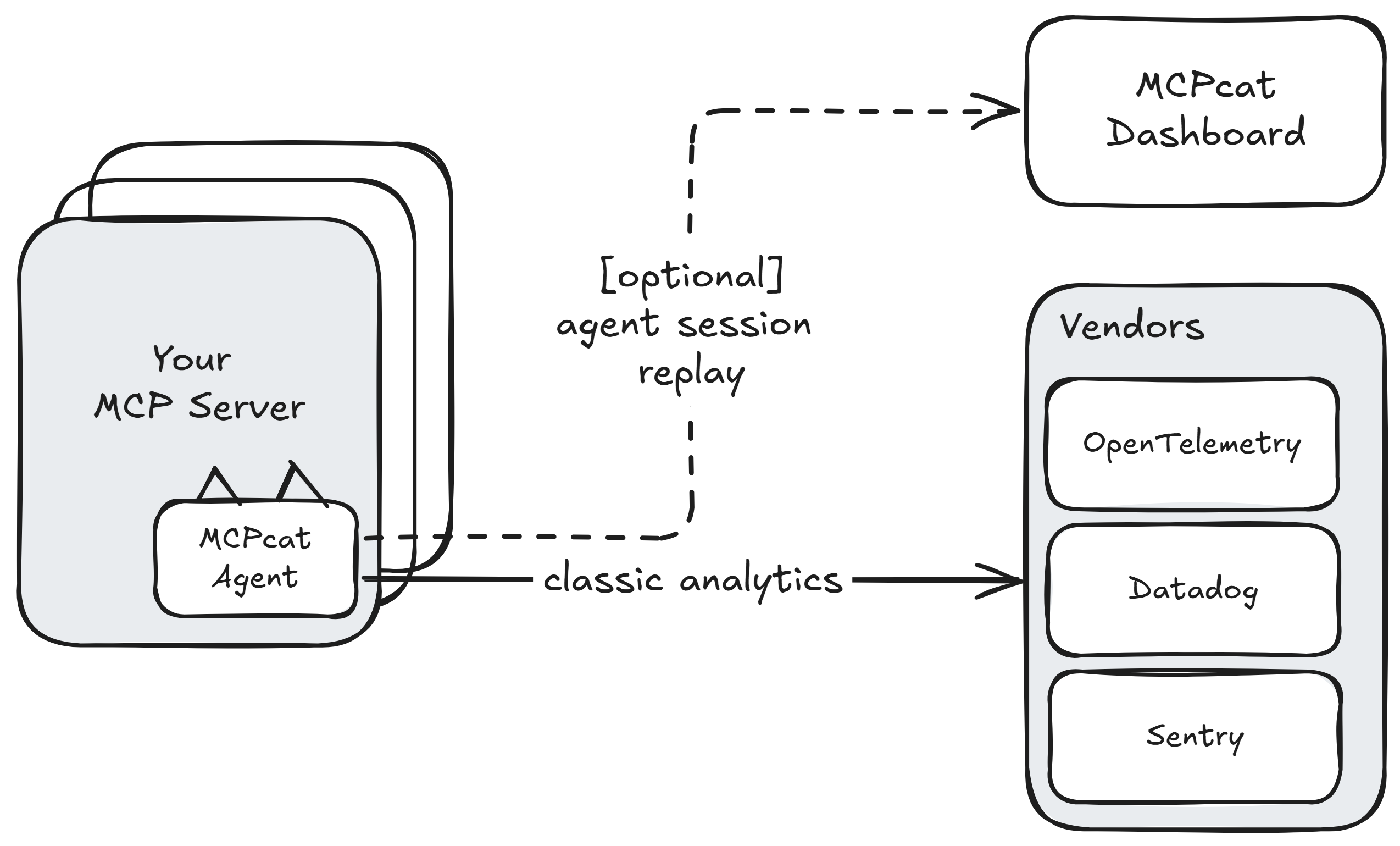
This SDK also provides a free and simple way to forward telemetry like logs, traces, and errors to any Open Telemetry collector or popular tools like Datadog and Sentry.
# Basic installation (includes official MCP SDK)
pip install mcpcat

# With Jlowin's/Prefect's FastMCP support
pip install "mcpcat[community]"
To learn more about us, check us out here
Why use MCPcat? 🤔
MCPcat helps developers and product owners build, improve, and monitor their MCP servers by capturing user analytics and tracing tool calls.
Use MCPcat for:
- User session replay 🎬. Follow alongside your users to understand why they're using your MCP servers, what functionality you're missing, and what clients they're coming from.
- Trace debugging 🔍. See where your users are getting stuck, track and find when LLMs get confused by your API, and debug sessions across all deployments of your MCP server.
- Existing platform support 📊. Get logging and tracing out of the box for your existing observability platforms (OpenTelemetry, Datadog, Sentry) — eliminating the tedious work of implementing telemetry yourself.
Getting Started
To get started with MCPcat, first create an account and obtain your project ID by signing up at mcpcat.io. For detailed setup instructions visit our documentation.
Once you have your project ID, integrate MCPcat into your MCP server:
import mcpcat
from mcp.server import FastMCP

server = FastMCP(name="echo-mcp", version="1.0.0")

mcpcat.track(server, "proj_0000000")
Identifying users
You can identify your user sessions with a simple callback MCPcat exposes, called identify.
def identify_user(request, extra):
    user = myapi.get_user(request.params.arguments.token)
    return UserIdentity(
            user_id=user.id,
            user_name=user.name,
            user_data={
                "favorite_color": user.favorite_color,
            },
    )

mcpcat.track(server, "proj_0000000", MCPCatOptions(identify=identify_user))
Redacting sensitive data
MCPcat redacts all data sent to its servers and encrypts at rest, but for additional security, it offers a hook to do your own redaction on all text data returned back to our servers.
# Sync version
def redact_sync(text):
    return custom_redact(text)

mcpcat.track(server, "proj_0000000", redact_sensitive_information=redact_sync)
Forwarding data to existing observability platforms
MCPcat seamlessly integrates with your existing observability stack, providing automatic logging and tracing without the tedious setup typically required. Export telemetry data to multiple platforms simultaneously:
from mcpcat import MCPCatOptions, ExporterConfig

mcpcat.track(
    server,
    "proj_0000000", # Or None if you just want to use the SDK to forward telemetry
    MCPCatOptions(
        exporters={
            # OpenTelemetry - works with Jaeger, Tempo, New Relic, etc.
            "otlp": ExporterConfig(
                type="otlp",
                endpoint="http://localhost:4318/v1/traces"
            ),
            # Datadog
            "datadog": ExporterConfig(
                type="datadog",
                api_key=os.getenv("DD_API_KEY"),
                site="datadoghq.com",
                service="my-mcp-server"
            ),
            # Sentry
            "sentry": ExporterConfig(
                type="sentry",
                dsn=os.getenv("SENTRY_DSN"),
                environment="production"
            )
        }
    )
)
Learn more about our free and open source telemetry integrations.
Internal diagnostics
To help us catch and fix broken installs, the SDK sends MCPcat a small, anonymized
signal when setup or runtime errors occur — never your tool calls, your responses,
or anything about your users. Records carry only operational metadata, such as your
project ID (or an anonymous install ID when none is set). Your local ~/mcpcat.log
is unchanged.
Diagnostics are on by default and can be turned off completely with either:
track(server, project_id, MCPCatOptions(disable_diagnostics=True)), or- the
DISABLE_DIAGNOSTICSenvironment variable.
Free for open source
MCPcat is free for qualified open source projects. We believe in supporting the ecosystem that makes MCP possible. If you maintain an open source MCP server, you can access our full analytics platform at no cost.
How to apply: Email hi@mcpcat.io with your repository link
Already using MCPcat? We'll upgrade your account immediately.
Community Cats 🐱
Meet the cats behind MCPcat! Add your cat to our community by submitting a PR with your cat's photo in the docs/cats/ directory.


Want to add your cat? Create a PR adding your cat's photo to docs/cats/ and update this section!
1 maintainer

Release files for mcpcat 0.1.15
For a detailed explanation of source distributions (sdists) and built distributions (wheels), please see the package formats documentation.
Source distribution (sdist)
| File | Size | Uploaded | |
|---|---|---|---|
| mcpcat-0.1.15.tar.gz | 138.8 kB | Details |
Built distribution (wheel)
| File | Interpreter | ABI | Platform | Reset |
|---|---|---|---|---|
| mcpcat-0.1.15-py3-none-any.whl | Python 3 | none | any | Details |
Total release size: 217.5 kB
Release files / mcpcat-0.1.15.tar.gz
| Download URL | mcpcat-0.1.15.tar.gz |
|---|---|
| Size | 138.8 kB |
| Tags | Source |
|
SHA-256 checksum How to use checksums |
e43f4df10d00521fa861c4bce68e2de4992134a7a9b38b827113739dec2071c3
|
|
BLAKE2b-256 checksum How to use checksums |
72ddf3693b7cd8a2b468b57be7cd0fd63ddf57a3981da67270e469793c7265e1
|
| Upload date | |
|
Uploaded using Trusted Publishing? What is trusted publishing? |
No |
| Uploaded via |
uv/0.7.8
|
Release files / mcpcat-0.1.15-py3-none-any.whl
| Download URL | mcpcat-0.1.15-py3-none-any.whl |
|---|---|
| Size | 78.7 kB |
| Tags | Python 3 |
|
SHA-256 checksum How to use checksums |
f881f0927df1b97550e395eadb972c51c343e5e606fe48eaaa788234e6997d6f
|
|
BLAKE2b-256 checksum How to use checksums |
bd2711f84979b992efddbedd58b5e66cfeae05c2bf95121928171ec145e78388
|
| Upload date | |
|
Uploaded using Trusted Publishing? What is trusted publishing? |
No |
| Uploaded via |
uv/0.7.8
|














