

One gateway in the path. On your machine.
mcpgawk







Your agents call Model Context Protocol servers that can change what their tools do after you approved them, and the agent will call the new one without noticing. mcpgawk reads every server your agents can reach, checks every call against a baseline you approved, and blocks the ones that changed. It runs on your machine and uploads nothing.
The same engine powers mcpgawk Platform, which puts one endpoint in front of the whole fleet with a key per caller, policy on every call and a tamper-evident audit log. This free layer is the seeing and the blocking underneath it.
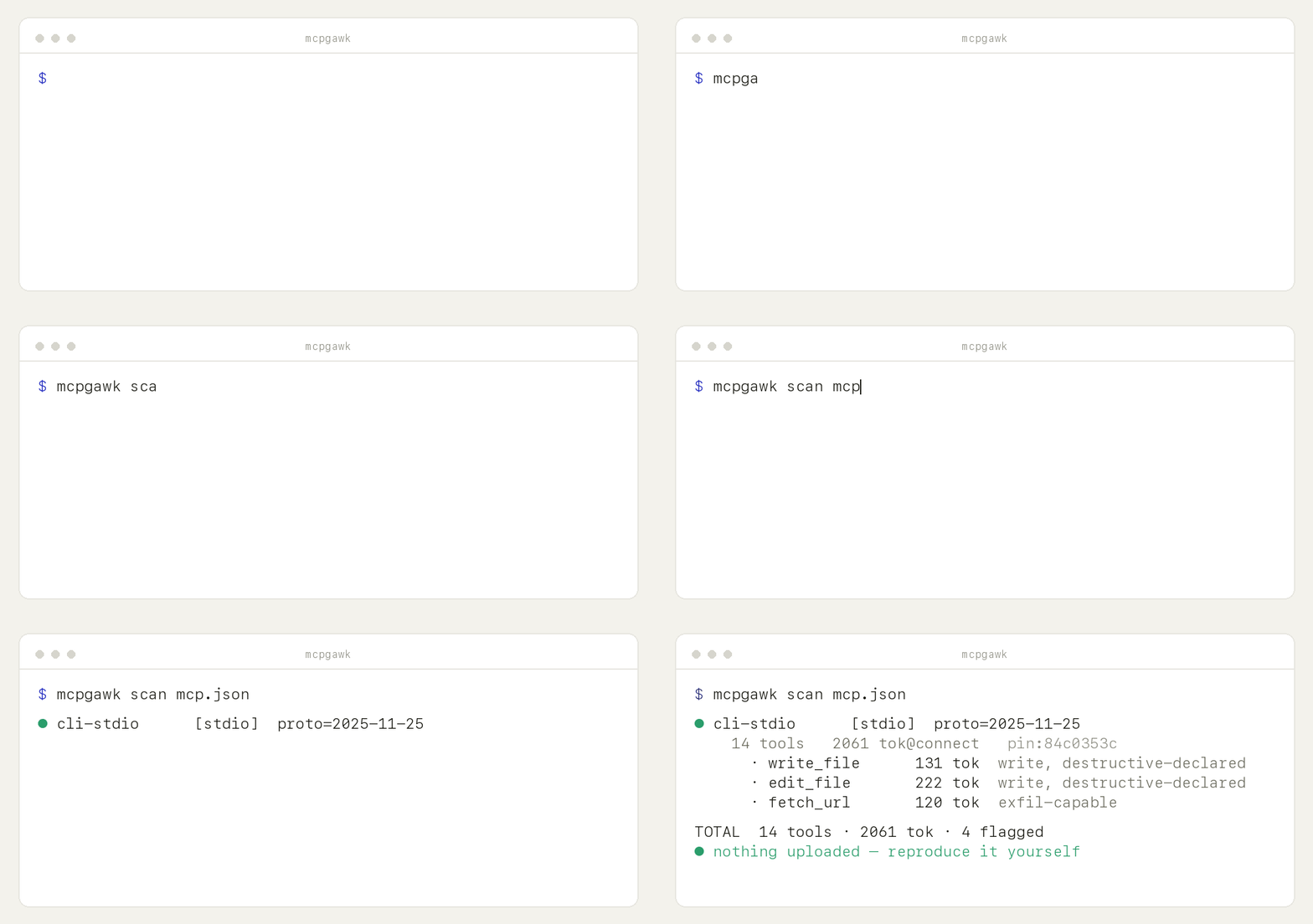
mcpgawk demo — its own output, in a sandbox that touches nothing of yours.
Run the same command and you get the same thing.
Why
A server you approved can change what its tools do afterwards. Nothing in MCP tells your agent that happened — it just calls the new tool. That is the rug-pull, and it is the case mcpgawk is built for.
Two things follow from being able to see a server properly. You find out what each one can reach before you trust it, and you find out what it costs: every tool is loaded into your context on every request, used or not.
How it's different
- It blocks, it does not only report. A scanner tells you afterwards.
mcpgawk guardinstalls one pre-execution hook and a tool that appeared after you approved the server does not run. - It runs the server, not just reads it.
mcpgawk verifydrives tools in a sandbox and reports what they actually did — exfiltration, SSRF, poisoning — reproduced before it is reported. - Nothing is uploaded. Cloud scanners send your inventory to a server and gate the verdict there. Every decision here is made on your machine, with no account and nothing to sign in to.
- It says what it did not check. Skipped tools are named as skipped, never counted as clean.
Features
- 🛑 Block a changed tool before it runs —
mcpgawk guard installputs one pre-execution hook in your agent's loop. The decision is local, in about 10ms, with nothing to sign in to. Works on 6 of the 21 supported clients; the rest have no hook point and are named, not glossed over. - 🧪 Run it, don't just read it —
mcpgawk verifydrives tools in a sandbox and reports what they did: exfiltration, SSRF, tool poisoning, secret leaks. Safe mode drives only provably read-only tools, and every tool it skips is named as skipped. - 🧑⚖️ Approval needs a person —
mcpgawk decideopens a local screen for what changed. The buttons live on the tokened link printed in your terminal, so an agent that opened the page cannot approve its own way past a block. - 🖥️ One local panel —
mcpgawk panel: every server, every decision, every piece of evidence. - 🔌 Any transport — stdio, streamable-HTTP, SSE, and OAuth remotes (via the
mcp-remotebridge). - 💸 Token cost index — exactly what each tool adds to your context at connect, plus the 3 heaviest tools.
- 🧾 Capability facts — write / exfil-capable / declared annotations, straight from the schema, plus a trust-surface summary (% write, % exfil-capable, destructive-declared count) and an annotation-completeness score.
- 📌 Integrity pin + drift — catch a server that silently rewrites its tools (
--track). - 🚩 Bounded signals — injection-shaped descriptions, cross-server shadowing, under-declaring Server Cards — pointers for a human, never verdicts.
- 🔒 Zero egress, by construction — the measurement layers import no network library. Enforced by a test.
Two checks are opt-in and make an explicit exception (see Guarantees):
--supply-chainand--oauth-scopes.
Get it — three ways
CLI (any terminal):
pip install mcpgawk        # or: uv tool install mcpgawk
mcpgawk scan mcp.json
Editor (VS Code / Cursor): install mcpgawk from the marketplace (Open VSX). It scans your workspace mcp.json and shows cost + capability flags inline. The extension drives this engine as a subprocess — it is built and released separately, so its source is not in this repository.
CI (GitHub Action): gate every PR on token budget / drift (Marketplace):
- uses: gawk-dev/mcpgawk@v1
  with: { config: mcp.json, max-tokens: 8000, fail-on-flagged: true }
When to run it
- Once, then leave it on —
mcpgawk guard install. After that a tool that appears on a server you already approved does not get called. - Before you add a server — see what it costs and what it can do, before you trust it.
- When your agent feels slow or picks the wrong tool — it's often MCP bloat (too many / too-heavy tools).
- On every PR — the CI gate catches drift and creeping token cost.
- If you publish an MCP server — see what it costs your users and how it reads to a client, and fix it (usually one line per tool). Lean + well-annotated is a differentiator.
Use
mcpgawk                                  # first run: every agent config on this machine
mcpgawk demo                             # the whole arc in a sandbox — approve, drift, block
mcpgawk guard install                    # put the baseline in your agent's loop
mcpgawk guard status                     # is protection actually on?
mcpgawk decide                           # what changed, and approve it as a human
mcpgawk panel                            # the local page: servers, decisions, evidence
mcpgawk verify mcp.json                  # run the servers and watch what they do
Scanning on its own, if that is all you want:
mcpgawk scan mcp.json                                              # a whole config
mcpgawk scan --stdio "npx -y @modelcontextprotocol/server-filesystem /tmp"
mcpgawk scan --http https://host/mcp --header "Authorization: Bearer $TOKEN"
mcpgawk scan --sse  https://host/sse
mcpgawk scan mcp.json --track                                     # record + detect rug-pulls over time
mcpgawk scan mcp.json --json                                      # machine-readable labels
mcpgawk scan mcp.json --verbose                                   # full per-tool table, not just flagged tools
mcpgawk scan mcp.json --supply-chain                              # opt-in: npm/PyPI deprecation check (network)
mcpgawk scan mcp.json --oauth-scopes                              # opt-in: decode a supplied Bearer JWT's scope
What it reports
- Cost index — tokens each tool adds at connect (named tokenizer; a comparable index, not an absolute Claude count), plus the 3 heaviest tools.
- Trust surface — capability facts (write/mutating, exfil-capable, declared annotations) rolled up into % write, % exfil-capable, and a destructive-declared count.
- Annotation completeness — a transparent composite (annotated ÷ total tools declaring read/write intent), not a risk score.
- Coverage — tools, prompts, and resources counted (
--verbosefor the full per-tool table). - Integrity pin — a hash that changes if the server silently rewrites its tools;
--trackturns it into rug-pull detection over time. - Bounded signals — precise, low-false-positive pointers for a human to review, never verdicts: injection-shaped descriptions (tools and prompts), cross-server name shadowing, and public Server Cards that under-declare what the server actually exposes.
- Supply-chain (opt-in,
--supply-chain) — checks the launched package against the public npm/PyPI registry for deprecation/yank status. - OAuth scopes (opt-in,
--oauth-scopes) — locally decodes a supplied Bearer JWT'sscopeclaim.
Guarantees
- No inventory egress. The only network is the protocol client talking to the server you point
it at. The measurement layers import no network library — they cannot egress by construction
(enforced by a test). Public Server Card discovery is fetched with no auth and no redirect-following.
Two flags are the explicit, opt-in exception:
--supply-chainsends the launched package's name (and pinned version, if any) — never your tool inventory — to the public npm registry or PyPI JSON API.--oauth-scopesmakes no network call at all; it locally decodes a Bearer JWT you already supplied. Neither runs unless you pass the flag. - Facts ≠ heuristics. Exact capability facts and the token index never mix with the bounded heuristic signals — separate in code, separate in output.
- Reproducible. One command, identical numbers.
- Tracks the protocol. Built on the official
mcpSDK, which negotiates the protocol version.
Develop
uv run --extra dev --with mcp --with tiktoken --with httpx python -m pytest -q
CI gate — GitHub Action
Scan your MCP servers on every pull request and fail the build if one gets too heavy or trips a signal. It runs entirely in your runner — nothing is uploaded — and posts a per-server cost/flag table to the job summary.
- uses: gawk-dev/mcpgawk@v1
  with:
    config: mcp.json        # or: stdio / http / sse — a single server
    max-tokens: 8000        # fail if any server loads more than this at connect
    fail-on-flagged: true   # fail if any bounded signal fires
Available on the GitHub Marketplace.
Contributing
Issues and PRs welcome. Please read CONTRIBUTING.md first, and see the design boundaries in THREAT-MODEL.md. Security reports go through SECURITY.md (privately, not a public issue).
License
Apache-2.0 — see LICENSE. Part of the nativerse · gawk.dev family. The value is in the repo, not a cloud.
Use it from your agent (skill)
Let your coding agent run the checks itself — whenever it adds, upgrades or audits an MCP server:
# Claude Code (similar for other agents: copy the folder into their skills directory)
mkdir -p ~/.claude/skills && cp -r skills/mcpgawk ~/.claude/skills/mcpgawk
The skill teaches the agent to measure a server BEFORE trusting it, audit an MCP-2 upgrade as a baseline diff instead of blind re-trust, and relay every consent prompt to you verbatim.
1 maintainer

Download files
Download the file for your platform. If you're not sure which to choose, learn more about installing packages.
Source Distribution
Built Distribution
Filter files by name, interpreter, ABI, and platform.
If you're not sure about the file name format, learn more about wheel file names.
Copy a direct link to the current filters
File details
Details for the file mcpgawk-0.1.31.tar.gz.
File metadata
- Download URL: mcpgawk-0.1.31.tar.gz
- Upload date:
- Size: 5.6 MB
- Tags: Source
- Uploaded using Trusted Publishing? No
- Uploaded via:
twine/7.0.0 CPython/3.12.13
File hashes
| Algorithm | Hash digest | |
|---|---|---|
| SHA256 |
d0b92094fb6b1145047ea7d11facc59a0504bc887d762c8a4806d3d0bc699f35
|
|
| MD5 |
058d6e36ee0f70d6f48a254a3f7f11db
|
|
| BLAKE2b-256 |
fb7921fe70346f7148bf23def2a4ca0faae69a47e3127bb5c642bfa0b95a77c3
|
File details
Details for the file mcpgawk-0.1.31-py3-none-any.whl.
File metadata
- Download URL: mcpgawk-0.1.31-py3-none-any.whl
- Upload date:
- Size: 4.4 MB
- Tags: Python 3
- Uploaded using Trusted Publishing? No
- Uploaded via:
twine/7.0.0 CPython/3.12.13
File hashes
| Algorithm | Hash digest | |
|---|---|---|
| SHA256 |
ec37e013f7fe608bebdbabc40086302135b2fc0c6a3e73b89e3e77c1c469a867
|
|
| MD5 |
447d4b248d2a3285b4b0100ddd5054a2
|
|
| BLAKE2b-256 |
d705fd44ab72cae0a3faa270eb00f41221cbdc88404475cdfea45267a1819205
|







