
mcpgrader
Lint and score any MCP server in one command: token bloat, vague tool descriptions, and a concrete fix list.




Every MCP tool you connect is sent to the model on every request: its name, description, and
full JSON schema. A few heavy servers can quietly eat thousands of context tokens, and vague or
near-duplicate descriptions make the model pick the wrong tool. mcpgrader connects to a server,
reads what it advertises, and tells you exactly what to fix.
Quick start
No install needed, with uv:
uvx mcpgrader scan --stdio "npx -y @modelcontextprotocol/server-filesystem /tmp"
Or install it:
pipx install mcpgrader      # or: uv tool install mcpgrader / pip install mcpgrader
mcpgrader scan --url https://example.com/mcp
Usage
# A local server, launched over stdio
mcpgrader scan --stdio "npx -y @modelcontextprotocol/server-memory"

# A remote server over streamable HTTP
mcpgrader scan --url http://localhost:8000/mcp

# Every server in your Claude Desktop / Cursor / VS Code config
mcpgrader scan --config ~/Library/Application\ Support/Claude/claude_desktop_config.json

# Machine-readable output, and fail CI below a score
mcpgrader scan --config .cursor/mcp.json --json --fail-under 80
| Option | Description |
|---|---|
--stdio "<command>" |
Launch a server as a subprocess and talk to it over stdio. |
--url <url> |
Connect to a streamable HTTP server. |
--config <path> |
Scan every server in a JSON config with an mcpServers (or servers) block. Disabled servers are skipped; headers and env are honored. |
--json |
Print the full report as JSON instead of the terminal view. |
--fail-under <score> |
Exit with code 1 if any server scores below this. |
--timeout <seconds> |
Per-server timeout for connecting and listing (default 30). |
mcpgrader runs initialize, tools/list, and (when the server supports them) prompts/list
and resources/list, then disconnects. It never calls a tool.
Exit codes: 0 scan finished, 1 a score is below --fail-under, 2 a server could not be
scanned or the input was invalid. Connection failures are reported as one readable line, never a
traceback.
Example output
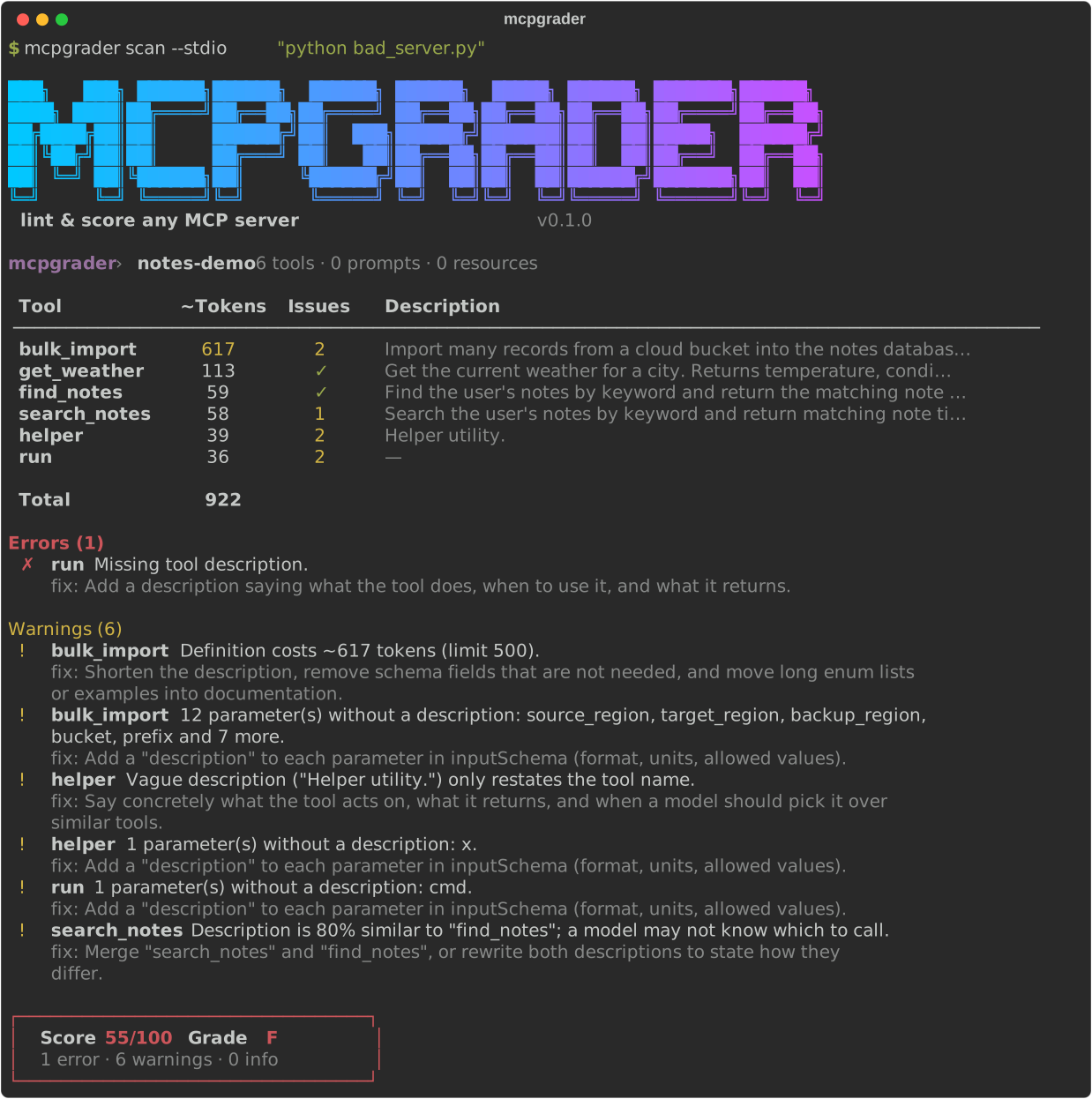
Real output from scanning the deliberately flawed fixture server:
mcpgrader › notes-demo  6 tools · 0 prompts · 0 resources

 Tool           ~Tokens   Issues   Description
 ────────────────────────────────────────────────────────────────────────────────────────────
 bulk_import        617        2   Import many records from a cloud bucket into the notes da…
 get_weather        113        ✓   Get the current weather for a city. Returns temperature, …
 find_notes          59        ✓   Find the user's notes by keyword and return the matching …
 search_notes        58        1   Search the user's notes by keyword and return matching no…
 helper              39        2   Helper utility.
 run                 36        2   —

 Total              922

Errors (1)
  ✗ run  Missing tool description.
    fix: Add a description saying what the tool does, when to use it, and what it returns.

Warnings (6)
  ! bulk_import  Definition costs ~617 tokens (limit 500).
    fix: Shorten the description, remove schema fields that are not needed, and move long enum
    lists or examples into documentation.
  ! bulk_import  12 parameter(s) without a description: source_region, target_region,
    backup_region, bucket, prefix and 7 more.
    fix: Add a "description" to each parameter in inputSchema (format, units, allowed values).
  ! helper  Vague description ("Helper utility.") only restates the tool name.
    fix: Say concretely what the tool acts on, what it returns, and when a model should pick it
    over similar tools.
  ! helper  1 parameter(s) without a description: x.
    fix: Add a "description" to each parameter in inputSchema (format, units, allowed values).
  ! run  1 parameter(s) without a description: cmd.
    fix: Add a "description" to each parameter in inputSchema (format, units, allowed values).
  ! search_notes  Description is 80% similar to "find_notes"; a model may not know which to
    call.
    fix: Merge "search_notes" and "find_notes", or rewrite both descriptions to state how they
    differ.

┌─────────────────────────────────┐
│  Score 55/100   Grade F         │
│  1 error · 6 warnings · 0 info  │
└─────────────────────────────────┘
Checks
Token cost (token_cost)
Each tool is serialized the way clients send it to a model (name, description, and
inputSchema as compact JSON) and counted with tiktoken's cl100k_base encoding. Counts are
approximate: every model family tokenizes a little differently, but the relative sizes hold.
| Finding | Severity |
|---|---|
| All tools together exceed 2,000 tokens | warn |
| All tools together exceed 5,000 tokens | error |
| A single tool exceeds 500 tokens | warn |
The report includes per-tool counts, the total, and the five heaviest tools. Thresholds live in
one dict, THRESHOLDS, in token_cost.py.
Description lint (description_lint)
Rule-based, deterministic, and offline: no LLM calls.
| Finding | Severity |
|---|---|
| Tool has no description, or it is blank | error |
| Description shorter than 20 characters | warn |
| Description longer than 1,000 characters | warn |
| Vague description: only generic words ("helper", "utility", "does stuff"), placeholders ("TODO"), or just restating the tool name | warn |
Parameters in inputSchema without a description (nested objects included) |
warn |
| Two tools with near-duplicate descriptions (Jaccard word similarity ≥ 0.7) | warn |
Scoring
Every server starts at 100. Each finding deducts points by severity, and the score never goes below 0:
| Severity | Deduction |
|---|---|
| error | −15 |
| warn | −5 |
| info | 0 |
| Score | Grade |
|---|---|
| 90–100 | A |
| 80–89 | B |
| 70–79 | C |
| 60–69 | D |
| 0–59 | F |
The fixture above has 1 error and 6 warnings: 100 − 15 − 6 × 5 = 55, grade F. The formula
lives in scoring.py.
Use it in CI
Fail a pull request when your server's tool definitions get worse:
# .github/workflows/mcpgrader.yml
name: mcpgrader
on: [pull_request]
jobs:
  audit:
    runs-on: ubuntu-latest
    steps:
      - uses: actions/checkout@v4
      - uses: astral-sh/setup-uv@v6
      - run: uvx mcpgrader scan --stdio "python server.py" --fail-under 80
JSON output
--json prints the whole report: every server, its tools and schemas, each check's findings
and metrics (per-tool token counts included), the score, and the grade.
mcpgrader scan --stdio "python server.py" --json | jq '.servers[0] | {score, grade}'
Roadmap
- Token cost and description lint, score, terminal and JSON output
- Injection-pattern check: flag tool descriptions that contain instructions aimed at the model ("ignore previous instructions", hidden Unicode, exfiltration prompts)
- Schema check: invalid JSON Schema, missing
required, overly permissiveanytypes, unbounded strings - Public server leaderboard: scan popular public MCP servers and publish their scores
- SARIF output for GitHub code scanning
Have an idea for a check? Open an issue.
Contributing
Contributions are welcome, especially new checks. A check is one file: see CONTRIBUTING.md for the five-minute guide.
git clone https://github.com/Manoj-Gujare/mcpgrader.git
cd mcpgrader
uv sync
uv run pytest
License
1 maintainer

Metadata
1 maintainer
Release files for mcpgrader 0.1.1
For a detailed explanation of source distributions (sdists) and built distributions (wheels), please see the package formats documentation.
Source distribution (sdist)
| File | Size | Uploaded | Provenance | |
|---|---|---|---|---|
| mcpgrader-0.1.1.tar.gz | 26.6 kB | With provenance | Details |
Built distribution (wheel)
| File | Interpreter | ABI | Platform | Reset |
|---|---|---|---|---|
| mcpgrader-0.1.1-py3-none-any.whl | Python 3 | none | any | Details |
Total release size: 50.2 kB
Release files / mcpgrader-0.1.1.tar.gz
| Download URL | mcpgrader-0.1.1.tar.gz |
|---|---|
| Size | 26.6 kB |
| Tags | Source |
|
SHA-256 checksum How to use checksums |
e1914184b6187cf4bbf8e7537fa35af40f066198a552a266ffd6d7809368a420
|
|
BLAKE2b-256 checksum How to use checksums |
d7d6799dc88901b362aa6b9cf0859ce1bbc1eb91940212d20f02a38724b76af1
|
| Upload date | |
|
Uploaded using Trusted Publishing? What is trusted publishing? |
Yes |
| Uploaded via |
twine/7.0.0 CPython/3.13.16
|
Provenance
Provenance describes where a file came from. On PyPI, provenance is shared via attestations, which provide a verifiable record of the build or publishing details. View details, limitations and caveats.


PyPI Publish Attestation
PyPI verified that this artifact, at this checksum, originated from the publisher listed below.
Signed by GitHub Actions, verified by PyPI on Oct 27, 2026.
Transparency logRelease files / mcpgrader-0.1.1-py3-none-any.whl
| Download URL | mcpgrader-0.1.1-py3-none-any.whl |
|---|---|
| Size | 23.6 kB |
| Tags | Python 3 |
|
SHA-256 checksum How to use checksums |
c6d0e561a79af7c0616e64c7697bc0a912f470672ae6e314717a72774ba80795
|
|
BLAKE2b-256 checksum How to use checksums |
eef714a4a1c944b14532548c4908fd3a219f11c027b49ce0619ba76a68f1f462
|
| Upload date | |
|
Uploaded using Trusted Publishing? What is trusted publishing? |
Yes |
| Uploaded via |
twine/7.0.0 CPython/3.13.16
|
Provenance
Provenance describes where a file came from. On PyPI, provenance is shared via attestations, which provide a verifiable record of the build or publishing details. View details, limitations and caveats.
PyPI Publish Attestation
PyPI verified that this artifact, at this checksum, originated from the publisher listed below.
Signed by GitHub Actions, verified by PyPI on Oct 27, 2026.
Transparency logSecurity for mcpgrader 0.1.1
Provenance
Provenance describes where a file came from. On PyPI, provenance is shared via attestations, which provide a verifiable record of the build or publishing details. View details, limitations and caveats.
Full provenance
All 2 files in this release have been uploaded with provenance metadata.
Attestation for mcpgrader-0.1.1.tar.gz
PyPI Publish Attestation
PyPI verified that this artifact, at this checksum, originated from the publisher listed below.
Signed by GitHub Actions, verified by PyPI on Oct 27, 2026.
Transparency logA note on package security
PyPI is a repository for distributing packages, not a service for auditing them. While third-party security researchers and our staff do their best to detect and remove malicious packages, PyPI cannot guarantee the quality, security or suitability of any given package.
To learn more about protecting yourself from malicious actors, visit our package security documentation.














