
Inkscape MCP Server mcpinkscape
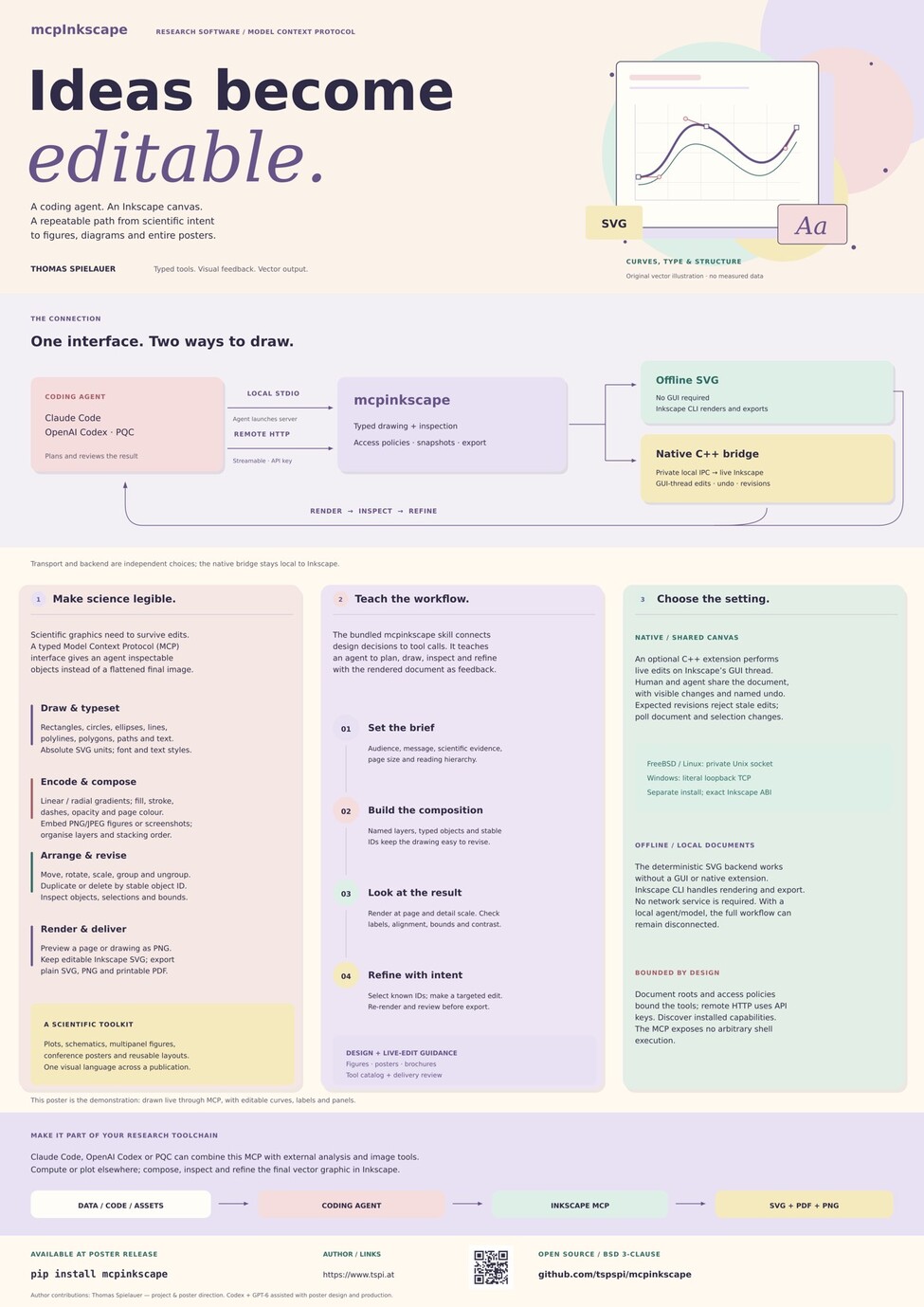
mcpinkscape is an MCP server for creating, inspecting, editing, rendering,
and exporting SVG/Inkscape documents. It provides a deterministic offline SVG
backend and a carefully limited bridge to a locally running Inkscape instance.
MCP clients use typed drawing tools; the server never exposes arbitrary shell
commands, Python execution, raw SVG replacement, or arbitrary Inkscape action
strings.
WORK IN PROGRESS — RC1 implementation
Offline SVG drawing, rendering, export, and the version-probed active-window CLI compatibility bridge are implemented and tested on FreeBSD with Inkscape 1.4.3. The separately buildable native C++ extension provides secure GUI-thread live editing, snapshots, revision-conflict protection, and polling; the RC1 native workflow is live-tested against an ABI-matched FreeBSD Inkscape 1.4.4 fixture. Native capabilities remain dynamically advertised because the extension is optional and its ABI must exactly match Inkscape.
- There is an accompanying blog article about this project
- Demonstration of the first run on YouTube
Features
- offline SVG document lifecycle, layers, object inspection, selection, and stable object IDs
- typed rectangles, ellipses, circles, lines, polylines, polygons, paths, and
text, including absolute SVG units such as
mm,cm,in,pt, andpx - typed fill, stroke/border appearance, opacity, text appearance, page background, linear/radial gradients, confined embedded PNG/JPEG placement, movement, rotation, scale, grouping, stacking, duplication, and deletion
- Inkscape CLI rendering to registered PNG snapshots plus SVG, plain-SVG, PNG, and PDF export
- active-window selection, style, transform, and document rendering through only the actions advertised by the installed Inkscape executable
- stdio MCP transport and authenticated Streamable HTTP transport with mcpFreeCAD-style API-key policy controls
- optional loaded C++ bridge extension over private UDS on FreeBSD/Linux, or
literal
127.0.0.1TCP only on Windows - managed Inkscape launch, automatic native bridge activation, restart recovery, save-on-shutdown, and interactive handoff on Unix graphical sessions
- repository-owned coding-agent skill and RC1 tool catalog
Installation
Install from this checkout in an existing Python environment containing the declared dependencies:
pip install -e .
For remote HTTP mode, install the existing optional dependencies as well:
pip install -e ".[remote]"
Neither command installs an Inkscape extension, creates a configuration file, or changes user or system configuration.
Quick Start
-
Copy examples/mcpinkscape.conf to a location you control and set its
stdio.document_root. -
Start the stdio MCP server:
mcpinkscape --config ./mcpinkscape.conf
-
From an MCP client, call
server_status, then usecreate_document, the typedcreate_*tools,set_fill/set_stroke, andrender_snapshot.
The server starts successfully without a GUI or native extension. server_status
reports which offline, active-window, and native capabilities are actually
available.
The bridge connects on demand when checking status or using live tools, so you
can launch Inkscape and enable its native bridge later without restarting the
MCP server. Native live tools remain discoverable while the bridge is offline;
calls report an unavailable-backend error until it is enabled. bridge.required
requires native live control (disabling the CLI fallback), but does not prevent
server startup or offline document work.
For a GUI workflow, call inkscape_start to launch the configured matched
application and enable its bridge automatically. Use inkscape_shutdown when
finished, or inkscape_release to leave it with the user. Modified documents
are saved as SVG copies under document_root by default on shutdown.
For complete operator guidance and examples, see USER_MANUAL.md.
Configuration
The configuration layout mirrors mcpFreeCAD. The server does not create or load
the example automatically. Its default configuration path is
~/.config/mcpinkscape.conf.
The repository ships two safe starting points:
- Local stdio mode: examples/mcpinkscape.conf
- Local authenticated HTTP mode: examples/mcpinkscape-remote.conf
Copy an example before changing it. The remote example deliberately binds only
to 127.0.0.1, has no usable API key yet, and must be initialized explicitly:
mcpinkscape --config ./mcpinkscape-remote.conf --genkey drawing-agent
The command prints the plaintext key once and stores only its derived verifier in the configuration file. Preserve that key in your chosen secret store; do not put it in a repository.
The local stdio example has this bridge and document-access structure:
{
  "mode": "stdio",
  "bridge": {
    "mode": "auto",
    "uds": "~/.local/state/mcpinkscape/bridge.sock",
    "tcp_host": "127.0.0.1",
    "tcp_port": 61779,
    "timeout_seconds": 30.0,
    "required": false,
    "auto_enable": true
  },
  "stdio": {
    "document_root": "./mcpinkscape-library",
    "allow_document_write": true,
    "allow_snapshots": true,
    "allow_live_control": true,
    "allow_application_control": true
  }
}
bridge.mode is one of auto, native_uds, active_window, or offline.
On FreeBSD/Linux a native extension uses the private UDS path. On Windows the
native endpoint is accepted only at literal 127.0.0.1:tcp_port; its default
port is 61779. No bridge token is used.
Connecting with Agents
Codex example (stdio)
Add this to the Codex configuration, adjusting the configuration path to the copy you created:
[mcp_servers.mcpinkscape]
command = "mcpinkscape"
args = [
  "--config", "/path/to/mcpinkscape.conf"
]
startup_timeout_sec = 300
Codex example (remote HTTP)
[mcp_servers.mcpinkscape]
url = "http://127.0.0.1:61780/mcp/mcp?api_key=<MCPINKSCAPE_API_KEY>"
PQC example (remote HTTP)
Add the following entry beneath mcp.servers in the PQC JSON configuration:
"mcpinkscape": {
  "enabled": true,
  "transport": "http",
  "url": "http://127.0.0.1:61780/mcp/mcp",
  "auth": {
    "mode": "query_param",
    "token": "<MCPINKSCAPE_API_KEY>",
    "param_name": "api_key"
  },
  "policy": {
    "enabled": true,
    "visible_by_default": true,
    "approval_mode": "never",
    "network_classification": "local"
  }
}
JSON MCP transport example
{
  "name": "mcpinkscape",
  "type": "mcp",
  "transport": {
    "type": "http",
    "url": "http://127.0.0.1:61780/mcp/mcp?api_key=<MCPINKSCAPE_API_KEY>"
  }
}
FreeBSD service
The server is not installed or enabled automatically. For a deliberate
remotehttp deployment, install the repository's
freebsd/rc.d/mcpinkscape as /usr/local/etc/rc.d/mcpinkscape, place a
reviewed configuration at /usr/local/etc/mcpinkscape.conf, then set:
mcpinkscape_enable="YES"
mcpinkscape_config="/usr/local/etc/mcpinkscape.conf"
The script defaults to remotehttp, requires both command and configuration,
and supports mcpinkscape_daemon_user, mcpinkscape_transport, and
mcpinkscape_flags overrides. It does not install the native Inkscape bridge;
that remains a separately built, per-user extension.
Remote mode adds remote_server and api_keys entries. Generate or rotate a
remote API key explicitly with:
mcpinkscape --config ./mcpinkscape.conf --genkey drawing-agent
The plaintext key is printed once; it is not retained in normal status output.
Running
Run stdio MCP mode:
mcpinkscape --config ./mcpinkscape.conf
Run authenticated Streamable HTTP mode:
mcpinkscape --config ./mcpinkscape.conf --transport remotehttp
The remote wrapper accepts Authorization: Bearer <key>, X-API-Key: <key>,
?mcp=<key>, or ?api_key=<key>. Its /status endpoint is intentionally
public for local health checks; /mcp requires a configured API key.
Native Extension
The native bridge supports stable document targets. Use live_list_documents,
then pass the chosen instance_id and document_id to live tools so window focus
changes cannot redirect edits or snapshots. See the live workflow
and the protocol contract for handle lifetimes
and compatibility behavior.
For the automated native application build/install entry points, see INSTALL.md, including supported platforms and current limitations.
The native/ directory is an Inkscape-source-overlay target, not an independent
binary build. It needs the exact matching Inkscape source, build headers,
compiler, and inkscape_base ABI. It supplies Start, Stop, and Status entries
under Inkscape’s Extensions menu. Installation is intentionally a separate
explicit action and is not performed by the Python package.
The extension implements bridge lifecycle, structured JSON framing, same-user transport checks, typed live drawing/style/transform/structure operations, named undo transactions, revision-conflict protection, page/drawing PNG snapshot staging, and pollable document/selection changes—including edits made directly by a human in Inkscape. Tools are advertised only when a connected bridge implements the matching protocol method.
Repository Layout
src/mcpinkscape/: Python MCP server, offline SVG backend, transports, and native bridge clientnative/: C++ loaded-extension source,.inxdescriptors, and overlay CMake targetexamples/: configuration exampleskill/: OpenAI-compatible coding-agent skilltests/: Python protocol, service, transport, and real-Inkscape testsUSER_MANUAL.md: operator and MCP-client usage guide
License
This project is distributed under the BSD-style terms in LICENSE.md.
1 maintainer

Metadata
1 maintainer
Release files for mcpinkscape 0.0.4
For a detailed explanation of source distributions (sdists) and built distributions (wheels), please see the package formats documentation.
Source distribution (sdist)
| File | Size | Uploaded | Provenance | Actions |
|---|---|---|---|---|
| mcpinkscape-0.0.4.tar.gz | 173.4 kB | Without provenance | Details for mcpinkscape-0.0.4.tar.gz |
Built distribution (wheel)
| File | Interpreter | ABI | Platform | Actions Reset |
|---|---|---|---|---|
| mcpinkscape-0.0.4-py3-none-any.whl | Python 3 | none | any | Details for mcpinkscape-0.0.4-py3-none-any.whl |
Total release size: 224.8 kB
Release files / mcpinkscape-0.0.4.tar.gz
| Download URL | mcpinkscape-0.0.4.tar.gz |
|---|---|
| Size | 173.4 kB |
| Tags | Source |
|
SHA-256 checksum How to use checksums |
7645b31bc9f8f4c902eeef1337c202b71fe0046cedcdeeade083b7ee9884562d
|
|
BLAKE2b-256 checksum How to use checksums |
f3afe9a15c8464379f7cca39796b4d42a506e75f5d8664bf340ec4b249d39933
|
| Upload date | |
|
Uploaded using Trusted Publishing? What is trusted publishing? |
No |
| Uploaded via |
twine/6.1.0 CPython/3.11.11
|
Release files / mcpinkscape-0.0.4-py3-none-any.whl
| Download URL | mcpinkscape-0.0.4-py3-none-any.whl |
|---|---|
| Size | 51.4 kB |
| Tags | Python 3 |
|
SHA-256 checksum How to use checksums |
460c8876c50b1b22b77d8e63e551346d024e899704f79bc8d92f00670e1deec7
|
|
BLAKE2b-256 checksum How to use checksums |
b73c0f1138ebd6e0892557be0c6660cc925ccd3e075859eb80bb547419b68cea
|
| Upload date | |
|
Uploaded using Trusted Publishing? What is trusted publishing? |
No |
| Uploaded via |
twine/6.1.0 CPython/3.11.11
|
Security for mcpinkscape 0.0.4
Provenance
Provenance describes where a file came from. On PyPI, provenance is shared via attestations, which provide a verifiable record of the build or publishing details. View details, limitations and caveats.
No provenance found
None of the files in this release were uploaded with provenance metadata.
A note on package security
PyPI is a repository for distributing packages, not a service for auditing them. While third-party security researchers and our staff do their best to detect and remove malicious packages, PyPI cannot guarantee the quality, security or suitability of any given package.
To learn more about protecting yourself from malicious actors, visit our package security documentation.














