
Pokemon Showdown MCP Server - Pokemon data lookup tools for LLMs via Model Context Protocol

Reason this release was yanked:
documentation edits
Project description
mcpkmn-showdown



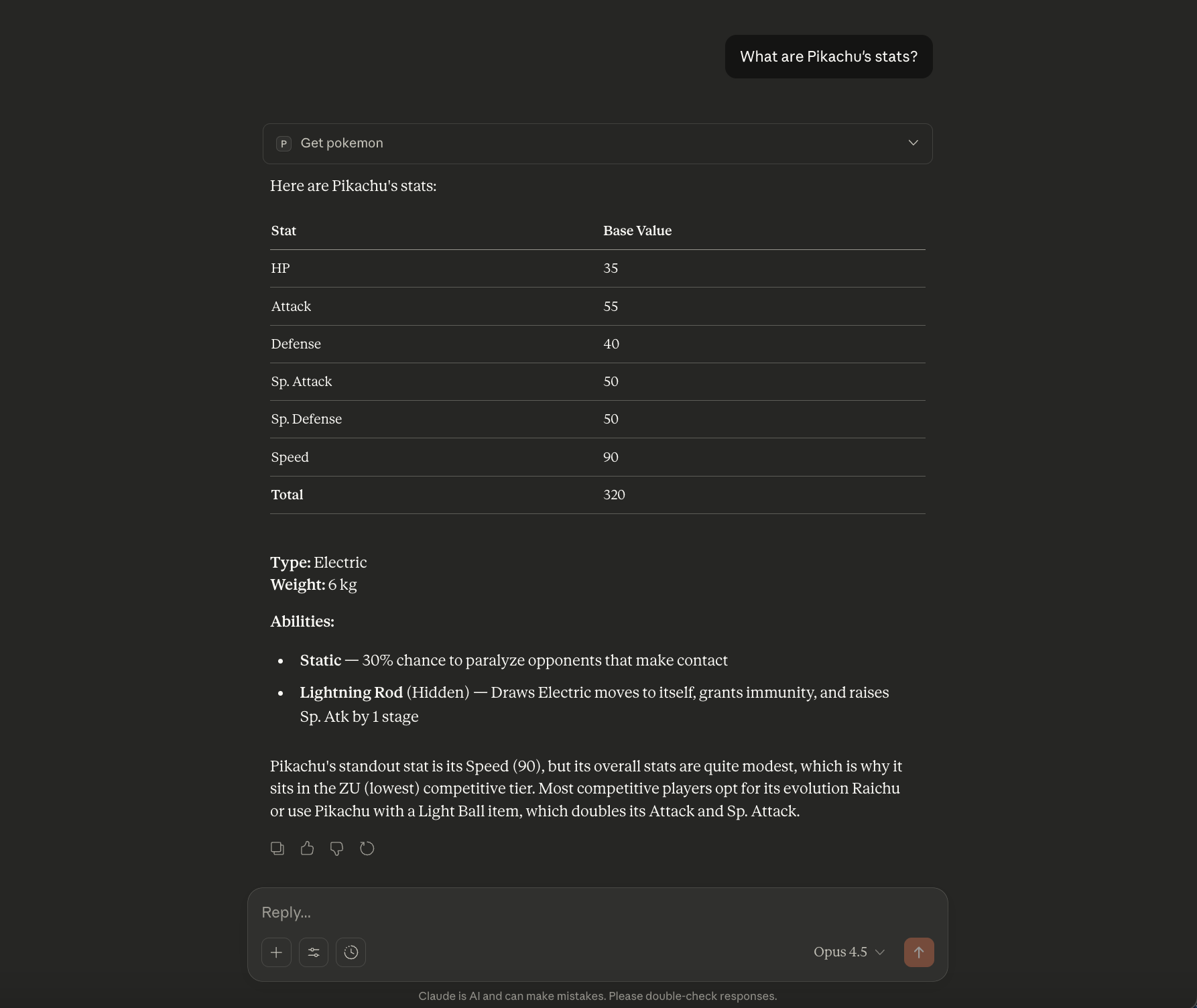
A Model Context Protocol (MCP) server that provides Pokemon Showdown data to LLMs. Enables AI assistants like Claude to look up Pokemon stats, moves, abilities, items, and type matchups during conversations.
What is MCP?
Model Context Protocol is an open standard that allows AI assistants to securely access external tools and data sources. This server exposes Pokemon game data as MCP tools that Claude and other compatible LLMs can call.
Features
- Pokemon Lookup - Stats, types, abilities for any Pokemon
- Move Database - Power, accuracy, effects, priority, descriptions
- Ability Info - Full descriptions of what abilities do in battle
- Item Effects - Held item descriptions and battle effects
- Type Calculator - Calculate type effectiveness multipliers
- Priority Moves - Search for moves with priority (Quick Attack, etc.)
- Ability Search - Find all Pokemon with a specific ability
- Dangerous Abilities - List battle-critical abilities (immunities, etc.)
Installation
Option 1: Using uvx (Recommended)
The easiest way to use mcpkmn-showdown is with uvx:
uvx mcpkmn-showdown
Option 2: Using pip
pip install mcpkmn-showdown
Then run:
mcpkmn-showdown
Option 3: From Source
git clone https://github.com/drewsungg/mcpkmn-showdown.git
cd mcpkmn-showdown
pip install .
mcpkmn-showdown
Usage with Claude Desktop
Add to your Claude Desktop configuration file:
macOS: ~/Library/Application Support/Claude/claude_desktop_config.json
Windows: %APPDATA%\Claude\claude_desktop_config.json
{
  "mcpServers": {
    "pokemon": {
      "command": "uvx",
      "args": ["mcpkmn-showdown"]
    }
  }
}
Or if installed via pip:
{
  "mcpServers": {
    "pokemon": {
      "command": "mcpkmn-showdown"
    }
  }
}
Restart Claude Desktop after updating the config.
Available Tools
get_pokemon
Look up a Pokemon by name. Returns base stats, types, abilities with descriptions, weight, and competitive tier.
Input: {"name": "garchomp"}
Output: Pokemon stats, types, abilities, etc.
get_move
Look up a move by name. Returns power, accuracy, type, category, priority, effects, and full description.
Input: {"name": "earthquake"}
Output: Move details including damage, accuracy, effects
get_ability
Look up an ability by name. Returns full description of what the ability does in battle.
Input: {"name": "levitate"}
Output: "This Pokemon is immune to Ground-type moves."
get_item
Look up a held item by name. Returns full description of what the item does in battle.
Input: {"name": "choice-scarf"}
Output: Item effect description
get_type_effectiveness
Calculate type effectiveness multiplier for an attack against a Pokemon's types.
Input: {"attack_type": "electric", "defend_types": ["water", "flying"]}
Output: "4x - Super effective!"
search_priority_moves
Find all moves with priority (moves that go before normal moves).
Input: {"min_priority": 1}
Output: List of priority moves (Quick Attack, Mach Punch, etc.)
search_pokemon_by_ability
Find all Pokemon that can have a specific ability.
Input: {"ability": "levitate"}
Output: List of Pokemon with Levitate
list_dangerous_abilities
List abilities that can significantly affect battle outcomes.
Input: {"category": "immunity"}
Output: Levitate, Flash Fire, Volt Absorb, etc.
Example Conversations
Once configured, you can ask Claude things like:
- "What are Garchomp's stats and abilities?"
- "Is Earthquake effective against Rotom-Wash?"
- "What does the ability Protean do?"
- "What priority moves can hit Ghost types?"
- "Which Pokemon have the ability Intimidate?"
Data Sources
Pokemon data is sourced from Pokemon Showdown, the popular competitive Pokemon battle simulator. Data includes:
pokedex.json- Pokemon stats, types, abilitiesmoves_showdown.json- Move data with effectsabilities_full.json- Ability descriptionsitems.json- Item descriptionstypechart.json- Type effectiveness chart
Development
Testing with MCP Inspector
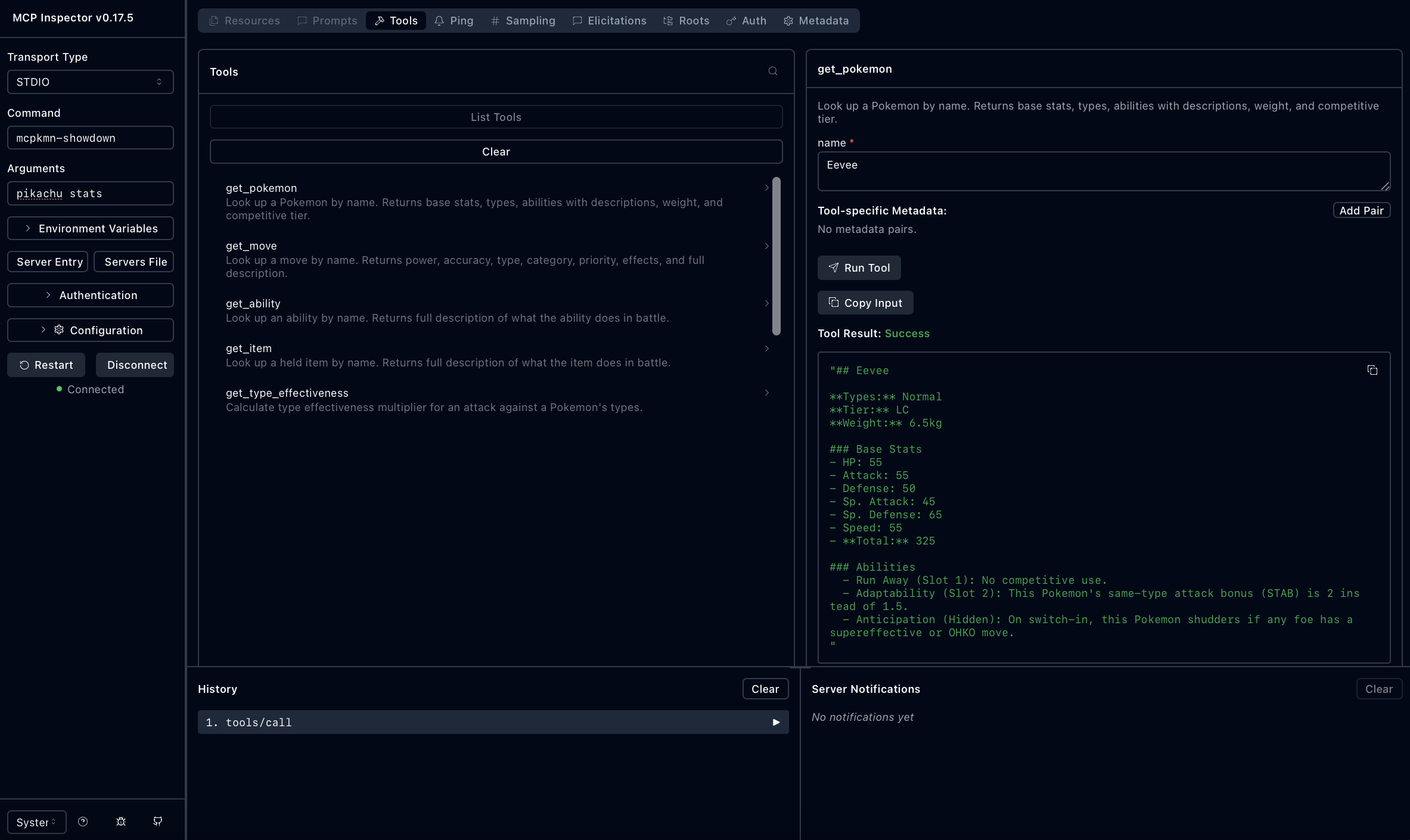
Use the MCP Inspector to test the tools interactively:
npx @modelcontextprotocol/inspector mcpkmn-showdown
Running Locally
git clone https://github.com/drewsungg/mcpkmn-showdown.git
cd mcpkmn-showdown
pip install -e ".[dev]"
python -m src.pokemon_server
Updating Pokemon Data
The cache data can be refreshed using the data fetcher:
python -m src.data_fetcher
Related Projects
- pokemon-llm-battle-bot - An LLM-powered Pokemon battle bot that uses this MCP server
- Pokemon Showdown - The source of Pokemon data
- Model Context Protocol - The protocol specification
License
MIT License - see LICENSE for details.
Contributing
Contributions are welcome! Please feel free to submit a Pull Request.
Author
Andrew Sung - @drewsungg
Release history Release notifications | RSS feed


Download files
Download the file for your platform. If you're not sure which to choose, learn more about installing packages.
Source Distribution
Built Distribution
Filter files by name, interpreter, ABI, and platform.
If you're not sure about the file name format, learn more about wheel file names.
Copy a direct link to the current filters
File details
Details for the file mcpkmn_showdown-1.0.1.tar.gz.
File metadata
- Download URL: mcpkmn_showdown-1.0.1.tar.gz
- Upload date:
- Size: 234.9 kB
- Tags: Source
- Uploaded using Trusted Publishing? No
- Uploaded via: twine/6.2.0 CPython/3.11.12
File hashes
| Algorithm | Hash digest | |
|---|---|---|
| SHA256 |
b07bc748116c0534feb449dddf922642b6eee71dfae76b4a67ebf7446c2793fb
|
|
| MD5 |
38707ce55b648adca7da6cf33edde1da
|
|
| BLAKE2b-256 |
1afb517443ccb525d2168230c24432b400786131a29af51fc242f142dc4fb72b
|
File details
Details for the file mcpkmn_showdown-1.0.1-py3-none-any.whl.
File metadata
- Download URL: mcpkmn_showdown-1.0.1-py3-none-any.whl
- Upload date:
- Size: 245.4 kB
- Tags: Python 3
- Uploaded using Trusted Publishing? No
- Uploaded via: twine/6.2.0 CPython/3.11.12
File hashes
| Algorithm | Hash digest | |
|---|---|---|
| SHA256 |
2c2590045ae50ab17090767072ddc8a353ff7fc11180d4eb9365a7ea09435591
|
|
| MD5 |
14780263da424637bc09f4f34eaae4de
|
|
| BLAKE2b-256 |
dafedae742a17b7da41cd44d6300bf4c96f180b296654287f9b36e61671a785d
|






