
A flexible and powerful Python client for Model Context Protocol (MCP) servers with advanced connection management

Project description
MCPlex
A powerful and flexible Python library for interacting with Model Context Protocol (MCP) servers, featuring advanced connection management, caching, and timeout controls.
Overview
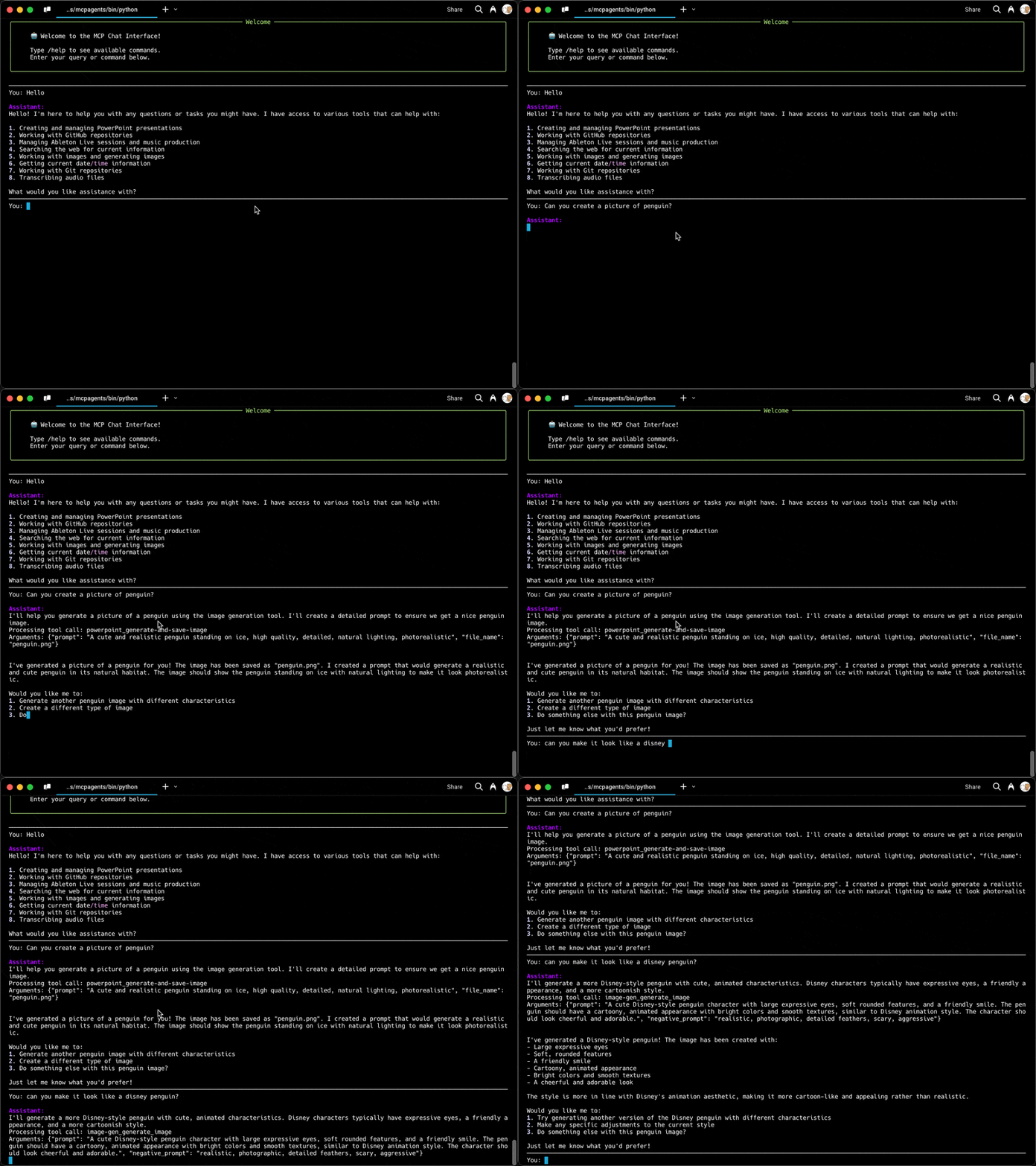
MCPlex is a Python library and command-line tool that enhances your interaction with MCP servers through natural language. It provides robust connection management, efficient caching, and fine-grained control over server interactions. The library seamlessly integrates with multiple LLM providers (OpenAI, Anthropic, Ollama) and offers a powerful interface for accessing and manipulating data from MCP servers.
The project demonstrates how to:
- Connect to multiple MCP servers simultaneously
- List and call tools provided by these servers
- Use function calling capabilities to interact with external data sources
- Process and present results in a user-friendly way
- Create a reusable Python library with a clean API
- Build a command-line interface on top of the library
Features
- Multiple Provider Support: Works with OpenAI, Anthropic, and Ollama models
- Modular Architecture: Clean separation of concerns with provider-specific modules
- Dual Interface: Use as a Python library or command-line tool
- MCP Server Integration: Connect to any number of MCP servers simultaneously
- Tool Discovery: Automatically discover and use tools provided by MCP servers
- Flexible Configuration: Configure models, servers, and timeouts through JSON configuration
- Environment Variable Support: Securely store API keys in environment variables
- Comprehensive Documentation: Detailed usage examples and API documentation
- Installable Package: Easy installation via pip with
mcplex-clicommand - Streaming Support: Add stream=True to enable streaming
- Connection Health Monitoring: Automatic health checks and recovery
- Message Queuing: Prevents concurrent writes and ensures message delivery
- Configurable Timeouts: Per-server timeout settings for different operations
- Enhanced Error Handling: Improved error recovery and reporting
Prerequisites
Before installing MCPlex MCP, ensure you have the following prerequisites installed:
- Python 3.8+
- SQLite - A lightweight database used by the demo
- uv/uvx - A fast Python package installer and resolver
Setting up Prerequisites
Windows
-
Python 3.8+:
- Download and install from python.org
- Ensure you check "Add Python to PATH" during installation
-
SQLite:
- Download the precompiled binaries from SQLite website
- Choose the "Precompiled Binaries for Windows" section and download the sqlite-tools zip file
- Extract the files to a folder (e.g.,
C:\sqlite) - Add this folder to your PATH:
- Open Control Panel > System > Advanced System Settings > Environment Variables
- Edit the PATH variable and add the path to your SQLite folder
- Verify installation by opening Command Prompt and typing
sqlite3 --version
-
uv/uvx:
- Open PowerShell as Administrator and run:
powershell -ExecutionPolicy ByPass -c "irm https://astral.sh/uv/install.ps1 | iex" - Restart your terminal and verify installation with
uv --version
- Open PowerShell as Administrator and run:
macOS
-
Python 3.8+:
brew install python
-
SQLite:
brew install sqlite
-
uv/uvx:
brew install uv
Or use the official installer:
curl -LsSf https://astral.sh/uv/install.sh | sh
Linux (Ubuntu/Debian)
-
Python 3.8+:
sudo apt update
sudo apt install python3 python3-pip
-
SQLite:
sudo apt update
sudo apt install sqlite3
-
uv/uvx:
curl -LsSf https://astral.sh/uv/install.sh | sh
Installation
Option 1: Install from PyPI (Recommended)
pip install mcplex
Option 2: Install from Source
-
Clone this repository:
git clone https://github.com/Ichigo3766/mcplex.git
cd mcplex
-
Install the package in development mode:
pip install -e .
-
Set up your environment variables:
cp .env.example .env
Then edit the
.envfile to add your API keys.
Configuration
The project uses two main configuration files:
-
.env- Contains API configuration:OPENAI_API_KEY=your_openai_api_key_here OPENAI_MODEL=gpt-4o ANTHROPIC_API_KEY=your_anthropic_key_here -
mcp_config.json- Defines MCP servers and their configuration:{ "mcpServers": { "server1": { "command": "command-to-start-server", "args": ["arg1", "arg2"], "env": { "ENV_VAR1": "value1", "ENV_VAR2": "value2" }, "timeout": 300 }, "server2": { "command": "another-server-command", "args": ["--option", "value"], "timeout": 10, "disabled": true // This server will be skipped } }, "models": [ { "model": "gpt-4o", "provider": "openai", "default": true, "systemMessage": "You are a smart and helpful assistant with access to MCP tools." } ] }
Each server configuration supports:
command: Command to start the MCP serverargs: Command-line arguments for the serverenv: Environment variables for the servertimeout: Maximum time to wait for server responses (in seconds, default: 60)disabled: Optional boolean flag to disable a server without removing its configuration
Usage
Using the CLI Command
mcplex-cli "Your query here"
Command-line Options
Usage: mcplex-cli [--model <name>] [--quiet] [--config <file>] [--stream] 'your question'

Options:
  --model <name>    Specify the model to use (can be model name or title from config)
  --quiet           Suppress intermediate output
  --config <file>   Specify a custom config file (default: mcp_config.json)
  --stream          Enable streaming mode
  --help, -h       Show this help message
Using the Library
import asyncio
from mcplex import run_interaction

## No streaming
async def main():

   ## No streaming
   result = await run_interaction(
      user_query="Hello",
      model_name="gpt-4o",  # Can use either model name ("gpt-4o") or title ("GPT-4")
      config_path="mcp_config.json",
      quiet_mode=False, #for logger messages
      show_tool_calls=True, #shows tool calls arguements and results to client
      stream=False
   )
   print(result)

    ## Streaming
   async for chunk in await run_interaction(
      user_query="Hello",
      model_name="gpt-4o",
      stream=True,
      config_path="mcp_config.json",
      quiet_mode=False, #for logger messages
      show_tool_calls=True, #shows tool calls arguements and results to client
   ):
      print(chunk, end="", Flush=True)

asyncio.run(main())
Architecture
Package Structure
Directory structure:
└── ichigo3766-mcplex/
    ├── README.md
    ├── mcp_config.json
    ├── pyproject.toml
    ├── requirements.txt
    ├── .env.example
    └── src/
        └── mcplex/
            ├── __init__.py
            ├── cli.py
            ├── client.py
            ├── mcp_errors.py
            ├── mcp_manager.py
            ├── mcp_types.py
            ├── utils.py
            └── providers/
                ├── __init__.py
                ├── anthropic.py
                ├── ollama.py
                └── openai.py
Key Components
-
Connection Management
- Connection pooling with configurable limits
- Automatic health monitoring
- Message queuing system
- Per-server timeout configuration
- Ability to disable each server from config
-
Error Handling
- Automatic recovery from failures
- Detailed error reporting
- Graceful degradation
-
Resource Management
- Efficient cleanup
- Memory optimization
- Connection reuse
-
Performance Features
- Message queuing prevents concurrent writes
- Connection health monitoring
- Efficient resource utilization
Requirements
- Python 3.8+
- OpenAI API key (or other supported provider API keys)
Core Dependencies
- openai
- mcp[cli]
- python-dotenv
- anthropic
- ollama
- jsonschema
Development Dependencies
- pytest
- pytest-asyncio
- pytest-mock
- uv
Contributing
Contributions are welcome! Please feel free to submit a Pull Request.
Release history Release notifications | RSS feed


Download files
Download the file for your platform. If you're not sure which to choose, learn more about installing packages.
Source Distribution
Built Distribution
Filter files by name, interpreter, ABI, and platform.
If you're not sure about the file name format, learn more about wheel file names.
Copy a direct link to the current filters
File details
Details for the file mcplex-0.1.2.tar.gz.
File metadata
- Download URL: mcplex-0.1.2.tar.gz
- Upload date:
- Size: 22.9 kB
- Tags: Source
- Uploaded using Trusted Publishing? No
- Uploaded via: twine/6.1.0 CPython/3.11.11
File hashes
| Algorithm | Hash digest | |
|---|---|---|
| SHA256 |
98a901eb8ff98631ebaa018cb2642c3adfde1a3e7a241d50bb44d6c7ff7d4c5b
|
|
| MD5 |
e9ff626db8721e775bf72844eaf8f2c2
|
|
| BLAKE2b-256 |
38d16c0934beb3549898280b88a6d2e634e2e8a1658c9ee1113e85670d242029
|
File details
Details for the file mcplex-0.1.2-py3-none-any.whl.
File metadata
- Download URL: mcplex-0.1.2-py3-none-any.whl
- Upload date:
- Size: 23.4 kB
- Tags: Python 3
- Uploaded using Trusted Publishing? No
- Uploaded via: twine/6.1.0 CPython/3.11.11
File hashes
| Algorithm | Hash digest | |
|---|---|---|
| SHA256 |
c5b66cbe6def7aa96bceeb23f47916542c9121100c17c870cf4a4747be2483ff
|
|
| MD5 |
e982a9cd3980d984c4134b75ac7293d6
|
|
| BLAKE2b-256 |
8e46aca1af380004a577616ee00b11150ed4a830e6544f588ad04f62ee19db53
|






