
Web UI and API for managing MCP Orchestrator (mcpo) instances and configurations.

Project description
MCPO Control Panel

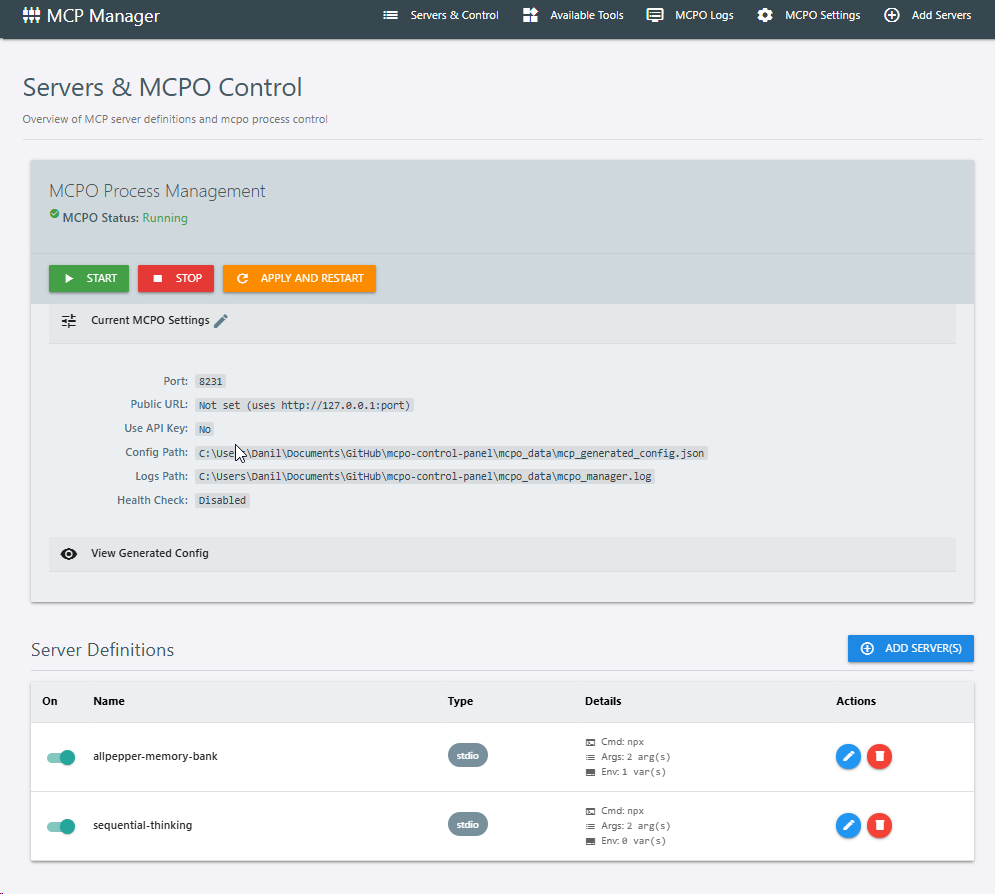
A web-based control panel designed to simplify the management of MCP-to-OpenAPI (mcpo) instances and their server configurations. It provides a user-friendly UI and an API for interacting with mcpo.
Demo
https://github.com/user-attachments/assets/dc3f11de-82f6-42ee-a72f-7181c9af0f45
Key Features
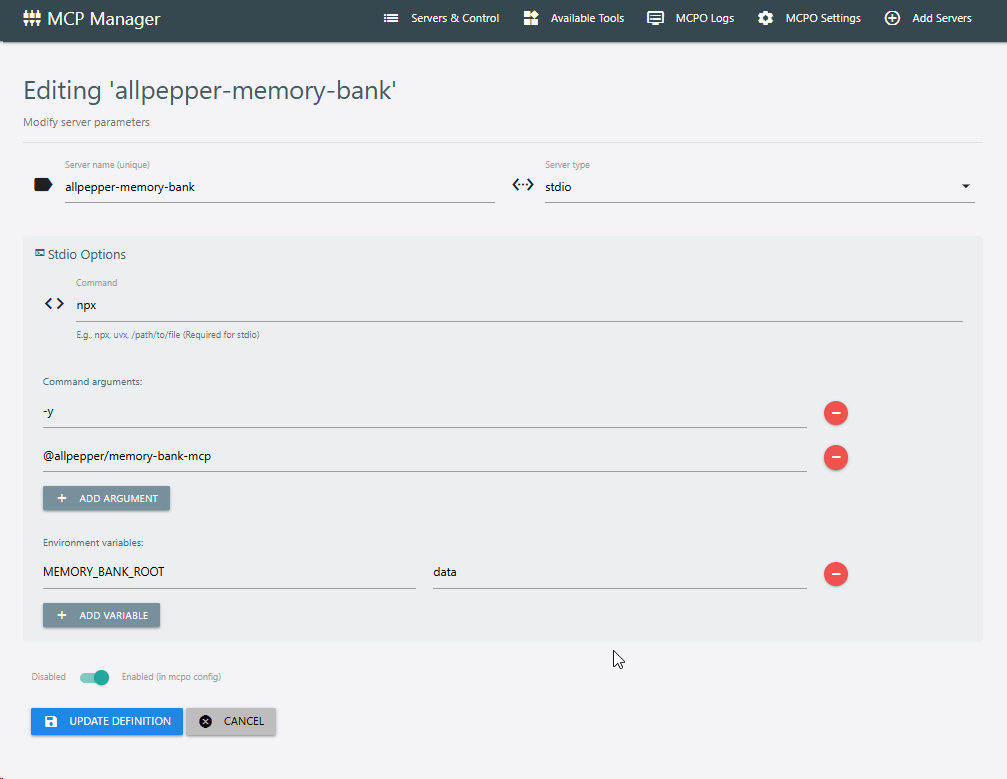
- Server Definition Management:
- Create, Read, Update, and Delete server definitions (for
stdio,sse,streamable_httptypes). - Easily toggle servers as enabled/disabled for inclusion in the
mcpoconfiguration. - Intuitive forms for specifying commands, arguments, environment variables, and URLs.
- Create, Read, Update, and Delete server definitions (for
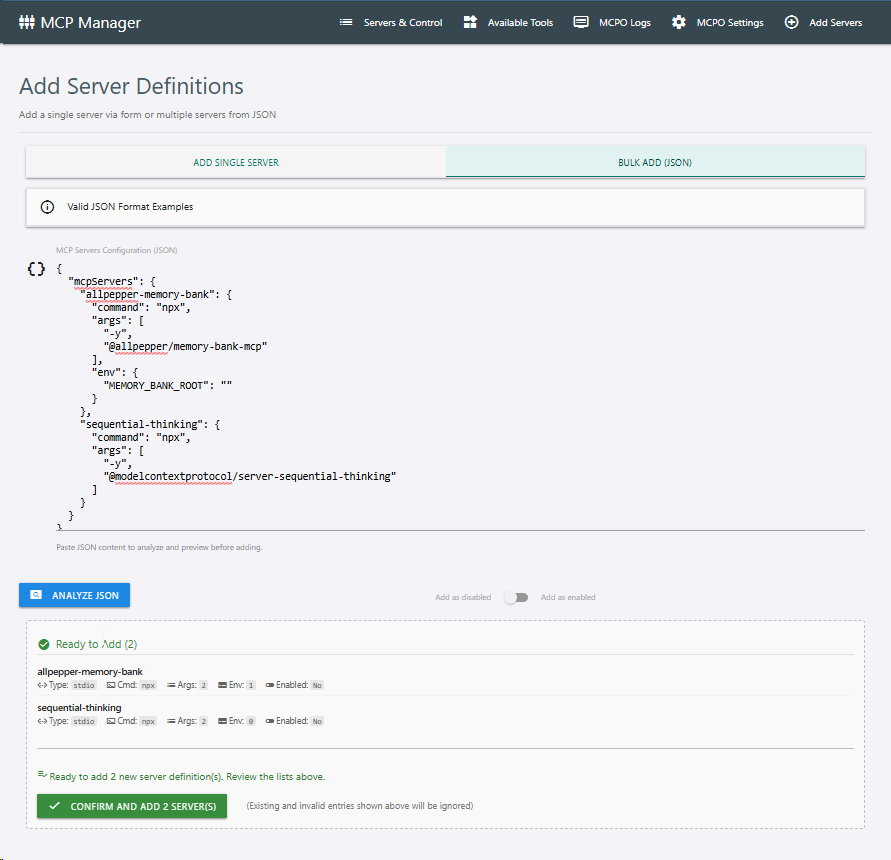
- Bulk Server Operations:
- Add multiple server definitions at once by pasting JSON content.
- Supports various JSON formats (object with
mcpServers, direct name-to-config map, list of server objects). - Two-step bulk add process:
- Analyze: Preview valid new servers, existing ones, and invalid entries from your JSON.
- Confirm: Add only the validated new servers to the database.
- Automatic de-adaptation of Windows-specific commands (e.g.,
cmd /c npx ...->npx ...).
- MCPO Process Control:
- Start, stop, and restart the
mcpoprocess directly from the UI. - View the real-time status of the
mcpoprocess (Running, Stopped, Error). - "Apply and Restart" functionality: Generates the
mcpoconfiguration from current server definitions and then restartsmcpo.
- Start, stop, and restart the
- Log Viewing:
- Display the latest logs from the
mcpoprocess log file. - Configurable auto-refresh for logs.
- Manual refresh and auto-scroll options.
- Display the latest logs from the
- MCPO Settings Configuration:
- Manage
mcpostartup parameters (port, API key usage, config file path, log file path). - Configure UI behavior (log refresh interval).
- Setup and manage health check parameters for
mcpo.
- Manage
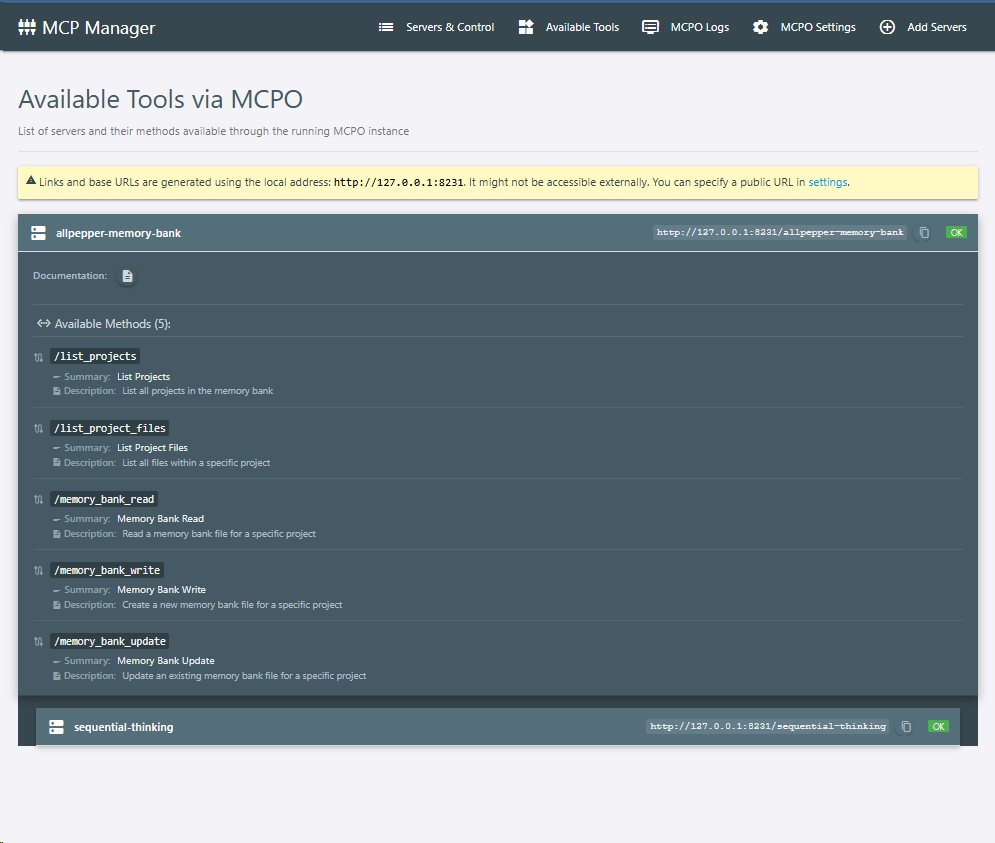
- Tool Aggregation & Viewing:
- Dynamically fetches and displays a list of available tools (server paths and summaries) from a running
mcpoinstance by querying its OpenAPI specifications. - Provides the base URL for constructing tool invocation links.
- Dynamically fetches and displays a list of available tools (server paths and summaries) from a running
- Health Checks & Auto-Restart:
- Background health monitoring of the
mcpoprocess using a built-in echo server. - Configurable check interval, failure attempts, and retry delays.
- Optional automatic restart of
mcpoif health checks fail consecutively.
- Background health monitoring of the
- Dynamic Configuration Generation:
- Generates the
mcp_generated_config.jsonfile formcpobased on enabled server definitions. - Provides options to download the standard configuration or a Windows-adapted version (which wraps commands like
npx,uvx,dockerwithcmd /c ...).
- Generates the
- Modern Web UI:
- Built with FastAPI, Jinja2 templates, and HTMX for a responsive and dynamic user experience.
- Utilizes Materialize CSS for styling.
- Persistent storage using an SQLite database (via SQLModel).
Installation
It's recommended to use uv for installation if available, as it's generally faster.
Method 1: Using uv (Recommended)
uv pip install mcpo-control-panel
Method 2: Using pip (Traditional)
Prerequisites
- Python 3.11 or higher.
pip install mcpo-control-panel
Method 3: From Source (for development)
-
Clone the repository:
git clone https://github.com/daswer123/mcpo-control-panel.git
cd mcpo-control-panel
-
Install in editable mode (this will also install dependencies):
pip install -e .
Method 4: Using Docker
You can also run the MCPO Control Panel using Docker. This is a convenient way to run the application in an isolated environment.
-
Pull the ready-made image from Docker Hub:
docker pull daswer123/mcpo-control-panel:latest
-
Or build the Docker image yourself: Ensure you have
Dockerfileanddocker-compose.ymlin your project root.docker compose build
-
Run the application using Docker Compose:
docker compose up
This will start the MCPO Control Panel, and it will be accessible at
http://localhost:8083/uiby default. The data will be persisted in a./datavolume on your host machine.You can customize the port and data directory in the
docker-compose.ymlfile if needed. Environment variables likeMCPO_MANAGER_HOST,MCPO_MANAGER_PORT, andMCPO_MANAGER_DATA_DIRare also respected by the Docker container.
-
Running the Application
Once installed, you can run the MCPO Control Panel.
Using python -m (works with pip or uv installations):
python -m mcpo_control_panel [OPTIONS]
Using the installed script (if your Python scripts directory is in PATH):
mcpo-control-panel [OPTIONS]
Common Options:
--host TEXT: Host to bind the server to. (Default:127.0.0.1)- Environment variable:
MCPO_MANAGER_HOST
- Environment variable:
--port INTEGER: Port to bind the server to. (Default:8083)- Environment variable:
MCPO_MANAGER_PORT
- Environment variable:
--workers INTEGER: Number of Uvicorn workers. (Default:1)- Environment variable:
MCPO_MANAGER_WORKERS
- Environment variable:
--reload: Enable auto-reload (for development).--config-dir TEXT: Directory for storing MCPO manager data (SQLite database, PID files, generated configs, settings).- Default:
~/.mcpo_manager_data(e.g.,C:\Users\YourUser\.mcpo_manager_dataon Windows or/home/youruser/.mcpo_manager_dataon Linux). - Environment variable:
MCPO_MANAGER_DATA_DIR
- Default:
Example:
python -m mcpo_control_panel --port 8083 --reload --config-dir "/path/to/my/mcpo-data"
Example using uvx (executes the command in an isolated environment with the specified package):
This is particularly useful for quick runs or testing without altering your global/current environment.
uvx --with mcpo-control-panel python -m mcpo_control_panel --host 0.0.0.0 --port 8934 --config-dir test
Or using environment variables:
export MCPO_MANAGER_PORT=8083
export MCPO_MANAGER_DATA_DIR="/path/to/my/mcpo-data"
python -m mcpo_control_panel --reload
The application will create the specified --config-dir if it doesn't exist. All application data, including the SQLite database (mcp_manager_data.db), settings file (mcpo_manager_settings.json), generated MCPO configuration (mcp_generated_config.json), and the mcpo process PID file, will be stored in this directory.
Accessing the UI
Once the server is running, open your web browser and navigate to:
http://<host>:<port>/ui
For example, if running with default settings: http://127.0.0.1:8083/ui
Configuration
Most configurations for the mcpo process itself (like its port, whether it uses an API key, log file paths) and for the UI (like log auto-refresh settings, health check parameters) are managed through the web interface on the "MCPO Settings" page.
These settings are saved to mcpo_manager_settings.json within the MCPO_MANAGER_DATA_DIR_EFFECTIVE (the directory specified by --config-dir or its default).
License
This project is licensed under the MIT License
Release history Release notifications | RSS feed


Download files
Download the file for your platform. If you're not sure which to choose, learn more about installing packages.
Source Distribution
Built Distribution
Filter files by name, interpreter, ABI, and platform.
If you're not sure about the file name format, learn more about wheel file names.
Copy a direct link to the current filters
File details
Details for the file mcpo_control_panel-0.1.0.tar.gz.
File metadata
- Download URL: mcpo_control_panel-0.1.0.tar.gz
- Upload date:
- Size: 66.7 kB
- Tags: Source
- Uploaded using Trusted Publishing? No
- Uploaded via: uv/0.7.2
File hashes
| Algorithm | Hash digest | |
|---|---|---|
| SHA256 |
6a9c0104775b5123bcb6f517c3bee4d15184f8bef2b185402a2e9536603b5580
|
|
| MD5 |
ec45fa0448a19f22e79a8e7c58658526
|
|
| BLAKE2b-256 |
10db7c3c9ee13022b22b5077ffe9dbe5d8408b6696a7c03b508794057af4f5d0
|
File details
Details for the file mcpo_control_panel-0.1.0-py3-none-any.whl.
File metadata
- Download URL: mcpo_control_panel-0.1.0-py3-none-any.whl
- Upload date:
- Size: 79.1 kB
- Tags: Python 3
- Uploaded using Trusted Publishing? No
- Uploaded via: uv/0.7.2
File hashes
| Algorithm | Hash digest | |
|---|---|---|
| SHA256 |
3e7241c2fb046dd776de1e6d728da7f4517f250922701924ce43a6a609c1b9a8
|
|
| MD5 |
bd4d18ab306aae0c8c1f8949e6337744
|
|
| BLAKE2b-256 |
01f04879b08290e2fabb54aeda7304792c6dd65eb8ad6a5d1801f7ceefc82658
|






