
md-mcp
Transform from Prompt Engineering to Context Engineering.
A lightweight Python library that instantly exposes your local markdown documentation, notes, and knowledge bases to any AI tool that supports the Model Context Protocol (MCP) – including Claude Desktop.
No embeddings, no preprocessing, and no uploading. Your files stay safely on your local machine, and any real-time updates are instantly reflected in your AI's context.
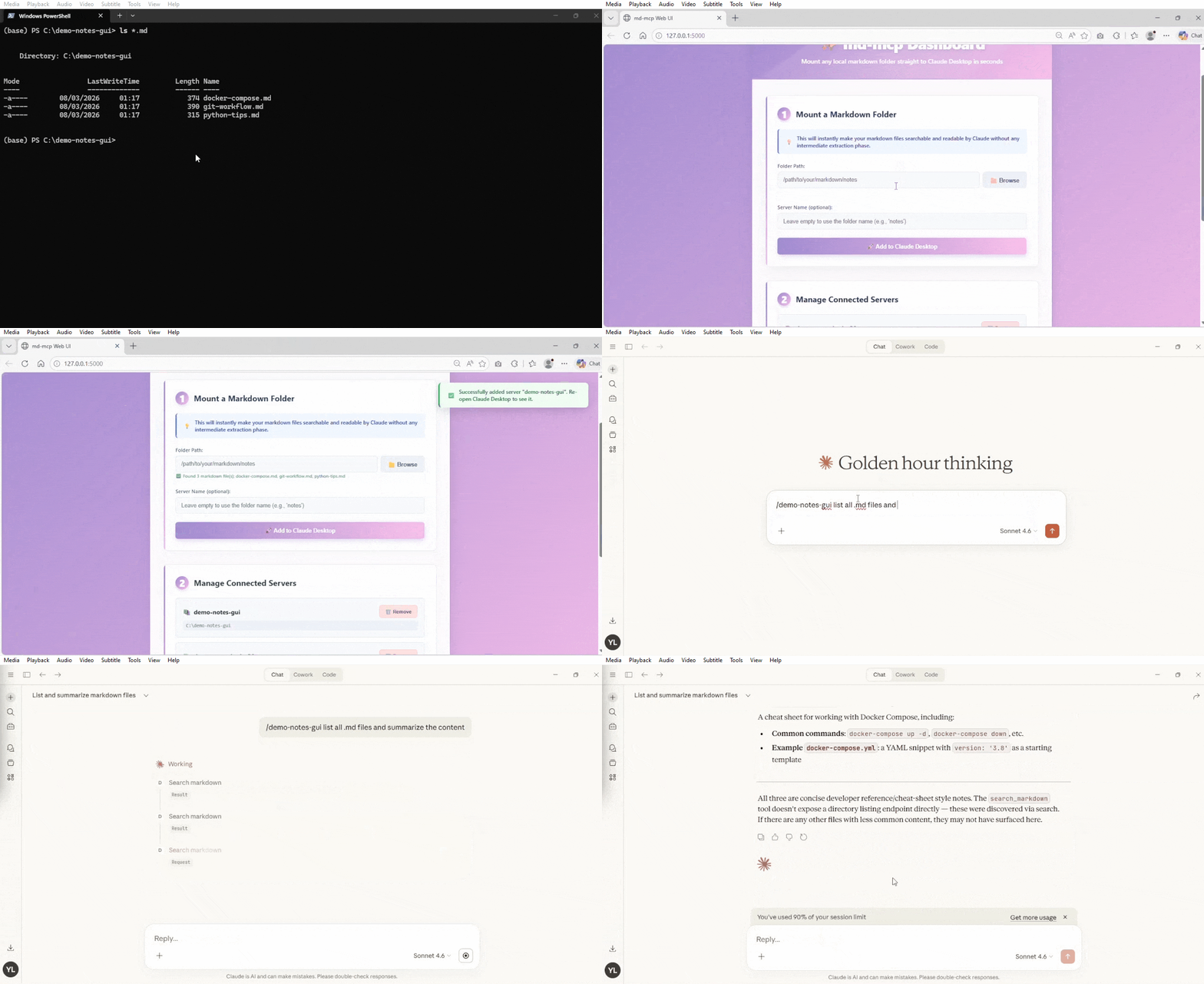
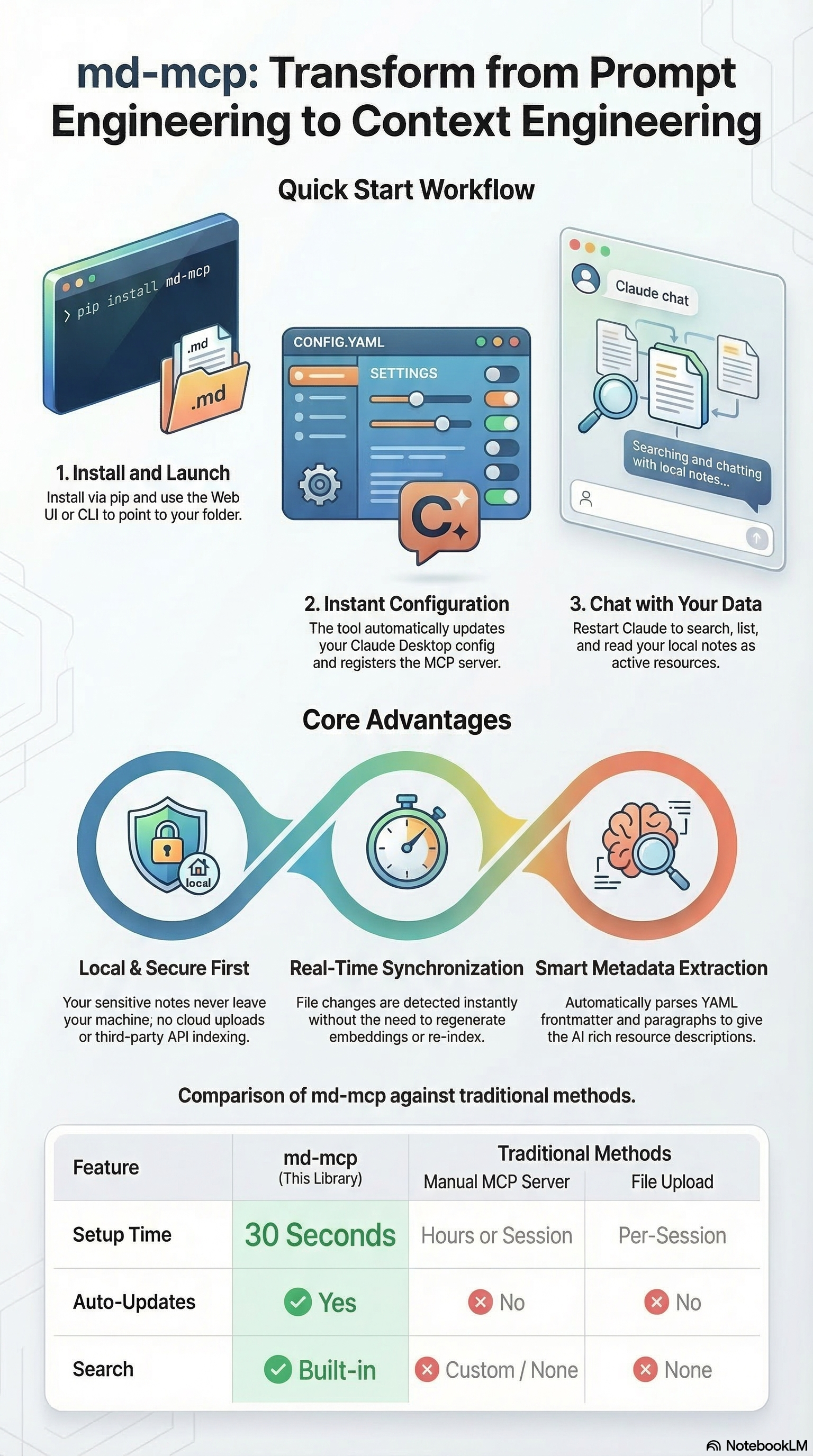
🚀 Quick Start
1. Install
Option A: Install from pypi
pip install md-mcp
Option B: Install from source code
uv sync
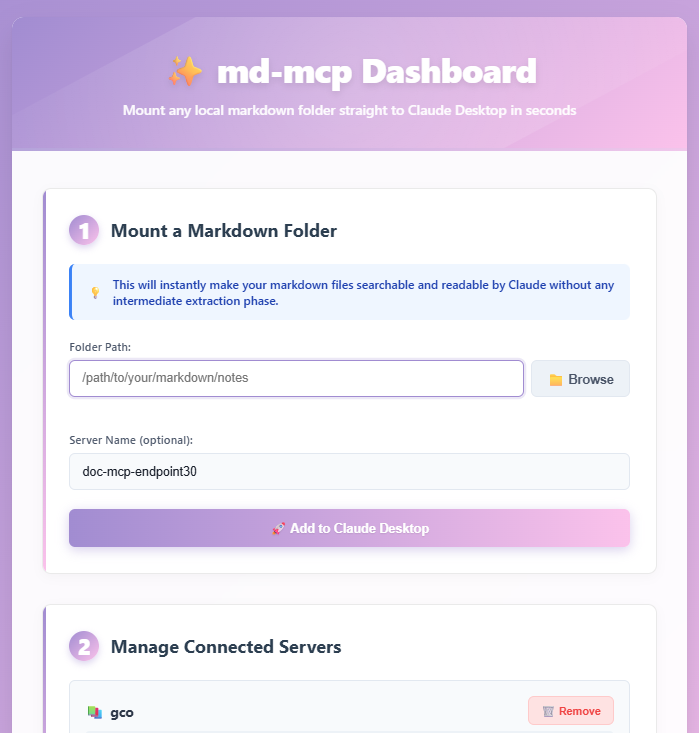
2. Launch the Web UI (Recommended)
The easiest way to manage your markdown servers is through the visual dashboard:
md-mcp --web
If the command is not recognized (e.g., if the Python scripts directory is not in your system PATH), you can run:
uv run python -m md_mcp --web
Just point at a folder and go!
3. Or use the CLI
If you prefer the command line:
# Expose a folder of markdown files
md-mcp --folder ~/Documents/notes --name "My Notes"

# That's it! Restart Claude Desktop and it's available.
📋 Features
- Context Engineering: Feed your AI assistant exactly the right local context to get better answers, eliminating the need to endlessly prompt.
- Universal MCP Support: Works natively with Claude Desktop and any other AI tool or agent that supports the Model Context Protocol.
- Local & Secure First: Your files never leave your machine. No cloud uploads, no third-party APIs parsing your sensitive notes.
- Real-time Sync: Edit your markdown files and the MCP server picks up the changes instantly. No need to regenerate embeddings or re-index.
- Auto File Watching: Automatically detects when files are added, modified, or deleted (powered by watchdog). Use the
rescan_folder()tool in Claude Desktop for manual refresh if needed. - Zero Configuration: Just point at a folder and go.
- Auto-Discovery: Recursively finds all
.mdfiles. - Metadata Extraction: Parses YAML frontmatter and first paragraphs for rich resource descriptions.
- Search Support: Built-in search across all files to quickly find the needle in the haystack.
- Web Interface: Easy-to-use visual dashboard for non-technical users to manage multiple knowledge bases.
- Observable by Default: Optional OpenTelemetry instrumentation (
uv pip install "md-mcp[observability]") traces every MCP tool call — an audit trail of what your AI assistant actually did with your notes. See docker/README.md.
🎯 Use Cases
1. Personal Knowledge Base
md-mcp --folder ~/obsidian-vault --name "Obsidian"
→ Claude can now read your entire Obsidian vault
2. Project Documentation
md-mcp --folder ~/code/myproject/docs --name "Project Docs"
→ Claude has full context on your project
3. Research Papers
md-mcp --folder ~/research/papers-md --name "Research"
→ Claude can reference your research notes
📖 Advanced Usage commands
Web Interface (easiest way to use)
# Direct command (if in PATH)
md-mcp --web

# Or via Python module
uv run python -m md_mcp --web

# You can optionally specify a custom port (default is 5000)
md-mcp --web --port 8080
# or: uv run python -m md_mcp --web --port 8080
Add a Markdown Folder
# With explicit name
md-mcp --folder /path/to/docs --name "My Docs"

# Auto-name from folder
md-mcp --folder ~/notes
# Creates server named "notes"

# Alias: --add
md-mcp --add ~/work-docs --name "Work"
Scan Before Adding (Dry Run)
md-mcp --folder ~/notes --scan
# Shows what files would be exposed
List Configured Servers
md-mcp --list
# Shows all md-mcp servers
Show Configuration Status
md-mcp --status
# Shows Claude config path and all servers
Remove a Server
md-mcp --remove "My Docs"
Interactive Mode
md-mcp
# Prompts for folder path
🔧 How It Works
-
You run the CLI:
md-mcp --folder ~/notes --name "Notes"
-
md-mcp:
- Scans folder for
.mdfiles - Extracts metadata (frontmatter, descriptions)
- Updates Claude Desktop config
- Registers MCP server entry
- Scans folder for
-
In Claude Desktop:
- Restart Claude
- Server appears in MCP dropdown
- All markdown files available as resources
- Use search tools to find content
📂 What Gets Exposed
Each markdown file becomes an MCP Resource:
{
  "uri": "md://notes/project-plan.md",
  "name": "Project Plan",
  "description": "Auto-extracted from frontmatter or first paragraph",
  "mimeType": "text/markdown"
}
🛠️ MCP Tools
md-mcp provides three tools to Claude:
1. search_markdown
Search across all markdown files by content or filename.
Usage in Claude:
- Standard (keyword): > "Search my notes for 'docker compose'"
⚠️ Experimental features below: (may not work)
- Semantic: > "Search my docs for 'user authentication' using semantic search" (Finds related concepts like login, OAuth, etc.)
- Hybrid: > "Search for 'docker setup' using hybrid search" (Combines exact matching and conceptual matching)
(Note: Semantic and hybrid search require uv pip install "md-mcp[semantic]", or installing with the extra flag)
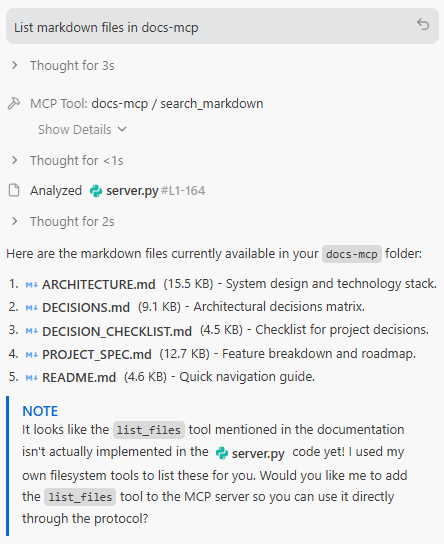
2. list_files
List all available markdown files.
Usage in Claude:
"What markdown files do I have about Python?"
3. rescan_folder
Manually rescan the folder for new, modified, or deleted markdown files. Use this if the automatic file watcher is not available or if files are missing.
Usage in Claude:
"Rescan the markdown folder to find my new notes"
📋 Requirements
- Python 3.10+
- mcp library
- Claude Desktop
🔧 Configuration
Claude Desktop Config Location (Automatic)
Windows: %APPDATA%\Claude\claude_desktop_config.json
macOS: ~/Library/Application Support/Claude/claude_desktop_config.json
Linux: ~/.config/Claude/claude_desktop_config.json
Antigravity Config Location (Manual)
Windows: %USERPROFILE%\.gemini\antigravity\mcp_config.json
Add your config and run Developer: Reload Window from the Command Palette (Ctrl+Shift+P).
Config Entry Format
# With uv installed
{
  "mcpServers": {
    "my-notes": {
      "command": "uvx",
      "args": [
        "md-mcp",
        "--folder", "C:\\Users\\Yang\\notes",
        "--name", "my-notes"
      ]
    }
  }
}

# Without uv installed
{
  "mcpServers": {
    "my-notes": {
      "command": "python",
      "args": [
        "-m", "md_mcp.server_runner",
        "--folder", "C:\\Users\\Yang\\notes",
        "--name", "my-notes"
      ]
    }
  }
}
VS Code MCP Config (Manual)
For workspace-level tools, use a file at .vscode/mcp.json. See official VS Code MCP documentation.
[!IMPORTANT] For workspace configs, the top-level key is
"servers", not"mcpServers".
Example .vscode/mcp.json:
{
  "servers": {
    "my-notes": {
      "command": "uvx",
      "args": [
        "md-mcp",
        "--folder", "C:\\Users\\Yang\\notes",
        "--name", "my-notes"
      ]
    }
  }
}
Sample Prompts to Test
Once configured, try these prompts with your AI assistant:
- "Search my-notes for 'Docker'"
- "List markdown files in my-notes"
- "What do my notes say about the system architecture?"
🧪 Testing
Test the Scanner
from md_mcp.scanner import MarkdownScanner

scanner = MarkdownScanner("~/notes")
files = scanner.scan()

for f in files:
    print(f"{f.name}: {f.description}")
Test the Server Locally
# Run server directly (stdio mode)
uv run python -m md_mcp.server_runner --folder ~/notes --name test

# Server listens on stdin/stdout for MCP protocol
📝 Markdown Frontmatter Support
md-mcp extracts metadata from YAML frontmatter:
---
title: My Document
description: A brief overview of the document
tags: [project, planning]
---

# Content starts here
Extracted fields:
description→ Used as resource description- Other fields stored in
frontmatterdict
If no frontmatter, first paragraph is used as description.
🚧 Roadmap
- v0.3: Smart chunking for large files
- v0.4: Semantic search with embeddings
- v1.0: Use web UI for all operations
🐛 Troubleshooting
"Server not showing in Claude Desktop"
-
Check config was updated:
md-mcp --status -
Verify file exists:
# Windows
type %APPDATA%\Claude\claude_desktop_config.json

# Mac/Linux
cat ~/.config/Claude/claude_desktop_config.json
-
Restart Claude Desktop completely
"No files found"
# Check what scanner finds
md-mcp --folder ~/notes --scan
"Permission denied"
Make sure the folder is readable:
# Check permissions
ls -la ~/notes
🏗️ Architecture
┌─────────────────┐
│  Claude Desktop │
│   (MCP Client)  │
└────────┬────────┘
         │ stdio (JSON-RPC)
         │
┌────────▼────────┐
│  md-mcp Server  │
│  (MCP Protocol) │
└────────┬────────┘
         │
┌────────▼────────┐
│ MarkdownScanner │
│  (File Reader)  │
└────────┬────────┘
         │
   ┌─────▼──────┐
   │ Filesystem │
   │  (*.md)    │
   └────────────┘
🤝 Comparison to Alternatives
| Feature | md-mcp | Manual MCP Server | File Upload |
|---|---|---|---|
| Setup Time | 30 seconds | Hours | Per-session |
| Auto-Updates | ✅ | ❌ | ❌ |
| Full Folder | ✅ | ✅ | ❌ |
| Search | ✅ | Custom | ❌ |
| One Command | ✅ | ❌ | ❌ |
📚 Development
Setup Dev Environment
git clone https://github.com/ly2xxx/md-mcp.git
cd md-mcp
uv sync --extra dev
#Equivalent to (pip install -e ".[dev]")
Run Tests
Run standard unit tests:
uv run pytest
Run AI Agent integration tests (BDD + DeepEval):
uv run deepeval test run sample-client/tests/step_defs/test_search_markdown.py
This project champions a new AI testing standard by combining Behavior-Driven Development (pytest-bdd) with LLM-as-a-judge metrics (DeepEval) to rigorously evaluate Agentic RAG workflows.

Format Code
uv run black md_mcp/
📄 License
This project is licensed under the MIT License - see the LICENSE file for details.
🙏 Credits
Inspired by:
- Model Context Protocol by Anthropic
- netshare - File sharing tool by Yang Li
📮 Contact
Issues: https://github.com/ly2xxx/md-mcp/issues
Built by: Yang Li Date: 2026-02-16
🚀 Just point at a folder and go!
1 maintainer

Release files for md-mcp 1.0.6
For a detailed explanation of source distributions (sdists) and built distributions (wheels), please see the package formats documentation.
Source distribution (sdist)
| File | Size | Uploaded | |
|---|---|---|---|
| md_mcp-1.0.6.tar.gz | 40.1 kB | Details |
Built distribution (wheel)
| File | Interpreter | ABI | Platform | Reset |
|---|---|---|---|---|
| md_mcp-1.0.6-py3-none-any.whl | Python 3 | none | any | Details |
Total release size: 78.9 kB
Release files / md_mcp-1.0.6.tar.gz
| Download URL | md_mcp-1.0.6.tar.gz |
|---|---|
| Size | 40.1 kB |
| Tags | Source |
|
SHA-256 checksum How to use checksums |
35d7ea917578111eb0acc54f953c29d7ee85b97693fdb0353011b33204d47621
|
|
BLAKE2b-256 checksum How to use checksums |
c90acbd10d3259d0cafbf6b5b3660cde31e707d1a3429c63326888522aee244b
|
| Upload date | |
|
Uploaded using Trusted Publishing? What is trusted publishing? |
No |
| Uploaded via |
twine/6.2.0 CPython/3.11.5
|
Release files / md_mcp-1.0.6-py3-none-any.whl
| Download URL | md_mcp-1.0.6-py3-none-any.whl |
|---|---|
| Size | 38.8 kB |
| Tags | Python 3 |
|
SHA-256 checksum How to use checksums |
cc9d99c62e4440317f75ae4f4ff9b0103122434b06230e9c33dad69515aa38b4
|
|
BLAKE2b-256 checksum How to use checksums |
c4a39de2feacee93873d0b78bbccf4340f14680ea84c9a56f5c4adb17eae0bda
|
| Upload date | |
|
Uploaded using Trusted Publishing? What is trusted publishing? |
No |
| Uploaded via |
twine/6.2.0 CPython/3.11.5
|














