
My Converter Bot · md2gost
Русский · English


A Markdown to DOCX converter that follows GOST 7.32-2017 (the Russian standard for research and student
reports), plus a Telegram bot for study routine: send a .md and get a report ready to submit, send a
project .zip and get a .txt with the folder tree and file contents. The converter is installable on its
own as the md2gost package on PyPI. The bot speaks Russian.
Status: personal project, maintained · bot @my_convbot · package md2gost
Stack: Python 3.9+ · python-docx · aiogram 3 · Docker
md2gost — Markdown → DOCX per GOST
pip install md2gost
md2gost report.md                 # writes report.docx next to it
md2gost report.md -o out.docx --no-heading-numbers
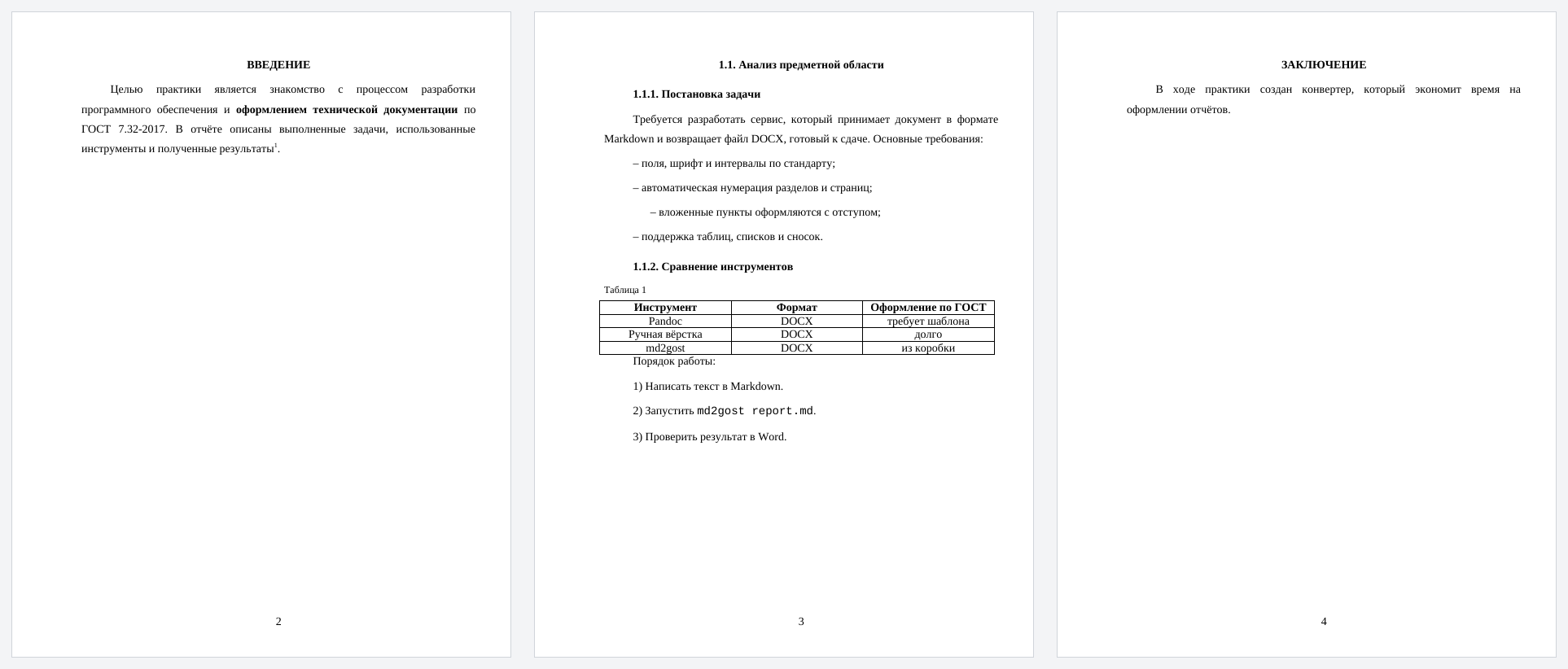
What it does to the document:
- margins: left 30 mm, right 15, top and bottom 20; Times New Roman 14 pt, 1.5 line spacing, 1.25 cm first-line indent, justified text
- page numbers at the bottom center, none on the title page
- section numbering
1.,1.1.,1.1.1.; structural elements ("Введение", "Заключение", "Список литературы" and others) unnumbered, uppercase, centered - a page break before every second-level section
- bulleted lists with dashes and nesting, numbered lists as
1)with numbering restarted per list - tables with a "Таблица N" caption on the top left, code blocks and inline code in a monospace font,
quotes, footnotes
[^1], bold and italic
Command-line options: --font, --size, --spacing, --no-heading-numbers, --no-page-numbers,
--number-title-page. From Python:
from md2gost import DocumentSettings, MarkdownToDocxConverter

settings = DocumentSettings()
settings.auto_numbering_headings = True
MarkdownToDocxConverter(settings).convert("report.md", "report.docx")
The Markdown parser is custom and line-based: nested tables and lists inside tables are not supported.
The bot
| Send | Get |
|---|---|
.md |
a GOST-formatted .docx (the same md2gost, with heading numbers) |
project .zip |
a .txt: folder tree and contents of text files with line numbers, handy for an LLM or a report appendix |
Files up to 20 MB. Archives are checked before extraction: at most 5000 files and 200 MB unpacked. Service
folders (.git, node_modules, __pycache__, build…) and binary files are skipped. Conversion runs in
a separate thread, so the bot never freezes on big files.
git clone https://github.com/EDeev/my_converterbot.git && cd my_converterbot
cp .env.example .env      # BOT_TOKEN from @BotFather
docker compose up -d
Prebuilt image: docker pull ghcr.io/edeev/my_converterbot or docker pull dcr.deev.su/edeev/my_converterbot.
Without Docker: pip install -r requirements.txt, then BOT_TOKEN=… python bot.py.
rep_to_txt.py also works on its own: python rep_to_txt.py path/to/project.
Development
pip install -r requirements-dev.txt
ruff check --select E9,F,B . && pytest
CI tests the package on Python 3.9, 3.12 and 3.13 and builds it. On v* tags the package is published to
PyPI and the bot's Docker image to GitHub Packages and dcr.deev.su.
License
MIT — see LICENSE.
Author
Egor Deev — GitHub · Telegram · egor@deev.space
1 maintainer

Metadata
1 maintainer
Release files for md2gost 1.0.0
For a detailed explanation of source distributions (sdists) and built distributions (wheels), please see the package formats documentation.
Source distribution (sdist)
| File | Size | Uploaded | |
|---|---|---|---|
| md2gost-1.0.0.tar.gz | 14.8 kB | Details |
Built distribution (wheel)
| File | Interpreter | ABI | Platform | Reset |
|---|---|---|---|---|
| md2gost-1.0.0-py3-none-any.whl | Python 3 | none | any | Details |
Total release size: 27.9 kB
Release files / md2gost-1.0.0.tar.gz
| Download URL | md2gost-1.0.0.tar.gz |
|---|---|
| Size | 14.8 kB |
| Tags | Source |
|
SHA-256 checksum How to use checksums |
9a35294dc071408f49b40c594ffe061874851b0a2531eb449d07c2778ded5a11
|
|
BLAKE2b-256 checksum How to use checksums |
d27e211f3368634a041a3f020cab58a5b96f6cead5e9987f246c4bf26b6621cf
|
| Upload date | |
|
Uploaded using Trusted Publishing? What is trusted publishing? |
No |
| Uploaded via |
twine/7.0.0 CPython/3.13.14
|
Release files / md2gost-1.0.0-py3-none-any.whl
| Download URL | md2gost-1.0.0-py3-none-any.whl |
|---|---|
| Size | 13.1 kB |
| Tags | Python 3 |
|
SHA-256 checksum How to use checksums |
94b48d1203d0e05156c8d78bd3af5cb928400084d62d32669c743bf5292202aa
|
|
BLAKE2b-256 checksum How to use checksums |
580d1ac0a0017e02d440e7493d4dbc6d11613a34f33885e3a03dd697369e43db
|
| Upload date | |
|
Uploaded using Trusted Publishing? What is trusted publishing? |
No |
| Uploaded via |
twine/7.0.0 CPython/3.13.14
|














