
md2indexhtml

md2indexhtml is a powerful Python package that converts Markdown files to beautifully styled HTML pages specifically designed for Odoo modules. It uses comprehensive Odoo frontend styling classes from web.assets_frontend.min.css to create professional, responsive documentation that integrates seamlessly with Odoo's design system.
Transform Your Documentation
Create stunning, professional HTML documentation from Markdown with authentic Odoo styling
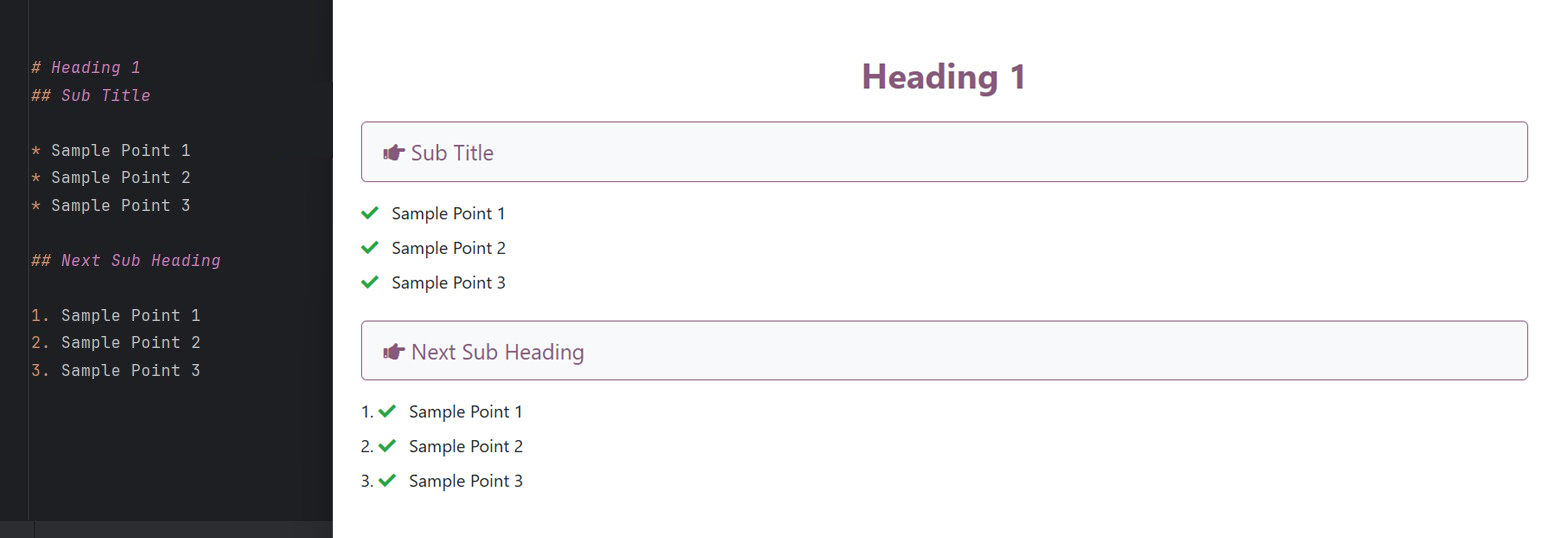
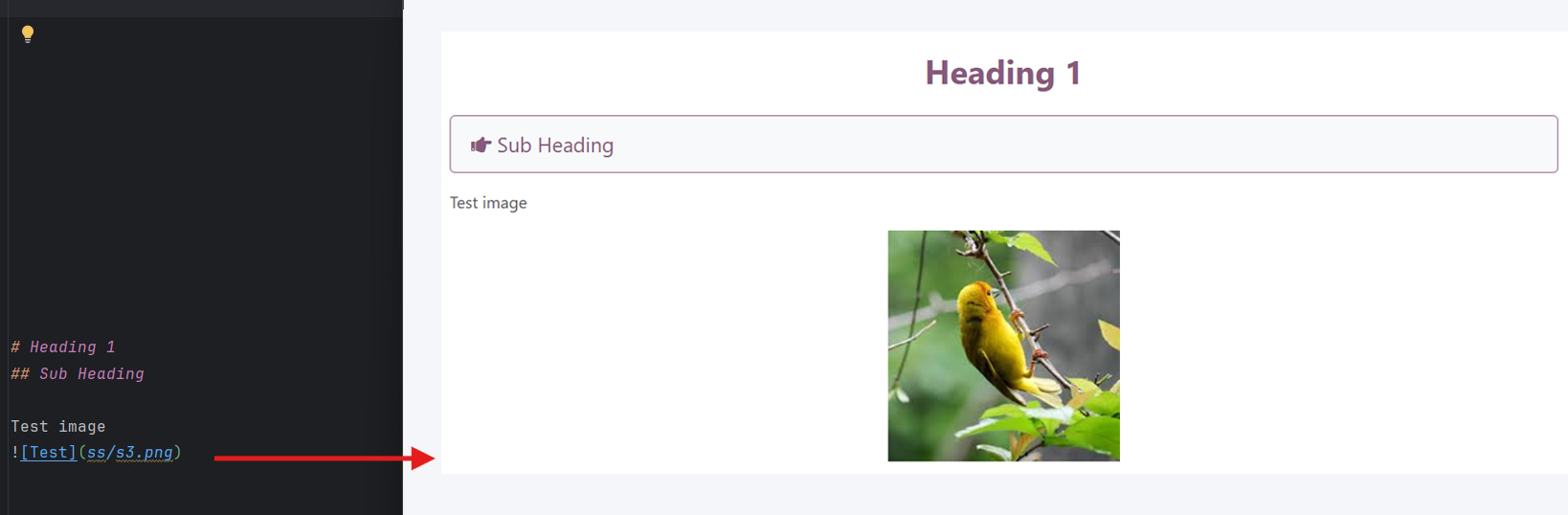
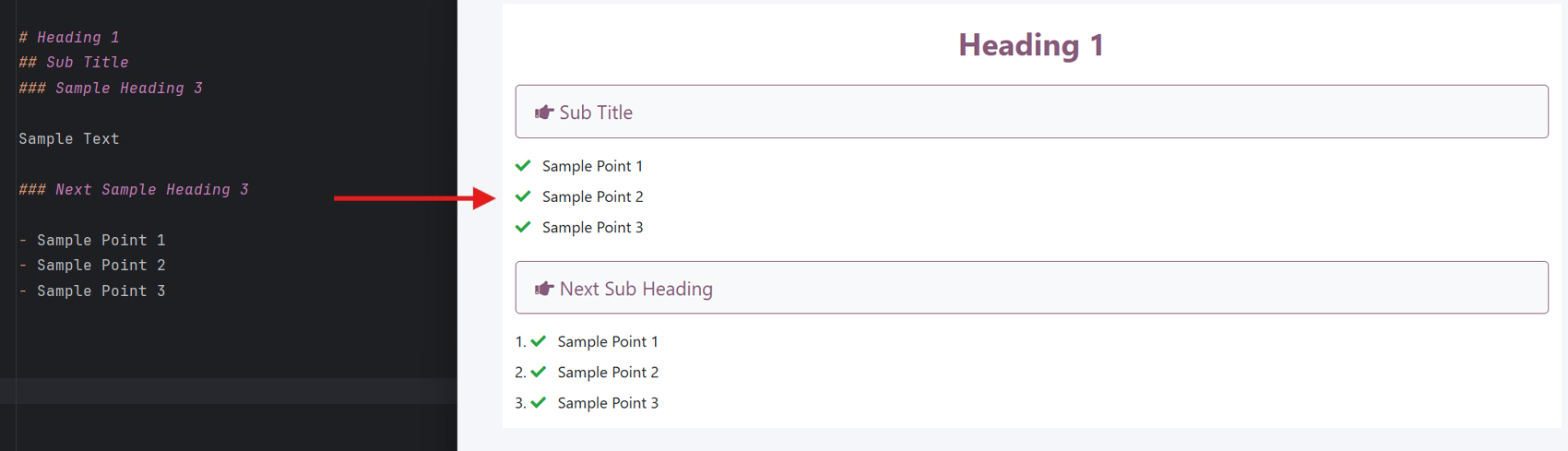
Simple command, beautiful results:
md2indexhtml README.mdFeatures
- Comprehensive Odoo Styling: Uses authentic Odoo frontend classes for consistent design
- Enhanced Premium Design: Modern typography (Inter font), soft shadows, and clean card layouts by default
- Semantic HTML5: Generates clean, accessible HTML with proper semantic structure
- Automatic Image Handling: Processes and copies images with responsive styling
- Custom Resource Injection: Easily inject custom CSS stylesheets and JavaScript files
- CLI Integration: Simple command-line interface with powerful options
- Responsive Design: Mobile-friendly layouts with Odoo's responsive classes
- Typography Excellence: Beautiful typography using Odoo's font system alongside Google's Inter font
- Card-Based Layouts: Automatic section organization into elegant card layouts with hover effects
- Table Enhancement: Professional table styling with striped rows and hover effects
Installation
Install the package using pip:
pip install md2indexhtml
Quick Start
Basic Usage
Convert your README.md to Odoo-styled HTML:
cd your_odoo_module
md2indexhtml README.md
This creates a beautifully styled static/description/index.html file perfect for the Odoo Apps Store.
Without Arguments
If you have a markdown file in your current directory:
md2indexhtml
It automatically finds and converts the first .md file found.
Advanced Usage
Custom Output Path
Specify where to save the HTML file:
md2indexhtml README.md --output /path/to/docs.html
# or use the short form
md2indexhtml README.md -o /path/to/docs.html
Custom Title
Set a custom title for your HTML document:
md2indexhtml README.md --title "Module Documentation"
Inject Custom Styles or Scripts
You can inject custom CSS or JavaScript files into the generated HTML. This is useful for adding google analytics, custom fonts, or specific styling tweaks.
Add Custom Stylesheet:
md2indexhtml README.md --stylesheet "https://fonts.googleapis.com/css?family=Open+Sans,custom.css"
Add Custom Script:
md2indexhtml README.md --script "https://example.com/analytics.js,custom_script.js"
Content Structure
Markdown Conversion
The package intelligently converts markdown elements:
# Headersbecome full-width sections with Odoo styling## Subheadersbecome card-based feature sections- Lists are styled with Odoo's list classes
- Code blocks get syntax highlighting and proper spacing
- Images are automatically made responsive and centered
- Tables receive full Odoo table styling
HTML Preservation
You can mix HTML directly in your markdown:
# My Module

<section class="py-5 bg-primary text-white text-center">
    <h2>Custom HTML Section</h2>
    <p>This will be preserved exactly as written</p>
</section>
Image Handling
The package automatically processes images:
# Using Markdown

# Using HTML
<img src="assets/demo.jpg" alt="Demo" />
Automatic Processing:
- Copies images to
images/directory in output location - Updates paths to use only filenames (flattens directory structure)
- Adds responsive classes automatically
- Preserves external URLs and base64 images
Python API
Use the package programmatically:
from md2indexhtml import convert_md_to_html

# Basic conversion
convert_md_to_html("README.md")

# With custom custom title and output
convert_md_to_html(
    md_file_path="README.md",
    title="My Documentation",
    output_path="docs/index.html"
)

# With custom stylesheets and scripts
convert_md_to_html(
    md_file_path="README.md",
    stylesheets=["https://example.com/style.css", "custom.css"],
    scripts=["https://example.com/script.js"]
)
Output Features
The generated HTML includes:
- Semantic Structure: Proper HTML5 semantic elements
- Responsive Design: Mobile-first responsive layout
- Odoo Integration: Native Odoo styling classes
- Typography: Professional typography with Odoo fonts
- Accessibility: ARIA labels and semantic markup
- Performance: Optimized CSS and clean HTML structure
Odoo Apps Store Ready
Files generated with md2indexhtml are specifically designed for the Odoo Apps Store:
- Uses
oe_structurecontainers for proper Odoo integration - Includes proper meta tags and viewport settings
- Follows Odoo's design guidelines and color schemes
- Optimized for the Apps Store's rendering system
CLI Reference
# Convert with defaults
md2indexhtml README.md

# Custom title and output
md2indexhtml README.md --title "My Module" --output custom.html

# Inject Custom resources
md2indexhtml README.md --stylesheet "style.css" --script "app.js"

# Get version
md2indexhtml --version
Contributing
Contributions are welcome! Please feel free to submit pull requests or open issues on GitHub.
Development Setup
git clone https://github.com/fasilwdr/md2indexhtml.git
cd md2indexhtml
pip install -e .
License
This project is licensed under the MIT License. See the LICENSE file for details.
Author
Fasil (@fasilwdr)
Email: fasilwdr@hotmail.com
GitHub: https://github.com/fasilwdr
Transform your Markdown documentation into professional, Odoo-ready HTML with md2indexhtml!
1 maintainer

Metadata
1 maintainer
Release files for md2indexhtml 0.6.0
For a detailed explanation of source distributions (sdists) and built distributions (wheels), please see the package formats documentation.
Source distribution (sdist)
| File | Size | Uploaded | Provenance | |
|---|---|---|---|---|
| md2indexhtml-0.6.0.tar.gz | 14.8 kB | With provenance | Details |
Built distribution (wheel)
| File | Interpreter | ABI | Platform | Reset |
|---|---|---|---|---|
| md2indexhtml-0.6.0-py3-none-any.whl | Python 3 | none | any | Details |
Total release size: 27.8 kB
Release files / md2indexhtml-0.6.0.tar.gz
| Download URL | md2indexhtml-0.6.0.tar.gz |
|---|---|
| Size | 14.8 kB |
| Tags | Source |
|
SHA-256 checksum How to use checksums |
27d861333bbbb4957cf3ae312cbbb88546b4452775fc037bf1babbebfcb09b62
|
|
BLAKE2b-256 checksum How to use checksums |
2abdbc3423ee62d94ea0e7e78cae7ef05fa2857735b71a969dece925f73ff7f9
|
| Upload date | |
|
Uploaded using Trusted Publishing? What is trusted publishing? |
Yes |
| Uploaded via |
twine/6.1.0 CPython/3.13.7
|
Provenance
Provenance describes where a file came from. On PyPI, provenance is shared via attestations, which provide a verifiable record of the build or publishing details. View details, limitations and caveats.


PyPI Publish Attestation
PyPI verified that this artifact, at this checksum, originated from the publisher listed below.
Signed by GitHub Actions, verified by PyPI on Dec 9, 2025.
Transparency logRelease files / md2indexhtml-0.6.0-py3-none-any.whl
| Download URL | md2indexhtml-0.6.0-py3-none-any.whl |
|---|---|
| Size | 13.0 kB |
| Tags | Python 3 |
|
SHA-256 checksum How to use checksums |
951f75223f6f7ff5a5031f847dea8ed059e5e5ddd7789f1fb6062feb6ec1cde9
|
|
BLAKE2b-256 checksum How to use checksums |
feefabd74e6c38ba9113cfc33fa0df17781d98452540f05f14ac236c24b6a605
|
| Upload date | |
|
Uploaded using Trusted Publishing? What is trusted publishing? |
Yes |
| Uploaded via |
twine/6.1.0 CPython/3.13.7
|
Provenance
Provenance describes where a file came from. On PyPI, provenance is shared via attestations, which provide a verifiable record of the build or publishing details. View details, limitations and caveats.
PyPI Publish Attestation
PyPI verified that this artifact, at this checksum, originated from the publisher listed below.
Signed by GitHub Actions, verified by PyPI on Dec 9, 2025.
Transparency logSecurity for md2indexhtml 0.6.0
Provenance
Provenance describes where a file came from. On PyPI, provenance is shared via attestations, which provide a verifiable record of the build or publishing details. View details, limitations and caveats.
Full provenance
All 2 files in this release have been uploaded with provenance metadata.
Attestation for md2indexhtml-0.6.0.tar.gz
PyPI Publish Attestation
PyPI verified that this artifact, at this checksum, originated from the publisher listed below.
Signed by GitHub Actions, verified by PyPI on Dec 9, 2025.
Transparency logA note on package security
PyPI is a repository for distributing packages, not a service for auditing them. While third-party security researchers and our staff do their best to detect and remove malicious packages, PyPI cannot guarantee the quality, security or suitability of any given package.
To learn more about protecting yourself from malicious actors, visit our package security documentation.














