
md2term





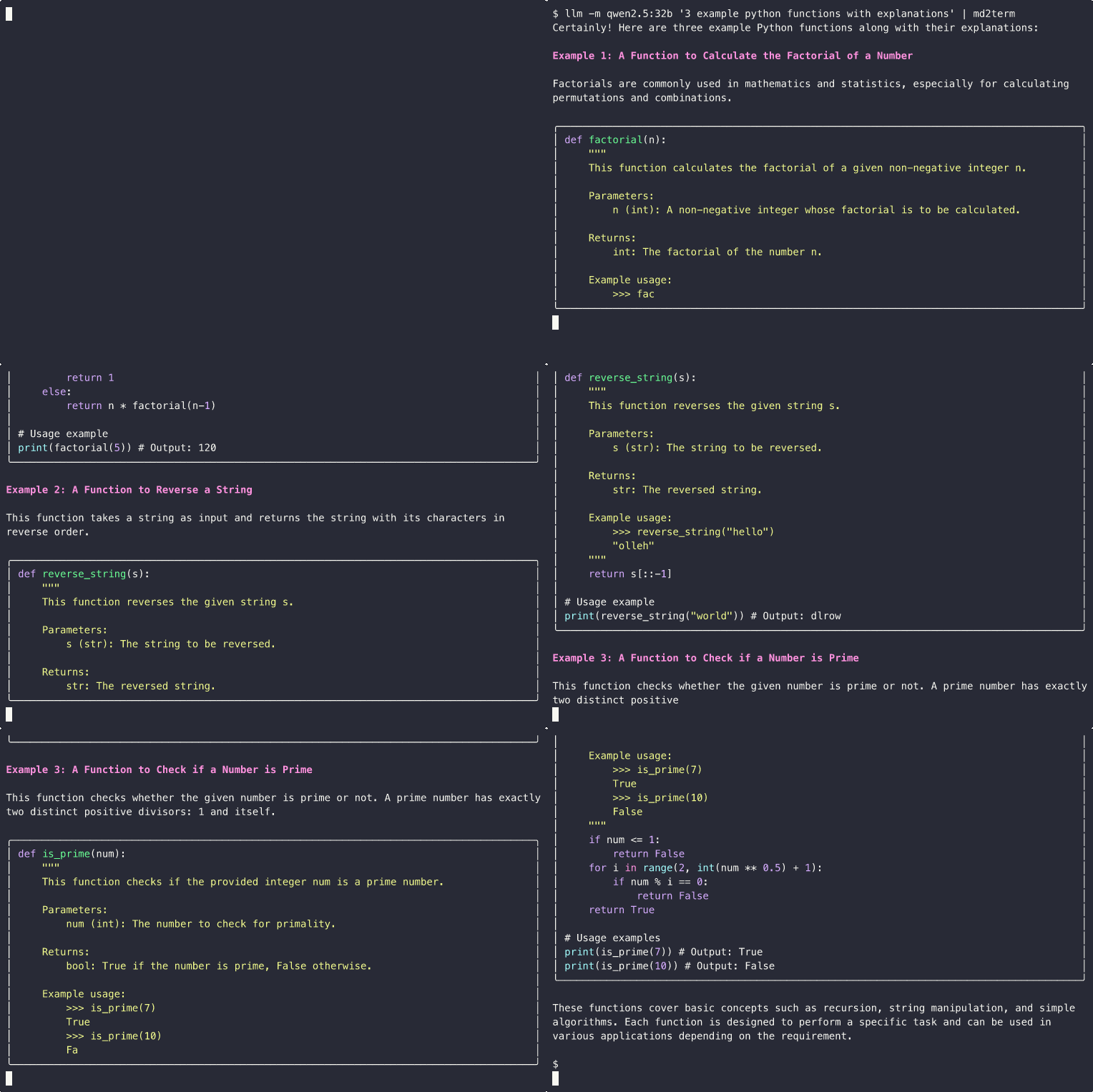
A streaming markdown-to-terminal converter that renders markdown with rich formatting and syntax highlighting. Streaming is supported so you can pipe your favorite LLM CLI tool to it, like llm or Ollama, like this:
Installation
Install md2term using uv:
uv tool install md2term
Or with pip or pipx:
pip install md2term
# or
pipx install md2term
Verify the installation:
md2term --version
Usage
Command Line
# Convert a markdown file
md2term README.md

# Read from stdin
cat README.md | md2term

# Pipe from other commands
curl -s https://raw.githubusercontent.com/user/repo/main/README.md | md2term

# Or commands with slow output
llm 'tell me long a story about cheesecakes using markdown formatting' | md2term

# Override terminal width
md2term --width 100 README.md

# Show version
md2term --version

# Show help
md2term --help
Python Library
You can also use md2term as a Python library for integrating markdown rendering into your applications:
from rich.console import Console
from md2term import convert, StreamingRenderer

# Simple conversion
markdown_text = "# Hello\n\nThis is **bold** text."
convert(markdown_text)

# Streaming usage (great for LLM applications)
console = Console(force_terminal=True)
renderer = StreamingRenderer(console)

try:
    # Add content incrementally
    renderer.add_text("# Streaming Example\n\n")
    renderer.add_text("This content appears **immediately** as it's added.\n")
    renderer.add_text("\n```python\nprint('Hello, World!')\n```\n")
finally:
    # Always finalize to ensure complete rendering
    renderer.finalize()
The streaming functionality is particularly useful for:
- LLM/AI applications that generate content in real-time
- Processing large files with immediate visual feedback
- Building interactive CLI tools with progressive output
See example_streaming.py for more detailed examples and patterns.
Examples
For a comprehensive example of markdown features, see example.md in this repository.
Design Decisions
Streaming and Timing Strategy
The program uses a sophisticated streaming approach designed to provide responsive real-time rendering while minimizing visual flickering and corruption:
Smart Update Frequency Control
The streaming renderer uses balanced update conditions to determine when to re-render content:
- Content-based triggers: Updates when 80+ characters are added AND at least 50ms have passed
- Paragraph breaks: Immediate updates on double newlines (
\n\n) for clear content boundaries - Time-based updates: Every 100ms if at least 20 characters have been added
- Completion detection: Updates when content appears complete (headings, list items, blockquotes) AND 80ms have passed
This approach balances responsiveness with performance, avoiding excessive re-rendering while ensuring users see content as it streams in.
Backtracking and Re-rendering
- Minimal re-rendering: Only re-renders when buffer content actually changes
- Accurate line counting: Uses a temporary console to count output lines before clearing previous content
- ANSI escape sequences: Clears previous output using
\033[1A\033[2K(move up, clear line) for each rendered line - Fallback handling: Gracefully falls back to plain text if markdown parsing fails during streaming
Input Processing Strategies
The program adapts its reading strategy based on input type:
- File input: Reads entire content at once for optimal performance
- Stdin streaming: Uses character-by-character reading with
select()optimization when available - Chunk optimization: Reads 64-character chunks when data is readily available, falls back to single characters otherwise
- Cross-platform compatibility: Gracefully handles systems where
select()orfileno()are not available
Completion Detection
The renderer intelligently detects when markdown elements appear complete:
- Double newlines: Clear paragraph boundaries
- Structural elements: Headings (
#), list items (-), blockquotes (>), horizontal rules (---) - Empty lines: Natural content breaks
This allows for responsive updates without waiting for arbitrary timeouts.
Code Block Handling
The program uses a smart approach to handle multi-line code blocks:
- Streaming Processing: For stdin input, the program processes content in chunks, buffering until it encounters blank lines (when not in a code block)
- Code Fence Detection: Detects triple backticks (
\```) to track when we're inside code blocks - No Backtracking: Instead of clearing previous lines, the program assumes that triple backticks always indicate the start/end of code blocks
This approach is efficient and works well for typical markdown usage patterns.
Color Scheme
- H1: Bright cyan with rules above and below, centered
- H2: Bright blue with rule below
- H3: Bright magenta
- H4: Bright yellow
- H5: Bright green
- H6: Bright white
- Code spans: Red text on dark gray background
- Links: Blue underlined text with URL in parentheses
- Lists: Yellow bullets (•) for unordered, cyan numbers for ordered
- Blockquotes: Blue italic text in a panel
Terminal Width Handling
The program automatically detects terminal width and wraps text accordingly. You can override this with the --width option for testing or specific formatting needs.
Development
To install for development:
# Clone the repository
git clone https://github.com/statico/md2term
cd md2term

# Install in development mode
uv tool install --editable .

# Or install dependencies for local development
uv sync
uv run md2term README.md
Running Tests
The project uses pytest with snapshot testing via syrupy to ensure consistent output formatting:
# Install test dependencies
uv sync --group test

# Run all tests
uv run pytest

# Run tests with coverage
uv run pytest --cov=md2term

# Run specific test file
uv run pytest tests/test_md2term.py

# Run specific test
uv run pytest tests/test_md2term.py::TestMarkdownFeatures::test_headings_all_levels
Snapshot Testing
The tests use snapshot testing to verify that markdown rendering produces consistent terminal output. Snapshots capture the exact ANSI escape sequences and formatting that would appear in the terminal.
# Update snapshots when output changes (after verifying changes are correct)
uv run pytest --snapshot-update

# Review snapshot differences
uv run pytest --snapshot-details
Important: When modifying rendering logic, always:
- Run tests to see what changed
- Manually verify the output looks correct with
uv run md2term example.md - Update snapshots only if the changes are intentional and correct
The snapshot file is located at tests/__snapshots__/test_md2term.ambr and contains the expected terminal output for various markdown inputs.
License
This project is licensed under the Apache License 2.0. See the LICENSE file for details.
1 maintainer

Metadata
1 maintainer
Release files for md2term 1.0.2
For a detailed explanation of source distributions (sdists) and built distributions (wheels), please see the package formats documentation.
Source distribution (sdist)
| File | Size | Uploaded | |
|---|---|---|---|
| md2term-1.0.2.tar.gz | 72.8 kB | Details |
Built distribution (wheel)
| File | Interpreter | ABI | Platform | Reset |
|---|---|---|---|---|
| md2term-1.0.2-py3-none-any.whl | Python 3 | none | any | Details |
Total release size: 88.7 kB
Release files / md2term-1.0.2.tar.gz
| Download URL | md2term-1.0.2.tar.gz |
|---|---|
| Size | 72.8 kB |
| Tags | Source |
|
SHA-256 checksum How to use checksums |
159dbe2843fab9f6714d7e0f4b64dfd104b2c2c8722004f7b3edc2e02491ed5b
|
|
BLAKE2b-256 checksum How to use checksums |
18c671841131fb745cb11c14bb44650cea68ebb7e0f6f22f359eee43d98c8dc0
|
| Upload date | |
|
Uploaded using Trusted Publishing? What is trusted publishing? |
Yes |
| Uploaded via |
twine/6.1.0 CPython/3.12.9
|
Provenance
Provenance describes where a file came from. On PyPI, provenance is shared via attestations, which provide a verifiable record of the build or publishing details. View details, limitations and caveats.


PyPI Publish Attestation
PyPI verified that this artifact, at this checksum, originated from the publisher listed below.
Signed by GitHub Actions, verified by PyPI on May 26, 2025.
Transparency logRelease files / md2term-1.0.2-py3-none-any.whl
| Download URL | md2term-1.0.2-py3-none-any.whl |
|---|---|
| Size | 16.0 kB |
| Tags | Python 3 |
|
SHA-256 checksum How to use checksums |
e3022798f8fb9f7836287cbbd3be01f00004b9cbf8f9d823147ef0ef1839ffaf
|
|
BLAKE2b-256 checksum How to use checksums |
c93b7993b1f58457ab61c924f42c54217c034faae66d98f75ab7bdf05522b62c
|
| Upload date | |
|
Uploaded using Trusted Publishing? What is trusted publishing? |
Yes |
| Uploaded via |
twine/6.1.0 CPython/3.12.9
|
Provenance
Provenance describes where a file came from. On PyPI, provenance is shared via attestations, which provide a verifiable record of the build or publishing details. View details, limitations and caveats.
PyPI Publish Attestation
PyPI verified that this artifact, at this checksum, originated from the publisher listed below.
Signed by GitHub Actions, verified by PyPI on May 26, 2025.
Transparency log













