
mdmm
mdmm implements the Modified Differential Multiplier Method for PyTorch. It was proposed in Platt and Barr (1988), "Constrained Differential Optimization". The MDMM minimizes a primary loss function subject to equality, inequality, and bound constraints on arbitrarily many secondary functions of your problem's parameters. It can be used for non-convex problems and problems with stochastic loss functions. It requires only one evaluation of the Lagrangian and its gradient per iteration, the same complexity as SGD.
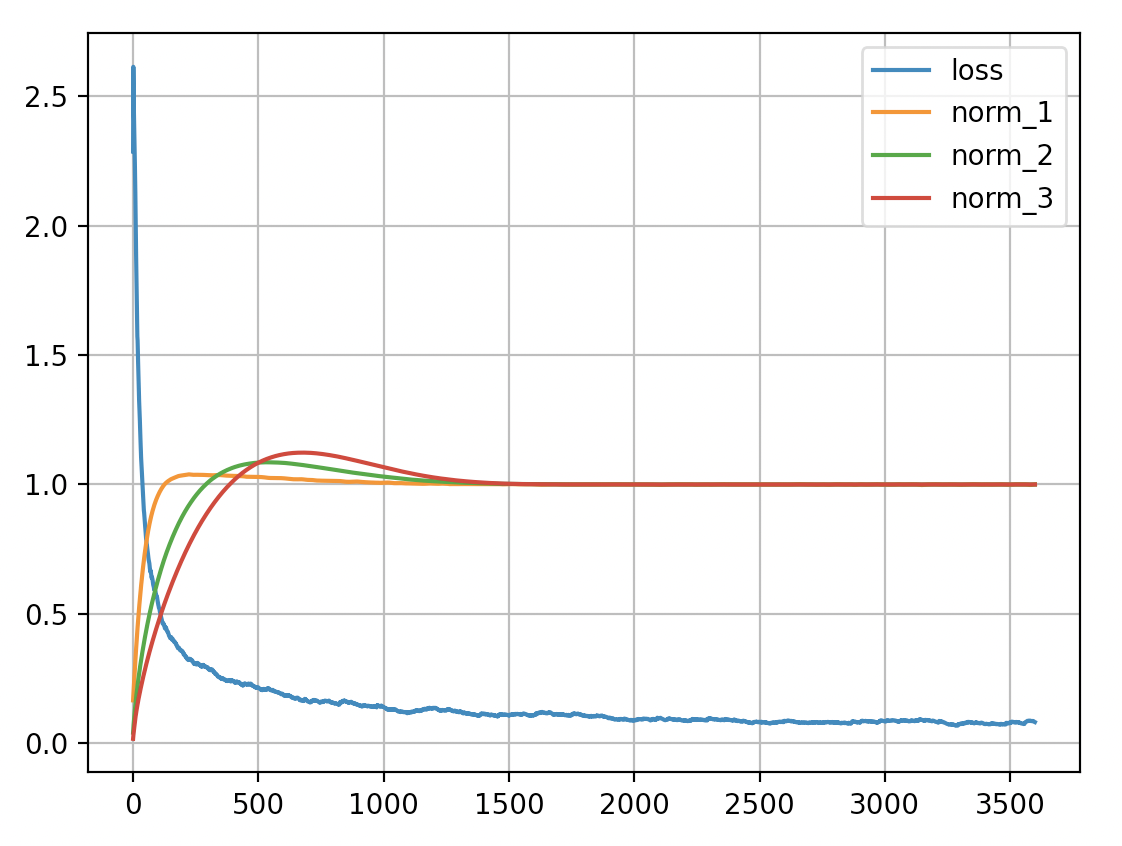
Here is a plot of the training loss and layer norms of mdmm_demo_mnist.py. Each of its three layers has an equality constraint that the mean absolute value of its weights be 1:
Installation
mdmm is on PyPI and can be installed with:
pip install mdmm
Basic usage
Creating a constraint instance, an MDMM instance, and the optimizer for the Lagrangian:
import mdmm

constraint = mdmm.EqConstraint(fn_of_params, 1)
mdmm_module = mdmm.MDMM([constraint])
opt = mdmm_module.make_optimizer(model.parameters(), lr=2e-3)
The first argument to the constraint constructor should be a differentiable function that takes no arguments and returns a zero-dimensional PyTorch Tensor (a single value).
MDMM constraints introduce extra parameters (Lagrange multipliers and slack variables) which must be included in the optimizer. Each MaxConstraint and MinConstraint introduces two parameters each, while all of the other constraint types introduce one. make_optimizer() accepts an optional optimizer factory keyword argument, optimizer, which can be set to a torch.optim class; use functools.partial() on the class to set the optimizer's arguments to non-default values. The default optimizer type is Adamax.
Inside your training loop, do:
outputs = model(inputs)
loss = loss_fn(outputs, targets)
mdmm_return = mdmm_module(loss)
opt.zero_grad()
mdmm_return.value.backward()
opt.step()
When an MDMM instance is called with the value of the primary loss function, it evaluates the functions originally passed to the constraints' constructors and returns a type containing a value augmented with terms involving the constraint functions. Calling backward() on this value will propagate gradients into your parameters and the parameters internal to the constraints. The type MDMM returns also contains a list of the constraint function values and a list of the computed infeasibilities (equal to 0 when the constraint is satisfied).
Since the constraints contain parameters internal to them, you must save and load the state dict of the MDMM instance (this contains all of the constraint buffers and parameters in the correct order) as well as the model and optimizer state dicts in order to be able to resume training from a checkpoint.
Constraint details
There are six supported constraint types:
-
EqConstraint(fn, value)represents an equality constraint onfn. -
MaxConstraint(fn, max)represents a maximum inequality constraint onfnwhich uses a slack variable. -
MaxConstraintHard(fn, max)represents a maximum inequality constraint onfnwithout a slack variable. -
MinConstraint(fn, min)represents a minimum inequality constraint onfnwhich uses a slack variable. -
MinConstraintHard(fn, min)represents a minimum inequality constraint onfnwithout a slack variable. -
BoundConstraintHard(fn, min, max)represents a bound constraint onfn. It does not use slack variables.
All MDMM constraints take a scale factor (scale) and a damping strength (damping) as optional arguments. The scale factor allows you to scale the computed infeasibility relative to the primary loss function's value. It may be needed if the magnitude of the primary loss function is very large or small compared to the constraint functions' magnitudes. The MDMM augments the Lagrangian with quadratic damping terms that help reduce oscillations in the infeasibilities. The damping strength can be manually decreased if there are no oscillations observed and increased if there are oscillations. The defaults for scale and damping are both 1.
A warning about lambda expressions
The following code is incorrect:
constraints = []
for layer in model:
    if hasattr(layer, 'weight'):
        constraints.append(mdmm.EqConstraint(lambda: layer.weight.abs.mean(), 1))
layer is a free variable inside the lambda expression and will be resolved at call time to the current value of layer in the enclosing code block, which is updated by the loop, so all of the constraints will refer to the last layer! A correct version is:
from functools import partial

constraints = []
for layer in model:
    if hasattr(layer, 'weight'):
        fn = partial(lambda x: x.weight.abs().mean(), layer)
        constraints.append(mdmm.EqConstraint(fn, 1))
partial() captures the value of the layer argument inside the callable it returns, so fn acts on the layer it was created with.
1 maintainer

Metadata
1 maintainer
Release files for mdmm 0.1.3
For a detailed explanation of source distributions (sdists) and built distributions (wheels), please see the package formats documentation.
Source distribution (sdist)
| File | Size | Uploaded | |
|---|---|---|---|
| mdmm-0.1.3.tar.gz | 7.5 kB | Details |
Built distribution (wheel)
| File | Interpreter | ABI | Platform | Reset |
|---|---|---|---|---|
| mdmm-0.1.3-py3-none-any.whl | Python 3 | none | any | Details |
Total release size: 13.3 kB
Release files / mdmm-0.1.3.tar.gz
| Download URL | mdmm-0.1.3.tar.gz |
|---|---|
| Size | 7.5 kB |
| Tags | Source |
|
SHA-256 checksum How to use checksums |
9c2b8475db7e0dd111e175157c65c338c79bde3274f73e180b6bca930696727b
|
|
BLAKE2b-256 checksum How to use checksums |
46982d58464d1bd2f4e38010b7812dcb43f31c02ebad2751e2cd51bdc7fb17fa
|
| Upload date | |
|
Uploaded using Trusted Publishing? What is trusted publishing? |
No |
| Uploaded via |
twine/3.3.0 pkginfo/1.7.0 requests/2.25.1 setuptools/52.0.0 requests-toolbelt/0.9.1 tqdm/4.56.0 CPython/3.9.1
|
Release files / mdmm-0.1.3-py3-none-any.whl
| Download URL | mdmm-0.1.3-py3-none-any.whl |
|---|---|
| Size | 5.7 kB |
| Tags | Python 3 |
|
SHA-256 checksum How to use checksums |
0fc40c82fb0553ddc4c3b93f085b0273338b1087f8db120546f5b16e0f7d0ac0
|
|
BLAKE2b-256 checksum How to use checksums |
3e23ae2103e1ba804fbcab4ec95a0e1eb98e906bde6a0684ef48960a58813e07
|
| Upload date | |
|
Uploaded using Trusted Publishing? What is trusted publishing? |
No |
| Uploaded via |
twine/3.3.0 pkginfo/1.7.0 requests/2.25.1 setuptools/52.0.0 requests-toolbelt/0.9.1 tqdm/4.56.0 CPython/3.9.1
|














