



🎇Features • 🏠Installation • 🚜Usage • 💻CLI • 💡Examples
✅Requirements • 🐳Docker • 🐍Python



CLI to replace ./image.png to raw.githubusercontent.com remote URL in
README.md






❔ What
What mdremotifier does:
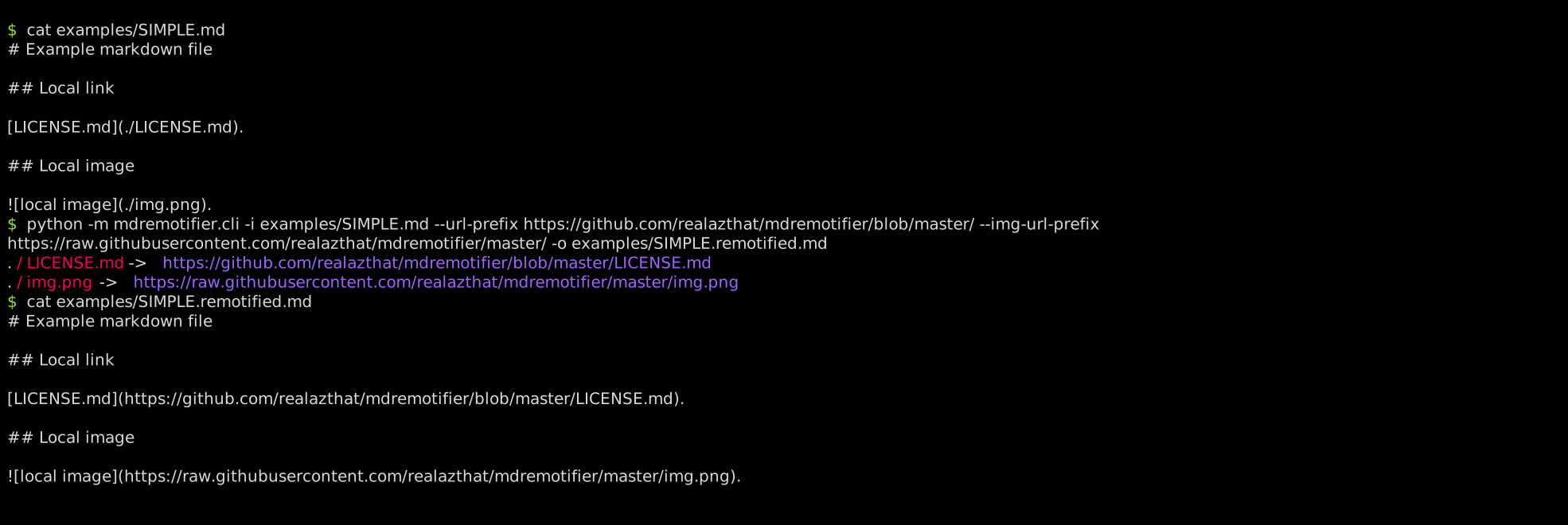
Turn this (./examples/SIMPLE.md):
# Example markdown file
## Local link
[LICENSE.md](./LICENSE.md).
## Local image
.
Into this (./examples/SIMPLE.remotified.md):
# Example markdown file
## Local link
[LICENSE.md](https://github.com/realazthat/mdremotifier/blob/master/LICENSE.md).
## Local image
.
This is useful for uploading README.md files to third-party sites, like the
npmjs.com registry, or pypi.org registry, because these registries will break
the local images in your README when displayed on their sites.
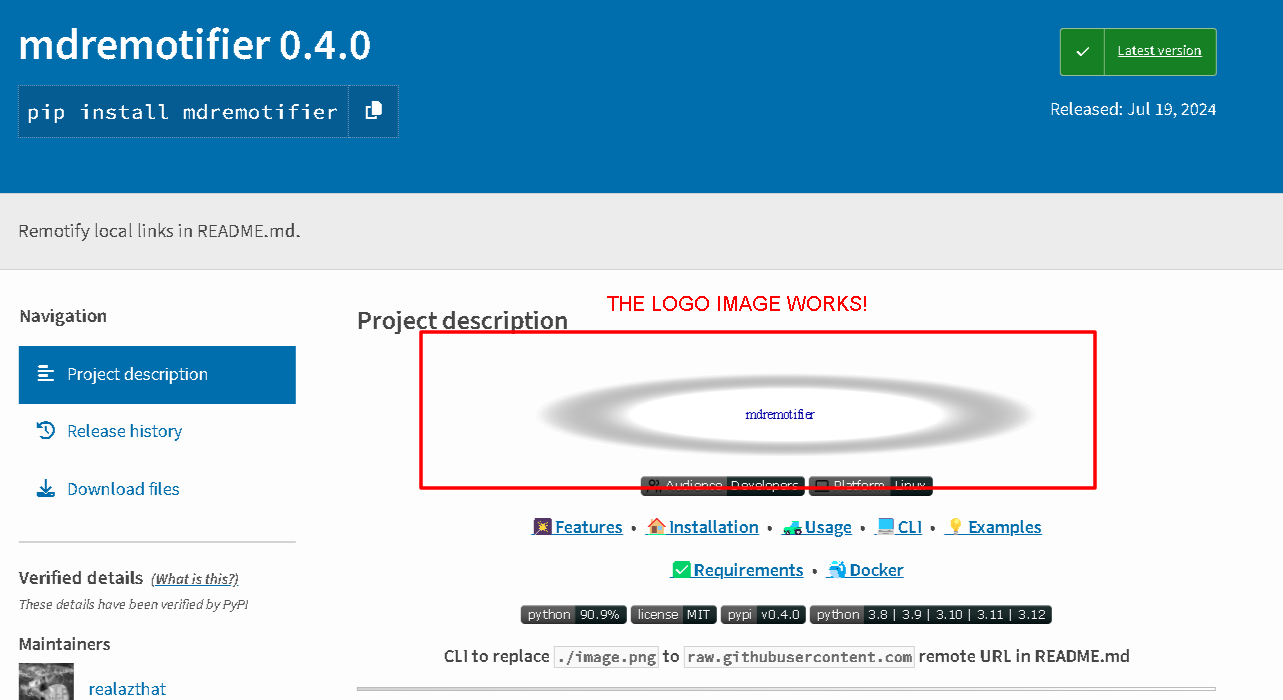
See https://pypi.org/project/mdremotifier/, notice how all of the images are not broken.
🎇 Features
- 📷🔗📡🌐🖼️ Replace local URLs with raw.githubusercontent.com URLs.
🏠 Installation
# Install from pypi (https://pypi.org/project/mdremotifier/)
pip install mdremotifier

# Install from git (https://github.com/realazthat/mdremotifier)
pip install git+https://github.com/realazthat/mdremotifier.git@v1.0.0
🚜 Usage
Example README: (./examples/SIMPLE.md):
# Example markdown file
## Local link
[LICENSE.md](./LICENSE.md).
## Local image
.
Generating the README:
# Using this command:
# View the template file.
cat "examples/SIMPLE.md"

python -m mdremotifier.cli  \
  -i "examples/SIMPLE.md" \
  --url-prefix https://github.com/realazthat/mdremotifier/blob/master/ \
  --img-url-prefix https://raw.githubusercontent.com/realazthat/mdremotifier/master/ \
  -o "examples/SIMPLE.remotified.md"

# View the remotified file.
cat "examples/SIMPLE.remotified.md"
Result:
# Example markdown file
## Local link
[LICENSE.md](https://github.com/realazthat/mdremotifier/blob/master/LICENSE.md).
## Local image
.
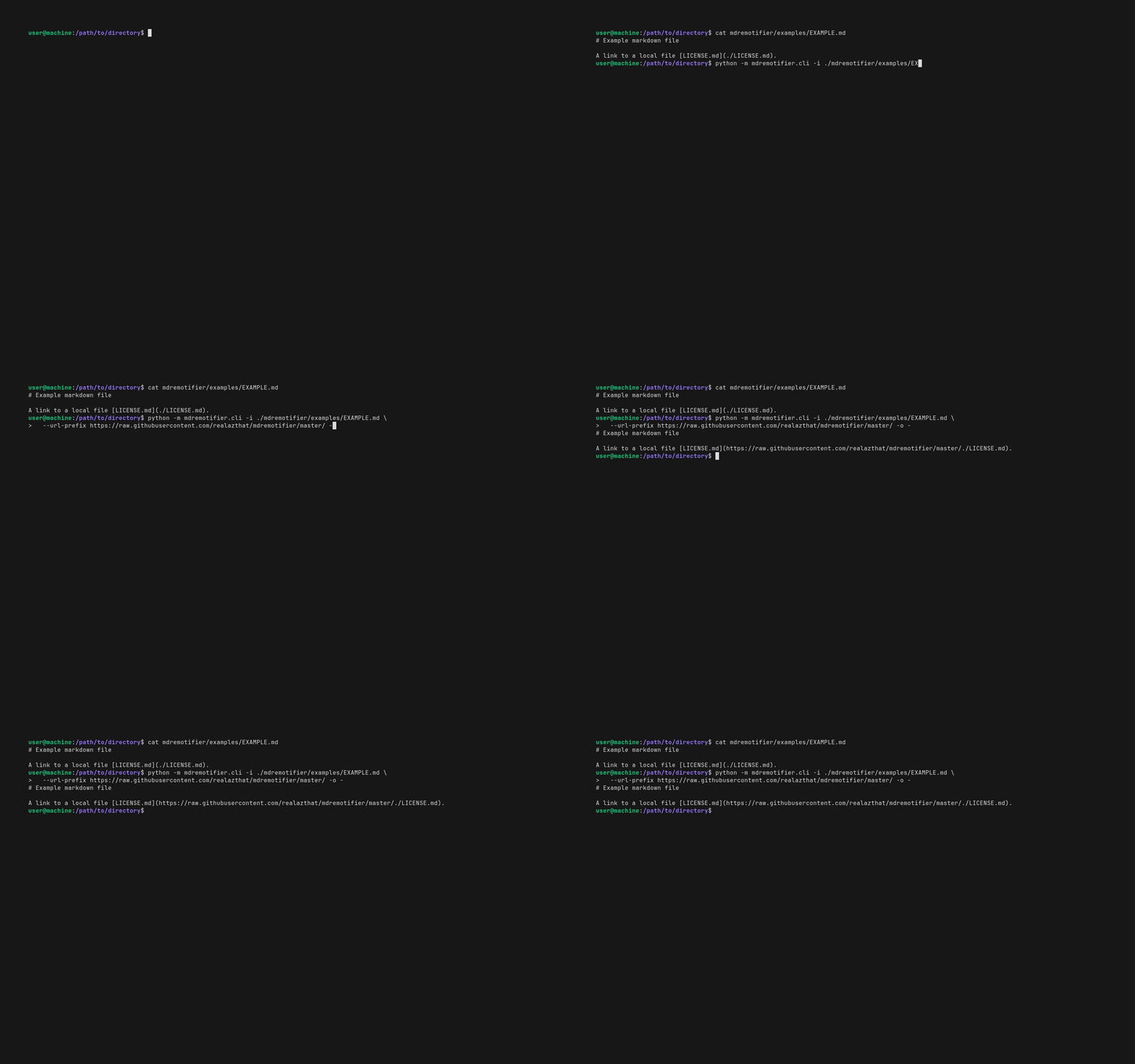
Full example:
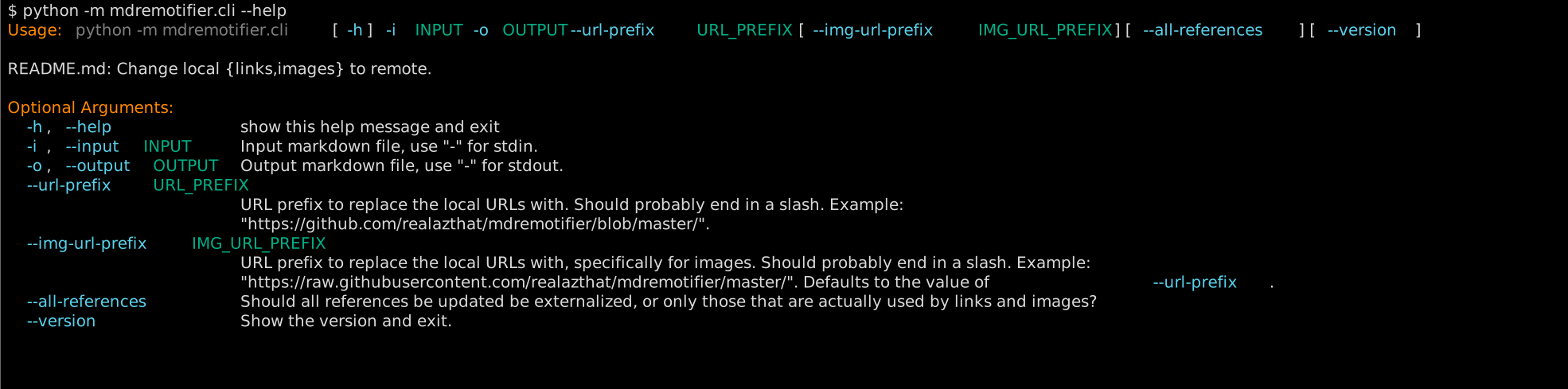
💻 Command Line Options
💡 Examples
- mdremotifier's own
README:- Original: ./README.md.
- Remotified: ./.github/README.remotified.md.
- Generation script: ./scripts/generate-readme.sh.
- Example:
- Original: ./examples/SIMPLE.md.
- Remotified: ./examples/SIMPLE.remotified.md.
- Generation script: ./examples/simple_example.sh.
- Projects using mdremotifier:
- realazthat/snipinator.
- README: snipinator/README.md.
- Generation script: snipinator/scripts/generate-readme.sh#L29.
- Remotified: snipinator/README.md.
- github.com/realazthat/excalidraw-brute-export-cli.
- README: excalidraw-brute-export-cli/README.md.
- Generation script: excalidraw-brute-export-cli/scripts/generate-readme.sh#L65.
- Remotified: excalidraw-brute-export-cli/README.md.
- realazthat/snipinator.
✅ Requirements
- Linux-like environment
- Why: Uses pexpect.spawn().
- Python 3.8+
- Why: Some dev dependencies require Python 3.8+.
Tested Platforms
- WSL2 Ubuntu 20.04, Python
3.8.0. - Ubuntu 20.04, Python
3.8.0, 3.9.0, 3.10.0, 3.11.0, 3.12.0, tested in GitHub Actions workflow (build-and-test.yml).
🐳 Docker Image
Docker images are published to ghcr.io/realazthat/mdremotifier at each tag.
# View the template file.
cat "examples/SIMPLE.md"

# Use the published images at ghcr.io/realazthat/mdremotifier.
# /data in the docker image is the working directory, so paths are simpler.
docker run --rm --tty \
  -v "${PWD}:/data" \
  ghcr.io/realazthat/mdremotifier:v1.0.0  \
  -i "examples/SIMPLE.md" \
  --url-prefix https://github.com/realazthat/mdremotifier/blob/master/ \
  --img-url-prefix https://raw.githubusercontent.com/realazthat/mdremotifier/master/ \
  -o "examples/SIMPLE.remotified.md"

# View the remotified file.
cat "examples/SIMPLE.remotified.md"
If you want to build the image yourself, you can use the Dockerfile in the repository.
docker build -t my-mdremotifier-image .

# View the template file.
cat "examples/SIMPLE.md"

# /data in the docker image is the working directory, so paths are simpler.
docker run --rm --tty \
  -v "${PWD}:/data" \
  my-mdremotifier-image  \
  -i "examples/SIMPLE.md" \
  --url-prefix https://github.com/realazthat/mdremotifier/blob/master/ \
  --img-url-prefix https://raw.githubusercontent.com/realazthat/mdremotifier/master/ \
  -o "examples/SIMPLE.remotified.md"

# View the remotified file.
cat "examples/SIMPLE.remotified.md"
Python Library
If you want to use mdremotifier as a library, you can do so. Here is an example:
from rich.console import Console
from mdremotifier.mdremotifier import Render
md = """
# Example markdown file
## Local link
[LICENSE.md](./LICENSE.md).
## Local image
.
"""
url_prefix = 'https://github.com/realazthat/mdremotifier/blob/master/'
img_url_prefix = 'https://raw.githubusercontent.com/realazthat/mdremotifier/master/'
console = Console()
print(
Render(md=md,
url_prefix=url_prefix,
img_url_prefix=img_url_prefix,
all_references=True,
console=console))
Here are the API docs:
def Render(*,
           md: str,
           url_prefix: str,
           img_url_prefix: Optional[str] = None,
           all_references: bool = False,
           console: Optional[Console] = None) -> str:
  """ Render the markdown with the given URL prefixes.

  Args:
    md: The markdown string to render.
    url_prefix: The URL prefix to replace the local URLs with. Should probably
      end in a slash.
      Example: "https://github.com/realazthat/mdremotifier/blob/master".
    img_url_prefix: The URL prefix to replace the local URLs with, specifically
      for images. Should probably end in a slash.
      Example: "https://raw.githubusercontent.com/realazthat/mdremotifier/master".
      Defaults to the value of `url_prefix`.
    all_references: Should all references be updated be externalized, or only
      those that are used by links and images? Defaults to False.
    console: The console to print debug information to. Defaults to None.
  """
🤏 Versioning
We use SemVer for versioning. For the versions available, see the tags on this repository.
🔑 License
This project is licensed under the MIT License - see the ./LICENSE.md file for details.
🙏 Thanks
Main libraries used in mdremotifier are:
- Markdown AST: mistletoe.
- Colorful CLI help: rich-argparse.
🤝 Related Projects
Not complete, and not necessarily up to date. Make a PR (contributions) to insert/modify.
| Project | Stars | Last Update | Language | Platform | Similarity X Obviousness |
|---|---|---|---|---|---|
| bdashore3/remark-github-images | 0 | 2022/12/29 |
JS | CLI | ⭐⭐⭐⭐⭐ |
| laobie/WriteMarkdownLazily | 36 | 2024/01/06 |
Python | CLI | ⭐⭐⭐⭐ |
| crh19970307/mdul | 1 | 2020/02/01 |
Python | CLI | ⭐⭐⭐⭐ |
| SkyLee424/Go-MarkDown-Image-Transfer-Helper | 0 | 2024/03/25 |
Go | CLI | ⭐⭐⭐⭐ |
| jen6/imgo | 0 | 2020/03/18 |
Pyhon | CLI | ⭐⭐⭐⭐ |
| chocoluffy/lazy-markdown | 0 | 2016/11/20 |
Python | CLI | ⭐⭐⭐⭐ |
| loheagn/gopic | 0 | 2021/11/24 |
Go | CLI | ⭐⭐⭐⭐ |
| Undertone0809/imarkdown | 57 | 2024/01/06 |
Python | Python | ⭐⭐⭐ |
| ravgeetdhillon/markdown-imgur-upload | 1 | 2022/03/26 |
Python | CLI | ⭐⭐⭐ |
🫡 Contributions
Development environment: Linux-like
-
For running
pre.sh(Linux-like environment).-
From ./.github/dependencies.yml, which is used for the GH Action to do a fresh install of everything:
bash: scripts.
findutils: scripts.
grep: tests.
xxd: tests.
git: scripts, tests.
xxhash: scripts (changeguard).
rsync: out-of-directory test.
expect: for `unbuffer`, useful to grab and compare ansi color symbols.
jq: dependency for [yq](https://github.com/kislyuk/yq), which is used to generate
  the README; the README generator needs to use `tomlq` (which is a part of `yq`)
  to query `pyproject.toml`.
-
Requires
pyenv, or an exact matching version of python as in ./.python-version (which is currently3.8.0). -
jq, (installation) required for yq, which is itself required for our ./README.md generation, which usestomlq(from the yq package) to include version strings from ./pyproject.toml. -
act (to run the GH Action locally):
- Requires nodejs.
- Requires Go.
- docker.
-
Generate animation:
- docker
-
docker (for building the docker image).
-
Commit Process
- (Optionally) Fork the
developbranch. - Stage your files:
git add path/to/file.py. bash ./scripts/pre.sh, this will format, lint, and test the code.git statuscheck if anything changed (generated ./README.md for example), if so,git addthe changes, and go back to the previous step.git commit -m "...".- Make a PR to
develop(or push to develop if you have the rights).
🔄🚀 Release Process
These instructions are for maintainers of the project.
- In the
developbranch, runbash ./scripts/pre.shto ensure everything is in order. - In the
developbranch, bump the version in ./pyproject.toml, following semantic versioning principles. Also modify thelast_releaseandlast_stable_releasein the[tool.mdremotifier-project-metadata]table as appropriate. Runbash ./scripts/pre.shto ensure everything is in order. - In the
developbranch, commit these changes with a message like"Prepare release X.Y.Z". (See the contributions section above). - Merge the
developbranch into themasterbranch:git checkout master && git merge develop --no-ff. masterbranch: Tag the release: Create a git tag for the release withgit tag -a vX.Y.Z -m "Version X.Y.Z".- Publish to PyPI: Publish the release to PyPI with
bash ./scripts/deploy-to-pypi.sh. - Push to GitHub: Push the commit and tags to GitHub with
git push && git push --tags. - The
--no-ffoption adds a commit to the master branch for the merge, so refork the develop branch from the master branch:git checkout develop && git merge master. - Push the develop branch to GitHub:
git push origin develop.
1 maintainer

Release files for mdremotifier 1.0.0
For a detailed explanation of source distributions (sdists) and built distributions (wheels), please see the package formats documentation.
Source distribution (sdist)
| File | Size | Uploaded | |
|---|---|---|---|
| mdremotifier-1.0.0.tar.gz | 25.8 kB | Details |
Built distribution (wheel)
| File | Interpreter | ABI | Platform | Reset |
|---|---|---|---|---|
| mdremotifier-1.0.0-py3-none-any.whl | Python 3 | none | any | Details |
Total release size: 40.3 kB
Release files / mdremotifier-1.0.0.tar.gz
| Download URL | mdremotifier-1.0.0.tar.gz |
|---|---|
| Size | 25.8 kB |
| Tags | Source |
|
SHA-256 checksum How to use checksums |
47a49fa56265459f0a8a31006dce6fbef256205034a7780d8d3a40c57d9195cf
|
|
BLAKE2b-256 checksum How to use checksums |
9c098cb102f5edfaa7fe43cbae3bbf5ef434ea989c0c483b68bba2a35751eac8
|
| Upload date | |
|
Uploaded using Trusted Publishing? What is trusted publishing? |
No |
| Uploaded via |
twine/5.0.0 CPython/3.8.0
|
Release files / mdremotifier-1.0.0-py3-none-any.whl
| Download URL | mdremotifier-1.0.0-py3-none-any.whl |
|---|---|
| Size | 14.6 kB |
| Tags | Python 3 |
|
SHA-256 checksum How to use checksums |
e1694431f7ac3dbbe4be850a73a319fda65d38499dfd81ee78f177fa2e652caa
|
|
BLAKE2b-256 checksum How to use checksums |
ceecd9c6048af03f5889f156b674b8e10732c59b5d54ec249e0256516f861438
|
| Upload date | |
|
Uploaded using Trusted Publishing? What is trusted publishing? |
No |
| Uploaded via |
twine/5.0.0 CPython/3.8.0
|














