
Markdown files/directory publishing to Atlassian Confluence

Project description
Markdown to Confluence Publisher (mdtocf)
Markdown files/directory publishing to Atlassian Confluence.
Install from PyPI
https://pypi.org/project/mdtocf/
uv tool install mdtocf
Or into a project virtual environment:
uv add mdtocf
Publish to Confluence
mdtocf --help
###
# Example usage:
# https://olafrv.atlassian.net/wiki/spaces/~5ed387058884020c24da5a42/pages/131089/Test
# - confluenceUsername: your Atlassian account email.
# - confluenceApiToken: see https://id.atlassian.com/manage-profile/security/api-tokens
# - confluenceUrl: your Atlassian Confluence URL, e.g. https://olafrv.atlassian.net
# - confluenceSpace: the target Confluence space ID, e.g. ~5ed387058884020c24da5a42
# - confluenceParentPageId: the target parent page ID, e.g. 131089
###
mdtocf \
    --confluenceUsername "olafrv@gmail.com" \
    --confluenceApiToken "${CONFLUENCE_API_TOKEN}" \
    --confluenceUrl "https://olafrv.atlassian.net" \
    --confluenceSpace "~5ed387058884020c24da5a42" \
    --confluenceParentPageId "131089" \
    --confluencePageTitlePrefix "[Test] " \
    --markdownDir ./examples \
    --db ./examples.db
Console Output
Output:
UPD => Update in Confluence. IDX => Index page in Confluence. SKP => Skip update in Confluence. DEL => Delete page in Confluence.
# --- Delete ./examples.db file ---
# --- Delete all pages in Confluence space ---
# --- 1st run ---
UPD => Title: [Test] _index.md
IDX => Title: [Test] Folder B
UPD => Title: [Test] bb.md
UPD => Title: [Test] aa.md
UPD Att. => Title: example.png
UPD => Title: [Test] example.md
UPD Att. => Title: example.png
# --- 2nd run (re-run) ---
SKP => Title: [Test] _index.md
SKP => Title: [Test] Folder B
SKP => Title: [Test] bb.md
SKP => Title: [Test] aa.md
DEL Att. => Title: example.png
UPD Att. => Title: example.png
SKP => Title: [Test] example.md
DEL Att. => Title: example.png
UPD Att. => Title: example.png
# --- Delete all sub pages in Confluence space ---
# --- 3nd run ---
SKP => Title: [Test] _index.md
Can't find '[Test] _index.md' page on https://olafrv.atlassian.net/wiki
SKP => Title: [Test] Folder B
Can't find '[Test] Folder B' page on https://olafrv.atlassian.net/wiki
SKP => Title: [Test] bb.md
Can't find '[Test] bb.md' page on https://olafrv.atlassian.net/wiki
SKP => Title: [Test] aa.md
Can't find '[Test] aa.md' page on https://olafrv.atlassian.net/wiki
DEL Att. => Title: example.png
UPD Att. => Title: example.png
SKP => Title: [Test] example.md
Can't find '[Test] example.md' page on https://olafrv.atlassian.net/wiki
DEL Att. => Title: example.png
UPD Att. => Title: example.png
The "Can't find..." means "not found but creating..." (Python Atlassian API).
Results in Confluence
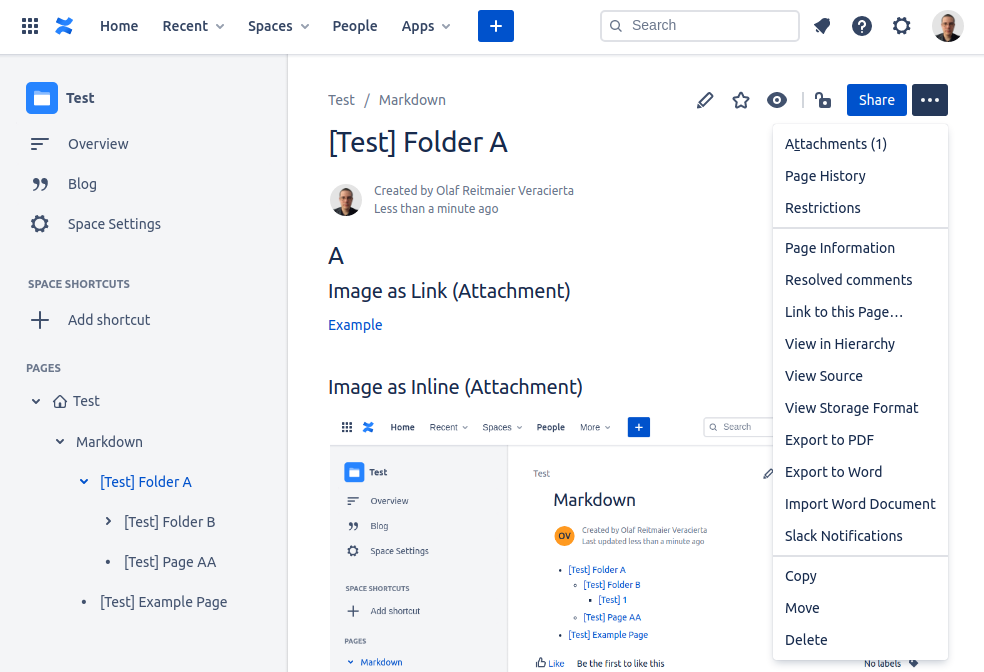
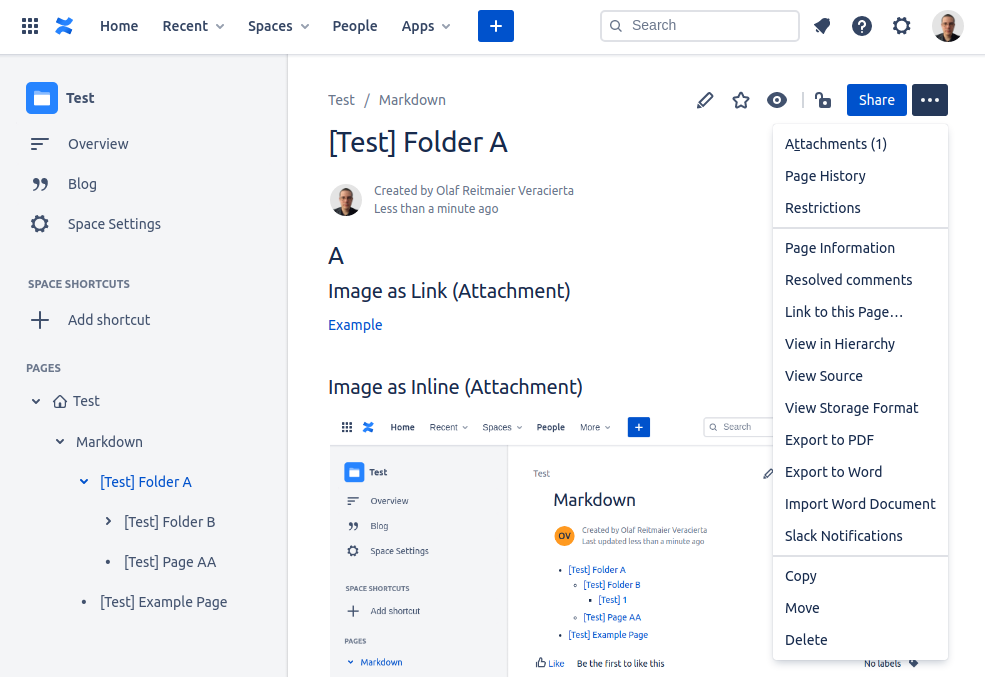
Rendering and publishing ./examples produce the following final result in Confluence:
About Markdown Compatibility
This scripts depends on Mistune v3 Markdown Parser, compatible with CommonMark
The (optional) metadata heading in markdown (.md) files likes the one which follows below used by Hugo, it is not part of CommonMarkdown standard, but just a popular way of specify in YAML markdown metadata usable for external tools.
---
title: My Page Title
date: 2019-03-26T08:47:11+01:00
draft: true
chapter: true
kind: index
---
It is parsed and partially used by this script to organize the content in Atlassian Confluence.
Development
Install from source as local editable package:
git clone "https://github.com/olafrv/mdtocf.git"
cd mdtocf
uv sync --group dev   # creates .venv and installs all dependencies
uv run pytest tests   # run tests
./release.sh          # full build and release to PyPI flow
References
Python v3
- https://docs.python.org/3/
- https://docs.python.org/3/howto/regex.html
- https://packaging.python.org/tutorials/packaging-projects/
- https://docs.astral.sh/uv/
- https://packaging.python.org/discussions/install-requires-vs-requirements/
Markdown Utils
- https://spec.commonmark.org
- https://spec.commonmark.org/dingus/
- https://github.com/lepture/mistune
- https://mistune.readthedocs.io/en/latest/
Confluence and Storage Format (Cloud API)
- https://pypi.org/project/atlassian-python-api/
- https://atlassian-python-api.readthedocs.io/confluence.html
- https://developer.atlassian.com/cloud/confluence/rest/
- https://confluence.atlassian.com/doc/confluence-storage-format-790796544.html
- https://confluence.atlassian.com/doc/macros-139387.html
- https://confluence.atlassian.com/conf59/code-block-macro-792499083.html
- https://confluence.atlassian.com/confkb/how-to-get-confluence-page-id-648380445.html
- https://confluence.atlassian.com/doc/delete-or-restore-a-page-139429.html
Release history Release notifications | RSS feed


Download files
Download the file for your platform. If you're not sure which to choose, learn more about installing packages.
Source Distribution
Built Distribution
Filter files by name, interpreter, ABI, and platform.
If you're not sure about the file name format, learn more about wheel file names.
Copy a direct link to the current filters
File details
Details for the file mdtocf-1.2.8.tar.gz.
File metadata
- Download URL: mdtocf-1.2.8.tar.gz
- Upload date:
- Size: 12.4 kB
- Tags: Source
- Uploaded using Trusted Publishing? No
- Uploaded via: twine/6.2.0 CPython/3.12.3
File hashes
| Algorithm | Hash digest | |
|---|---|---|
| SHA256 |
0d927832077a3a823c2c1783a43ddbc713c8dfff65264aa99df3bc1e39821696
|
|
| MD5 |
d48521e8d1eebc76ef107859fd8b1cc5
|
|
| BLAKE2b-256 |
739c93429a5eb0dd7ea27499aeb6a1fa89d7fd1828eacfabdeaad70902340399
|
File details
Details for the file mdtocf-1.2.8-py3-none-any.whl.
File metadata
- Download URL: mdtocf-1.2.8-py3-none-any.whl
- Upload date:
- Size: 9.5 kB
- Tags: Python 3
- Uploaded using Trusted Publishing? No
- Uploaded via: twine/6.2.0 CPython/3.12.3
File hashes
| Algorithm | Hash digest | |
|---|---|---|
| SHA256 |
96b64761ff466b87b4860d489331c1dda3631fc9827282925e1209a377381a0d
|
|
| MD5 |
10cd398d9a3a15e8c8e23d3c7a485b49
|
|
| BLAKE2b-256 |
01edc8534787c00a7fefdde0fbf5e8a66f64731fedc7f28cfd64cd573aaa1560
|






