
This release is a pre-release and may not be stable for production use.

Mechvane
You and your agent on the same model.
Parametric 3D CAD for everyday mechanical engineering (individual engineers, makers, small and medium-sized companies), following the workflow of classic mechanical CAD systems. Model by hand, hand a step to an AI agent, or both: you work on the same parts and get the same design checks either way. The core stays small; domain modules (sheet metal, standard parts, frames, drawings …) load only when a document or the user needs them.
Try the web UI in your browser: example models with the model tree and design check findings, nothing to install.
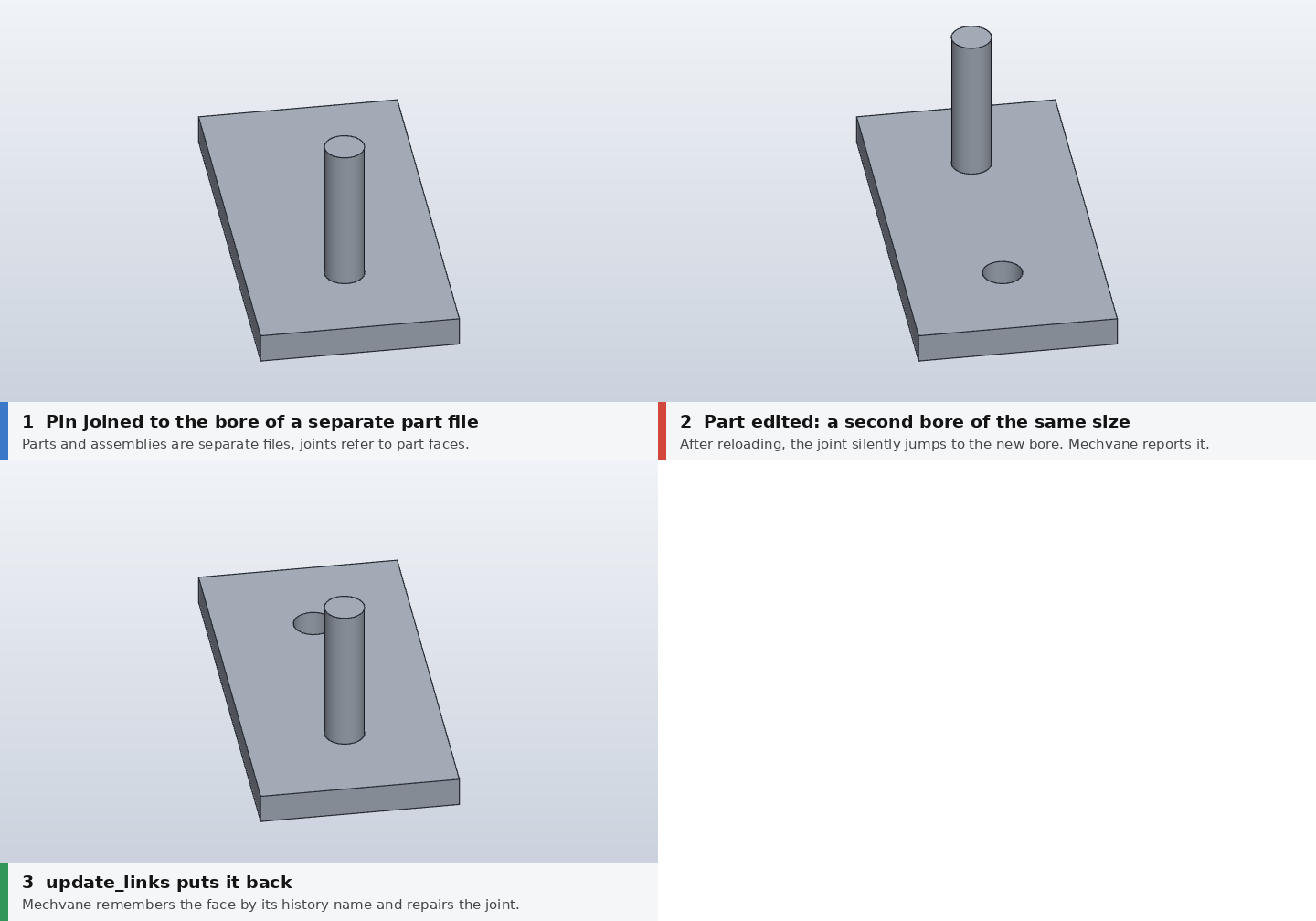
Change a part, and update_links notices that a joint jumped to a different bore and
repairs it (regenerate with python3 tools/demo_update_links.py).
Guiding principles
- One model, many hands. Every action is a typed command. You in the GUI, your scripts, plugins and AI agents (MCP) share one interface, with undo, batch rollback and precise error messages, so you can pick up where your agent left off and the other way round.
- Engineering knowledge for you and your agent. An open, sourced knowledge catalog: standard
values from freely accessible sources, best practice from public handbooks and design
guides, our own measurement series on the printer. Every rule carries its source,
rationale, exceptions and severity (error or hint), so
check_designdoes not guess and an agent proposes what an experienced engineer would. - No dead weight. What monolithic CAD suites carry around (piping, cable harness, BIM, rendering studio …) is a plugin here or left out.
- Proven workflows where they work. Design accelerators (bolted connections, shafts, gears), frame generator, standard parts, ISO drawings with parts list, rule-based configuration.
- Text- and git-friendly file format.
Foundation
Mechvane builds on SolidCraft (Rust, Apache-2.0), an open CAD kernel and app where "everything is a command", with a built-in MCP server. SolidCraft stays unchanged as a dependency; Mechvane adds its own layer on top (ADR 0001).
Quick start
Requirements: Python ≥ 3.11. Everything else comes with mechvane setup: it downloads the
pinned solidcraft-cli and SolidCraft web app (v0.25.1) from the
SolidCraft release for your platform
(Linux x86_64/aarch64, Windows x64/arm64, macOS) and checks their SHA256. No build needed;
rendering works headless too.
pip install mechvane
mechvane setup        # SolidCraft CLI and web app, about 90 MB, once
mechvane ui --demo    # example models in their own app window
mechvane ui my-project/   # your own .solidcraft files
mechvane shortcut     # optional: start menu entry for ~/Mechvane (Windows, Linux)
mechvane ui opens an app window when Chrome, Edge, Chromium or Brave is installed (no tabs, no
address bar; closing it stops Mechvane), otherwise a tab in your default browser. --browser
always uses a tab. Everything runs locally and offline after mechvane setup.
Alpha: tested on Linux and Windows 11 (x64); macOS is expected to work but not yet tested.
If mechvane is not found after a user install on Windows, use python -m mechvane setup (and
ui, mcp) instead.
An existing solidcraft-cli is used when you set SOLIDCRAFT_CLI or skip mechvane setup
and have it on your PATH.
As an MCP server for an agent (e.g. Claude Code), .mcp.json in your project:
{
  "mcpServers": {
    "mechvane": {
      "command": "mechvane",
      "args": ["mcp", "--workspace", "./workspace"]
    }
  }
}
For development, clone the repo and run the checks:
git clone https://github.com/mechvane/mechvane && cd mechvane
pip install -e .
python3 tests/mechvane/check.py      # about 240 checks, a few minutes
python3 tests/reference/check.py     # reference parts with expected values
Then ask, for example: "Build an 80×40×8 plate with four M5 clearance holes, bolt it to a
bracket and check the design." The agent uses new_part, run, bolted_connection,
add_joint and check_design. When a part changes, update_links finds joints that
jumped to a different face and repairs them.
Windows: docs/installation-windows.md (German).
Status
Phase 1: a Python prototype running as an MCP server on top of SolidCraft. Separate part
and assembly files, sketches owned by their feature, a model browser in the classic tree
style, joints across files with checking and repair, standard parts (screws, nuts,
washers, ball bearings), a bolted connection assistant with patterns, check_design with
design rules, ISO 286 fits and a knowledge catalog of sourced standard values. A read-only
web UI (python3 -m mechvane.ui <file.solidcraft> [--port 8765]) shows the 3D model,
the model browser tree and design/joint findings with interactive face highlighting.
Its "Model by hand" mode (/model) embeds the SolidCraft web app: edit the part or
assembly with the mouse, save, and Mechvane checks it again and updates the links. The web
app is downloaded once from the SolidCraft release and checked against a pinned SHA256.
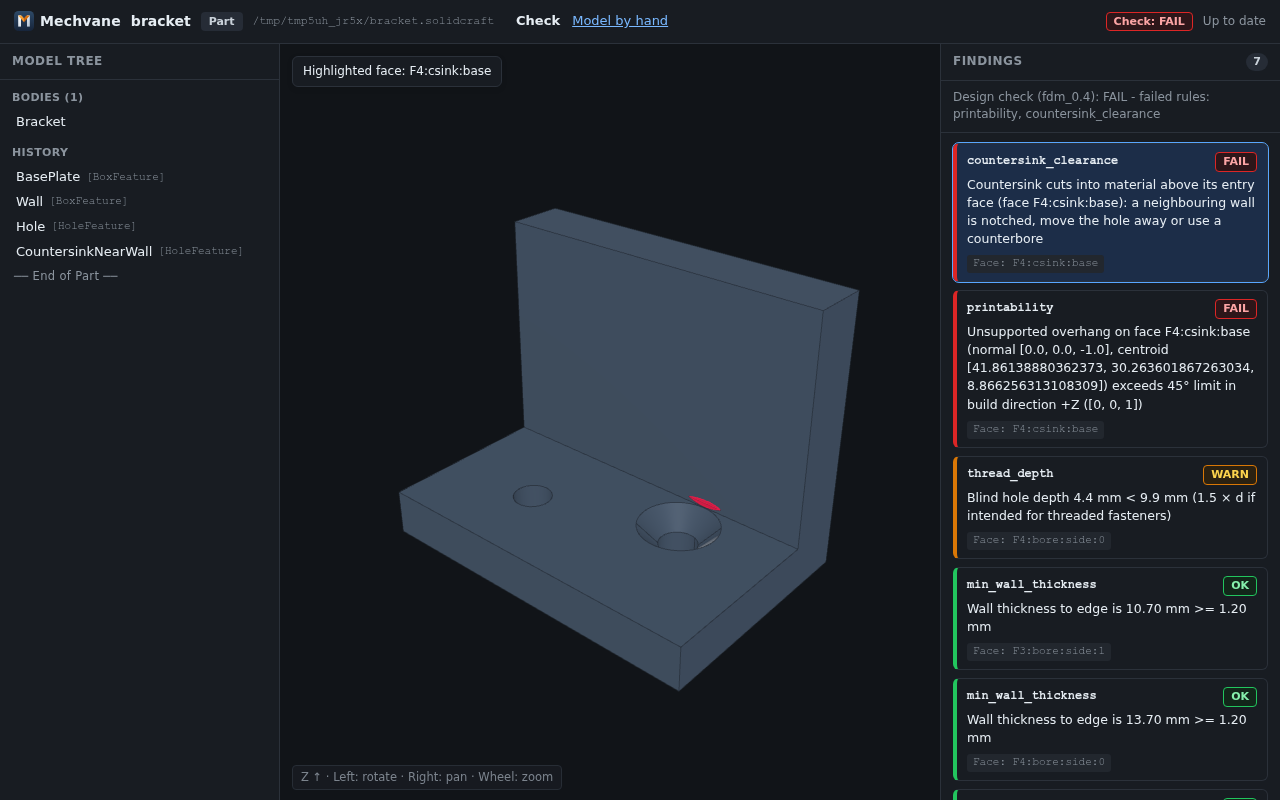
A countersink that notches the wall, highlighted on click (regenerate with
python3 tools/demo_web_ui.py).
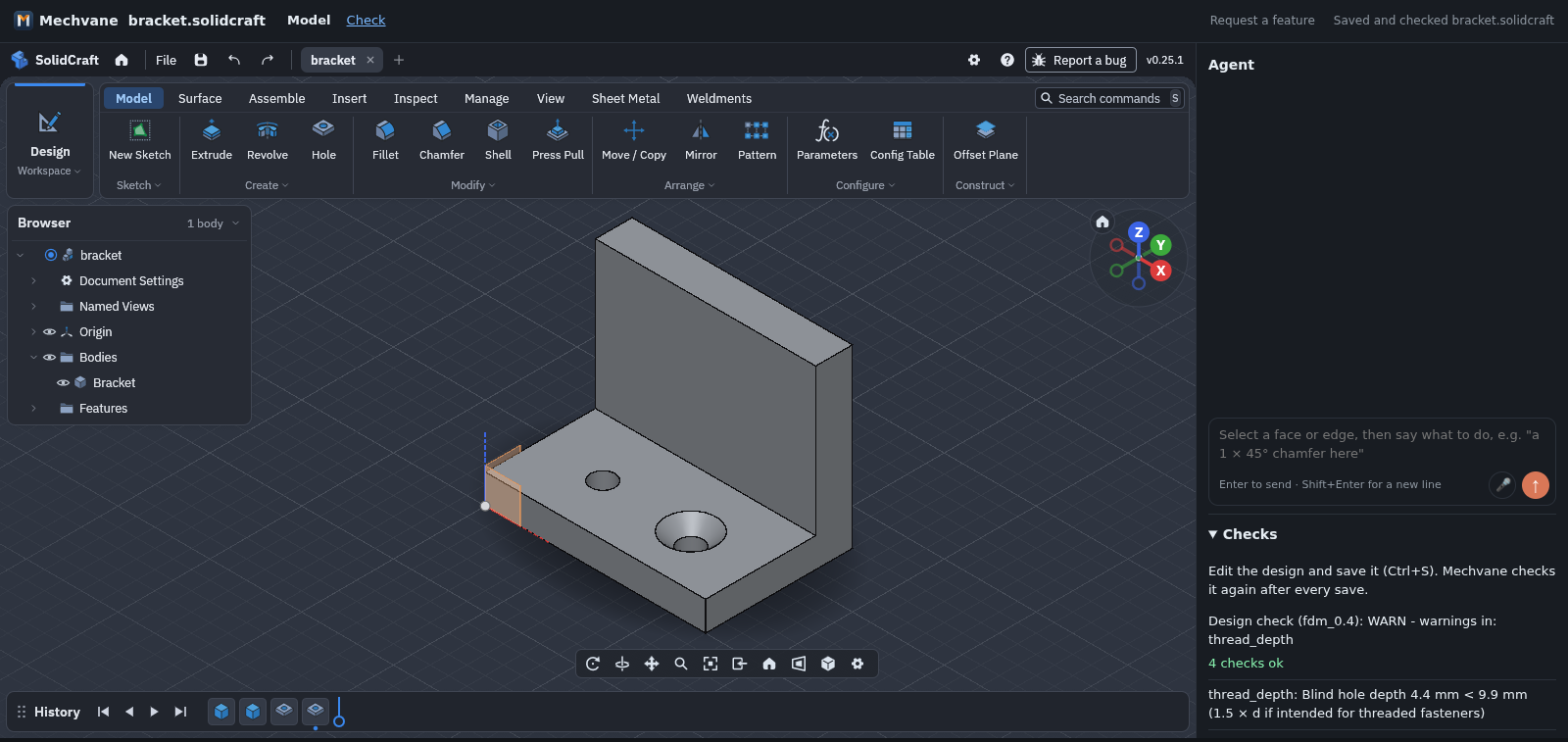
Model by hand: the same bracket in the embedded SolidCraft web app, the countersink moved away
from the wall and saved, Mechvane checked it again (regenerate with python3 tools/demo_model_ui.py).
Try it without installing: live demo.
Contents
- CHANGELOG.md: what changed in each release
- mechvane.dev: the project website
- Roadmap at a glance: what is available, what comes next
- ROADMAP.md: phases, decision points, risks (detailed, in German)
- docs/adr/: architecture decisions
- MCP server (
mechvane/): tools, data model, test reports - tests/: layer checks and reference parts
- docs/research/: research notes and practice tests, dated. Notes
marked as drafts (e.g.
-flash,-gemini) are unverified unless a check note says otherwise.
Most project documentation is in German for now; code and comments are in English.
License
MIT OR Apache-2.0, at your option (LICENSE-MIT, LICENSE-APACHE), like SolidCraft, so
code can move in both directions. Contributions are under the same terms. AGPL slicers
such as CuraEngine only run as separate processes and are not part of Mechvane
(NOTICE). See CONTRIBUTING.md.
Mechvane is an independent project and is not affiliated with Autodesk or any other CAD vendor. Product names only describe workflows.
1 maintainer

Metadata
1 maintainer
Release files for mechvane 0.1.0a10
For a detailed explanation of source distributions (sdists) and built distributions (wheels), please see the package formats documentation.
Source distribution (sdist)
| File | Size | Uploaded | Provenance | Actions |
|---|---|---|---|---|
| mechvane-0.1.0a10.tar.gz | 467.9 kB | With provenance | Details for mechvane-0.1.0a10.tar.gz |
Built distribution (wheel)
| File | Interpreter | ABI | Platform | Actions Reset |
|---|---|---|---|---|
| mechvane-0.1.0a10-py3-none-any.whl | Python 3 | none | any | Details for mechvane-0.1.0a10-py3-none-any.whl |
Total release size: 946.7 kB
Release files / mechvane-0.1.0a10.tar.gz
| Download URL | mechvane-0.1.0a10.tar.gz |
|---|---|
| Size | 467.9 kB |
| Tags | Source |
|
SHA-256 checksum How to use checksums |
d47d3da346bea9c98aeec80da19546a55a63c0d3f84e443e3f76185df71719a4
|
|
BLAKE2b-256 checksum How to use checksums |
193d49d63c8d4f29c662927ee9cd33967293c3a966a34d4871a15ce73f707537
|
| Upload date | |
|
Uploaded using Trusted Publishing? What is trusted publishing? |
Yes |
| Uploaded via |
twine/7.0.0 CPython/3.13.16
|
Provenance
Provenance describes where a file came from. On PyPI, provenance is shared via attestations, which provide a verifiable record of the build or publishing details. View details, limitations and caveats.


PyPI Publish Attestation
PyPI verified that this artifact, at this checksum, originated from the publisher listed below.
Signed by GitHub Actions, verified by PyPI on Oct 30, 2026.
Transparency logRelease files / mechvane-0.1.0a10-py3-none-any.whl
| Download URL | mechvane-0.1.0a10-py3-none-any.whl |
|---|---|
| Size | 478.7 kB |
| Tags | Python 3 |
|
SHA-256 checksum How to use checksums |
81aa0525781aa800ea34640388bfe3943341c7f8a85536735d8c737e18f84944
|
|
BLAKE2b-256 checksum How to use checksums |
aa22dfb7ce3c0f0620a025c9077b39d16344da295d767f688dab393a466d12c0
|
| Upload date | |
|
Uploaded using Trusted Publishing? What is trusted publishing? |
Yes |
| Uploaded via |
twine/7.0.0 CPython/3.13.16
|
Provenance
Provenance describes where a file came from. On PyPI, provenance is shared via attestations, which provide a verifiable record of the build or publishing details. View details, limitations and caveats.
PyPI Publish Attestation
PyPI verified that this artifact, at this checksum, originated from the publisher listed below.
Signed by GitHub Actions, verified by PyPI on Oct 30, 2026.
Transparency logSecurity for mechvane 0.1.0a10
Provenance
Provenance describes where a file came from. On PyPI, provenance is shared via attestations, which provide a verifiable record of the build or publishing details. View details, limitations and caveats.
Full provenance
All 2 files in this release have been uploaded with provenance metadata.
Attestation for mechvane-0.1.0a10.tar.gz
PyPI Publish Attestation
PyPI verified that this artifact, at this checksum, originated from the publisher listed below.
Signed by GitHub Actions, verified by PyPI on Oct 30, 2026.
Transparency logA note on package security
PyPI is a repository for distributing packages, not a service for auditing them. While third-party security researchers and our staff do their best to detect and remove malicious packages, PyPI cannot guarantee the quality, security or suitability of any given package.
To learn more about protecting yourself from malicious actors, visit our package security documentation.














