
MEDiml is a Python package for processing and extracting features from medical images

Project description







Table of Contents
- 1. Introduction
- 2. Installation
- 3. Generating the documentation locally
- 4. A simple example
- 5. Tutorials
- 6. IBSI Standardization
- 7. Acknowledgement
- 8. Authors
- 9. Statement
1. Introduction
MEDiml is an open-source Python package that can be used for processing multi-modal medical images (MRI, CT or PET) and for extracting their radiomic features. This package is meant to facilitate the processing of medical images and the subsequent computation of all types of radiomic features while maintaining the reproducibility of analyses. This package has been standardized with the IBSI norms.
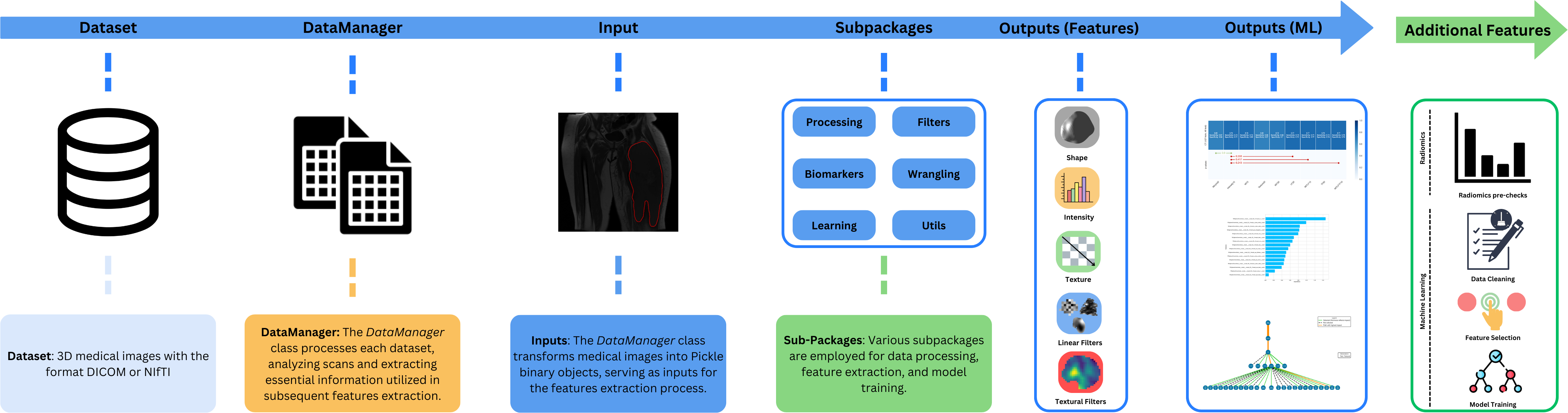
2. Installation
Python installation
The MEDiml package requires Python 3.8 or more. If you don't have it installed on your machine, follow the instructions here to install it.
Package installation
You can easily install the MEDiml package from PyPI using:
pip install MEDiml
For more installation options (Conda, Poetry...) check out the installation documentation.
3. Generating the documentation locally
The documentation of the MEDiml package was created using Sphinx. However, you can generate and host it locally by compiling the documentation source code using :
cd docs
make clean
make html
Then open it locally using:
cd _build/html
python -m http.server
4. A simple example
import os
import pickle

import MEDiml

# Load MEDiml DataManager
dm = MEDiml.DataManager(path_dicoms=os.getcwd())

# Process the DICOM files and retrieve the MEDiml object
med_obj = dm.process_all_dicoms()[0]

# Extract ROI mask from the object
vol_obj_init, roi_obj_init = MEDiml.processing.get_roi_from_indexes(
            med_obj,
            name_roi='{ED}+{ET}+{NET}',
            box_string='full')

# Extract features from the imaging data
local_intensity = MEDiml.biomarkers.local_intensity.extract_all(
                img_obj=vol_obj_init.data,
                roi_obj=roi_obj_init.data,
                res=[1, 1, 1]
            )

# Update radiomics results class
med_obj.update_radiomics(loc_int_features=local_intensity)

# Saving radiomics results
med_obj.save_radiomics(
                scan_file_name='STS-UdS-001__T1.MRscan.npy',
                path_save=os.getcwd(),
                roi_type='GrossTumorVolume',
                roi_type_label='GTV',
            )
5. Tutorials
We have created many tutorial notebooks to assist you in learning how to use the different parts of the package. More details can be found in the documentation.
6. IBSI Standardization
The image biomarker standardization initiative (IBSI) is an independent international collaboration that aims to standardize the extraction of image biomarkers from acquired imaging. The IBSI therefore seeks to provide image biomarker nomenclature and definitions, benchmark datasets, and benchmark values to verify image processing and image biomarker calculations, as well as reporting guidelines, for high-throughput image analysis. We participate in this collaboration with our package to make sure it respects international nomenclatures and definitions. The participation was separated into two chapters:
-
IBSI Chapter 1
The IBSI chapter 1 is dedicated to the standardization of commonly used radiomic features. It was initiated in September 2016 and reached completion in March 2020. We have created two jupyter notebooks for each phase of the chapter and made them available for the users to run the IBSI tests for themselves. The tests can also be explored in interactive Colab notebooks that are directly accessible here:
- Phase 1:
- Phase 2:
- Phase 1:
-
IBSI Chapter 2
The IBSI chapter 2 was launched in June 2020 and reached completion in February 2024. It is dedicated to the standardization of commonly used imaging filters in radiomic studies. We have created two jupyter notebooks for each phase of the chapter and made them available for the users to run the IBSI tests for themselves and validate image filtering and image biomarker calculations from filter response maps. The tests can also be explored in interactive Colab notebooks that are directly accessible here:
- Phase 1:
- Phase 2:
Our team at UdeS (a.k.a. Université de Sherbrooke) has already submitted the benchmarked values to the IBSI uploading website.
- Phase 1:
Miscellaneous
You can avoid the next steps (Jupyter installation and environment setup) if you installed the package using Conda or Poetry according to the documentation.
You can view and run the tests locally by installing the Jupyter Notebook application on your machine:
python -m pip install jupyter
Then add the installed MEDiml environment to the Jupyter Notebook kernels using:
python -m ipykernel install --user --name=MEDiml
Then access the IBSI tests folder using:
cd notebooks/ibsi/
Finally, launch Jupyter Notebook to navigate through the IBSI notebooks using:
jupyter notebook
7. Acknowledgement
MEDiml is an open-source package developed at the MEDomicsLab laboratory with the collaboration of the international consortium MEDomics. We welcome any contribution and feedback. Furthermore, we wish that this package could serve the growing radiomics research community by providing a flexible as well as IBSI standardized tool to reimplement existing methods and develop new ones.
8. Authors
- MEDomicsLab: Research laboratory at Université de Sherbrooke & McGill University.
- MEDomics: MEDomics consortium.
9. Statement
This package is part of https://github.com/medomics, a package providing research utility tools for developing precision medicine applications.
Copyright (C) 2024 MEDomics consortium

GPL3 LICENSE SYNOPSIS

Here's what the license entails:

1. Anyone can copy, modify and distribute this software.
2. You have to include the license and copyright notice with each and every distribution.
3. You can use this software privately.
4. You can use this software for commercial purposes.
5. If you dare build your business solely from this code, you risk open-sourcing the whole code base.
6. If you modify it, you have to indicate changes made to the code.
7. Any modifications of this code base MUST be distributed with the same license, GPLv3.
8. This software is provided without warranty.
9. The software author or license can not be held liable for any damages inflicted by the software.
More information on about the LICENSE can be found here


Download files
Download the file for your platform. If you're not sure which to choose, learn more about installing packages.
Source Distribution
Built Distribution
Filter files by name, interpreter, ABI, and platform.
If you're not sure about the file name format, learn more about wheel file names.
Copy a direct link to the current filters
File details
Details for the file mediml-0.9.9.tar.gz.
File metadata
- Download URL: mediml-0.9.9.tar.gz
- Upload date:
- Size: 214.0 kB
- Tags: Source
- Uploaded using Trusted Publishing? No
- Uploaded via: poetry/1.1.14 CPython/3.8.0 Windows/10
File hashes
| Algorithm | Hash digest | |
|---|---|---|
| SHA256 |
2963c72eb736c1361f2fe0c9592cb8b128412b98bc3c9eb95e271dfe81258b1f
|
|
| MD5 |
5a2953bb4e37fcf821beac8f572e3cef
|
|
| BLAKE2b-256 |
5f95c30bac52adb2cf528366c43c7b8bd7852dd352618bbf3d8e21db10c089af
|
File details
Details for the file mediml-0.9.9-py3-none-any.whl.
File metadata
- Download URL: mediml-0.9.9-py3-none-any.whl
- Upload date:
- Size: 245.8 kB
- Tags: Python 3
- Uploaded using Trusted Publishing? No
- Uploaded via: poetry/1.1.14 CPython/3.8.0 Windows/10
File hashes
| Algorithm | Hash digest | |
|---|---|---|
| SHA256 |
807e1c3367b09dd6e829b8f20ca97f878b6294b747ec67459adcca0b3da94698
|
|
| MD5 |
5f75167dbc7b5751dfeb54da5abd053a
|
|
| BLAKE2b-256 |
0ddf0f05123a2b5613af55f39ba59ab3d48ac2996daf7bae2a2b6f1fb7d87389
|






