
Medical image synthesis metrics (FID/MMD/MS-SSIM) with MedicalNet feature extractor.

Project description
Medmetric
medmetric is a lightweight PyTorch package for evaluating real vs synthetic medical images (especially 3D volumes like brain MRI) using:
- MedicalNet (3D ResNet) features (Tencent Med3D / MedicalNet)
- FID and MMD computed on feature vectors
- MS-SSIM for pairwise similarity (commonly used as a diversity proxy over fake–fake pairs)
Installation
Core install (extractor + MMD)
pip install medmetric
Optional: MONAI (required for FID + MS-SSIM)
FID and MS_SSIM are thin wrappers around MONAI metrics. If MONAI is not installed, these metrics raise an informative ImportError.
Recommended (installs MONAI via the package extra):
pip install "medmetric[monai]"
If your installed medmetric build does not expose the extra yet, install MONAI directly:
pip install monai
MedicalNet weights
Pretrained checkpoints are resolved from the pinned manifest:
medmetric/weights/medicalnet.yaml
Each entry specifies:
- the Hugging Face repo (
repo_id) - the filename (
filename) shortcut_type, and (optionally) architecture hints (layers,block)- a pinned SHA256 checksum, which is verified after download
Available checkpoints (from the shipped YAML)
| depth | variant | repo_id | filename | shortcut | block |
|---|---|---|---|---|---|
| 10 | standard | TencentMedicalNet/MedicalNet-Resnet10 |
resnet_10.pth |
B | BasicBlock |
| 10 | 23dataset | TencentMedicalNet/MedicalNet-Resnet10 |
resnet_10_23dataset.pth |
B | BasicBlock |
| 18 | standard | TencentMedicalNet/MedicalNet-Resnet18 |
resnet_18.pth |
A | BasicBlock |
| 18 | 23dataset | TencentMedicalNet/MedicalNet-Resnet18 |
resnet_18_23dataset.pth |
A | BasicBlock |
| 34 | standard | TencentMedicalNet/MedicalNet-Resnet34 |
resnet_34.pth |
A | BasicBlock |
| 34 | 23dataset | TencentMedicalNet/MedicalNet-Resnet34 |
resnet_34_23dataset.pth |
A | BasicBlock |
| 50 | standard | TencentMedicalNet/MedicalNet-Resnet50 |
resnet_50.pth |
B | Bottleneck |
| 50 | 23dataset | TencentMedicalNet/MedicalNet-Resnet50 |
resnet_50_23dataset.pth |
B | Bottleneck |
| 101 | standard | TencentMedicalNet/MedicalNet-Resnet101 |
resnet_101.pth |
B | Bottleneck |
| 152 | standard | TencentMedicalNet/MedicalNet-Resnet152 |
resnet_152.pth |
B | Bottleneck |
| 200 | standard | TencentMedicalNet/MedicalNet-Resnet200 |
resnet_200.pth |
B | Bottleneck |
Important behavior:
use_23dataset=Trueis available for depths 10/18/34/50.- For depths 101/152/200, only the standard checkpoint is listed in the manifest, so you must call:
MedicalNetFeatureExtractor.from_pretrained(depth=101, use_23dataset=False, ...).
Input normalization
For best alignment with MedicalNet training, apply per-volume z-score normalization before passing volumes into the extractor (and apply the same preprocessing to real and fake).
Keep MS-SSIM calculations in the original image domain (e.g., [0,1]) with an appropriate data_range.
Metrics
This section documents the metrics implemented in medmetric and how they are computed.
Important: In this package, FID and MMD are computed on feature embeddings (e.g., extracted with MedicalNet). MS-SSIM is computed on image/volume tensors in their original intensity domain (e.g.
[0, 1]withdata_range=1.0).
FID (Fréchet Inception Distance) on features
What it measures: distance between two Gaussians fit to real and fake feature distributions (lower is better).

Definitions (real vs fake feature statistics):


- (r_i) are real feature vectors, (f_i) are fake feature vectors
- (N_r) and (N_f) are the number of real/fake samples
Usage (features):
from medmetric.metrics import FID

fid = FID()
score = fid(fake_feats, real_feats)  # scalar tensor
MMD (Maximum Mean Discrepancy) on features
What it measures: discrepancy between two distributions in an RKHS induced by a kernel (k) (lower is better).
Unbiased MMD² (U-statistic) (default):

Biased MMD² (V-statistic) (biased=True):

Gaussian / RBF kernel:
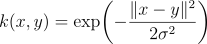
Practical note: the unbiased estimator is for MMD², and it can be slightly negative due to finite-sample variance. Common reporting conventions are:
- Report MMD² (clamped):
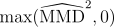
- Or report MMD (root of clamped MMD²):

Usage (features):
from medmetric.metrics import MMD

mmd = MMD()              # unbiased by default
score = mmd(fake_feats, real_feats)

mmd_b = MMD(biased=True) # biased MMD^2
score_b = mmd_b(fake_feats, real_feats)
MS-SSIM (Multi-Scale SSIM) on images/volumes
What it measures: perceptual/structural similarity between two images/volumes across multiple scales. Higher means “more similar”.
In medmetric, MS-SSIM is commonly used as a diversity proxy by scoring many fake–fake pairs:
- mean MS-SSIM ↓ → diversity ↑ (often reported as
1 - mean_ms_ssim)
Usage (images/volumes):
from medmetric.metrics import MS_SSIM

ms = MS_SSIM(spatial_dims=3, data_range=1.0)  # for 3D volumes in [0,1]
val = ms(y_pred, y)  # scalar (default reduction)
Tip: compute MS-SSIM on the original intensity domain (e.g.
[0,1]withdata_range=1.0), not on z-scored volumes used for feature extraction.
End-to-end example (recommended workflow)
This example follows the intended pipeline:
- Keep images in
[0,1]for MS-SSIM - Z-score normalize volumes for MedicalNet feature extraction
- Compute FID/MMD on features
- Compute MS-SSIM “diversity” on fake–fake pairs, with
K = min(target_pairs, N*(N-1)/2)
import torch
from medmetric.extractors.medicalnet import MedicalNetFeatureExtractor
from medmetric.metrics import FID, MMD, MS_SSIM

# -----------------------------
# Config
# -----------------------------

D, H, W = 64, 64, 64
n_real, n_fake = 16, 16
target_pairs = 5000  # target number of fake–fake pairs to evaluate (upper-bounded by N choose 2)

device = "cuda" if torch.cuda.is_available() else "cpu"
device_t = torch.device(device)

# -----------------------------
# Dummy data (in [0,1])
# Volumes: (B, 1, D, H, W)
# -----------------------------
real_images = torch.rand(n_real, 1, D, H, W, device=device_t)
fake_images = torch.rand(n_fake, 1, D, H, W, device=device_t)

# -----------------------------
# IMPORTANT: z-score normalization for MedicalNet input
# (apply the same preprocessing to both real and fake)
# -----------------------------
def zscore_per_volume(x: torch.Tensor, eps: float = 1e-8) -> torch.Tensor:
    dims = tuple(range(2, x.ndim))  # normalize per (D,H,W) per sample (and per channel if C>1)
    mean = x.mean(dim=dims, keepdim=True)
    std = x.std(dim=dims, keepdim=True).clamp_min(eps)
    return (x - mean) / std

real_z = zscore_per_volume(real_images)
fake_z = zscore_per_volume(fake_images)

# -----------------------------
# MedicalNet feature extractor
# -----------------------------
extractor = MedicalNetFeatureExtractor.from_pretrained(depth=50, use_23dataset=True, device=device)

# Alternative in-place loading (same result, avoids rebuilding):
# extractor = MedicalNetFeatureExtractor(depth=50).to(device_t)
# extractor.load_pretrained(use_23dataset=True, device=device)

real_feats = extractor(real_z)  # (N, F) pooled embeddings
fake_feats = extractor(fake_z)

# -----------------------------
# Similarity on FEATURES
# -----------------------------
fid = FID()
mmd = MMD()  # unbiased by default

fid_score = fid(fake_feats, real_feats)
mmd_score = mmd(fake_feats, real_feats)

# -----------------------------
# Diversity on IMAGES (fake–fake pairs)
# For N=16 this evaluates randomly sampled pairs (120).
# -----------------------------
n = fake_images.shape[0]
k = min(5000, n * (n - 1) // 2)

i = torch.randint(0, n, (k,), device=fake_images.device)
j = torch.randint(0, n - 1, (k,), device=fake_images.device)
j = j + (j >= i)  # ensures j != i

ms_ssim = MS_SSIM(
    spatial_dims=fake_images.ndim - 2,
    data_range=1.0,
    kernel_size=3 # default 11 [default require images with a dim > 180 approx.]
    )  # default reduction="mean"
ms_mean = ms_ssim(fake_images[i], fake_images[j])  # <-- actually computes the mean over k pairs


print("FID:", float(fid_score))
print("MMD:", float(mmd_score))
print("MS-SSIM(fake pairs) mean:", float(ms_mean))
Examples
See examples/compute_metrics.py.
Testing
pytest -q
License
MIT (see LICENSE).
Contributing (simple workflow)
The simplest approach is:
- Fork the repo
- Create a feature branch
- Open a PR into
main
Recommended minimal contribution checks:
pip install -e .[dev]
pytest -q
Release history Release notifications | RSS feed


Download files
Download the file for your platform. If you're not sure which to choose, learn more about installing packages.
Source Distribution
Built Distribution
Filter files by name, interpreter, ABI, and platform.
If you're not sure about the file name format, learn more about wheel file names.
Copy a direct link to the current filters
File details
Details for the file medmetric-0.1.1.tar.gz.
File metadata
- Download URL: medmetric-0.1.1.tar.gz
- Upload date:
- Size: 37.8 kB
- Tags: Source
- Uploaded using Trusted Publishing? Yes
- Uploaded via: twine/6.1.0 CPython/3.13.7
File hashes
| Algorithm | Hash digest | |
|---|---|---|
| SHA256 |
74bcdc7ffff4dffa494b99c0d2308a5e67ef1c9f1193495bd643ffdd83666204
|
|
| MD5 |
47a61334005e3bdab730b3b433940f91
|
|
| BLAKE2b-256 |
78b94e52650786beaf128feb43d571770c89353b6586696cd2345ee22f8aafc6
|
Provenance
The following attestation bundles were made for medmetric-0.1.1.tar.gz:
Publisher:
release.yml on yasinzaii/medmetric
-
Statement:
-
Statement type:
https://in-toto.io/Statement/v1 -
Predicate type:
https://docs.pypi.org/attestations/publish/v1 -
Subject name:
medmetric-0.1.1.tar.gz -
Subject digest:
74bcdc7ffff4dffa494b99c0d2308a5e67ef1c9f1193495bd643ffdd83666204 - Sigstore transparency entry: 781148955
- Sigstore integration time:
-
Permalink:
yasinzaii/medmetric@6af098ae0d4358e7ce0080e8de2e48dac3223ec2 -
Branch / Tag:
refs/tags/v0.1.1 - Owner: https://github.com/yasinzaii
-
Access:
public
-
Token Issuer:
https://token.actions.githubusercontent.com -
Runner Environment:
github-hosted -
Publication workflow:
release.yml@6af098ae0d4358e7ce0080e8de2e48dac3223ec2 -
Trigger Event:
push
-
Statement type:
File details
Details for the file medmetric-0.1.1-py3-none-any.whl.
File metadata
- Download URL: medmetric-0.1.1-py3-none-any.whl
- Upload date:
- Size: 26.2 kB
- Tags: Python 3
- Uploaded using Trusted Publishing? Yes
- Uploaded via: twine/6.1.0 CPython/3.13.7
File hashes
| Algorithm | Hash digest | |
|---|---|---|
| SHA256 |
a8561eb3b1b54eef412d92bdc7139241c8fb590b793cd24efd6f7c9f91d98081
|
|
| MD5 |
29ec9c08cf4cf1bde4e8bc73e1aa4d8c
|
|
| BLAKE2b-256 |
3c855412df342d1815e6a237a4d568f657e081e2ea21a1d495f9a39009cddb58
|
Provenance
The following attestation bundles were made for medmetric-0.1.1-py3-none-any.whl:
Publisher:
release.yml on yasinzaii/medmetric
-
Statement:
-
Statement type:
https://in-toto.io/Statement/v1 -
Predicate type:
https://docs.pypi.org/attestations/publish/v1 -
Subject name:
medmetric-0.1.1-py3-none-any.whl -
Subject digest:
a8561eb3b1b54eef412d92bdc7139241c8fb590b793cd24efd6f7c9f91d98081 - Sigstore transparency entry: 781148957
- Sigstore integration time:
-
Permalink:
yasinzaii/medmetric@6af098ae0d4358e7ce0080e8de2e48dac3223ec2 -
Branch / Tag:
refs/tags/v0.1.1 - Owner: https://github.com/yasinzaii
-
Access:
public
-
Token Issuer:
https://token.actions.githubusercontent.com -
Runner Environment:
github-hosted -
Publication workflow:
release.yml@6af098ae0d4358e7ce0080e8de2e48dac3223ec2 -
Trigger Event:
push
-
Statement type:






