
MedMLX
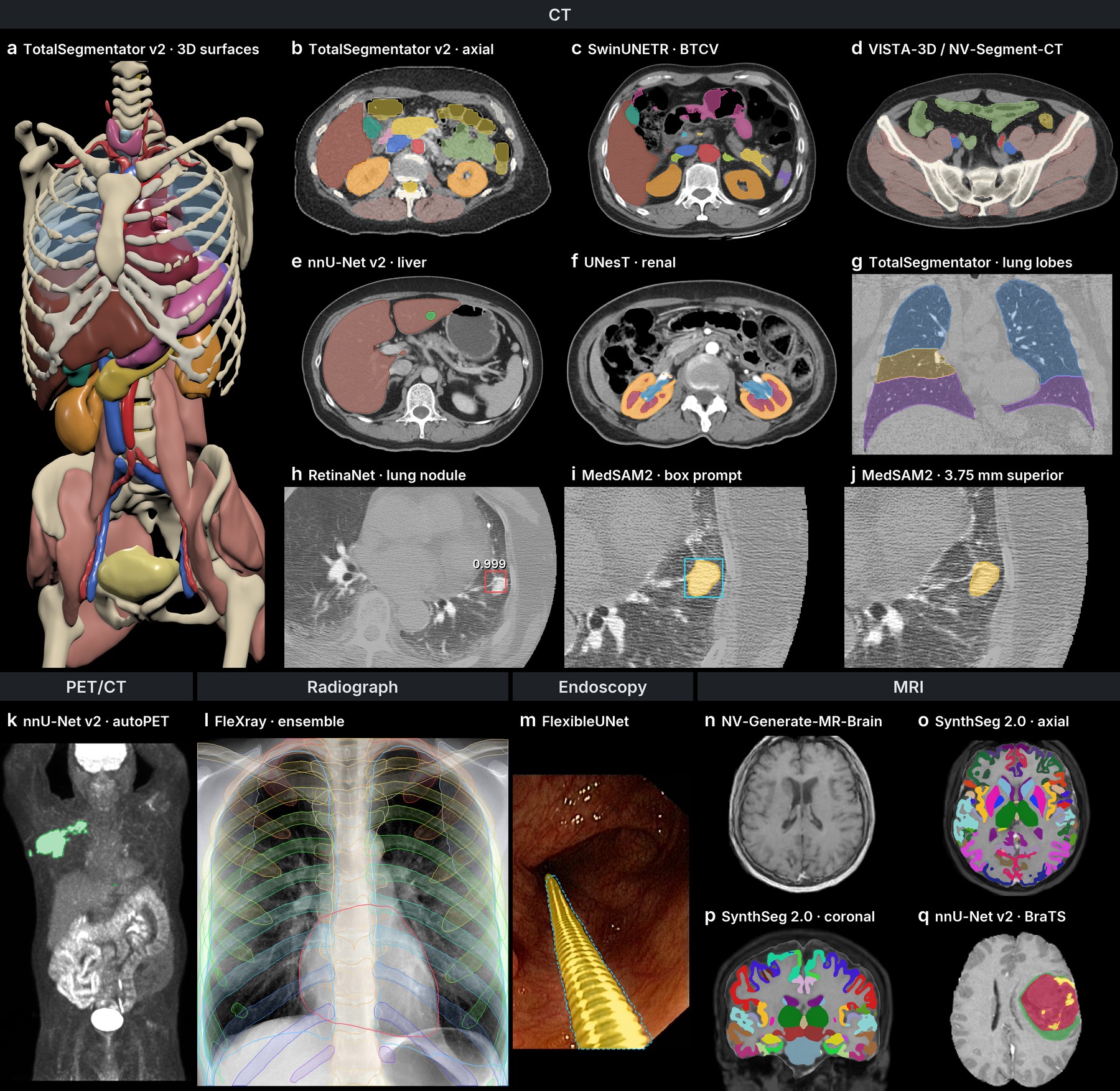
One Python API, command line and MCP server for native medical imaging on Apple Silicon. Run TotalSegmentator, nnU-Net, MedSAM2, SynthSeg and more through their independent MLX runtimes.
Apple Silicon · Metal · Python 3.13 · uv
This README describes the 0.4.2 release. The PyPI documentation describes the same release; source-only features are tracked in the release notes.
Install
Install the latest published CLI and MCP server with all model families:
uv tool install --python 3.13 "medmlx[all,mcp]"
For a Python project, use uv add "medmlx[all,mcp]" instead.
Choose segment, generate or vision instead of all for a smaller install.
The segment extra includes SAM 3 image and video support; generate includes
NV-Reason-CT and the weight-free FDG PET adapter. Model weights download
automatically on first use and keep their own terms. MedGemma uses a provisional bridge to a
separate MedVLM environment; checkpoint inference and numerical accuracy are
unqualified. See the
bridge setup and limits.
For unreleased runtime changes, use the locked source workspace described in the MCP setup guide. The dependency definitions record the runtime versions used by that workspace.
Run a model
medmlx describe mlx-segment-ct
medmlx readiness mlx-segment-ct --arguments arguments.json --root /path/to/work
medmlx run mlx-segment-ct --arguments arguments.json --root /path/to/work
For models with automatic assets, omit weights_path: the runner downloads its
configured Hub repository or model files, reuses the cached folder afterwards,
and records its revision in the run details. For your own weights, pass a local
folder as weights_path. MedGemma and MRSegmentator currently require local
weights; multi-model workflows can require separate asset paths.
describe shows each model's arguments. readiness checks the runtime and Metal
without downloading weights. Optionally pre-download installed model assets for
offline use with medmlx setup --all --progress; workflows with multiple assets
require manual setup.
See automatic weights and readiness.
import json
from pathlib import Path
import medmlx

arguments = json.loads(Path("arguments.json").read_text())
result = medmlx.run("mlx-segment-ct", arguments=arguments, root="/path/to/work")
For an MCP client, use medmlx serve --root /path/to/work as its stdio command.
Disconnecting the client cancels its running jobs. See the
MCP guide for client
setup, tools and a complete job workflow. For checkpoint conversion and
development, see conversion
and core.
The package also includes
Reason-CT with nodule tools:
model-selected detector and MedSAM2 calls, spatially grounded masks and a local
CT review page. It requires the reason-tools extra and model assets.
License
Apache-2.0. See third-party notices. Runtimes and model weights retain their own terms.
For research and education. Outputs require human review.
Metadata
Release files for medmlx 0.4.2
For a detailed explanation of source distributions (sdists) and built distributions (wheels), please see the package formats documentation.
Source distribution (sdist)
| File | Size | Uploaded | Provenance | Actions |
|---|---|---|---|---|
| medmlx-0.4.2.tar.gz | 71.0 kB | Without provenance | Details for medmlx-0.4.2.tar.gz |
Built distribution (wheel)
| File | Interpreter | ABI | Platform | Actions Reset |
|---|---|---|---|---|
| medmlx-0.4.2-py3-none-any.whl | Python 3 | none | any | Details for medmlx-0.4.2-py3-none-any.whl |
Total release size: 156.3 kB
Release files / medmlx-0.4.2.tar.gz
| Download URL | medmlx-0.4.2.tar.gz |
|---|---|
| Size | 71.0 kB |
| Tags | Source |
|
SHA-256 checksum How to use checksums |
743ff1c68fe07b64ea58d44a63251c3655a99628fa20688361308110f14fcdd6
|
|
BLAKE2b-256 checksum How to use checksums |
91b61f8502d6c4eb8ec6fe08cd81bf2f9bf97d508b0589a1d9d123d99c15e869
|
| Upload date | |
|
Uploaded using Trusted Publishing? What is trusted publishing? |
No |
| Uploaded via |
uv/0.13.5 {"installer":{"name":"uv","version":"0.13.5","subcommand":["publish"]},"python":null,"implementation":{"name":null,"version":null},"distro":{"name":"macOS","version":null,"id":null,"libc":null},"system":{"name":null,"release":null},"cpu":null,"openssl_version":null,"setuptools_version":null,"rustc_version":null,"ci":null}
|
Release files / medmlx-0.4.2-py3-none-any.whl
| Download URL | medmlx-0.4.2-py3-none-any.whl |
|---|---|
| Size | 85.3 kB |
| Tags | Python 3 |
|
SHA-256 checksum How to use checksums |
2b2a65e9b7f9784668468ffe7cda5fb8c245c2337dfd780b2fc50565461b0a0e
|
|
BLAKE2b-256 checksum How to use checksums |
3df1767f7926b7dde6e6983378e095ce0c12336f4ee438ca517933c0fa153b58
|
| Upload date | |
|
Uploaded using Trusted Publishing? What is trusted publishing? |
No |
| Uploaded via |
uv/0.13.5 {"installer":{"name":"uv","version":"0.13.5","subcommand":["publish"]},"python":null,"implementation":{"name":null,"version":null},"distro":{"name":"macOS","version":null,"id":null,"libc":null},"system":{"name":null,"release":null},"cpu":null,"openssl_version":null,"setuptools_version":null,"rustc_version":null,"ci":null}
|
Security for medmlx 0.4.2
Provenance
Provenance describes where a file came from. On PyPI, provenance is shared via attestations, which provide a verifiable record of the build or publishing details. View details, limitations and caveats.
No provenance found
None of the files in this release were uploaded with provenance metadata.
A note on package security
PyPI is a repository for distributing packages, not a service for auditing them. While third-party security researchers and our staff do their best to detect and remove malicious packages, PyPI cannot guarantee the quality, security or suitability of any given package.
To learn more about protecting yourself from malicious actors, visit our package security documentation.













