
Meilisearch Python SDK




Meilisearch Python SDK provides both an async and sync client for the Meilisearch API.
Which client to use depends on your use case. If the code base you are working with uses asyncio,
for example if you are using FastAPI, choose the AsyncClient,
otherwise choose the sync Client. The functionality of the two clients is the same, the difference
being that the AsyncClient provides async methods and uses the AsyncIndex with its own
additional async methods. On the other hand, Client provides blocking methods and uses the Index
with its own blocking methods.
Installation
Using a virtual environment is recommended for installing this package. Once the virtual environment is created and activated, install the package with:
pip install meilisearch-python-sdk
Installing with the orjson extra will make JSON serilization/deserilization faster.
pip install meilisearch-python-sdk[orjson]
Run Meilisearch
There are several ways to run Meilisearch. Pick the one that works best for your use case and then start the server.
As as example to use Docker:
docker pull getmeili/meilisearch:latest
docker run -it --rm -p 7700:7700 getmeili/meilisearch:latest ./meilisearch --master-key=masterKey
Usage
Add Documents
AsyncClient
- Note: `client.index("books") creates an instance of an AsyncIndex object but does not make a network call to send the data yet so it does not need to be awaited.
from meilisearch_python_sdk import AsyncClient

async with AsyncClient('http://127.0.0.1:7700', 'masterKey') as client:
    index = client.index("books")

    documents = [
        {"id": 1, "title": "Ready Player One"},
        {"id": 42, "title": "The Hitchhiker's Guide to the Galaxy"},
    ]

    await index.add_documents(documents)
Client
from meilisearch_python_sdk import Client

with Client('http://127.0.0.1:7700', 'masterKey') as client:
    index = client.index("books")

    documents = [
        {"id": 1, "title": "Ready Player One"},
        {"id": 42, "title": "The Hitchhiker's Guide to the Galaxy"},
    ]

    index.add_documents(documents)
The server will return an update id that can be used to
get the status
of the updates. To do this you would save the result response from adding the documents to a
variable, this will be an UpdateId object, and use it to check the status of the updates.
AsyncClient
task = await index.add_documents([{"id": 1, "title": "test"}])
status = await client.get_task(task.task_uid)
Client
task = index.add_documents([{"id": 1, "title": "test"}])
status = client.get_task(task.task_uid)
Basic Searching
AsyncClient
search_result = await index.search("ready player")
Client
search_result = index.search("ready player")
Base Search Results: SearchResults object with values
SearchResults(
    hits = [
        {
            "id": 1,
            "title": "Ready Player One",
        },
    ],
    offset = 0,
    limit = 20,
    nb_hits = 1,
    exhaustive_nb_hits = bool,
    facets_distributionn = None,
    processing_time_ms = 1,
    query = "ready player",
)
Custom Search
Information about the parameters can be found in the search parameters section of the documentation.
AsyncClient
await index.search(
    "guide",
    attributes_to_highlight=["title"],
    filters="book_id > 10"
)
Client
index.search(
    "guide",
    attributes_to_highlight=["title"],
    filters="book_id > 10"
)
Custom Search Results: SearchResults object with values
SearchResults(
    hits = [
        {
            "id": 42,
            "title": "The Hitchhiker's Guide to the Galaxy",
            "_formatted": {
                "id": 42,
                "title": "The Hitchhiker's Guide to the <em>Galaxy</em>"
            }
        },
    ],
    offset = 0,
    limit = 20,
    nb_hits = 1,
    exhaustive_nb_hits = bool,
    facets_distributionn = None,
    processing_time_ms = 5,
    query = "galaxy",
)
Benchmark
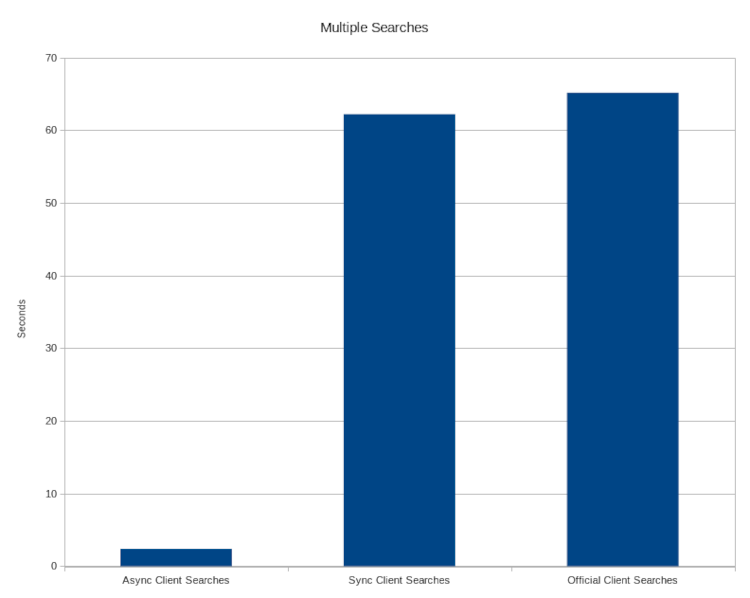
The following benchmarks compare this library to the official
Meilisearch Python library. Note that all
of the performance gains seen with the AsyncClient are achieved by taking advantage of asyncio.
This means that if your code is not taking advantage of asyncio or it does not block the event loop,
the gains here will not be seen and the performance between the clients will be very similar.
Add Documents in Batches
This test compares how long it takes to send 1 million documents in batches of 1 thousand to the Meilisearch server for indexing (lower is better). The time does not take into account how long Meilisearch takes to index the documents since that is outside of the library functionality.

Multiple Searches
This test compares how long it takes to complete 1000 searches (lower is better)
Independent testing
Prashanth Rao did some independent testing and found this async client to be ~30% faster than the sync client for data ingestion. You can find a good write-up of the results how he tested them in his blog post.
Documentation
See our docs for the full documentation.
Contributing
Contributions to this project are welcome. If you are interested in contributing please see our contributing guide
1 maintainer

Metadata
1 maintainer
Release files for meilisearch-python-sdk 8.0.0
For a detailed explanation of source distributions (sdists) and built distributions (wheels), please see the package formats documentation.
Source distribution (sdist)
| File | Size | Uploaded | |
|---|---|---|---|
| meilisearch_python_sdk-8.0.0.tar.gz | 249.3 kB | Details |
Built distribution (wheel)
| File | Interpreter | ABI | Platform | Reset |
|---|---|---|---|---|
| meilisearch_python_sdk-8.0.0-py3-none-any.whl | Python 3 | none | any | Details |
Total release size: 328.3 kB
Release files / meilisearch_python_sdk-8.0.0.tar.gz
| Download URL | meilisearch_python_sdk-8.0.0.tar.gz |
|---|---|
| Size | 249.3 kB |
| Tags | Source |
|
SHA-256 checksum How to use checksums |
9a973c1bad0ce2df4411799d738cb98c6e7594f7841b654830b1a0f4fa9f331a
|
|
BLAKE2b-256 checksum How to use checksums |
e64cbc12dba16046c7b2e121331a9da5efd2e232c04abb63cddbbeae1df6fbe1
|
| Upload date | |
|
Uploaded using Trusted Publishing? What is trusted publishing? |
Yes |
| Uploaded via |
uv/0.12.23 {"installer":{"name":"uv","version":"0.12.23","subcommand":["publish"]},"python":null,"implementation":{"name":null,"version":null},"distro":{"name":"Ubuntu","version":"24.04","id":"noble","libc":null},"system":{"name":null,"release":null},"cpu":null,"openssl_version":null,"setuptools_version":null,"rustc_version":null,"ci":true}
|
Release files / meilisearch_python_sdk-8.0.0-py3-none-any.whl
| Download URL | meilisearch_python_sdk-8.0.0-py3-none-any.whl |
|---|---|
| Size | 79.0 kB |
| Tags | Python 3 |
|
SHA-256 checksum How to use checksums |
a2233d802b04a55d3855c3e00eac17bd816a8747410dd8d768b4790df5510316
|
|
BLAKE2b-256 checksum How to use checksums |
b0c08186fcd5ec7e87ff9b13e5395e211c0b6ec8dfe1bfc5741716d97aa91d1e
|
| Upload date | |
|
Uploaded using Trusted Publishing? What is trusted publishing? |
Yes |
| Uploaded via |
uv/0.12.23 {"installer":{"name":"uv","version":"0.12.23","subcommand":["publish"]},"python":null,"implementation":{"name":null,"version":null},"distro":{"name":"Ubuntu","version":"24.04","id":"noble","libc":null},"system":{"name":null,"release":null},"cpu":null,"openssl_version":null,"setuptools_version":null,"rustc_version":null,"ci":true}
|














