
Python package for high-precision circadian melatonin profile analysis
Verified details
These details have been verified by PyPIProject links
GitHub Statistics
Maintainers

Project description
melafit

Python package for high-precision circadian melatonin profile analysis. Features a variety of baseline cosine functions for curve fitting (Van Someren & Nagtegaal, 2007) and a robust cost function for superior convergence, even with sparse data (Gabel et al., 2017).
Overview
melafit is a Python package designed for high-precision analysis of 24-hour melatonin secretion. While standard cosinor or harmonic analyses fail to capture the physiological nuances of the melatonin "wave," melafit implements several baseline cosine functions including bimodal, skewed and bimodal-skewed modifications. This approach accounts for the characteristic baseline, asymmetry and dual peaks often seen in high-resolution circadian melatonin data.
Furthermore, the library utilizes a specialized cost function developed to overcome common optimization hurdles (trivial all-zero solutions), ensuring stable convergence even when working with sparse or incomplete time series.
Its extensible architecture allows users to define custom waveform functions, cost functions, and result classes, enabling adaptation to diverse experimental paradigms beyond the built-in models.
Key Features
- Bimodal Waveform Fitting: Implementation of the Van Someren & Nagtegaal (2007) model for superior physiological accuracy.
- Optimized Convergence: Leverages the robust cost function described in Gabel et al. (2017) to ensure reliable fits across diverse datasets.
- Sparse Data Support: Capable of reconstructing full profiles and estimating circadian phase from limited data points, as well as determining dim light melatonin onset (DLMO) with partial data.
- Research-Ready: Direct derivation of
Amplitude,DLMOn,DLMOff,Midpoint,AreaandCOGmarkers from continuous, fitted waveforms.
Installation
melafit is available on PyPI and can be
installed with pip. However, installing directly into your system Python
environment without a virtual environment is strongly discouraged, as it may
cause conflicts with other packages. The recommended approach is to use
Miniforge as the package and environment
manager to create a dedicated virtual environment, as described below.
As a community-maintained tool that defaults to the conda-forge channel,
Miniforge carries no commercial licensing restrictions.
Standard installation
Download file
melafit.yml
to a directory of your choice (YOUR-DIRECTORY). Navigate to the directory,
create and activate the conda environment:
cd YOUR-DIRECTORY
conda env create -f melafit.yml
conda activate melafit
The environment configuration file
melafit.yml
explicitly uses conda-forge as the sole package channel and excludes all
other channels, ensuring reproducibility, avoiding potential conflicts between
packages from different channels, and eliminating any commercial licensing
concerns. melafit itself is installed from
PyPI via pip as part of the
environment setup. This will create a fully functional analysis environment,
including all supporting packages (numpy, scipy, pandas, openpyxl and
matplotlib).
Developer installation
Click to expand
If you intend to follow the development closely or contribute to the
package, clone the repository first to a dedicated directory
YOUR-DIRECTORY. Navigate to it and clone the repository as follows:
cd YOUR-DIRECTORY
git clone https://github.com/vitaliy-ch25/melafit.git
cd melafit
Then create and activate the conda environment using the developer
configuration file
melafit-dev.yml,
which installs melafit directly from the cloned directory in editable mode:
conda env create -f melafit-dev.yml
conda activate melafit
With an editable install, any changes to the source code in the cloned directory take effect immediately without reinstalling the package.
Updating
Standard update
Download the latest
melafit.yml
to YOUR-DIRECTORY. Navigate to it and run the update command as follows:
cd YOUR-DIRECTORY
conda env update -f melafit.yml --prune
This updates both the dependencies and melafit itself to the latest
released version.
Developer update
Click to expand
Navigate to the cloned repository directory and pull the latest version from the main branch:
cd YOUR-DIRECTORY/melafit
git pull
The editable install picks up the changes immediately. If dependencies in
melafit-dev.yml
have changed, also run:
conda env update -f melafit-dev.yml --prune
This updates both the dependencies and the melafit package itself to
the latest version.
Getting Started
Code examples and some dummy data demonstrating melatonin profile curve
fitting with this package are included in
./examples/ and
./data/. Copy
sample scripts and datasets to your working directory and start from there. If
you have performed the steps above as described, your script will 'see' all
the required packages from any location. Simply make sure to use the virtual
environment melafit you created.
Minimal example — fit a single participant and compute area/COG
Click to expand
"""
Determine phase markers from the full melatonin profile of one participant
via fitting the BSBCF function.
"""

import os
import matplotlib.pyplot as plt
from matplotlib import dates
import melafit as mf

# Read full profile data from Excel spreadsheet
data = mf.read_data("./data/dummy_data_full.xlsx")

# Prepare results directory and collector
result_path = "./results/one_fit/"
os.makedirs(result_path, exist_ok=True)
collector = mf.ResultsCollector()

participant = 1

# Prepare data for the participant
p_data = mf.prepare_part_data(data, participant)

# Fit curve and compute resampled waveform
res = mf.fit(p_data.Timestamp, p_data.Mel, mf.bsbcf)
resampled_t = mf.gen_time_range(p_data.Timestamp, step="1min")
resampled_f = mf.bsbcf(t=resampled_t, p=res)

# Compute area and COG
ac = mf.area_cog(resampled_t, resampled_f)

# Collect all results for this participant
meta = mf.SessionInfo(p_data)
collector.add(meta, res, ac)

# Print summary
print(meta)
print(res)
print(ac)

# Visualize results
title_str = (f"{meta}, {ac}, R²={res.r2:.3f}")

plt.close("all")
plt.figure(figsize=(12, 5))
plt.scatter(p_data.Timestamp, p_data.Mel, c='b')
plt.plot(resampled_t, resampled_f, 'g')
plt.xlabel("Time, hh:mm")
plt.gca().xaxis.set_major_formatter(dates.DateFormatter('%H:%M'))
plt.ylabel("Concentration, pg/ml")
plt.title(title_str)
plt.legend(["Melatonin data", "BSBCF curve"])
plt.savefig(result_path + f"mel_data_{participant}_BSBCF.png")

# Show plot for 1 second
plt.pause(1.0)

# Save results to Excel file
collector.save(result_path, "results_one_fit_BSBCF.xlsx")
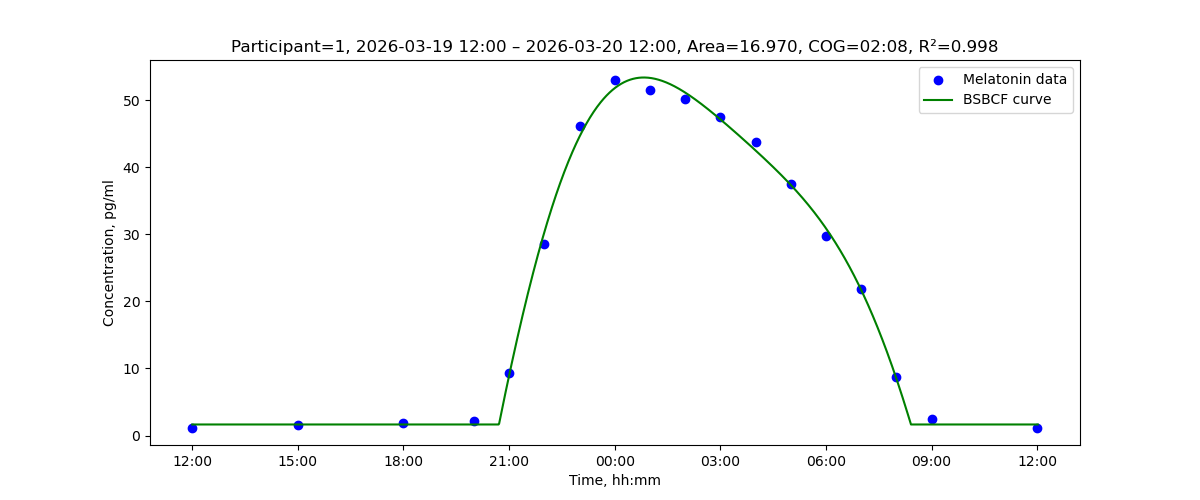
Running this code contained in example_one_fit.py produces the following text output in the terminal
Participant=1, 2026-03-19 12:00 – 2026-03-20 12:00
Fitted function: BSBCF, parameters: phi=0.108, b=1.650, H=65.766, c=0.235, v=0.185, m=0.198, R²=0.9978
Area=16.970, COG=02:08
and the following figure is displayed with a fitted BSBCF waveform and the data it was fitted to. Besides that, the results are stored to an Excel table results_one_fit_BSBCF.xlsx under ./results/one_fit/.
Data preparation
Follow the Excel table format and column naming conventions as in ./data/:
- Participant for study participant ID
- Date for dates of the respective samples
- Time for sample timestamps
- Mel for melatonin level values
Scientific Foundations
If you use melafit in your research, please cite the following foundational publications:
Human-Readable
- Van Someren, E. J., & Nagtegaal, E. (2007). Improving melatonin circadian phase estimates. Sleep Medicine, 8(6), 590-601.
- Gabel, V., et al. (2017). Differential impact in young and older individuals of blue-enriched white light on circadian physiology and alertness during sustained wakefulness. Scientific Reports, 7, 7620.
BibTeX
Click to expand
@article{vansomeren2007,
  title={Improving melatonin circadian phase estimates},
  author={Van Someren, Eus JW and Nagtegaal, Elsbeth},
  journal={Sleep Medicine},
  volume={8},
  number={6},
  pages={590--601},
  year={2007},
  publisher={Elsevier}
}

@article{gabel2017,
  title={Differential impact in young and older individuals of
         blue-enriched white light on circadian physiology and alertness
         during sustained wakefulness},
  author={Gabel, Virginie and Reichert, Carolin F and Maire, Micheline
          and Schmidt, Christina and Schlangen, Luc JM
          and Kolodyazhniy, Vitaliy and Garbazza, Corrado
          and Cajochen, Christian and Viola, Antoine U},
  journal={Scientific Reports},
  volume={7},
  pages={7620},
  year={2017},
  publisher={Nature Publishing Group}
}
If there is no associated publication on melafit yet, please cite the
package directly using the following reference:
Kolodyazhniy, V., & Cajochen, C. (2026). melafit: Python package for
high-precision circadian melatonin profile analysis (Version x.y.z).
[Computer software]. GitHub: https://github.com/vitaliy-ch25/melafit.
DOI: https://doi.org/10.5281/zenodo.20573831
Authors
- Vitaliy Kolodyazhniy – Lead Developer
- Christian Cajochen – Scientific Lead
Revision History
Click to expand
v0.6.0 - Resampling function
- New function resample_t for resampling input data to the given time axis
v0.5.3 - Bugfixes
- Fixed nan handling in abs_threshold() and func_defaults()
- Added respective unit tests
- Fixed related identifiers in .zenodo.json
v0.5.2 - Zenodo DOI and citation metadata
- Zenodo DOI registered; DOI badge added to README
CITATION.cffadded with full author metadata, ORCID identifiers and concept DOI for consistent citation across all releases.zenodo.jsonadded for automatic Zenodo metadata population on each future release, including author names, affiliations, ORCID identifiers and related publication DOIs- Package title updated to "melafit: Python package for high-precision
circadian melatonin profile analysis" across
CITATION.cff,.zenodo.jsonand the suggested citation reference in README - Package citation reference in README updated to use the permanent DOI
- Corrects the PyPI publishing failure in v0.5.1 caused by a versioning
error in
_version.py; v0.5.1 was released on GitHub and Zenodo only - Fixed a rendering issue inside the collapsible sections of the README on GitHub Pages
- Improved the Overview section of the README and added a github link to the recommended reference
- No changes to package functionality
v0.5.1 - Documentation and example fix
- Fixed a rendering issue in the README where content following collapsible sections was truncated on GitHub Pages
- In
example_one_fit.py, plt.pause(1.0) instead of plt.waitforbuttonpress() to avoid issues with the Spyder IDE when inline figures are configured - No changes to package functionality
v0.5.0 - API improvements and bugfixes
- New
dlmo()function inmarkers.pycomputes DLMO from the rising slope only, returning aDLMOResultwithdlmophase and threshold; raisesValueErrorwith a descriptive message (threshold value and data range) if the waveform never crosses the threshold - New
DLMOResultdataclass with__str__()andto_dict()(timing as HH:MM string); accepted byResultsCollector.add()alongsideSessionInfoandFitResult example_dlmo.pyupdated to usedlmo()and restricted tobcf/sbcf(bimodal functions are not appropriate for onset-only partial data);gen_time_range()call usesfull_day=False- Module docstrings added to all three example scripts
melafit/__init__.py: corrected description of the midpoint markerexample_one_fit.py:collector.add()now includes the fit result (res)- Unit tests added for
DLMOResult,dlmo(), andResultsCollectorintegration withDLMOResult day_profile()gains aninterpparameter (defaultNone) for optional interpolation of empty bins before averaging, useful for sparse raw data- All marker functions (
dlmo,midpoint,area_cog) now accept abinsizeparameter and applyinterp='linear'by default, so sparse inputs are interpolated automatically before phase/marker extraction amplitude()andarea_cog()switch tonp.nanmin/np.nanmaxso input NaNs (e.g. empty Excel cells) are ignored rather than propagated- Unit tests added for interior NaN handling (
TestInteriorNaNHandling) - Fixed a bug in
day_profile()that caused an error when the input data had a sampling period other than 1 minute; the function now correctly handles raw data and fitted curves at any temporal resolution. Combined with the newinterpparameter andbinsizesupport in the marker functions, it is now also possible to extract phase markers directly from raw data without any prior curve fitting or interpolation - Fitting and marker functions (
fit(),amplitude(),dlmo(),midpoint(),area_cog(),day_profile()) now acceptpd.Seriesfor value arguments andpd.Series/pd.DatetimeIndexfor time arguments gen_time_range()switched fromnp.arangeto integer step counting to avoid off-by-one errors from floating-point roundingarea_cog(): baseline fallback tonanminis now computed from the resampled waveform (afterday_profile()) rather than the raw inputarea_cog()andmidpoint()docstrings note the 24 h coverage assumption- Unit tests added:
TestSeriesInput(all new input combinations) andTestMarkersFromRawData(all four markers applied to sparse participant data without curve fitting)
v0.4.1 - Bugfix and documentation polish
ResultsCollector.save()now appends.xlsxonly when the supplied filename does not already end with.xlsx, preventing double-extension filenames such asresults.xlsx.xlsx- Unit test
test_save_filename_with_xlsx_extensionadded to verify that a filename passed with.xlsxalready present is written without modification - Docstrings improved in
markers.pyandresults.py - README: collapsible sections added for BibTeX citation block, Revision History, Developer installation, and Developer update; section captions and markup refined; recommended package/environment manager updated to Miniforge
midpoint()now raisesValueErrorwith a descriptive message (data range and threshold value included) when the threshold is never crossed, replacing a silentIndexErrorarea_cog()now raisesValueErrorwith a descriptive message when the baseline is never crossed from below, or when the area under the curve is zeroprepare_part_data()issueswarnings.warn()instead ofprint()when correcting a duplicate timestamp, so the message integrates with standard Python warning filters- Unused imports removed from
markers.py(phase_to_string) andutils.py(os,scipy.optimize) - Unit tests added:
test_threshold_never_crossed_raises(TestMidpoint),test_baseline_never_crossed_raisesandtest_zero_area_raises(TestAreaCog) pyproject.toml:keywords,classifiers, andDocumentationURL added
v0.4.0 - Improved API and examples
AmplitudeResultnow includes abaselinefield (waveform minimum)ResultsCollectorrecords and Excel output now include thebaselinecolumn__str__()added to allAnalysisRecordsubclasses for human-readableprint()output:SessionInfo: participant name and session date/time rangeAmplitudeResult: amplitude and baseline valuesMidpointResult: DLMOn, DLMOff and Midpoint timesAreaCogResult: area and COG timeFitResult: function name, parameters and R²AnalysisRecordbase: generic fallback derived fromto_dict()
- Example scripts updated to use
print(meta),print(res),print(mid, ac)directly via the new__str__representations - Unit tests extended to cover the new
baselinefield andResultsCollectorcolumn - All example scripts simplified to
import melafit as mf(single top-level import replaces multiplefrom melafit.xxx import ...lines) - New minimal getting-started example
example_one_fit.py: single-participant fit withbsbcf,area_cog, result collection, plot and Excel export os.makedirs(result_path, exist_ok=True)added toexample_dlmo.pyandexample_full_profile.pyso result directories are created automatically- README: collapsible getting-started example with output figure added to the Getting Started section
- Version is now managed in a single source of truth:
melafit/_version.pycontains__version__;pyproject.tomlusesdynamic = ["version"]with[tool.setuptools.dynamic]pointing tomelafit._version.__version__;melafit/__init__.pyimports and re-exports__version__from._version - Fixed citation author in module docstring: "Ruf et al. (1992)" → "Ruf (1992)"
v0.3.0 - Cleaner API
AnalysisResultrenamed toAnalysisRecordAnalysisInforenamed toSessionInfo; describes the data acquisition session only (participant,start,end);funcandr2removedSessionInfoconstructor simplified: accepts a singlep_dataDataFrame (as returned byprepare_part_data());participant,startandendare derived automaticallyFitResult.to_dict()now includesfunc(waveform function name) andr2(R² goodness of fit), both computed automatically at the end offit()r2is no longer a field ofSessionInfo;fit()computes and stores it inFitResultdirectlycompute_wave()eliminated; replaced by thegen_time_range()+ waveform-function pattern:gen_time_range()accepts a Timestamp series or explicittmin/tmaxbounds and a pandas offset string forstep, and returns a time axis as float days since the Unix UTC epoch, which is then passed directly to the waveform function (e.g.bsbcf(t=gen_time_range(series, step="1min"), p=fit_result))- New helper
to_days()converts timestamps to float days since the Unix UTC epoch; timezone-naive input is treated as UTC, timezone-aware input is converted to UTC first - New helper
from_days()is the inverse ofto_days(); returns a UTC-awarepd.DatetimeIndex day_profile(),midpoint()andarea_cog()now accept a float days array (as returned bygen_time_range()) in addition topd.DatetimeIndexfit()now accepts adatetime64array or pandasTimestampSeries fortime_fit; conversion viato_days()is automaticprepare_part_data()no longer adds aTimedayscolumn to the returned DataFrame; time handling is done internally viato_days()prepare_part_data()returns an independent copy of the participant's data; mutations to the returned DataFrame do not affect the original; redundantDateandTimecolumns are dropped (both are combined inTimestamp)
v0.2.0 - Simplified API
- New module
results.pywith classes:AnalysisResult(abstract base),AnalysisInfo,AmplitudeResult,MidpointResult,AreaCogResult,FitResultandResultsCollectorfor result management FitResultwrapsscipy.optimize.OptimizeResultin itsresultfield;fit()now returnsFitResultFitResultcan be passed directly to waveform functions andcompute_waveamplitude(),midpoint()andarea_cog()now return their respective result classes instead of tuples/floatsto_dict()on all result classes: timing fields returned asHH:MMstrings, other fields as native typesAnalysisInfo.r2defaults toNaNfor convenience in DLMO workflows- New
string_to_phase()utility function inutils.py(inverse ofphase_to_string) day_profile()accepts separate times and values parametersPARAM_NAMESrenamed toBUILTIN_PARAM_NAMES- Example scripts simplified via
ResultsCollectorand result classes - Unit tests for all new classes and methods
v0.1.3
- Improved documentation
- Developer installation option
v0.1.2
- Improved documentation
v0.1.1 - First PyPI release
- Enhanced function
fit()to support custom waveform functions with user-defined initial parameters and bounds - Changed named parameter order in
fit():cost_fandcost_pare now the last two parameters - Fixed returned type hints in
func_defaults() - Additional unit tests for new functionality
- Improved README
- Package registered in Python Package Index PyPI
v0.1.0 - First public release
- Dictionary support for waveform function parameters throughout the
package: all functions accept both
dictandnp.ndarrayfor parameter input - Named parameter constants:
BCF_PARAM_NAMES,SBCF_PARAM_NAMES,BBCF_PARAM_NAMES,BSBCF_PARAM_NAMESandPARAM_NAMESlookup - New utility functions
params_to_array()andarray_to_params()for conversion between array and named dictionary representations fit()now returns named parameter dictionary asres.pin addition to the standard scipyres.xarrayfit()now acceptscost_pdictionary for passing parameters to the cost function (e.g.{"eps": 1e-6})- New utility function
params_to_string()for human-readable parameter output - Fixed
area_cog(): baseline subtraction and bin size normalization - Unit tests for all public functions in
fitting,markersandutils
Initial revisions (v0.0.1 – v0.0.9)
- Full implementation of melatonin profile analysis as described in Gabel et al. (2017)
- Waveform functions:
bcf,sbcf,bbcf,bsbcf - Markers:
amplitude,midpoint,DLMOn,DLMOff,area,cog - Utilities:
read_data,prepare_part_data,compute_wave,day_profile,abs_threshold,time_to_phase,phase_to_string,phase_diff - Example scripts:
example_dlmo.py(DLMO from partial data) andexample_full_profile.py(full profile analysis) - MIT license, packaging metadata and README
License
This project is licensed under the MIT License. See the LICENSE file for details.
Project details
Verified details
These details have been verified by PyPIProject links
GitHub Statistics
Maintainers
Release history Release notifications | RSS feed


Download files
Download the file for your platform. If you're not sure which to choose, learn more about installing packages.
Source Distribution
Built Distribution
Filter files by name, interpreter, ABI, and platform.
If you're not sure about the file name format, learn more about wheel file names.
Copy a direct link to the current filters
File details
Details for the file melafit-0.6.0.tar.gz.
File metadata
- Download URL: melafit-0.6.0.tar.gz
- Upload date:
- Size: 49.6 kB
- Tags: Source
- Uploaded using Trusted Publishing? Yes
- Uploaded via: twine/6.1.0 CPython/3.13.12
File hashes
| Algorithm | Hash digest | |
|---|---|---|
| SHA256 |
42908a41c3f2c6f9dd72805f0110601eacac4839aff9e1058331aef75039c6cd
|
|
| MD5 |
78a401d430fb562e0fc0e42f9d60d04e
|
|
| BLAKE2b-256 |
472721ec5ff7c212c06ba8825f74f1ca8a80a47fbd577d52dfdc9e14ac519f93
|
Provenance
The following attestation bundles were made for melafit-0.6.0.tar.gz:
Publisher:
python-publish.yml on vitaliy-ch25/melafit
-
Statement:
-
Statement type:
https://in-toto.io/Statement/v1 -
Predicate type:
https://docs.pypi.org/attestations/publish/v1 -
Subject name:
melafit-0.6.0.tar.gz -
Subject digest:
42908a41c3f2c6f9dd72805f0110601eacac4839aff9e1058331aef75039c6cd - Sigstore transparency entry: 2071681756
- Sigstore integration time:
-
Permalink:
vitaliy-ch25/melafit@dcd9106dbf8a48994a9152a30fa443e2a6e008b7 -
Branch / Tag:
refs/tags/v0.6.0 - Owner: https://github.com/vitaliy-ch25
-
Access:
public
-
Token Issuer:
https://token.actions.githubusercontent.com -
Runner Environment:
github-hosted -
Publication workflow:
python-publish.yml@dcd9106dbf8a48994a9152a30fa443e2a6e008b7 -
Trigger Event:
release
-
Statement type:
File details
Details for the file melafit-0.6.0-py3-none-any.whl.
File metadata
- Download URL: melafit-0.6.0-py3-none-any.whl
- Upload date:
- Size: 30.0 kB
- Tags: Python 3
- Uploaded using Trusted Publishing? Yes
- Uploaded via: twine/6.1.0 CPython/3.13.12
File hashes
| Algorithm | Hash digest | |
|---|---|---|
| SHA256 |
71dd3616758c3be7834977089cd7f2053be0b0e34c2853a4d9fc65e093186d23
|
|
| MD5 |
1dc89a4cbce0e3835582e373777b6e59
|
|
| BLAKE2b-256 |
6f23569af880ce1af2128edc6b4e6f10d9e7635eb51b1836fa7c586fd25aee8c
|
Provenance
The following attestation bundles were made for melafit-0.6.0-py3-none-any.whl:
Publisher:
python-publish.yml on vitaliy-ch25/melafit
-
Statement:
-
Statement type:
https://in-toto.io/Statement/v1 -
Predicate type:
https://docs.pypi.org/attestations/publish/v1 -
Subject name:
melafit-0.6.0-py3-none-any.whl -
Subject digest:
71dd3616758c3be7834977089cd7f2053be0b0e34c2853a4d9fc65e093186d23 - Sigstore transparency entry: 2071681876
- Sigstore integration time:
-
Permalink:
vitaliy-ch25/melafit@dcd9106dbf8a48994a9152a30fa443e2a6e008b7 -
Branch / Tag:
refs/tags/v0.6.0 - Owner: https://github.com/vitaliy-ch25
-
Access:
public
-
Token Issuer:
https://token.actions.githubusercontent.com -
Runner Environment:
github-hosted -
Publication workflow:
python-publish.yml@dcd9106dbf8a48994a9152a30fa443e2a6e008b7 -
Trigger Event:
release
-
Statement type:






