
Memory that AI Agents Love!

Project description

Memanto - Memory that AI Agents Love!







What Is MEMANTO?
MEMANTO is a universal memory layer for agentic AI. While LLMs often forget context between sessions, MEMANTO gives your agents long-term memory so they can carry context forward and remember what matters across sessions.
Why MEMANTO Performs
MEMANTO is built for teams that want high-quality agent memory without graph-heavy complexity. It combines immediate semantic availability, low-overhead serverless operation, and strong real-world memory accuracy so you can ship production workflows with a simpler architecture.
- Zero-cost ingestion latency: No indexing wait or token usage at ingestion, so memories are available for retrieval immediately.
- Zero storage cost at idle: Serverless architecture scales to zero when not in use.
- State-of-the-art benchmark performance: Final evaluation results reached 89.8% on LongMemEval and 87.1% on LoCoMo.
🏗️ Architecture
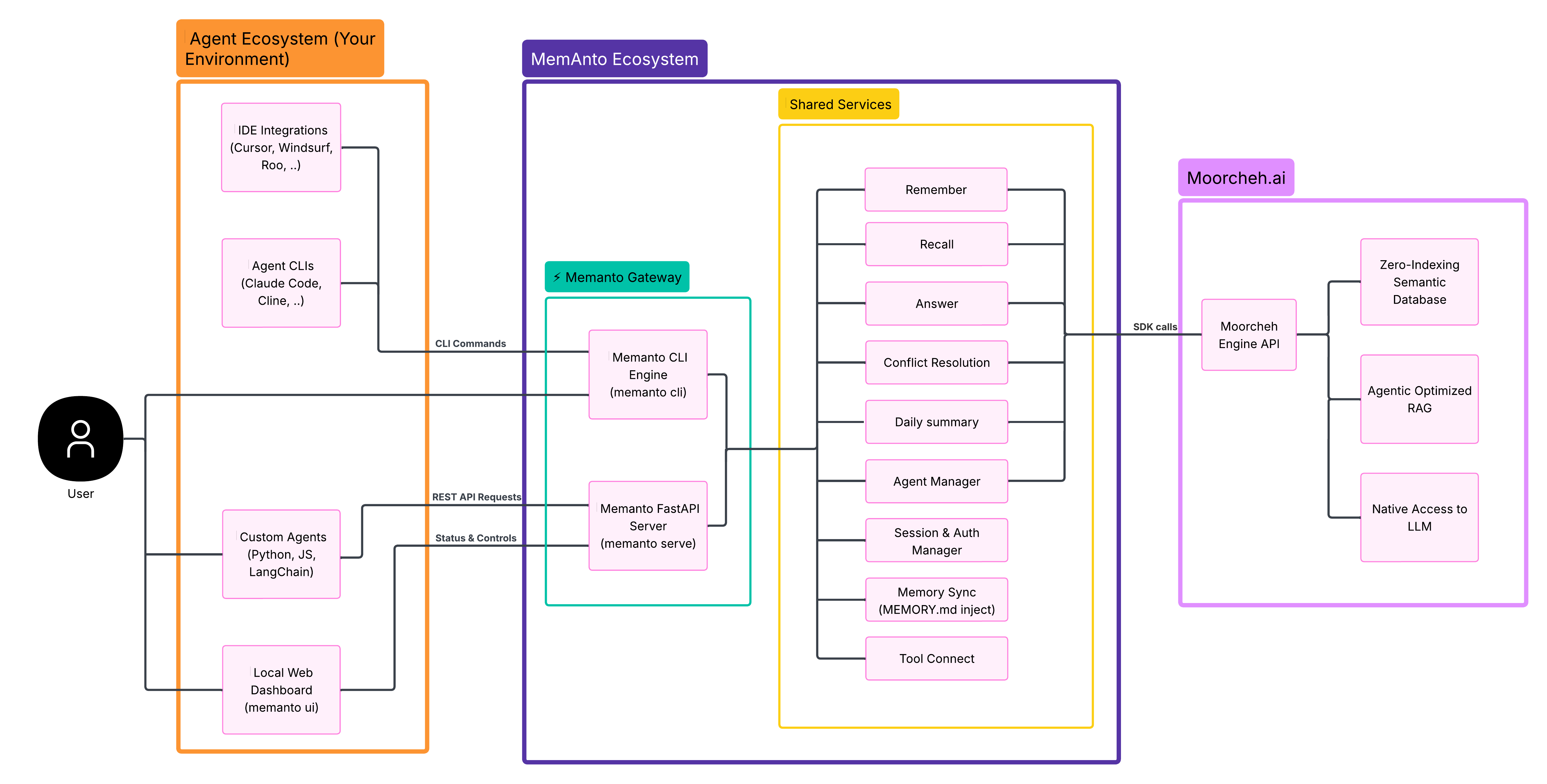
📺 Setup & Demo

🚀 MEMANTO CLI
MEMANTO comes with a powerful, developer-friendly Command Line Interface. You can manage your agent's memories completely from your terminal—no local server required!
You need a Moorcheh API key to use MEMANTO. Create one in the Moorcheh Dashboard.
MEMANTO has native LLM access, so you don't need a separate external model API key for common memory workflows.
1. Install & Configure
pip install memanto

# Setup your environment (prompts for your Moorcheh API key)
memanto
2. Test Agent Memories
# Create and auto-activate an agent session
memanto agent create customer-support

# Store memories with specific semantic types
memanto remember "The user prefers dark mode for the dashboard."
memanto remember "User's timezone is PST."

# Instantly recall relevant context
memanto recall "What mode does the user like?"

# Get grounded AI answers using built-in RAG
memanto answer "Based on the memory, what should the theme be set to?"
Supported Memory Types
instruction, fact, decision, goal, commitment, preference, relationship, context, event, learning, observation, artifact, error
Use memory types to categorize what you store so retrieval is cleaner and more controllable:
- Save with a specific type:
memanto remember "User prefers concise answers" --type preference - Filter by type when searching:
memanto recall "user communication style" --type preference
Key Features
| Capability | Commands | What it does |
|---|---|---|
| System status dashboard | memanto status |
View environment, configuration, server health, active session, and registered agents. |
| Local REST API + Web UI | memanto serve, memanto ui |
Run the MEMANTO REST API locally and open an interactive browser UI. (Optional for CLI usage). |
| Agent lifecycle management | memanto agent ... |
Create/list/delete agents, activate/deactivate sessions, and run agent bootstrap for an intelligence snapshot. |
| Memory capture at scale | memanto remember |
Store single memories with metadata or batch-ingest up to 100 records from JSON. |
| File upload to memory | memanto upload |
Upload documents (.pdf, .docx, .xlsx, .json, .txt, .csv, .md) directly into an agent's memory namespace — content becomes instantly searchable via recall. |
| Advanced retrieval modes | memanto recall |
Run standard search plus temporal queries (--as-of, --changed-since, --current-only) with filters. |
| Grounded QA over memory | memanto answer |
Generate RAG answers using retrieved memory context. |
| Daily intelligence workflows | memanto daily-summary, memanto conflicts |
Generate summaries, detect contradictions, and resolve conflicts interactively. |
| Session and automation controls | memanto session ..., memanto schedule ... |
Inspect/extend sessions and enable scheduled daily summary runs. |
| Memory file pipelines | memanto memory export, memanto memory sync |
Export structured memory markdown and sync MEMORY.md into projects. |
| Configuration inspection | memanto config show |
Inspect API key status, active agent/session, server settings, and schedule time. |
| Multi-agent ecosystem integration | memanto connect ... |
Connect/remove/list integrations for Claude Code, Codex, Cursor, Windsurf, Antigravity, Gemini CLI, Cline, Continue, OpenCode, Goose, Roo, GitHub Copilot, and Augment (local or global). |
Additional setup guides are available at the Moorcheh YouTube channel.
🎯 REST API Endpoints
For programmatic access, MEMANTO exposes a clean, session-based REST API.
Important: MEMANTO does not have a hosted API server yet. To use these endpoints, run your own local server first:
cd memanto

# Start server
memanto serve

# Or run with Docker
docker-compose up -d
By default, call the endpoints on your local server (for example: "http://127.0.0.1:8000").
Agent Management
POST /api/v2/agents- Create a new agent namespaceGET /api/v2/agents- List all available agentsGET /api/v2/agents/{agent_id}- Get metadata for a specific agentDELETE /api/v2/agents/{agent_id}- Delete an agent and all its memories
Session Management
POST /api/v2/agents/{agent_id}/activate- Start a session (returns a 6-hour JWTsession_token)POST /api/v2/agents/{agent_id}/deactivate- Manually end a sessionGET /api/v2/session/current- Check the status/validity of the current sessionPOST /api/v2/session/extend- Extend the session expiration time
Memory Operations
POST /api/v2/agents/{agent_id}/remember- Store a new memory into the agent's semantic databasePOST /api/v2/agents/{agent_id}/batch-remember- Batch-store up to 100 memories in one requestPOST /api/v2/agents/{agent_id}/upload-file- Upload a file (.pdf, .docx, .xlsx, .json, .txt, .csv, .md) — content is chunked and made searchableGET /api/v2/agents/{agent_id}/recall- Run an exact semantic search against the agent's memoriesPOST /api/v2/agents/{agent_id}/answer- Generate a grounded RAG answer based on the agent's memories
Authentication Required:
Authorization: Bearer {moorcheh_api_key}headerX-Session-Token: {session_token}header (for Session & Memory operations)
🤖 Why Moorcheh?
Moorcheh.ai - The world's only no-indexing semantic database.
The Revolutionary Difference
Traditional Vector DBs: Minutes of indexing delay, approximate search, stateful architecture
Moorcheh: Instant availability, exact search, serverless/stateless, 80% compute savings
Real Impact
| Feature | Traditional | Moorcheh |
|---|---|---|
| Write-to-Search | Minutes | Instant |
| Accuracy | Approximate | Exact |
| Idle Costs | Always running | Zero |
| Free Tier | Limited | 100K ops/month |
📄 Research & Results
MEMANTO is backed by peer-reviewed research. For benchmark results, methodology, and technical details, see our paper on Hugging Face:
Memanto: Typed Semantic Memory with Information-Theoretic Retrieval for Long-Horizon Agents
🌟 If you find this project useful, please upvote the paper on Hugging Face! It helps the research reach more people in the community.
You can also explore our models and resources on the Moorcheh Hugging Face organization page.
If you use MEMANTO in your research, please cite:
@misc{abtahi2026memantotypedsemanticmemory,
      title={Memanto: Typed Semantic Memory with Information-Theoretic Retrieval for Long-Horizon Agents},
      author={Seyed Moein Abtahi and Rasa Rahnema and Hetkumar Patel and Neel Patel and Majid Fekri and Tara Khani},
      year={2026},
      eprint={2604.22085},
      archivePrefix={arXiv},
      primaryClass={cs.AI},
      url={https://arxiv.org/abs/2604.22085},
}
📞 Support & Documentation
Have questions or feedback? We're here to help:
- Docs: https://docs.memanto.ai
- Discord: Join our Discord server
- Email: support@moorcheh.ai
MIT License


Download files
Download the file for your platform. If you're not sure which to choose, learn more about installing packages.
Source Distribution
Built Distribution
Filter files by name, interpreter, ABI, and platform.
If you're not sure about the file name format, learn more about wheel file names.
Copy a direct link to the current filters
File details
Details for the file memanto-0.0.6.tar.gz.
File metadata
- Download URL: memanto-0.0.6.tar.gz
- Upload date:
- Size: 534.2 kB
- Tags: Source
- Uploaded using Trusted Publishing? No
- Uploaded via: twine/6.1.0 CPython/3.13.12
File hashes
| Algorithm | Hash digest | |
|---|---|---|
| SHA256 |
6d192e4d32ebe8a129139abe7be0b36db270721ee3d8d6651f141d31d917fbdb
|
|
| MD5 |
670ff50e11103f2461d3d62594b7af50
|
|
| BLAKE2b-256 |
61176c641d372ae31ff822a43c46dd5841be2ea695dab67c0a4d1a31a60526c9
|
File details
Details for the file memanto-0.0.6-py3-none-any.whl.
File metadata
- Download URL: memanto-0.0.6-py3-none-any.whl
- Upload date:
- Size: 180.8 kB
- Tags: Python 3
- Uploaded using Trusted Publishing? No
- Uploaded via: twine/6.1.0 CPython/3.13.12
File hashes
| Algorithm | Hash digest | |
|---|---|---|
| SHA256 |
8da864dccab4a6dacb2eb35e414ccb0355a1aea7d78efe542e72d42b5085a255
|
|
| MD5 |
d363fde316d70a8d1642610c5b1791d5
|
|
| BLAKE2b-256 |
643a350ed0d025e73fef3ce3659ab6e2862bec6c402c901c36faaf088f18fa7b
|






