

Memory
The Memory Layer for AI That Never Forgets
Give every AI agent and LLM interface persistent, cross-platform memory out of the box.






Demo • Features • Architecture • Benchmarks • Quickstart • Configuration
Updates / News
- [1 June 2026] Memory now has a native Golang implementation of its memory layer. Built for higher throughput, lower latency, and production-scale deployments where memory needs to operate reliably across millions of interactions.
- [25 May 2026] Local workspace support is now live. Set up Memory locally in just 3 commands and start building with memory in minutes. See Local.md for setup instructions.
npx create-memory@latest
cd memory
npm run dev
What is Memory?
Every conversation with an LLM starts from scratch. Switch tools, switch providers, come back next week and all context is gone.
Memory is India's #1 Open Source Agentic Memory Layer, we’re introducing Memory-as-a-Service i.e memory layer for every AI use case, domain, whether it’s temporal memory for long-running agents, medical memory for patient context, enterprise memory for teams and projects, or developer memory for coding agents and workflows.
This is a first-of-its-kind agentic memory layer for stateful AI. Unlike traditional memory systems that simply store and retrieve chunks, Memory turns memory into an active reasoning process. It decides what to remember, what to update, what to forget, and dynamically routes each memory to the right specialized agent & store.
Demo
Just type "X" on any AI platform of your choice and choose between the four modes Memory offers to seamlessly store and search your memories, import context from existing chats, or work with indexed repos.
https://github.com/user-attachments/assets/8e3349ab-63c9-4046-821d-ca8097948440
Features
Chrome Extension
The Memory Chrome extension brings persistent memory to ChatGPT, Claude, Gemini, DeepSeek, and Perplexity.
Live Search & Inject - As you type a prompt, Memory searches your memory in real time and shows a floating chip. One click injects relevant context directly into your input, zero friction.
Background Auto-Save (Xingest) - When you hit "Send", Memory asynchronously captures the conversation turn. A background queue extracts facts and summaries without touching your UI.
https://github.com/user-attachments/assets/97793cf9-d247-4d02-9c31-3cc9bbbf89aa
Agent Plugins
The new plugin/ folder brings Memory directly into developer agents and coding assistants. It includes first-party integrations for Claude Code, Codex, Cursor, Hermes, OpenClaw, and OpenCode, so agents can search existing memory, save durable project knowledge, and carry context across sessions while keeping API keys in environment variables or client-specific secret stores.
Context
Context lets you bring an existing conversation into Memory without manually copy pasting anything.
Paste a shared ChatGPT, Claude, or Gemini link. Memory opens it, extracts every user and assistant message, and runs the full ingest pipeline so the conversation becomes searchable memory.
You can also upload a transcript file (text, markdown, or JSON). Memory has built in parsing for Cursor and Antigravity exports and uses an LLM fallback for unknown formats.
https://github.com/user-attachments/assets/4ff22405-b7ad-4b78-9189-9a6e3ebd5e40
Scanner
Scanner indexes entire Git repositories and builds a queryable knowledge graph of your codebase.
Once indexed, you can ask natural language questions about files, functions, dependencies, and impact. Use it to understand a new repo, find where a feature lives, trace how code connects, or figure out what would break if you changed something.
https://github.com/user-attachments/assets/f0fd393e-3820-404b-8d0e-e452e1dd52d0
Multi-Domain Classification
Not all memory is the same, and treating it that way is why other solutions underperform. Memory's Classifier Agent analyzes every piece of incoming data and routes it to the right domain:
| Domain | What It Stores | Example | Storage |
|---|---|---|---|
| Profile | Permanent user facts, preferences, identity | "I prefer Go over Python for backends" | Pinecone |
| Temporal | Time-anchored events with date resolution | "I got promoted to Staff Engineer yesterday" | Neo4j |
| Summary | Compressed conversation takeaways | "Discussed migration from REST to gRPC" | Pinecone |
| Code | Annotations, bugs, explanations tied to symbols | "This retry logic has a race condition" | Neo4j + Pinecone |
| Snippet | Personal code patterns and utilities | "Here's my standard error handler in Go" | Pinecone |
| Image | Visual observations and descriptions | Screenshot of architecture diagram | Pinecone |
V2 image ingest: An attached image is analysed once at low detail, rendered as one cohesive set of plain facts, and passed through the normal Profile, Summary, and Temporal lifecycle. V2 does not create a separate Image memory. The deprecated V1 API retains its legacy Image domain behavior.
Agentic Retrieval
When you query Memory, retrieval is not a simple vector search. The LLM itself decides what to look up:
- Tool Selection - The retrieval LLM analyzes your query and calls the appropriate search tools (SearchProfile, SearchTemporal, SearchSummary, SearchSnippet), potentially multiple in parallel.
- Synthesis - Results from all search tools are aggregated and the LLM generates a cited answer with source references.
This means asking "What's my preferred tech stack and when did I last refactor the auth module?" triggers both a profile lookup and a temporal search automatically.
Multi-LLM Orchestration with Fallback
Memory isn't locked to one provider. It orchestrates across Gemini, Claude, OpenAI, OpenRouter, Amazon Bedrock, and Ollama with automatic failover:
gemini -> claude -> openai -> bedrock -> ollama
If your primary LLM rate limits or goes down, Memory silently falls back to the next provider. Each agent can be pinned to a specific model. The fallback order is fully configurable.
Runs Locally
No cloud dependency required. Run Memory with Ollama for LLM, FastEmbed for embeddings, and Chroma or SQLite for vector storage:
pip install -e ".[local]"
Architecture
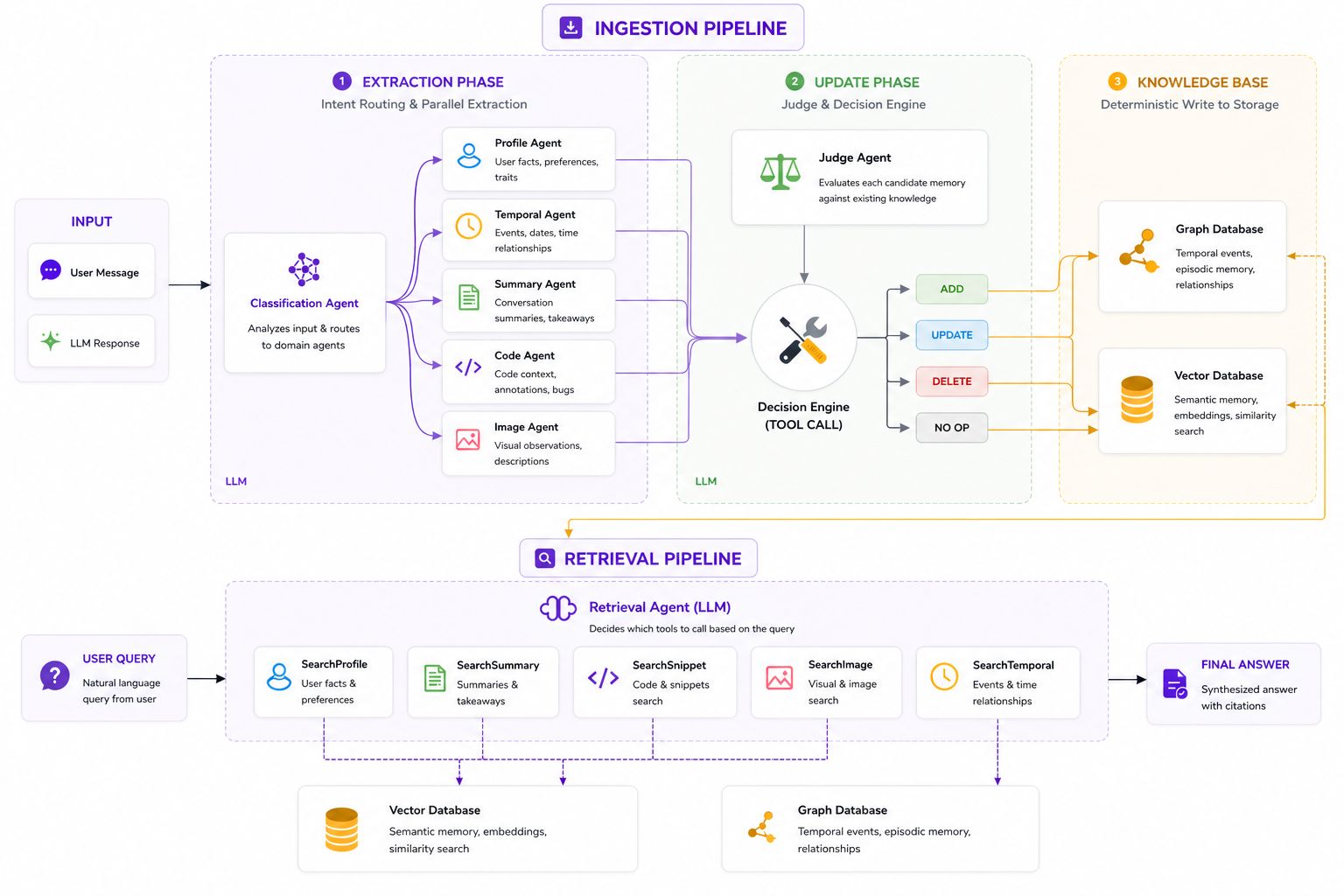
Memory is built as a pipeline of specialized AI agents coordinated by LangGraph, backed by a deterministic execution layer (Weaver) and three purpose-built storage engines.
Ingestion Flow
User Input (SDK / Chrome Extension / API)
         |
         v
   +--------------+
   |  Classifier   |    Analyzes text, routes to domains
   +------+-------+
          |
    +-----+-----+------+----------+
    v     v     v      v          v
 Profile Temporal Summary Code  Snippet     Domain agents extract
 Agent   Agent   Agent  Agent   Agent       structured data in parallel
    |     |      |      |        |
    v     v      v      v        v
   +----------------------------------+
   |          Judge Agent             |     Compares against existing memory
   |   (ADD / UPDATE / DELETE / NOOP) |     Prevents duplicates & staleness
   +----------------+-----------------+
                    |
                    v
   +----------------------------------+
   |        Weaver (Rust core)        |     Deterministic executor
   |  Pinecone | Neo4j | MongoDB     |     No LLM. Pure software logic.
   +----------------------------------+
- Classifier routes input to the relevant domains.
- Domain Agents extract structured data in parallel. In V2, the Image agent is a preprocessing step whose output re-enters the Profile, Summary, and Temporal lifecycle; deprecated V1 retains its legacy standalone Image domain.
- Judge Agent compares each extraction against existing memory and decides: ADD, UPDATE, DELETE, or NOOP.
- Weaver deterministically executes the Judge's decisions across all storage backends. The core is implemented as a standalone Rust crate with no LLM involvement.
High-effort mode automatically splits long inputs into overlapping chunks (~200 tokens) and processes them in parallel, then merges results to ensure nothing is missed in lengthy conversations.
Retrieval Flow
User Query
    |
    v
+----------------------------------+
|       Retrieval LLM              |
|  Decides which tools to call:    |
|  SearchProfile, SearchTemporal,  |
|  SearchSummary, SearchSnippet    |
+----------------+-----------------+
                 |
    +------------+------------+
    v            v            v
 Pinecone      Neo4j      Pinecone        Parallel search execution
 (profiles)   (events)   (summaries)
    |            |            |
    +------------+------------+
                 v
+----------------------------------+
|   Answer Synthesis + Citations   |    LLM generates answer with sources
+----------------------------------+
Storage
| Engine | Purpose | Used For |
|---|---|---|
| Pinecone | High speed vector similarity search | Profiles, summaries, snippets, code annotations |
| Neo4j | Graph traversal + temporal reasoning | Events, code knowledge graph, annotations |
| MongoDB | Raw document storage | Scanned code, file metadata, scan state |
Benchmarks
We tested Memory against every major memory solution on two established academic benchmarks. Memory outperforms across the board.
LoCoMo
Tests compositional reasoning over memory. Can the system connect facts across conversations, reason about temporal relationships, and answer open-ended questions?
| Method | Single-Hop (%) | Multi-Hop (%) | Open Domain (%) | Temporal (%) | Overall (%) |
|---|---|---|---|---|---|
| MEMORY (Ours) | 90.6 | 92.3 | 91.2 | 91.9 | 91.5 |
| Zep | 74.11 | 66.04 | 67.71 | 79.79 | 75.14 |
| Memobase (v0.0.37) | 70.92 | 46.88 | 77.17 | 85.05 | 75.78 |
| Mem0g (YC 24) | 65.71 | 47.19 | 75.71 | 58.13 | 68.44 |
| Mem0 (YC 24) | 67.13 | 51.15 | 72.93 | 55.51 | 66.88 |
| LangMem | 62.23 | 47.92 | 71.12 | 23.43 | 58.10 |
| OpenAI | 63.79 | 42.92 | 62.29 | 21.71 | 52.90 |
On multi-hop reasoning (connecting facts from different conversations), Memory beats the next best system by 26.3 points. Overall, Memory leads all systems at 91.5%, ahead of Zep at 75.14.
LongMemEval-S
The industry standard benchmark for long-term conversational memory. Tests whether a system can recall facts, track preference changes, reason about time, and maintain context across sessions.
| Category | Memory (Gemini 3-flash) | Backboard.io (GPT-4o) | Mastra (GPT-4o) | Supermemory (GPT-4o) |
|---|---|---|---|---|
| Multi-Session | 93.6 | 91.7 | 79.7 | 71.43 |
| Temporal Reasoning | 94.5 | 91.7 | 85.7 | 76.69 |
| Single-Session Assistant | 96.43 | 98.2 | 82.1 | 96.43 |
| Single-Session User | 97.1 | 97.1 | 98.6 | 97.14 |
| Knowledge Update | 91.2 | 93.6 | 85.9 | 88.46 |
| Single-Session Preference | 87.0 | 90.0 | 73.3 | 70.0 |
Memory matches Backboard.io across all categories, both scoring near-perfect on session recall and preference tracking. Memory outperforms Mastra by 9.2 points and Supermemory by 11.8 points overall.
How We Benchmark
- Evaluation: LLM-as-Judge using Gemini with structured rubrics
- Fairness: All systems tested with identical conversation histories and queries
Quickstart
Local Memory
npx create-memory@latest
cd memory
npm run dev
This works on Windows, macOS, and Linux. It creates a local Memory workspace, installs the backend, starts local storage, builds the Chrome extension, and launches the API at http://localhost:8000.
Local prerequisites:
- Git
- Node.js 20+
- Python 3.11+
- Docker Desktop
- Ollama, unless you add a cloud LLM key to
.env
After setup, load the extension from:
repos/memory-extension/dist
Chrome path: chrome://extensions -> enable Developer mode -> Load unpacked.
Local Commands
npm run setup
npm run start
npm run verify
npm run doctor
If .env contains a real cloud LLM key, Memory uses that provider and keeps embeddings local with FastEmbed. If no cloud key is configured, Memory falls back to local Ollama and pulls the required local models during setup.
Context Portability
npm run context:export
npm run context:import -- --file ./exports/memory-context.json
npm run context:sync -- --file ./exports/memory-context.json --server https://api.memory.in --api-key <key>
context:export writes a local context bundle that can be imported later or synced to an Memory server.
Index a Repository
python -m src.scanner.runner \
  --org your-org \
  --repo your-repo \
  --url https://github.com/your-org/your-repo.git \
  --enrich
Configuration
Memory is highly configurable. Override any agent's model, tune the fallback chain, or adjust quality/speed tradeoffs.
| Setting | Default | Description |
|---|---|---|
FALLBACK_ORDER | openrouter,gemini,claude,openai | Provider failover sequence |
DEEPSEEK_API_KEY | empty | DeepSeek API key for the official OpenAI-compatible endpoint |
MIMO_API_KEY | empty | Xiaomi MiMo API key for the official OpenAI-compatible endpoint |
CLASSIFIER_MODEL | default model | Override model for classifier agent |
JUDGE_MODEL | default model | Override model for judge agent |
RETRIEVAL_MODEL | default model | Override model for retrieval synthesis |
EMBEDDING_MODEL | gemini-embedding-001 | Text embedding model |
EMBEDDING_PROVIDER | auto | auto, gemini, bedrock, ollama, fastembed |
VECTOR_STORE_PROVIDER | pinecone | pinecone, pgvector, chroma, sqlite |
PINECONE_DIMENSION | 768 | Embedding vector dimension |
RATE_LIMIT | 60 | API requests per minute |
TEMPERATURE | 0.4 | LLM generation temperature |
Production deployment
Pushes to GitLab main are validated before the exact commit is deployed to EC2 and both the memory API and memory-v2-worker services are restarted and health-checked.
Deployment credentials are supplied through protected, production-scoped GitLab CI/CD variables.
1 maintainer

Metadata
1 maintainer
Release files for memcode 0.1.0
For a detailed explanation of source distributions (sdists) and built distributions (wheels), please see the package formats documentation.
Source distribution (sdist)
| File | Size | Uploaded | |
|---|---|---|---|
| memcode-0.1.0.tar.gz | 838.1 kB | Details |
Built distribution (wheel)
| File | Interpreter | ABI | Platform | Reset |
|---|---|---|---|---|
| memcode-0.1.0-py3-none-any.whl | Python 3 | none | any | Details |
Total release size: 1.7 MB
Release files / memcode-0.1.0.tar.gz
| Download URL | memcode-0.1.0.tar.gz |
|---|---|
| Size | 838.1 kB |
| Tags | Source |
|
SHA-256 checksum How to use checksums |
b92e7a79fe41efac140d118c0c7f032d51507581c3dfdb9b6dc3d4af0631d258
|
|
BLAKE2b-256 checksum How to use checksums |
7e8a106b0948cf495c04089a7cb8aff5f60abb5955eb10ecca9981b3277e819b
|
| Upload date | |
|
Uploaded using Trusted Publishing? What is trusted publishing? |
No |
| Uploaded via |
twine/7.0.0 CPython/3.14.4
|
Release files / memcode-0.1.0-py3-none-any.whl
| Download URL | memcode-0.1.0-py3-none-any.whl |
|---|---|
| Size | 895.1 kB |
| Tags | Python 3 |
|
SHA-256 checksum How to use checksums |
14fc0cce86d567aa00371bb29ebefe5bd1703ccb664de8e959ecd52625505b2c
|
|
BLAKE2b-256 checksum How to use checksums |
6b576b853f3aba87a5b678c353c295ef1c1f203e45c7af56b8db2e29f476a3c1
|
| Upload date | |
|
Uploaded using Trusted Publishing? What is trusted publishing? |
No |
| Uploaded via |
twine/7.0.0 CPython/3.14.4
|













