

MemDream
A Python library that gives your AI agent long-term memory that maintains itself.




Install · Quick start · The whole API · Dream · Your prompts · How it works
What is MemDream?
MemDream is a library you import into your own code. There is no server to run
and nothing to deploy: your agent calls mem.add(...) and mem.search(...), and
MemDream keeps the memory correct over time.
Most "agent memory" is a vector database with an add() call. That works right up
until the user contradicts themselves. Tell it "I live in Chennai", then later
"I moved to Bangalore", and a plain vector store now holds both — and
answers with whichever is worded closer to the question.
MemDream reasons about every new fact against what it already knows, using prompts you write, and one of four things happens:
| When | What happens to the old memory | |
|---|---|---|
| ADD | Genuinely new fact | — |
| SUPERSEDE | Contradicts something stored | Kept as history, marked superseded, points at its replacement |
| MERGE | Same fact, said better | Kept as history, marked merged, points at the canonical version |
| NOOP | Adds nothing | Nothing changes — and the reason is recorded |
Then, in the background, Dream reads across a user's memories, writes down the patterns none of them state individually, and retires facts that are no longer true. You do not have to schedule anything.
Install
pip install memdream
Add extras for the providers you use:
pip install "memdream[anthropic]"          # Claude
pip install "memdream[gemini,postgres]"    # several at once
Pin a version (memdream==0.1.1) in anything that matters. Releases and upgrade
notes: CHANGELOG.md. The latest unreleased code:
pip install "memdream @ git+https://github.com/Mamlesh18/MemDream.git".
Python 3.10+. OpenAI, Azure OpenAI, Ollama, Together and Fireworks need no extra.
Quick start
1. Get the starter prompts. MemDream decides how to remember; your prompts decide what is worth remembering for your product. Copy the starter set and edit it later:
python -m memdream prompts ./prompts
2. Set your model key in the environment (keys never go in code):
export OPENAI_API_KEY=sk-...
3. Use it:
from memdream import MemDream

mem = MemDream(
    user_id="alice",                          # whose memory this is
    prompts="./prompts",
    llm="openai:gpt-4o-mini",
    embeddings="openai:text-embedding-3-small",
    database="memory",                        # no database needed to try it
)

mem.add("I live in Chennai.")
mem.add("I moved to Bangalore last month.")   # -> SUPERSEDE: Chennai becomes history

print(mem.search("Where does the user live?", latest_only=True).as_context())
# - User lives in Bangalore.
database="memory" keeps everything in your process and forgets it when the
process exits — ideal for trying MemDream and for tests. For real use, point it
at MongoDB or PostgreSQL and nothing else changes:
mem = MemDream(user_id="alice", prompts="./prompts",
               llm="openai:gpt-4o-mini", embeddings="openai:text-embedding-3-small",
               database="mongodb://localhost:27017/memdream")
# or database="postgresql://user:pass@localhost/memdream"
No API key yet? python examples/quickstart.py (from a clone) runs the whole
system on offline stand-ins for the model, the embedder and the database.
The whole API
Every method is on the mem object. Scope (user_id) is set once in the
constructor; pass user_id=... on any call to act for someone else.
Remember
result = mem.add("I'm vegetarian and I work at Acme.")   # your prompts decide what to keep
result.action                  # "ADD" | "SUPERSEDE" | "MERGE" | "NOOP"
result.memory_id               # the memory written or kept
result.superseded_memory_ids   # what it replaced, if anything
Recall
found = mem.search("What does the user eat?", latest_only=True, limit=5)
found.as_context()             # "- User is vegetarian." — ready to drop into a prompt
for m in found:
    m.content, m.score, m.memory_type
Add, edit and delete by hand
When you already know exactly what to store, skip the model entirely:
m = mem.create("User is allergic to peanuts.", memory_type="constraint")
mem.update(m.memory.memory_id, content="User has a severe peanut allergy.")

mem.forget(memory_id)          # retire it: out of search, still in history — reversible
mem.delete(memory_id)          # erase it for good — not reversible
mem.purge(confirm=True)        # erase everything about this user (e.g. a GDPR request)
Inspect
mem.get(memory_id)             # one memory, with what it replaced and what it came from
mem.list()                     # active memories, no query needed
mem.history(memory_id)         # the chain of facts it superseded: "where did they live before?"
mem.audit()                    # every decision and why — including the NOOPs
mem.stats()                    # counts, token spend, estimated cost
Dream, on demand
mem.synthesize(wait=True)      # look for patterns across this user's memories now
mem.consolidate()              # dry run: what would be retired, changing nothing
mem.consolidate(dry_run=False) # do it
Full reference, every argument: docs/sdk.md.
In an agent turn loop
Works with any framework:
memories = mem.search(user_message, latest_only=True)            # recall
reply = your_llm(system_prompt + memories.as_context(), user_message)
mem.add(user_message)                                            # remember
Recall before responding, remember after — otherwise the current message
becomes context for answering itself. In a web server, use AsyncMemDream (the
same methods, awaited) and do the add in the background so the user is not
waiting on it.
Working examples: examples/custom_agent.py (any
framework) · examples/semantic_kernel_agent.py
(Semantic Kernel) · examples/embedded.py.
Create one MemDream per process and reuse it — it holds the database and
model connections. Close it on shutdown (mem.close(), or use with MemDream(...) as mem:).
Dream runs on its own
You do not need a cron job, a worker or a queue. With the default
auto_dream=True, as long as your process is running:
| What | When | Costs a model call? |
|---|---|---|
| Synthesis — writes pattern memories ("User usually orders vegetarian on weekdays") with links to their evidence | after a user gains 20 new memories, at most every 6 hours | yes, one per cluster |
| Expiry — retires memories whose validity has ended ("on leave until Friday", or a fact that was superseded) | once a day, 00:00 UTC | no |
| Compaction — folds piles of low-value memories into one summary | off by default | yes |
| Decay — retires what nothing has recalled in a long time | off by default | no |
Retiring is a status change, never a deletion, so a wrong call is reversible. Running synthesis twice over the same evidence produces one pattern, not two.
Turn it off and call synthesize() / consolidate() yourself instead:
mem = MemDream(user_id="alice", ..., auto_dream=False)
Every threshold above is configurable — see config/dream.yaml.
Write your own prompts
MemDream ships no built-in prompts. The engine knows how to extract facts, decide between adding and superseding, find patterns and compact old memories. What to say to the model is yours, because it depends on your product — a memory layer for a restaurant, a bank and a support desk should remember different things.
python -m memdream prompts ./prompts # a working set, yours to edit
extraction.md   what is worth remembering at all    ← tune this first
decision.md     ADD / SUPERSEDE / MERGE / NOOP for one fact
supersede.md    SUPERSEDE or NOOP        ┐ staged decision mode only
merge.md        MERGE or NOOP            ┘
synthesis.md    what patterns matter
compaction.md   how to fold a crowd of old memories into one summary
The smallest working set is two files: extraction and decision. Synthesis and
compaction prompts are needed only when those are enabled. If a required prompt
is missing, MemDream refuses to start and tells you which one. Prompts can also
be passed inline: MemDream(prompts={"extraction": "...", "decision": "..."}).
What you write, and what MemDream handles
| Layer | Example | Who owns it |
|---|---|---|
| Contract | the output JSON shape | MemDream — appended to your prompt and validated on the way back, so you never write it |
| Safety | never invent ids, preserve history, lose no detail in a merge | Shared — the code enforces these anyway, and the starter prompts ask for them |
| Domain | what matters in your product, what to ignore, worked examples | You |
Tuning for your use case
Start with prompts/extraction.md. The whole file is the prompt — no front
matter, no special syntax:
Extract durable facts about the user from one message.{domain}

Remember: symptoms, medications, allergies, appointment preferences, providers.
Ignore: insurance claim numbers, payment details, small talk.

One fact per memory, third person about "User", self-contained months later.

"I have been getting headaches every morning for two weeks"
  -> "User has experienced morning headaches for two weeks." (symptom)
Worked examples move behaviour more than instructions do. Two or three
input → output pairs are worth a paragraph of prose. {domain} is replaced with
your DREAM_DOMAIN sentence.
Full guide — what each prompt receives, what it must return, how to test a
change: docs/prompts.md.
Models and storage
Pick each piece in the constructor. API keys always come from the environment.
MemDream(
    user_id="alice",
    llm="anthropic:claude-sonnet-4-5",          # or "openai:...", "azure:...", "gemini:...", "ollama:..."
    embeddings="openai:text-embedding-3-small", # or "gemini:...", "ollama:...", "azure:..."
    database="postgresql://localhost/memdream", # or "mongodb://...", or "memory"
    vector="faiss:./data/faiss",                # the default; or "qdrant:http://...", "memory", ...
    prompts="./prompts",
)
| Piece | Options | Key from |
|---|---|---|
| LLM | OpenAI · Azure OpenAI · Anthropic · Gemini · Ollama · Together · Fireworks · any OpenAI-compatible endpoint | OPENAI_API_KEY, ANTHROPIC_API_KEY, GOOGLE_API_KEY, AZURE_OPENAI_* |
| Embeddings | OpenAI · Azure OpenAI · Gemini · Ollama · any OpenAI-compatible endpoint | same |
| Database | memory (no server, for trying it) · MongoDB · PostgreSQL |
— |
| Vector index | FAISS (default, local files) · in-memory · Qdrant · pgvector · Chroma · Pinecone · Milvus · Azure AI Search | — |
Anthropic has no embeddings API, so pair it with another embedder. Ollama gives a fully local setup with no key and no per-token cost.
The same settings can come from environment variables instead of code
(DREAM_LLM_PROVIDER=openai, DREAM_DATABASE_PROVIDER=postgres, …), and every
tuning threshold lives in config/dream.yaml. The database
is the source of truth; the vector index is derived from it and can be rebuilt
at any time with scripts/rebuild_index.py.
Before changing similarity thresholds, measure them for your embedding
model — python -m scripts.calibrate — rather than guessing.
How it works
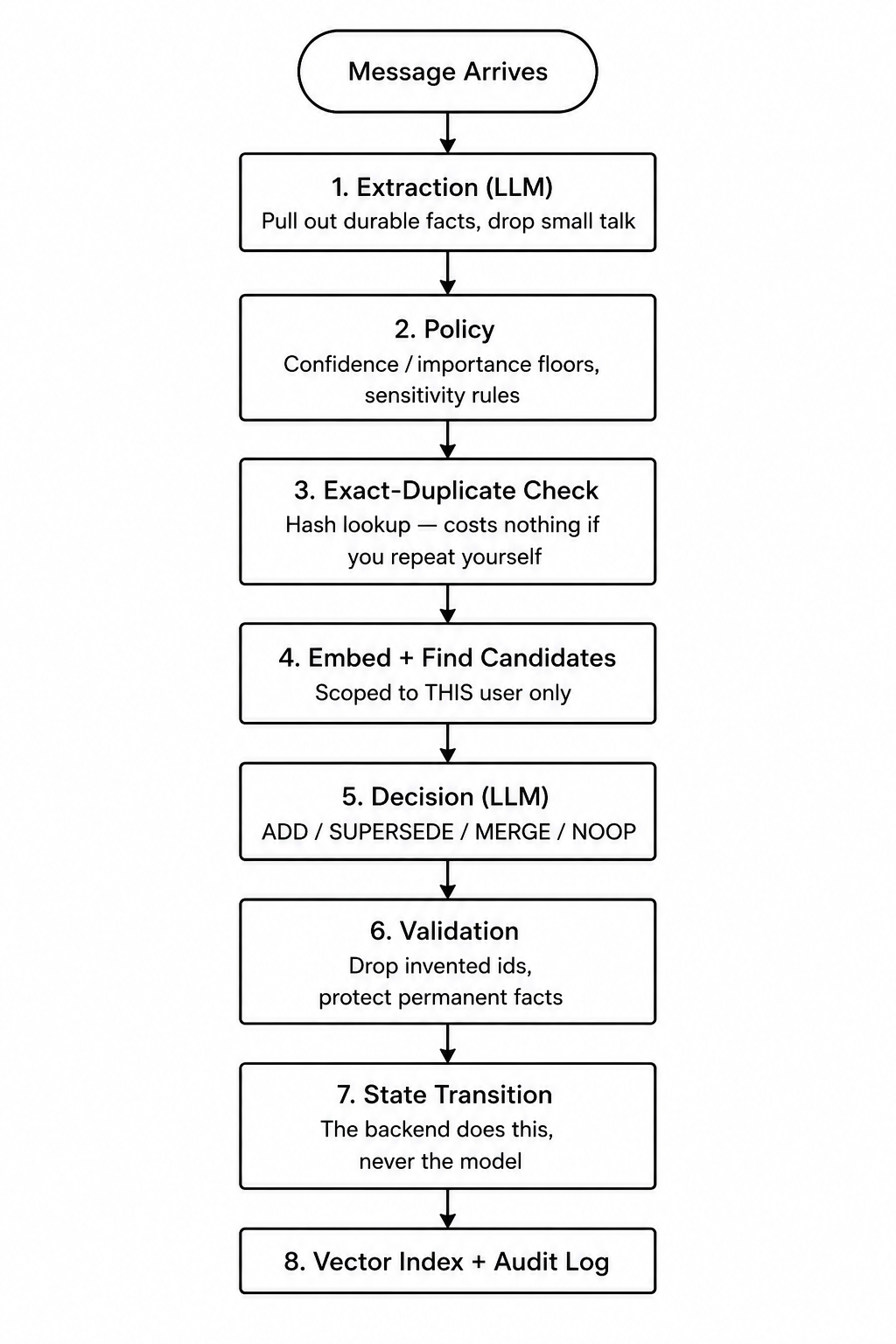
On add(), the cheap deterministic checks run first and the model runs last, on
as little as possible:
your message
   ↓
triage                    "hi", "thanks", "ok" never reach the model
   ↓
extraction (LLM)          pull out durable facts, using YOUR extraction prompt
   ↓
policy                    confidence / importance floors, sensitivity rules
   ↓
exact-duplicate check     hash lookup — costs nothing if the user repeats themselves
   ↓
embed + find candidates   scoped to THIS user only
   ↓
decision (LLM)            ADD / SUPERSEDE / MERGE / NOOP, using YOUR decision prompt
   ↓
validation                drop invented ids, protect permanent facts
   ↓
state change              done by code, never by the model
   ↓
vector index + audit log
And in the background (Dream):
enough new memories, or the daily clock
   ↓
candidate selection       1000 memories → ~200, deterministic
   ↓
clustering                → ~20 clusters
   ↓
synthesis (LLM)           one call per cluster
   ↓
idempotency check         source overlap, then semantic similarity
   ↓
pattern memory + links to its evidence
Design commitments
History is kept unless you delete it. Superseded and merged memories stay,
with pointers to what replaced them, so "where did they live before, and when
did that change?" stays answerable. Nothing MemDream does on its own ever
deletes; only your explicit delete() or purge() does.
The model proposes, the code decides. The model's answer is checked against the memories it was actually shown, its scores are clamped, and it cannot retire protected memories. A model cannot reach a memory it was never given.
Users are isolated by construction. Every storage call takes the user's scope; there is no way to read a memory without one, and each user's vectors live in their own partition.
Explainable. Every decision writes an audit row, NOOP included. "Why was
nothing remembered?" is the question you will actually have, and mem.audit()
answers it.
More: docs/concepts.md · docs/how-it-works.md ·
docs/diagrams.md · docs/architecture.md
What it costs
Measured with gpt-4o-mini + text-embedding-3-small:
| Action | LLM calls | Approx. cost |
|---|---|---|
| Message with a new fact | 2 (extract + decide) | ~$0.0007 |
| Message, nothing related yet | 1 (extract only) | ~$0.0003 |
| Greeting / small talk | 0 — triage | $0 |
| Exact repeat | 0 — hash lookup | $0 |
| Search | 0 | ~$0.0000001 |
create / update by hand |
0 | ~$0.0000001 |
forget / delete |
0 | $0 |
| Dream synthesis | 1 per cluster | ~$0.0004 |
mem.stats() reports live token spend and estimated cost per user.
Testing and evaluation
git clone https://github.com/Mamlesh18/MemDream.git && cd MemDream
pip install -e ".[dev]"
pytest                 # fully offline, no credentials needed
python -m eval.run     # 250 hand-written cases: 50 each of ADD, MERGE, SUPERSEDE, NOOP, SYNTHESIS
python -m eval.run --provider azure --report eval/results/azure.json
The evaluation set includes the cases that must not fire: added detail that looks like a contradiction, two pets that look like duplicates, patterns already covered by an existing one. The default run uses a deterministic offline stand-in for the model, so it tests the pipeline, not model quality — run it with a real provider to measure your prompts.
Optional: running it as a shared service
You do not need this to use MemDream. It exists for when several apps — or apps not written in Python — should share one memory. The same engine is available as an HTTP API:
git clone https://github.com/Mamlesh18/MemDream.git && cd MemDream
cp .env.example .env            # model keys and database
docker compose up --build       # or: uvicorn memdream.engine.main:app
Your code then swaps one line and keeps every method:
from memdream import DreamClient
mem = DreamClient("http://localhost:8000", user_id="alice")   # instead of MemDream(...)
console.html is a single-file web console for a running service: live
decisions, memory inspector, audit trail and token costs. Deployment, scaling and
the REST endpoints: docs/self-hosting.md · docs/api.md.
Documentation
docs/sdk.md |
Every method and argument — start here |
docs/prompts.md |
Writing your own prompts |
docs/concepts.md |
Scope, the memory lifecycle, ranking and Dream |
config/dream.yaml |
Every tunable, annotated |
examples/ |
Runnable integrations |
docs/how-it-works.md |
Technical walkthrough with code references |
docs/architecture.md |
Why each design decision went the way it did |
docs/self-hosting.md · docs/api.md |
The optional HTTP service |
CONTRIBUTING.md |
How to contribute |
Status
Alpha. The interfaces are settled; the tuning is not.
- Extraction quality dominates everything downstream. A fact extracted
ambiguously will be consolidated ambiguously — tune
extraction.mdfirst. - The default FAISS index is local files. Fine for one machine. If several machines share one memory, use a vector server (Qdrant, pgvector, …).
- Sensitivity is a single flag.
allow_sensitivecovers credentials, health, financial and address data together, so you cannot yet keep allergies while refusing API keys. Per-category policy is planned.
Contributing
Contributions are very welcome — see CONTRIBUTING.md. Good
first issues: a new provider adapter, starter prompts for a new vertical, or
evaluation cases that expose a failure mode we do not handle.
License
Apache License 2.0 — free for commercial and private use, with an explicit patent grant.
1 maintainer

Metadata
1 maintainer
Release files for memdream 0.1.1
For a detailed explanation of source distributions (sdists) and built distributions (wheels), please see the package formats documentation.
Source distribution (sdist)
| File | Size | Uploaded | Provenance | Actions |
|---|---|---|---|---|
| memdream-0.1.1.tar.gz | 3.6 MB | Without provenance | Details for memdream-0.1.1.tar.gz |
Built distribution (wheel)
| File | Interpreter | ABI | Platform | Actions Reset |
|---|---|---|---|---|
| memdream-0.1.1-py3-none-any.whl | Python 3 | none | any | Details for memdream-0.1.1-py3-none-any.whl |
Total release size: 3.9 MB
Release files / memdream-0.1.1.tar.gz
| Download URL | memdream-0.1.1.tar.gz |
|---|---|
| Size | 3.6 MB |
| Tags | Source |
|
SHA-256 checksum How to use checksums |
8ca51d71324b36bc89f6b174bd0904bdda1e6af9ff9b94cec315fd2ece0a1f87
|
|
BLAKE2b-256 checksum How to use checksums |
ae43399b8bed86481162d50de1f2e2180bcce0a8eb61c3cbcd4374ae7b93275a
|
| Upload date | |
|
Uploaded using Trusted Publishing? What is trusted publishing? |
No |
| Uploaded via |
twine/7.0.0 CPython/3.11.9
|
Release files / memdream-0.1.1-py3-none-any.whl
| Download URL | memdream-0.1.1-py3-none-any.whl |
|---|---|
| Size | 298.6 kB |
| Tags | Python 3 |
|
SHA-256 checksum How to use checksums |
3067ce65334345549eb8829d3e7c0c46c7d6a6d832c9c9b4656a2441bc295e91
|
|
BLAKE2b-256 checksum How to use checksums |
d35e09a58e707c56cc858a6832d770432b9312645c009e7ca004209f80ed6301
|
| Upload date | |
|
Uploaded using Trusted Publishing? What is trusted publishing? |
No |
| Uploaded via |
twine/7.0.0 CPython/3.11.9
|
Security for memdream 0.1.1
Provenance
Provenance describes where a file came from. On PyPI, provenance is shared via attestations, which provide a verifiable record of the build or publishing details. View details, limitations and caveats.
No provenance found
None of the files in this release were uploaded with provenance metadata.
A note on package security
PyPI is a repository for distributing packages, not a service for auditing them. While third-party security researchers and our staff do their best to detect and remove malicious packages, PyPI cannot guarantee the quality, security or suitability of any given package.
To learn more about protecting yourself from malicious actors, visit our package security documentation.













