
The repository or configuration that created this release differ from a previous release. View details.
This release is a pre-release and may not be stable for production use.
 MemForge
Give every agent your team's brain on day one.
The memory layer for AI agents. Everything your team knows. Cited, and always up to date. Built from your docs, tickets and chat, plus what you ask your agents to remember.




Status: beta. APIs, storage formats and plugin packaging may still change. A new release saves a recovery point of the database and vector index before it upgrades them, rolls back a migration that fails, and refuses data a newer release wrote; restoring the recovery point goes back (Upgrading). The open-source build runs for one user on one machine.
Quick start
You need Docker with Compose v2 and an API key for a model provider (OpenRouter, OpenAI or Anthropic), or a model server such as Ollama.
git clone https://github.com/dodo-labs-ai/mem-forge.git && cd mem-forge
cp .env.example .env
docker compose up --build
Open the admin UI at http://localhost:5174 and choose a generation model and an embedding model in Settings. Then install the agent plugin:
# Claude Code (inside a session)
/plugin marketplace add dodo-labs-ai/mem-forge
/plugin install memory@memforge
# Codex
codex plugin marketplace add dodo-labs-ai/mem-forge
codex plugin add memory@memforge
Open Sources in the admin UI to connect Confluence, Jira or another source, then start a new agent session and ask:
Before you change this, check MemForge for decisions and conventions that
apply, and show the source for each one you rely on.
When you settle something in a session, ask the agent to remember it. It shows you the memory first and saves it after you confirm.
The quickstart covers model settings, plugin routing for a hosted endpoint or more than one workspace, local folders, the host CLI and network details.
Why MemForge
One memory for your docs and your decisions. Confluence, Jira, Notion,
GitHub and Teams land in one store and come back from one search call. When
you tell Claude Code or Codex to remember a decision or a correction, it saves
that one memory after you confirm, never a transcript. A decision you saved in
Claude Code is there when you open Codex.
It follows the source. When a page or ticket changes, the next sync rechecks the memories built on it. Each one is kept, replaced or retired, or it waits for your review, and earlier versions keep their history. Across documents, MemForge marks memories that repeat, update or contradict each other.
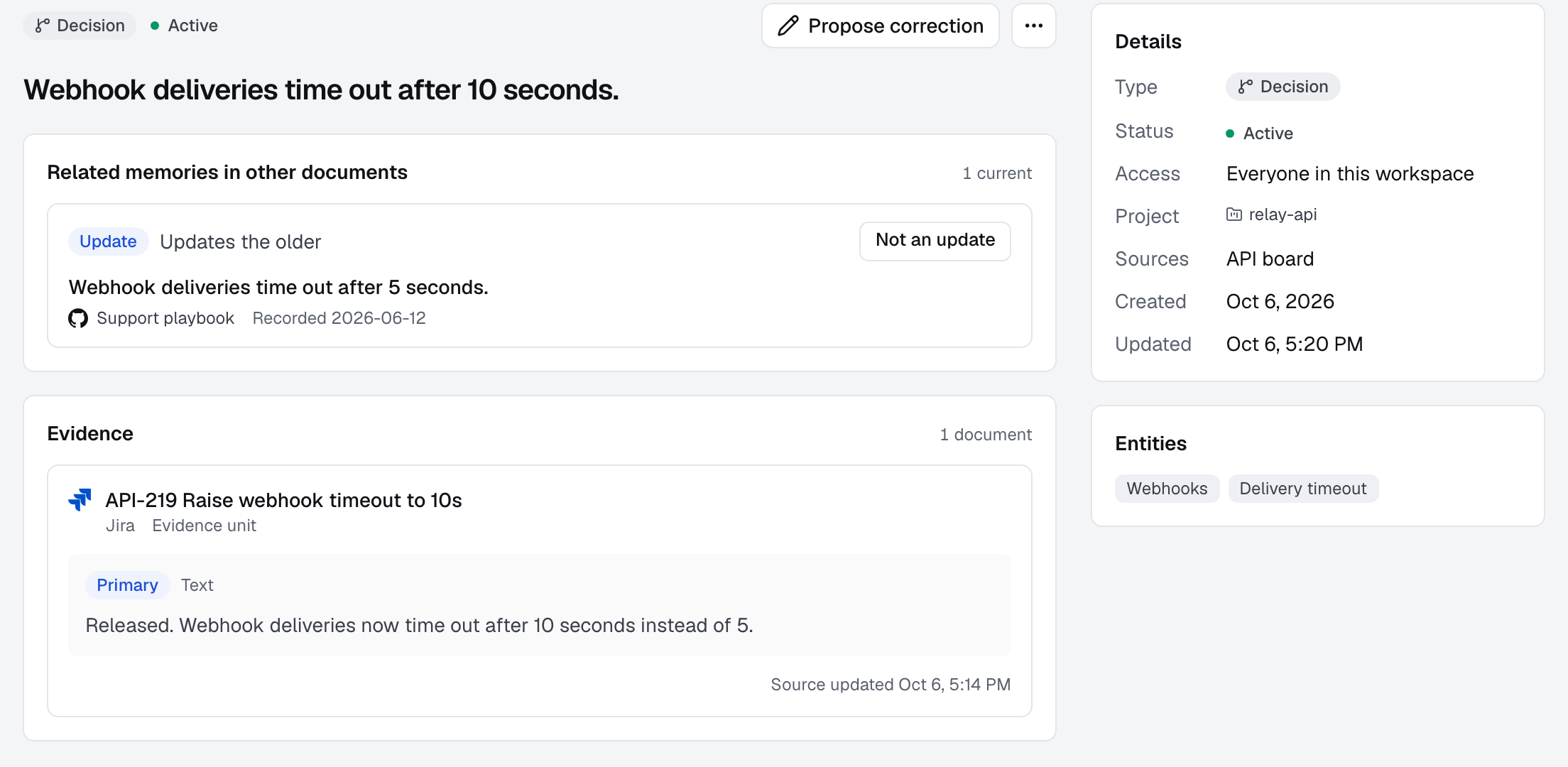
Every answer has a source. get_memory returns the supporting text and a
link back to the page, ticket or file. Where the source allows it, the citation
is pinned to the revision and passage that was read, and get_resource opens
the original. The supporting text can be the model's focused wording, not
always a verbatim quote.
Runs on your machine. Apache-2.0. docker compose up starts the service
with local storage (SQLite, FTS5 and Chroma). You bring your own model
endpoints and keys, and those providers receive what is sent for inference.
The plugins send no session transcripts: an agent writes only the memory you
confirm.
See how MemForge compares with Mem0, Zep, claude-mem and Unblocked.
How it works
flowchart LR
  subgraph You["Your machine"]
    CC["Claude Code / Codex"]
    Plugin["MemForge plugin<br/>MCP proxy"]
  end
  Docs["Confluence, Jira, Notion,<br/>GitHub, Teams, local Markdown"]
  API["MemForge API"]
  Extract["Extract memories<br/>with source Evidence"]
  Recheck["Plan updates and Reviews<br/>relate across documents"]
  Store[("SQLite + FTS5<br/>Chroma")]

  CC --> Plugin
  Docs -- "sync" --> API
  API --> Extract --> Recheck --> Store
  Plugin -- "search / get_memory / get_resource<br/>create_memory (confirmed)" --> API
  API -- "read" --> Store
- Capture. Connectors sync documents, and an agent saves a memory you ask it to remember after you confirm it.
- Extract. An LLM turns each source into short memories with supporting Evidence.
- Reconcile. When a source changes, affected memories are rechecked and related ones are linked.
- Recall. Agents call
search,get_memoryandget_resourceover MCP.
More detail: architecture overview.
Integrations
MemForge sits between the systems where your team writes things down and the agents that do the work.
Agent integrations


Memory sources
| Docs and wikis |
 Confluence Confluence
   Local folders Local folders
|
| Tickets |  Jira Jira |
| Chat |  Teams Teams |
| Planned |
 Obsidian Obsidian
|
Add a source lists what each one syncs and how to scope it. Need one that is missing? Open an issue.
Limits
- The open-source build is single-user, has no authentication, and binds to
127.0.0.1only. Do not expose it on a network. - Model extraction and semantic judgments can miss useful knowledge or make mistakes. Check the cited Evidence before relying on a consequential claim.
- A generation model is required; without one, syncs store content but create no memories.
Documentation
- Quickstart: setup, models, plugins, sources, CLI, development from source
- Docs index: quickstart, architecture, API and release guides
- Contributing
License
Apache License 2.0. See LICENSE.
1 maintainer

Metadata
1 maintainer
Release files for memforge-ai 0.2.0b2
For a detailed explanation of source distributions (sdists) and built distributions (wheels), please see the package formats documentation.
Change of provenance
The repository or configuration that created these release files differ from that of a previous release.
We recommend inspecting the repository and configuration before proceeding. View details.
Source distribution (sdist)
| File | Size | Uploaded | Provenance | |
|---|---|---|---|---|
| memforge_ai-0.2.0b2.tar.gz | 3.7 MB | With provenance | Details |
Built distribution (wheel)
| File | Interpreter | ABI | Platform | Reset |
|---|---|---|---|---|
| memforge_ai-0.2.0b2-py3-none-any.whl | Python 3 | none | any | Details |
Total release size: 5.1 MB
Release files / memforge_ai-0.2.0b2.tar.gz
Change of provenance
This file belongs to a release with changed provenance: the repository or configuration that created the release files differ from that of a previous release.
We recommend inspecting the repository and configuration before proceeding. View details.
| Download URL | memforge_ai-0.2.0b2.tar.gz |
|---|---|
| Size | 3.7 MB |
| Tags | Source |
|
SHA-256 checksum How to use checksums |
51f2ebc6156367a5f84b7de8db7222492b4649806057dc9a01bd08aa5e974d3c
|
|
BLAKE2b-256 checksum How to use checksums |
4ecc0c64cfaece33d97dfb7c0ea15987520921d7882f67a060b1166ed785c8f2
|
| Upload date | |
|
Uploaded using Trusted Publishing? What is trusted publishing? |
Yes |
| Uploaded via |
twine/7.0.0 CPython/3.13.14
|
Provenance
Provenance describes where a file came from. On PyPI, provenance is shared via attestations, which provide a verifiable record of the build or publishing details. View details, limitations and caveats.


PyPI Publish Attestation
PyPI verified that this artifact, at this checksum, originated from the publisher listed below.
Signed by GitHub Actions, verified by PyPI on Oct 24, 2026.
Transparency logRelease files / memforge_ai-0.2.0b2-py3-none-any.whl
Change of provenance
This file belongs to a release with changed provenance: the repository or configuration that created the release files differ from that of a previous release.
We recommend inspecting the repository and configuration before proceeding. View details.
| Download URL | memforge_ai-0.2.0b2-py3-none-any.whl |
|---|---|
| Size | 1.4 MB |
| Tags | Python 3 |
|
SHA-256 checksum How to use checksums |
eb74cb978dfa16dca3b49ecb043cc629fd235aea5c3bdc112d8a49060da04e33
|
|
BLAKE2b-256 checksum How to use checksums |
12edc86c3d3574ab7ebbe748c6d9b1f5fd9c7ac28c03d67f9e1447789b7cce6b
|
| Upload date | |
|
Uploaded using Trusted Publishing? What is trusted publishing? |
Yes |
| Uploaded via |
twine/7.0.0 CPython/3.13.14
|
Provenance
Provenance describes where a file came from. On PyPI, provenance is shared via attestations, which provide a verifiable record of the build or publishing details. View details, limitations and caveats.
PyPI Publish Attestation
PyPI verified that this artifact, at this checksum, originated from the publisher listed below.
Signed by GitHub Actions, verified by PyPI on Oct 24, 2026.
Transparency logSecurity for memforge-ai 0.2.0b2
Provenance
Provenance describes where a file came from. On PyPI, provenance is shared via attestations, which provide a verifiable record of the build or publishing details. View details, limitations and caveats.
Change of provenance
The repository that created this release differs from a previous release.
While this could reflect a routine change by the project maintainers, it may also indicate that the release files have been compromised.
Repository
- Removed 0.2.0b1 GitHub: shno-labs/mem-forge
- Added 0.2.0b2 GitHub: dodo-labs-ai/mem-forge
Attestation for memforge_ai-0.2.0b2.tar.gz
PyPI Publish Attestation
PyPI verified that this artifact, at this checksum, originated from the publisher listed below.
Signed by GitHub Actions, verified by PyPI on Oct 24, 2026.
Transparency logA note on package security
PyPI is a repository for distributing packages, not a service for auditing them. While third-party security researchers and our staff do their best to detect and remove malicious packages, PyPI cannot guarantee the quality, security or suitability of any given package.
To learn more about protecting yourself from malicious actors, visit our package security documentation.














