
memonto 🧠



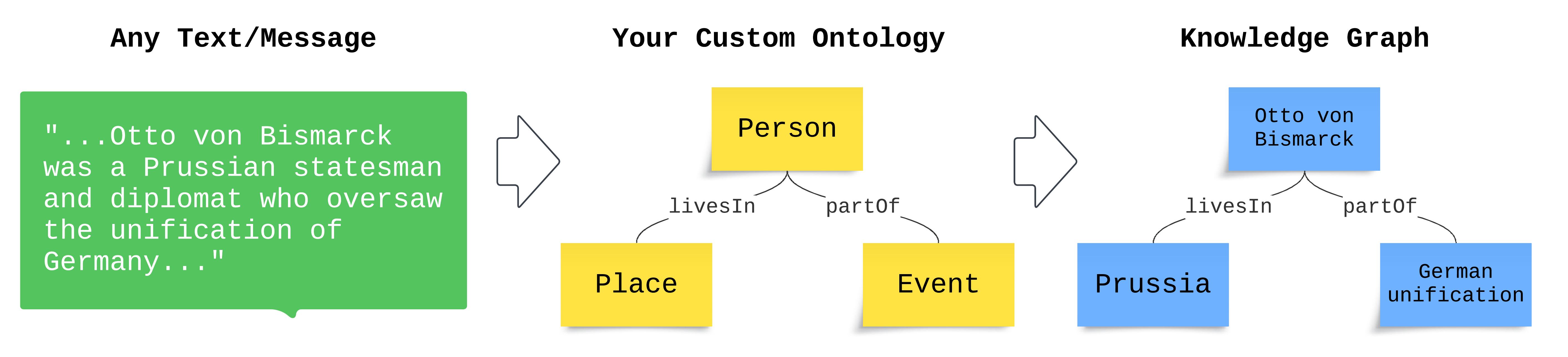
memonto (memory + ontology) augments AI agents with long-term memory through a knowledge graph. The knowledge graph enables agents to remember past interactions, understand relationships between data, and improve contextual awareness.
- Define the ontology for the information you want memonto to retain.
- Extract that information from any unstructured text to a knowledge graph.
- Query your knowledge graph for intelligent summaries or raw data for RAG.
🚀 Install
pip install memonto
⚙️ Configure
Ephemeral Mode
Use memonto without any data stores.
[!IMPORTANT]
ephemeralmode is recommended for simpler/smaller use cases.
Define RDF ontology
from memonto import Memonto
from rdflib import Graph, Namespace, RDF, RDFS

g = Graph()

HIST = Namespace("history:")

g.bind("hist", HIST)

g.add((HIST.Person, RDF.type, RDFS.Class))
g.add((HIST.Event, RDF.type, RDFS.Class))
g.add((HIST.Place, RDF.type, RDFS.Class))

g.add((HIST.isFrom, RDF.type, RDF.Property))
g.add((HIST.isFrom, RDFS.domain, HIST.Person))
g.add((HIST.isFrom, RDFS.range, HIST.Place))

g.add((HIST.participatesIn, RDF.type, RDF.Property))
g.add((HIST.participatesIn, RDFS.domain, HIST.Person))
g.add((HIST.participatesIn, RDFS.range, HIST.Event))
Configure LLM
config = {
    "model": {
        "provider": "openai",
        "config": {
            "model": "gpt-4o",
            "api_key": "api-key",
        },
    }
}
Enable Ephemeral Mode
memonto = Memonto(
    ontology=g,
    namespaces={"hist": HIST},
    ephemeral=True,
)
memonto.configure(config)
Triple Store Mode
Enable triple store for persistent storage. To configure a triple store, add triple_store to the top level of your config dictionary.
Configure Triple Store
config = {
    "triple_store": {
        "provider": "apache_jena",
        "config": {
            "connection_url": "http://localhost:8080/dataset_name",
        },
    },
}
Install Apache Jena Fuseki
- Download Apache Jena Fuseki here.
- Unzip to desired folder.
tar -xzf apache-jena-fuseki-X.Y.Z.tar.gz
- Run a local server.
./fuseki-server --port=8080
Triple + Vector Stores Mode
Enable vector store for contextual retrieval. To configure a vector store, add vector_store to the top level of your config dictionary.
[!IMPORTANT] You must enable triple store in conjunction with vector store.
Configure Local Vector Store
config = {
    "vector_store": {
        "provider": "chroma",
        "config": {
            "mode": "remote",
            "path": ".local",
        },
    },
}
🧰 Usage
Retain
Exatract information from text that maps onto your ontology. It will only extract data that matches onto an entity in your ontology.
memonto.retain("Otto von Bismarck was a Prussian statesman and diplomat who oversaw the unification of Germany.")
Recall
Get a summary of the current memories. You can provide a context for memonto to only summarize the memories that are relevant to that context.
[!IMPORTANT] When in
ephemeralmode, all memories will be returned even if acontextis provided.
# retrieve summary of memory relevant to a context
memonto.recall("Germany could unify under Prussia or Austria.")

# retrieve summary of all stored memory
memonto.recall()
Retrieve
Get raw knowledge graph data that can be programatically parsed or query for a summary that is relevant to a given context.
[!IMPORTANT] When in
ephemeralmode, raw queries are not supported.
# retrieve raw memory data by schema
memonto.retrieve(uri=HIST.Person)

# retrieve raw memory data by SPARQL query
memonto.retrieve(query="SELECT ?s ?p ?o WHERE {GRAPH ?g {?s ?p ?o .}}")
Forget
Forget about it.
memonto.forget()
RDF Namespaces
memonto supports RDF namespaces as well. Just pass in a dictionary with the namespace's name along with its rdflib.Namespace object.
memonto = Memonto(
    ontology=g,
    namespaces={"hist": HIST},
)
Auto Expand Ontology
Enable memonto to automatically expand your ontology to cover new data and relations. If memonto sees new information that does not fit onto your ontology, it will automatically add onto your ontology to cover that new information.
memonto = Memonto(
    id="some_id_123",
    ontology=g,
    namespaces={"hist": HIST},
    auto_expand=True,
)
🔀 Async Usage
All main functionalities have an async version following this function naming pattern: def a{func_name}:
async def main():
    await memonto.aretain("Some user query or message")
    await memonto.arecall()
    await memonto.aretrieve(uri=HIST.Person)
    await memonto.aforget()
🔮 Current and Upcoming Support
| LLM | Vector Store | Triple Store | |||
|---|---|---|---|---|---|
| OpenAI | ✅ | Chroma | ✅ | Apache Jena | ✅ |
| Anthropic | ✅ | Pinecone | 🔜 | ||
| Meta llama | 🔜 | Weaviate | 🔜 |
Feedback on what to support next is always welcomed!
💯 Requirements
Python 3.7 or higher.
1 maintainer

Download files
Download the file for your platform. If you're not sure which to choose, learn more about installing packages.
Source Distribution
Built Distribution
Filter files by name, interpreter, ABI, and platform.
If you're not sure about the file name format, learn more about wheel file names.
Copy a direct link to the current filters
File details
Details for the file memonto-0.2.3.tar.gz.
File metadata
- Download URL: memonto-0.2.3.tar.gz
- Upload date:
- Size: 23.0 kB
- Tags: Source
- Uploaded using Trusted Publishing? No
- Uploaded via:
twine/5.1.1 CPython/3.12.7
File hashes
| Algorithm | Hash digest | |
|---|---|---|
| SHA256 |
81ba71e9b4f864177b001e3d8f6c6911f4b460d9d7d480e83df6ac464dce2e56
|
|
| MD5 |
f6f57632edf3ab25095bd214100a7225
|
|
| BLAKE2b-256 |
0c8fb7e0dcced94d137affe0ccf6c7af4339b72710485799e2311451542e9966
|
File details
Details for the file memonto-0.2.3-py3-none-any.whl.
File metadata
- Download URL: memonto-0.2.3-py3-none-any.whl
- Upload date:
- Size: 30.6 kB
- Tags: Python 3
- Uploaded using Trusted Publishing? No
- Uploaded via:
twine/5.1.1 CPython/3.12.7
File hashes
| Algorithm | Hash digest | |
|---|---|---|
| SHA256 |
0bd2f9b158353a5f1bd4b0d0689f29f2f70cec0e45bd30847e35caaed6bbde40
|
|
| MD5 |
d7cfb2f303934c9541f1f1f0c2c891cc
|
|
| BLAKE2b-256 |
f3ff19338233ffaede74bf89d02cdaab2fa12683c5f3aa3e897ca6a766f75062
|














