
The Open-Source Memory Layer for AI Agents & Multi-Agent Systems
Verified details
These details have been verified by PyPIProject links
GitHub Statistics
Maintainers

Project description

An open-source SQL-Native memory engine for AI
One line of code to give any LLM persistent, queryable memory using standard SQL databases







What is Memori
Memori enables any LLM to remember conversations, learn from interactions, and maintain context across sessions with a single line: memori.enable(). Memory is stored in standard SQL databases (SQLite, PostgreSQL, MySQL) that you fully own and control.
Why Memori?
- One-line integration - Works with OpenAI, Anthropic, LiteLLM, LangChain, and any LLM framework
- SQL-native storage - Portable, queryable, and auditable memory in databases you control
- 80-90% cost savings - No expensive vector databases required
- Zero vendor lock-in - Export your memory as SQLite and move anywhere
- Intelligent memory - Automatic entity extraction, relationship mapping, and context prioritization
Documentation | Examples | Discord
Quick Start
pip install memorisdk
from memori import Memori
from openai import OpenAI

# Initialize
memori = Memori(conscious_ingest=True)
memori.enable()

client = OpenAI()

# First conversation
response = client.chat.completions.create(
    model="gpt-4o-mini",
    messages=[{"role": "user", "content": "I'm building a FastAPI project"}]
)

# Later conversation - Memori automatically provides context
response = client.chat.completions.create(
    model="gpt-4o-mini",
    messages=[{"role": "user", "content": "Help me add authentication"}]
)
# LLM automatically knows about your FastAPI project
Database Support
Memori works with any SQL database you already use:
| Database | Connection String Example |
|---|---|
| SQLite | sqlite:///my_memory.db |
| PostgreSQL | postgresql://user:pass@localhost/memori |
| MySQL | mysql://user:pass@localhost/memori |
| Neon | postgresql://user:pass@ep-*.neon.tech/memori |
| Supabase | postgresql://postgres:pass@db.*.supabase.co/postgres |
LLM Framework Support
Works with any LLM framework through LiteLLM's native callback system:
| Framework | Status | Usage |
|---|---|---|
| OpenAI | ✓ Native | from openai import OpenAI |
| Anthropic | ✓ Native | from anthropic import Anthropic |
| LiteLLM | ✓ Native | from litellm import completion |
| LangChain | ✓ Supported | Use with LiteLLM integration |
| Azure OpenAI | ✓ Supported | Configure with ProviderConfig.from_azure() |
| 100+ Models | ✓ Supported | Any LiteLLM-compatible provider |
Configuration
Persistent Storage
from memori import Memori

memori = Memori(
    database_connect="postgresql://user:pass@localhost/memori",
    conscious_ingest=True,  # Short-term working memory
    auto_ingest=True,       # Dynamic search per query
    openai_api_key="sk-..."
)
memori.enable()
Memory Modes
Conscious Mode - One-shot working memory injection
memori = Memori(conscious_ingest=True)
Auto Mode - Dynamic search per query
memori = Memori(auto_ingest=True)
Combined Mode - Best of both
memori = Memori(conscious_ingest=True, auto_ingest=True)
Using ConfigManager
from memori import Memori, ConfigManager

config = ConfigManager()
config.auto_load()  # Loads from environment or config files

memori = Memori()
memori.enable()
Set environment variables:
export MEMORI_DATABASE__CONNECTION_STRING="postgresql://..."
export MEMORI_AGENTS__OPENAI_API_KEY="sk-..."
export MEMORI_MEMORY__NAMESPACE="production"
Architecture Overview
Memori works by intercepting LLM calls - injecting context before the call and recording after:
graph LR
    A[Your App] -->|1. client.chat.completions.create| B[Memori Interceptor]
    B -->|2. Get Context| C[(SQL Database)]
    C -->|3. Relevant Memories| B
    B -->|4. Inject Context + Call| D[OpenAI/Anthropic/etc]
    D -->|5. Response| B
    B -->|6. Extract & Store| C
    B -->|7. Return Response| A

    E[Conscious Agent] -.->|Background: Analyze & Promote| C
How It Works
Pre-Call (Context Injection)
- Your app calls
client.chat.completions.create(messages=[...]) - Memori intercepts the call transparently
- Retrieval Agent (auto mode) or Conscious Agent (conscious mode) retrieves relevant memories
- Context injected into messages before sending to the LLM provider
Post-Call (Recording)
- LLM provider returns response
- Memory Agent extracts entities, categorizes (facts, preferences, skills, rules, context)
- Conversation stored in SQL database with full-text search indexes
- Original response returned to your app
Background (every 6 hours)
- Conscious Agent analyzes patterns and promotes essential memories from long-term to short-term storage
For detailed architecture documentation, see docs/architecture.md.
Examples
Basic Examples
- Basic Usage - Simple memory setup
- Personal Assistant - AI assistant with memory
- Memory Retrieval - Function calling
- Advanced Config - Production setup
Multi-User
- Simple Multi-User - User memory isolation
- FastAPI Multi-User App - REST API with Swagger
Framework Integrations
| Framework | Description |
|---|---|
| AgentOps | Memory operation tracking with observability |
| Agno | Agent framework with persistent conversations |
| AWS Strands | Strands SDK with persistent memory |
| Azure AI Foundry | Enterprise AI agents with Azure |
| AutoGen | Multi-agent group chat memory |
| CamelAI | Multi-agent communication framework |
| CrewAI | Multi-agent shared memory |
| Digital Ocean AI | Customer support with history |
| LangChain | Enterprise agent framework |
| OpenAI Agent | Function calling with preferences |
| Swarms | Multi-agent persistent memory |
Interactive Demos
| Demo | Description | Live |
|---|---|---|
| Personal Diary | Mood tracking and pattern analysis | Try it |
| Researcher | Research assistant with web search | Try it |
Contributing
We welcome contributions from the community! Please see our Contributing Guidelines for details on:
- Setting up your development environment
- Code style and standards
- Submitting pull requests
- Reporting issues
Support
- Documentation: https://memorilabs.ai/docs
- Discord: https://discord.gg/abD4eGym6v
- Issues: GitHub Issues
License
Apache 2.0 - see LICENSE
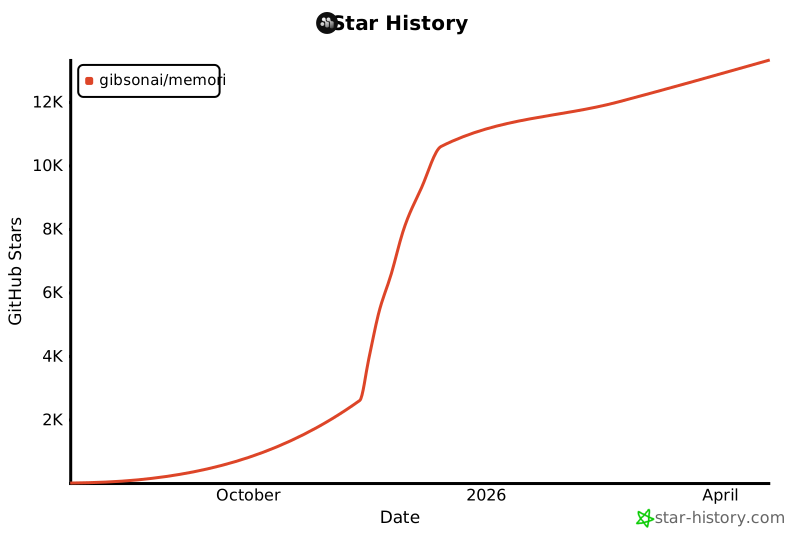
Star us on GitHub to support the project
Project details
Verified details
These details have been verified by PyPIProject links
GitHub Statistics
Maintainers
Release history Release notifications | RSS feed


Download files
Download the file for your platform. If you're not sure which to choose, learn more about installing packages.
Source Distribution
Built Distribution
Filter files by name, interpreter, ABI, and platform.
If you're not sure about the file name format, learn more about wheel file names.
Copy a direct link to the current filters
File details
Details for the file memorisdk-2.3.3.tar.gz.
File metadata
- Download URL: memorisdk-2.3.3.tar.gz
- Upload date:
- Size: 221.8 kB
- Tags: Source
- Uploaded using Trusted Publishing? Yes
- Uploaded via: twine/6.1.0 CPython/3.13.7
File hashes
| Algorithm | Hash digest | |
|---|---|---|
| SHA256 |
bfffe1d283dcc501ad870c6d0a1be46146c73a605b5f786d1cc4cecbbeca2498
|
|
| MD5 |
44c18c398cd8e8756c1b4df28e48de34
|
|
| BLAKE2b-256 |
2fc4a31cf081906316b1bc6eb1adb5a8c5d4c834dadf45c8333385ac6b15572f
|
Provenance
The following attestation bundles were made for memorisdk-2.3.3.tar.gz:
Publisher:
release.yml on GibsonAI/Memori
-
Statement:
-
Statement type:
https://in-toto.io/Statement/v1 -
Predicate type:
https://docs.pypi.org/attestations/publish/v1 -
Subject name:
memorisdk-2.3.3.tar.gz -
Subject digest:
bfffe1d283dcc501ad870c6d0a1be46146c73a605b5f786d1cc4cecbbeca2498 - Sigstore transparency entry: 715590870
- Sigstore integration time:
-
Permalink:
GibsonAI/Memori@a7ff06e51d11488f24940c0cd668c795686af239 -
Branch / Tag:
refs/heads/main - Owner: https://github.com/GibsonAI
-
Access:
public
-
Token Issuer:
https://token.actions.githubusercontent.com -
Runner Environment:
github-hosted -
Publication workflow:
release.yml@a7ff06e51d11488f24940c0cd668c795686af239 -
Trigger Event:
workflow_dispatch
-
Statement type:
File details
Details for the file memorisdk-2.3.3-py3-none-any.whl.
File metadata
- Download URL: memorisdk-2.3.3-py3-none-any.whl
- Upload date:
- Size: 254.1 kB
- Tags: Python 3
- Uploaded using Trusted Publishing? Yes
- Uploaded via: twine/6.1.0 CPython/3.13.7
File hashes
| Algorithm | Hash digest | |
|---|---|---|
| SHA256 |
633d41aa0fa3fa338f749758ea500691f849e2c1ead1c356e3b1a813d33b3979
|
|
| MD5 |
b57792fa1cb2227c38156267eab96cbb
|
|
| BLAKE2b-256 |
569fdfeb9814c0a1dd77e996f7ef9e6393b580f724af215d7d4f77319db9e22b
|
Provenance
The following attestation bundles were made for memorisdk-2.3.3-py3-none-any.whl:
Publisher:
release.yml on GibsonAI/Memori
-
Statement:
-
Statement type:
https://in-toto.io/Statement/v1 -
Predicate type:
https://docs.pypi.org/attestations/publish/v1 -
Subject name:
memorisdk-2.3.3-py3-none-any.whl -
Subject digest:
633d41aa0fa3fa338f749758ea500691f849e2c1ead1c356e3b1a813d33b3979 - Sigstore transparency entry: 715590871
- Sigstore integration time:
-
Permalink:
GibsonAI/Memori@a7ff06e51d11488f24940c0cd668c795686af239 -
Branch / Tag:
refs/heads/main - Owner: https://github.com/GibsonAI
-
Access:
public
-
Token Issuer:
https://token.actions.githubusercontent.com -
Runner Environment:
github-hosted -
Publication workflow:
release.yml@a7ff06e51d11488f24940c0cd668c795686af239 -
Trigger Event:
workflow_dispatch
-
Statement type:






