
Self-contained memory vault for any AI agent — vector search, session diaries, and agent-agnostic hooks.

Project description
Memorius
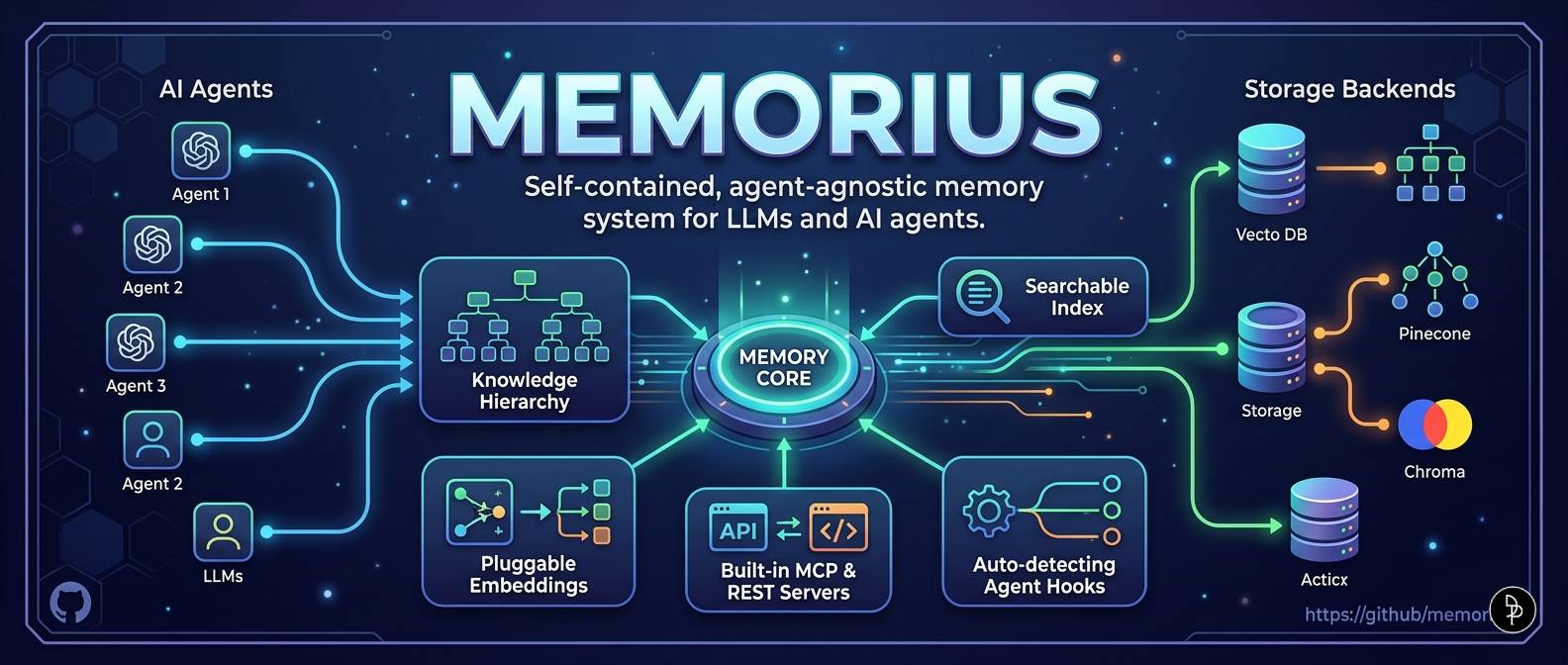
Universal memory vault for any AI agent.





Works with Claude Code, Codex CLI, Gemini CLI, OpenClaude, OpenCode, Pi, and any MCP-compatible agent.
Landing page: https://dream-pixels-forge.github.io/memorius/
If you find this project useful, leaving a star ⭐ on the repository is the best way to support my work!
Why Memorius?
Most AI memory tools lock you into one agent ecosystem. Memorius is agent-agnostic by design — the same memory vault works whether you use Claude Code, Codex CLI, Gemini CLI, or any MCP-compatible agent. No vendor lock-in.
| Feature | Memorius | Others |
|---|---|---|
| Agent support | 7 agents (auto-detected) | Usually 1-3 |
| Protocol | Open MCP standard | Proprietary plugins |
| Memory hierarchy | Vault → Shelf → Folder → Note | Flat |
| Temporal decay | Ebbinghaus forgetting curve | - |
| Knowledge graph | Auto-linked memories | - |
| Fact-checking | Contradiction detection | - |
| Cross-encoder reranking | ms-marco-MiniLM-L-6-v2 | - |
| Obsidian integration | Native import/export | - |
| LLM extraction | OpenAI / Ollama / regex backends | - |
| Web augmentation | DuckDuckGo / Tavily fallback | - |
| Dual storage backends | ChromaDB + SQLite-vec | - |
| Self-hosted | No cloud dependency | Often SaaS |
| Open source | MIT license | Varies |
pip install memorius
REST API server is included by default —
fastapi,uvicorn,pydantic, andsse-starletteare now core dependencies. No extra[rest]install flag needed.
Quick Start
# Initialize a vault
memorius init

# Store a memory
memorius store "The sky is blue because Rayleigh scattering scatters shorter wavelengths more" --vault main --shelf science --folder physics

# Semantic search
memorius search "why is the sky blue"

# Mine memories from a conversation
memorius mine transcript.txt --vault conversations

# LLM-powered structured extraction
memorius extract meeting-notes.txt --backend openai

# Check status
memorius status

# Write a diary entry
memorius diary "session-001" --title "Research findings"
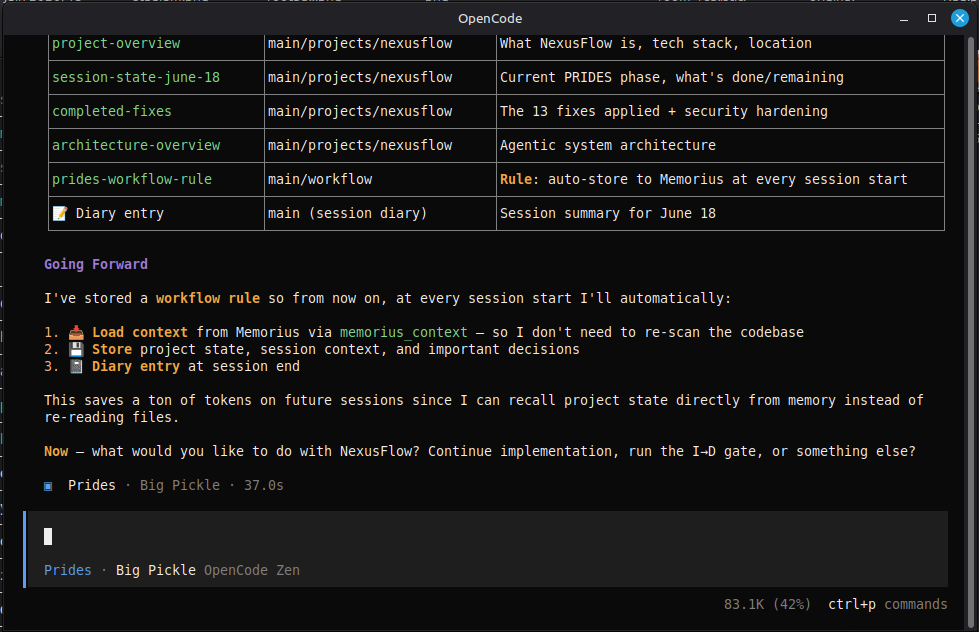
Architecture
┌──────────────────────────────────────────────────────────────┐
│                         Memorius                             │
├──────────────────────────────────────────────────────────────┤
│  CLI        memorius init | store | search | mine | ...      │
│  MCP        JSON-RPC protocol server (stdin/stdout)          │
│  REST       FastAPI HTTP server (API key auth + rate limit)  │
│  Hooks      Auto-detect: Claude Code, Codex, Gemini, ...    │
│  Obsidian   Import / export notes from Obsidian vaults       │
├──────────────────────────────────────────────────────────────┤
│  Vault Engine                                                │
│  ├── ChromaStore    Vector search (ChromaDB HNSW)            │
│  ├── SqliteVecStore Single-file alternative (sqlite-vec)     │
│  ├── SQLiteStore    Metadata & hierarchy (SQLite)            │
│  ├── KnowledgeGraph Auto-linked memories + contradictions    │
│  ├── TemporalDecay  Ebbinghaus forgetting curve              │
│  └── Embeddings     Pluggable providers (ONNX / SF / OA)    │
├──────────────────────────────────────────────────────────────┤
│  Vault  >  Shelf  >  Folder  >  Note  hierarchy              │
│  Diaries          Session diary entries                      │
│  Mine             Extract memories from transcripts          │
│  Extract          LLM-powered structured extraction          │
│  Consolidate      Cluster + merge duplicate memories         │
│  Factcheck        Contradiction detection with web fallback  │
│  Prune            Decay-based stale memory archival          │
│  Export/Import    JSON or Markdown vault portability          │
├──────────────────────────────────────────────────────────────┤
│  Plugin Gen    →  Generate per-agent plugins                 │
│  Normalizers   →  Import Discord/Telegram/WhatsApp/etc       │
│  Obsidian      →  Bidirectional vault sync                   │
└──────────────────────────────────────────────────────────────┘
Configuration
Config lives at ~/.memorius/config.yaml (auto-created on memorius init):
storage:
  path: ~/.memorius/data
  type: chroma            # chroma (default) | sqlite-vec (single-file)

embeddings:
  provider: chroma-default  # chroma-default | sentence-transformers | openai
  model: all-MiniLM-L6-v2

vault:
  default: main

server:
  mcp_port: 8911
  rest_port: 8912
  host: 127.0.0.1

retrieval:
  web_fallback: false        # opt-in: augment thin local recall with web
  web_provider: duckduckgo   # duckduckgo (keyless) | tavily (keyed) | mock (tests)
  tavily_api_key: null       # or set TAVILY_API_KEY env var
  web_min_results: 1         # if ZERO local hits, fall back to web
  web_max_results: 5         # max web results to return
Environment variable overrides:
| Variable | Overrides |
|---|---|
MEMORIUS_STORAGE_PATH |
storage.path |
MEMORIUS_STORAGE_TYPE |
storage.type |
MEMORIUS_EMBEDDINGS_PROVIDER |
embeddings.provider |
MEMORIUS_DEFAULT_VAULT |
vault.default |
MEMORIUS_MCP_PORT |
server.mcp_port |
MEMORIUS_REST_PORT |
server.rest_port |
MEMORIUS_HOST |
server.host |
MEMORIUS_OPENAI_API_KEY |
embeddings.openai.api_key |
MEMORIUS_WEB_PROVIDER |
retrieval.web_provider |
MEMORIUS_WEB_FALLBACK |
retrieval.web_fallback |
MEMORIUS_TAVILY_API_KEY |
retrieval.tavily_api_key |
MEMORIUS_MODEL_CACHE_DIR |
ONNX model cache directory |
Vector Store Backends
| Backend | Dependency | Description |
|---|---|---|
| ChromaDB (default) | ChromaDB (bundled) | Persistent HNSW cosine search, auto-migration from legacy collections |
| SQLite-vec | pip install memorius[single-file] |
Single-file alternative, no ChromaDB dependency |
Set storage.type: sqlite-vec in config or MEMORIUS_STORAGE_TYPE=sqlite-vec to use the lightweight backend.
Embedding Providers
| Provider | Requirement | Quality |
|---|---|---|
chroma-default |
ChromaDB (bundled ONNX) | Good (384d) |
sentence-transformers |
pip install memorius[local-embeddings] |
Better (768d+) |
openai |
OPENAI_API_KEY env var |
Best (1536d or 3072d) |
Providers are extensible via EmbeddingFactory.register() for custom runtime providers.
Temporal Decay
Memorius implements the Ebbinghaus forgetting curve to rank memories by relevance over time:
- Decay score (0–1) = age decay (40%) + recency boost (40%) + access reinforcement (20%)
- Search ranking = semantic similarity (60%) + temporal decay (25%) + access frequency (15%)
touch(memory_id)reinforces a memory on read- Stale memories are detected via decay score threshold or TTL expiry
- TTL support:
memorius store "..." --ttl 30setsexpires_atin metadata
Knowledge Graph
- Auto-linking on every
store()call by content proximity (Jaccard word overlap or vector cosine) - BFS expansion from search results (
--expand-graphon CLI /expand_graph=Trueon MCP) - Contradiction edges persisted by
factcheck(bidirectionalrelation='contradicts') - Graph statistics via
memorius statsor MCPmemorius_graph_stats
Cross-Encoder Reranker
Improve search precision with a cross-encoder reranker:
memorius search "query" --rerank
| Provider | Requirement |
|---|---|
cross-encoder/ms-marco-MiniLM-L-6-v2 |
pip install memorius[ranker] |
Adds __rerank_score__ to memory metadata for transparent ranking.
Web Search
When local recall is thin, Memorius can optionally augment retrieval with
live web results. This is local-first and opt-in — web search never runs
unless you ask for it: the memorius web command, the --web flag on
search / context / factcheck, or retrieval.web_fallback: true.
# Live web search (keyless DuckDuckGo by default)
memorius web "python 3.13 changelog"

# Use the keyed Tavily provider for higher signal-to-noise
memorius web "python 3.13 changelog" --provider tavily

# Augment a local search with web when local hits are thin
memorius search "latest rust release" --web

# Fact-check with web cross-reference
memorius factcheck "Rust 1.80 was released in July 2024" --web
Providers
| Provider | Key | Notes |
|---|---|---|
duckduckgo (default) |
none | Keyless, stdlib-only scraper. Works out of the box. |
tavily |
TAVILY_API_KEY or MEMORIUS_TAVILY_API_KEY |
Agent-grade signal-to-noise. Missing key warns and returns [] — never crashes. |
mock |
n/a | Test double for offline testing. |
Configuration
retrieval:
  web_fallback: false        # opt-in: augment thin local recall with web
  web_provider: duckduckgo   # duckduckgo (keyless) | tavily (keyed) | mock (tests)
  tavily_api_key: null       # or set TAVILY_API_KEY / MEMORIUS_TAVILY_API_KEY
  web_min_results: 1         # fall back to web only when local hits < this
  web_max_results: 5         # max web results to return
MEMORIUS_WEB_PROVIDER, MEMORIUS_WEB_FALLBACK, and MEMORIUS_TAVILY_API_KEY
override the corresponding config keys (the raw TAVILY_API_KEY is also read
directly). A missing Tavily key never crashes the CLI — it logs a warning and
returns no web results.
LLM-Powered Memory Extraction
The extract command uses an LLM to identify and structure memories from unstructured text:
memorius extract meeting-notes.txt --backend openai
memorius extract transcript.txt --backend ollama
memorius extract notes.txt --backend regex    # fallback, no LLM required
| Backend | Model | Notes |
|---|---|---|
openai |
gpt-4o-mini | Requires OPENAI_API_KEY |
ollama |
llama3.2 | Requires local Ollama server |
regex |
n/a | Rule-based fallback, no LLM needed |
Extracts 6 memory categories: decision, preference, fact, action_item, relationship, context. Includes prompt injection protection, 50KB input limit, and validated structured output with confidence scores.
Memory Consolidation
Clusters similar memories and merges them into consolidated insights:
memorius consolidate --threshold 0.80 --dry-run
memorius consolidate --vault main
Two algorithms: O(N^2) pairwise for <500 memories, HNSW per-collection for >500. Archives originals after consolidation.
Memory Pruning
Find and archive stale memories based on temporal decay:
memorius prune --threshold 0.1 --dry-run       # preview stale memories
memorius prune --threshold 0.1                  # soft-archive stale
memorius prune --threshold 0.1 --delete         # hard-delete
Export / Import
Back up and migrate vaults between instances:
memorius export ./backup --format json          # single JSON file
memorius export ./backup --format markdown      # individual .md files

memorius import ./backup/backup.json            # merge import
memorius import ./backup/backup.json --replace  # overwrite mode
JSON export includes hierarchy, memories, diaries, and graph edges (schema versioned). Markdown export creates .md files with YAML frontmatter.
CLI Reference
Core commands
memorius init                Initialize a new vault
memorius setup               Download ONNX model + initialize vault
  --force                      Force re-download of model
  --skip-model                 Skip model download
memorius status              Show vault status
memorius store <text>        Store a memory
  --vault, -v                  Vault name (default: main)
  --shelf, -s                  Shelf name (default: default)
  --folder, -f                 Folder name (default: default)
  --note, -n                   Note name (default: default)
  --ttl                        Time-to-live in days (memory expires after N days)
memorius search <query>      Semantic search
  --vault, -v                  Filter by vault
  --shelf, -s                  Filter by shelf
  --folder                     Filter by folder (Chroma metadata)
  --note                       Filter by note (Chroma metadata)
  --tag                        Filter by tag (repeatable; memory must carry ALL supplied tags)
  --n                          Max results (default: 10)
  --expand-graph               Also pull in 1-hop graph-linked memories
  --rerank                     Cross-encoder reranking
  --web                        Augment with web search when local hits are thin
memorius get <id>            Get a single memory by UUID
  --json                       Output as JSON
memorius update <id>         Update memory content/metadata
  --content                    New content (omit to keep existing)
  --metadata                   JSON metadata to shallow-merge
  --json                       Output as JSON
memorius delete <id>         Delete a memory by ID (validation + confirmation)
  --vault, -v                  Vault scope (must match the memory's vault)
  --shelf, -s                  Shelf scope (must match the memory's shelf)
  --yes, -y                    Skip the confirmation prompt
  --dry-run                    Preview what would be deleted
memorius list                List memories with cursor pagination
  --vault                      Filter by vault
  --limit                      Results per page (default: 10)
  --cursor                     Cursor for next page
memorius mine <file|text>    Extract memories from transcript
  --vault, -v                  Target vault (default: main)
  --text                       Treat input as raw text, not a file path
memorius extract <file|text> Extract memories from conversation (LLM)
  --vault                      Target vault (default: main)
  --shelf                      Target shelf (default: extracted)
  --backend                    LLM backend: auto|openai|ollama|regex
memorius diary <session>     Write a diary entry
  --title                      Entry title
  --summary                    Entry summary
  --content                    Entry content
  --vault                      Vault name (default: main)
  --exchange-count             Number of exchanges in session
memorius diaries              List recent diary entries
memorius ls                   Explore vault hierarchy
memorius consolidate         Merge duplicate memories
  --vault                      Filter by vault
  --threshold                  Similarity threshold 0-1 (default: 0.80)
  --dry-run                    Preview without changes
memorius factcheck <stmt>    Fact-check against stored memories
  --vault                      Filter by vault
  --web                        Cross-check with web search
memorius context <query>     Get formatted memory context for injection
  --vault                      Filter by vault
  --max                        Max items (default: 5)
  --web                        Augment with web search
memorius profile <session>   Build session memory profile
  --vault                      Vault name (default: main)
memorius prune               Find/archive stale memories by decay score
  --threshold                  Decay score threshold (default: 0.1)
  --dry-run                    Preview without changes
  --delete                     Hard-delete instead of soft-archive
  --json                       Output as JSON
memorius export <dest>       Export vault to JSON or Markdown
  --format                     json (default) | markdown
memorius import <src>        Import vault from JSON export
  --replace                    Overwrite mode (default: merge)
memorius doctor              Run health checks on the vault
memorius stats               Show vault + memory + graph statistics
memorius web <query>         Live web search
  --provider                   duckduckgo (default) | tavily
  --max                        Max results (default: 5)
memorius serve               Start MCP server (stdio)
memorius serve-rest          Start REST API server
  --port                       Port number
  --host                       Bind address
  --daemon                     Run as background daemon
  --stop                       Stop the running daemon
  --pid-file                   PID file path
memorius config              Show current configuration
  --path                       Print config file path only
memorius --version           Show version
Obsidian integration
memorius obsidian list                Explore vault structure
  --vault, -v                         Path to Obsidian vault directory
                                      (default: $OBSIDIAN_VAULT_PATH or
                                       ~/Documents/Obsidian Vault)

memorius obsidian import              Import Obsidian notes as memorius memories
  --vault, -v                         Path to Obsidian vault
  --target-vault                      Target memorius vault (default: main)
  --target-shelf                      Target memorius shelf (default: obsidian)
  --tag                               Only import notes with this tag
  --dry-run                           Preview without importing

memorius obsidian export              Export memorius memories as Obsidian notes
  --vault, -v                         Path to Obsidian vault
  --source-vault                      Source memorius vault (default: main)
  --source-shelf                      Filter by shelf (default: all)
  --dry-run                           Preview without exporting
Import preserves the file hierarchy: vault/Subfolder/note.md maps to
vault/Subfolder/vault > shelf > folder > note. YAML frontmatter is parsed
and stored as memory attributes.
MCP Protocol
MCP is the primary interface for AI agents to interact with Memorius. Connect any MCP-compatible client by pointing it at the MCP server:
{
  "mcpServers": {
    "memorius": {
      "command": "memorius",
      "args": ["serve"]
    }
  }
}
Available MCP tools (22 tools):
| Tool | Description |
|---|---|
memorius_status |
Memory vault status |
memorius_store |
Store content in vault/shelf/folder/note hierarchy (with ttl_days) |
memorius_search |
Semantic search (expand_graph, rerank, tags, cursor pagination) |
memorius_get |
Get a single memory by UUID |
memorius_update |
Update memory content/metadata (re-embeds on change) |
memorius_delete |
Delete a memory by ID |
memorius_list |
List memories with cursor pagination |
memorius_mine |
Extract memories from conversation transcript |
memorius_extract |
LLM-powered structured memory extraction |
memorius_diary_write |
Write session diary entry |
memorius_diary_list |
List diary entries |
memorius_vault_ls |
Browse vault hierarchy |
memorius_consolidate |
Merge duplicate memories, extract insights |
memorius_factcheck |
Fact-check a statement against stored memories |
memorius_context |
Get formatted memory context for injection |
memorius_session_profile |
Build session memory profile for inheritance |
memorius_contradictions |
Get memories that contradict a given memory ID |
memorius_graph_stats |
Knowledge graph statistics (nodes, edges, relations) |
memorius_memory_stats |
Memory tracking statistics (total, active, archived, by vault) |
memorius_prune |
Find stale memories by decay score, archive or delete |
memorius_doctor |
Run health checks (config, storage, vector store, graph) |
REST API
The REST server is always available (no extra install flags needed):
memorius serve-rest
Starts a FastAPI server on http://127.0.0.1:8912 by default.
Security
- API key auth: Set
MEMORIUS_API_KEYenv var; send asAuthorization: Bearer <key> - Rate limiting: 500 requests/min per IP
- Request body limit: Maximum body size enforced
- CORS: Restrictive by default (Obsidian app + localhost only)
- Daemon mode:
--daemon/--stopwith PID file management
Endpoints
| Method | Path | Description |
|---|---|---|
| GET | /health |
Health check |
| GET | /status |
System status |
| GET | /stats |
Full vault + memory + graph stats |
| GET | /doctor |
Health checks |
| GET | /vault |
Browse vault hierarchy |
| GET | /diaries |
List recent diary entries |
| GET | /memory/{memory_id} |
Get single memory by UUID |
| GET | /contradictions/{memory_id} |
Get contradicting memories |
| GET | /memories |
List memories with cursor pagination |
| GET | /obsidian |
List notes in Obsidian vault |
| POST | /store |
Store a memory |
| POST | /search |
Semantic search |
| POST | /mine |
Extract memories from transcript |
| POST | /diary |
Write diary entry |
| POST | /consolidate |
Merge duplicate memories (requires confirm=true) |
| POST | /extract |
Extract memories from conversation (LLM) |
| POST | /factcheck |
Fact-check statement against vault |
| POST | /context |
Get formatted memory context for injection |
| POST | /prune |
Find and archive stale memories |
| POST | /obsidian/import |
Import Obsidian notes as memories |
| POST | /obsidian/export |
Export memories as Obsidian notes |
| PATCH | /memory/{memory_id} |
Update memory content/metadata |
| DELETE | /memory/{memory_id} |
Delete a memory |
Agent Skill Installation
Memorius ships with a ready-to-use agent skill (skills/memorius/SKILL.md) for agents that support the Hermes Agent skill format. The skill provides auto-capture rules, smart context injection, session diary templates, and workflow patterns — so agents can use memorius proactively without being told.
Skill Structure
skills/
  memorius/
    SKILL.md              # Full skill definition (auto-capture, context injection, diary rules)
    README.md             # Quick command reference
    .memorius_version     # Version tracker
Installing for Hermes Agent
The skill is designed for Hermes Agent — copy it into your Hermes skills directory:
# Copy the skill
cp -r skills/memorius ~/.hermes/skills/

# Verify it's loaded
hermes skills list | grep memorius
Once installed, Hermes will automatically detect it and follow the skill's workflows.
Installing for Other Agents
Agents that don't use the Hermes skill format can still use memorius via MCP or CLI:
| Agent | Install Command |
|---|---|
| Claude Code | claude mcp add memorius -- memorius serve |
| Codex CLI | codex mcp add memorius -- memorius serve |
| Gemini CLI | gemini mcp add memorius $(which memorius) serve |
| Cursor | Add to .cursor/mcp.json: {"mcpServers": {"memorius": {"command": "memorius", "args": ["serve"]}}} |
| Aider | aider --mcp-servers memorius=memorius serve |
| Continue | Add memorius to .continue/config.json MCP servers |
| OpenClaw | openclaw mcp set memorius '{"command":"memorius","args":["serve"]}' |
See manifest.yaml for the full list of supported agents and their install commands.
Copying the SKILL.md file directly may also work for agents with their own skills directory (e.g. ~/.claude/skills/, ~/.codex/skills/) — check your agent's documentation.
Agent Hooks
Memorius includes universal agent lifecycle hooks — auto-detecting, agent-agnostic, and framework-free. Hook scripts are generated per agent:
memorius-plugin-gen init
# Edit universal-manifest.yaml
memorius-plugin-gen generate
Supported agents (8 adapters)
| Agent | Hook protocol | Events |
|---|---|---|
| OpenClaude | OpenClaude marker in payload |
stop, precompact, session_start |
| Claude Code (Anthropic) | stop_hook_active / precompact |
stop, precompact, session_start |
| Codex CLI (OpenAI) | session_id + context_dir |
session_start, session_stop, stop, precompact |
| Gemini CLI (Google) | conversation_id + extensions |
stop, session_start |
| OpenClaw | openclaw marker in payload |
stop, session_stop, precompact, session_start |
| OpenCode (anomalyco/sst) | provider dict + openCodeVersion |
stop, session_stop, session_start, precompact |
| Pi (kachow-compatible) | event in Pi event set |
session_start, session_shutdown, pre_compact, tool_call, turn_end |
| Generic | Fallback for unrecognized payloads | Any |
Hook engine actions (10 types)
| Action | Description |
|---|---|
mine_dir |
Read transcript file(s) and mine via VaultEngine |
diary |
Write a diary entry |
conditional_diary |
Write diary only after N exchanges (interval-based) |
command |
Execute a shell command (sanitized via shlex) |
log |
Log a message |
webhook |
POST event payload to a URL (with SSRF protection) |
inject_context |
Inject relevant memories into context |
consolidate |
Run memory consolidation |
factcheck |
Fact-check a statement from event payload |
| (allow/block) | Engine can return block to pause agent execution |
Auto-detection (no config needed)
Hooks are auto-detected from stdin — no --agent flag required. Just pipe
agent hook JSON to the memorius hook engine and it figures out which agent
sent the event:
# Hook engine auto-detects the agent
cat hook-payload.json | memorius-hook mine
cat hook-payload.json | memorius-hook diary
You can also force a specific agent with --agent:
memorius-hook mine --agent claude-code
memorius-hook diary --agent opencode
Detection priority (most-specific first):
OpenClaude → Claude Code → Codex → Gemini CLI → OpenClaw → OpenCode → Pi → Generic
Hook CLI commands:
memorius-hook run              Process a hook event from stdin
memorius-hook init-config      Generate default ~/.memorius/hooks.yaml
memorius-hook status           Show hook state summary
Plugin Generator
memorius-plugin-gen list          # Show supported agents
memorius-plugin-gen init          # Create universal-manifest.yaml
memorius-plugin-gen generate      # Generate plugins for all agents
memorius-plugin-gen generate --watch  # Live regeneration on config change
Generates plugins for: Claude Code, Codex CLI, Cursor, OpenClaw, and marketplace. Outputs: plugin.json, hooks.json, hook shell scripts, skill cards, commands, marketplace.json, README.
Conversation Normalizers
memorius-normalize detect <files>           # Auto-detect format
memorius-normalize convert <file>           # Convert to transcript
memorius-normalize batch <dir>              # Batch convert directory
memorius-normalize pipe                     # Read stdin, write stdout
| Format | Description |
|---|---|
discord |
Discord channel export JSON (DiscordChatExporter) |
telegram |
Telegram Desktop chat export JSON |
whatsapp |
WhatsApp plain text export (international + US/EU variants) |
generic-json |
Any JSON with {role, content}, {author, text}, or {from, text} |
generic-messages |
List of message objects with role/author fields |
generic-chat |
Dict with conversations/chats key |
generic-text |
Plain text with speaker: message pairs or > transcript markers |
Context Injection
Formatted memory blocks for agent system prompts:
# Full formatted block with category, vault, confidence, source
format_memory_block(memory)

# Compact format for system prompts
format_for_system_prompt(memories)

# Combines recent diaries + topic search for session continuity
inject_for_session(query, vault)
Includes prompt injection protection — sanitizes memory content before LLM injection (strips "ignore previous instructions", XML tags, control characters).
Session Memory Inheritance
memorius profile <session> Build session memory profile
Builds a session profile analyzing recent diaries, memories, and access patterns. Enables cross-session continuity with: summary, key_decisions, ongoing_tasks, recent_topics, context_memories.
Health Checks
memorius doctor
Runs 6 checks: config parseable, storage writable, ONNX model present, vector/meta count drift, collection name length, graph health. Returns structured report with ok/warn/fail/skip per check.
Validation
All inputs are validated for security and correctness:
- Names:
^[a-zA-Z0-9_\-]+$, max 1000 chars - Memory IDs: Must be valid UUID (prevents path traversal)
- Content: Max 100KB
- Search limit: Max 100 results
- Diary content: Max 50KB
- Request body: Size limit middleware on REST server
Thread Safety
- Thread-local SQLite connections
threading.Lock()for all meta store writesthreading.Lock()for sqlite-vec storeatexithandler to close connections
Security
Hook Engine
- Template injection prevention: strips shell metacharacters
- Command execution:
shlex.split()withshell=False(no shell injection) - Webhook SSRF protection: blocks localhost, private IPs, metadata endpoints, non-HTTP schemes
REST Server
- API key auth via
MEMORIUS_API_KEY(Bearer token) - Rate limiting: 500 req/min per IP
- CORS: restrictive by default (Obsidian app + localhost only)
- Path traversal detection on Obsidian export
Optional Dependencies
pip install memorius[local-embeddings]  # sentence-transformers
pip install memorius[openai]            # openai SDK
pip install memorius[ranker]            # cross-encoder reranker
pip install memorius[single-file]       # sqlite-vec backend
pip install memorius[all]               # everything above
pip install memorius[dev]               # pytest + pytest-asyncio
Installed CLI Entry Points
| Command | Entry Point |
|---|---|
memorius |
Core CLI (init, store, search, mine, etc.) |
memorius-hook |
Agent hook engine (run, init-config, status) |
memorius-plugin-gen |
Plugin generator (list, init, generate) |
memorius-normalize |
Conversation normalizer (detect, convert, batch, pipe) |
Development
git clone https://github.com/Dream-Pixels-Forge/memorius.git
cd memorius
python3 -m venv .venv
source .venv/bin/activate
pip install -e ".[dev]"

# Run tests
pytest

# Run end-to-end
memorius init
memorius store "test memory"
memorius search "test"
memorius serve-rest         # REST server available out of the box
License
MIT
Release history Release notifications | RSS feed


Download files
Download the file for your platform. If you're not sure which to choose, learn more about installing packages.
Source Distribution
Built Distribution
Filter files by name, interpreter, ABI, and platform.
If you're not sure about the file name format, learn more about wheel file names.
Copy a direct link to the current filters
File details
Details for the file memorius-0.6.1.tar.gz.
File metadata
- Download URL: memorius-0.6.1.tar.gz
- Upload date:
- Size: 182.4 kB
- Tags: Source
- Uploaded using Trusted Publishing? No
- Uploaded via: twine/6.2.0 CPython/3.11.9
File hashes
| Algorithm | Hash digest | |
|---|---|---|
| SHA256 |
3231c5eec0fafccdbee188f3c229026c49ef50242f2a4c0de2144f77ad2b8731
|
|
| MD5 |
4e80cec0b344e685ddd554c11d92fb0c
|
|
| BLAKE2b-256 |
4f88e49f36954a1cee0d449be6ee93b328fd17578311e886e08e0b754603b895
|
File details
Details for the file memorius-0.6.1-py3-none-any.whl.
File metadata
- Download URL: memorius-0.6.1-py3-none-any.whl
- Upload date:
- Size: 140.5 kB
- Tags: Python 3
- Uploaded using Trusted Publishing? No
- Uploaded via: twine/6.2.0 CPython/3.11.9
File hashes
| Algorithm | Hash digest | |
|---|---|---|
| SHA256 |
47b60f68060a2ff107fbf20d279f1742a7ec5d59c946ee5227838a7635115ea8
|
|
| MD5 |
aa78eb4f13a738e6f76eaad12fee7a4e
|
|
| BLAKE2b-256 |
414f05884bc4bc3d265544371ca16937736b1986b5dd16a564a3dc7b911c97d5
|






