
Memorizz
The intelligence plane for memory-first agents.
Memorizz is a Python framework that connects persistent memory, models, prompts, and reasoning so agents can recall what matters, reuse experience, and make better decisions across sessions.
Documentation · PyPI · Examples · Changelog
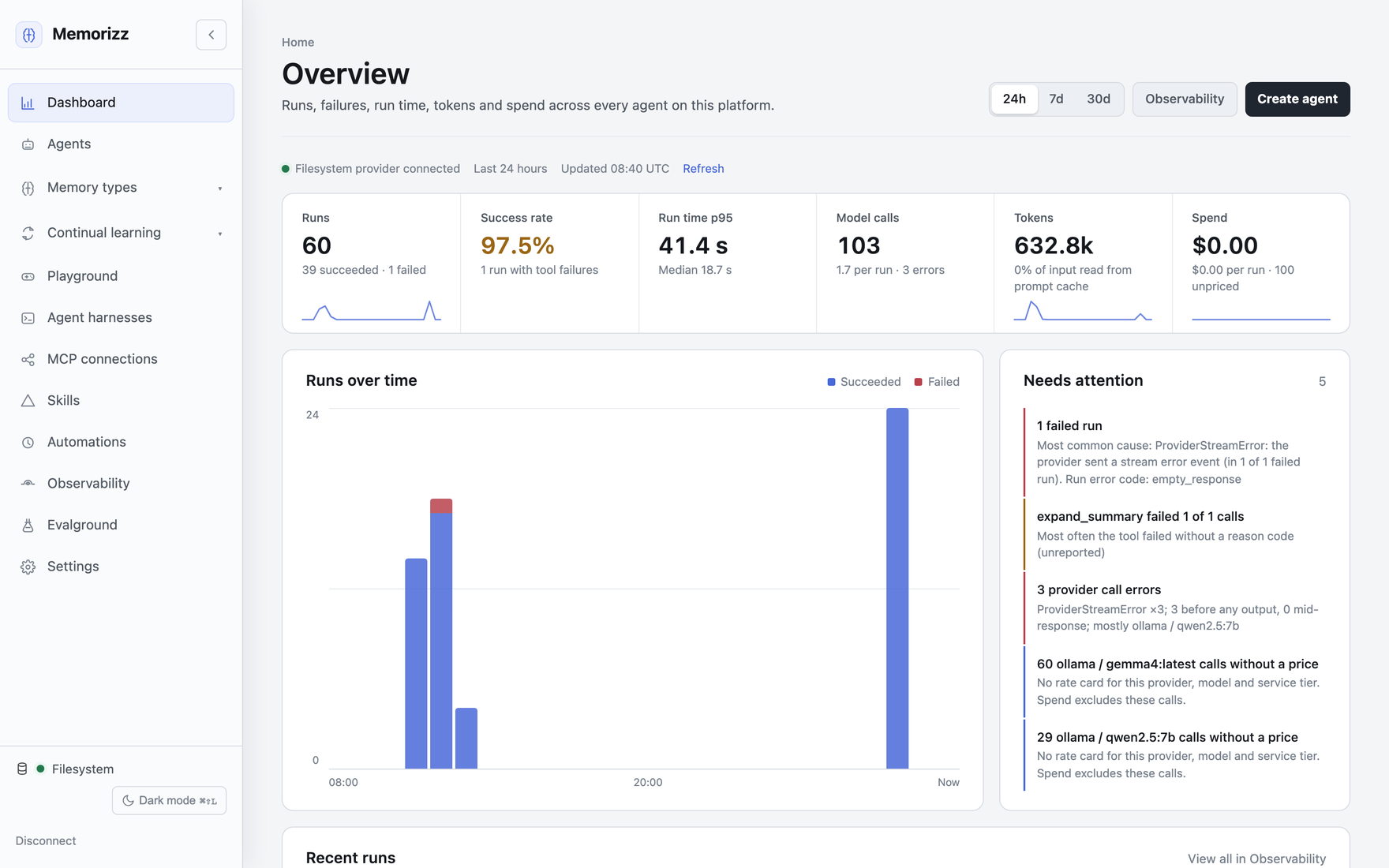
The agent dashboard in the local UI (memorizz ui): runs, success rate, run
time, model calls, tokens and spend across every agent, and what needs
attention.
Memory management
Memory is the foundation: retain information, retrieve relevant context, and refine what an agent knows over time.
| Memory | What it gives your agents |
|---|---|
| Episodic | Conversation history, past interactions, and summaries. |
| Semantic | Knowledge bases, entity facts, preferences, and personas. |
| Procedural | Registered tools, recorded workflows, and reusable skills. |
| Short-term | Working context and semantic caching. |
| Shared | A shared workspace for agent coordination and handoffs. |
- Persist and isolate: scope memory by agent, user, and conversation. Start with local filesystem storage, or use MongoDB, Oracle, or Notion with separate vector storage through the same provider contract.
- Ingest and retrieve: turn files and folders into a knowledge base with configurable chunking, embeddings, and semantic or hybrid search.
- Manage context: deduplicate retrieved memories, summarize and compact history, inspect recall decisions, and control retention and forgetting.
- Forget the way Generative Agents do: retrieval ranks memories by recency since last use, stored importance and relevance, recalls reinforce a memory, and a governed planner suppresses, never deletes, records whose retention decayed; every suppression is approved and reversible. See the forgetting mechanism.
Explore memory concepts and scope, storage providers, and context efficiency.
Agent framework
Build persistent agents with MemAgent and MemAgentBuilder. Choose
assistant, workflow, or deep_research modes and connect cloud or local
model providers.
- Tools and integrations: Python functions, MCP servers, internet search, governed browser control, sandboxes, and external skills. A tool call cache reuses the results of repeated calls to tools that are safe to reuse.
- Coordination: delegate work to specialist agents, share memory, and run scheduled automations.
- Interfaces: use the Python SDK, interactive CLI, local web UI, or expose Memorizz as an MCP server.
Start with the SDK quickstart or the CLI guide.
Harness
MetaHarness runs tasks through Codex, Claude Code, OpenHands, DeepSeek, pi,
Hermes, or native MemAgent workers, and a MemAgent can hand parts of a request
to delegates that run on those harnesses. It carries memory scope and learning evidence across
harnesses while managing permissions, approvals, workspace isolation, budgets,
cancellation, and host-side verification.
Use an external harness for an entire task or let a MemAgent call one as a
specialist tool. Inspect installed adapters with memorizz harness doctor.
See the MetaHarness guide and hands-on examples.
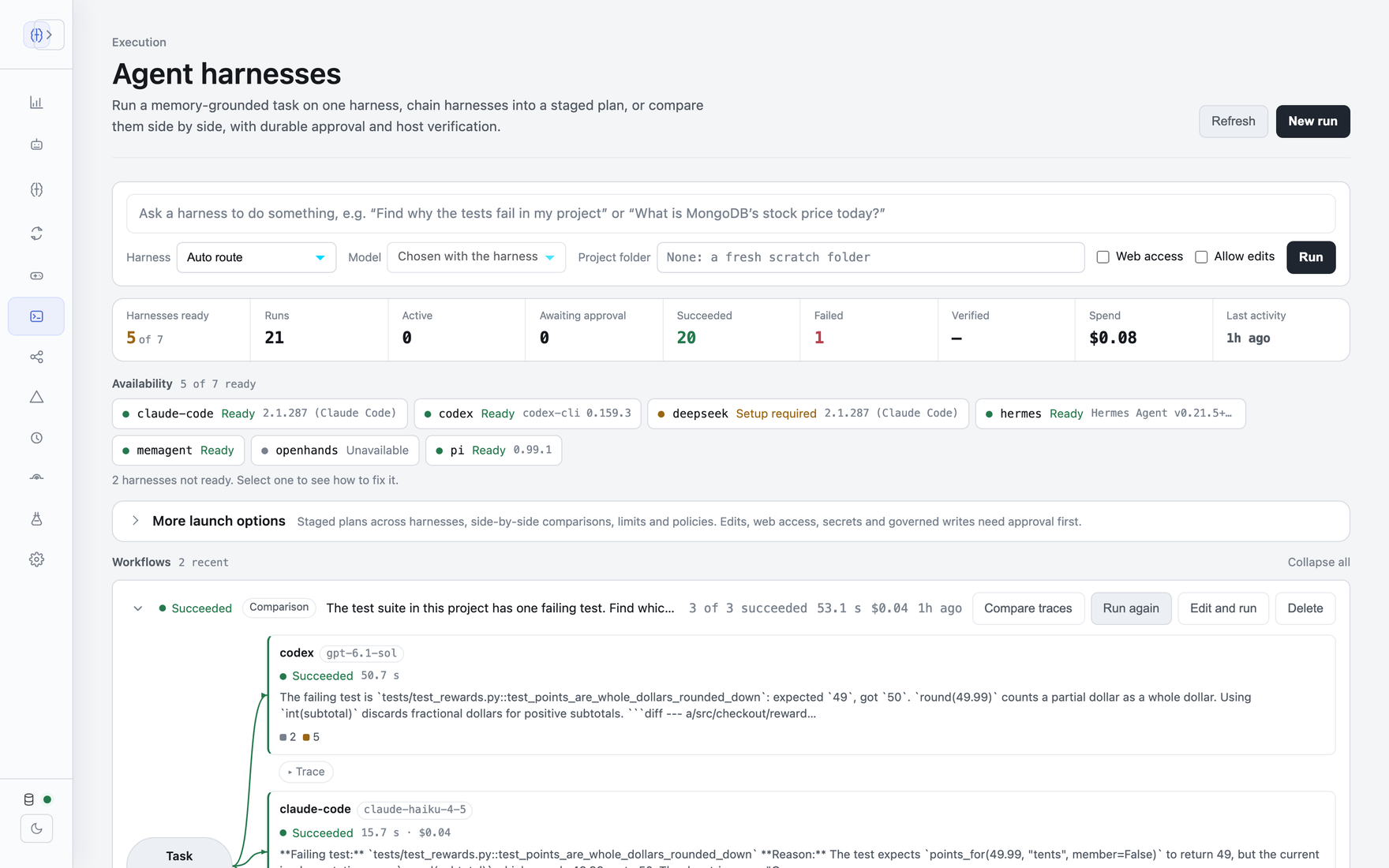
The harness dashboard: run a memory-grounded task on one harness, chain harnesses into a plan, or compare them side by side, with approvals and verification.
Memory for Codex and Claude Code
MemoRizz is also a plugin for Codex and Claude Code. The agent starts each session with the project's facts and the last session's summary; each turn and a summary of each session are saved as episodic memory; and the agent can search past sessions, save and correct facts, record entities and load project documents. Both agents share the memory, locally or on a hosted MemoRizz MCP server for a team (deploy/mcp-server). Each session also appears on the UI's Harnesses page with its full trajectory, so you can follow a Codex session and a Claude Code session step by step and compare them.
memorizz plugin install codex # or: memorizz plugin install claude-code
Or codex plugin marketplace add RichmondAlake/memorizz /
claude plugin marketplace add RichmondAlake/memorizz, then install
memorizz@memorizz. See MemoRizz in Codex and Claude Code,
and examples/coding_agent_plugins for
Codex and Claude Code sharing one project's memory.
Continual learning and the intelligence plane
The intelligence plane is the model layer and everything that helps it think: the LLM, prompts, reasoning strategies such as planning, reflection, and tool selection, plus the memory and retrieval that supply context. Its job is decision quality. A bad plan or a hallucinated tool call is an intelligence plane problem.
Memorizz makes memory the foundation of this plane. Its opt-in continual learning loop captures tool workflows and their outcomes, distills repeated successful procedures into reusable skills, retrieves relevant active skills, and monitors their performance. Shadow evaluation and review support skill activation; skills that stop working can be demoted.
The learning control plane adds traceable outcome evidence, bounded retrieval, and reversible forgetting. Together, these capabilities help agents retain, recall, reuse, and refine experience.
Read about continual learning, the learning control plane, the forgetting mechanism, and evaluation methods.
Quick start
Requires Python 3.10+. Install and launch the CLI with a cloud model:
python -m pip install memorizz
export OPENAI_API_KEY="your-key"
memorizz
For a fully local setup, use Ollama.
The installation guide covers uv,
pipx, npm, Homebrew, and optional integrations.
Save credentials without putting them in shell history, and choose memory storage independently from the model:
memorizz config set OPENAI_API_KEY  # hidden prompt
memorizz memory configure          # guided memory-provider setup
memorizz notion connect            # Notion library + separate vector provider
memorizz config path               # actual save target and precedence
These commands save defaults for the next launch; they do not switch a running agent or migrate memory. See CLI configuration.
Build a memory-first agent in Python using the same environment:
from memorizz import MemAgentBuilder

agent = (
    MemAgentBuilder()
    .with_instruction("Remember useful context and use it to help the user.")
    .with_llm_config({"provider": "openai", "model": "gpt-4o-mini"})
    .with_memory_ids("my-assistant")
    .build_and_save()
)

scope = {"memory_id": "my-assistant", "user_id": "alice", "thread_id": "intro"}
with agent.lifecycle(close_memory_provider=True):
    agent.run("I work on payments systems.", **scope)
    print(agent.run("What did I tell you about my work?", **scope))
Memory persists under ~/.memorizz/memory by default. Save agent.agent_id to
restore the agent later.
Explore
- Memory-first tutorials
- Persistent notes and searchable history: filesystem and Oracle notebooks
- MCP connectivity and MCP server
- Automations and multi-user applications
- Observability and evaluation suite
- Usage, cost and memory analytics
- Account-owned persona evolution
- API reference, configuration, and troubleshooting
License
Source available under PolyForm Noncommercial 1.0.0. See NOTICE. Memorizz is experimental: APIs may change and it has not undergone security hardening for production workloads.
1 maintainer

Metadata
1 maintainer
Release files for memorizz 0.16.4
For a detailed explanation of source distributions (sdists) and built distributions (wheels), please see the package formats documentation.
Source distribution (sdist)
| File | Size | Uploaded | |
|---|---|---|---|
| memorizz-0.16.4.tar.gz | 6.3 MB | Details |
Built distribution (wheel)
| File | Interpreter | ABI | Platform | Reset |
|---|---|---|---|---|
| memorizz-0.16.4-py3-none-any.whl | Python 3 | none | any | Details |
Total release size: 8.4 MB
Release files / memorizz-0.16.4.tar.gz
| Download URL | memorizz-0.16.4.tar.gz |
|---|---|
| Size | 6.3 MB |
| Tags | Source |
|
SHA-256 checksum How to use checksums |
870e52c4f273a4aeb231ef6ed2ccef9cacf458f1e82390cb699f520ddc3ead22
|
|
BLAKE2b-256 checksum How to use checksums |
89f5217510fbc8e6f600abbb7cf0c8950247f82f45e553f47748a6472037185b
|
| Upload date | |
|
Uploaded using Trusted Publishing? What is trusted publishing? |
Yes |
| Uploaded via |
twine/7.0.0 CPython/3.13.14
|
Provenance
Provenance describes where a file came from. On PyPI, provenance is shared via attestations, which provide a verifiable record of the build or publishing details. View details, limitations and caveats.


PyPI Publish Attestation
PyPI verified that this artifact, at this checksum, originated from the publisher listed below.
Signed by GitHub Actions, verified by PyPI on Oct 10, 2026.
Transparency logRelease files / memorizz-0.16.4-py3-none-any.whl
| Download URL | memorizz-0.16.4-py3-none-any.whl |
|---|---|
| Size | 2.1 MB |
| Tags | Python 3 |
|
SHA-256 checksum How to use checksums |
d005c4da33931dda95538e69eefc2e91bbca441a337233b22cf00f9c8ea0dfbd
|
|
BLAKE2b-256 checksum How to use checksums |
25faaa1c0b6fad0411d50d15a5b80955312cfe9d4966df1b787ebac0b654ed32
|
| Upload date | |
|
Uploaded using Trusted Publishing? What is trusted publishing? |
Yes |
| Uploaded via |
twine/7.0.0 CPython/3.13.14
|
Provenance
Provenance describes where a file came from. On PyPI, provenance is shared via attestations, which provide a verifiable record of the build or publishing details. View details, limitations and caveats.
PyPI Publish Attestation
PyPI verified that this artifact, at this checksum, originated from the publisher listed below.
Signed by GitHub Actions, verified by PyPI on Oct 10, 2026.
Transparency log













